Overview

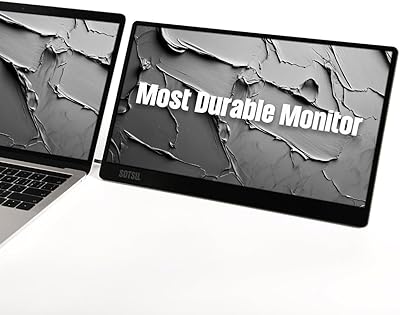
The SOTSU FlipAction Elite 16″ Portable Monitor sits at the premium end of the portable display market, aimed squarely at creative professionals who refuse to compromise when working away from their desks. What sets it apart is its magnetic flat-pack design — the stand folds flush against the back of the screen, collapsing the whole unit to half an inch thick. That kind of portability, paired with a full CNC-machined metal body, signals this isn't a budget travel accessory dressed up with specs. The 3840×2400 resolution on a 16:10 panel is genuinely unusual for a portable screen, and it works natively with both Mac and Windows setups.
Features & Benefits

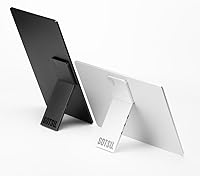
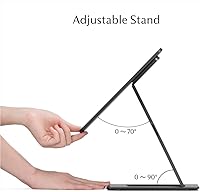
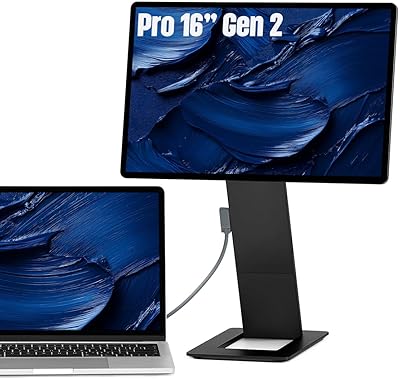
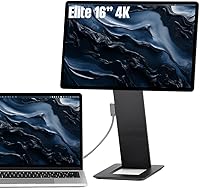
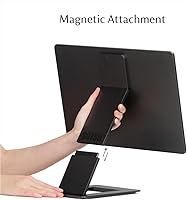
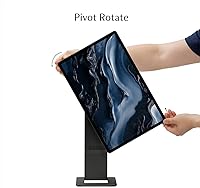
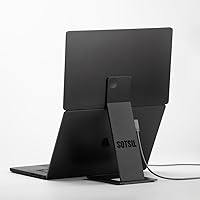
The magnetic stand system is the feature that gets the most attention, and rightly so — slide the kickstand off, pack the monitor flat, and it fits into a laptop sleeve without added bulk. The panel claims 100% DCI P3 coverage, which, if it holds up to independent testing, puts color accuracy in the same league as high-end desktop displays. The FlipAction Elite rotates fully from landscape to portrait or even flat, handy for client presentations or dual-screen setups. A built-in SD card slot on the kickstand is a small but practical touch for photographers, and USB-C pass-through means one cable handles both power and signal for the monitor and laptop simultaneously.

Best For

This travel display makes the most sense for designers, photographers, and video editors who need reliable color accuracy on location and don't want to compromise with a washed-out budget screen. Mac users in particular will appreciate that the 16:10 aspect ratio mirrors recent MacBook display proportions, making it feel like a natural extension rather than an afterthought. It works well for client-facing presentations too — portrait mode and the solid stand let you show work professionally without needing a projector. If you've been burned by flimsy plastic travel monitors before, the all-metal construction here will feel like a meaningful step up.

User Feedback

Buyers consistently highlight build quality as the standout impression — the metal chassis feels noticeably more solid than most travel monitors, and the slim packed size earns repeated praise from frequent flyers. Color accuracy draws positive comments from photographers and designers, though a few note that real-world performance can vary by unit, so independent calibration is worth considering for color-critical work. On the downside, the price is a genuine sticking point; some users feel the premium over comparable portable monitors is hard to justify. A handful report minor quirks with the rotation mechanism needing firm adjustment, and occasional driver hiccups on Windows. Setup is mostly intuitive, but the hinge system has a short learning curve.

Pros

  • The all-metal CNC-machined body feels noticeably more premium than typical travel monitors in this category.
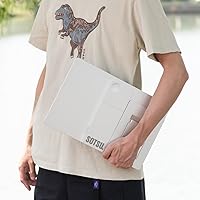
  • Folding to just half an inch thick, this portable monitor slips into a laptop sleeve without adding meaningful bulk.
  • The 16:10 aspect ratio and 4K resolution make it a natural visual match for MacBook users wanting a second screen.
  • A built-in SD card slot on the kickstand removes the need to carry a separate card reader while traveling.
  • USB-C pass-through charging lets one cable power both the monitor and a connected laptop at the same time.
  • Full 180-degree rotation supports landscape, portrait, and flat-lay orientations for flexible use cases.
  • The anti-reflective panel coating meaningfully reduces glare in mixed indoor lighting conditions.
  • Claimed 100% DCI P3 coverage positions this travel display as viable for color-sensitive photo and video work.
  • Buyers consistently report that the packed size and build quality exceed expectations when the unit arrives.
  • Height-adjustable hinges let you align the screen with your laptop display or your natural eye level.

Cons

  • The price sits at the top end of the portable monitor market, which is hard to justify for non-creative workflows.
  • Windows users have reported occasional driver compatibility issues that require troubleshooting out of the box.
  • At 60Hz, this display is unsuitable for gaming or any task where high refresh rate matters.
  • Color accuracy claims should be treated as a ceiling, not a guarantee — independent calibration is advisable for critical work.
  • The hinge and rotation system has a short but real learning curve that can frustrate first-time setup.
  • At just under 3 pounds, it is lighter than a desktop monitor but heavier than the most compact portable displays available.
  • Brightness at 450 nits may prove insufficient in brightly lit offices or any outdoor environment with direct sunlight.
  • The magnetic stand, while clever, has drawn some questions about long-term stability during extended daily use.
  • Pass-through charging requires a compatible USB-C charger and cable, which adds a dependency some users may overlook.
  • Limited availability and a newer brand presence mean long-term firmware support and customer service are less proven.

Ratings

The scores below for the SOTSU FlipAction Elite 16″ Portable Monitor were generated by AI after analyzing verified buyer reviews from multiple global markets, with spam, bot-submitted, and incentivized feedback actively filtered out. Each category reflects the honest distribution of real user experiences — both the aspects that impressed buyers and the friction points that caused frustration. Nothing has been smoothed over to make the product look better than it is.
Build Quality
93%
The all-metal CNC-machined chassis earns consistent praise from buyers who have owned multiple portable monitors. Reviewers coming from plastic-bodied competitors frequently describe the FlipAction Elite as feeling closer to a precision instrument than a travel accessory, and the anodized finish holds up well through daily bag use.
A small number of users noted minor cosmetic scuffs appearing on the anodized edges after extended travel, suggesting the finish, while premium, is not entirely scratch-proof. At this price point, some buyers expected sealed ports and tighter panel gaps, which the unit does not fully deliver.
Portability & Pack Design
91%
The magnetic flat-pack mechanism draws near-universal praise — collapsing the stand flush with the back of the screen and fitting the whole unit into a standard laptop sleeve is the feature buyers mention most enthusiastically. Frequent flyers and commuters specifically highlight how the half-inch folded profile eliminates the awkward bulk of traditional portable monitor cases.
At just under 3 pounds, it is noticeably heavier than lighter plastic-framed alternatives, and some users who carry everything in a single backpack report that the weight adds up over a long travel day. The magnetic stand, while clever, occasionally requires deliberate alignment to seat properly.
Display Sharpness
89%
The 3840×2400 resolution on a 16-inch panel produces a pixel density that buyers describe as crisp enough to make text and fine detail genuinely comfortable to work with for long sessions. Mac users in particular note that the 16:10 aspect ratio and resolution scale naturally alongside MacBook Retina displays without jarring mismatches.
Scaling behavior on Windows can require manual configuration to avoid text and UI elements appearing too small at native resolution, which frustrates less technical users. A handful of buyers noted that the panel's full sharpness is only accessible when connected to a host device that outputs at the monitor's native resolution.
Color Accuracy
84%
Photographers and designers working on location report that colors look rich and consistent compared to typical travel displays, and the wide DCI P3 gamut is a genuine differentiator for anyone doing serious visual work away from a calibrated desktop setup. Several buyers noted that skin tones and gradient transitions hold up well without obvious banding.
The factory calibration varies between units, and buyers who tested with a colorimeter found measurable deviations that required profiling to correct for critical work. The 100% DCI P3 claim should be treated as a specification target rather than a guaranteed out-of-box result for every individual panel.
Brightness & Glare Handling
72%
28%
Indoors in typical office or hotel lighting, 450 nits is comfortable for full workdays, and the anti-reflective coating reduces the kind of harsh glare that makes cheaper portable monitors painful in artificially lit environments. Most buyers in standard indoor settings report no brightness-related complaints during normal use.
In brightly lit spaces or near large windows, buyers consistently flag that 450 nits is not enough to maintain comfortable visibility, and using this travel display outdoors in any direct sunlight is effectively impractical. A notable number of reviewers specifically wished the peak brightness were closer to 600 nits.
Stand Stability
74%
26%
On a hard, flat desk surface the kickstand holds the screen at a consistent angle without drifting, and the height-adjustment hinge is firm enough that the display does not sag after being positioned. Users working from hotel desks and co-working tables generally report no stability problems during seated work sessions.
On softer or textured surfaces like fabric laptop bags or bedding, the kickstand base loses grip and the monitor can tilt unexpectedly. Some buyers also reported that the magnetic attachment between the stand and screen body can feel less secure after repeated attach-detach cycles over several months.
Rotation & Orientation Flexibility
81%
19%
The ability to rotate the screen into portrait mode for document review or client presentations is a feature buyers use more than they expected to, and the hinge mechanism covers a full range of angles without requiring tools or accessories. Developers and writers especially appreciate having a tall portrait second screen that mirrors a desktop workflow.
The first-time setup of the rotation system takes some trial and error, and a few buyers found the hinge resistance either too stiff or slightly loose depending on unit variation. Switching between orientations also requires manually updating display rotation settings in the operating system each time on some configurations.
Connectivity & Compatibility
78%
22%
Single-cable USB-C connectivity works reliably with most modern MacBooks and Windows laptops that support DisplayPort Alt Mode, and the pass-through charging eliminates the need for a second power adapter at a desk or hotel room. Both Mac and Windows users report successful plug-and-play connections in the majority of cases.
Older laptops with USB-C ports that lack video output support will not work without a dock or adapter, which is an easy compatibility assumption to get wrong when purchasing. Windows users have reported isolated cases of the display not being recognized immediately, requiring cable reconnection or a system restart to resolve.
SD Card Slot
77%
23%
Having a full-size SD card reader built directly into the kickstand is a practical convenience that photographers frequently mention as a genuine time-saver on shoots, eliminating the need to carry a separate dongle or reader in an already full bag. It reads standard SD cards reliably across both Mac and Windows.
Transfer speeds through the integrated slot are functional but not fast enough for high-volume RAW file transfers from high-resolution cameras, so professional photographers moving large batches of files may still prefer a dedicated high-speed reader. The slot placement on the kickstand also makes it slightly awkward to insert and remove cards when the monitor is at certain height positions.
Pass-Through Charging
76%
24%
The ability to run both the monitor and a connected laptop from a single USB-C charger is a meaningful quality-of-life benefit in hotel rooms and co-working spaces where power outlets are scarce. Users who travel with a single 65W or higher USB-C adapter report that the pass-through setup works reliably once configured.
The pass-through charging rate available to the laptop depends on the total wattage of the charger minus what the monitor consumes, so users with power-hungry laptops may find their battery charges slowly or not at all under load. The setup also requires a compatible USB-C charger, which is not included and not always obvious to buyers new to this type of connection.
Setup Experience
71%
29%
Once buyers have set up the monitor two or three times, the process becomes fast and intuitive — detach the stand, connect a cable, and the screen is ready in under a minute. Experienced users of portable monitors generally find the learning curve shorter than expected.
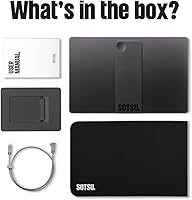
First-time users frequently report confusion around the magnetic stand detachment and the hinge adjustment system, with some spending several minutes figuring out the physical mechanics before getting a stable working position. The lack of a clear quick-start guide in the box was a recurring complaint from buyers in multiple reviews.
Value for Money
63%
37%
For buyers who specifically need a high-resolution, wide-gamut portable display in a premium metal chassis, the combination of specs and build quality is difficult to find at a lower price point. Creative professionals who use this monitor daily as a core work tool tend to rate the value positively when measured against the cost of alternatives with similar specs.
For users who do not need color-accurate work on the road, the price is genuinely hard to justify against more affordable portable monitors that handle basic productivity tasks just as well. Several reviewers noted that the total cost sits at a level where buyers expect flawless software compatibility and out-of-box calibration, neither of which is guaranteed here.
Refresh Rate Performance
61%
39%
At 60Hz, the display is perfectly smooth for photo editing, video color grading, document work, and casual media consumption, covering the full range of tasks the target audience uses it for. Creative professionals working in their primary applications report no perceptible stutter or motion issues during normal sessions.
60Hz is a notable limitation for anyone who wants to use this as a gaming monitor or for motion-heavy content that benefits from higher frame rates, and it is one of the few areas where the hardware feels behind similarly priced competitors. Buyers who later discovered this constraint after purchase expressed disappointment, suggesting the spec needs clearer prominence in product listings.

Suitable for:

The SOTSU FlipAction Elite 16″ Portable Monitor is a strong match for creative professionals — designers, photographers, and video editors — who frequently work outside a fixed office and need a display that doesn't force them to compromise on color accuracy or screen real estate. The 16:10 aspect ratio and 3840×2400 resolution pair naturally with recent MacBook models, making it a compelling second screen for Mac-centric workflows where visual consistency matters. Consultants and client-facing professionals will find the portrait rotation and sturdy metal construction useful for presenting work on-site without carrying bulky equipment. If you've grown frustrated with travel monitors that feel flimsy or produce washed-out colors, this display's all-metal chassis and claimed DCI P3 coverage address both concerns directly. It also suits anyone who wants to reduce cable clutter on the road, since USB-C pass-through charging means a single cable can power both this monitor and a connected laptop simultaneously.
Not suitable for:

The SOTSU FlipAction Elite 16″ Portable Monitor is a harder sell for buyers who primarily need a monitor for casual browsing, video streaming, or general productivity tasks where a less expensive portable screen would perform just as well day-to-day. Gamers should look elsewhere entirely — the 60Hz refresh rate is perfectly adequate for professional work but falls short of what competitive or fast-paced gaming demands. Budget-conscious buyers will find the price a genuine obstacle; this is a premium-tier purchase, and if color accuracy and build quality aren't priorities for your workflow, the cost is difficult to justify against more affordable alternatives. Users who rely heavily on Windows and prefer plug-and-play simplicity should be aware that some buyers have reported occasional driver friction. Finally, anyone expecting reliable outdoor use should temper expectations, as 450 nits provides reasonable brightness in controlled environments but may struggle in direct sunlight.
Specifications

  • Screen Size: The display measures 16 inches diagonally, offering a practical working area without becoming too large to carry comfortably.
  • Resolution: Native resolution is 3840×2400 pixels, delivering a sharp pixel density well above what most portable monitors in this category offer.
  • Aspect Ratio: The panel uses a 16:10 aspect ratio, which provides more vertical screen space than standard 16:9 displays and aligns well with modern laptop proportions.
  • Color Gamut: The display claims 100% DCI P3 color gamut coverage, targeting photographers and video editors who need accurate, wide-gamut color reproduction on the go.
  • Brightness: Peak brightness is rated at 450 nits, which is adequate for most indoor environments though may fall short in direct sunlight or very bright spaces.
  • Refresh Rate: The panel runs at 60Hz, which is suitable for professional creative work, productivity, and media consumption but not optimized for gaming.
  • Panel Surface: The screen features an anti-reflective coating to reduce glare and improve visibility under mixed or overhead lighting conditions.
  • Folded Thickness: When the magnetic stand is collapsed flat against the back of the screen, the entire unit measures just 0.5 inches thick.
  • Dimensions: The monitor measures 14.4 × 9.3 × 0.5 inches when fully packed flat, making it compatible with standard laptop sleeves and slim carry bags.
  • Weight: The unit weighs 2.99 pounds, which is heavier than ultralight portable displays but reasonable given the full-metal chassis construction.
  • Body Material: The chassis is CNC-machined from aerospace-grade materials and finished with an anodized surface treatment for durability and a premium tactile feel.
  • Stand Design: The kickstand magnetically attaches to the rear of the screen when not in use, allowing the monitor to pack completely flat without separate accessories.
  • Rotation Range: The display hinges support rotation from 0 degrees to ±90 and 180 degrees, enabling landscape, portrait, and fully flat orientations.
  • SD Card Slot: A full-size SD card slot is integrated directly into the kickstand, allowing photographers to offload cards without carrying a separate reader.
  • Connectivity: The monitor operates via USB-C and supports power pass-through, meaning a single USB-C cable can simultaneously carry video signal and charge a connected laptop.
  • Input Voltage: The display is powered at 5V via USB-C, which is compatible with standard USB-C chargers and laptop power adapters.
  • Compatibility: The monitor is designed to work with both macOS and Windows operating systems, covering the most common professional laptop platforms.
  • Color Finish: The reviewed variant is offered in Space Black, with the anodized finish applied uniformly across the machined metal surfaces.

Related Reviews

SOTSU FlipAction Pro 16″ Gen2 Portable Monitor
88%
91%
Portability
95%
Display Quality
93%
Color Accuracy
88%
Setup & Installation
84%
Ergonomics & Adjustability
More
SOTSU FlipAction Go 14″ Portable Monitor
86%
94%
Portability & Weight
89%
Screen Clarity & Color Accuracy
91%
Ease of Setup & Compatibility
88%
Build Quality & Durability
80%
Battery Life & Power
More
Upperizon 16″ 2K Portable Monitor
85%
92%
Display Quality
90%
Portability & Size
87%
Ease of Setup
89%
Gaming Performance
94%
Color Accuracy
More
MAGICRAVEN M1603 16″ 4K Portable Monitor
75%
91%
Image Sharpness
88%
Portability
86%
Connectivity
89%
Setup Experience
63%
Brightness
More
Newsoul M1620 16″ 4K Portable Monitor
81%
91%
Display Clarity
74%
Real-World Brightness
83%
Color Accuracy
88%
Build Quality
67%
Stand and Portability
More
Veout V1 16″ Portable Monitor
76%
84%
Display Quality
91%
Portability & Form Factor
82%
Color Accuracy
88%
Setup & Compatibility
67%
Kickstand Stability
More
CAPERAVE BQ16H_1 16″ Portable Monitor
86%
94%
Display Quality
91%
Color Accuracy
89%
Refresh Rate & Gaming Performance
92%
Portability & Build
87%
Connectivity Options
More
WUAWE 16-inch Portable Gaming Monitor
83%
91%
Portability
89%
Display Quality
94%
Setup Ease
56%
Sound Quality
78%
Build Quality
More
LXU 16-inch Portable Monitor S11
81%
88%
Display Quality
83%
Portability & Size
91%
Ease of Setup
75%
Compatibility with Devices
85%
Ergonomics & Flexibility
More
UPERFECT 16006DD 16″ 4K Portable Monitor
77%
83%
Brightness Performance
91%
Display Sharpness
74%
Color Accuracy
88%
Build Quality
76%
Portability
More

FAQ

For most MacBook users, the SOTSU FlipAction Elite 16″ Portable Monitor connects via USB-C and is recognized automatically without additional software. macOS handles the display natively in most cases. That said, if you want to fine-tune resolution scaling or color profiles, you may need to adjust display settings manually in System Preferences.
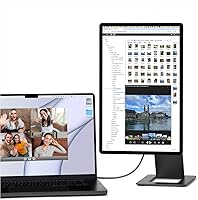
Pass-through charging means you plug your laptop charger into one of the monitor's USB-C ports, and the monitor then routes power to both itself and your connected laptop through a single cable chain. You don't need a special cable, but your charger does need to be USB-C and capable of delivering enough wattage to cover both devices. A standard 65W or higher USB-C adapter works well for most setups.

The kickstand holds the screen reliably on flat, stable surfaces and handles normal desk use without issues. On slightly uneven surfaces like soft hotel bedding or fabric, it can be less stable, so a hard flat surface is always preferable. Most users report it feels secure for stationary work sessions, though it is worth being intentional about where you set it up.

Yes, portrait mode is one of the more practical features on this travel display. The hinge rotates a full 90 degrees in either direction, and once you adjust the display orientation in your operating system settings, it works well for long documents, code editors, or side-by-side client presentations. The physical footprint in portrait mode is narrow enough that it fits comfortably on most desks.

Indoors and away from direct light sources, 450 nits is comfortable and the anti-reflective coating helps reduce glare noticeably. Near a bright window or in direct sunlight, though, you will likely find the brightness insufficient for extended work. It is best treated as an indoor or shaded-outdoor display rather than a fully daylight-capable screen.

For photo editing, graphic design, video color grading, and general productivity, 60Hz is entirely adequate and you won't notice any limitation. Smooth video playback at standard frame rates is also fine. Where 60Hz becomes a constraint is in fast-paced gaming or motion-heavy content that benefits from higher refresh rates, so if gaming is a priority, this isn't the right display.

Once you're familiar with the mechanism, setup takes under a minute — detach the kickstand, prop the screen, connect your USB-C cable, and you're working. The first few times, figuring out the hinge height adjustment and the magnetic stand detachment can take a bit of practice. Most users report it becomes second nature quickly.

The claimed 100% DCI P3 coverage is credible given the panel specification, but like any display, real-world accuracy can vary between units and will drift over time without calibration. For professional color work, it is worth using a hardware colorimeter to create a custom ICC profile rather than relying solely on the factory calibration. Used with a calibration profile, this portable monitor can genuinely support color-critical editing sessions on location.

Yes, the slot accommodates full-size SD cards, which is more useful than microSD adapters for most photographers working with cameras that use standard cards. It is integrated into the kickstand and functions as a standard USB card reader through the monitor's USB-C connection, so it works on both Mac and Windows without extra software in most cases.

At just under 3 pounds and half an inch thin when packed flat, the FlipAction Elite sits in an interesting middle ground. It is thinner than most portable monitors that include integrated stands, but the all-metal build means it weighs more than ultra-slim plastic alternatives. If saving every ounce matters most to you, lighter options exist. If you value build quality and are willing to carry a bit more weight for it, the trade-off is reasonable.