Overview

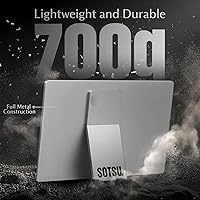
The SOTSU FlipAction Go 14″ Portable Monitor enters a competitive mid-range field with a clear identity: a pivot-hinge display built from aerospace-grade materials that weighs just under 700 grams. That number matters when you are packing for a week of back-to-back travel across multiple cities. SOTSU includes a proprietary connecting dock that expands setup options in ways worth exploring hands-on. One important caveat deserves mention upfront — macOS font rendering at 1080p can look noticeably soft compared to Windows or Android, a real drawback if your workflow is Mac-centric. This travel display is a capable, versatile road companion; it is not a color-critical production tool.

Features & Benefits

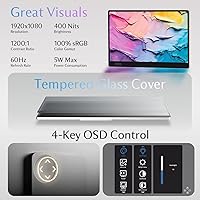
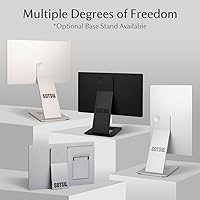
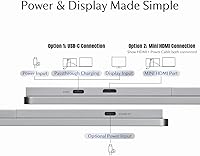
The pivot hinge is the standout hardware detail, rotating from flat landscape through portrait and all the way to 180 degrees — genuinely useful when a colleague needs to see your screen across a table or you want vertical mode for reading long documents. The 14-inch panel delivers 1920×1080 at 400 nits with full sRGB coverage, handling productivity tasks and casual media without complaint. It sits behind tempered glass that feels solid, though the glossy surface will catch reflections in bright rooms. Connectivity runs through USB-C and Mini HDMI, pass-through charging cuts down on adapter count, and the whole unit draws just 5 watts — enough to run off a single laptop port without a meaningful battery penalty.

Best For

This portable monitor is a natural fit for digital nomads who bounce between hotels, cafes, and shared offices — anywhere a reliable second screen reduces friction in the workday. Content creators pairing a mirrorless camera or smartphone with a laptop will find the rotation range and input options genuinely practical for live monitoring. The FlipAction Go performs better on Windows and Android than on macOS, so Mac-heavy users should weigh that trade-off carefully before buying. It also suits anyone who values a clean desk setup, since pass-through charging and hidden cable routing keep wire clutter to a minimum. Portrait mode adds real utility for coders and anyone who works with long vertical documents regularly.

User Feedback

With roughly 80 ratings and a 4.2 average, the feedback pool is still growing, but the early signal is cautiously positive. Build quality and the hinge flexibility draw consistent praise — most buyers seem pleased that the physical construction holds up to the mid-range asking price. Portability gets frequent mentions too, with the sub-700g weight standing out as a genuine selling point for frequent travelers. On the negative side, glare on the glossy panel is a recurring complaint in brighter environments, and the macOS font issue surfaces in enough reviews to confirm it is not a fringe concern. Opinions on the SOTSU dock are genuinely mixed — some find it adds real versatility, others consider it an underused extra.

Pros

  • Weighs under 700 grams, making it one of the lighter options in the 14-inch portable monitor category.
  • The pivot hinge rotates a full 180 degrees, unlocking portrait, landscape, and flat-sharing configurations most rivals skip.
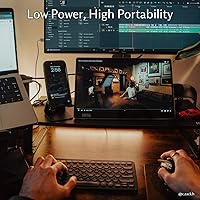
  • A 5W power draw means you can run this travel display off a laptop port without a noticeable battery hit.
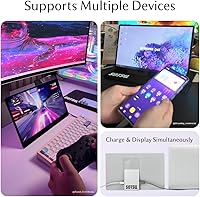
  • Pass-through charging lets you power both the monitor and your connected device from a single cable source.
  • Full sRGB coverage and 400-nit brightness deliver crisp, vibrant output for everyday productivity and media viewing.
  • USB-C and Mini HDMI inputs cover a wide range of source devices without needing extra adapters.
  • The SOTSU connecting dock adds genuine setup flexibility for multi-device workflows.
  • Rear cable routing keeps the desk or table surface visually tidy — a practical touch frequent travelers notice quickly.
  • Tempered glass construction feels substantially more durable than the plastic-fronted panels common at this price tier.
  • Early buyer feedback leans positive on build quality, suggesting the aerospace-material claims are not just marketing language.

Cons

  • macOS users face real font-rendering softness at 1080p — this is a confirmed, recurring issue, not an edge case.
  • The glossy panel surface catches reflections noticeably in bright rooms or near windows.
  • Only 80 reviews exist so far, meaning long-term durability data is still thin and hard to evaluate confidently.
  • No matte screen option is available, which limits usability in uncontrolled lighting environments.
  • The SOTSU dock gets mixed feedback — some buyers find it underused, suggesting it may not justify the added complexity.
  • At 14 inches, screen real estate feels limited for users who regularly work across three or more windows simultaneously.
  • Mini HDMI is a less common port format, and forgetting the right adapter on a trip creates an avoidable headache.
  • No mention of a carrying case or sleeve in the package, which is a noticeable omission for a monitor marketed at travelers.

Ratings

The scores below reflect an AI-driven analysis of verified global buyer reviews for the SOTSU FlipAction Go 14″ Portable Monitor, with spam, bot-generated, and incentivized feedback actively filtered out before scoring. Each category captures both what real users praised and where they ran into friction, giving you an honest read across the full ownership experience. Nothing has been smoothed over — the strengths and the genuine pain points are weighted equally.

Portability
91%
At just under 700 grams, this travel display consistently earns praise from users who carry it daily in a backpack or messenger bag alongside a laptop. The slim 0.5-inch profile means it slides into most sleeves without adding bulk, and multiple buyers specifically called out how little they notice its weight during long transit days.
A small number of users pointed out that without a bundled carrying case or sleeve, the bare glass panel feels exposed in a packed bag. The absence of any protective pouch is a recurring frustration for buyers who expected travel-ready packaging at this price point.
Build Quality
84%
Most buyers describe the chassis as noticeably rigid for its weight class, with little flex or creaking when the hinge is adjusted or the unit is picked up by one corner. The aerospace-material construction appears to translate into a tangible sense of solidity that stands out compared to lighter plastic-bodied rivals in the same segment.
Because the product launched relatively recently, long-term durability data is still sparse. A handful of reviewers flagged uncertainty about how the hinge mechanism will hold up after a year of daily rotation cycles, and the review pool is not yet large enough to draw confident conclusions about lasting robustness.
Display Quality
78%
22%
The 400-nit brightness and full sRGB coverage give the FlipAction Go a noticeably punchy, well-saturated look for indoor productivity, video playback, and light photo review. Users working in dim hotel rooms or shaded cafe corners consistently noted that colors pop without needing to push brightness to its ceiling.
The 1080p resolution is adequate but not exceptional on a 14-inch panel — pixel density is visible at close reading distances for detail-sensitive users. Several buyers also noted that sharpness and vibrancy vary depending on the source device and cable quality, so results are not always perfectly consistent out of the box.
Pivot Hinge Versatility
88%
The full rotation range — covering portrait, landscape, and a flat 180-degree position — is consistently described as the single most practically useful feature of this monitor. Remote workers who frequently switch between reading vertically and working horizontally report that the hinge removes a real daily friction point without requiring any tool or disassembly.
A few users noted that rotating between extreme positions requires two hands to keep the base stable, particularly on uneven surfaces like a cafe table. The hinge also lacks any click-stop detents at common angles, so finding a precise 45-degree tilt can take a moment of micro-adjustment.
Glare & Reflections
54%
46%
In controlled indoor environments with soft, diffuse lighting — a home office with blinds, a dim conference room, or a hotel desk — the glossy surface produces vivid contrast and clean blacks that a matte panel cannot easily match. Users who work in predictable lighting conditions rarely mention glare as a meaningful issue.
Buyers who use the monitor near windows, under bright overhead fluorescents, or in any outdoor setting report significant reflection problems that genuinely interfere with readability. This is the most consistently cited frustration in critical reviews, and the absence of a matte coating option makes it a hard limitation rather than a fixable one.
Connectivity
82%
18%
Having both USB-C and Mini HDMI inputs means the FlipAction Go covers a wide range of source devices without needing a dock or hub — laptops, desktop PCs, cameras, and USB-C smartphones can all connect directly. Pass-through charging is a practical addition that most users in this segment have come to expect, and it works reliably here.
Mini HDMI is a less common port format, and several travelers reported being caught without the right cable or adapter at an inopportune moment. The port selection is functional but not future-proof — a second USB-C input or a full-size HDMI option would have broadened compatibility further.
macOS Compatibility
47%
53%
The monitor does connect and function on macOS without driver installation, and basic display output works reliably across MacBook models that support USB-C video. For users who primarily watch video or use it as a secondary reference screen rather than for reading text, the experience is more tolerable.
Font rendering at 1080p on macOS is a well-documented shortcoming that SOTSU itself acknowledges in the product listing. Mac-primary users who rely on crisp text for writing, coding, or document review consistently rate the experience below expectations, and this single issue is responsible for most of the negative reviews the FlipAction Go has received.
Power Efficiency
89%
The 5W power draw is a standout figure that lets users run this portable monitor entirely from a laptop USB-C port without triggering noticeable battery drain during a typical working session. Digital nomads who spend long stretches away from power outlets consistently highlight this as a meaningful practical advantage over higher-draw competitors.
While 5W is genuinely low, users with older or lower-power USB-C laptops occasionally report that the port cannot fully sustain the display at peak brightness alongside other connected peripherals. In those edge cases, either brightness dips or the user needs to fall back on a dedicated charger.
Cable Management
76%
24%
The rear cable routing channel is a small but genuinely appreciated design detail — buyers who set up the monitor at a permanent desk noted that it eliminates the dangling cable look that most portable monitors create. Combined with pass-through charging, the result is a noticeably tidier workspace than comparable travel displays in this category.
The channel only accommodates certain cable diameters neatly, and thicker or angled connectors can sit awkwardly without fully hiding. It is also a fixed routing path, which limits flexibility for users who prefer cables to exit from a specific side based on their desk layout.
SOTSU Dock Utility
63%
37%
For content creators who regularly switch between a laptop and a secondary video source — like a mirrorless camera or a tablet — the included dock provides a genuine workflow convenience by reducing the number of manual cable swaps per session. Users with multi-device setups tend to rate it more favorably than single-device users.
Buyer sentiment on the dock is genuinely split. A meaningful portion of reviewers describe it as an accessory they have never used after the initial setup, and a few found the dock's build quality inconsistent with the main monitor. It adds conceptual complexity to the package without being essential for the average user.
Setup & Ease of Use
83%
Plug-and-play operation on Windows and Android is confirmed by most buyers — connecting via USB-C typically requires no driver installation and results in an immediately recognized display within seconds. The hinge mechanism is intuitive enough that most users report having the monitor positioned and ready to use within a minute of unpacking it.
Portrait mode requires a manual display rotation setting change in the operating system, which is straightforward but not automatic. A small number of users also noted that the on-screen display menu controls are less intuitive than expected for adjusting brightness and input source, requiring a brief learning curve.
Value for Money
71%
29%
Buyers who primarily use the monitor on Windows or Android and value the hinge flexibility tend to feel the asking price is justified — the build quality and rotation range genuinely differentiate it from cheaper flat-panel portables. The included dock adds perceived value for multi-device users who would otherwise spend more on a separate hub.
Mac users and anyone prioritizing outdoor or bright-room usability tend to feel the pricing is harder to defend given the glossy panel and font-rendering limitations. The lack of a carrying case at this tier also draws criticism, as competing options often include protective accessories that justify a similar or higher price.
Aesthetic & Design
80%
20%
The metallic gray finish and slim proportions give this travel display a professional, understated appearance that pairs well with modern laptops in meeting rooms or shared workspaces. The hidden cable channel contributes to an unusually clean front-face presentation that several users specifically called out as a reason they chose it over alternatives.
The glossy surface, while visually attractive in photographs, is a fingerprint magnet in daily use — smudges from adjusting the hinge or touching the panel edge accumulate quickly and are visible in certain lighting. A textured or matte finish on the bezels would have improved the premium feel without adding cost.

Suitable for:

The SOTSU FlipAction Go 14″ Portable Monitor is a strong match for anyone whose work life regularly involves airports, hotel rooms, and borrowed desks. Digital nomads who bounce between time zones will appreciate having a reliable second screen that weighs roughly as much as a hardcover book and runs off a single USB-C cable. Remote workers on Windows or Android who need a portrait-capable display for reading long documents or coding vertically will find the pivot hinge earns its place quickly. Content creators who monitor camera output or review footage on the road get a workable 100% sRGB panel without hauling bulky equipment. If tidy cable management matters to you — and it usually does when working out of a bag — the pass-through charging and hidden rear routing are small but meaningful quality-of-life features.

Not suitable for:

Mac-first professionals should think carefully before committing to this travel display — the 1080p resolution is a known weak point for macOS font rendering, and the experience on a MacBook can look noticeably softer than what Windows users see on the same panel. Color-critical work like photo retouching or video color grading belongs on a purpose-built display with wider gamut coverage and hardware calibration, neither of which the FlipAction Go offers. Buyers who work exclusively in bright outdoor environments or near large windows will likely find the glossy tempered glass surface frustrating, since it picks up reflections aggressively. Users expecting a large-format productivity canvas should also look elsewhere — 14 inches is a genuinely compact footprint, and extended multi-window work on a screen this size can feel cramped over a full workday.

Specifications

  • Screen Size: The display measures 14 inches diagonally, offering a portable footprint that fits comfortably in most laptop bags.
  • Resolution: Native resolution is 1920×1080 (FHD 1080p), delivering a pixel density suitable for everyday productivity and media consumption.
  • Brightness: Panel brightness is rated at 400 nits, which is above average for portable monitors and handles indoor lighting conditions well.
  • Color Gamut: The display covers 100% of the sRGB color space, making it reliable for content review and general creative work.
  • Aspect Ratio: Standard 16:9 widescreen aspect ratio is used, consistent with most laptops, external monitors, and video content formats.
  • Panel Surface: The screen is covered by glossy tempered glass, which enhances durability and color richness but can produce reflections in bright environments.
  • Hinge Range: The pivot hinge rotates from 0° to ±90° and fully flat at 180°, enabling landscape, portrait, and tabletop-sharing orientations.
  • Weight: The monitor weighs approximately 700 grams (1.55 lb), placing it among the lighter options available in the 14-inch portable display category.
  • Dimensions: Physical dimensions are 0.5 × 12.7 × 8.7 inches (depth × width × height), keeping the profile slim enough for most laptop sleeves.
  • Power Draw: Operating power consumption is just 5W, low enough to run reliably from a single USB-C port on most modern laptops.
  • Video Inputs: Connectivity options include one USB-C port and one Mini HDMI port, covering a broad range of laptops, cameras, and mobile devices.
  • Pass-Through Charging: The monitor supports pass-through charging, allowing the host device's charger to power both the monitor and the connected source simultaneously.
  • Cable Routing: A rear cable channel routes the connecting cable along the back of the unit, keeping the front face and desk surface visually tidy.
  • Build Materials: The chassis incorporates aerospace-grade materials to achieve a balance of structural rigidity and low weight for travel durability.
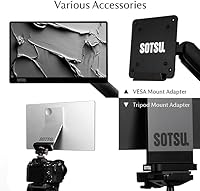
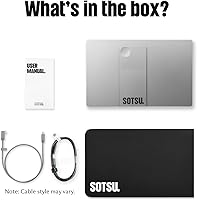
  • Included Accessory: The package includes the SOTSU connecting dock, which expands setup configurations for multi-device or mixed-source workflows.
  • Color Option: The monitor is available in a metallic gray finish, which gives it a professional appearance consistent with mid-range laptop aesthetics.
  • Input Voltage: The unit operates at 5 volts, compatible with standard USB power delivery and most laptop charging ecosystems.
  • OS Compatibility: The monitor works with Windows, Android, and macOS, though macOS users should note that 1080p resolution can produce softer font rendering on Apple systems.

Related Reviews
SOTSU FlipAction Elite 16″ Portable Monitor
78%
93%
Build Quality
91%
Portability & Pack Design
89%
Display Sharpness
84%
Color Accuracy
72%
Brightness & Glare Handling
More
SOTSU FlipAction Pro 16″ Gen2 Portable Monitor

77%
94%
Build Quality
88%
Display Accuracy
91%
Portability
71%
macOS Compatibility
86%
Refresh Rate & Smoothness
More
Dell P1424H 14-inch Portable Monitor
79%
93%
Portability
91%
Setup & Ease of Use
88%
Display Clarity
61%
Brightness & Visibility
58%
Stand & Adjustability
More
Asani 14″ Portable Monitor
83%
91%
Portability & Design
85%
Display Quality
88%
Ease of Setup
76%
Brightness & Visibility
90%
Connectivity Options
More
SOTSU FlipAction Touch 14″ Portable Monitor
73%
93%
Build Quality
89%
Portability
78%
Display Quality
82%
Touch & Stylus Performance
84%
Stand & Hinge Mechanism
More
domyfan F1 14″ Portable Monitor

72%
83%
Display Clarity
71%
Portability
88%
Stand Design
79%
Setup & Compatibility
52%
Screen Glare
More
MAGICRAVEN 14.5″ 4K Portable Monitor
84%
91%
Display Quality
88%
Portability
90%
Ease of Setup
85%
Build Quality
87%
Connectivity
More
WGK W140F1 14-inch Portable Monitor
76%
91%
Portability
83%
Display Clarity
88%
Value for Money
79%
Connectivity
71%
Screen Brightness
More
Lrtzcbi 14-inch Portable Touchscreen Monitor
74%
88%
Value for Money
79%
Image Quality
72%
Touch Responsiveness
91%
Portability
58%
Kickstand Stability
More
KEEPTIME P142 14-inch Portable Monitor
75%
88%
Display Sharpness
83%
Color Accuracy
93%
Portability
86%
Connectivity
61%
Brightness & Glare
More

FAQ

Yes, in most cases. The FlipAction Go draws only 5W, so a single USB-C connection to a modern laptop is enough to power both the display and maintain the data signal. That said, pass-through charging is also available if you want to keep your laptop topped up at the same time using its original charger.

Based on available buyer feedback, the hinge feels firm and holds its set angle without creeping. It covers a wide range — portrait, landscape, and flat at 180 degrees — and users generally report that it stays put during normal desk use. Long-term wear data is still limited given the product's relatively recent launch, so it is worth monitoring.

It will technically connect and function, but there is a known trade-off worth understanding: 1080p resolution on macOS tends to produce softer, less crisp font rendering compared to Windows or Android. If most of your work involves reading text-heavy documents or writing code, that softness may become noticeable and frustrating over a full workday. Mac users doing media playback or using the monitor mainly as a reference screen may find it more tolerable.

It can be. The tempered glass surface looks sharp and premium in controlled lighting, but it picks up reflections more readily than a matte-coated panel would. Working with your back to a window or in a dim cafe is generally fine, but bright overhead lighting or direct sunlight behind you will create noticeable glare. If your primary workspace has challenging ambient light, this is worth factoring into your decision.

The dock expands the connectivity options for the monitor, allowing setups that involve multiple input sources — for example, connecting a laptop and a camera simultaneously, or routing inputs from a smartphone alongside a desktop. Buyer opinion on it is genuinely divided; some find it adds meaningful flexibility, while others consider it an extra accessory they never reach for. It is included in the box regardless, so you can try it without additional cost.

The hinge rotates to a true 90-degree portrait orientation, and the display holds that angle stably. For tasks like reading long articles, reviewing vertical video footage, or coding with a tall terminal window, portrait mode is genuinely practical. You will need to configure display rotation in your operating system settings, which takes about thirty seconds and is straightforward on both Windows and Android.

No dedicated carrying case or sleeve appears to be included in the standard package. For a monitor marketed at travelers, that is a noticeable gap. It is worth picking up a padded sleeve sized for a 14-inch display separately to protect the glass panel in a bag.

Yes, as long as your phone supports USB-C video output or DisplayPort Alt Mode. Many recent Android flagships support this natively, allowing you to mirror or extend your phone screen without a laptop in the chain. iPhone users will need to verify compatibility with their specific adapter setup, as Apple's USB-C implementation varies by device generation.

Mini HDMI carries the same signal as full-size HDMI but uses a smaller connector. Most monitors and TVs use full-size HDMI, so the cable included with your laptop or other devices probably will not fit directly. You will need either a Mini HDMI to full-size HDMI cable or an adapter, which are widely available but easy to forget when packing for a trip.

Early buyer feedback on build quality is positive, with most users describing the chassis as surprisingly rigid for its weight. The aerospace-material construction does seem to translate into a monitor that does not flex or creak under normal handling. That said, the review pool is still relatively small, so long-term durability across heavy travel use has not been extensively documented yet. Treating it with normal care — a padded bag slot, careful packing — should keep it in good shape.

Where to Buy