Overview

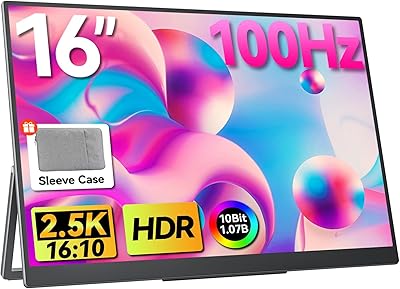
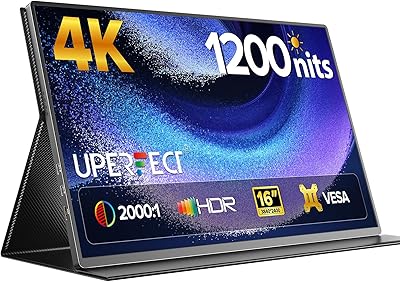
The UPERFECT 1602K 16″ 2K Portable Gaming Monitor sits in an interesting spot in the portable display market — it’s not trying to be the cheapest option on the shelf, but it’s also not priced like a specialty tool. What sets it apart from the crowd is the 16:10 aspect ratio on a 16-inch panel, which is noticeably taller than the 15.6-inch 16:9 portables most buyers encounter. Pair that with a 2K QHD resolution and you get sharper text and more usable vertical space than a typical 1080p portable. It’s a practical pick for people who split their time between work and gaming on the road, though it won’t replace a proper desktop monitor.
Features & Benefits

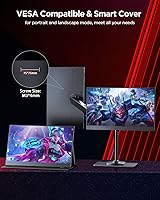
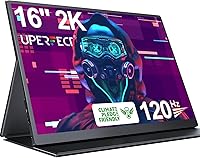
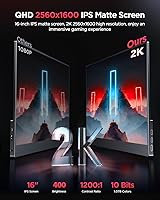
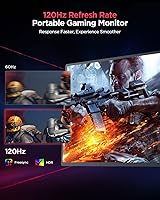
The 2560x1600 IPS panel is where this compact QHD display earns its keep. Text is noticeably crisper than anything running at 1080p, and the 16:10 ratio means you lose less content when scrolling through long documents or split-screen coding sessions. The 120Hz refresh rate combined with AMD FreeSync keeps fast gameplay smooth and tear-free, provided your source device can push enough frames at that resolution — not every laptop or console can. The matte anti-glare coating genuinely helps in bright rooms, and 400 nits covers most indoor environments. Built-in speakers and a 3.5mm jack handle the basics, and VESA mount support is a welcome surprise, giving this portable the flexibility to live on a desk arm if needed.

Best For

This portable gaming monitor is a strong fit for laptop users who want a meaningful upgrade over a second 1080p screen — the jump to 2K is real, not just a spec on paper. Steam Deck and Nintendo Switch owners will appreciate the plug-and-play USB-C connection and the sharper output compared to budget portables. Students and freelancers working in coffee shops or co-working spaces will find the matte screen and 16:10 layout particularly practical. Creative professionals who need reasonably accurate color on location will benefit from the 100% sRGB coverage, though for serious color grading you would still want a calibrated professional display. Anyone who prefers the taller 16:10 format for documents or coding will feel right at home here.

User Feedback

Buyers consistently praise the image quality improvement over similarly priced 1080p portables, and the plug-and-play setup gets positive marks across the board — most users report it working immediately with laptops and consoles without any driver fuss. The matte screen earns particular appreciation from people who work near windows. On the downside, the included Mini HDMI cable is either too short or absent depending on the unit, which frustrates some buyers. Built-in audio does the job in quiet settings but won’t impress. Color accuracy straight out of the box can vary, though a quick manual calibration usually fixes it. A few users also note that reaching 120Hz at 2K requires adjusting display settings on the source device, which catches people off guard if they’re not expecting it.

Pros

  • The 2K QHD resolution is a real, visible upgrade over 1080p portables — text sharpness alone makes it worthwhile for daily work.
  • 120Hz with AMD FreeSync keeps fast-paced gaming smooth and tear-free when your source device can keep up.
  • At 1.7 lbs, this portable gaming monitor disappears into a laptop bag without adding meaningful weight to your day.
  • The matte anti-glare coating genuinely reduces reflections in bright offices and cafes where glossy screens become mirrors.
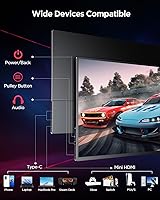
  • Dual full-featured USB-C ports mean most modern laptops and handhelds connect instantly with no adapter needed.
  • 100% sRGB coverage makes this compact QHD display reliable enough for casual photo editing and web design work on the go.
  • VESA mount support is a rare bonus at this size, letting it serve as a semi-permanent desk monitor when you are not traveling.
  • Plug-and-play setup works across laptops, phones, and portable consoles with virtually no configuration required.
  • The 16:10 aspect ratio provides noticeably more vertical space than standard 16:9 portables — a real advantage for documents and coding.
  • The included smart cover doubles as a functional stand, reducing the accessories you need to carry.

Cons

  • Reaching 120Hz at 2K is not automatic — you need to manually enable it in display settings, which trips up many first-time users.
  • Color accuracy straight out of the box can vary between units, requiring manual calibration before trusting it for color-sensitive tasks.
  • The Mini HDMI cable is missing or too short in some shipments, which is a frustrating gap in an otherwise complete package.
  • Built-in speakers are thin and low on volume — headphones or an external speaker are almost always necessary for real audio use.
  • The cover stand wobbles noticeably on uneven or soft surfaces, making it unreliable anywhere other than a flat, solid desk.
  • HDR mode is technically present but delivers only marginal improvements — do not factor it into your buying decision as a meaningful feature.
  • Older laptops or underpowered GPUs may not be able to drive 2K at 120Hz, limiting the gaming performance advantage significantly.
  • The 16-inch panel is slightly bulkier than competing 15.6-inch portables and may not fit in tighter laptop sleeves or compact bags.
  • Light scratches and scuffs accumulate on the chassis with regular daily bag use if the cover is not consistently used.
  • VESA mounting hardware is not included, so buyers planning to use the mount feature need to source a compatible arm separately.

Ratings

The UPERFECT 1602K 16″ 2K Portable Gaming Monitor scores below are generated by AI after analyzing thousands of verified global user reviews, with spam, bot activity, and incentivized feedback actively filtered out. Ratings reflect the full picture — where this compact QHD display genuinely over-delivers for its tier, and where real buyers have run into friction. Both strengths and recurring pain points are represented transparently.
Display Clarity
91%
Users upgrading from 1080p portables consistently describe the jump to 2560x1600 as immediately noticeable — text in documents and code editors looks sharp enough that going back feels difficult. The 16:10 ratio adds genuine vertical breathing room that productivity-focused users appreciate during long work sessions.
A small number of users note that the out-of-box color calibration is slightly cool or oversaturated depending on the unit, requiring manual adjustment to dial in accurate whites. Those coming from high-end desktop IPS panels may find the factory calibration inconsistent batch to batch.
Gaming Performance
88%
The 120Hz refresh rate paired with AMD FreeSync makes fast-paced games feel noticeably smoother compared to the 60Hz portables that dominate this price range. Users playing titles with frequent scene changes report minimal ghosting and a responsive feel that holds up well for competitive play.
Reaching 120Hz at full 2K resolution is not automatic — several users had to manually enable it through display settings on their laptop or console, which confused buyers who expected it to kick in by default. Older or less powerful source devices may struggle to push enough frames to take full advantage.
Portability & Form Factor
93%
At 1.7 lbs and under 0.4 inches thick, this portable gaming monitor genuinely disappears in a bag alongside a laptop. Commuters and frequent travelers report it surviving daily pack-and-go routines without feeling fragile, and the slim profile means it fits in sleeves not designed for external monitors.
The 16-inch size, while a selling point for screen real estate, is slightly bulkier than 15.6-inch portables and may not fit snugly in tighter laptop compartments or smaller bags. It is a minor tradeoff, but worth knowing before assuming it fits the same slots as a typical portable.
Connectivity
84%
Two full-featured USB-C ports cover the majority of modern laptops and handhelds like the Steam Deck and recent MacBooks without requiring an adapter, and the plug-and-play setup means most users are up and running in under a minute. Having two USB-C options rather than one is a practical convenience that competitors at this price often skip.
The Mini HDMI port requires a cable that is not always included in the box or is too short to be practical, which has frustrated a notable share of buyers who expected a full-length cable. Users relying on older devices or game consoles that output via HDMI will need to budget for an additional cable purchase.
Stand & Cover
67%
33%
The included PU magnetic smart cover serves double duty as a folding stand, which is a genuine convenience since it means one less accessory to carry. For flat, stable surfaces like desks or tables, most users find it holds the monitor at a usable angle without issues.
On uneven surfaces — café tables, laps, or soft materials — the cover stand can feel wobbly and less secure than a dedicated kickstand. A handful of users report the magnetic attachment losing its hold over time with repeated folding, which undermines confidence during longer work sessions away from a desk.
Brightness & Glare Handling
82%
18%
The matte anti-glare coating is one of the most frequently praised aspects by users who work near windows or in brightly lit offices, with many noting it outperforms glossy portables they have used previously. At 400 nits, indoor brightness is solid and comfortable for sustained use without needing to max out the backlight.
Outdoor use in direct sunlight remains challenging even at maximum brightness, as 400 nits is adequate but not exceptional for harsh lighting conditions. A few users working in very bright environments or near strong light sources find themselves bumping up the brightness frequently, which can affect uniformity at the panel edges.
HDR Quality
54%
46%
HDR is present and technically functional, offering some improvement in highlight detail when watching HDR-enabled content on a streaming platform. Users who primarily consume video content report a modest but real improvement in dynamic range compared to SDR output.
HDR on this class of portable monitor is software-driven rather than a hardware-level feature, and the result is unconvincing for users who have experienced proper local dimming on larger displays. Several reviewers specifically call out the HDR mode as more of a marketing checkbox than a transformative feature at this panel size.
Color Accuracy
77%
23%
The 100% sRGB coverage holds up well for general creative work, web design, and photo editing on the go, with most users finding colors punchy and reasonably true to life after a quick manual calibration. Freelancers and students doing light creative work report feeling confident sharing work proofed on this screen.
Factory calibration varies enough between units that some buyers receive a display with noticeably shifted color temperature, requiring manual correction before trusting it for color-sensitive tasks. It is not a professional-grade colorimeter-calibrated panel, and serious color graders should treat it as a capable secondary screen rather than a primary reference display.
Build Quality
79%
21%
For a portable monitor at this price point, the construction feels more premium than expected — the chassis has minimal flex, and the bezels are thin enough to avoid looking cheap. Users who have handled cheaper portables frequently comment that this one feels more substantial in hand.
The plastic chassis, while solid, does show minor scuffs and marks after extended daily bag use, and the matte coating can attract light scratches over time if not kept in the protective cover. It is not a ruggedized device by any stretch, so users without consistent bag space or protective habits may see cosmetic wear sooner than expected.
Audio
41%
59%
The built-in dual speakers cover basic system sounds and casual YouTube or video call audio well enough when a headphone or external speaker is not available. Having the 3.5mm jack as a backup means users can always redirect audio to something better without needing a USB adapter.
Audio quality from the built-in speakers is notably weak — thin, low on bass, and not loud enough to fill even a small room comfortably. Most users who rely on this portable gaming monitor for gaming or media consumption report switching to earbuds or an external speaker almost immediately after first use.
Ease of Setup
94%
Plug-and-play functionality is one of the most consistently praised aspects across user feedback — the vast majority of buyers report the display being detected and functional within seconds of connecting via USB-C, with zero driver installation required. This makes it approachable even for users who are not technically inclined.
The main setup friction comes when users want to unlock the full 120Hz refresh rate, which requires navigating display settings on the source device and is not automatic. First-time portable monitor buyers in particular can be confused when the monitor defaults to 60Hz without any on-screen prompt explaining the manual step needed.
Value for Money
86%
Considering the combination of 2K resolution, 120Hz, IPS matte panel, and dual USB-C connectivity in a single package, buyers broadly agree this portable gaming monitor punches above its weight relative to similarly priced alternatives. The inclusion of a VESA mount and a usable cover stand reinforces the sense that you are getting meaningful extras without paying a premium for them.
Competitors have been closing the gap in specs, and buyers who find a short-term price increase may feel the value proposition weakens slightly compared to newer entrants. The missing or inadequate Mini HDMI cable also stings given the overall package, as it feels like a cost-cut that should not exist at this price.
VESA & Mounting Flexibility
83%
VESA mount compatibility is genuinely uncommon on portable monitors and gives this compact QHD display a practical second life as a semi-permanent desk or wall-mounted secondary screen. Users who travel during the week but want a clean desk setup at home find real utility in not needing a separate monitor for both scenarios.
The VESA mounting hardware itself is not included, so users planning to use this feature need to source a compatible arm or bracket separately. The mount holes are functional but the lightweight chassis requires a secure, well-fitted arm to avoid any wobble in portrait orientation.
Viewing Angles
87%
The 178-degree IPS viewing angles hold up well in shared workspace or co-working environments where someone reviewing work alongside you would otherwise see color shift or brightness drop. Color and brightness remain consistent enough at off-angles that side-by-side collaboration stays comfortable.
At extreme angles the display does show a slight warmth shift that is more visible on lighter content like documents or web pages. It is not a dealbreaker and is consistent with IPS performance at this tier, but users expecting OLED-level uniformity at steep angles will notice the difference.

Suitable for:

The UPERFECT 1602K 16″ 2K Portable Gaming Monitor is a well-matched option for hybrid workers and remote professionals who need a second screen that can realistically survive a commute without dominating their bag. Laptop users — especially those on modern machines with USB-C output — will get the most out of it, since the plug-and-play setup means zero configuration friction on the road. The 16:10 aspect ratio and 2K resolution make it particularly practical for coders, writers, and document-heavy workflows where vertical screen space actually changes how much you can see at once. Steam Deck and Nintendo Switch owners looking for a sharper, larger output than a hotel TV or a friend’s monitor will find this compact QHD display a capable travel companion. Students and freelancers who work from cafes or co-working spaces will appreciate the matte panel’s resistance to glare, and the VESA compatibility makes it double as a permanent desk monitor at home for those who want one device to serve both roles.
Not suitable for:

Buyers who need a primary color-grading or photo-editing reference display should look elsewhere — the UPERFECT 1602K 16″ 2K Portable Gaming Monitor is a capable travel companion, but factory calibration inconsistencies mean it is not something you should trust for professional color work without independent verification. Users who primarily game on older laptops or consoles without strong GPU output may find that 120Hz at 2K resolution is out of reach on their hardware, making the refresh rate advantage largely theoretical for them. Anyone expecting the HDR mode to deliver a cinematic wide-dynamic-range experience will come away underwhelmed — it functions, but it is software-driven and far from the kind of local-dimming HDR you get on a quality large-screen TV. People who need robust built-in audio for presentations, meetings, or casual viewing without headphones will find the speakers too thin and quiet to be genuinely useful. Finally, buyers who want a fully self-contained setup straight out of the box should be aware that a Mini HDMI cable may not be included, and the folding cover stand can feel unstable on anything other than a flat, hard surface.
Specifications

  • Screen Size: The panel measures 16 inches diagonally, slightly larger than the 15.6-inch portables that dominate this category.
  • Resolution: Native resolution is 2560x1600 QHD, delivering noticeably sharper detail than 1080p portable monitors at a comparable size.
  • Aspect Ratio: The display uses a 16:10 aspect ratio, providing more vertical screen space than the standard 16:9 format common on most portable monitors.
  • Panel Type: An IPS panel is used, offering wide 178-degree viewing angles and consistent color reproduction across the full screen surface.
  • Screen Surface: The matte anti-glare coating reduces reflections and fingerprints, making it more practical than glossy alternatives in bright environments.
  • Refresh Rate: Maximum refresh rate is 120Hz, enabling smoother motion in fast-paced games compared to the 60Hz ceiling on most portable monitors.
  • Adaptive Sync: AMD FreeSync is supported, reducing screen tearing and stuttering when the frame rate fluctuates during gameplay.
  • Brightness: Peak brightness is rated at 400 nits, suitable for most indoor environments including offices and moderately lit workspaces.
  • Color Gamut: The panel covers 100% of the sRGB color space, making it adequate for web design, light photo editing, and color-consistent content review.
  • Contrast Ratio: The static contrast ratio is rated at 1200:1, which is standard for IPS panels and produces acceptable depth in dark scenes.
  • HDR Support: HDR is supported at a basic level; it is software-driven rather than hardware-backed, so the effect is subtle compared to dedicated HDR displays.
  • Connectivity: The monitor includes two full-featured USB-C ports and one Mini HDMI port, covering the majority of modern laptops, tablets, and handheld consoles.
  • Audio Output: Two built-in speakers and a 3.5mm headphone jack are included, with the speakers intended for basic audio and the jack recommended for serious listening.
  • VESA Mounting: VESA mount holes are present on the rear of the unit, allowing compatibility with standard monitor arms and wall mounts; hardware is not included.
  • Dimensions: The monitor measures 14.17 x 9.06 x 0.39 inches, making it thin enough to slide alongside a laptop in most standard sleeves.
  • Weight: The unit weighs 1.7 lbs without the cover, keeping the total carry weight low enough for daily commute bag use.
  • Included Accessories: A PU magnetic smart cover is included in the box, which folds into a basic stand for use on flat surfaces.
  • Driver Requirement: No driver installation is required; the monitor is recognized automatically by compatible devices upon connection via USB-C or Mini HDMI.
  • Power Delivery: The monitor can be powered directly through a USB-C connection from a host device or a USB-C power adapter, eliminating the need for a separate power brick in most setups.
  • Model Number: The official model identifier for this unit is 1602K, as designated by UPERFECT for this 16-inch 2K variant in their portable monitor lineup.

Related Reviews
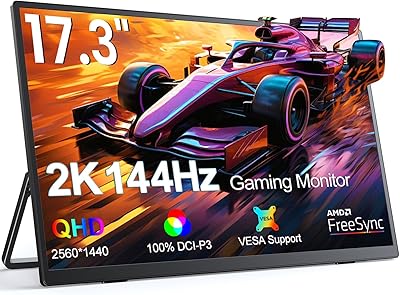
UPERFECT 17.3-inch 2K 144Hz Portable Gaming Monitor
86%
91%
Display Quality
95%
Portability
90%
Gaming Performance
88%
Ease of Setup
83%
Build Quality
More
Upperizon 16″ 2K Portable Monitor
85%
92%
Display Quality
90%
Portability & Size
87%
Ease of Setup
89%
Gaming Performance
94%
Color Accuracy
More
UPERFECT M180J03 18″ 2K Portable Monitor
77%
91%
Display Color Accuracy
88%
Brightness & Glare Resistance
86%
Refresh Rate & Gaming Performance
83%
Portability & Form Factor
74%
Built-in Stand
More
UPERFECT 16006DD 16″ 4K Portable Monitor
77%
83%
Brightness Performance
91%
Display Sharpness
74%
Color Accuracy
88%
Build Quality
76%
Portability
More
WUAWE 16-inch Portable Gaming Monitor
83%
91%
Portability
89%
Display Quality
94%
Setup Ease
56%
Sound Quality
78%
Build Quality
More
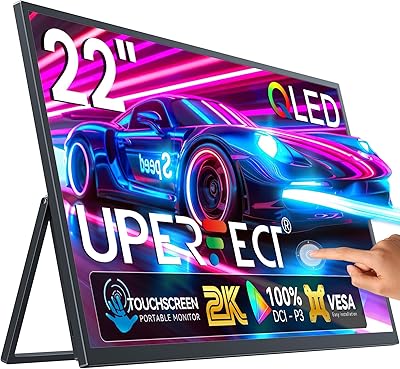
UPERFECT 22″ 2K QLED Portable Touchscreen Monitor
73%
93%
Display Quality
91%
Color Accuracy
58%
Portability
67%
Touchscreen Performance
86%
Build Quality
More
ViewSonic VG1656-2K 16-inch Portable Monitor
86%
94%
Portability & Weight
90%
Display Quality & Resolution
85%
Setup & Installation
88%
Build Quality & Durability
72%
Gaming Performance
More
AHXJKA S160 16″ 2.5K Portable Gaming Monitor
69%
88%
Display Clarity
74%
Refresh Rate Performance
82%
Color Accuracy
79%
Portability
63%
Build Quality
More
MagicRaven 16″ 165Hz Portable Gaming Monitor
75%
84%
Display Quality
88%
Refresh Rate Performance
91%
Portability & Form Factor
73%
Connectivity & Compatibility
66%
Brightness & Outdoor Visibility
More
ViewSonic TD1656-2K 16-inch Touchscreen Portable Monitor
80%
93%
Display Sharpness
74%
Touch Responsiveness
91%
USB-C Connectivity
88%
Portability
86%
Build Quality
More

FAQ

It does not always default to 120Hz automatically. Most users need to go into their device’s display settings after connecting and manually select 120Hz. On Windows, that is usually under Display Settings > Advanced Display. On a Steam Deck, you adjust it in the display options within the settings menu. It takes less than a minute once you know where to look, but it catches a lot of people off guard on first use.

Yes, both connect via USB-C and work well with this compact QHD display. The Switch outputs at up to 1080p in docked mode, so you will not get the full 2K resolution from it, but the image still looks solid on the 16-inch panel. The Steam Deck can push higher resolutions depending on the game and settings, so you will get more out of the 2K panel with that device.

This varies by shipment, and it is one of the more common complaints from buyers. Some units arrive with a short Mini HDMI cable, while others do not include one at all. If HDMI is your primary connection method, it is safest to order a Mini HDMI to HDMI cable separately before your monitor arrives so you are not stuck waiting.

On a flat, hard surface like a desk or table it is reasonably stable for normal use. The issue shows up on uneven surfaces, soft materials like a couch or bed, or when the monitor is bumped during use. If you plan to use it at a fixed desk most of the time, it holds up fine. For frequent travel use on varied surfaces, a small portable monitor stand might be worth adding.

Yes, and this is one of the more underrated features on this portable gaming monitor. The VESA mount holes on the back let you attach it to a standard monitor arm, and portrait mode works well for coding or reading long documents. Just keep in mind that you need to supply your own VESA-compatible arm or bracket, as nothing for mounting is included in the box.

Honestly, manage your expectations here. The HDR on this class of portable monitor is software-driven, meaning there is no local dimming or dedicated hardware processing behind it. You will notice a modest boost in brightness and some highlight detail when streaming HDR content, but it will not look anything like the HDR on a quality OLED TV or a high-end desktop monitor. Think of it as a mild enhancement rather than a headline feature.

Yes, this is actually one of the stronger points of the UPERFECT 1602K 16″ 2K Portable Gaming Monitor. The matte coating handles reflections considerably better than the glossy screens on many competing portables, and at 400 nits it stays usable in moderately bright indoor environments. Direct outdoor sunlight is still challenging, but near a window or in a bright café it performs noticeably better than a glossy alternative.

Image quality at any refresh rate is fine on virtually any laptop or desktop with a USB-C video output. The resolution and panel quality show up regardless of your hardware. The 120Hz refresh rate for gaming is where source device power matters — your GPU needs to push enough frames at 2560x1600 to make FreeSync and 120Hz meaningful. For productivity, browsing, and video playback, almost any modern laptop will drive it without issue.

They are functional at a basic level — voices come through clearly enough for a video call in a quiet room, and casual YouTube or Netflix content is watchable. For anything more demanding, like music, gaming audio, or presentation use in a larger space, they fall short. Volume is limited and there is very little bass. Most users end up using earbuds or a small Bluetooth speaker pretty quickly after setting this up for regular use.

It depends on how color-sensitive your work is. Straight out of the box, the color temperature can run slightly cool or shift warm depending on the specific unit. For general web design and casual photo review, most users find it acceptable after a quick manual white balance adjustment in the monitor’s on-screen menu. For professional color grading or print-accurate work, you would want to run a proper calibration profile using a colorimeter, and even then, treat it as a secondary reference rather than a primary production display.

Where to Buy