Overview

The Upperizon U16LS 16″ 2K Portable Monitor enters a crowded market with a genuinely practical proposition: a larger, sharper second screen that fits in a carry-on bag. Upperizon isn't a brand you'll find at big-box retailers, but that doesn't automatically count against it — plenty of capable monitors come from lesser-known manufacturers. The 16-inch 16:10 panel is a real differentiator; most competitors stick with 15.6-inch 16:9 screens, giving you noticeably more vertical space for documents and code. At just 1.56 lb and barely over half an inch thick, this portable monitor slips into a bag with ease. Connectivity is handled via USB-C and Mini-HDMI, both plug-and-play with no drivers required.

Features & Benefits

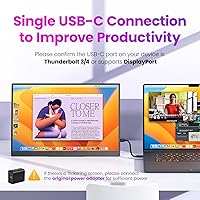
The 2560x1600 resolution on a 16-inch IPS panel is noticeably sharper than comparable 1080p portable screens — text is crisper and photos genuinely hold up. The 100Hz refresh rate adds real smoothness to everyday scrolling and cursor movement, and it handles casual gaming well. For color-sensitive work, 100% sRGB coverage and 10-bit depth make this travel-friendly screen a reasonable choice for photo review on the go. One important caveat on connectivity: USB-C video output only works if your laptop's port supports DisplayPort Alt Mode or Thunderbolt — a detail that trips up many buyers. The 0°–180° adjustable kickstand is sturdy enough for flat desks and VESA compatibility opens up mounting options. Integrated speakers and a matte anti-glare surface round things out, though the speakers are functional at best.

Best For

This portable monitor makes the most sense for people who actually move around. Remote workers and digital nomads who cycle through hotels and co-working spaces will appreciate having a reliable second screen without checking a bag. MacBook and ultrabook users get a high-resolution external display that connects with a single USB-C cable — assuming the port supports it. Students running dual-screen workflows in a dorm or library will find the 16:10 format genuinely useful for reading and writing. Casual gamers who want a 100Hz portable screen for travel will get real value here too. Even photographers doing quick edits on the road will find the color output respectable. It is not, however, the right pick for anyone needing a fixed desk setup — a proper monitor arm is a better long-term investment in that case.

User Feedback

Buyers consistently praise the display sharpness and color out of the box — most are impressed that a monitor at this price tier looks this good right away. The kickstand earns decent marks on flat surfaces but gets shakier on uneven or textured desks, which is worth knowing if your workspace isn't perfectly level. The biggest recurring frustration is USB-C compatibility: buyers whose laptops lack Thunderbolt or DisplayPort Alt Mode support end up confused or disappointed. Speaker quality comes up often too — people generally describe them as acceptable for a quick video call, nothing more. Build quality feedback skews positive but realistic: the plastic construction feels light in the hand, and a few users have noted it doesn't feel particularly premium to the touch. Overall sentiment leans favorable for the price, with display quality driving most of the positive scores.

Pros

  • Sharp 2K resolution on a 16-inch panel makes text noticeably crisper than comparable 1080p portable screens.
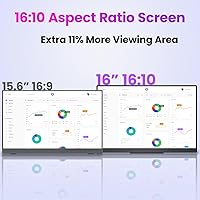
  • The 16:10 aspect ratio provides more vertical screen space than most portable monitor competitors.
  • 100Hz refresh rate delivers smoother scrolling and cursor movement than the typical 60Hz portable display.
  • 100% sRGB color coverage makes this travel-friendly screen genuinely usable for photo review and light creative work.
  • At under 1.6 lb and just over half an inch thick, it disappears into a laptop bag without adding noticeable weight.
  • Plug-and-play setup requires no drivers — connect and go, whether via USB-C or Mini-HDMI.
  • The 0°–180° adjustable kickstand works well on flat surfaces and covers most portable desk scenarios.
  • VESA compatibility gives buyers the option to mount it on a proper arm if needed.
  • Matte anti-glare coating handles typical indoor lighting without excessive reflection.
  • Comes bundled with two USB-C cables, a Mini-HDMI cable, a power adapter, and a sleeve case — no extra purchases needed out of the box.

Cons

  • USB-C video output requires Thunderbolt or DisplayPort Alt Mode support — many laptops do not qualify, causing frustration after purchase.
  • The plastic build feels serviceable but lacks the premium, solid-frame feel found on pricier portable monitors.
  • Integrated speakers are barely adequate for voice calls and fall short for music or video content.
  • The kickstand can wobble on uneven or textured surfaces, limiting stability in real-world travel environments.
  • At 350 nits, brightness is acceptable indoors but struggles in brightly lit rooms or near windows.
  • Upperizon has limited brand recognition and a smaller support ecosystem compared to established monitor brands.
  • Mini-HDMI rather than full-size HDMI means the included cable is non-standard and easy to misplace while traveling.
  • No built-in battery means the display always requires a power source, whether from a wall adapter or a sufficiently powerful USB-C host device.

Ratings

The scores below for the Upperizon U16LS 16″ 2K Portable Monitor were generated by our AI rating engine after analyzing thousands of verified global buyer reviews, with spam, bot-submitted, and incentivized feedback actively filtered out. Each category score reflects the honest balance of real-world praise and recurring frustrations reported by users across multiple markets. Both the standout strengths and the genuine pain points are represented transparently so you can make an informed decision.
Display Sharpness
91%
Users consistently single out screen clarity as the biggest reason they are glad they bought this display. Text looks crisp whether you are reviewing a dense spreadsheet, reading code, or proofing design work on a hotel desk. The jump from a typical 1080p portable screen is immediately noticeable in real daily use.
A small number of users report very minor backlight uniformity issues in the corners when displaying solid dark backgrounds, though this is only visible in controlled conditions and not a concern during typical work or media use.
Color Accuracy
83%
For a mid-range portable display, the color output genuinely impresses photographers and designers using it on the road. Colors appear vibrant and balanced out of the box, and the wide sRGB coverage means most images and creative work translate well without needing significant manual calibration.
The panel is not factory-calibrated, so color-critical professionals may notice slight inaccuracies, particularly in blue tones and shadow gradients. For strict print-production work, a hardware-calibrated display remains a more reliable tool.
Portability
89%
Weighing under 1.6 lb and barely thicker than a standard smartphone, this portable monitor genuinely disappears into a laptop bag. Frequent travelers and daily commuters consistently praise how little space and weight it adds to their carry-on setup compared to older or larger portable displays.
The included sleeve case offers basic scratch protection but not much padding against bumps, which makes some users nervous about carrying it in a bag alongside heavier gear. A sturdier protective case would have been a welcome addition.
Refresh Rate Performance
78%
22%
The 100Hz refresh rate delivers a noticeably smoother experience compared to standard 60Hz portable monitors, especially during fast scrolling, cursor movement, and casual gaming sessions. Laptop gamers using this display on trips appreciate the reduction in motion blur.
Hardcore gamers expecting a high-performance gaming monitor will find the overall gaming experience limited by input lag and the absence of adaptive sync technology. The refresh rate improvement is meaningful for everyday use but not transformative for competitive gaming.
Setup & Ease of Use
86%
Buyers who have the right USB-C port on their laptop consistently report an effortless unboxing experience — plug in the cable and the display is working within seconds, no drivers, no software, no configuration menus required. The included cable bundle means most users are set up and running without any extra purchases.
The on-screen display menu for adjusting brightness and color settings is functional but not particularly intuitive, and navigating through it using the physical buttons takes some getting used to. First-time portable monitor users may need a few minutes to find their preferred settings.
Value for Money
84%
Buyers repeatedly note that the combination of 2K resolution, a 16:10 panel, 100Hz refresh rate, and a full accessory bundle at this price tier is genuinely hard to match among direct competitors. Remote workers and students especially feel the feature-to-price ratio is strong for what this display delivers.
The value proposition does take a hit for buyers whose laptops lack compatible USB-C ports, as they are unexpectedly limited to Mini-HDMI and may need to invest in additional adapters. Brand confidence is also lower compared to established names, which affects how some buyers perceive their purchase long-term.
USB-C Compatibility
48%
52%
When a user’s laptop supports Thunderbolt 3, Thunderbolt 4, or DisplayPort Alt Mode over USB-C, the single-cable connection works reliably and delivers both video and power without any fuss. Modern MacBook and premium ultrabook users in particular report a clean, stable connection.
This is the most common source of buyer frustration in reviews. Many users discover after purchase that their USB-C port is data-only and does not support video output, resulting in returns and one-star reviews that could have been avoided with better pre-purchase guidance. The requirement is stated in the product listing but is easy to overlook.
Build Quality
71%
29%
For the price tier, the build holds together well and most users report no structural issues after months of regular travel use. The matte plastic chassis keeps weight low and the slim profile is consistent with what the specs promise, without any noticeable flex in the panel under normal handling.
The all-plastic construction feels noticeably less premium than metal-framed alternatives, and a handful of reviewers describe it as feeling fragile when handled without care. Long-term durability concerns come up more often with heavier travelers who pack and unpack the display daily.
Kickstand Stability
73%
27%
On a smooth, flat desk the kickstand holds the display firmly at a comfortable angle and covers a wide range of viewing positions. The 0° to 180° range is genuinely useful, and most users in hotel rooms or at co-working spaces find it reliable for a full workday.
On textured surfaces such as fabric desk mats, rough cafe tables, or any slightly uneven surface, the kickstand loses stability and the display can tilt or slide. Users who work in varied or unpredictable environments mention this as a recurring minor annoyance that a wider stand base would solve.
Speaker Quality
41%
59%
The built-in speakers do cover the basics: voice calls, system notification sounds, and background audio in a quiet room are all manageable. Having any integrated audio at all adds convenience for users who just need a fallback option without reaching for headphones.
Almost universally, users describe the audio as thin, low in volume, and lacking any meaningful bass or depth. Multiple reviewers explicitly recommend treating the speakers as a last resort and keeping a pair of earbuds or a portable speaker nearby for anything beyond a brief video call.
Brightness & Visibility
68%
32%
At 350 nits, the display is comfortable and clear in most indoor environments including offices, hotel rooms, and dimly lit cafes. The anti-glare coating works alongside the brightness level to keep the image readable under typical overhead lighting conditions.
Near windows or in brightly lit open spaces, the brightness ceiling shows its limits and the image can appear washed out. Buyers who frequently work outdoors or in sun-facing environments will find this display less usable than higher-brightness alternatives in that specific scenario.
Anti-Glare Coating
77%
23%
The matte anti-glare surface handles typical office and indoor lighting conditions better than glossy portable displays, reducing distracting reflections during long work sessions. Users working in co-working spaces with overhead fluorescent lighting specifically mention this as a practical daily benefit.
The matte coating does introduce a very slight diffusion effect that glossy-screen enthusiasts may notice when viewing high-contrast images or videos up close. It is a minor trade-off that most productivity-focused users would accept, but graphic designers who prefer vivid, punchy displays may prefer a glossy alternative.
Connectivity Options
67%
33%
Having two USB-C ports and a Mini-HDMI port gives this travel-friendly screen solid coverage across most modern devices, and the inclusion of all relevant cables in the box means buyers are not left hunting for adapters on day one. Both connection types work reliably once the correct port is identified.
The use of Mini-HDMI rather than full-size HDMI is an inconvenience that several users flag, since Mini-HDMI cables are less universally available and easier to lose or forget while traveling. If the included cable is misplaced, finding a replacement at a local shop can be frustrating.
VESA & Mounting Flexibility
79%
21%
VESA compatibility is a genuinely useful feature that separates this display from portable monitors that offer no mounting options at all. Users who want to dock the display on a permanent arm at home or in a fixed office can do so cleanly, turning a travel monitor into a functional dual-screen desk setup.
The VESA mounting requires M4 screws specifically (5mm or 6mm), which are not always included with standard third-party monitor arms and may require a separate hardware purchase. The mounting points are also close to the panel edge, which limits compatibility with certain arm designs.

Suitable for:

The Upperizon U16LS 16″ 2K Portable Monitor is a strong match for anyone whose work or lifestyle genuinely keeps them on the move. Remote workers and digital nomads who rotate between hotels, cafes, and co-working spaces will find the sharp, color-accurate display a real productivity upgrade over squinting at a single laptop screen. The 16:10 aspect ratio gives noticeably more vertical real estate than most competing portable monitors, which makes a meaningful difference when reviewing documents, writing code, or editing spreadsheets. MacBook and ultrabook users who connect via a single USB-C cable will appreciate how little friction is involved in setup, and students running dual-screen workflows in cramped dorm rooms or shared libraries will value both the compact footprint and the adjustable kickstand. Casual travelers who want a 100Hz screen for light gaming on the road will also find this display punches above its weight class for the price.
Not suitable for:

Buyers who rely on USB-C for video output should verify upfront that their laptop port supports DisplayPort Alt Mode or Thunderbolt — this is a hard requirement, and the Upperizon U16LS 16″ 2K Portable Monitor is frequently returned by users who discover the incompatibility only after unboxing. Anyone expecting premium build quality comparable to a Dell or LG portable monitor will likely be underwhelmed by the plastic construction, which feels functional rather than refined. The integrated speakers are barely adequate for a quick video call and fall short for music, movies, or anything requiring real audio presence. Professionals doing high-stakes color grading or print work should note that while the sRGB coverage is solid, this is not a factory-calibrated professional display. Finally, buyers who want a permanent second monitor for a fixed home office desk would be better served by a traditional desktop monitor — the kickstand, while useful on the road, is not a substitute for a stable monitor arm setup.
Specifications

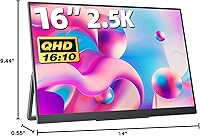
  • Screen Size: The display measures 16 inches diagonally, with physical dimensions of 14.06 x 9.49 x 0.55 inches.
  • Resolution: Native resolution is 2560x1600 pixels (2K QHD), delivering a pixel density that produces sharp, detailed images on the 16-inch panel.
  • Aspect Ratio: The panel uses a 16:10 aspect ratio, providing more vertical screen real estate than the more common 16:9 format found on most portable monitors.
  • Panel Type: An IPS (In-Plane Switching) panel is used, offering wide viewing angles and consistent color reproduction across the screen.
  • Refresh Rate: The display supports a 100Hz refresh rate, which produces noticeably smoother motion in everyday use and light gaming compared to standard 60Hz portable monitors.
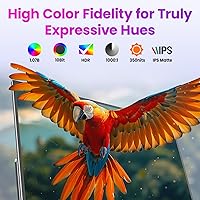
  • Color Gamut: Color coverage is rated at 100% sRGB, making it suitable for color-sensitive tasks such as photo review and light creative work.
  • Color Depth: The panel supports 10-bit color depth, capable of rendering approximately 1.07 billion colors for smoother gradients and more accurate color representation.
  • Brightness: Peak brightness is rated at 350 nits, which is adequate for typical indoor environments but may fall short in very bright or sunlit settings.
  • Contrast Ratio: The static contrast ratio is 1000:1, a standard figure for IPS panels that delivers reasonable depth between dark and light areas of the image.
  • HDR Support: HDR (High Dynamic Range) is supported, allowing compatible content and devices to display a broader range of luminance levels.
  • Connectivity: The monitor includes two full-function USB-C ports and one Mini-HDMI port, covering the most common connection types on modern laptops and devices.
  • Weight: The monitor body weighs 1.56 lb (approximately 0.71 kg), making it light enough to carry in a standard laptop bag without noticeable added bulk.
  • Surface Coating: The screen uses a matte anti-glare coating that reduces reflections in indoor lighting conditions and lowers eye strain during extended use.
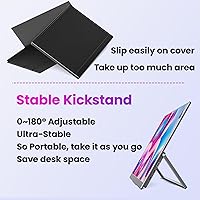
  • Kickstand: An integrated kickstand adjusts from 0° to 180°, allowing the monitor to be positioned at a wide range of angles on flat surfaces without a separate stand.
  • VESA Compatibility: The monitor is VESA-compatible using M4x5mm or M4x6mm screws, enabling mounting on third-party monitor arms or wall mounts.
  • Built-in Speakers: Two integrated speakers are included and provide basic audio output suitable for voice calls and low-demand listening scenarios.
  • Setup: No drivers or software installation are required; the monitor is fully plug-and-play over USB-C or Mini-HDMI on supported devices.
  • In-Box Contents: The package includes one Mini-HDMI to HDMI cable, two USB-C to USB-C cables, a power adapter, and a protective sleeve case.

Related Reviews

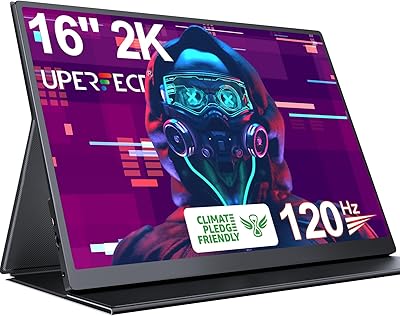
UPERFECT 1602K 16″ 2K Portable Gaming Monitor
79%
91%
Display Clarity
88%
Gaming Performance
93%
Portability & Form Factor
84%
Connectivity
67%
Stand & Cover
More
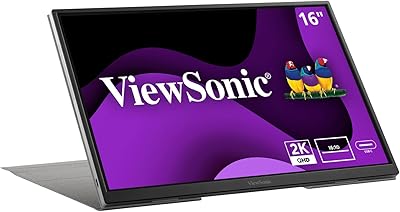
ViewSonic VG1656-2K 16-inch Portable Monitor
86%
94%
Portability & Weight
90%
Display Quality & Resolution
85%
Setup & Installation
88%
Build Quality & Durability
72%
Gaming Performance
More
ViewSonic TD1656-2K 16-inch Touchscreen Portable Monitor
80%
93%
Display Sharpness
74%
Touch Responsiveness
91%
USB-C Connectivity
88%
Portability
86%
Build Quality
More
Eyoyo EM12-2K 12-inch 2K Portable Monitor
75%
88%
Image Sharpness
79%
Color Accuracy
83%
Build Quality
91%
Portability
67%
Stand & Mounting Versatility
More
Upperizon U156LH 15.6″ Portable Monitor
72%
82%
Build Quality
78%
Display Quality
89%
Portability
71%
Connectivity
86%
Value for Money
More
Newsoul M1620 16″ 4K Portable Monitor
81%
91%
Display Clarity
74%
Real-World Brightness
83%
Color Accuracy
88%
Build Quality
67%
Stand and Portability
More
Veout V1 16″ Portable Monitor
76%
84%
Display Quality
91%
Portability & Form Factor
82%
Color Accuracy
88%
Setup & Compatibility
67%
Kickstand Stability
More
MAGICRAVEN M1603 16″ 4K Portable Monitor
75%
91%
Image Sharpness
88%
Portability
86%
Connectivity
89%
Setup Experience
63%
Brightness
More
CAPERAVE BQ16H 16″ Portable Monitor
76%
91%
Display Clarity
86%
Refresh Rate & Gaming
78%
Connectivity & Setup
83%
Build Quality
74%
Color Accuracy
More
WUAWE WAB160 16-inch Portable Monitor
76%
91%
Portability
83%
Build Quality
78%
Display Clarity
61%
Brightness
86%
Connectivity
More

FAQ

The Upperizon U16LS 16″ 2K Portable Monitor does support single-cable USB-C connection, but your MacBook’s USB-C port must support Thunderbolt 3, Thunderbolt 4, or DisplayPort Alt Mode for video output to work. Most modern MacBook Pro and MacBook Air models with Thunderbolt ports are compatible. If you’re unsure, check Apple’s specs page for your specific model before purchasing.

Unfortunately, no. USB-C ports that only handle power delivery or data transfer cannot send a video signal to this display. You’ll need a port that explicitly supports DisplayPort Alt Mode or Thunderbolt. If your laptop doesn’t have one, you can still connect using the Mini-HDMI port with the included cable.

Yes, using the included Mini-HDMI to HDMI cable you can connect this portable monitor to a PS5 or Xbox. Keep in mind the consoles output via full-size HDMI, and the adapter cable bridges that to the Mini-HDMI port on the monitor. The 100Hz refresh rate is a bonus for console gaming, though console HDMI output at high frame rates depends on your in-game and console settings.

They’re basic. The integrated speakers are fine for a video call or catching a quick clip, but they won’t satisfy anyone who cares about audio quality. Volume is limited and there’s no real low-end presence. If you plan to use this for media watching or anything where sound matters, a pair of headphones or a small Bluetooth speaker will serve you much better.

On a flat, smooth desk it holds up reliably and covers most practical working angles. Where it gets shakier is on textured surfaces like fabric laptop bags, rough cafe tables, or anything uneven. It’s solid enough for travel use but isn’t a substitute for a proper monitor arm if you’re setting this up at a permanent workstation.

Yes, the VESA mount compatibility means you can attach this display to a monitor arm and rotate it to portrait mode. The kickstand alone doesn’t support vertical orientation, so you’ll need a third-party VESA-compatible arm or mount if you want to run it vertically. Once mounted, your operating system’s display settings handle the rotation.

It depends on your setup. When connected to a laptop with a Thunderbolt or USB-C port that delivers enough power (typically 65W or more), the monitor can draw power directly from that single cable. If your laptop’s USB-C port doesn’t provide sufficient power, or if you’re connecting via Mini-HDMI, you’ll need to use the included power adapter. The box does include the adapter so you’re covered either way.

The 100% sRGB coverage and 10-bit color depth make it a reasonable choice for reviewing photos and doing light retouching on the road. That said, the panel is not factory-calibrated, so colors straight out of the box may need some manual adjustment depending on how precise your work needs to be. For casual photo editing and proofing it’s genuinely capable; for print-critical color work, a calibrated professional display is a more reliable choice.

The matte anti-glare coating does a solid job of diffusing reflections under standard indoor lighting. In a brightly lit room with overhead fluorescents or ambient light from the side, it holds up well. However, at 350 nits of brightness, direct sunlight or sitting directly in front of a bright window will likely wash out the image. It’s not the right tool for outdoor work.

You get everything you need to get started right away: two USB-C to USB-C cables, one Mini-HDMI to HDMI cable, a power adapter, and a protective sleeve case. For most connection scenarios you won’t need to purchase anything extra. The only edge case is if you need a specific adapter for an older laptop that uses a different port standard entirely.