Overview

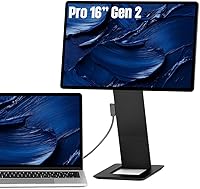
The SOTSU FlipAction Pro 16″ Gen2 Portable Monitor sits firmly at the premium end of the portable display market — and it makes no apologies for that. Unlike the flood of plastic-bodied alternatives dominating this space, this portable monitor is built from CNC-machined aluminum, giving it a solidity you feel the moment you pick it up. The 2560×1600 resolution across a 16:10 panel deliberately mirrors MacBook-class displays, so there is no awkward letterboxing when running alongside a modern laptop. The magnetic flat-pack stand is the most distinctive mechanical feature here — collapse it and the whole unit is barely half an inch thick. Whether that justifies the price depends entirely on how often you travel and what you actually need a second screen to accomplish.
Features & Benefits

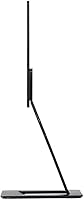
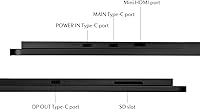
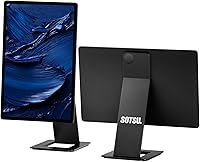
The magnetic collapsible stand is genuinely clever: it snaps flush against the rear panel, cutting the packed profile to around half an inch — thin enough to slide alongside a laptop in most bags without adding real bulk. The anodized body feels like a finished product rather than a prototype, with precisely radiused edges throughout. Display-wise, 120Hz refresh paired with 100% DCI P3 coverage is an unusual combination at this size; most portable monitors sacrifice one for the other. The pivot hinge handles full 180-degree rotation cleanly, making portrait mode a practical option rather than a gimmick. A built-in SD card slot in the kickstand and pass-through charging via a single USB-C cable round out a feature set clearly designed with traveling creatives in mind.

Best For

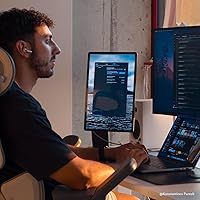
This ultraportable display makes the most sense for people who already live out of a bag. Photographers and video editors who need to trust what they see — and cannot wait to return to a calibrated studio monitor — will appreciate the wide color coverage, though factory calibration can vary between units. Mac users, particularly those on MacBook Pro or MacBook Air, will find the 16:10 panel a natural extension of their built-in screen. Developers who read long files in portrait, or writers who prefer a tall viewport, get real utility from the rotation hinge. Those wanting daisy-chain dual monitors without adding a hub will find MST support a genuine practical benefit rather than a spec-sheet footnote.

User Feedback

Buyers who spend time with the FlipAction Pro tend to reach similar conclusions: the build quality is legitimately strong, but a few real-world trade-offs matter. The magnetic stand earns consistent praise for travel convenience, though some users report the kickstand feels less stable on soft or uneven surfaces. On Mac, the HiDPI scaling issue is a known sticking point — the brand itself openly recommends a third-party app called BetterDisplay to resolve it, so factor in that setup step. The single USB-C port is the most common frustration; anyone running peripherals will need a hub. At 400 nits behind a glossy panel, indoor performance is solid but direct sunlight is a challenge. Hinge durability is generally reported as reliable, though initial stiffness catches some buyers off guard.

Pros

  • The magnetic flat-pack stand collapses the entire unit to roughly half an inch thick — genuinely thinner than most competing portable monitors.
  • CNC-machined aluminum construction feels substantially more robust than the plastic bodies common in this category.
  • The 16:10 aspect ratio pairs naturally with MacBook and modern laptop displays, eliminating the visual mismatch of widescreen panels.
  • 120Hz refresh rate makes the display feel responsive, which matters beyond gaming — scrolling and window management feel noticeably smoother.
  • 100% DCI P3 color coverage is a rare spec at this size and gives photographers a credible field reference for color-sensitive work.
  • Portrait mode rotation is fully functional and practically useful, not just a spec-sheet feature — the hinge holds position reliably.
  • A built-in SD card slot in the kickstand removes one small but real friction point for photographers working away from their desk.
  • MST daisy-chain support lets power users run two external monitors from one host without adding a dedicated dock or hub.
  • Pass-through charging via a single USB-C cable keeps the desk or bag setup genuinely minimal.
  • The 1.98-pound weight is light enough that adding it to a daily carry bag is rarely a dealbreaker.

Cons

  • A single USB-C port means anyone with peripherals will need a hub, which partially defeats the minimal-cable promise.
  • The glossy panel picks up reflections in bright rooms or near windows, limiting usability in well-lit public spaces.
  • Mac users must install the third-party BetterDisplay app to resolve HiDPI scaling issues — this is a known workaround, not a clean out-of-box experience.
  • Factory color calibration can vary between units, so the DCI P3 coverage claim does not guarantee identical accuracy across every display produced.
  • The kickstand can feel less stable on soft or uneven surfaces like couches, beds, or fabric desk mats.
  • 400 nits brightness is adequate indoors but falls short in direct sunlight or unusually bright environments.
  • The hinge can feel stiff initially, which may concern buyers who are not expecting resistance when first adjusting the angle.
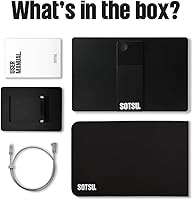
  • No carrying case is included, which is a notable omission at this price point for a product marketed around travel.
  • Windows users may encounter display scaling or compatibility quirks depending on their GPU and driver setup.
  • Buyers primarily using a fixed desk setup are paying for portability engineering they will rarely use, making the value proposition harder to justify.

Ratings

Our AI rating system analyzed verified global buyer reviews for the SOTSU FlipAction Pro 16″ Gen2 Portable Monitor, actively filtering out incentivized, bot-generated, and outlier feedback to surface what real everyday users actually experience. The scores below reflect both the genuine strengths that keep buyers satisfied long-term and the friction points that caused frustration or regret. Nothing has been smoothed over — the trade-offs are represented as honestly as the praise.

Build Quality
94%
The CNC-machined aluminum body consistently earns top marks from users who have owned cheaper plastic portable monitors before. Buyers describe it as feeling closer to a precision instrument than a peripheral accessory, with rounded edges that hold up to daily bag carry without developing sharp stress points or creaks over time.
A small number of users noted that the anodized finish, while durable, is not immune to fine surface scratches when sharing bag space with unprotected cables or keys. No protective sleeve is included in the box, which feels like an oversight at this price tier.
Display Accuracy
88%
Photographers and video editors working on location consistently highlight the wide color coverage as a practical advantage — the display reads closer to their calibrated studio monitors than any other portable screen they have used. For reviewing RAW files or checking color grades on the go, the panel performs well above the portable monitor norm.
Factory calibration is not perfectly consistent across units, and a handful of buyers received panels with a slight warm or cool shift out of the box. For truly critical color work, investing in a hardware colorimeter to profile the specific unit is advisable rather than trusting the spec sheet alone.
Portability
91%
The magnetic stand mechanism is the feature buyers most frequently cite as genuinely impressive in real use — collapsing the unit to roughly half an inch thick makes it thin enough to slot alongside a laptop without reorganizing the rest of the bag. At under two pounds, most users report forgetting it is even there during commutes.
The absence of an included carry case is a recurring complaint, particularly given the premium positioning of the product. Users traveling daily typically end up purchasing a separate sleeve, which adds both cost and a small amount of bulk to what is otherwise an exceptional packed profile.
macOS Compatibility
71%
29%
On a MacBook Pro or MacBook Air, the 16:10 resolution and aspect ratio produce a visually coherent dual-screen setup that feels intentional rather than cobbled together. Once BetterDisplay is configured, Mac users report the experience is smooth and the display feels like a natural extension of their built-in screen.
The out-of-box macOS experience requires a third-party app to resolve HiDPI scaling, which catches buyers off guard if they were not forewarned. It is a fixable issue, but requiring a workaround on a premium product before the display looks correct is a friction point that should not exist at this price.
Refresh Rate & Smoothness
86%
The 120Hz panel makes a noticeable difference during everyday use — scrolling through long documents, moving windows, and browser navigation all feel significantly crisper compared to the 60Hz panels that dominate the portable monitor segment. Buyers who use the display for light gaming or fast UI work particularly appreciate the headroom.
The 120Hz capability is dependent on the host device supporting the output, and some users on older laptops found they could not drive the full refresh rate over their available USB-C port. In those cases the display falls back to 60Hz, which is functional but makes the spec feel underutilized.
Connectivity
58%
42%
Pass-through charging via USB-C is genuinely useful for keeping the desk or café table tidy — one cable from a wall charger runs through the monitor to the laptop, which reduces clutter meaningfully. MST daisy-chain support adds real flexibility for users wanting a two-monitor setup without a dock.
A single USB-C port is the most commonly cited frustration across all buyer feedback. Anyone connecting a mouse, external drive, or audio interface alongside the monitor needs a hub immediately, which undercuts the minimal-cable setup the product otherwise promises. For a display in this category, a second port would make a substantial practical difference.
Brightness & Glare
63%
37%
In typical indoor environments — home offices, hotel rooms, shaded café tables — 400 nits is entirely comfortable and the glossy panel makes colors look vivid and well-saturated. Buyers who work predominantly in controlled lighting rarely flag brightness as a limitation.
The glossy finish and 400-nit ceiling become a real problem near windows or under strong overhead lighting, where reflections compete directly with the image. Multiple users report the display is effectively unusable outdoors in daylight, which is a meaningful limitation for a product marketed around mobile productivity.
Stand Stability
74%
26%
On a solid flat desk the magnetic kickstand performs reliably, holding the display at a chosen angle through normal typing vibration and accidental bumps. Users who work at conventional desks report no persistent stability issues under typical conditions.
On fabric desk mats, soft surfaces, or uneven tables the kickstand is noticeably less confident, and a few users report the display shifting position during extended sessions. The mechanism is optimized for firm, flat surfaces, which is a limitation worth knowing if your work environment varies day to day.
Portrait Mode Usability
83%
The full 90-degree rotation in either direction is not just a listed feature — buyers who use it for coding, reading legal documents, or reviewing long articles consistently report it as one of the most practically useful aspects of the display. The hinge holds the chosen angle without drifting during a full workday.
Initial hinge stiffness catches some buyers off guard when first rotating the display, and a small number of users expressed concern about long-term wear at the pivot point. The stiffness generally loosens with use, but the out-of-box resistance feels inconsistent with the otherwise refined execution of the product.
SD Card Slot
79%
21%
Photographers in particular appreciate having a full-size SD card slot built directly into the kickstand — it removes one small but real inconvenience from the travel kit and keeps the desk setup cleaner. Buyers who offload camera cards regularly describe it as a thoughtful detail that earns its inclusion.
The slot is positioned in the kickstand rather than the monitor body itself, which means it is only easily accessible when the stand is deployed. A handful of users found the placement slightly awkward when trying to insert or remove cards one-handed while the display was positioned at a steep angle.
Windows Compatibility
76%
24%
On modern Windows laptops with full DisplayPort Alt Mode over USB-C, the display connects and scales without significant issues for most users. The 16:10 resolution is increasingly well-supported in recent Windows builds, and the majority of buyers on Dell, Lenovo, and HP machines report a straightforward setup experience.
A smaller subset of Windows users encountered scaling or refresh rate issues related to GPU driver behavior or USB-C port capabilities on their specific machines. The experience is less consistent than on Mac once BetterDisplay is configured, and buyers on older or budget Windows hardware should verify compatibility before purchasing.
Value for Money
66%
34%
For buyers who travel frequently and genuinely need a durable, accurate, ultra-thin portable display, the premium over cheaper alternatives translates into tangible daily-use differences — better color, more confident build, and a packed profile that no plastic competitor currently matches. Those users consistently rate it as worth the investment.
For buyers with a more casual second-screen need or a fixed desk setup, the price requires a lot of justification given that the core display task — extending a laptop screen — can be accomplished by far less expensive options. The value equation is strongly use-case dependent, and several disappointed buyers made the purchase without fully accounting for that.
Hinge Durability
77%
23%
Over several months of regular use, the majority of buyers report the hinge maintains consistent resistance and shows no signs of loosening or developing play. The pivot mechanism feels engineered for repeated adjustment rather than as an afterthought, which inspires reasonable confidence in its longevity.
The initial stiffness is the primary complaint, and because it eases gradually, early impressions of the hinge are often more negative than later ones. A small number of buyers with heavier daily rotation usage noted subtle changes in hinge tension over time, though outright failures are not a common report.

Suitable for:

The SOTSU FlipAction Pro 16″ Gen2 Portable Monitor is best understood as a tool for people whose work genuinely follows them — not just occasionally, but regularly. Photographers and video editors who shuttle between client sites, studios, and cafés will get the most out of the wide color coverage, since having a display that can approximate studio-grade color accuracy in the field is a meaningful practical advantage. Mac users on a MacBook Pro or MacBook Air are a particularly strong fit: the 16:10 aspect ratio and 2560×1600 resolution match the native display so closely that using both screens together feels coherent rather than jarring. Developers and writers who prefer a tall viewport for code or long documents will find real utility in the full 180-degree portrait rotation. For any professional who has previously settled for a cheaper, flimsier portable display and been quietly frustrated by it, this ultraportable display represents a meaningful step up in both usability and day-to-day durability.
Not suitable for:

The SOTSU FlipAction Pro 16″ Gen2 Portable Monitor is a harder sell for buyers who primarily need a second screen at a fixed desk, since the price premium is built around portability features that simply would not matter in that context. Anyone with more than one peripheral to connect will immediately run into the single USB-C port constraint — a hub becomes a mandatory accessory, which undercuts the clean one-cable setup that makes this display appealing in the first place. The glossy panel is a practical limitation for anyone who works regularly near windows or in bright environments, as 400 nits is not enough to comfortably cut through direct glare. Windows users should also be aware that the macOS scaling issue — which requires a third-party app to resolve — is not their concern, but Windows-specific display compatibility quirks are worth testing before committing. Budget-conscious buyers comparing this to the growing field of capable but cheaper portable monitors should think honestly about whether the metal construction and magnetic stand mechanism justify the significant price difference for their specific workflow.

Specifications

  • Screen Size: The display measures 16 inches diagonally, offering a usable working area that comfortably extends a laptop screen without being cumbersome to carry.
  • Resolution: Native resolution is 2560×1600 pixels across a 16:10 panel, producing a pixel density suitable for sharp text and detailed image work.
  • Refresh Rate: The panel runs at 120Hz, which keeps motion and scrolling visibly smoother than the 60Hz panels found in most competing portable monitors.
  • Color Gamut: Rated at 100% DCI P3 coverage, the display targets professional color accuracy for photography and video editing workflows, though calibration can vary between individual units.
  • Brightness: Peak brightness is rated at 400 nits, which is adequate for indoor and shaded environments but may struggle against direct sunlight or very bright rooms.
  • Panel Surface: The screen uses a glossy finish, which enhances color vibrancy and contrast indoors but increases reflections in high-ambient-light settings.
  • Aspect Ratio: The 16:10 aspect ratio is intentionally chosen to align with modern MacBook and premium Windows laptop displays, reducing visual disparity between screens.
  • Body Material: The chassis is CNC-machined from aerospace-grade aluminum and finished with an anodized coating, giving it a rigid, premium feel distinct from plastic-bodied competitors.
  • Weight: The unit weighs 1.98 pounds, light enough for daily bag carry without meaningfully adding to a standard laptop travel load.
  • Packed Thickness: When the magnetic stand is collapsed flat against the rear, the total packed thickness is approximately 0.5 inches, making it one of the slimmest portable monitors available.
  • Dimensions: Unpacked display dimensions are 14.4 × 9.3 inches, fitting within the footprint of most 15-inch and 16-inch laptop bags.
  • Stand Design: The kickstand is magnetic and collapses flush to the back of the display, functioning as both a travel cover and an adjustable support in use.
  • Rotation Range: The hinge supports rotation from 0° to 90°, −90°, and 180°, enabling both landscape and portrait orientations as well as flat-lay configurations.
  • SD Card Slot: A full-size SD card slot is built into the kickstand, removing the need for a separate card reader when working with camera media in the field.
  • Connectivity: The monitor has one USB-C port, which handles video input, pass-through charging, and data — meaning peripheral users will need a hub for additional connections.
  • Pass-Through Charging: The single USB-C port supports pass-through charging, allowing the host device charger to power both the monitor and the connected laptop simultaneously.
  • MST Support: Multi-Stream Transport is supported, enabling a daisy-chain configuration with one additional QHD or 1080p monitor from a compatible host device.
  • Input Voltage: The display operates at 5V DC, making it compatible with standard USB-C power delivery from laptops and most modern chargers.

Related Reviews
SOTSU FlipAction Elite 16″ Portable Monitor
78%
93%
Build Quality
91%
Portability & Pack Design
89%
Display Sharpness
84%
Color Accuracy
72%
Brightness & Glare Handling
More
SOTSU FlipAction Go 14″ Portable Monitor
76%
91%
Portability
84%
Build Quality
78%
Display Quality
88%
Pivot Hinge Versatility
54%
Glare & Reflections
More
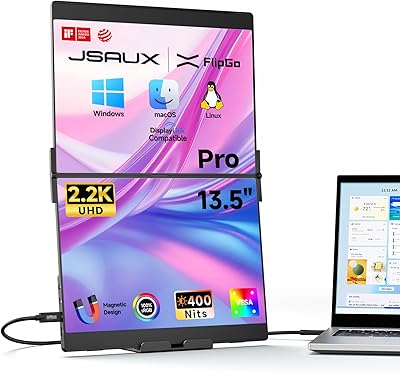
JSAUX FlipGo Pro 16″ Dual Portable Monitor
85%
94%
Portability & Design
91%
Display Quality
90%
Ease of Setup
73%
Power Performance
88%
Compatibility & Connectivity
More
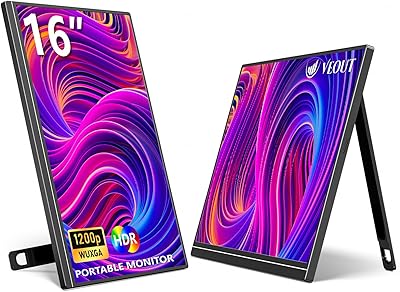
Veout V1 16″ Portable Monitor
76%
84%
Display Quality
91%
Portability & Form Factor
82%
Color Accuracy
88%
Setup & Compatibility
67%
Kickstand Stability
More
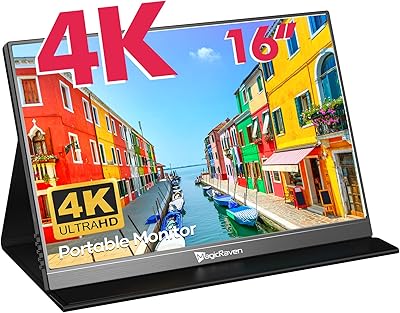
MAGICRAVEN M1603 16″ 4K Portable Monitor
75%
91%
Image Sharpness
88%
Portability
86%
Connectivity
89%
Setup Experience
63%
Brightness
More
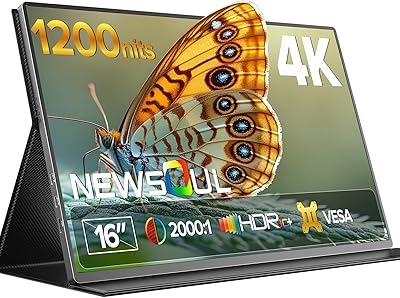
Newsoul M1620 16″ 4K Portable Monitor
81%
91%
Display Clarity
74%
Real-World Brightness
83%
Color Accuracy
88%
Build Quality
67%
Stand and Portability
More
CAPERAVE BQ16H 16″ Portable Monitor
76%
91%
Display Clarity
86%
Refresh Rate & Gaming
78%
Connectivity & Setup
83%
Build Quality
74%
Color Accuracy
More
Upperizon U16LS 16″ 2K Portable Monitor
74%
91%
Display Sharpness
83%
Color Accuracy
89%
Portability
78%
Refresh Rate Performance
86%
Setup & Ease of Use
More
UPERFECT 1602K 16″ 2K Portable Gaming Monitor
79%
91%
Display Clarity
88%
Gaming Performance
93%
Portability & Form Factor
84%
Connectivity
67%
Stand & Cover
More
LXU S11 16-inch Portable Screen Extender
71%
83%
Display Quality
88%
Aspect Ratio Utility
91%
Setup & Ease of Use
41%
Mac Compatibility
62%
Portability
More

FAQ

It connects and displays fine out of the box via USB-C, but many Mac users find the default scaling leaves text or UI elements looking smaller than expected. The brand openly recommends installing a free third-party app called BetterDisplay, which lets you enable HiDPI scaling so the display looks sharp and readable. It is an extra step, but the setup takes only a few minutes and most users find it solves the issue completely.

Honestly, yes — if you regularly run peripherals, the single port will feel limiting. You will need a USB-C hub to connect additional devices while also running the display. The pass-through charging helps keep cable count low, but the port situation is a real trade-off worth thinking through before purchasing.

On a firm, flat surface like a wooden desk or conference table, the kickstand holds reliably and the magnetic connection keeps the stand from shifting. On softer surfaces — think fabric desk mats, couch cushions, or uneven tables — it is noticeably less stable. If you regularly work in varied environments, it is worth being aware that the stand is optimized for flat, hard surfaces.

Yes, and it works well in practice. The hinge rotates a full 90 degrees in either direction, and the display holds position once set. For reading long documents or scrolling through code, portrait orientation on a 16:10 panel gives you a tall, comfortable viewport. Some users keep it as their permanent second-screen orientation.

Indoors and away from direct light, 400 nits is comfortable and the image looks rich on the glossy panel. Near a window or under strong overhead lighting, reflections become a noticeable distraction. It is not the right display for working outdoors in sunlight — the glossy finish and brightness ceiling combine to make that genuinely difficult.

It works with Windows laptops that support DisplayPort Alt Mode over USB-C, which covers most modern machines from Dell, Lenovo, HP, and others. That said, the 16:10 resolution and display scaling can occasionally need adjustment depending on your GPU and Windows display settings. It is not Mac-exclusive, but some Windows users report needing a few minutes of configuration to get scaling looking exactly right.

The anodized finish is reasonably durable for daily carry, but like any bare metal surface, it will pick up light scuffs over time — especially if it shares bag space with keys or unprotected cables. A sleeve or thin pouch is worth using since no case is included in the box.

Yes, MST support is built in, so you can chain a second QHD or 1080p monitor directly from the display without a dedicated dock — provided your host machine and its GPU support MST output over USB-C. It is worth checking your laptop specs first, as not all USB-C ports on every laptop support MST passthrough.

For a portable monitor, the DCI P3 coverage is genuinely impressive and well above average. That said, factory calibration varies between individual units, so if color precision is mission-critical for your work, using a hardware colorimeter to profile your specific panel is a good idea. Most photographers use it as a reliable field reference rather than a replacement for a fully calibrated studio display.

In isolation, under two pounds is light. In context of a full laptop bag, most users report it adds less than they expected. The thin packed profile matters more than the weight for most people — at half an inch thick, it tucks alongside a laptop without reorganizing everything else in the bag. The lack of an included case does mean you need to sort out protection separately.

Where to Buy