
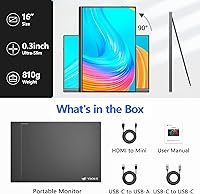
Overview

The Veout V1 16″ Portable Monitor is a solid entry from a newer brand that's quietly building a reputation in the crowded portable display space. What sets this travel monitor apart isn't just price — it's the 16:10 aspect ratio, which gives you noticeably more vertical screen space than the 15.6-inch 16:9 panels that dominate this category. The aluminum body and four color choices feel like design decisions you'd expect from something pricier. That said, Veout is still an emerging name, so tempered expectations matter here — this portable display punches above its weight in several areas, but it isn't without real trade-offs worth knowing before you buy.

Features & Benefits

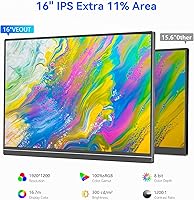
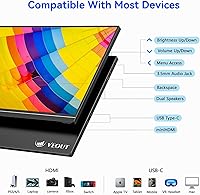
The panel is where this travel monitor genuinely earns attention. A 1920x1200 IPS display with full sRGB coverage means colors are accurate and consistent — useful whether you're reviewing photos or parsing dense spreadsheets. That extra vertical resolution compared to standard 1080p screens means less scrolling and more content visible at once. Connectivity covers most scenarios: two USB-C ports and a Mini-HDMI input handle everything from MacBooks to PS5. The adjustable kickstand spans 0 to 75 degrees and pivots into portrait mode, which is genuinely handy for reading long documents. Built-in speakers and a menu control wheel mean fewer dongles to carry.

Best For

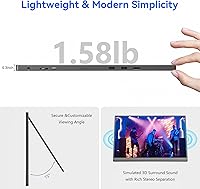
This portable display hits the mark for a fairly specific type of buyer. Remote workers and digital nomads who need a second screen without weighing down their bag will find it easy to justify — at 1.58 pounds and under half an inch thick, it slides into most laptop sleeves without drama. Students doing research, writing, or coding get meaningful screen real estate without needing a full desk setup. Color-sensitive professionals reviewing reference imagery on the road will appreciate the full sRGB panel. Casual console gamers traveling with an Xbox or PS5 can connect easily too, though anyone chasing competitive low-latency gaming performance should keep expectations in check.

User Feedback

Buyers respond warmly to the Veout screen overall, with consistent praise for its plug-and-play USB-C setup and color accuracy relative to cheaper IPS alternatives at this price point. The aluminum chassis earns positive mentions too, though a handful of users note it feels thinner than anticipated — functional, but not quite as reassuring as more established brands. Outdoor use draws mixed reactions; 300 cd/m² holds up fine in the shade but struggles in direct sunlight. The kickstand has been flagged as unstable on soft surfaces. One recurring frustration: no Mini-HDMI cable ships in the box, which catches buyers off guard more often than it should.

Pros

  • The 16:10 aspect ratio gives noticeably more vertical screen space than standard 15.6-inch rivals.
  • Single-cable USB-C setup works instantly with most modern MacBooks and Windows laptops — no drivers needed.
  • Full sRGB color coverage is a genuine asset for photographers and designers working on the road.
  • At 1.58 pounds and under half an inch thick, this portable display fits easily into any laptop bag.
  • Dual USB-C ports allow pass-through charging, so your laptop battery isn't drained during use.
  • Portrait mode rotation is quick and practical for reading long documents or scrolling content.
  • The aluminum build looks and feels more premium than plastic-chassis competitors at a similar price.
  • FreeSync support and a flicker-free, low blue light panel make extended work sessions more comfortable.
  • Four color options — black, silver, pink, blue — make it one of the more personalized choices in its category.
  • Wide device compatibility covers laptops, smartphones, Xbox, PS5, and PS4 via USB-C or Mini-HDMI.

Cons

  • No Mini-HDMI cable is included in the box, despite the port being a key connectivity feature.
  • The kickstand loses stability quickly on uneven or soft surfaces, which is a real problem for travel use.
  • Outdoor visibility in direct sunlight is noticeably poor — brightness falls short of the marketing impression.
  • Factory color calibration is inconsistent across units, which matters for any color-sensitive work.
  • No carry case or protective sleeve is included, leaving a thin aluminum screen vulnerable in a bag.
  • Built-in speakers distort at higher volumes and are genuinely only useful for low-demand audio needs.
  • Switching between portrait and landscape requires a manual OS setting change — there is no auto-rotation.
  • The aluminum chassis is thin enough to flex slightly under pressure and scratches without a cover.
  • Veout is a newer brand with a limited support and warranty track record compared to established monitor makers.
  • Input lag makes this travel monitor unsuitable for fast-paced or competitive gaming sessions.

Ratings

The Veout V1 16″ Portable Monitor has been evaluated by our AI system after analyzing verified global buyer reviews, with spam, bot-generated, and incentivized submissions actively filtered out to ensure the scores reflect genuine user experience. Across categories ranging from display quality to portability and setup ease, both the strengths and real frustrations are transparently reflected below. This travel monitor has a lot going for it at its price point, but the numbers tell a nuanced story worth reading before you commit.

Display Quality
84%
The IPS panel consistently earns praise for accurate, vivid colors that hold up well when editing photos or reviewing design mockups on the road. Users switching from cheaper TN-based travel monitors frequently comment that the color consistency across the screen is noticeably better than they expected at this price.
A minority of buyers report mild backlight bleed in the corners during dark scenes or night use, which becomes distracting during movie playback in low-light hotel rooms. HDR performance, while advertised, is considered modest rather than transformative by most who specifically tested it.
Portability & Form Factor
91%
At 1.58 pounds and under four-tenths of an inch thick, this portable display genuinely disappears into a laptop bag — multiple users describe fitting it alongside a 15-inch laptop with room to spare. The slim aluminum chassis feels purposeful rather than flimsy, and the four color choices mean it doesn't look like an afterthought on a desk.
The thin profile does come with some compromise: a handful of users note the chassis flexes slightly under pressure, and the aluminum can pick up micro-scratches without a sleeve. There is no included carry case or protective pouch, which feels like an oversight for a monitor marketed specifically at travelers.
Color Accuracy
82%
18%
Full sRGB coverage is the real headline for creatives using this travel monitor as a reference display. Photographers and video editors working on location report that colors are consistent and reliable enough for basic review work, saving them from hauling a heavier monitor for non-critical editing sessions.
Factory calibration varies noticeably between units — some buyers received panels that were slightly warm or oversaturated out of the box and had to manually adjust settings. Without a colorimeter, there is no guarantee your unit matches another, which matters if color precision is non-negotiable for your workflow.
Setup & Compatibility
88%
The vast majority of users plug a single USB-C cable into their MacBook or Windows laptop and the screen is recognized instantly — no drivers, no software installation, no fuss. Console users connecting a PS5 or Xbox via Mini-HDMI also report a smooth experience, making this a genuinely versatile option across device types.
Compatibility isn't universal: some older USB-C ports lacking DisplayPort Alt Mode require an adapter or the Mini-HDMI route instead, which caught several buyers off guard. The Mini-HDMI cable is not included in the box, and discovering that at setup time is a recurring frustration in user reviews.
Kickstand Stability
67%
33%
The integrated kickstand covers a practical tilt range and the ability to flip into portrait mode is genuinely appreciated by users who read long articles, review code vertically, or give document-based presentations. Setup takes seconds and there are no separate stand components to lose.
Stability on uneven or soft surfaces — think a cafe table with slight wobble, or a couch cushion — is a recurring complaint. The kickstand hinge, while adjustable, can feel slightly loose over time, and several users report the monitor shifting if the desk vibrates or if they type aggressively next to it.
Brightness & Outdoor Usability
63%
37%
At 300 cd/m², this travel monitor performs reasonably well in shaded outdoor areas or indoor environments with controlled lighting. Users working in coffee shops or co-working spaces with normal overhead lighting report no meaningful visibility issues during a standard workday.
Direct sunlight is a different story — multiple buyers explicitly flag that outdoor brightness falls short of the marketing impression, making screen content hard to read on a bright patio or in a moving vehicle with sun exposure. This is not a dealbreaker, but it is an honest limitation buyers should factor in.
Build Quality
76%
24%
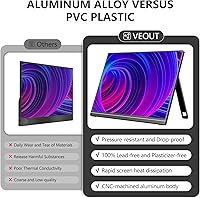
The aluminum construction immediately distinguishes the Veout screen from the all-plastic competition at similar prices. The material choice gives it a more premium feel in hand, and users consistently comment that it looks more expensive than it cost, which matters when using it in professional or client-facing settings.
Durability over time raises some questions — the aluminum shell is thin, and without a case it scuffs relatively easily. A small but consistent group of longer-term users report minor hinge creaking and one noted a hairline crack near the kickstand after a light drop, suggesting it needs more careful handling than a sturdier-framed rival might.
Speaker Performance
58%
42%
Having built-in speakers at all is a convenience that gets genuine appreciation — for video calls, casual YouTube, or background music while working, they serve the purpose without requiring Bluetooth speakers or earbuds. Users value the menu control wheel for quick volume adjustments without diving through menus.
Nobody is mistaking these for quality audio. The speakers are thin-sounding, lack meaningful bass, and distort at higher volumes. For anything beyond background listening or a quick video call, most users reach for headphones — the speakers are best treated as a backup rather than a feature.
Value for Money
83%
Relative to the feature set — IPS panel, aluminum body, dual USB-C, portrait mode, full sRGB — the price-to-spec ratio is genuinely strong for buyers who know what they need. Students and remote workers on a budget consistently rate satisfaction high once they've used it for a week and contextualize what they paid.
The value calculation shifts if you factor in the missing Mini-HDMI cable, the lack of a carry sleeve, and the inconsistent factory calibration that some units arrive with. Buyers who need to spend more on accessories afterward may feel the effective out-of-pocket cost is slightly higher than the listing price implied.
Eye Comfort
79%
21%
The combination of a flicker-free backlight and a hardware-level low blue light filter earns consistent positive mentions from users who spend long hours in front of screens. Several reviewers with prior eye strain issues from cheaper monitors specifically comment that fatigue is noticeably reduced after switching to the Veout screen.
The matte screen surface, while useful for reducing glare, adds a subtle diffusion that some users find softens fine text slightly compared to glossy alternatives. At lower brightness settings, a handful of buyers with light sensitivity still report mild discomfort during extended late-night sessions.
Portrait Mode Usability
74%
26%
Rotating into portrait orientation is a quick physical action that snaps into place reliably, and users who read long-form content, scroll through social feeds, or review vertical documents find it genuinely practical. Coders who use it to see more lines of code vertically are among the most enthusiastic adopters of this feature.
Auto-rotation is not available — you have to manually change the display orientation in your OS settings each time you switch modes, which gets tedious if you flip between layouts frequently throughout a workday. The kickstand is also less stable in portrait orientation, particularly on slightly uneven surfaces.
Gaming Performance
61%
39%
FreeSync support helps reduce screen tearing for compatible devices, and console users connecting a PS5 or Xbox for casual gaming sessions on the road report smooth enough performance for single-player titles. The screen size and resolution make it a satisfying casual gaming option in a hotel room or dorm.
Competitive or fast-paced gaming exposes the monitor's limitations — input lag and response time are not officially specified in detail, and users playing shooters or fighting games notice a perceptible delay compared to dedicated gaming monitors. This travel monitor is better suited to casual play than competitive sessions.
Connectivity Options
81%
19%
Two USB-C ports is a meaningful advantage over single-port rivals — it allows pass-through charging while the monitor is in use, which prevents draining a laptop battery during long working sessions. Broad compatibility across Mac, Windows, Android phones, and consoles gives this portable display flexibility most competitors don't match.
The Mini-HDMI port, while useful, requires a cable that is not in the box — an omission that stings given how niche Mini-HDMI cables are in most travel bags. There is no full-size HDMI port, which limits plug-and-play compatibility with older laptops or projector dongles without an additional adapter.

Suitable for:

The Veout V1 16″ Portable Monitor is a strong match for remote workers and digital nomads who want a meaningful productivity upgrade without adding serious weight to their bag. If your daily setup involves a single laptop screen and you regularly find yourself toggling between browser tabs, documents, and communication tools, the extra screen real estate — especially that taller 16:10 panel — genuinely changes how efficiently you can work from a coffee shop or co-working space. Students doing research-heavy coursework, writing papers, or working through code will find the added vertical space particularly useful for keeping reference material visible alongside their work. Creatives who need a reliable color reference on location — photographers culling shots, designers reviewing mockups — will appreciate the full sRGB coverage, which is rarely this solid at this price point. Casual console gamers who want a compact screen for a hotel room PS5 session, and anyone who frequently flips between landscape and portrait layouts, also get real value from this travel monitor's flexibility.

Not suitable for:

The Veout V1 16″ Portable Monitor is not the right call for buyers who spend significant time working in direct sunlight or brightly lit outdoor environments — 300 cd/m² simply isn't enough to compete with glare in those conditions, and the disappointment from real users is consistent on this point. Competitive gamers who need low input lag and fast response times should look elsewhere; this portable display is built for productivity and casual use, not frame-perfect gaming. Anyone who plans to use this as a primary creative production monitor — color grading video, doing print-ready design work — should invest in a properly calibrated display with documented factory accuracy, since unit-to-unit consistency with the Veout screen can vary. Buyers expecting a complete out-of-the-box experience may be caught off guard by the missing Mini-HDMI cable and the absence of any carry case, which adds both cost and inconvenience. Finally, if long-term brand reliability and warranty support are major factors in your buying decision, Veout's limited track record means it carries more uncertainty than established players in this space.

Specifications

  • Screen Size: The display measures 16 inches diagonally, offering more usable space than the 15.6-inch panels common in this category.
  • Resolution: Native resolution is 1920x1200 pixels, delivering a 16:10 aspect ratio with extra vertical space compared to standard 1080p widescreen panels.
  • Panel Type: IPS (In-Plane Switching) technology provides consistent color and clarity across a wide 178-degree viewing angle, horizontal and vertical.
  • Color Coverage: The panel covers 100% of the sRGB color space, making it suitable for color-sensitive work such as photo review and design reference.
  • Contrast Ratio: A 1200:1 contrast ratio produces distinguishable blacks and whites, contributing to better readability and image depth under normal lighting conditions.
  • Brightness: Peak brightness is rated at 300 cd/m², which performs adequately indoors and in shaded environments but is limited in direct sunlight.
  • Dimensions: The monitor measures 13.9 inches wide by 9.4 inches tall and 0.36 inches thick, making it one of the slimmer options in the portable display segment.
  • Weight: Total weight is 1.58 pounds, light enough to carry alongside a laptop in a standard backpack without meaningful added bulk.
  • Body Material: The chassis is constructed from aluminum, providing a more rigid and premium feel compared to the all-plastic enclosures typical at this price tier.
  • Ports: Connectivity includes two full-function USB-C ports and one Mini-HDMI port; the USB-C ports support both video input and pass-through power delivery.
  • Kickstand Range: The built-in kickstand adjusts from 0 to 75 degrees and supports both landscape and portrait orientations without requiring a separate stand accessory.
  • Eye Care Features: The panel includes a hardware-level low blue light filter and a flicker-free backlight to reduce eye strain during extended viewing sessions.
  • Refresh & Sync: FreeSync adaptive sync technology is supported, reducing screen tearing for compatible devices during video playback and casual gaming.
  • HDR Support: HDR mode is available and enhances dynamic range for supported content, though the effect is moderate given the panel's brightness ceiling.
  • Audio: Dual stereo speakers are built into the chassis, with volume controlled via an onboard menu wheel rather than requiring external controls or software.
  • Color Options: The monitor is available in four finishes: black, silver, pink, and blue, which is an unusually broad palette for a portable display in this category.
  • Compatible Devices: Verified compatible devices include Windows PCs, MacBooks, Android smartphones, Xbox Series consoles, PlayStation 4, and PlayStation 5 via USB-C or Mini-HDMI.
  • Screen Surface: The display uses a matte anti-glare coating, which diffuses reflections in bright environments at the cost of a slight reduction in perceived sharpness.

Related Reviews
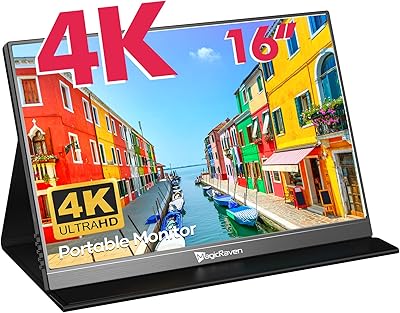
CAPERAVE BQ16H_1 16″ Portable Monitor
86%
94%
Display Quality
91%
Color Accuracy
89%
Refresh Rate & Gaming Performance
92%
Portability & Build
87%
Connectivity Options
More
Newsoul M1620 16″ 4K Portable Monitor
81%
91%
Display Clarity
74%
Real-World Brightness
83%
Color Accuracy
88%
Build Quality
67%
Stand and Portability
More
Upperizon 16″ 2K Portable Monitor
85%
92%
Display Quality
90%
Portability & Size
87%
Ease of Setup
89%
Gaming Performance
94%
Color Accuracy
More
MAGICRAVEN M1603 16″ 4K Portable Monitor
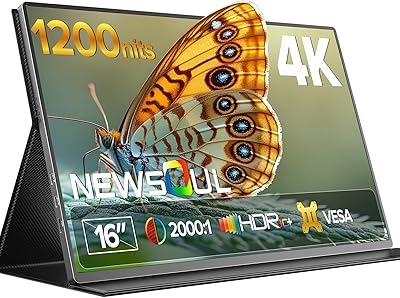
75%
91%
Image Sharpness
88%
Portability
86%
Connectivity
89%
Setup Experience
63%
Brightness
More
WUAWE 16-inch Portable Gaming Monitor
83%
91%
Portability
89%
Display Quality
94%
Setup Ease
56%
Sound Quality
78%
Build Quality
More
LXU 16-inch Portable Monitor S11
81%
88%
Display Quality
83%
Portability & Size
91%
Ease of Setup
75%
Compatibility with Devices
85%
Ergonomics & Flexibility
More
ARZOPA 16.1″ Portable Monitor Z1C
86%
93%
Display Quality
88%
Portability
90%
Ease of Setup
91%
Color Accuracy
87%
Build Quality
More
UPERFECT 16006DD 16″ 4K Portable Monitor
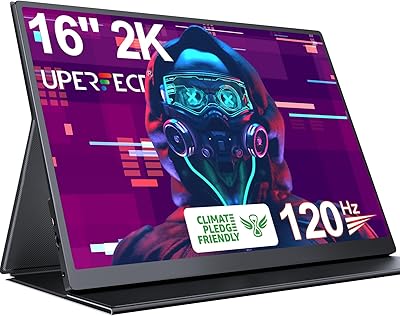
77%
83%
Brightness Performance
91%
Display Sharpness
74%
Color Accuracy
88%
Build Quality
76%
Portability
More
UPERFECT 1602K 16″ 2K Portable Gaming Monitor
79%
91%
Display Clarity
88%
Gaming Performance
93%
Portability & Form Factor
84%
Connectivity
67%
Stand & Cover
More
JSAUX FlipGo TouchScreen 16″ Dual Portable Monitor
86%
94%
Display Quality
89%
Touchscreen Accuracy
91%
Portability
88%
Ease of Setup
87%
Build Quality
More

FAQ

Yes, as long as your MacBook has a Thunderbolt or USB-C port that supports DisplayPort Alt Mode — which all modern MacBook Air and MacBook Pro models do — a single USB-C cable handles both video and power simultaneously. No adapters or drivers needed; the screen is recognized automatically within a few seconds of plugging in.

No, and this catches a lot of buyers off guard. The Veout V1 16″ Portable Monitor ships with USB-C cables but not a Mini-HDMI cable, so if you plan to use the HDMI connection — for example with a desktop PC or older laptop — you will need to purchase that cable separately before you can get started.

Android phones with USB-C DisplayPort output (Samsung DeX-compatible devices, for example) work well with this travel monitor over a single cable. iPhone compatibility is more limited — you would need a Lightning or USB-C to HDMI adapter, and full screen mirroring support depends on your specific iPhone model and iOS version.

On a flat, firm desk it holds steady without much trouble. The issues tend to come up on surfaces that have any flex or texture — a cafe table with slight wobble, a lap desk, or a couch cushion can all cause the monitor to shift or tip during use. If you work at a fixed desk most of the time, it should be fine, but road warriors using it on varied surfaces may find it frustrating.

In the shade, yes — it's bright enough for comfortable working. In direct sunlight, it struggles. The 300 cd/m² brightness rating sounds sufficient on paper, but real-world outdoor use in full sun makes the screen genuinely hard to read. If you regularly work outside in sunny conditions, you'll want to look at a brighter panel in the 400–500 cd/m² range.

Connecting a PS5 or Xbox via Mini-HDMI works without issues, and for single-player or casual gaming the experience is perfectly enjoyable. That said, if you play fast-paced competitive games — shooters, fighting games, anything where milliseconds matter — the input lag is perceptible enough to put you at a disadvantage compared to a dedicated gaming monitor.

You can physically rotate the screen into portrait orientation using the kickstand, but there is no auto-rotation sensor — you have to manually change the display orientation in your operating system settings (Display Settings on Windows, System Preferences on Mac) each time you switch. It is a minor inconvenience but worth knowing if you plan to flip between modes regularly throughout the day.

For casual review work and non-critical design tasks, yes — the full sRGB panel is genuinely solid for this price range. That said, factory calibration varies slightly between units, so if your work requires print-accurate color or broadcast-standard precision, you would ideally run a calibration check with a colorimeter before relying on it for production output.

Most buyers describe it as feeling more premium than expected for the price, which is fair — aluminum always reads better in the hand than plastic. That said, the shell is on the thinner side and has some flex when pressed. It is not fragile, but it is also not as robust as a heavy-duty build, so keeping it in a sleeve or padded compartment when traveling is a smart habit.

For the vast majority of users connecting via USB-C, no installation is required — it works plug-and-play on Windows 10 and later, macOS, and most modern Android devices. The Mini-HDMI connection is similarly driver-free. The only scenario where you might need to adjust settings is if your USB-C port does not support video output, in which case you would need to use the HDMI route instead.