SkyGive N99 Wireless Keyboard and Mouse Combo
Overview
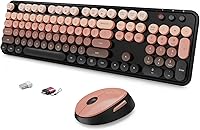
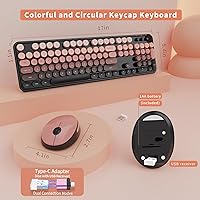
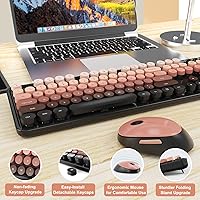
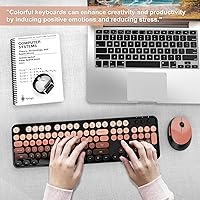
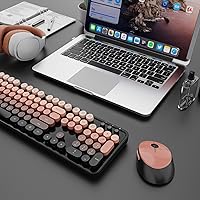
The SkyGive N99 Wireless Keyboard and Mouse Combo is one of those rare budget picks that actually has a visual identity worth talking about. Built around a warm color gradient with round typewriter keycaps, it targets people tired of flat, anonymous peripherals. You get the keyboard, an optical mouse, a USB wireless receiver stored under the mouse, a Type-C adapter, and batteries — everything included. SkyGive is a smaller brand, but this retro wireless combo has quietly climbed into the top 60 of its category on Amazon, which is a meaningful signal at this price tier.
Features & Benefits
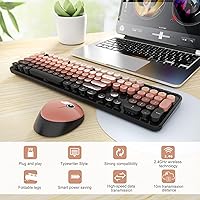
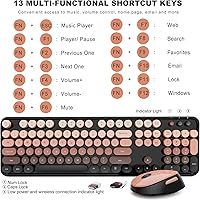
The 2.4GHz wireless connection keeps latency low enough for everyday typing and browsing without any pairing hassle. The USB receiver tucks neatly under the mouse — a smart storage choice that means you will rarely misplace it. A Type-C adapter is included for laptops that have moved on from full-size USB-A ports. The keyboard offers a full numeric keypad alongside 15 hotkeys that you activate with Fn or Shift combos, which is genuinely handy for media and productivity shortcuts. The mouse enters auto sleep mode after just 20 seconds idle, helping stretch battery life well beyond what you might expect from a budget combo.
Best For
This keyboard-and-mouse set is a natural fit for home office workers and students who want a stylish desk setup without a serious budget commitment. If you have been running the same plain black combo for years and want something with a bit of character, this is an easy step up. The full-size layout with a numeric pad makes it practical for data entry or spreadsheet-heavy work, and the 15 hotkeys earn their keep for anyone toggling media or browser controls throughout the day. Cross-platform support across Windows, Mac, and Chromebook with no driver install needed makes it flexible enough for multi-device households.
User Feedback
Buyers consistently praise the visual design first — the color gradient and rounded keycaps look more striking in person than product photos usually convey. Plug-in setup gets frequent compliments, with most users up and running in under a minute. Where reviews get mixed is typing feel: some find the key travel acceptable for the price, but others wanted more tactile depth. The mouse is generally described as comfortable for average and smaller hands; larger hands may find it runs a bit small. Wireless range holds up well for typical desk use, though a few buyers noted occasional brief drops. Battery life is a bright spot, with many users reporting several weeks on a single set.
Pros
- Retro round keycaps and a warm color gradient give the desk setup a distinctive, eye-catching personality.
- Plug-and-play setup means no driver downloads — just plug in the receiver and start typing.
- The USB receiver stores under the mouse, so losing the dongle is much less likely.
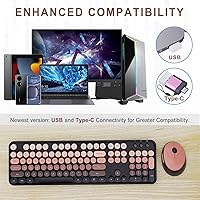
- A Type-C adapter is included, making it compatible with modern laptops that lack full-size USB-A ports.
- Full-size layout with a numeric keypad covers data entry and everyday productivity without compromise.
- Mouse auto-sleep after 20 seconds keeps battery drain low, and buyers report weeks of life per set.
- Works across Windows, Mac, and Chromebook with no extra configuration needed.
- 15 accessible hotkeys handle media and productivity shortcuts without requiring third-party software.
- Batteries are included in the box, so you can start using it the moment it arrives.
- Ranked in the top 60 of its category on Amazon, reflecting strong buyer adoption for the price tier.
Cons
- Key travel is shallow and lacks tactile depth, which can feel unsatisfying for experienced typists.
- The mouse body runs small and may feel cramped for users with medium-to-large hands.
- No backlit keys make this keyboard a poor choice for dim or low-light working environments.
- Build materials feel lightweight — the plastic construction does not inspire long-term durability confidence.
- A small number of buyers have reported brief wireless dropouts, though these appear infrequent.
- No Bluetooth support means it always occupies a USB port, which can be limiting on ultrabooks.
- The 2.4GHz connection works well at a normal desk distance but may degrade further away.
- Only one color variant is widely available, limiting personalization beyond the Aurora Red aesthetic.
- The hotkey activation method requires memorizing Fn and Shift combos, which takes adjustment time.
- SkyGive is a lesser-known brand with limited customer support history, which may concern some buyers.
Ratings
The scores below for the SkyGive N99 Wireless Keyboard and Mouse Combo were generated by our AI review engine after processing verified global buyer feedback, with spam, bot-submitted reviews, and incentivized ratings actively filtered out. Each category reflects the honest distribution of real user experiences — strengths and frustrations alike — so you can make a genuinely informed decision. No score has been inflated, and no recurring complaint has been buried.
Value for Money
Design & Aesthetics
Typing Feel
Wireless Reliability
Ease of Setup
Mouse Comfort
Battery Life
Build Quality
Hotkey Functionality
OS Compatibility
Noise Level
Numeric Keypad
Portability
Suitable for:
The SkyGive N99 Wireless Keyboard and Mouse Combo is a strong match for anyone who wants to make their desk look less generic without spending heavily to do it. Students who spend hours typing notes or working in spreadsheets will appreciate the full-size layout with a numeric keypad — it covers all the bases a basic wireless combo should. Home office workers on a tight budget who are tired of boring black peripherals will find the retro color gradient a genuinely refreshing change of pace. The plug-and-play setup with no driver installation makes it equally appealing to less tech-savvy buyers, such as parents setting up a shared family PC or older adults who simply want something that works out of the box. Chromebook users and Mac owners often get overlooked in this price range, so the broad cross-platform compatibility is a real differentiator here.
Not suitable for:
The SkyGive N99 Wireless Keyboard and Mouse Combo is not the right call for anyone who demands a premium typing experience. If you type for hours daily and care deeply about key travel, actuation force, or tactile precision, this budget combo will likely leave you underwhelmed — it is built for casual to moderate use, not marathon typing sessions. Heavy-handed typists or gamers should look elsewhere; the wireless connection handles everyday tasks well but is not tuned for low-latency or high-frequency input. The mouse leans small, which will frustrate users with larger hands who need a full-grip form factor. There are also no backlights, so working in a dim room is genuinely inconvenient. Finally, buyers who need Bluetooth connectivity instead of a USB receiver — for example, those using a tablet or a port-limited ultrabook — will find this retro wireless combo falls short of their needs.
Specifications
- Brand & Model: Manufactured by SkyGive under the model designation N99.
- Connection Type: Uses a 2.4GHz wireless connection via a compact USB receiver that stores under the mouse when not in use.
- Port Adapter: A Type-C adapter is included in the box to allow the USB receiver to work with modern laptops lacking full-size USB-A ports.
- Keyboard Layout: Full-size layout with a dedicated numeric keypad on the right side for data entry and number-heavy tasks.
- Hotkeys: Features 15 hotkeys activated through Fn + F1–F12 or Shift + F1–F12 combinations for shortcuts such as media controls and browser navigation.
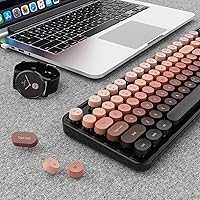
- Keycap Style: Round retro-style keycaps with a color gradient finish, designed to mimic the look of vintage typewriter keys.
- Mouse Shape: Pebble-shaped optical mouse with a compact ergonomic profile intended to reduce wrist fatigue during moderate daily use.
- Mouse Sleep Mode: The mouse automatically enters a power-saving sleep state after 20 seconds of inactivity and wakes instantly upon movement.
- Batteries: Requires 2 AA batteries, which are included in the package so the combo is ready to use straight out of the box.
- Setup: Plug-and-play design requires no driver installation — simply insert the USB receiver and the devices are recognized automatically.
- OS Compatibility: Compatible with Windows XP, Vista, 7, 8, 10, and 11, as well as Mac OS and Chrome OS across desktops, laptops, and Chromebooks.
- Package Dimensions: The retail package measures 17.76 x 8.94 x 2.01 inches, accommodating both the keyboard and mouse in a single box.
- Item Weight: The combined package weight is 1.5 pounds, reflecting the lightweight plastic construction of both devices.
- Backlighting: No backlight or RGB illumination is present on either the keyboard or the mouse.
- Wireless Range: The 2.4GHz receiver supports a standard wireless operating range suitable for typical desk and home office distances.
- BSR Ranking: Ranked #56 in the Computer Keyboard and Mouse Combos category on Amazon at the time of review.
Related Reviews

Arteck HW192 Wireless Keyboard and Mouse Combo

CHESONA Multi-Device Wireless Keyboard and Mouse Combo

TKVPJYYI Wireless Retro Typewriter Keyboard and Mouse Combo

Vssoplor Wireless Keyboard and Mouse Combo

Atelus Wireless Keyboard and Mouse Combo

MPTOG S801AG Wireless Keyboard and Mouse Combo

UBOTIE Wireless Keyboard and Mouse Combo
MOWUX Wireless Keyboard and Mouse Combo

QUASIO Wireless Keyboard and Mouse Combo
