Overview

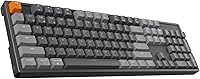
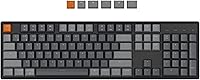
The Keychron K10 Full-Size Mechanical Keyboard is Keychron's answer to everyone who looked at the company's compact lineup and flatly refused to give up the numpad. Unlike the K2 or K6, this board gives you all 104 keys without compromise. The aluminum top frame sets a different tone the moment you pick it up — noticeably more substantial than plastic-bodied boards competing at the same price. Keychron designed it with Mac users in mind, yet the Windows experience is genuinely complete: bundled alternate keycaps, full key compatibility, the works. Manage your expectations accordingly, though — this is a refined, practical daily driver, not a custom-build endgame piece.
Features & Benefits

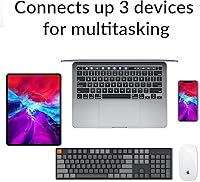
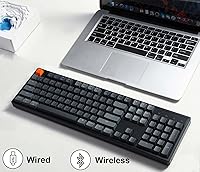
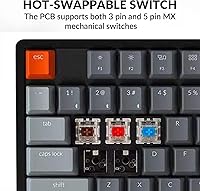
The standout here is the hot-swap PCB. If that term is new to you, it simply means you can pull out any switch and push a replacement in without soldering — in under a minute. That one decision transforms Keychron's 104-key wireless board from a static purchase into something you can genuinely evolve over time. Bluetooth 5.1 handles up to three paired devices and switches between them with a dedicated key combo, which saves real friction if your day involves a MacBook, an iPad, and a Windows PC. The 4000 mAh battery easily lasts weeks with modest backlight use. Pre-installed Gateron G Pro Reds feel smooth and quiet, well-suited for both long writing sessions and late-night work.

Best For

This full-size mechanical keyboard earns its place in home-office setups where numpad access matters — anyone doing heavy spreadsheet work, data entry, or bookkeeping will feel the difference immediately. Mac users upgrading from a flat membrane keyboard will find the transition surprisingly intuitive, with dedicated Screenshot, Siri, and Screen Lock keys working exactly as they should from day one. Hobbyists just getting into switch experimentation will find the hot-swap capability a genuinely low-cost entry point into customization territory. Multi-device households will also get a lot of mileage from the three-device Bluetooth pairing. Competitive gamers, however, should look elsewhere — Bluetooth latency over a fast-paced online match is not this board's strong suit.

User Feedback

Owners of the Keychron K10 tend to keep it around — which says more than any spec sheet. The recurring praise focuses on build quality relative to price; the aluminum chassis regularly surprises people expecting something cheaper. Bluetooth reliability also draws consistent compliments, with most users reporting smooth switching between devices day to day. The criticisms are worth noting, too. Mac owners often flag the lack of dedicated RGB software, so advanced lighting control on macOS is essentially off the table. Stock keycaps are functional but widely considered the first thing to swap out. A handful of gaming-focused buyers report Bluetooth latency spikes under pressure, and the absence of a bundled wrist rest catches some people off guard.

Pros

  • The aluminum top frame feels noticeably premium and holds up well to daily desk abuse without flex or creaking.
  • Hot-swappable switches mean you can change the entire typing feel in minutes, no soldering required.
  • Bluetooth 5.1 connects reliably to three devices and switches between them quickly with a simple key combo.
  • The 4000 mAh battery lasts weeks between charges with moderate backlight use — far longer than most wireless competitors.
  • Dedicated Mac-native keys like Screenshot and Screen Lock work out of the box, no remapping needed.
  • Bundled Windows keycaps mean both platforms get a proper, labeled layout without buying anything extra.
  • Gateron G Pro Red switches offer smooth, consistent linear actuation that holds up well for long typing sessions.
  • The MX-compatible hot-swap socket accepts nearly any 3-pin or 5-pin third-party switch on the market.
  • Long-term owners consistently report this board running reliably as a daily driver for well over a year.
  • The mid-range price delivers a build quality that routinely surprises buyers expecting something cheaper.

Cons

  • No dedicated RGB lighting software for macOS means advanced per-key customization is essentially unavailable on Mac.
  • Bluetooth input carries measurable latency, making this a poor choice for competitive or reflex-driven online gaming.
  • The full 104-key footprint is physically large and can overwhelm smaller or cluttered desk setups.
  • No wrist rest is included, and the typing angle can cause fatigue during very long sessions without one.
  • Stock keycaps are functional but thin enough that many enthusiasts treat them as the first thing to replace.
  • Num Lock only works on Windows, which can confuse new Mac users expecting full numpad functionality across platforms.
  • Firmware customization options are more limited compared to keyboards with open-source or fully programmable layouts.
  • The keyboard has no per-key RGB software control on any platform without third-party workarounds.
  • At 3.49 pounds, portability is limited — this is a stay-on-your-desk board, not a travel-friendly option.

Ratings

Scores for the Keychron K10 Full-Size Mechanical Keyboard are generated by our AI engine after processing thousands of verified global buyer reviews, with spam, bot-submitted ratings, and incentivized posts actively filtered out before analysis. The result is a balanced breakdown that captures what real users genuinely praise and what consistently frustrates them across daily use. Every category score reflects the full picture — strong points and recurring pain points carry equal weight here.
Build Quality
91%
The aircraft-grade aluminum top frame is the first thing users comment on after unboxing — it adds a rigidity and permanence that plastic alternatives simply cannot replicate at the same price. Long-term owners consistently report zero creaking, flex, or structural degradation even after daily use spanning well over a year.
A portion of users note that the bottom casing is plastic, creating a material inconsistency when handling the board. The premium feel is concentrated at the top frame rather than distributed throughout, which becomes apparent if you pick the board up and examine it closely.
Typing Experience
87%
Gateron G Pro Reds strike a balance that works across most typing styles — light enough for fast bursts, smooth enough for long writing sessions without finger fatigue. Users regularly describe the out-of-box feel as immediately satisfying, with none of the scratchiness sometimes found in budget linear switches at this price tier.
The stock setup includes no sound dampening, so bottoming out produces a noticeable plate ping that bothers some users in quiet office or bedroom environments. Those chasing a deeper, thockier sound profile will likely need to add foam dampening or swap to heavier switches via the hot-swap sockets.
Wireless Connectivity
83%
The Broadcom Bluetooth 5.1 chip handles three paired devices cleanly, and most users report channel switching takes under two seconds without requiring a re-pair. The connection stays stable across typical home and office environments with very few reports of random mid-session dropouts.
A recurring complaint involves the keyboard taking longer than expected to reconnect after waking from sleep, which creates small but noticeable workflow friction. Connection quality also degrades in environments with heavy 2.4 GHz interference, and the board does not include a USB wireless dongle as a fallback option.
Battery Life
88%
The 4000 mAh cell is one of the most generous batteries in the mechanical keyboard category, and real-world results reflect that — most users charge it once every few weeks with moderate backlight use. For anyone who has dealt with dead keyboard batteries mid-workday, this capacity is a genuine relief.
Running full RGB brightness drains the battery dramatically faster, dropping real-world life to roughly 15 to 20 hours — a steep gap from the 240-hour headline figure. Users who prefer vivid lighting effects will need to charge far more frequently, and the board provides no battery percentage display to help manage that.
Value for Money
84%
At its mid-range price point, the combination of aluminum construction, hot-swap capability, and multi-device Bluetooth represents a hardware tier that typically costs more from competing brands. Most buyers feel the board punches noticeably above its weight class, especially against plastic-framed alternatives offering fewer connectivity features.
Buyers who factor in the likely cost of keycap upgrades, a separate wrist rest, and potentially a new switch set may find the true ownership cost higher than the sticker price implies. For strictly budget-conscious shoppers, cheaper boards exist — but they trade away the aluminum frame and hot-swap flexibility.
Mac Compatibility
82%
18%
Dedicated Mac keys — Screenshot, Siri, and Screen Lock — work correctly from the first keypress without any remapping required, which sets this board clearly apart from competitors that treat macOS as secondary. Bundled Mac keycaps arrive pre-installed, so Mac users get a properly labeled board straight out of the box.
The absence of dedicated RGB customization software on macOS is a real shortcoming that surfaces once the initial setup excitement fades. Lighting adjustments are limited to preset modes cycled through keyboard shortcuts, leaving anyone hoping for per-key color mapping on macOS with no officially supported path forward.
Windows Compatibility
79%
21%
Switching to Windows mode via the physical side toggle and swapping the included alternate keycaps takes only minutes, and all core Windows functions including Num Lock and Cortana key work as expected. The board is far more Windows-ready than most Mac-primary keyboards, which often treat Windows support as a secondary consideration.
Windows users must manually swap keycaps to get a properly labeled layout, a small but real extra step that Mac users do not face at all. The Num Lock function being Windows-exclusive can also catch cross-platform users off guard when switching from Windows back to macOS and expecting the same numpad behavior.
Hot-Swap Experience
89%
The hot-swap PCB is genuinely accessible even for complete beginners — no soldering, no technical knowledge required. Keychron includes both a keycap puller and a switch puller in the box, and most users report completing a full 104-key swap in under an hour on their very first attempt.
The tilde key socket only accepts 3-pin switches, which is a minor but real constraint for users wanting to run exclusively 5-pin switches across the entire board. Stabilizers on the larger modifier keys are also not hot-swappable, meaning any stabilizer tuning or lubing requires partial board disassembly.
RGB Lighting
67%
33%
The south-facing RGB LEDs produce clean, vibrant colors visible through most keycap sets, and the four brightness levels give users enough control to dial down for nighttime use. Casual users who simply want a lit-up board without complex setup will find the built-in preset effects more than sufficient.
Mac users have essentially no software-based lighting customization, and even on Windows, the control options feel limited compared to keyboards at similar price points with dedicated per-key mapping software. The south-facing LED position also means shine-through legends look better on some keycap profiles than others.
Switch Quality
86%
Gateron G Pro Reds feel noticeably smoother than many factory-installed linear switches at this price level, with consistent actuation force across all keys that does not vary noticeably between individual units. Users who type heavily describe them as fatigue-resistant across multi-hour work sessions.
Linear switches are inherently polarizing — users who prefer tactile feedback or an audible click will find the Reds unsatisfying regardless of their technical quality. While the hot-swap feature makes switching easy, the cost of sourcing a full replacement set of 104 switches adds meaningfully to the total investment.
Keycap Quality
63%
37%
The included doubleshot ABS keycaps are accurately labeled for both Mac and Windows layouts and remain readable straight out of the box. For casual users with no interest in upgrading, they hold up acceptably during normal light-to-moderate daily use without cracking or warping.
ABS plastic develops a visible shine on high-contact keys after several weeks of heavy use, which is a well-documented and frequently cited complaint among regular typists. Most experienced users treat the stock set as temporary, budgeting for a PBT keycap upgrade fairly early into ownership.
Software & Firmware
58%
42%
Core functionality works entirely without software — device switching, lighting effects, and OS toggling are all hardware-controlled. Keychron has issued firmware updates to address reported issues, showing at least baseline ongoing support for the product line.
There is no dedicated companion app for macOS supporting remapping, macro programming, or per-key RGB control — a significant gap compared to software ecosystems from competing brands. Windows support is limited as well, and users looking for deep programmability should look toward QMK-compatible alternatives rather than this board.
Gaming Performance
62%
38%
For casual gaming — strategy games, RPGs, or anything that does not demand sub-millisecond input precision — the board performs well, particularly when wired via USB Type-C. The Gateron Red switches register keystrokes cleanly, and the full-size layout feels familiar to gamers transitioning from standard desktop setups.
Bluetooth latency is a genuine handicap for competitive online gaming, where even small delays are perceptible in fast-paced shooters or fighting games. The board also lacks onboard macro storage and offers no published polling rate specification, both of which are factors that serious gaming buyers typically evaluate before purchasing.
Ergonomics & Comfort
74%
26%
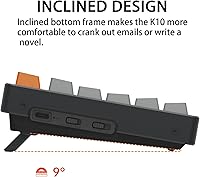
The two-level tilt adjustment — 6 degrees and 9 degrees — offers more flexibility than most boards in this price range, and the inclined bottom frame keeps the typing angle natural for extended sessions. The light actuation of the linear switches also reduces finger strain compared to heavier tactile or clicky options.
The absence of a bundled wrist rest is a recurring complaint, particularly among users who type for four or more hours daily. Without one, the aluminum frame edge can press against the wrists uncomfortably during long sessions, and sourcing a third-party option that fits the board's unusually wide full-size footprint takes extra effort.
Multi-Device Pairing
81%
19%
Three-device Bluetooth pairing covers the most common real-world scenario — a work laptop, a personal machine, and a tablet — and the channel switching becomes genuinely second nature within a few days of use. Most users report that all three device slots hold their connections reliably without re-pairing after software updates.
There is no visual indicator on the board itself showing which Bluetooth channel is currently active, so users must infer connection status from the device they are working on. Some buyers also report sluggish reconnection after the keyboard sits idle for an extended period, adding a small delay when returning to work.

Suitable for:

The Keychron K10 Full-Size Mechanical Keyboard is a strong fit for anyone who spends serious hours at a desk and refuses to give up the numpad — think accountants, data analysts, writers, or anyone who lives in spreadsheets. Mac users making their first jump into mechanical keyboards will find the transition unusually comfortable, since the dedicated Screenshot, Screen Lock, and Siri keys work exactly as expected without remapping gymnastics. People managing multiple devices — say, a MacBook for personal use, a Windows work laptop, and an iPad on the side — will get real, daily value from the three-device Bluetooth pairing. The hot-swap PCB also makes this a smart long-term buy for hobbyists curious about switch experimentation, since you can swap Gateron Reds for Browns, Blacks, or anything MX-compatible without touching a soldering iron. At its mid-range price point, the aluminum build gives it a premium-desk-worthy presence that most plastic competitors simply cannot match.
Not suitable for:

The Keychron K10 Full-Size Mechanical Keyboard is the wrong tool for competitive or fast-paced online gamers who need guaranteed low-latency input — Bluetooth inherently introduces some lag, and while it's unnoticeable for typing, it can be a liability in reflex-critical gaming. Buyers with very tight desk space will also struggle, since a full 104-key layout with numpad is genuinely large and leaves little room for wide mouse movements in a cramped setup. If you were hoping to build out an elaborate per-key RGB lighting scheme on macOS, you will run into a real wall — there is no dedicated software for Mac-side RGB customization, and the lighting options remain basic outside of Windows. Users who prefer a softer, cushioned typing feel or who require a wrist rest out of the box will need to budget for accessories, since nothing ergonomic ships in the box. Finally, hardcore keyboard enthusiasts chasing premium sound profile, gasket-mounting, or fully programmable firmware may find this board too conservative for their tastes.
Specifications

  • Key Layout: Full-size 104-key layout includes a dedicated numpad, arrow cluster, function row, and all standard modifier keys.
  • Frame Material: The top frame is constructed from aircraft-grade aluminum, providing a rigid and premium-feeling chassis with minimal flex.
  • Switch Type: Pre-installed Gateron G Pro Red linear switches deliver smooth, quiet actuation with a rated lifespan of 50 million keystrokes.
  • Hot-Swap: The PCB supports tool-free hot-swapping of MX-style 3-pin switches on all keys and 5-pin switches on all keys except the tilde position.
  • Wireless: Bluetooth 5.1 via Broadcom chipset pairs with up to three devices and switches between them using a dedicated key combination.
  • Wired Mode: A USB Type-C port provides a stable wired connection as a full alternative to Bluetooth operation.
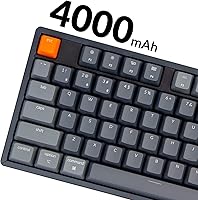
  • Battery: The internal 4000 mAh lithium battery delivers up to 240 hours of use with the backlight fully disabled.
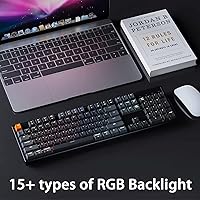
  • Backlighting: South-facing RGB LEDs support four adjustable brightness levels and multiple built-in lighting effects.
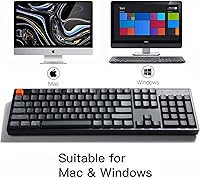
  • OS Support: Compatible with macOS, Windows, Android, and iOS, with a physical toggle switch and bundled alternate keycaps for both Mac and Windows layouts.
  • Mac Keys: Includes dedicated keys for Screenshot, Siri, and Screen Lock that function natively on macOS without any remapping.
  • Dimensions: The keyboard measures 440 x 129 x 40 mm, approximately equivalent to 17.3 x 5.1 x 1.6 inches.
  • Weight: Total weight is 3.49 pounds, a direct result of the aluminum construction rather than a lightweight plastic shell.
  • Tilt Feet: Two sets of foldout feet offer a 6-degree or 9-degree typing angle in addition to the standard flat position.
  • Num Lock: The Num Lock function is supported on Windows only; macOS treats the numpad keys as always active without requiring a lock toggle.
  • Switch Variants: The keyboard is available in Gateron G Pro Red (linear), Blue (clicky), and Brown (tactile) switch versions depending on the variant selected at purchase.

Related Reviews
Keychron C2 Full-Size Hot-Swap Mechanical Keyboard
75%
83%
Build Quality
81%
Switch Feel & Performance
88%
Hot-Swap Functionality
79%
Mac Compatibility
62%
Keycap Quality
More
Keychron K8
Keychron K8
80%
91%
Typing Feel & Switch Quality
88%
Noise Level
86%
Multi-Device Connectivity
67%
Build Quality & Materials
72%
Battery Life
More
Keychron K2 V2 75% Mechanical Keyboard
79%
91%
Build Quality
84%
Typing Experience
86%
Wireless Connectivity
89%
Battery Life
88%
Hot-Swap Feature
More
Keychron V1 75% Mechanical Keyboard
82%
83%
Build Quality
81%
Typing Feel
74%
Switch Performance
93%
Customization & Firmware
91%
Hot-Swap Functionality
More
Keychron K4 Bluetooth Wireless Mechanical Keyboard
86%
91%
Build Quality
88%
Battery Life
85%
Typing Experience
90%
Connectivity & Versatility
82%
RGB Backlighting
More
Samsers KF08S Foldable Bluetooth Keyboard
80%
93%
Portability
81%
Typing Comfort
78%
Build Quality
84%
Multi-Device Connectivity
74%
Battery Life
More
Arteck HA305-3B USB Wired Backlit Keyboard
80%
97%
Ease of Setup
83%
Typing Experience
74%
Backlight Quality
71%
Build Quality & Durability
92%
Value for Money
More
Perixx Periboard-106 Ergonomic Full-Size Keyboard
79%
88%
Typing Comfort
83%
Build Quality
81%
Key Feel
91%
Value for Money
87%
Comfort for Long Sessions
More
Amazon Basics Wireless Keyboard and Mouse Combo

74%
94%
Ease of Setup
88%
Value for Money
63%
Typing Experience
61%
Mouse Comfort & Usability
57%
Build Quality
More
Merdia Triple Mode 100-Key Wireless Mechanical Keyboard
74%
88%
Value for Money
84%
Wireless Connectivity
81%
Typing Experience
83%
Hot-Swap Functionality
67%
Build Quality
More

FAQ

No drivers are needed on macOS. The dedicated Mac layout means the Screenshot, Siri, and Screen Lock keys work correctly from the first keypress, and a physical side switch lets you toggle between Mac and Windows mode instantly.

In real-world use, switching takes roughly one to two seconds after pressing the key combo. The board holds its paired devices in memory, so you are not re-pairing from scratch each time — just waking up a connection that is already established.

It really is. A basic switch puller grips the switch, you pull straight up and it pops out, then you align the new switch pins and press down until it clicks into place. No heat, no soldering, no risk of damaging anything. Most people finish their first full 104-key swap in under an hour.

The 240-hour figure applies only when the backlight is completely off. At full RGB brightness, expect roughly 15 to 20 hours per charge. At a moderate brightness level, realistic daily use lands somewhere between several days and a week before you need to plug in.

For casual or single-player gaming, you likely will not notice any lag at all. For competitive multiplayer games where split-second timing matters, Bluetooth does introduce measurable latency. In that scenario, connecting via the USB Type-C cable eliminates the issue entirely.

This is one of the board's real limitations for Mac users. There is no dedicated software for per-key RGB programming on macOS, so you are limited to cycling through the built-in lighting presets using keyboard shortcuts. Windows users get access to Keychron's software for more granular control.

No wrist rest is included. The package ships with the keyboard, a braided USB Type-C cable, a keycap puller, a switch puller, and a set of alternate keycaps for Windows. If you plan on long typing sessions, budgeting for a separate wrist rest is worth doing upfront.

Reds are on the quieter end of the mechanical spectrum — no audible click, just the soft thud of the key bottoming out. They are not silent, but most people find them acceptable for shared spaces. Typing with a lighter touch reduces the sound noticeably, and you can always hot-swap to dampened switches if you need it quieter.

Virtually any MX-style switch works, including Cherry MX, Gateron, Kailh, NovelKeys, and most boutique third-party options. Three-pin switches fit every socket on the board. Five-pin switches work in all positions except the tilde key, which is limited to three-pin only.

It is a strong first board. Gateron Red switches have a light, forgiving feel that most new users adapt to quickly, and the full-size layout removes any adjustment period from a missing numpad or rearranged keys. The main thing to prepare for is the footprint — this board is substantially larger than a laptop keyboard and needs a proper amount of clear desk space.

Where to Buy