Perixx Periboard-106 Ergonomic Full-Size Keyboard
Perixx Periboard-106 Ergonomic Full-Size Keyboard — image 1
Perixx Periboard-106 Ergonomic Full-Size Keyboard — image 2
Perixx Periboard-106 Ergonomic Full-Size Keyboard — image 3
Perixx Periboard-106 Ergonomic Full-Size Keyboard — image 4

Perixx Periboard-106 Ergonomic Full-Size Keyboard — image 5
Perixx Periboard-106 Ergonomic Full-Size Keyboard — image 6
Perixx Periboard-106 Ergonomic Full-Size Keyboard — image 7
79%
21%

Overview

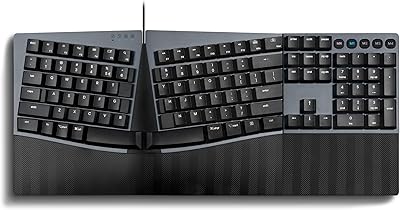
The Perixx Periboard-106 Ergonomic Full-Size Keyboard has been a quiet staple on office desks since 2014, and its sustained presence near the top of bestseller charts says something real about how well it holds up over time. What separates it from ordinary flat membrane boards is its curved key layout, where keys sit at graduated heights to follow the natural arc of your fingers. It includes a numpad, media keys, and a standard US English QWERTY arrangement — everything a desktop user expects. This is not a keyboard built for gamers or mechanical switch enthusiasts. It is built for everyday comfort, plain and simple.

Features & Benefits

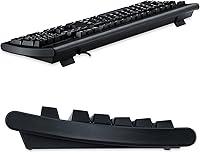
The SA spherical keycaps are the headline feature here — each key has a slightly scooped surface that cradles your fingertip rather than forcing a flat landing. Combined with the tiered height design, typing for hours feels noticeably less taxing on your fingers. The keys carry a satisfying travel distance with mild auditory feedback, landing somewhere between a mushy membrane and a loud mechanical switch, which most office environments will appreciate. The six-foot USB-A cable is longer than average and eliminates the need for extensions in most setups. Keycaps pop off easily for cleaning, and no driver install is required to get going.

Best For

This wired desktop keyboard suits anyone who types for several hours daily and wants something kinder on their fingers without paying a premium for a split or tented design. Students, data-entry workers, and office staff who rely on a full numpad will find the layout practical and familiar. It is also worth considering if you are coming from a flat laptop-style keyboard and notice finger fatigue during longer sessions. That said, keep in mind this is Windows-only out of the box with no wireless option, so Mac users or anyone needing a cable-free desk should look elsewhere before buying.

User Feedback

With more than 1,500 ratings averaging 4.5 stars, buyers have been consistently satisfied over many years. The most repeated praise centers on long-session comfort — many users describe switching from a standard flat keyboard and noticing less wrist and finger fatigue within the first week. Build quality also earns frequent mentions, with people expressing surprise at how solid the construction feels relative to the price. On the downside, some longer-term users report that keycap legends fade after a year or two of heavy daily use. A handful of buyers also wish the cable routing were tidier for minimalist desk setups, though these are minority concerns in an otherwise strong track record.

Pros

  • Curved, tiered keycaps reduce finger fatigue noticeably during multi-hour typing sessions.
  • The spherical key surface cradles fingertips naturally, making it easier on hands than flat membrane boards.
  • Long key travel with mild auditory feedback strikes a comfortable middle ground for office environments.
  • Full-size layout with numpad is ideal for data entry, spreadsheets, and number-heavy workflows.
  • Plug-and-play USB-A connection works instantly on Windows with no drivers or software required.
  • Keycaps are removable for easy cleaning, a practical plus for busy or shared desks.
  • The six-foot cable reaches most desktop configurations without needing an extension.
  • Built to withstand up to 10 million keystrokes per key, suggesting solid long-term durability.
  • Hotkeys and media controls work out of the box without any setup.
  • Over 1,500 buyer ratings averaging 4.5 stars reflects consistently high satisfaction across years of real-world use.

Cons

  • No wireless option at all — buyers needing a cable-free desk have no version to choose from.
  • Mac compatibility is not supported, making it a poor fit for Apple users without workarounds.
  • Keycap legends on heavily used units have been reported to fade after extended daily use.
  • The large full-size footprint can feel overwhelming on smaller or minimalist desk setups.
  • No backlighting, which is a drawback for anyone working in low-light environments.
  • The aesthetic is purely utilitarian — there is nothing visually distinctive about its plain black design.
  • Cable management is basic, which can contribute to desk clutter for tidiness-conscious users.
  • Not suitable for gaming due to the lack of anti-ghosting or N-key rollover features.

Ratings

The scores below for the Perixx Periboard-106 Ergonomic Full-Size Keyboard were generated by our AI system after analyzing thousands of verified buyer reviews from global markets, with spam, bot submissions, and incentivized feedback actively filtered out. Each category reflects the honest spread of real user experiences, capturing both what makes this wired desktop keyboard genuinely worth considering and the areas where it falls short for certain buyers.

Typing Comfort
88%
Users who switched from flat chiclet keyboards consistently report less finger fatigue during extended work sessions, often mentioning the difference within the first few days of daily use. The tiered key heights and scooped keycap surface let fingers land more naturally, which adds up over hours of writing, coding, or data entry.
A small portion of users with larger hands found the key spacing slightly cramped for their reach, and buyers accustomed to low-profile laptop keys needed a brief adjustment period before the longer travel felt intuitive.
Build Quality
83%
The chassis feels solid and resists flex during normal typing, and the overall weight keeps it planted on the desk without the need for adhesive feet. Multiple long-term owners describe it still functioning reliably after two or more years of daily office use.
The plastic finish, while sturdy, has a budget feel that is immediately apparent compared to premium boards. A handful of buyers reported that the keycap legends began to fade on heavily used keys after 12 to 18 months of intensive daily typing.
Key Feel
81%
19%
The long-travel mechanism delivers a satisfying tactile response with a mild click that most office users describe as pleasant and confidence-inspiring during touch typing. It occupies a comfortable middle ground between the mushy feedback of cheap membrane boards and the loud clatter of full mechanical switches.
Users who prefer either a near-silent keystroke or the crisp snap of a genuine mechanical switch are likely to find this feel underwhelming. The feedback is consistent but not particularly distinctive, and enthusiasts will notice it lacks the precision of a dedicated typing switch.
Value for Money
91%
At its price point, delivering a curved key design, full-size numpad, media controls, and a rated 10-million-keystroke lifespan is genuinely competitive, and buyers routinely cite it as a strong upgrade from the basic keyboards bundled with desktop PCs. Many users describe recommending it to colleagues or repurchasing it as a reliable secondary keyboard.
Buyers who stretch their budget slightly further have access to entry-level mechanical keyboards that offer more customization and potentially longer legend durability, which makes the value case less clear-cut for users who intend to keep one keyboard for many years.
Comfort for Long Sessions
87%
Office workers and writers logging four or more hours of typing daily consistently highlight reduced hand strain as the primary reason they keep coming back to the Periboard-106. The curved design does what it promises for most users, making it noticeably more forgiving than flat alternatives during marathon work sessions.
The keyboard ships without a wrist rest, so users who need full wrist support from the moment they sit down will need to budget for one separately. On very flat desk surfaces without a wrist rest, some users reported residual wrist tension after extended periods.
Ease of Setup
96%
Plug in the USB-A cable and it works immediately on any supported Windows machine — no driver disc, no software portal, no firmware update required. This makes it a practical choice for shared office workstations or anyone who simply does not want to deal with installation steps.
The exclusively wired, Windows-only setup is a limitation rather than a flaw in execution, but it does mean that buyers using Linux or older macOS machines will encounter configuration hurdles that the out-of-box experience cannot resolve.
Cable & Connectivity
74%
26%
The 6-foot USB-A cable is longer than what typically ships with budget keyboards and handles most desktop tower-to-desk routing scenarios without needing an extension. The connection is stable with no reports of signal dropout, which is exactly what you want from a wired peripheral.
The cable is fixed and non-detachable, so damage to it means replacing the whole keyboard rather than just swapping a cable. The lack of any wireless or Bluetooth option is a recurring disappointment for buyers who discover this limitation only after purchase.
Cleaning & Maintenance
84%
Removable keycaps are a practical and often underappreciated feature on a desk keyboard, making it easy to clear crumbs, dust, and debris that accumulate over months of regular use. No special tools are needed to pop the caps off, and standard water cleaning restores them easily.
The keycap surfaces, while cleanable, do not resist oily residue as well as PBT keycaps found on pricier boards, meaning they can develop a slightly worn, shiny look on the most-used keys over time even with regular cleaning.
Noise Level
78%
22%
The auditory feedback is mild enough that most open-plan office users find it acceptable, and colleagues sitting nearby have generally not raised complaints according to buyer feedback. It is substantially quieter than any clicky mechanical switch.
In truly quiet environments, such as a private study or a shared sleeping space, the click is noticeable enough to be distracting. Buyers needing near-silent input for recording setups or very noise-sensitive shared spaces should consider a quieter membrane board.
Aesthetic Design
58%
42%
The all-black colorway is clean and inoffensive, blending into virtually any desk setup without drawing attention, which is exactly what a no-fuss office tool should do.
There is nothing visually interesting about the design — no backlighting, no color options, and a plain utilitarian appearance that feels dated against modern peripherals. Users who care about desk aesthetics or a more polished look will find it underwhelming.
Keycap Durability
63%
37%
Under light to moderate daily use, the keycap legends hold up reasonably well and remain legible for the first year without obvious wear. For touch typists who rarely look at the keys, legend fading is essentially a non-issue.
Heavy typists who spend six or more hours a day at the keyboard have reported visible fading on frequently used keys within 12 to 18 months. The legends appear to be pad-printed rather than laser-etched or double-shot, which limits long-term durability on high-traffic keys.
Compatibility
61%
39%
Broad Windows compatibility spanning versions 7 through 10 makes this a reliable drop-in replacement for aging office machines, and the plug-and-play nature means IT staff do not need to intervene for basic deployment.
The absence of official Mac or Linux support is a real limitation that affects a meaningful segment of potential buyers. There is no mention of Windows 11 compatibility in official documentation, which may give pause to users on newer systems, though anecdotal reports suggest it generally functions normally.
Media & Hotkeys
77%
23%
Having dedicated media and volume controls that work immediately without software is a small but genuinely useful convenience for anyone who listens to music or takes video calls while working, and buyers appreciate not needing a separate volume knob or mouse click.
The hotkey selection is limited to basic media and system functions, with no programmable macro support or application-specific shortcuts, which will disappoint power users who rely on custom key assignments for productivity workflows.

Suitable for:

The Perixx Periboard-106 Ergonomic Full-Size Keyboard is a strong fit for anyone who spends the bulk of their workday at a Windows desktop and has started noticing finger or wrist fatigue from flat, chiclet-style keyboards. Office workers, writers, students, and data-entry professionals will appreciate the curved key layout and tiered heights, which make long typing sessions feel noticeably less taxing without requiring an adjustment period as steep as split or tented designs. If you rely on a numpad for spreadsheets, accounting work, or data processing, the full-size layout covers that without compromise. The plug-and-play USB-A connection means it works immediately on any Windows 7, 8, or 10 machine with zero driver fuss, which makes it a reliable choice for shared workstations or simple home desk setups. People upgrading from a basic flat keyboard on a modest budget will likely find this delivers a meaningful improvement in day-to-day comfort.

Not suitable for:

Buyers expecting wireless freedom should stop here — the Perixx Periboard-106 Ergonomic Full-Size Keyboard is strictly wired, and there is no Bluetooth or USB dongle variant available. Mac users will also run into compatibility walls, as the keyboard is officially supported only on Windows, meaning certain modifier keys and system shortcuts will not behave as expected on macOS without remapping software. Gamers or mechanical switch enthusiasts looking for precise actuation, N-key rollover, or RGB lighting will find this board underwhelming, since it is designed around office comfort rather than performance input. If your desk space is tight or you prefer a compact tenkeyless layout, the full-size footprint at nearly 18 inches wide may feel like too much real estate. Finally, buyers who are hard on their equipment and need legends that stay crisp for many years should be aware that heavier users have reported fading keycap printing over time.

Specifications

  • Layout: Full-size US English QWERTY layout with a dedicated numpad, function row, and navigation cluster.
  • Key Design: SA spherical keycaps with a scooped surface and tiered height rows that follow the natural curve of the fingers.
  • Key Travel: Long-travel key mechanism that provides both tactile and auditory feedback on each keystroke.
  • Key Lifespan: Each key is rated for up to 10 million actuations, indicating strong long-term durability under daily use.
  • Connection: Wired USB-A connection with a 6-foot cable, requiring no wireless receiver or pairing process.
  • Plug-and-Play: No drivers or software installation required; the keyboard is recognized immediately upon connection on supported systems.
  • Compatibility: Officially compatible with Windows 7, Windows 8, and Windows 10; Mac and Linux are not officially supported.
  • Special Keys: Includes dedicated hotkeys and media control keys for playback, volume, and system functions accessible without software.
  • Keycap Removal: Keycaps are individually removable without tools, making routine cleaning straightforward and practical.
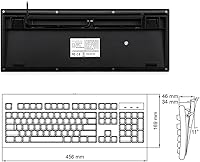
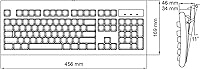
  • Dimensions: The keyboard measures 17.95″ long by 6.65″ wide by 1.34″ tall at its lowest profile point.
  • Weight: The unit weighs 1.72 pounds, giving it enough heft to stay stable on a desk without being cumbersome.
  • Color: Available in black with a classic, understated finish suited to standard office and home desktop environments.
  • Cable Length: The attached USB-A cable measures 6 feet, providing flexible reach for most standard desktop tower placements.
  • Backlighting: No key backlighting is included; this is a standard non-illuminated keyboard intended for well-lit work environments.
  • Wireless Option: No wireless or Bluetooth variant exists for this model; it is exclusively a wired peripheral.
  • Brand Origin: Manufactured by Perixx Computer GmbH, a German peripheral brand with a focused lineup of comfort-oriented input devices.
  • Release Date: This model was first made available in September 2014 and remains in active production with no discontinuation notice.
  • Package Contents: The package includes the keyboard unit only; no additional accessories, wrist rest, or keycap puller are bundled.

Related Reviews
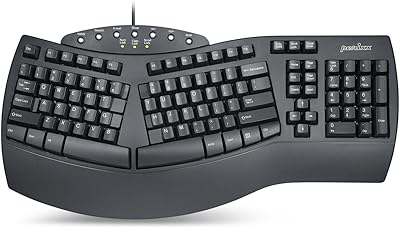
Perixx PERIBOARD-512B Wired Ergonomic Keyboard
83%
87%
Ergonomics & Comfort
84%
Key Layout & Typing Experience
82%
Build Quality & Durability
91%
Wrist Support
95%
Setup & Installation
More
Perixx PERIBOARD-624B Wireless Ergonomic Split Keyboard
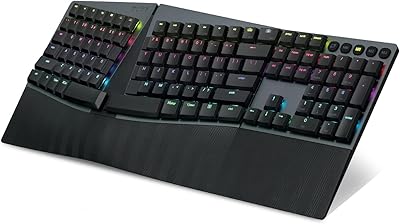
85%
89%
Ergonomics & Comfort
91%
Wireless Connectivity
76%
Key Response & Travel
84%
Build Quality
80%
Typing Experience
More
Perixx PERIBOARD-835BL Wireless Ergonomic Mechanical Keyboard
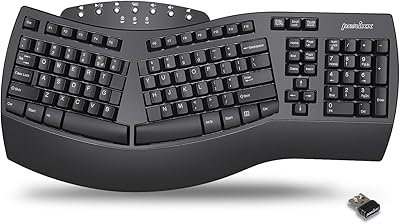
82%
88%
Ergonomics and Comfort
85%
Typing Experience
82%
Connectivity and Multi-Device Support
87%
Build Quality
90%
RGB Customizability
More
Perixx PERIBOARD-536B Wired Ergonomic Compact Keyboard
85%
89%
Ergonomics
91%
Comfort
85%
Build Quality
78%
Typing Experience
92%
Design/Compactness
More
Perixx Periboard-612B Wireless Ergonomic Split Keyboard
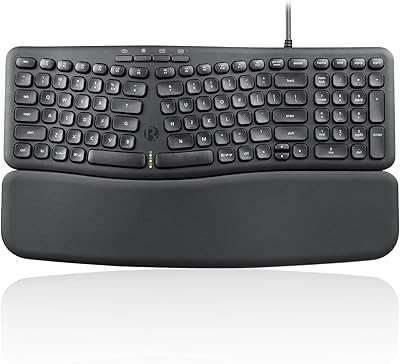
84%
88%
Ergonomics & Comfort
91%
Wireless Connectivity
85%
Ease of Use
76%
Key Travel & Typing Experience
82%
Build Quality
More
Perixx PERIBOARD-535BR Wired Ergonomic Mechanical Split Keyboard
86%
88%
Ergonomics and Comfort
90%
Build Quality
85%
Performance
92%
Key Switch Feel
87%
Macro Functionality
More
Perixx PERIBOARD-636B Wireless Ergonomic Compact USB Keyboard
85%
88%
Ergonomics and Comfort
84%
Typing Experience
80%
Build Quality
90%
Wireless Connectivity
91%
Wrist Rest Comfort
More
Perixx PERIBOARD-409H Mini USB Keyboard
75%
93%
Space Efficiency
79%
Built-in USB Hubs
63%
Typing Feel
88%
Setup & Compatibility
74%
Build Quality
More
Perixx PERIBOARD-505H Wired Mini Keyboard with Trackball
86%
92%
Value for Money
87%
Trackball Performance
85%
Ease of Use
80%
Build Quality
91%
Compact Design
More
Keychron K10 Full Size Wireless Mechanical Keyboard
83%
91%
Typing Experience
89%
Build Quality
87%
Bluetooth Connectivity
85%
Battery Life
82%
Ergonomics
More

FAQ

It is fully plug-and-play on Windows 7, 8, and 10. Just connect the USB-A cable and it is ready to use immediately, no software download required.

Officially, it is not supported on macOS. Some buyers have had partial success using key remapping tools, but modifier keys like Command and Option will not map correctly by default, so Mac users are better off looking at a keyboard designed with Apple compatibility in mind.

The Perixx Periboard-106 Ergonomic Full-Size Keyboard uses SA spherical keycaps, meaning each key has a slightly concave surface that cups your fingertip rather than presenting a flat landing. Combined with the tiered row heights, the physical shape of the keyboard follows the arc your fingers naturally form, which reduces the stretching and flattening motion that causes fatigue on standard flat keyboards.

It is quieter than a mechanical keyboard but has a mild click that is audible in a quiet room. Most open-office environments should find it acceptable, though if your colleagues are sensitive to typing noise, a softer membrane board might be a safer choice.

You can use it for casual gaming, but it is not designed for that purpose. It lacks features gamers typically need, such as anti-ghosting, N-key rollover, and programmable macros, so competitive or fast-paced gaming is not where this keyboard shines.

The keycaps pop off individually without needing any tools. You can rinse them with water, wipe them down, let them dry fully, and press them back into place. It is one of the more practical design choices on this board for anyone who eats at their desk.

No, there is no wireless variant. The Periboard-106 is a strictly wired keyboard, and Perixx has not released a wireless version of this specific model.

The cable is 6 feet long, which is longer than many budget keyboards and should reach comfortably from most desktop towers to a standard desk position. The cable is not detachable, so if it gets damaged, replacement would require a new unit.

Some heavy users report that the printed legends begin to fade after a year or more of intensive daily typing. It is not a universal complaint, but if you type for many hours every day, it is something to keep in mind, particularly on the most-used keys like the home row.

No wrist rest is included in the box. The curved key profile does reduce some of the strain associated with flat keyboards, but if you need dedicated wrist support, you would need to purchase a separate wrist rest.

Where to Buy