Overview

The Arteck HA305-3B USB Wired Backlit Keyboard is a straightforward, no-frills full-size keyboard built for everyday use at an accessible price. Plug it into any USB port and it works instantly — no drivers, no software, no setup headaches. The design is deliberately slim and low-profile, using scissor-switch keys that suit office desks and home workstations equally well. You get a complete layout here: number pad, arrow keys, and media hotkeys, all packed into a board that sits just a quarter-inch off your desk. This isn't a gaming keyboard or a mechanical enthusiast's pick — it's a reliable daily driver for people who just want to type.
Features & Benefits

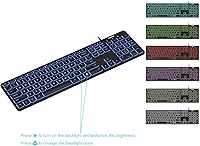
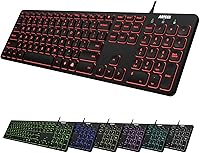
The 7 LED backlight colors are one of this wired backlit keyboard's more immediately appealing traits — cycle through options and adjust among three brightness levels to suit your environment. The scissor-switch keys deliver a quieter, slightly more tactile experience than flat membrane boards, which makes a real difference during long typing sessions. At just over a pound and under a quarter-inch thick, the Arteck keyboard is easy to slide into a bag or reposition on a crowded desk. The four-foot USB cable handles most standard desk layouts comfortably, though it may feel short in some tower setups. A 24-month warranty rounds things out nicely for this price tier.

Best For

This slim USB keyboard is a natural fit for office workers and students who want a full layout without the bulk of a traditional board. If you frequently work in dim lighting — a home office at night, a basement desk, a shared workspace with poor overhead lighting — the adjustable backlight adds genuine utility without requiring a premium purchase. The full numpad is a practical bonus for anyone doing data entry or spreadsheet work. It also makes a solid secondary keyboard for a shared PC or a clean replacement for a failing board. Those who find mechanical switches too loud but still want something with a bit more feedback than a mushy membrane will feel right at home here.

User Feedback

Across thousands of reviews, the Arteck keyboard holds a strong 4.4-out-of-5 rating, and the recurring praise is consistent: buyers love how quickly it gets up and running, and many note the key feel is surprisingly comfortable for the price. The backlight colors draw positive remarks — described as bright and clean, though not as refined as higher-end boards. Worth flagging honestly: the USB cable length does come up as a minor frustration for users with tower PCs placed farther from their desk. A small number of buyers have reported occasional key wobble or uneven lighting, though this appears to be rare. The lightweight build earns mixed reactions — some love it, others find it shifts on their desk.

Pros

  • Plug in and start typing immediately — no drivers, software, or configuration required
  • Full-size layout with numpad, arrow keys, and media hotkeys in a surprisingly thin package
  • Seven backlight color options with three brightness levels offer genuine flexibility for low-light work
  • Scissor-switch keys are noticeably quieter than mechanical boards — ideal for shared spaces
  • At just over a pound, the Arteck keyboard is easy to carry between workstations or pack with a laptop
  • A 24-month warranty provides meaningful purchase protection that is rare at this price point
  • Media hotkeys work reliably out of the box for volume, playback, and common shortcuts
  • The slim profile keeps desk clutter minimal and suits tight or minimalist workstation setups
  • Strong overall satisfaction rating backed by thousands of verified buyers worldwide

Cons

  • The USB cable is only about four feet long, which is too short for floor-standing tower PC setups
  • A minority of units have shown key wobble on larger modifier keys like Shift and Enter
  • Backlight uniformity is inconsistent on some units, with certain keys glowing noticeably dimmer than others
  • The all-plastic build feels lightweight in a way that can make the board shift on smooth desk surfaces
  • Not compatible in a meaningful way with macOS — shortcuts and key labeling do not translate well
  • No wireless or Bluetooth option exists, so desk cable management remains a permanent consideration
  • Key legends are small and can be difficult to read in certain lighting conditions despite the backlight
  • Customer service response times appear inconsistent based on buyer accounts, despite the warranty coverage

Ratings

The Arteck HA305-3B USB Wired Backlit Keyboard was scored by our AI system after processing thousands of verified global buyer reviews, with spam, bot-generated, and incentivized feedback actively filtered out. The scores below reflect real-world usage patterns across home offices, student desks, and general PC setups — strengths and frustrations included. Nothing is glossed over.
Ease of Setup
97%
Plug in the USB cable and you are typing within seconds — no driver downloads, no pairing codes, no software to install. For buyers replacing a failed keyboard in a hurry, or setting up a shared workstation, this kind of instant compatibility is genuinely appreciated and frequently mentioned in reviews.
There is almost nothing to criticize here, though users with older systems running non-standard USB configurations have occasionally reported needing to switch ports before the keyboard registers. This is a rare edge case rather than a design flaw.
Typing Experience
83%
The scissor-switch keys strike a comfortable middle ground — quieter than mechanical switches but with more feedback than a flat membrane board. Office users and students working in shared spaces consistently highlight that the shallow keystroke reduces fatigue during long typing sessions.
Those accustomed to full-travel mechanical keys may find the short actuation distance leaves them wanting more. A handful of reviewers also noted that the keys can feel slightly springy under aggressive typing, which is not ideal for fast typists who prefer a firmer bottom-out.
Backlight Quality
74%
26%
Seven color options with three brightness levels give users meaningful control over their lighting environment, which is a genuine bonus for late-night work or dimly lit home offices. For this price range, buyers consistently describe the colors as vibrant and evenly distributed across most keys.
The backlight is good for the money, not outstanding by any objective measure. Some users report minor inconsistencies in glow intensity between keys, and the lighting does not approach the crispness of dedicated backlit keyboards at higher price points. Expectations should be set accordingly.
Build Quality & Durability
71%
29%
The ultra-thin chassis feels surprisingly solid for a budget board, and most daily users report no structural issues after months of regular use. The low-profile design resists flexing better than similarly priced competitors, which inspires a modest degree of confidence in long-term durability.
A small but notable portion of reviewers flagged key wobble on specific keys, and a few reported keycaps feeling less secure than expected. The lightweight plastic construction, while practical for portability, does not project premium durability — it feels like what it is at this price tier.
Value for Money
92%
Full-size layout with numpad, backlit keys, media hotkeys, and a two-year warranty bundled into a single affordable purchase — that combination is hard to argue with. Buyers repeatedly cite this wired backlit keyboard as one of the better-value options they have tried, especially as a reliable everyday replacement or secondary board.
The value proposition holds up only when expectations are calibrated correctly. Buyers expecting premium key feel or flawless backlighting at this price will come away disappointed. It delivers excellent bang for the buck, but it is not competing with boards that cost several times more.
Key Stability
68%
32%
The majority of keys feel consistent and well-seated during normal typing, and the scissor-switch mechanism provides more lateral stability than basic membrane keyboards in the same class. For standard office tasks like emails, documents, and spreadsheets, most users find the stability perfectly adequate.
Key wobble is the most commonly cited structural complaint in negative reviews. While it affects only a minority of units, it is concentrated in specific keys — often the larger modifier keys like Shift and Enter. For users who type forcefully, this inconsistency can become distracting over time.
Cable Length & Manageability
62%
38%
The approximately four-foot USB cable is sufficient for most laptop and compact desktop setups where the tower or USB hub sits on the desk. Users with standard workstation layouts rarely mention the cable as an issue, and the length keeps desk clutter manageable.
Tower PC users who keep their case on the floor, or those with deep desks, frequently flag the cable as too short to reach comfortably without pulling the keyboard toward the edge. This is one of the more consistent complaints across reviews and a real limitation for certain desk configurations.
Portability
88%
Weighing just over a pound and sitting less than a quarter-inch tall, the Arteck keyboard is genuinely easy to move between workstations or tuck into a bag alongside a laptop. Students who carry their keyboard to libraries or shared labs appreciate not being weighed down by a bulky board.
The lightweight build that makes it so portable is also the reason some users feel it shifts on smooth desk surfaces during use. Without rubber feet providing strong grip, the keyboard can creep forward during extended typing sessions, which is a minor but recurring annoyance.
Media Hotkeys Functionality
81%
19%
Dedicated media keys for volume control, playback, and common shortcuts work reliably without requiring any additional software. For users who constantly adjust audio or toggle between applications, having these functions accessible at the top row saves real time and reduces reliance on on-screen controls.
The hotkey labels are small and can be difficult to read under certain lighting conditions. There is also no dedicated mute button on some configurations, which is a minor but occasionally inconvenient omission for users in shared or call-heavy work environments.
Noise Level
86%
The scissor-switch design keeps the keyboard noticeably quieter than mechanical alternatives, which is a meaningful advantage in open-plan offices, shared bedrooms, or anywhere noise is a consideration. Co-workers and family members in the same room are unlikely to be disturbed during normal typing.
It is not silent — at higher typing speeds, there is an audible click from the key mechanisms that some office environments may still find noticeable. Users specifically seeking near-silent input should look at keyboards with dedicated quiet membrane switches rather than relying on scissor mechanisms alone.
Compatibility
89%
The standard USB-A connection works across virtually every Windows desktop and laptop without any configuration. Users who have bought this slim USB keyboard as a quick replacement or secondary input device consistently report it recognized immediately across a wide range of PC hardware and Windows versions.
Compatibility is essentially limited to USB-enabled Windows environments. Mac users report functional but imperfect performance, with some key labeling and shortcut behavior not matching macOS conventions. There is no mention of official Mac support, so non-Windows buyers should research carefully before purchasing.
Warranty & After-Sales Support
79%
21%
A 24-month warranty is a standout inclusion at this price point and gives buyers meaningful purchase protection. Several reviewers mention that Arteck responded to warranty claims and replacement requests without significant friction, which builds a degree of trust in the brand for repeat buyers.
Customer service response times vary based on reviewer accounts, with some reporting prompt resolutions and others experiencing slower communication. The warranty also does not cover all reported issues consistently, and the process for claiming a replacement can require more follow-up than buyers typically expect.
Aesthetic & Desk Presence
76%
24%
The slim profile and clean key layout give this wired backlit keyboard a tidy, modern look that suits minimalist desk setups well. The backlit color options add a degree of visual personality without looking garish, which appeals to buyers who want a functional but visually inoffensive board on their desk.
The all-plastic build in a single base color does not project much visual character, and the font choices on keycaps are unremarkable. Users who invest in desk aesthetics may find the overall look a bit generic, and the key legends can appear slightly misaligned on close inspection on some units.

Suitable for:

The Arteck HA305-3B USB Wired Backlit Keyboard is a strong match for office workers, remote employees, and students who need a dependable full-size board that simply works without any setup friction. If your desk sits in a dimly lit corner, a basement home office, or a shared bedroom where you often work after dark, the adjustable backlight adds real practical value without the cost premium of a dedicated gaming or enthusiast keyboard. Data entry workers and spreadsheet-heavy users will appreciate having a full numpad in a board that does not dominate the desk. People who share a workspace with others — a partner, a roommate, a sleeping child nearby — will find the scissor-switch keys quiet enough to type without causing tension. It also makes an excellent emergency replacement or secondary keyboard for anyone whose primary board has failed and who needs something functional and affordable delivered quickly.
Not suitable for:

The Arteck HA305-3B USB Wired Backlit Keyboard is not the right choice for buyers who prioritize tactile precision or audible key feedback, as the scissor-switch mechanism is built for quiet comfort rather than the deep actuation feel that mechanical enthusiasts expect. If your PC tower sits on the floor or your desk is particularly deep, the approximately four-foot USB cable may not reach your keyboard position without awkward pulling — a limitation that has frustrated enough real buyers to be worth taking seriously before purchasing. Mac users will find the keyboard functional but imperfect, with shortcut keys and key labeling that do not align naturally with macOS conventions. Competitive gamers or fast typists who demand absolute key stability and zero flex will likely find the lightweight plastic chassis underwhelming. Anyone investing in a premium desk setup where build materials and aesthetics matter will probably feel this slim USB keyboard looks and feels too budget-oriented to fit the bill.
Specifications

  • Brand: Manufactured by Arteck, a brand specializing in affordable consumer peripherals including keyboards, mice, and mobile accessories.
  • Model Number: The exact model identifier for this keyboard is HA305-3B.
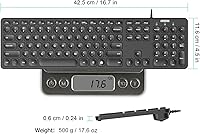
  • Dimensions: The keyboard measures 16.7″ in length, 4.5″ in width, and just 0.24″ in height, making it one of the slimmest full-size boards in its class.
  • Weight: The keyboard weighs approximately 17.4 oz (1.41 lbs), which is notably light for a full-size layout that includes a numpad.
  • Connection: Connects via USB-A wired interface with no wireless option; plug-and-play on all compatible systems with no drivers or software required.
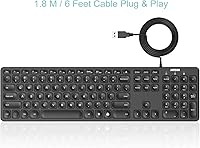
  • Cable Length: The attached USB cable measures approximately 1.2 meters (about 4 feet), which suits most standard desk configurations.
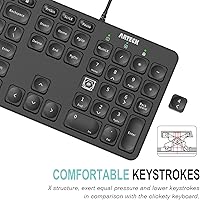
  • Key Switch Type: Uses scissor-switch (X-structure) mechanisms, which provide a shallower keystroke and quieter actuation compared to standard dome membrane switches.
  • Layout: Full-size layout including a main alphanumeric section, dedicated arrow keys, a numeric keypad, and function row with media hotkeys.
  • Media Hotkeys: Includes dedicated hotkeys along the top row for functions such as volume control, media playback, and common system shortcuts.
  • Backlight Colors: Offers 7 distinct LED backlight color options, each adjustable across 3 brightness levels using dedicated keyboard shortcuts.
  • Backlight Type: LED backlighting is built directly into the key switches and illuminates key legends from below for visibility in low-light environments.
  • Compatibility: Designed for use with Windows-based desktops and laptops; officially supports PC and laptop configurations via standard USB-A connection.
  • Profile: Ultra-thin, low-profile design sits at under a quarter-inch in height, keeping wrist angle low and reducing typing fatigue during extended sessions.
  • Warranty: Comes with a 24-month manufacturer warranty along with access to Arteck customer support for defect-related claims.
  • Package Contents: The retail box includes the keyboard itself, a USB cable, and a printed welcome guide with basic setup instructions.
  • Key Labeling: Key legends are laser-etched and backlit, covering standard QWERTY layout with secondary function labels printed on applicable keys.
  • Surface Material: The keyboard body and keycaps are constructed from ABS plastic, consistent with the lightweight and slim build of the chassis.

Related Reviews
Atelus USB Wired Backlit Keyboard
87%
91%
Typing Comfort
88%
Backlight Visibility
83%
Build Quality
86%
Key Responsiveness
85%
Ergonomics
More
Perixx PERIBOARD-333RGB Wired Backlit USB Keyboard
85%
88%
Typing Comfort & Responsiveness
84%
RGB Backlighting Customization
79%
Build Quality & Durability
91%
Value for Money
83%
Multimedia Key Functionality
More
Perixx PERIBOARD-332
81%
83%
Typing Comfort
74%
Build Quality
69%
Backlighting Quality
91%
Compact Design & Portability
67%
Cross-Platform Compatibility
More
Perixx PERIBOARD-317R Wired Backlit USB Keyboard
83%
88%
Ease of Use
85%
Typing Comfort
77%
Backlighting Performance
92%
Value for Money
90%
Key Visibility
More
Arteck Ergonomic Split USB Keyboard with Wrist Rest
75%
83%
Ergonomic Comfort
71%
Wrist Rest Quality
74%
Key Feel & Typing Experience
67%
Build Quality & Durability
78%
Backlighting
More
Perixx PERIBOARD-326 Wired Mini Backlit USB Keyboard
85%
87%
Typing Comfort
80%
Build Quality
90%
Backlighting Performance
91%
Portability
72%
Key Response
More
HP 400 Backlit Wired Keyboard
86%
89%
Backlighting Performance
87%
Typing Comfort
82%
Ergonomics
91%
Build Quality
85%
Portability
More
Dilter Large Print Wired USB Keyboard
88%
91%
Ease of Use
96%
Key Visibility
83%
Typing Comfort
94%
Setup/Installation
85%
Build Quality
More
B.Friend KB1430 Wired Keyboard
78%
83%
Typing Comfort
88%
Noise Level
61%
Build Quality
86%
Value for Money
79%
Key Feel & Actuation
More
MOWUX SK-693EL Wired Backlit Keyboard
73%
83%
Value for Money
67%
Typing Experience
71%
Backlight Quality
62%
Build Quality
94%
Ease of Setup
More

FAQ

No, nothing at all. Just plug the USB cable into any open USB port on your PC or laptop and the keyboard is recognized immediately. There is no companion app, no driver download, and no configuration required before you start typing.

It will function on a Mac in a basic sense — the keys register and you can type — but it is not officially supported for macOS. The shortcut keys and some labeling are built around Windows conventions, so Mac-specific functions like Command shortcuts will not behave as expected. If you primarily use a Mac, a keyboard designed with macOS in mind would serve you better.

Backlight color and brightness are controlled directly from the keyboard itself using dedicated key combinations, so no software is involved. You cycle through the 7 available colors and 3 brightness levels with a quick key press. The exact shortcut is noted in the included welcome guide.

It depends on where your tower sits. The cable is approximately 4 feet long, which works well if your PC is on the desk beside or below the monitor. If your tower is on the floor at a distance from the desk surface, the cable may fall short — this is the most consistently reported limitation by buyers, so it is worth measuring your setup before purchasing.

The scissor-switch keys are noticeably quieter than mechanical switches and produce a softer, more muted sound than typical budget membrane keyboards. They are not completely silent, but they are unlikely to disturb someone sitting nearby. If you have ever typed on a laptop keyboard, the sound and feel are broadly comparable.

It can handle light or casual gaming, but it is not designed for that use case. There is no anti-ghosting, no N-key rollover, and no software customization for macros or key remapping. If gaming performance matters to you, a dedicated gaming keyboard would be a better investment. For typing-heavy games or general use alongside gaming, it will hold up fine.

A small number of units do ship with minor key wobble or slightly inconsistent backlighting between keys — it is an edge case but a real one. If you notice this out of the box, reach out to Arteck customer support, as the 24-month warranty covers defects. Most buyers report that Arteck handles these claims without excessive friction.

A USB hub works in most cases. Since the keyboard is plug-and-play and draws minimal power, it does not require a direct port connection. That said, if you experience any recognition issues, plugging directly into a port on your computer is the fastest way to rule out hub-related interference.

Yes, it handles extended use well for most people. The low-profile scissor-switch keys reduce the wrist angle compared to thicker keyboards, and the shallow key travel tends to reduce finger fatigue over long periods. It is not an ergonomic split keyboard, but for a standard flat board it is comfortable for daily office work.

For routine cleaning, a can of compressed air works well to clear dust and debris from between the keys. For the key surfaces, a slightly damp microfiber cloth with a small amount of isopropyl alcohol is safe on the ABS keycaps. Avoid getting any liquid near the USB connection end of the cable, and never submerge or spray the board directly.