Overview

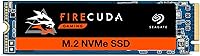
The Seagate FireCuda 510 2TB NVMe SSD arrived in 2019 as a serious performance statement for gamers and creative professionals who refused to compromise on either speed or storage space. Running on a PCIe Gen3 x4 interface, it delivers bandwidth that leaves SATA-based drives far behind — we're talking about a fundamentally different class of storage, not just a modest upgrade. Two terabytes at this performance tier was a compelling combination when it launched, and it remains relevant today for anyone who hasn't yet moved to a Gen4 platform. If your motherboard tops out at Gen3, this FireCuda 510 is still a genuinely strong contender.
Features & Benefits

Peak sequential reads of 3,450MB/s and writes of 3,200MB/s sound impressive on paper, but the real story is how those numbers translate when you're loading a 100GB open-world title or exporting a 4K video timeline. The NVMe 1.3 protocol keeps latency low even under sustained workloads, which is exactly where older SATA drives start to stumble noticeably. Seagate chose 3D TLC NAND here — a solid call for balancing high capacity with write endurance over years of heavy use. The drive's M.2 2280 form factor slots into virtually any modern desktop or laptop build, and at under 0.3 ounces it adds nothing meaningful to a portable rig.

Best For

If your game library has grown past the point where a single smaller drive makes sense, the Seagate FireCuda drive is a natural fit for a high-end gaming build. Content creators who routinely shuffle large video or photo files will also appreciate the sustained throughput — storage bottlenecks mid-workflow are genuinely disruptive, and this drive avoids them. Laptop users upgrading from a SATA SSD will notice a tangible difference in everyday system responsiveness, not just in benchmarks. One practical compatibility note: before buying, verify your motherboard or laptop has an available M.2 slot that actually supports NVMe, since not all M.2 slots are equivalent.

User Feedback

With a 4.7-star average across more than 2,200 ratings, this NVMe SSD has earned a dependable reputation over several years in the market. Buyers consistently praise easy installation — the drive is recognized immediately with no fuss — and many describe the jump in real-world responsiveness as obvious from day one. Where criticism surfaces, it tends to focus on value: Gen4 drives have matured since this model launched and can offer faster peak speeds at comparable prices. That is a fair point worth weighing. On the positive side, long-term reliability reports from early adopters are encouraging, with many users noting their drives are still performing without problems years after purchase.

Pros

  • Reaches up to 3,450MB/s sequential reads, cutting large file transfer times dramatically compared to SATA drives.
  • The 2TB capacity is genuinely practical for gamers who refuse to constantly manage which titles to keep installed.
  • 3D TLC NAND provides a solid balance of endurance and capacity for years of heavy daily use.
  • A 1.8 million hour MTBF rating gives real confidence in long-term reliability for demanding workloads.
  • The M.2 2280 form factor fits the vast majority of modern gaming desktops and laptops without any adapter needed.
  • Installation is straightforward — most buyers report the drive is recognized immediately with no driver headaches.
  • Over 2,200 user ratings averaging 4.7 stars reflects a consistently positive real-world ownership experience.
  • Long-term feedback from early adopters suggests this NVMe SSD holds up well years into regular use.
  • At under 0.3 ounces, it adds virtually no weight to a portable gaming laptop build.
  • Seagate's brand reputation and warranty support add a layer of accountability that lesser-known drives lack.

Cons

  • PCIe Gen4 drives now offer faster peak speeds and have closed the price gap considerably since this model launched.
  • Price-per-gigabyte is harder to justify in a market where newer competitors have pushed costs down.
  • No built-in heatsink means sustained heavy workloads can cause thermal throttling on systems without good airflow.
  • Buyers on older systems must confirm their M.2 slot specifically supports NVMe — assuming compatibility is a real risk.
  • Being a Gen3 drive, it will not benefit from the additional bandwidth available on newer Gen4 or Gen5 motherboards.
  • The FireCuda 510 lacks hardware encryption support, which matters for users with data security requirements.
  • As a 2019-era product, it misses newer firmware features and controller improvements found in more recent SSDs.
  • Not the best fit for budget-conscious buyers, as similarly fast options are now available for less money.

Ratings

The scores below reflect an AI-driven analysis of thousands of verified global user reviews for the Seagate FireCuda 510 2TB NVMe SSD, with spam, bot activity, and incentivized feedback actively filtered out to ensure the results are grounded in genuine buyer experiences. Each category captures both the strengths that real users praise and the friction points they actually encounter — nothing is glossed over. The result is an honest, balanced picture to help you decide whether this FireCuda 510 is the right drive for your specific situation.

Sequential Read Speed
91%
Gamers and content creators consistently report that the jump to 3,450MB/s reads is immediately noticeable — large game installs complete faster, and opening massive Premiere Pro project files no longer feels like a waiting game. Users upgrading from SATA SSDs describe the difference as dramatic rather than incremental.
A growing number of buyers note that Gen4 drives now push past 7,000MB/s reads, making this drive's ceiling feel less impressive than it did at launch. For users on Gen4-capable boards, the FireCuda 510's read performance no longer represents the top of the market.
Sequential Write Speed
88%
Write speeds holding near 3,200MB/s hold up well during sustained tasks like video rendering exports or cloning a drive, where consistent throughput matters more than peak burst numbers. Creative professionals in particular appreciate that the drive rarely dips into cache-exhaustion slowdowns during typical project file sizes.
At very large file sizes — think multi-hour 4K video exports exceeding the drive's SLC cache buffer — write speeds can taper noticeably, which is a real-world issue for video editors pushing the drive hard in a single session.
Real-World Gaming Performance
89%
Load times in open-world titles drop meaningfully compared to SATA drives, and users with large libraries — 20 or more installed games — report that the 2TB capacity means they rarely have to uninstall titles to make room. The consistency across multiple game launches back-to-back is something buyers specifically call out in long-term reviews.
Honest users acknowledge that in many multiplayer games, load time differences between NVMe tiers are marginal once you are already on NVMe — so the leap from a budget NVMe to this FireCuda drive is less dramatic than the leap from SATA to NVMe.
Installation Ease
93%
An overwhelming share of buyers — including first-time builders — describe the physical installation as foolproof, with the drive sliding into the M.2 slot and being recognized immediately by Windows without any driver hunting. The ultra-thin form factor makes it easy to seat even in tight laptop bays.
A small but recurring complaint involves users who discover too late that their M.2 slot is SATA-only, rendering the drive incompatible — this is a compatibility research failure rather than a product flaw, but it generates frustration in reviews nonetheless.
Long-Term Reliability
87%
With the drive now having a multi-year real-world track record since its 2019 launch, early adopters report that their units are still performing without measurable degradation — a meaningful data point that short-lived reviews cannot capture. The 1.8 million hour MTBF rating appears to reflect actual ownership experience rather than just a marketing claim.
A small percentage of users report drive failures within the first year, and a few note that Seagate's warranty replacement process — while ultimately effective — involves more back-and-forth than they expected. No drive category is immune to early failures, and this one is no exception.
Thermal Management
63%
37%
Under moderate everyday workloads — web browsing, gaming sessions under an hour, or routine file management — thermal behavior is a non-issue, and most users never encounter any heat-related symptoms at all during normal use.
Under sustained heavy loads like long sequential writes or extended benchmarking, the drive gets warm enough that throttling can occur in systems without adequate airflow or a motherboard M.2 heatsink. Compact laptop users with poor ventilation have flagged this as a real performance limiter, and the lack of an included heatsink is a notable omission at this price tier.
Value for Money
61%
39%
At the time of its launch, this NVMe SSD offered a genuinely compelling combination of speed and 2TB capacity that was hard to match at a comparable price. Users who bought it in its early retail window feel they got solid return on investment, especially given how reliably it has performed over multiple years.
The value equation has shifted considerably as Gen4 drives have dropped in price and raised the performance bar. Buyers shopping today face a harder justification when faster alternatives are available at similar or lower price points, and the FireCuda 510 now sits in a more competitive and less clearly differentiated position than it once did.
Compatibility
78%
22%
The M.2 2280 form factor is about as universally supported as it gets — the vast majority of gaming motherboards from the past several years, plus a wide range of modern laptops, accept this drive without any adapter or bracket.
PCIe backward compatibility means it works in Gen4 slots but cannot take advantage of that extra bandwidth, and some budget or older boards have only one NVMe-capable slot — a real consideration for secondary drive installations. Users with legacy systems or SATA-only M.2 slots have no path to compatibility at all.
Capacity Satisfaction
92%
The 2TB size consistently earns praise from users who previously bounced between multiple smaller drives — consolidating everything onto a single fast drive simplifies both the build and the storage management experience meaningfully. Gamers with 15-plus titles installed report headroom to spare.
A small cohort of power users — particularly those who work with uncompressed RAW video or manage large local media libraries — find that even 2TB fills up faster than expected, and wish a 4TB variant existed in the FireCuda 510 line.
Boot and OS Responsiveness
90%
Users running Windows as their primary OS on the Seagate FireCuda drive consistently describe boot times as fast and application launch speeds as snappy — everyday computing feels noticeably more responsive compared to their previous SATA setups, especially for heavier applications like Adobe Creative Cloud tools.
The subjective benefit of faster OS responsiveness diminishes somewhat once you cross the NVMe threshold in general — going from any NVMe drive to this one is less dramatic than going from SATA, and buyers expecting a night-and-day improvement over an existing budget NVMe drive may be underwhelmed.
Build Quality
84%
The physical construction feels solid and well-finished for an M.2 drive, and Seagate's quality control reputation holds up here — the drive arrives without the connector damage or board defects that cheaper off-brand drives occasionally exhibit. Users handling the board directly appreciate the clean, professional finish.
There is no protective sleeve or housing, which means the NAND chips are exposed during installation — a drop onto a hard surface before seating could technically damage the drive, though in practice this is rarely reported as an issue.
Software and Ecosystem
71%
29%
Seagate's SeaTools software provides useful health monitoring and diagnostic capability, and access to Acronis-based drive cloning software is a genuinely appreciated perk for users migrating their existing Windows installation to the new drive.
SeaTools itself draws mixed reactions — some users find the interface dated and less polished than what competing brands offer, and the cloning software occasionally requires workarounds depending on the source drive's configuration. The ecosystem feels functional but not particularly refined.
Noise and Vibration
97%
As a solid-state drive with no moving parts, it operates in complete silence under all conditions — something users coming from HDDs find immediately refreshing, and a non-negotiable advantage for content creators recording audio in the same room as their PC.
There is genuinely little to criticize here. A very small number of users report coil whine from associated system components under load, but this is a motherboard or PSU issue rather than anything attributable to the drive itself.

Suitable for:

The Seagate FireCuda 510 2TB NVMe SSD is a strong match for PC gamers and content creators who need both speed and generous storage under one roof. If your game library has ballooned past 1TB and slow load times are genuinely disrupting your experience, this drive solves that problem directly. Creative professionals who routinely work with large video projects or high-resolution photo batches will find the sustained read and write performance makes a tangible difference in daily workflow. Laptop users stuck on a SATA drive will notice a dramatic jump in system responsiveness after the upgrade — not just in benchmarks, but in how the whole machine feels. It also suits builders putting together a high-end Gen3 platform who want a reliable, well-regarded brand for their primary or secondary drive without gambling on an unknown name.

Not suitable for:

Buyers who already own or are building around a PCIe Gen4-capable motherboard should think carefully before choosing the Seagate FireCuda 510 2TB NVMe SSD, since Gen4 drives now offer meaningfully faster peak speeds at prices that have become increasingly competitive. Casual users who primarily browse the web, stream video, or work in basic productivity apps will not notice any real-world difference from this drive compared to a much less expensive SATA or budget NVMe option. Anyone on a tight budget should also weigh the price-per-gigabyte carefully, as newer drives have shifted the value equation since this model launched in 2019. Desktop users with older systems that only support SATA connections will find this drive entirely incompatible, since it requires an M.2 slot with NVMe support — not all M.2 slots qualify. If maximum sequential throughput is the top priority and money is no object, a current-generation Gen4 drive is the more future-proof choice.

Specifications

  • Brand: Manufactured by Seagate, a well-established storage brand with decades of experience in consumer and professional drives.
  • Model Number: The specific model identifier for this 2TB variant is ZP2000GM30021.
  • Capacity: This drive offers 2TB of usable storage, with actual formatted capacity appearing as approximately 1.95TB on your system.
  • Interface: Uses a PCIe Gen3 x4 connection running NVMe 1.3 protocol, delivering far greater bandwidth than any SATA-based SSD.
  • Form Factor: Follows the M.2 2280 standard, meaning it is 22mm wide and 80mm long — the most common M.2 size in modern motherboards and laptops.
  • Sequential Read: Peak sequential read speed reaches up to 3,450MB/s, enabling rapid large file access and fast game loading.
  • Sequential Write: Peak sequential write speed reaches up to 3,200MB/s, making it well-suited for saving large files or writing game data quickly.
  • NAND Type: Built with 3D TLC (Triple-Level Cell) NAND flash, which balances storage density and write endurance effectively for high-capacity drives.
  • Reliability (MTBF): Seagate rates this drive at 1.8 million hours Mean Time Between Failures, reflecting strong expectations for long-term dependability.
  • Weight: The drive weighs just 0.293 ounces, making it a negligible addition to any desktop build or portable laptop.
  • Dimensions: Physical dimensions measure 3.15″ x 0.87″ x 0.14″, consistent with the slim M.2 2280 standard form factor.
  • Compatible Devices: Designed for internal installation in compatible desktop PCs and laptops that feature an M.2 slot with NVMe support.
  • Installation Type: This is an internal drive requiring physical installation inside a PC or laptop — it is not an external or plug-and-play device.
  • Available Capacities: The FireCuda 510 series is available in three capacities: 500GB, 1TB, and 2TB, allowing buyers to choose based on budget and storage needs.
  • Heatsink: No heatsink is included in the retail package; users with thermally demanding environments may wish to add a third-party M.2 heatsink.
  • Encryption: This drive does not support hardware-level encryption, which may be a consideration for users with strict data security requirements.
  • Launch Year: The FireCuda 510 series was first made available in April 2019 and remains in active production as of this writing.
  • Warranty: Seagate backs this drive with a 5-year limited warranty, which is a strong coverage period for a consumer NVMe SSD.

Related Reviews
Seagate FireCuda 530 2TB SSD
89%
95%
Performance for Gaming
93%
Read/Write Speed
88%
Thermal Management
91%
Ease of Installation
92%
Durability & Longevity
More
SanDisk 2TB SSD Plus M.2 NVMe SSD
86%
89%
Performance
92%
Ease of Installation
88%
Reliability
91%
Value for Money
90%
Capacity
More
Fikwot FX550 2TB NVMe M.2 SSD
80%
88%
Sequential Read Speed
61%
Sustained Write Performance
86%
Value for Money
92%
Compatibility & Fit
77%
Thermal Management
More
Seagate FireCuda 520N 1TB SSD
87%
94%
Performance
89%
Installation Ease
91%
Speed (Read/Write)
85%
Durability and Reliability
90%
Compatibility
More
ORICO J10 256GB M.2 NVMe Internal SSD
76%
83%
Read Speed Performance
61%
Write Speed & Cache Behavior
88%
Heatsink Quality
74%
Compatibility
79%
Value for Money
More
ORICO X7000 2TB NVMe SSD
79%
88%
Read & Write Performance
84%
PS5 Compatibility
91%
Thermal Management
93%
Installation Ease
82%
Value for Money
More
KingSpec XG7000 2TB NVMe M.2 SSD
81%
88%
Sequential Read Speed
84%
Sequential Write Speed
93%
Value for Money
91%
PS5 Compatibility
74%
Thermal Management
More
WD_BLACK SN7100 2TB NVMe SSD
85%
93%
Read & Write Performance
88%
Gaming Load Times
86%
Power Efficiency
84%
Thermal Management
91%
Value for Money
More
Seagate One Touch SSD 2TB External SSD
76%
83%
Transfer Speed
94%
Portability
76%
Build Quality
78%
Value for Money
91%
Ease of Setup
More
TEAMGROUP MP44L 2TB NVMe M.2 SSD
79%
88%
Sequential Read Performance
83%
Sequential Write Performance
74%
Thermal Management
91%
Installation Experience
89%
Value for Money
More

FAQ

It works in both desktops and laptops, as long as your device has an M.2 slot that supports NVMe. The key thing to check before buying is whether your M.2 slot runs on NVMe or only SATA — some laptops have M.2 slots that are SATA-only, and this drive will not work in those. Your laptop or motherboard manual should make this clear.

Yes, it will work in a Gen4 motherboard slot because PCIe is backward compatible. That said, the drive will operate at Gen3 speeds rather than Gen4 speeds, so you will not see any performance improvement over what a Gen3 motherboard would deliver. If your board is Gen4-capable, you might consider whether a native Gen4 drive better suits your needs.

In most cases, no. Modern versions of Windows 10 and 11 recognize NVMe drives natively and will detect this FireCuda drive without any additional drivers. You may still want to download Seagate's SeaTools software for drive health monitoring, but it is not required for basic operation.

Like most M.2 NVMe drives, it can get warm under sustained workloads such as large file transfers or extended gaming sessions. There is no heatsink included in the box, so if your motherboard does not have a built-in M.2 shield, adding an inexpensive third-party heatsink is a reasonable precaution — especially in a compact or poorly ventilated case.

Absolutely — in fact, that is one of its strongest use cases. Installing Windows on the Seagate FireCuda drive produces noticeably faster boot times and application load speeds compared to SATA SSDs. Most users choose this kind of high-performance NVMe drive specifically as their primary system drive.

Peak sequential speeds like 3,450MB/s are measured under ideal benchmark conditions, so everyday tasks will not always hit those numbers. That said, the drive is genuinely fast in practical use — game loading, large video exports, and system responsiveness all benefit noticeably compared to older SATA storage. The difference from SATA to NVMe is very tangible; the gap from this Gen3 drive to Gen4 competitors is real but less dramatic in daily tasks.

It handles a large library comfortably. Modern AAA games can run anywhere from 50GB to over 100GB each, so 2TB gives you room for a meaningful collection without constantly juggling installs. If your library is smaller or you mix storage tiers — keeping less-played games on a secondary SATA drive — even 1TB works, but the 2TB version removes that management headache entirely.

Seagate offers free access to their DiscWizard cloning software, which is based on Acronis True Image and supports drive-to-drive migration. It is not always included physically in the box, but you can download it directly from Seagate's website using the drive's serial number. This makes it fairly straightforward to move your existing Windows installation over without reinstalling everything from scratch.

Based on real-world feedback from buyers who have owned the drive since its 2019 launch, reliability reports are genuinely encouraging. Many early adopters report their drives are still performing well several years in with no issues. The 1.8 million hour MTBF rating and Seagate's 5-year warranty also back up that confidence, though no drive is immune to failure and maintaining backups is always a smart practice.

It depends on your setup. If your system is Gen3-only, this NVMe SSD remains a very capable choice and delivers strong real-world performance. If you have a Gen4 motherboard, newer drives offer higher peak speeds and the price gap has narrowed enough that Gen4 is worth prioritizing. For anyone firmly on a Gen3 platform, the Seagate FireCuda drive is not a compromise — it is still a high-performing, reliable option.

Where to Buy