Overview

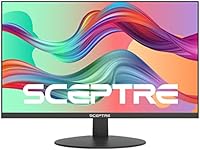
The Sceptre E278W-FPT 27″ Gaming Monitor sits squarely in the budget end of the IPS monitor market, and that context matters. Sceptre has earned a reputation in the US by consistently delivering functional displays at accessible prices — nothing flashy, but reliable. This model targets casual gamers and home office users who want a large, capable screen without spending heavily. At 27 inches, the screen size hits a practical sweet spot for most desk setups — big enough to feel immersive, not so large that it overwhelms a smaller room. Honest expectations matter here: this is a solid everyday display, but it won't satisfy anyone chasing high-refresh-rate or color-critical work.

Features & Benefits

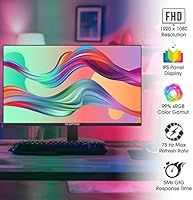
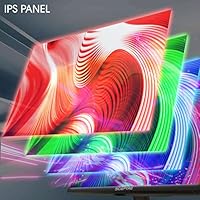
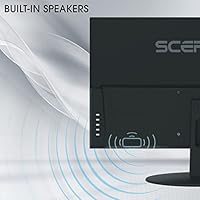
The IPS panel is the headline feature here, and it genuinely makes a difference at this price point. Unlike TN panels — common in cheap monitors — IPS technology keeps colors consistent whether you're viewing the screen head-on or from the side. Color reproduction covers 99% of the sRGB spectrum, which is respectable for casual photo work or streaming content. The 75Hz refresh rate won't satisfy competitive shooter players, but it produces noticeably smoother video and gaming compared to a standard 60Hz screen. Two HDMI ports make switching between a PC and a game console straightforward. The matte finish keeps glare manageable in brighter rooms, and the built-in speakers handle background audio without needing extra gear on the desk.

Best For

This 27-inch IPS display makes the most sense for people at the start of their monitor journey — students upgrading from a laptop screen, or remote workers who need a large, readable display without a major financial commitment. Console gamers will find the dual HDMI inputs convenient, since connecting a PlayStation or Xbox is a one-cable setup. Slower-paced games — RPGs, strategy titles, simulators — play perfectly fine here. Where it starts to show limits is with fast-paced competitive gaming; the response time and refresh rate simply are not built for that crowd. It also works well as a secondary monitor in a multi-display setup where spending more on a premium panel simply isn't justified.

User Feedback

With over 1,500 ratings averaging 4.5 stars, this budget gaming monitor has clearly landed well with its intended audience. Buyers consistently highlight how easy setup is, with accurate colors right out of the box — a genuine win for those who don't want to spend time adjusting settings. The size-to-value ratio comes up frequently in positive reviews. On the downside, the stand is a weak point: it only tilts, with no height or swivel adjustment, which frustrates taller users and anyone sharing a desk. The built-in speakers get a pass for occasional background use but disappoint anyone expecting real volume or bass. A smaller segment of buyers using it for fast multiplayer gaming also report noticeable ghosting during quick movements.

Pros

  • IPS panel delivers noticeably more accurate colors and wider viewing angles than TN-based rivals at this price.
  • The 27-inch screen size offers genuine desk presence without dominating a small room.
  • 75Hz refresh rate makes video playback and casual gaming visibly smoother than a standard 60Hz display.
  • Dual HDMI inputs make it easy to keep a PC and a game console connected simultaneously.
  • 99% sRGB color coverage is a real asset for streaming, content consumption, and light creative work.
  • Matte screen coating cuts down glare effectively in rooms with windows or overhead lighting.
  • Setup is straightforward — most buyers report being up and running quickly with no complex calibration needed.
  • Built-in speakers and headphone jack reduce the need for additional audio equipment on a tight desk.
  • The price-to-screen-size ratio is difficult to beat for an IPS panel in this category.
  • A well-established brand with broad US availability means easier returns and customer support access.

Cons

  • The stand only tilts — no height adjustment, swivel, or pivot, which limits ergonomic flexibility.
  • Response time is not competitive for fast-paced multiplayer gaming, with ghosting reported during quick movements.
  • Built-in speakers lack bass and volume, making them unsuitable as a primary audio solution.
  • 1080p resolution on a 27-inch panel means pixel density is lower than on smaller screens at the same resolution.
  • VESA mount compatibility is not clearly confirmed in official product documentation.
  • No adaptive sync support means screen tearing can occur during variable-frame-rate gaming.
  • Color gamut does not extend beyond sRGB, ruling it out for professional color work.
  • At 320 Lux, peak brightness may feel underwhelming in very bright or sunlit environments.
  • VGA port inclusion feels outdated and adds little practical value for most modern users.
  • Long-term build quality of the chassis and stand feels consistent with budget-tier construction.

Ratings

The scores below for the Sceptre E278W-FPT 27″ Gaming Monitor were generated by our AI after analyzing thousands of verified global buyer reviews, with spam, bot submissions, and incentivized feedback actively filtered out. This Sceptre monitor has earned a loyal following among budget-conscious buyers, and these ratings reflect both where it genuinely delivers and where real-world frustrations consistently surface.

Value for Money
91%
Buyers repeatedly call out the price-to-screen-size ratio as the single strongest reason to choose this monitor. Getting a 27-inch IPS panel with dual HDMI at this price point is genuinely difficult to beat, and most owners feel they received more than they paid for.
A small segment of buyers who stretched their budget expecting near-premium performance walked away disappointed — value perception drops sharply when buyers compare it to mid-range monitors just a step up in price.
Image Quality
78%
22%
Out-of-the-box color accuracy earns consistent praise, with most users reporting the image looks natural and well-balanced without any manual calibration. The IPS panel makes a real difference for everyday use — watching shows or working with documents looks clean and comfortable.
At 27 inches with a 1080p resolution, pixel density is noticeably lower than on smaller screens at the same resolution, and some users spot soft edges on fine text. Those coming from higher-resolution displays may find the overall sharpness underwhelming.
Color Accuracy
74%
26%
The 99% sRGB coverage means everyday content — streaming video, web browsing, casual photo viewing — looks vibrant and true to life. Home office users working with presentation decks and digital documents find the color rendering honest and easy on the eyes during long sessions.
Outside the sRGB color space, the panel shows its limits quickly. Anyone doing work that touches DCI-P3 or print color profiles will find the display falls short, and color volume thins out noticeably toward the edges of the screen.
Gaming Performance
62%
38%
For casual gaming — RPGs, strategy titles, narrative games, and slower-paced adventures — this budget gaming monitor gets the job done without complaint. The 75Hz refresh rate produces visibly smoother motion than 60Hz panels, and most casual players report a satisfying experience.
Competitive or fast-paced gaming exposes the panel's limitations fast. Ghosting during rapid on-screen movement is a recurring complaint from shooter and fighting game players, and the absence of adaptive sync means screen tearing is a real issue in variable frame rate scenarios.
Build Quality
63%
37%
The monitor feels sturdy enough for stationary desktop use, and the plastic chassis doesn't rattle or flex when being adjusted. At this price tier, the construction is acceptable, and most buyers report no structural issues after extended daily use.
The overall finish feels unmistakably budget — the plastic surfaces show fingerprints easily and lack the rigidity of mid-range builds. A few buyers mention minor light bleed along the panel edges, which becomes visible in dark room environments.
Stand & Ergonomics
41%
59%
The stand keeps the monitor stable on flat desk surfaces without wobbling, and the included tilt adjustment does at least allow for minor forward and backward screen angle changes to reduce neck strain in ideal seating setups.
This is the most consistently criticized aspect of the monitor. With tilt as the only adjustment option — no height raise or lower, no swivel, no pivot — users who don't already sit at the perfect eye-level relative to the panel are stuck either buying a monitor arm or improvising with books. Taller users particularly flag this as a meaningful daily annoyance.
Connectivity
83%
Having two HDMI ports is a genuine convenience that many buyers in this price range don't expect. Console gamers especially appreciate being able to leave both a PC and a PlayStation or Xbox permanently plugged in, switching between them without any cable juggling.
The VGA port feels like a remnant of an older era and adds limited value for most modern users. There is no DisplayPort option, which matters to PC enthusiasts who want to push the monitor to its 75Hz ceiling through a more capable connection.
Setup & Ease of Use
88%
Assembly is consistently described as fast and painless — buyers report having the monitor out of the box and running within minutes, with no confusing instructions or fiddly cable management required. The on-screen menu is straightforward enough that most users rarely need to dig into settings.
The OSD (on-screen display) controls, while functional, feel slightly slow and unresponsive to some users, and the button placement on the rear of the panel can be awkward to locate without looking. Minor complaints, but present across enough reviews to be worth noting.
Viewing Angles
81%
19%
The IPS panel is the right choice for anyone sharing a screen — whether showing a colleague something at the desk or watching content with someone sitting slightly to the side, colors and contrast hold up well without the color shift that plagues TN-based panels.
While solid by IPS standards at this price, the viewing angle performance doesn't match higher-grade IPS or OLED panels. Significant off-axis positioning — particularly from extreme vertical angles — does produce some brightness drop and mild color shift.
Glare & Reflection Handling
76%
24%
The matte anti-glare coating earns genuine appreciation from buyers who work near windows or under strong overhead lighting. It diffuses reflections meaningfully, reducing eye strain during daytime work hours without the hazy quality some anti-glare coatings introduce.
In very bright, directly sunlit rooms, the 320 Lux brightness ceiling makes the screen feel washed out even with the anti-glare coating helping. Users who work in sun-facing rooms recommend positioning the monitor carefully or adding window coverings.
Built-in Audio
47%
53%
The built-in speakers are adequate for low-stakes use — video calls, background music at low volume, or the occasional YouTube session. Having them built in does keep the desk cleaner for users who don't want any extra gear on the surface.
Bass is virtually absent, and at higher volume levels the audio becomes thin and harsh. The majority of buyers who care about sound quality at all end up plugging in headphones or external speakers fairly quickly — the built-in audio is a convenience checkbox, not a genuine feature.
Response Time
53%
47%
For the use cases this monitor is designed around — productivity, casual gaming, video streaming — the response time is unlikely to cause noticeable issues. Slower-paced games and daily computer work don't stress the panel in ways that reveal its limitations.
In fast-moving games or action-heavy video, ghosting and motion blur become visible enough to be distracting. Competitive gamers or anyone sensitive to motion clarity will find the response time a persistent frustration, and it's a key reason this monitor shouldn't be marketed seriously toward FPS players.
Screen Size & Desk Fit
86%
The 27-inch diagonal hits a genuinely practical sweet spot for most desk setups — large enough to feel immersive and comfortable for multitasking or media consumption, yet compact enough to sit on standard-depth desks without overwhelming the workspace.
At a typical desktop viewing distance, the lower pixel density of 1080p on a 27-inch screen becomes perceptible for users who do a lot of reading or fine text work. Those used to higher-DPI laptop screens may find the transition to this display size requires some adjustment.
Brightness
66%
34%
At standard indoor lighting conditions, 320 Lux provides a comfortable and consistent level of brightness for both dark and light content. Most users working in controlled home office or bedroom environments report no issues with screen visibility throughout the day.
The brightness ceiling is a real limitation in any environment with strong natural light. Several buyers note the screen feels dim when pushed into brighter rooms, and HDR content — where peak brightness is critical — looks flat and underwhelming compared to higher-nit displays.

Suitable for:

The Sceptre E278W-FPT 27″ Gaming Monitor is a strong pick for anyone stepping up from a laptop screen for the first time and wanting a large, comfortable display without a steep investment. Students setting up a dorm or apartment desk will find the 27-inch size genuinely roomy for both coursework and casual gaming sessions. Home office workers who need a color-consistent panel for document work, video calls, and light content editing will get reliable performance from the IPS panel and wide sRGB coverage. Console gamers can take advantage of the dual HDMI inputs to keep both a PC and a game console connected at once, with no adapters required. It also earns its place as a secondary monitor in a multi-display workstation where spending heavily on a premium panel simply makes no practical sense.

Not suitable for:

Anyone who takes competitive online gaming seriously should look elsewhere — the Sceptre E278W-FPT 27″ Gaming Monitor's 75Hz refresh rate and standard response time are not built for fast-paced shooters or fighting games where every millisecond counts. Professional photographers, video editors, or designers working on color-critical projects will quickly find the panel limiting, as 99% sRGB coverage does not extend to wider color spaces like DCI-P3 or Adobe RGB. Buyers who sit at non-standard desk heights or share a workstation will likely be frustrated by the stand, which only tilts and cannot be raised, lowered, or swiveled. If high-quality built-in audio is important to you, this monitor will disappoint — the speakers are a convenience feature, not a sound solution. Those who anticipate needing ergonomic flexibility or confirmed VESA mount compatibility should verify support before purchasing, as neither is clearly documented for this model.

Specifications

  • Screen Size: The display measures 27 inches diagonally, offering a spacious viewing area well-suited to desk setups with moderate viewing distances.
  • Panel Type: An IPS (In-Plane Switching) panel is used, providing consistent color accuracy and stable image quality across wide horizontal and vertical viewing angles.
  • Resolution: Native resolution is 1920x1080 pixels (Full HD), rendering a standard 16:9 image at a pixel density appropriate for typical desktop use distances.
  • Refresh Rate: The panel supports a maximum refresh rate of 75Hz, producing smoother motion in video and casual gaming compared to a standard 60Hz display.
  • Color Gamut: Color reproduction covers 99% of the sRGB color space, making it a reasonable choice for content consumption and light creative tasks.
  • Brightness: Peak brightness is rated at 320 Lux, which is adequate for indoor use but may feel limited in very bright or sunlit environments.
  • Screen Surface: The matte anti-glare coating on the panel surface reduces reflections, helping maintain image clarity in rooms with ambient lighting.
  • Aspect Ratio: The display uses a standard 16:9 widescreen aspect ratio, compatible with virtually all modern video content, games, and operating system interfaces.
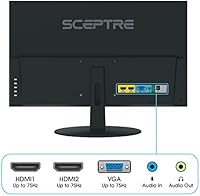
  • Video Inputs: Connectivity includes two HDMI ports and one VGA port, allowing connection to a range of modern and legacy source devices simultaneously.
  • Audio Outputs: The monitor includes a 3.5mm headphone jack and an audio-in port alongside the built-in speakers, offering multiple audio routing options.
  • Built-in Audio: Integrated stereo speakers are built into the monitor chassis, providing basic audio output without requiring a separate speaker set on the desk.
  • Stand Adjustment: The included stand supports tilt adjustment only; height, swivel, and pivot adjustments are not available with the stock stand.
  • VESA Mounting: VESA mount compatibility is not explicitly confirmed in the official product documentation; buyers intending to wall-mount should verify before purchasing.
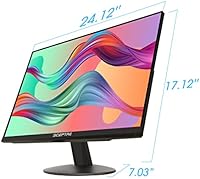
  • Dimensions: The monitor measures approximately 24.12 inches wide, 17.12 inches tall, and 7.03 inches deep with the stand attached.
  • Weight: The assembled unit weighs approximately 7.12 pounds, making it manageable for a single person to position and reposition on a desk.
  • Power Input: The monitor is rated for up to 240 volts input, making it compatible with both standard US power and international voltage ranges.
  • Model Series: This monitor belongs to the E278W-FPT series manufactured by Sceptre, a US-market brand known for producing accessible entry-level display products.
  • Availability: The product was first made available in July 2021 and has not been discontinued by the manufacturer as of the time of this review.

Related Reviews
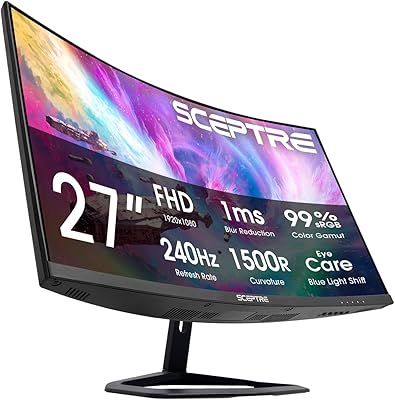
Sceptre C275B-FWT240 27″ Curved Gaming Monitor

75%
91%
Refresh Rate Performance
88%
Value for Money
79%
Panel Contrast & Color
83%
Motion Clarity
61%
Build Quality
More
Skytech Gaming Moonshadow 27-inch Curved Gaming Monitor
83%
88%
Image Quality
91%
Refresh Rate Performance
86%
Adaptive-Sync
83%
VA Panel Contrast
84%
Stand & Ergonomics
More
Raywego Z270B13 27-inch Gaming Monitor
70%
88%
Value for Money
83%
Picture Quality
84%
Refresh Rate Performance
62%
Build Quality
81%
Eye Comfort
More
MSI G273QPF 27-inch QHD Gaming Monitor
78%
88%
Image Clarity
91%
Refresh Rate Performance
86%
Response Time
79%
Panel Quality
84%
Ergonomics & Stand
More
AOC Q27G4XN 27″ Gaming Monitor

79%
91%
Image Sharpness
88%
Motion Performance
83%
Refresh Rate Value
79%
Color Accuracy
52%
Glare & Reflections
More
CRUA CR270F 27-inch 540Hz Gaming Monitor
76%
91%
Motion Clarity
83%
Refresh Rate Value
74%
Image Quality
56%
Pixel Density
86%
Ergonomics & Stand
More
ZZA Z27H1K280HZ 27″ Curved Gaming Monitor
70%
88%
Refresh Rate Performance
84%
Value for Money
76%
Image Quality & Color Accuracy
67%
Motion Clarity & Response
89%
Contrast & Black Levels
More
GIGABYTE GS27FC 27″ Gaming Monitor
86%
91%
Display Quality
96%
Refresh Rate Performance
95%
Response Time
88%
Color Accuracy
85%
HDR Performance
More
FYHXele 27-inch 4K 120Hz Gaming Monitor
72%
83%
Value for Money
88%
Image Sharpness
79%
Panel Response & Motion
76%
Color Accuracy
47%
HDR Performance
More
Viewedge CS27FM 27-inch Gaming Monitor
72%
91%
Refresh Rate Performance
76%
Panel & Image Quality
61%
Resolution & Sharpness
74%
Color Accuracy
52%
HDR Experience
More

FAQ

Yes, it connects easily to both PlayStation and Xbox consoles via HDMI. The dual HDMI inputs mean you can keep a console and a PC connected at the same time and switch between them without unplugging anything — which is genuinely useful.

It works well as a home office display. The IPS panel keeps text sharp and colors consistent, which matters during long document or spreadsheet sessions. The 27-inch size also gives you comfortable screen real estate for having multiple windows open side by side.

For most people, yes — especially when watching video or playing games where the screen updates frequently. It isn't a dramatic transformation, but scrolling and motion feel a bit crisper. If you're coming from a 60Hz screen, you'll likely notice the difference within the first few minutes.

No, and this is one of the more common complaints about this monitor. The stand only tilts forward and backward — there's no height adjustment, swivel, or pivot. If your desk and chair height don't naturally put the screen at eye level, you may need to prop it up or invest in a separate monitor arm.

Adaptive sync support is not listed in the official specifications for this model. Buyers who experience screen tearing during gaming should be aware that the monitor does not advertise FreeSync or G-Sync compatibility, which is common at this price point.

They're serviceable for background noise — think video calls, YouTube, or low-volume ambient audio. But if you care about sound quality at all, they fall short. There's very little bass, and volume at higher levels can sound thin. Most users who do any serious listening end up pairing the monitor with headphones or external speakers.

It's fine for hobbyist or casual creative work. The 99% sRGB coverage means everyday colors look accurate and natural. That said, it doesn't cover wider color spaces like DCI-P3 or Adobe RGB, so professional photographers or designers working on print or broadcast projects will want a more capable panel.

VESA mount compatibility isn't clearly confirmed in the official documentation for this model, so it's worth checking directly with Sceptre's customer support before buying a wall mount. Don't assume it's VESA-compatible based on the price tier alone.

The matte anti-glare coating handles ambient light reasonably well. It won't eliminate reflections entirely if you have a window directly behind you, but it performs noticeably better than glossy panels in the same conditions. The 320 Lux brightness rating is adequate for most indoor environments, though a very bright or sunlit room may wash it out a bit.

It's one of the more practical options at this price for a student setup. The 27-inch screen gives you comfortable working space, the IPS panel handles both classwork and casual gaming without major complaints, and the dual HDMI inputs mean you can plug in a laptop and a console without buying a hub. The stand limitation is worth knowing about upfront, but for a first proper monitor, it gets the job done.