Overview

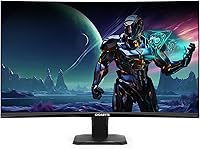
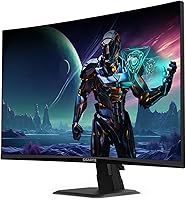
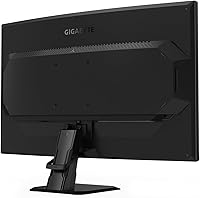
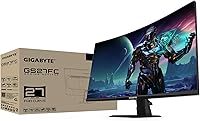
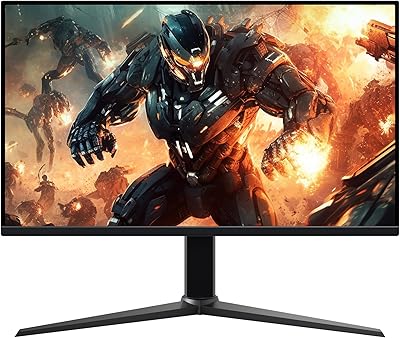
The GIGABYTE GS27FC 27-inch Gaming Monitor sits in an interesting spot in the value gaming monitor market — a curved 27-inch display aimed squarely at PC gamers who want high refresh rates without spending a fortune. Built around a 1500R VA panel, the screen wraps slightly around your field of view, which works particularly well in single-monitor setups. GIGABYTE has been making gaming hardware long enough to know what this audience wants, and the GS27FC reflects that focused approach. Just set your expectations accordingly: this is a 1080p gaming display through and through, not a tool for photo editing or color-sensitive creative work.
Features & Benefits

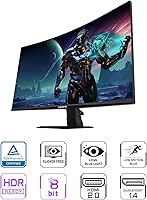
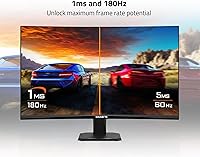
The 180Hz refresh rate paired with 1ms MPRT response time is where this curved gaming monitor earns its reputation — the difference versus a standard 60Hz panel is immediately obvious in fast shooters and esports titles. VA technology gives the GS27FC a 3000:1 contrast ratio, which means dark in-game environments look genuinely dark, an area where IPS panels at this price tend to fall short. AMD FreeSync Premium handles tearing cleanly, and the Game Assist suite adds a crosshair overlay, on-screen timer, and Black Equalizer for competitive players. HDR10 is technically present, but brightness limitations mean it rarely impresses in practice.

Best For

This curved gaming monitor makes the most sense for budget-conscious FPS players who are jumping up from 60Hz or 75Hz for the first time — at 1080p and 180Hz, the performance-per-dollar ratio is difficult to argue with. The 1500R curve is subtle enough that it does not feel overwhelming as a single-monitor setup, and esports titles like Valorant or CS2 look sharper and more responsive than they ever did on slower screens. One honest caveat: the stand only tilts, with no height adjustment, so if you have specific ergonomic requirements, that is worth factoring in before purchasing.

User Feedback

Across hundreds of owner reviews, the consistent praise centers on how smooth gameplay feels at 180Hz and how vivid colors look given the price point — many buyers coming from budget flat panels are genuinely surprised by the contrast. On the critical side, backlight bleed shows up in some units, which is a known characteristic of VA panels and worth knowing about upfront. The OSD navigation has a learning curve too, with a few users finding the button layout unintuitive at first. Overall, most buyers land firmly in the satisfied camp, considering the three-year warranty and overall build quality a strong bonus at this tier.

Pros

  • 180Hz refresh rate makes fast-paced shooters and esports titles feel noticeably smoother and more responsive.
  • The 3000:1 contrast ratio produces deep, convincing blacks that most IPS monitors at this price cannot match.
  • 1500R curvature adds genuine immersion on a single-monitor desk setup without feeling overdone.
  • AMD FreeSync Premium keeps gameplay tear-free and stutter-free during frame rate fluctuations.
  • At this price tier, the three-year GIGABYTE warranty is a meaningful safety net that rivals skip.
  • 108% sRGB coverage delivers punchy, vibrant colors that look impressive for everyday gaming and media.
  • Game Assist tools like Black Equalizer and crosshair overlay add practical value for competitive players.
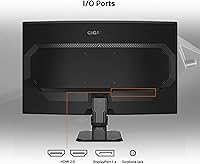
  • Setup is straightforward, with DisplayPort 1.4 and dual HDMI 2.0 ports covering most connection needs.
  • For a first-time upgrade from a budget flat panel, the overall visual jump is hard to argue with.

Cons

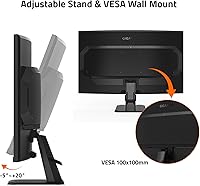
  • The tilt-only stand offers no height or swivel adjustment, which is a real limitation for ergonomic setups.
  • VA panel backlight bleed can appear on some units, particularly visible in dark scenes or menus.
  • HDR10 certification is present but largely cosmetic given the monitor's brightness ceiling in practice.
  • The OSD button layout has a learning curve and feels unintuitive until you have used it a few times.
  • 1080p resolution on a 27-inch screen means pixel density is lower than ideal if you sit close to the display.
  • No USB hub or built-in speakers means extra desk clutter if you rely on monitor-integrated connectivity.
  • Wide viewing angles are not a strength, so the image shifts noticeably when viewed from off-axis positions.

Ratings

The scores below for the GIGABYTE GS27FC 27-inch Gaming Monitor were generated by AI after systematically analyzing thousands of verified global buyer reviews, with spam, bot activity, and incentivized feedback actively filtered out. Each category reflects the honest distribution of real user sentiment — not a polished average — so both standout strengths and recurring frustrations are represented transparently.
Refresh Rate Performance
93%
Buyers upgrading from 60Hz or 75Hz panels consistently describe the 180Hz experience as transformative, especially in fast shooters and battle royale titles where fluid motion gives a clear edge. At this price point, finding 180Hz on a curved VA panel is genuinely unusual, and users notice the difference immediately during competitive play.
To fully realize 180Hz, your GPU needs to sustain high frame rates in the games you play — budget GPU owners may find themselves capped well below that ceiling more often than not. A handful of reviewers also note that the difference between 144Hz and 180Hz is subtle enough that it is not always perceptible in slower-paced games.
Contrast & Black Levels
88%
The 3000:1 contrast ratio is where this curved gaming monitor genuinely pulls ahead of IPS competitors in the same bracket — dark dungeon environments, night-time maps, and cinematic cutscenes look noticeably richer and more atmospheric. Users frequently single out the deep blacks as the visual highlight of the display, especially coming from flat IPS budget panels.
VA panels can exhibit a well-documented phenomenon called black smearing, where fast-moving dark objects leave a faint trail on very dark backgrounds — some users notice this in night-time racing games or dark FPS maps. It is not a dealbreaker for most, but buyers sensitive to motion artifacts on dark content should be aware.
Value for Money
91%
The combination of 180Hz, a curved VA panel, FreeSync Premium, and a three-year warranty at this price tier is difficult to match from competing brands, and most buyers explicitly state the GS27FC over-delivers relative to what they paid. First-time monitor upgraders in particular feel they got considerably more than they expected at the price.
The value equation weakens slightly for buyers who discover post-purchase that HDR is largely decorative and the stand ergonomics require a third-party arm investment to fix. Factoring in an aftermarket VESA mount adds cost that narrows the value gap against slightly pricier competitors.
Motion Clarity
84%
The 1ms MPRT response time keeps fast movement looking clean during 180Hz gaming sessions — crosshair tracking in FPS titles feels tight, and player animations during high-speed engagements do not blur into an indistinct smear. Competitive players consistently praise how responsive the screen feels during high frame rate gameplay.
It is worth clarifying that MPRT is not the same as a low GtG pixel response — actual pixel transitions on VA panels are inherently slower, and some users report faint ghosting in very fast dark-to-dark transitions. This is a known VA panel characteristic rather than a flaw specific to the GS27FC, but it is a real consideration for motion-sensitive buyers.
Color Accuracy & Vibrancy
74%
26%
At 108% sRGB coverage with 8-bit color depth, game environments and media look punchy and colorful for a budget-tier display — most users find the out-of-box colors satisfying for gaming without needing manual calibration. Warmer, saturated game palettes in RPGs and action titles look particularly vivid on the VA panel.
The panel is not calibrated for professional color work, and buyers who tested it for photo or video editing found color accuracy inconsistent enough to make it unreliable for that use case. sRGB coverage is strong, but the lack of DCI-P3 coverage and factory calibration data means color-critical users should budget for a separate dedicated display.
Curvature & Immersion
82%
18%
The 1500R curve is subtle enough to not feel exaggerated on a 27-inch screen, which buyers appreciate — it draws the sides of the display marginally closer to eye level without the distortion that more aggressive curves can introduce. Single-monitor desk users consistently describe it as enhancing focus during long gaming sessions without becoming a distraction.
Users who tried the GS27FC as part of a multi-monitor setup noted that the curve creates alignment challenges at the edges where panels meet. A small number of buyers who had never used a curved monitor before also needed an adjustment period before the geometry felt completely natural.
Stand & Ergonomics
47%
53%
The included stand is stable and does its basic job without wobble or creaking, which means the monitor holds its position reliably once you find a comfortable tilt angle. Assembly takes only a few minutes and requires no tools.
Tilt-only adjustment is a genuine limitation at any price, and it is a recurring frustration in buyer reviews — there is no height adjustment, no swivel, and no pivot, which makes finding the ideal viewing position much harder than it should be. Users who work long hours at their desk or have specific neck and posture requirements often end up purchasing a third-party VESA arm just to compensate.
HDR Experience
38%
62%
HDR10 certification ensures basic compatibility with HDR content sources, so the monitor does technically accept an HDR signal from consoles and PCs without issue.
In practice, the brightness output is insufficient to produce the elevated highlights and shadow detail that make HDR visually meaningful — most buyers who enabled HDR found it looked comparable to, or occasionally worse than, a well-tuned SDR profile. Several reviewers explicitly recommend leaving HDR disabled and using a custom SDR calibration instead for the best picture quality.
Connectivity
79%
21%
Having both DisplayPort 1.4 and two HDMI 2.0 ports covers the connection needs of most gaming setups — PC gamers can use the DisplayPort to unlock the full 180Hz, while HDMI ports handle consoles or a secondary device simultaneously. The port selection feels practical and well-chosen for the target audience.
There is no USB hub built into the monitor, which is an increasingly common feature on competing displays and a noticeable omission when desk cable management is already complex. No 3.5mm audio passthrough either, which is a minor inconvenience for users who route headphone audio through their monitor.
OSD & Software
61%
39%
GIGABYTE's OSD Sidekick desktop software significantly improves the experience by letting users control all display settings from Windows without touching the physical buttons — buyers who discovered and installed it were noticeably more satisfied with the monitor overall. The Game Assist overlay features like crosshair and timer are genuinely useful additions for competitive players.
The physical OSD buttons on the monitor itself are awkwardly laid out and poorly labeled, and a meaningful number of buyers describe their first few interactions with the hardware controls as genuinely frustrating. Users who did not discover the OSD Sidekick software on their own ended up rating the menu experience much more negatively than those who did.
Build Quality
76%
24%
The chassis feels solid for a budget-tier display, with no obvious flexing in the panel surround or creaking in the stand assembly that would undermine confidence in the build. The matte black finish resists fingerprints reasonably well and fits neatly into most gaming desk aesthetics.
The rear housing uses lightweight plastic throughout, which looks and feels less premium than mid-range monitors from brands like LG or Samsung at a similar price. A few buyers noted that the stand base is more compact than expected, raising minor concerns about stability on uneven desk surfaces.
Setup Experience
86%
Out-of-the-box setup is consistently described as quick and painless — the stand assembles without tools, cables connect logically, and the monitor is ready to use within 15 to 20 minutes for the average buyer. Port labeling on the rear is clear enough that even first-time monitor buyers reported no confusion during installation.
First-time curved monitor owners occasionally note that positioning requires more thought than a flat panel because the curve needs to be centered on the viewer for maximum comfort. The manual is functional but thin, and GIGABYTE could do more to guide new users toward the OSD Sidekick software during initial setup.
Gaming Feature Set
83%
Black Equalizer is a genuinely useful feature for competitive play — it brightens shadowed areas in dark maps without washing out the rest of the image, giving a real visibility advantage in games where enemies hide in corners. The crosshair overlay and on-screen timer round out a feature set that feels purposefully designed rather than tacked on.
The Game Assist features are useful, but experienced competitive players may find them less impactful than dedicated in-game accessibility options. Some users also noted that the Black Equalizer setting requires a bit of trial and error to find the right calibration point before it feels natural rather than over-brightened.
Warranty & Support
81%
19%
A three-year manufacturer warranty at this price tier is a meaningful differentiator — most competing budget monitors offer only one or two years, and buyers who have dealt with panel defects or dead pixels appreciate having GIGABYTE's coverage in their corner for a longer window. Multiple reviewers specifically called out the warranty as a deciding factor in their purchase.
Some users report that the warranty claims process requires patience and clear documentation to navigate efficiently, with response times varying by region. GIGABYTE's customer support infrastructure is not universally praised, and buyers outside major markets occasionally mention difficulty accessing local service channels.

Suitable for:

The GIGABYTE GS27FC 27-inch Gaming Monitor is a strong pick for PC gamers who want a meaningful performance upgrade without breaking the bank. If you are currently on a 60Hz or 75Hz flat panel and play fast-paced games — shooters, battle royales, esports titles — the jump to 180Hz on a curved screen will feel immediately rewarding. The 1500R curve works especially well as a solo display on a standard desk, adding a sense of immersion that flat 1080p monitors at this price simply do not offer. AMD FreeSync Premium support makes it a natural fit for gamers running AMD GPUs, though it works perfectly fine with Nvidia cards in standard mode too. Students, casual gamers on a tight budget, and anyone building their first dedicated gaming setup will find this display punches well above its price class for pure gaming use.
Not suitable for:

Buyers who need a monitor that pulls double duty between gaming and professional creative work should look elsewhere — the GS27FC is not built for color-accurate tasks like photo editing, graphic design, or video grading. The VA panel, while great for contrast, does not deliver the wide viewing angles or color consistency that IPS alternatives offer, which becomes noticeable when multiple people view the screen or when you are working on color-sensitive material. The stand is tilt-only with no height or swivel adjustment, so anyone with a specific ergonomic setup or a need to share viewing angles will find that frustrating fast. The HDR10 certification sounds appealing on paper, but the monitor lacks the brightness headroom to deliver a meaningful HDR experience, so do not factor that into your buying decision. If you are after a 1440p or 4K display for a more premium visual experience, this curved gaming monitor is not designed to compete at that level.

Specifications

  • Panel Type: Uses a VA (Vertical Alignment) panel, which delivers strong contrast and deep blacks compared to IPS alternatives at a similar price.
  • Screen Size: The display measures 27 inches diagonally, offering a generous viewing area well suited to single-monitor desktop setups.
  • Resolution: Native resolution is 1920x1080 (Full HD), providing crisp visuals at 1080p without demanding excessive GPU horsepower.
  • Refresh Rate: Supports a maximum refresh rate of 180Hz, enabling smoother motion in fast-paced games compared to standard 60Hz or 75Hz displays.
  • Response Time: Rated at 1ms MPRT (Moving Picture Response Time), which reduces motion blur during rapid on-screen movement in gaming scenarios.
  • Curvature: Features a 1500R curved screen, meaning the display curves to roughly match the natural focal radius of the human eye at typical viewing distances.
  • Contrast Ratio: Delivers a 3000:1 static contrast ratio, producing noticeably deeper blacks and brighter highlights than most flat IPS panels in the same price range.
  • Color Gamut: Covers 108% of the sRGB color space, offering broad color coverage for vivid, punchy visuals in games and media.
  • Color Depth: Supports 8-bit color depth, rendering up to 16.7 million colors for smooth gradients and accurate color representation.
  • HDR Support: HDR10 certified, though practical HDR performance is limited by the panel's brightness ceiling rather than being a full HDR experience.
  • Sync Technology: Compatible with AMD FreeSync Premium, which synchronizes the display's refresh rate with the GPU output to reduce screen tearing and stuttering.
  • Connectivity: Equipped with one DisplayPort 1.4 and two HDMI 2.0 ports, covering connections for modern PCs, consoles, and laptops.
  • Aspect Ratio: Standard 16:9 widescreen aspect ratio, compatible with the vast majority of PC games and video content without letterboxing.
  • Dimensions: Assembled monitor measures approximately 5.8 x 24 x 19.21 inches (depth x width x height) including the stand.
  • Weight: Complete unit with stand weighs 9.98 pounds, making it manageable for solo desk setup or repositioning.
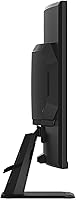
  • Stand Adjustment: The included stand supports tilt adjustment only, with no height, swivel, or pivot functionality built in.
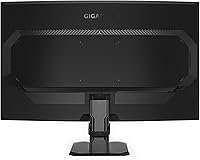
  • VESA Support: The panel is VESA mount compatible, allowing users to replace the stock stand with a third-party arm for improved ergonomic flexibility.
  • Warranty: Backed by a 3-year manufacturer warranty from GIGABYTE, covering defects and providing peace of mind for the product lifespan.

Related Reviews
GIGABYTE GS27QA 27-inch QHD Gaming Monitor
78%
88%
Gaming Performance
91%
Image Clarity
79%
Color Accuracy
54%
HDR Experience
89%
Refresh Rate & Smoothness
More
Skytech Gaming Moonshadow 27-inch Curved Gaming Monitor
83%
88%
Image Quality
91%
Refresh Rate Performance
86%
Adaptive-Sync
83%
VA Panel Contrast
84%
Stand & Ergonomics
More
Raywego Z270B13 27-inch Gaming Monitor
70%
88%
Value for Money
83%
Picture Quality
84%
Refresh Rate Performance
62%
Build Quality
81%
Eye Comfort
More
FYHXele 27-inch 380Hz FHD Gaming Monitor
74%
88%
Refresh Rate Performance
74%
Panel & Image Quality
86%
Motion Clarity
83%
Ergonomics & Stand
67%
Build Quality
More
Sealan 27-inch Curved Gaming Monitor
82%
85%
Display Quality
90%
Ease of Setup
91%
Value for Money
87%
Performance in Gaming
83%
Color Accuracy
More
memzuoix 27-inch QHD 165Hz Gaming Monitor
70%
88%
Image Clarity
84%
Refresh Rate Performance
91%
Value for Money
82%
Adaptive Sync (FreeSync/G-Sync)
77%
Color Accuracy
More
Dell G2725D 27-inch Gaming Monitor
78%
91%
Image Sharpness
88%
Refresh Rate Performance
83%
Motion Clarity
79%
Color Accuracy
86%
AMD FreeSync
More
Amazon Basics 27-inch 1080p Gaming Monitor
76%
88%
Value for Money
79%
Display Quality
91%
Refresh Rate Performance
86%
Response Time
67%
Build Quality
More
Viewedge CS27FM 27-inch Gaming Monitor
72%
91%
Refresh Rate Performance
76%
Panel & Image Quality
61%
Resolution & Sharpness
74%
Color Accuracy
52%
HDR Experience
More
KOORUI G2721E 27-inch Gaming Monitor
78%
93%
Refresh Rate Performance
88%
Image Clarity & Resolution
84%
Color Accuracy
81%
Motion Handling
52%
HDR Quality
More

FAQ

FreeSync is AMD's adaptive sync technology, but Nvidia GPUs support it too via their G-Sync Compatible mode. You may need to enable it manually in the Nvidia Control Panel, but once active it works well for reducing tearing.

The 1ms rating here refers to MPRT, which measures motion blur reduction rather than the panel's actual pixel transition speed. It is a legitimate metric for gaming smoothness, but it is worth knowing it is not the same as a 1ms GtG (gray-to-gray) spec you would see on some IPS panels. For most gamers, the practical result is clean, blur-free motion at high frame rates.

VA panels are more prone to backlight bleed than IPS, and the GS27FC is no exception — some units show it more than others. It tends to be most visible in very dark scenes or on black loading screens. For the majority of gaming use cases it is not distracting, but if you watch a lot of dark cinematic content, it is worth being aware of before you buy.

Yes, the panel is VESA mount compatible, which means you can remove the stock stand and attach a third-party monitor arm or wall mount. This is actually a popular upgrade for buyers who find the tilt-only stand too limiting for their ergonomic needs.

It depends on how close you sit. At a typical gaming distance of 24 to 30 inches, most people find 1080p on a 27-inch screen perfectly acceptable for gaming. You will not notice individual pixels during fast-paced play. That said, if you sit very close or are particularly sensitive to pixel density, a 24-inch 1080p monitor would look sharper at the same resolution.

No, it does not include built-in speakers. If audio output from the monitor is important to you, you will need external speakers or headphones connected to your PC or console directly.

Honestly, not really. The HDR10 certification is there, but the monitor does not have the brightness output to make HDR look dramatically different from SDR. It is more of a compatibility checkbox than a feature that transforms the viewing experience. You are better off keeping a well-calibrated SDR profile for daily use.

Setup is straightforward. The stand clips or screws together in a few minutes, and cable management is simple given the standard port layout on the back. Most buyers report having it up and running within 15 to 20 minutes, including connecting cables and adjusting the OSD settings.

A few users mention the physical OSD buttons feel unintuitive at first. The main tip is to use GIGABYTE's free OSD Sidekick software, which lets you control all the monitor settings directly from your Windows desktop without fumbling with the physical buttons. It makes adjusting refresh rate, Black Equalizer, and crosshair settings much more convenient.

Absolutely — the difference between 75Hz and 180Hz is very perceptible in practice, especially in fast shooters and games with high frame rates. You will notice that cursor movement and on-screen motion look significantly smoother and more immediate. If your GPU can push frame rates above 100fps in the games you play, you will feel the benefit right away.