Overview

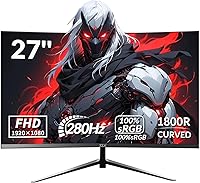
The ZZA Z27H1K280HZ 27″ Curved Gaming Monitor is a budget-focused display built for competitive gamers who want a high refresh rate without spending a lot. At this price point, landing a 280Hz refresh rate is genuinely impressive — that spec alone puts it in contention with pricier options. ZZA is manufactured by Jetta (Shenzhen), a Chinese OEM brand without the name recognition of ASUS or AOC, so expectations should be calibrated accordingly. The VA panel brings deep contrast and rich blacks that IPS panels typically struggle to match, though it comes with trade-offs in motion clarity. This is a monitor built for value-driven esports players, not enthusiasts chasing perfection.
Features & Benefits

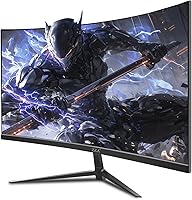
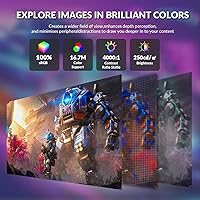
The biggest thing to know upfront: 280Hz only works via DisplayPort. Plug in over HDMI and you are capped at 144Hz — a fact that trips up a surprising number of buyers. The 1800R curve is on the deeper end for a 27-inch screen, creating genuine immersion in racing or open-world games but potentially introducing slight edge distortion if you sit too close. The 1ms MPRT figure refers to backlight strobing, not actual pixel transition speed — real GtG times will be slower, as is typical for VA panels. AMD FreeSync helps smooth things out regardless. 100% sRGB coverage and a 4000:1 contrast ratio round out a competitive spec sheet for the price tier.

Best For

This curved gaming monitor makes the most sense for FPS and esports players who care far more about frame rate than pixel density — at 1080p on a 27-inch panel, sharpness is not its strongest suit, but 280Hz responsiveness is a real advantage in fast-paced titles. It also works well for anyone building a first competitive rig on a tight budget, or as a secondary screen alongside a higher-end primary display. Gamers currently running 144Hz or 165Hz who want a meaningful jump will find this a legitimate upgrade path. Those who enjoy single-player titles will appreciate the immersive curved screen as a bonus on top of the raw speed.

User Feedback

Buyers generally come away pleased with out-of-box color vibrancy, noting the image looks punchy and rich for the money. Smoothness at high frame rates gets consistent praise in fast-paced shooters — people upgrading from 144Hz panels frequently mention a noticeable difference in feel. On the flip side, some users report mild backlight bleed along the edges, and the stand draws criticism for feeling less sturdy than expected. A few note the OSD menu is not the most intuitive to navigate. Compared to similarly priced options from AOC or Sceptre, the ZZA 27-inch display holds its own on raw specs, though brand trust and long-term after-sale support remain open questions for cautious shoppers.

Pros

  • 280Hz refresh rate is genuinely rare at this price point, giving competitive gamers a real edge.
  • The 4000:1 contrast ratio produces deep blacks that most IPS panels at this price simply cannot match.
  • AMD FreeSync keeps gameplay tear-free on compatible AMD GPUs without any extra cost.
  • The 1800R curved screen adds immersion in single-player and open-world titles as a nice bonus.
  • 100% sRGB color coverage means out-of-box colors look vibrant and punchy for everyday gaming and media.
  • VESA mount compatibility gives you full flexibility to use an aftermarket arm for ergonomic positioning.
  • Matte screen surface handles ambient light and glare well, reducing reflections in bright rooms.
  • Buyers upgrading from 144Hz or 165Hz panels consistently report a noticeable improvement in smoothness.

Cons

  • 280Hz is only achievable via DisplayPort — HDMI users are hard-capped at 144Hz, which is easy to miss before buying.
  • VA panel ghosting in dark, fast-moving scenes is a real issue that can distract in competitive play.
  • At 27 inches, 1080p resolution looks noticeably soft for everyday desktop work and text rendering.
  • The included stand has been reported as feeling flimsy, with limited adjustment options beyond basic tilt.
  • No built-in speakers means you must budget for external audio, adding to the overall setup cost.
  • The OSD menu is reported as unintuitive, making display calibration a frustrating trial-and-error process.
  • ZZA has limited brand history, making long-term durability and warranty support hard to evaluate with confidence.
  • Backlight bleed along panel edges has been flagged by multiple buyers in darker viewing environments.

Ratings

The scores below for the ZZA Z27H1K280HZ 27″ Curved Gaming Monitor were generated by AI after analyzing verified global buyer reviews, with spam, bot-submitted, and incentivized feedback actively filtered out. Each category reflects what real users consistently praised or struggled with across thousands of honest purchase experiences. Both strengths and genuine pain points are represented transparently so you can make a fully informed buying decision.
Refresh Rate Performance
88%
Buyers who connected via DisplayPort consistently praised how smooth 280Hz feels in fast-paced shooters — the difference from 144Hz is noticeable enough that upgraders frequently mention it as the highlight of their purchase. For esports titles like Valorant and CS2, the fluidity genuinely stands out at this price tier.
The 280Hz ceiling is strictly a DisplayPort-only feature, and a meaningful portion of buyers were caught off guard by the 144Hz HDMI cap. Those connecting from consoles or older systems never experience the headline spec, which feels like a bait-and-switch for uninformed buyers.
Value for Money
84%
Measured against what the market charges for 280Hz panels, this budget esports monitor offers a spec sheet that competes well above its price tier. Buyers repeatedly note they were not expecting this level of refresh rate and contrast performance for the amount they paid.
Long-term value is harder to assess given ZZA's limited brand history and uncertain after-sale support. A few buyers noted that comparably priced options from AOC or Sceptre come with more established warranty processes, which factors into total ownership value.
Image Quality & Color Accuracy
76%
24%
Out of the box, colors appear punchy and vibrant thanks to the 100% sRGB coverage and the VA panel's 4000:1 contrast ratio. Users watching movies or playing visually rich games frequently comment on how satisfying the deep blacks look compared to IPS monitors they had before.
At 1080p on a 27-inch screen, pixel density is soft enough that text and fine UI elements can look slightly fuzzy during desktop work. Color accuracy beyond sRGB is not a strength, and users doing any photo or video editing found the monitor lacking compared to higher-end panels.
Motion Clarity & Response
67%
33%
In bright, high-contrast gaming environments, most users found motion clear enough for competitive play. The 1ms MPRT figure, while a backlight-strobe measurement rather than a true pixel transition speed, does contribute to a reasonably sharp feel in well-lit game scenes.
VA ghosting in dark scenes is the most commonly cited technical complaint. Users playing dark atmospheric games or night-map FPS rounds reported visible trailing behind fast-moving objects, which is a known characteristic of VA panels and not something firmware can fully resolve.
Contrast & Black Levels
89%
The 4000:1 contrast ratio genuinely sets this monitor apart from IPS competitors at the same price, and buyers notice it. Dark scenes in cinematic games look impressively deep, and the curved VA panel adds a sense of dimension that flat IPS screens at this price cannot replicate.
The high contrast ratio can occasionally make shadow details appear crushed in very dark scenes, an issue some competitive players find frustrating when trying to spot enemies in dimly lit map areas. Calibrating the gamma settings in the OSD can help, but the menu is not user-friendly.
Build Quality & Stand
58%
42%
The monitor body itself presents well — the thin bezels and curved chassis look modern and reasonably premium for the price. A few buyers specifically noted the aesthetic fits nicely into a budget gaming battlestation without looking cheap on camera or during streams.
The included stand is a consistent weak point in buyer feedback. Multiple users reported wobbling during desk vibrations and a limited tilt range with no height adjustment. At this price, some compromise on stand ergonomics is expected, but the level of flimsiness reported is a legitimate frustration.
Connectivity Options
69%
31%
Having both HDMI and DisplayPort available covers most common use cases, and the audio output lets users route sound to desktop speakers or a DAC without needing a separate audio interface. The port selection is practical for a single-monitor gaming setup.
The absence of a USB hub means no built-in device switching, which bothers users who run multiple peripherals. There is also only one HDMI port, limiting flexibility for users who want to connect a second device like a console alongside a PC without swapping cables manually.
Ergonomics & Adjustability
52%
48%
VESA compatibility partially redeems the ergonomic story — users who invested in an aftermarket monitor arm reported being very satisfied with the result and found the panel itself well-balanced once properly mounted. The lightweight chassis at 10.28 pounds makes arm mounting straightforward.
Without an aftermarket arm, ergonomic options are minimal. The factory stand only tilts and does not offer height adjustment, swivel, or pivot. For users who spend long hours at their desk, the fixed positioning becomes uncomfortable relatively quickly, and neck strain complaints appear in longer-term reviews.
Curvature & Immersion
78%
22%
The 1800R curve is among the more aggressive available at 27 inches, and buyers positioned at a normal desk distance found it genuinely immersive in racing games, RPGs, and open-world titles. The wrap-around effect adds a sense of depth that flat screens at this size lack.
Sitting very close to the screen amplifies the curvature enough that straight lines near the panel edges can appear slightly warped, which a handful of buyers found distracting. For productivity tasks involving spreadsheets or document editing, the curve adds minimal benefit and occasionally feels like a minor hindrance.
Brightness & Glare Handling
71%
29%
The matte screen coating does a solid job of diffusing reflections, making this a workable monitor even in rooms with windows or overhead lighting. Users in moderately lit gaming rooms rarely complained about glare interference during long sessions.
At 250 cd/m² peak brightness, this ZZA 27-inch display can look dim in very bright environments or sun-facing rooms. HDR is not supported, and the brightness ceiling limits how vivid the image looks in high-ambient-light conditions compared to monitors rated at 350 cd/m² or above.
OSD & Calibration Experience
48%
52%
Once users found the right settings through trial and error, the image responded well to manual calibration — several buyers who spent time tuning gamma and color temperature reported a noticeably improved picture over the factory defaults. The effort, for those willing to invest it, is rewarded.
The OSD navigation is widely described as clunky and non-intuitive, with a button layout that makes adjusting settings more frustrating than it needs to be. For less tech-savvy buyers, the calibration experience is a real pain point, and many simply give up and live with the factory default settings.
AMD FreeSync Effectiveness
81%
19%
Paired with a mid-range AMD GPU, FreeSync works reliably across the monitor's refresh rate range, and buyers playing at frame rates between 100Hz and 280Hz reported clean, tear-free visuals. The sync range is broad enough to remain effective even when GPU output dips during demanding scenes.
NVIDIA users need to verify G-Sync Compatible functionality before assuming full FreeSync benefits, and some reported less consistent results compared to native AMD pairings. The lack of official G-Sync certification means performance on green-team cards varies slightly by driver version and game title.
Brand Trust & Support
51%
49%
ZZA does claim to offer dedicated customer support, and a portion of buyers reported receiving satisfactory responses when reaching out with technical questions. For buyers who purchased through Amazon, the platform's standard return policy provides a reliable safety net regardless of brand.
As a lesser-known OEM label with a short market history, ZZA has limited third-party reliability data to draw on. Long-term owners beyond the one-year mark are rare enough in review pools that durability conclusions remain inconclusive, leaving cautious buyers understandably uncertain.

Suitable for:

The ZZA Z27H1K280HZ 27″ Curved Gaming Monitor is built for a specific type of buyer, and it genuinely delivers for that audience. If you play competitive FPS titles — think fast-twitch shooters where every millisecond of visual lag costs you — the 280Hz refresh rate is a real, tangible advantage at a price most gamers can actually afford. It is also a strong choice for anyone assembling their first dedicated gaming setup who wants high-end refresh rate specs without the high-end price tag. Casual single-player gamers who enjoy the immersive feel of a curved screen will find the 1800R curvature adds a nice sense of depth without requiring any premium for it. This budget esports monitor also works well as a secondary screen for streamers or productivity users who want a capable display to run alongside a more expensive primary monitor.
Not suitable for:

There are real limitations here that certain buyers will find hard to overlook. Content creators, digital artists, or anyone who depends on color accuracy beyond basic sRGB — think DCI-P3 wide gamut or HDR workflows — will find this curved gaming monitor falls short of professional display standards. At 27 inches with a 1080p resolution, pixel density is noticeably soft compared to 1440p or 4K panels at the same size, which bothers some users in daily desktop use or media consumption. VA panels as a category carry a known weakness in fast-motion scenarios: pixel response trailing, sometimes called ghosting, is a real concern in very dark scenes during gameplay, and this monitor is no exception. Buyers who rely on HDMI connectivity — perhaps from a console or older GPU — should know they are limited to 144Hz, not the advertised 280Hz. Finally, if brand reliability and robust after-sale support matter to you, ZZA is a relatively unknown label with limited long-term track record compared to AOC, ASUS, or LG.

Specifications

  • Screen Size: The display measures 27 inches diagonally, providing a wide viewing area well-suited for competitive and casual gaming alike.
  • Panel Type: This monitor uses a VA (Vertical Alignment) panel, which delivers strong contrast performance and rich blacks compared to IPS alternatives.
  • Resolution: Native resolution is 1920x1080 pixels (Full HD), offering a standard 16:9 aspect ratio across the full screen area.
  • Refresh Rate: The panel supports up to 280Hz via DisplayPort and up to 144Hz via HDMI, with the higher rate requiring a compatible GPU and cable.
  • Response Time: The specified 1ms response time is measured using MPRT (Moving Picture Response Time), which reflects backlight strobe behavior rather than actual pixel transition speed.
  • Curvature: The screen features an 1800R curve radius, one of the deeper curvatures available at this screen size, designed to increase immersion during extended sessions.
  • Color Gamut: The display covers 100% of the sRGB color space, supporting 16.7 million colors for vibrant, accurate rendering in games and media.
  • Brightness: Peak brightness is rated at 250 cd/m², which is adequate for typical indoor lighting conditions but may appear dim in very bright rooms.
  • Contrast Ratio: The static contrast ratio is 4000:1, a figure well above what most IPS panels at this price tier can offer.
  • Viewing Angle: The VA panel supports 178° horizontal and vertical viewing angles, maintaining reasonable color consistency for off-axis viewing.
  • Sync Technology: AMD FreeSync is supported, reducing screen tearing and stuttering when paired with a compatible AMD graphics card.
  • Connectivity: Available ports include one HDMI port, one DisplayPort, and one audio output jack; there is no USB hub or built-in speakers.
  • VESA Mount: The monitor is VESA mount compatible, allowing it to be attached to a third-party monitor arm or wall mount for flexible positioning.
  • Screen Surface: The display uses a matte screen coating that reduces glare and minimizes reflections from ambient light sources.
  • Color Depth: Supports 16.7 million colors (8-bit), which is standard for FHD gaming monitors in this category.
  • Dimensions: The full unit measures 27.5 x 4.68 x 16.9 inches including the stand, and weighs 10.28 pounds.
  • Manufacturer: This monitor is produced by Jetta (Shenzhen) E-commerce Co., Ltd., a Chinese OEM manufacturer selling under the ZZA brand label.
  • Model Number: The official model number is Z27H1K280HZ, which can be used to identify firmware updates, compatible accessories, or warranty claims.

Related Reviews

Skytech Gaming Moonshadow 27-inch Curved Gaming Monitor
83%
88%
Image Quality
91%
Refresh Rate Performance
86%
Adaptive-Sync
83%
VA Panel Contrast
84%
Stand & Ergonomics
More
ZZA 27-inch Curved Monitor
86%
89%
Display Quality
92%
Color Accuracy
85%
Ergonomics
88%
Build Quality
90%
Ease of Setup
More
ZZA 32″ Curved Gaming Monitor
83%
88%
Display Quality
94%
Gaming Performance
91%
Value for Money
89%
Curvature & Immersion
85%
Ease of Setup
More
AOC CQ27G4ZH 27″ Curved Gaming Monitor
87%
95%
Gaming Performance
90%
Display Quality
85%
Build Quality
87%
Ergonomics
92%
Value for Money
More
AOC C27G4H 27″ Curved Gaming Monitor
89%
93%
Performance
95%
Display Quality
87%
Ergonomics/Adjustability
91%
Value for Money
89%
Compatibility (Console)
More
Sealan 27-inch Curved Gaming Monitor
82%
85%
Display Quality
90%
Ease of Setup
91%
Value for Money
87%
Performance in Gaming
83%
Color Accuracy
More
AOC C27G2Z 27″ Curved Gaming Monitor
80%
93%
Refresh Rate Performance
88%
Response Time & Motion Clarity
79%
Color Accuracy & Vibrancy
86%
Contrast & Black Levels
62%
Resolution & Pixel Density
More
Acer Nitro ED270R 27″ Curved Gaming Monitor
73%
91%
Value for Money
88%
Immersion & Curvature
79%
Picture Quality
89%
Refresh Rate & Smoothness
84%
Adaptive Sync (FreeSync)
More
DJiEX Q27P28 27-inch Curved Gaming Monitor
84%
91%
Display Quality
88%
Gaming Performance
89%
Color Accuracy
72%
Setup & Calibration
85%
Eye Care Features
More
Samsung S39C 27-Inch Curved Gaming Monitor
75%
83%
Picture Quality & Color Accuracy
88%
Curvature & Immersion
61%
Refresh Rate & Gaming Performance
86%
Eye Comfort & Long-Session Usability
79%
Build Quality & Aesthetics
More

FAQ

You do need DisplayPort to hit 280Hz — that is not optional. If you connect via HDMI, the monitor will top out at 144Hz regardless of your GPU or system settings. A DisplayPort cable is not always included in the box, so it is worth confirming before you set everything up.

The ZZA Z27H1K280HZ 27″ Curved Gaming Monitor officially supports AMD FreeSync, but NVIDIA GPUs that support G-Sync Compatible mode can also use FreeSync over DisplayPort. You will want to enable G-Sync Compatible in the NVIDIA Control Panel if you are on a green-team card. The high refresh rate itself works with any GPU that can output 280Hz over DisplayPort.

It will work, but with a notable limitation. Consoles connect via HDMI, which caps this monitor at 144Hz. For PS5 and Xbox Series X, that is still a perfectly smooth experience, but you will not be getting the full 280Hz the panel is capable of. If console gaming is your primary use case, the extra headroom this display offers is only relevant if you also game on PC.

VA ghosting is a real thing, especially in dark scenes where you might notice faint trailing behind fast-moving objects. For most competitive FPS games with bright, high-contrast environments, it is unlikely to be a serious distraction. In darker games or scenes with lots of shadow movement, some users do notice smearing. If you are extremely sensitive to this, an IPS panel may suit you better.

There are no built-in speakers on this monitor. You will need either a headset, desktop speakers, or a DAC connected to the 3.5mm audio output port. It is worth factoring that into your overall setup budget if you do not already have an audio solution in place.

Yes, the monitor is VESA compatible, so you can attach it to most standard monitor arms or wall mounts. The included stand gets mixed reviews for sturdiness, so many users find switching to an aftermarket arm is a worthwhile upgrade that also frees up desk space.

Honestly, it is one of the weaker points. Several buyers have noted that the on-screen menu is not very intuitive, and finding the right settings for brightness, contrast, or response time modes takes some patience. It is not broken, just a bit clunky. A few minutes of trial and error during initial setup is pretty normal with this monitor.

AOC and Sceptre have longer market histories and more established customer support networks, which gives some buyers more confidence in the long run. In terms of raw specs, this budget esports monitor holds its own — 280Hz and a 4000:1 contrast ratio at this price tier are genuinely competitive. The trade-off is brand trust and the uncertainty of after-sale support from a lesser-known label.

Pixel density at this combination is around 82 PPI, which is noticeably softer than 1440p at the same size. For gaming, most people adapt quickly and the high refresh rate compensates for the softer image. For desktop work, text editing, or close-up media consumption, some users do find it a little soft compared to higher-resolution panels. It depends heavily on your sitting distance and how critical you are about sharpness.

ZZA states it offers dedicated customer support and stands behind its monitors, but as a newer and smaller brand, third-party warranty data and long-term reliability reports are limited. Your best protection is purchasing through Amazon, which has a standardized return window. Reading seller-specific return policies before buying is advisable, especially for a brand without a widely documented service track record.