


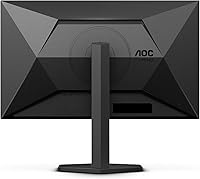
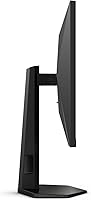
Overview

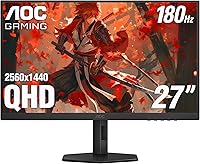
The AOC Q27G4XN 27″ Gaming Monitor arrived in late 2023 squarely targeting the mid-range sweet spot — a segment packed with competitors but short on monitors that genuinely deliver across the board. This AOC gaming monitor doesn’t try to be everything; it pairs a sharp 2K panel with a fast refresh rate and a clean ergonomic design at a price that won’t strain a reasonable budget. The slim three-sided bezel and matte-black chassis look tidy on a desk without telegraphing corner-cutting. The height-adjustable stand is a practical bonus you don’t always see at this tier. Think of it as a capable all-rounder — not a flagship, but a display that holds its own surprisingly well.

Features & Benefits

At the heart of the Q27G4XN is a 2560x1440 panel — on a 27-inch screen, that pixel density makes a real, visible difference over a standard 1080p display. Text looks crisper, in-game textures carry more detail, and you genuinely notice it. The 180Hz refresh rate, accessed through DisplayPort, keeps motion sharp in fast-paced games, while the 1ms response time keeps ghosting in check during dramatic scene changes. Adaptive-Sync works across AMD and NVIDIA setups, so tearing is essentially a non-issue. Color reproduction comfortably exceeds standard sRGB coverage, which means richer-looking visuals than you’d expect. Two HDMI 2.0 ports round out a versatile connectivity setup.

Best For

The Q27G4XN makes the most sense for PC gamers ready to leave 1080p behind but not yet committed to the demands of a 4K setup. The jump in clarity is real without the GPU overhead that 4K requires. Console players will find it a practical match — two HDMI ports mean you can keep a PS5 and a Switch connected simultaneously without constant cable swapping. Students or remote workers who also game get a genuinely useful QHD workspace alongside the adjustable stand for better posture. For anyone building a multi-monitor battle station, the near-borderless three-sided design keeps things visually clean and cohesive.

User Feedback

Across close to a thousand ratings, this 27-inch QHD display has earned a strong 4.4-star consensus — not perfect, but genuinely earned. Buyers consistently praise the out-of-box color accuracy, the smooth motion handling, and how straightforward the stand is to assemble. The glossy panel finish, however, draws regular complaints from users in bright rooms or near windows — glare is a real concern, so your lighting situation matters before buying. Some buyers also note that full 180Hz is only accessible via DisplayPort; HDMI connections run at a lower ceiling, which catches console players off guard. The three-year zero-bright-dot warranty is a legitimate perk that reflects real confidence in the panel.

Pros

  • The jump from 1080p to QHD resolution on a 27-inch panel is immediately visible and worth the upgrade.
  • A 180Hz refresh rate through DisplayPort keeps fast-paced gaming noticeably smooth and competitive.
  • Adaptive-Sync works across both AMD and NVIDIA graphics cards, covering most PC gaming setups.
  • Dual HDMI 2.0 ports let console players keep two devices plugged in simultaneously without cable swapping.
  • Color reproduction exceeds standard sRGB coverage, producing richer, more vibrant visuals out of the box.
  • The height-adjustable stand is a practical ergonomic feature rarely found at this price point.
  • Three-sided frameless bezels make this 27-inch QHD display a clean fit for multi-monitor arrangements.
  • The three-year zero-bright-dot warranty signals genuine panel confidence and offers real peace of mind.
  • Assembly is straightforward, with users consistently reporting the stand clicks together without frustration.
  • Near 1,000 ratings averaging 4.4 stars reflects a broad and largely satisfied buyer base.

Cons

  • The glossy panel surface causes distracting glare in bright rooms or near windows.
  • Full 180Hz refresh is locked to DisplayPort only — HDMI connections run at a significantly lower maximum rate.
  • No USB hub or passthrough ports, which limits convenience for users with multiple peripherals.
  • At nearly 18 pounds, the Q27G4XN is on the heavier side and not ideal for frequent repositioning.
  • The glossy finish also picks up fingerprints and smudges more visibly than a matte-coated alternative.
  • No built-in speakers, so external audio is a required addition for any complete setup.
  • Viewing angles can shift color and contrast noticeably when looking at the screen from an off-axis position.
  • The OSD menu controls have been described by some users as unintuitive and slow to navigate.

Ratings

The scores below reflect AI-driven analysis of verified global buyer reviews for the AOC Q27G4XN 27″ Gaming Monitor, with spam, bot-generated, and incentivized feedback actively filtered out before scoring. Each category captures both the genuine strengths users praised and the frustrations they reported, without glossing over the trade-offs. The result is an honest, balanced picture of what this 27-inch QHD display actually delivers in daily use.

Image Sharpness
91%
Buyers upgrading from 1080p screens consistently describe the jump in detail as immediately striking — text edges look cleaner, in-game textures carry more depth, and the overall picture feels more grounded and realistic. At this screen size, the pixel density hits a practical sweet spot that most users find genuinely satisfying for both gaming and productivity.
Users who regularly switch between this monitor and a higher-resolution 4K display occasionally report that the QHD image starts to look softer by comparison, particularly in close-up desktop work. It’s a relative criticism, but worth noting for buyers who already own a 4K reference screen.
Motion Performance
88%
Competitive gamers note that fast-moving scenes in shooters and racing titles track cleanly without the trailing artifacts that plague slower panels. The combination of a high refresh rate and a low response time rating translates into real-world smoothness that casual and enthusiast players alike pick up on quickly.
A handful of users with particularly trained eyes noticed residual ghosting in very dark scene transitions, which suggests the rated response time reflects the best-case scenario rather than an average across all tonal ranges. This is a minor complaint but comes up often enough to be a fair data point.
Refresh Rate Value
83%
Getting a high refresh rate display at this price tier is something buyers frequently call out as one of the stronger value arguments for the Q27G4XN. PC gamers with mid-range GPUs find that the monitor keeps up comfortably with what their hardware can actually push at this resolution.
The significant limitation is that the maximum refresh rate is only accessible through DisplayPort — HDMI connections are capped considerably lower. This catches console buyers off guard, since most consoles use HDMI exclusively, and the real-world gap between the two connection speeds is not prominently communicated in marketing materials.
Color Accuracy
79%
21%
Out-of-box color performance receives consistent praise in user feedback, with many buyers noting they didn’t feel the need to calibrate before gaming or casual media consumption. The wide color coverage beyond standard sRGB gives games and movies a vibrancy that is genuinely noticeable compared to budget panels.
Creative professionals attempting to use this AOC gaming monitor for color-sensitive work found the out-of-box calibration too inconsistent for reliable accuracy across the full gamut. Without factory calibration data or hardware profiling, the color output is better described as visually pleasing rather than technically precise.
Glare & Reflections
52%
48%
In controlled or dim lighting environments — such as a dedicated gaming room with blackout blinds or evening setups — the glossy panel actually enhances perceived contrast and color depth in a way matte screens typically can’t match. Some users specifically chose this surface for the punchier visual quality it delivers in those conditions.
In any room with windows, overhead lighting, or multiple ambient light sources, the reflections on the glossy panel become a persistent annoyance. Multiple buyers reported abandoning comfortable seating positions just to avoid a glare hotspot, which is a significant ergonomic compromise that matte panels simply don’t impose.
Build Quality
76%
24%
The chassis feels solid and wobble-free at its base, and the matte-black plastic finish looks clean and professional on a desk without appearing obviously budget-tier. Most buyers report that it feels sturdier than they expected given the price, particularly around the stand hinge.
Some users noticed minor flex in the panel housing when adjusting the height, and the plastic construction does show its limitations under close inspection. A few buyers flagged visible seam inconsistencies around the bezel edge, which is cosmetic but suggests the quality control isn’t airtight across every unit.
Ergonomics & Stand
82%
18%
The height-adjustable stand is one of the most frequently praised practical features by buyers who have previously dealt with fixed-height displays propped up on books or boxes. Office workers and students who use this 27-inch QHD display for long work sessions specifically appreciate being able to set a comfortable eye-level position.
The stand does not support tilt or swivel adjustments beyond the basics, which limits positioning flexibility for users in corner setups or shared desk environments. Those wanting portrait mode rotation for reading or coding will need to invest in a third-party VESA arm.
Console Compatibility
74%
26%
Having two HDMI ports on a single monitor is a practical feature that console players with multiple devices genuinely benefit from — keeping a PS5 and a Switch simultaneously connected removes the daily frustration of cable juggling. Buyers running mixed console households call this out as one of the more thoughtful design decisions.
The refresh rate ceiling over HDMI is a real limitation for console gamers who want to leverage the monitor’s full speed, and the monitor’s marketing doesn’t make this distinction clear enough. Several buyers expressed frustration after setup when they realized their console experience was capped lower than the headline number suggested.
Adaptive Sync
86%
Users across both AMD and NVIDIA GPU ecosystems report that Adaptive-Sync works reliably out of the box without requiring driver workarounds or monitor menu digging. The practical result is a noticeably smoother gaming experience in titles where frame rates fluctuate, which is most modern games at this resolution.
At the very low end of the supported frame rate range, a small number of users reported occasional stuttering before the sync technology fully kicks in. This is an edge case that only surfaces during severe performance drops, but it’s worth knowing if you game on an older or entry-level GPU.
Port Selection
67%
33%
The combination of two HDMI inputs and a dedicated DisplayPort covers the most common real-world connection scenarios for both PC and console users. For straightforward display use, the available ports handle most setups without requiring adapters or splitters.
The complete absence of USB passthrough or a built-in hub is a notable gap for users who want to plug in peripherals directly at the monitor. There is also no audio output jack, which means users relying on monitor-connected speakers or headset adapters will need a separate audio solution.
Value for Money
89%
The overall feature-to-price ratio is where this AOC gaming monitor earns its strongest endorsement from buyers. Getting a high refresh rate, QHD resolution, Adaptive-Sync, an adjustable stand, and a three-year zero-bright-dot warranty in a single package at this price tier is genuinely difficult to match in the current market.
A small segment of buyers feel that the glossy panel and HDMI refresh rate limitation represent corners that were cut to hit the price point, and that a slightly higher investment could have resolved both issues. For buyers who need matte coating or full-speed HDMI performance, the value equation shifts considerably.
OSD & Controls
61%
39%
Once initial settings are configured, most buyers find they rarely need to revisit the on-screen menu during normal use. The input-switching function works predictably and is one area of the OSD where users report fewer complaints.
The OSD navigation is widely described as sluggish and counterintuitive, with the physical button layout requiring a learning curve that some users find disproportionate to the task. Adjusting brightness or switching inputs in a darkened room is awkward enough that several buyers mentioned it as a minor but recurring irritant.
Bezel & Aesthetics
84%
The three-sided near-borderless design looks noticeably cleaner in person than many photos suggest, and buyers using this display in dual- or triple-monitor arrangements specifically praise how minimal the gap looks between screens. The understated matte-black finish blends into most desk environments without demanding attention.
The bottom bezel is visibly thicker than the other three sides, which breaks the visual symmetry when viewing the monitor straight-on. It’s a common design compromise at this price tier, but buyers expecting a fully uniform bezel from all angles may find it slightly underwhelming.
Warranty & Support
87%
The three-year zero-bright-dot warranty is a standout policy commitment that buyers consistently flag as a meaningful differentiator from competing monitors with weaker coverage terms. Knowing that a single stuck bright pixel qualifies for a replacement claim gives buyers real confidence in the panel’s long-term reliability.
Some users have reported that the warranty claims process requires persistence, with initial support contacts sometimes requesting extended troubleshooting before approving a replacement. The policy itself is strong, but the execution of honoring it is not universally praised as frictionless.

Suitable for:

The AOC Q27G4XN 27″ Gaming Monitor is a strong fit for PC gamers who have outgrown 1080p but aren’t ready to invest in a 4K setup — the resolution bump on a 27-inch panel is immediately noticeable and meaningful without demanding a high-end GPU to push it. Console players with multiple devices will appreciate having two HDMI ports ready to go, making it easy to keep a PS5 and a Nintendo Switch plugged in at the same time. Students and hybrid workers who also game after hours get a genuinely practical dual-purpose display: the QHD resolution gives you comfortable screen real estate for productivity tasks, and the height-adjustable stand means you can dial in the ergonomics rather than stacking books under it. Budget-conscious builders putting together their first serious desk setup will find this monitor punches well above what its price tag implies. Those running a multi-monitor arrangement will also benefit from the near-borderless three-sided design, which keeps visual gaps between screens to a minimum.

Not suitable for:

The AOC Q27G4XN 27″ Gaming Monitor is not the right call for anyone working in a bright room or near a large window — the glossy panel finish reflects ambient light noticeably, and that glare will wear on you during long sessions. Serious console gamers expecting to run their setup at maximum refresh speeds over HDMI will run into a disappointment: the full 180Hz is only available through DisplayPort, so HDMI connections operate at a lower ceiling, which matters if you’re chasing every competitive advantage. Content creators who need color-accurate work for print or professional video production should also look elsewhere, as this display isn’t calibrated or certified for that level of accuracy. Buyers who want USB passthrough or a built-in hub for peripheral management will find the port selection limited to video inputs only. And if you’re hoping for an IPS-level wide viewing angle experience for group viewing or off-axis use, the panel characteristics here may not fully satisfy.

Specifications

  • Screen Size: The display measures 27 inches diagonally, offering enough screen real estate to appreciate the QHD resolution without needing to sit unusually close.
  • Resolution: The panel renders at 2560x1440 pixels (QHD), delivering noticeably sharper detail than a standard 1080p screen at the same size.
  • Refresh Rate: A maximum refresh rate of 180Hz is available when connected via DisplayPort 1.4; HDMI connections support a lower maximum refresh ceiling.
  • Response Time: The panel is rated at 1ms GtG (gray-to-gray), minimizing motion blur and ghosting during fast-moving content and competitive gameplay.
  • Sync Technology: Adaptive-Sync is supported and is compatible with both AMD FreeSync and NVIDIA setups, preventing screen tearing without requiring proprietary hardware.
  • Color Gamut: Color coverage exceeds 127% of the standard sRGB color space, producing richer, more saturated visuals than typical entry-level panels.
  • Panel Surface: The screen uses a glossy coating, which enhances color vibrancy but reflects ambient light and can cause noticeable glare in well-lit environments.
  • Aspect Ratio: The monitor uses a standard 16:9 widescreen aspect ratio, compatible with all modern gaming consoles, PCs, and streaming content.
  • Connectivity: The monitor includes two HDMI 2.0 ports and one DisplayPort 1.4 input, enabling simultaneous connection of multiple devices without frequent cable swapping.
  • Bezel Design: Three sides of the monitor feature a near-borderless frameless design, making it a practical choice for side-by-side multi-monitor configurations.
  • Stand Adjustments: The included stand supports height adjustment, allowing users to position the screen at a comfortable eye level without purchasing a separate arm or riser.
  • Console Support: The Q27G4XN is compatible with Xbox Series X, PlayStation 5, and Nintendo Switch via its HDMI ports, though maximum refresh rates vary by console output.
  • Warranty: AOC backs this display with a three-year zero-bright-dot warranty, meaning any stuck bright pixel qualifies for a replacement claim during the coverage period.
  • Dimensions: With the stand attached, the monitor measures approximately 24.17 inches wide, 21.32 inches tall, and 8.18 inches deep.
  • Weight: The full assembled unit, including the stand, weighs approximately 17.96 pounds, which is on the heavier side for a 27-inch display.
  • Color & Finish: The chassis and stand are finished in matte black, giving the monitor a clean, understated look that suits most desk setups.
  • Manufacturer: The Q27G4XN is designed by AOC and manufactured by TPV Technology, one of the largest display manufacturers in the world.
  • Market Launch: This model became available in December 2023, positioning it as a current-generation display with support for modern PC and console hardware standards.

Related Reviews
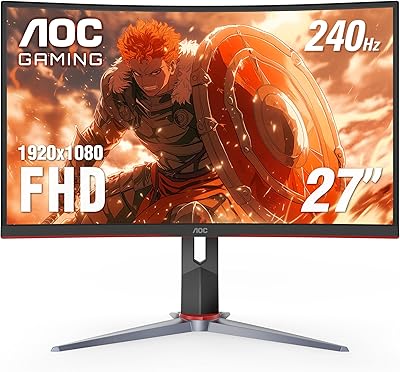
AOC CQ27G4ZH 27″ Curved Gaming Monitor
87%
95%
Gaming Performance
90%
Display Quality
85%
Build Quality
87%
Ergonomics
92%
Value for Money
More
AOC C27G2Z 27″ Curved Gaming Monitor
80%
93%
Refresh Rate Performance
88%
Response Time & Motion Clarity
79%
Color Accuracy & Vibrancy
86%
Contrast & Black Levels
62%
Resolution & Pixel Density
More
AOC C27G4H 27″ Curved Gaming Monitor
89%
93%
Performance
95%
Display Quality
87%
Ergonomics/Adjustability
91%
Value for Money
89%
Compatibility (Console)
More
AOC AG276QZD2 27″ OLED Gaming Monitor

80%
94%
Image Quality
92%
Motion Clarity & Response Time
96%
Contrast & Black Levels
88%
Color Accuracy
89%
Refresh Rate & Sync Performance
More
Skytech Gaming Moonshadow 27-inch Curved Gaming Monitor
83%
88%
Image Quality
91%
Refresh Rate Performance
86%
Adaptive-Sync
83%
VA Panel Contrast
84%
Stand & Ergonomics
More
AOC U27U2DP 27″ 4K Monitor
76%
91%
USB-C Docking Performance
88%
Image Clarity & Sharpness
83%
Color Accuracy
89%
Connectivity & Port Selection
67%
KVM Switch Usability
More
CRUA 27” 540Hz Gaming Monitor
86%
94%
Gaming Performance
89%
Color Accuracy
86%
Ergonomics & Comfort
91%
Connectivity Options
67%
Setup & Installation
More
ZZA Z27H1K280HZ 27″ Curved Gaming Monitor
70%
88%
Refresh Rate Performance
84%
Value for Money
76%
Image Quality & Color Accuracy
67%
Motion Clarity & Response
89%
Contrast & Black Levels
More
MSI G273QPF 27-inch QHD Gaming Monitor
78%
88%
Image Clarity
91%
Refresh Rate Performance
86%
Response Time
79%
Panel Quality
84%
Ergonomics & Stand
More
Raywego Z270B13 27-inch Gaming Monitor
70%
88%
Value for Money
83%
Picture Quality
84%
Refresh Rate Performance
62%
Build Quality
81%
Eye Comfort
More

FAQ

Not quite. The full 180Hz refresh rate is only accessible through the DisplayPort 1.4 connection, and current-gen consoles like the PS5 and Xbox Series X output via HDMI. Those consoles top out at 120Hz over HDMI 2.0 anyway, so you’ll get a great experience, just not the monitor’s absolute maximum rate.

It works with both. The Adaptive-Sync implementation on this 27-inch QHD display is compatible with NVIDIA’s G-Sync Compatible certification as well as AMD FreeSync, so you don’t need to match brands to get tear-free gaming.

Honestly, it’s a real consideration. The glossy panel produces more vivid colors than a matte alternative, but it reflects light sources behind you quite noticeably. If your desk faces a window or sits under bright overhead lighting, you’ll want to manage that with blinds or repositioning. Users in dimmer or controlled-lighting setups rarely complain about it.

A zero-bright-dot warranty means that if any pixel on the panel gets stuck in the ‘on’ state and appears as a persistent bright spot, AOC will replace the monitor during the three-year coverage window. It’s a more generous policy than the industry norm, where manufacturers typically require multiple dead pixels before honoring a claim.

It’s decent for casual creative work given its wide color coverage, but it isn’t factory-calibrated and lacks the color accuracy certifications that professional content creators typically need. If you’re editing for print or broadcast delivery, a purpose-built color-accurate display is a better investment.

The stand provides a meaningful range of height travel, which covers most desk and chair combinations comfortably. Taller users and those with ergonomic chairs set at higher positions generally find it adequate, though if you have specific posture requirements, a VESA-compatible monitor arm gives you more precise control.

No, there are no built-in speakers. You’ll need to connect external speakers or use a headset, which is fairly standard at this price tier for gaming monitors.

Yes, and this is one of the more practical aspects of the Q27G4XN. The two HDMI 2.0 ports let you keep two devices plugged in at the same time — say, a PS5 and a Switch — and switch between them using the monitor’s input selection menu. It’s straightforward once you’ve navigated to the input option in the OSD.

It’s functional but not the most intuitive system out there. Some users find the navigation a bit slow and the button layout takes a few minutes to get used to. That said, once you’ve configured your preferred settings, you rarely need to dig back into the menus unless you’re switching between input sources or adjusting brightness.

Yes, the panel supports standard VESA mounting, so you can remove the included stand and attach a third-party monitor arm if you prefer a cleaner desk setup or need a wider range of positioning options than the stock stand provides.

Where to Buy