Overview

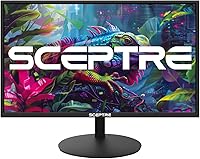
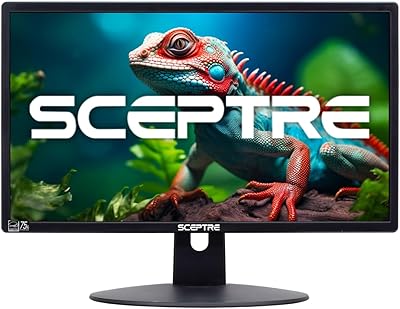
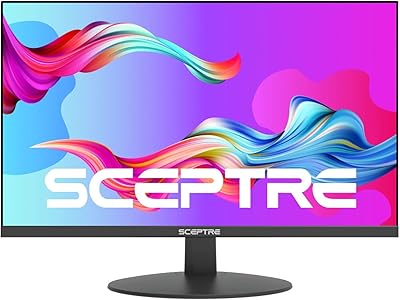
The Sceptre E275W-19203R 27-inch 1080p LED Monitor has been a quiet staple in the budget display market since 2017, and its sustained spot as a top-ten bestseller in computer monitors says something real. Sceptre is a California-based brand that has carved a niche delivering large screens at accessible prices, and this model reflects that focus well. The metallic black finish and slim profile look more considered than the price tag suggests. One thing worth addressing upfront: 1080p spread across 27 inches is noticeably softer than a QHD panel, so if you sit close and do detail-heavy work, that trade-off is worth knowing before you buy.
Features & Benefits

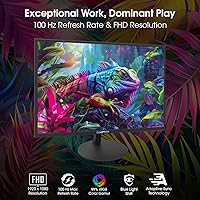
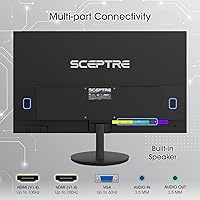
The 75Hz refresh rate paired with Adaptive Sync is what separates this Sceptre monitor from a basic office display. For casual gaming, that extra smoothness over a standard 60Hz panel is genuinely noticeable, particularly in fast-paced games where screen tearing gets irritating fast. Connectivity is unusually flexible at this price: two HDMI ports and a VGA input let you switch between a laptop, desktop, and gaming console without constantly unplugging cables. The 99% sRGB coverage holds up well for streaming content or light photo browsing, though it is not a replacement for a professionally calibrated panel. Blue Light Shift and the FPS and RTS game presets round things out nicely for long sessions.

Best For

This budget 27-inch display is a natural fit for students, remote workers, and anyone who wants a large, capable screen without spending heavily. The dual HDMI inputs make it especially practical for multi-device households, whether that means toggling between a work laptop and a gaming console or anchoring a two-monitor setup. Casual gamers stepping up from a 60Hz or older screen will feel the refresh rate difference immediately. It is also a sensible starting point for anyone building their first proper desk. If your priority is pixel-level precision for professional design or color-critical editing, this is not the right tool, but for everyday productivity, streaming, and light gaming, it covers everything that matters.

User Feedback

With over 7,000 ratings and a 4.5-star average, the 27-inch Sceptre has earned broad, consistent approval across a wide range of buyers. The most repeated compliments focus on out-of-box color quality and a stand that feels surprisingly solid for the price tier. Setup is straightforward, with most buyers reporting a simple plug-and-play experience. On the downside, the built-in speakers are functional but thin, better suited for a background call than anything you actually want to listen to. A minority of buyers have flagged backlight bleed along the edges, though this appears to be a unit-level inconsistency rather than a systemic issue. Text rendering at close range draws occasional criticism as well.

Pros

  • 75Hz refresh rate with Adaptive Sync delivers noticeably smoother visuals than a standard 60Hz panel.
  • Two HDMI ports plus a VGA input make it easy to connect multiple devices without a switch.
  • The 99% sRGB color gamut produces vibrant, accurate color for streaming and casual content creation.
  • Matte panel surface cuts down on glare, making it comfortable in brightly lit rooms.
  • VESA mount compatibility opens the door to aftermarket arm upgrades for better desk ergonomics.
  • Built-in speakers handle conference calls and background audio without needing external hardware.
  • The stand is stable and sturdy, which is not a given at this price point.
  • Blue Light Shift mode is a practical addition for anyone working long hours in front of the screen.
  • Plug-and-play setup means most users are up and running within minutes of unboxing.
  • Over 7,000 reviews with a strong average rating reflect broad, sustained buyer satisfaction.

Cons

  • 1080p pixel density on a 27-inch panel looks noticeably soft for close-up text or detailed work.
  • Built-in speakers are low-volume and thin-sounding, barely adequate for anything beyond basic audio.
  • No height adjustment or swivel on the stand limits ergonomic flexibility out of the box.
  • Backlight bleed along the edges has been reported by a portion of buyers, though it varies by unit.
  • Not suited for competitive gaming beyond 75Hz; high-refresh-rate players will hit a ceiling quickly.
  • Color accuracy is not reliable enough for professional design or color-critical editing tasks.
  • The budget 27-inch display lacks USB ports, which limits desk cable management options.
  • No DisplayPort input may be a drawback for users with newer graphics cards or docking stations.

Ratings

The scores below reflect an AI-driven analysis of thousands of verified global reviews for the Sceptre E275W-19203R 27-inch 1080p LED Monitor, with spam, bot activity, and incentivized feedback actively filtered out before scoring. Each category is weighted against real buyer expectations for this price tier, not compared to premium alternatives. Both the genuine strengths and the recurring frustrations buyers encounter are reflected transparently in every score.

Value for Money
93%
This is where the 27-inch Sceptre earns its best marks by a wide margin. Buyers repeatedly express surprise at how much screen and functionality they get relative to what they paid, particularly those upgrading from a smaller or older display. The size-to-price ratio is a consistent theme across thousands of reviews.
A handful of buyers who expected near-QHD sharpness or premium build quality felt the value narrative oversold certain aspects. The trade-off in pixel density at 27 inches is real, and those who missed that nuance during purchase tend to feel the deal was less clean than advertised.
Picture Quality
74%
26%
Out-of-box color vibrancy is one of the most frequently praised qualities of this budget 27-inch display. The 99% sRGB coverage delivers punchy, reasonably accurate colors for streaming, gaming, and general use, and the matte coating keeps the image readable even in rooms with significant ambient light.
At 27 inches, the 1080p resolution starts to show its limits, especially for users who sit within two feet of the screen and work with fine text or detailed graphics. The pixel density is noticeably softer than a QHD panel of the same size, and this is the most common source of disappointment among more discerning buyers.
Refresh Rate & Smoothness
81%
19%
The 75Hz refresh rate with Adaptive Sync produces a meaningfully smoother experience than the 60Hz panels this monitor is typically replacing. Casual gamers playing titles like racing games, RPGs, or first-person shooters notice the difference during fast motion sequences, and screen tearing is well-controlled during typical gaming sessions.
For anyone who has spent time on a 144Hz or higher display, 75Hz feels modest rather than impressive. Competitive gamers who prioritize frame rate above all else will find this ceiling limiting, and the monitor does not support DisplayPort, which restricts high-refresh-rate options for some GPU configurations.
Connectivity
88%
Having two HDMI inputs alongside a VGA port is genuinely useful in real-world multi-device households. Users regularly mention switching between a laptop, a desktop, and a console without needing to unplug anything, which adds practical day-to-day convenience that is easy to underappreciate until you have it.
The absence of a DisplayPort input is a meaningful gap for users with modern discrete graphics cards who want to push higher refresh rates or use more advanced sync features. There are also no USB ports on the monitor itself, which limits its usefulness as a desk hub in a cleaner cable-management setup.
Build Quality
76%
24%
The metallic black finish gives this Sceptre monitor a cleaner, more considered aesthetic than many competitors at the same price point. The stand in particular draws positive comments for feeling solid and planted on a desk, which is not always a given in this segment.
The chassis is predominantly plastic despite the metallic finish, and some buyers note visible flex around the rear panel under pressure. A minority of units have arrived with minor cosmetic issues from shipping, suggesting the packaging could be more protective for a product of this size.
Ergonomics & Adjustability
58%
42%
The 13-degree backward tilt gives users enough angle flexibility to find a comfortable viewing position for most standard desk heights. VESA compatibility is a practical escape valve here, allowing buyers who want height or swivel control to invest in an aftermarket arm without replacing the monitor entirely.
Without height adjustment or swivel on the included stand, taller users or those with non-standard desk setups often struggle to find an ideal ergonomic position. This is one of the more commonly mentioned frustrations, particularly from buyers who spend long workdays in front of the screen.
Built-in Speakers
47%
53%
The integrated speakers do cover the basics: they are adequate for a video call, a virtual meeting, or background audio while working. Having speakers built in means buyers do not need to source or budget for external audio just to get sound out of the box, which is a convenience for minimal setups.
Volume headroom is limited and bass response is essentially absent, making any sustained music listening or game audio feel flat and small. Buyers who care about sound quality at all will find themselves reaching for headphones or external speakers almost immediately, which makes this feature feel more like a checkbox than a genuine capability.
Eye Comfort
79%
21%
The matte panel and Blue Light Shift mode together make extended sessions noticeably more comfortable than glossy screens or monitors without any eye-care features. Remote workers and students who use this display for several hours daily tend to report less eye fatigue than with previous monitors they have owned.
Blue Light Shift shifts the color temperature visibly toward warm tones, which some users find distracting or unflattering for color-sensitive work. There is no flicker-free certification mentioned in the specs, and a small number of sensitive users have reported mild discomfort during very long sessions.
Gaming Performance
72%
28%
The FPS and RTS game presets provide a noticeable contrast boost and sharpening effect that suits fast-paced genres reasonably well. Combined with Adaptive Sync and 75Hz, this budget 27-inch display holds its own for casual gaming across genres like action-adventure, racing, and strategy titles.
Input lag, while not officially specified, has been flagged occasionally by more reactive gamers as slightly higher than ideal for competitive play. The 1080p resolution also limits visual fidelity in modern titles that are increasingly optimized for 1440p or 4K presentation.
Setup & Ease of Use
91%
Assembly is consistently described as quick and intuitive across the review base, with most buyers reporting the monitor is operational within ten to fifteen minutes of opening the box. The on-screen menu is navigable without a steep learning curve, and the included cable gets users connected immediately.
The physical buttons for the on-screen display are located on the underside of the bezel, which some users find fiddly to operate by feel. A joystick or front-facing button layout would improve the experience, particularly for buyers who adjust settings frequently.
Backlight Uniformity
63%
37%
The majority of units perform acceptably in everyday use, with backlight consistency that is unremarkable in a positive sense: most buyers never think about it. For standard content consumption in normal lighting conditions, uniformity issues are unlikely to be a meaningful factor.
A recurring minority of reviews flag visible backlight bleed along the lower corners or edges, which becomes obvious when watching dark scenes in a dim room. This appears to be a unit-level quality control inconsistency rather than a universal flaw, but it is common enough to be worth flagging before purchase.
Color Accuracy
69%
31%
The 99% sRGB coverage translates to colors that look vibrant and pleasing for consumer-grade tasks like streaming, casual photo browsing, and content consumption. Factory calibration is reasonably close for this price tier, and most non-professional users will not feel the need to adjust it significantly.
Delta E performance is not specified, and buyers who work in photography or design have noted visible color inconsistencies when comparing output to a calibrated reference display. This is not a panel for color-critical workflows, and treating it as one is a recipe for disappointment.
Long-term Reliability
77%
23%
The product has been on the market since 2017 with a sustained bestseller ranking, which provides meaningful real-world evidence of durability across a large installed base. Many buyers note they have owned the monitor for multiple years without any degradation in panel quality or functionality.
Sceptre is not a tier-one monitor brand, and long-term warranty support and customer service experience can be inconsistent based on buyer reports. Units that develop issues after the standard warranty window tend to generate frustrated feedback, as replacement parts and official service options are limited.

Suitable for:

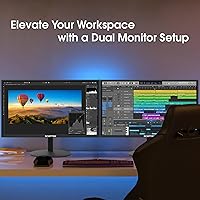
The Sceptre E275W-19203R 27-inch 1080p LED Monitor is built for buyers who want a large, capable screen without the financial commitment that typically comes with it. Students setting up a first desk, remote workers who spend long hours on video calls and documents, and casual gamers looking to get more out of their setup without upgrading to a dedicated gaming display will all find real value here. The dual HDMI inputs are genuinely useful for anyone juggling multiple devices, whether that is a work laptop during the day and a console in the evening, or two computers sharing a single screen. Multi-monitor users will also appreciate the consistent color output and straightforward connectivity, especially when building out a side-by-side productivity setup on a budget. If your priority is screen size and smooth everyday performance rather than cutting-edge pixel density, this Sceptre monitor makes a compelling case.
Not suitable for:

Buyers who sit close to their screen and do precision work, whether that is detailed photo editing, graphic design, or reading dense text for hours, may find that 1080p resolution spread across 27 inches does not hold up well at arm's length. The Sceptre E275W-19203R 27-inch 1080p LED Monitor is not aimed at creative professionals who need accurate color reproduction for client deliverables; the 99% sRGB coverage is solid for general use but falls short of what a professionally calibrated wide-gamut display offers. The stand provides only tilt adjustment, with no height or swivel range, so ergonomically particular users may find the setup limiting without an aftermarket arm. Those who rely on their monitor's built-in speakers for anything beyond the occasional background call will likely feel underserved. And competitive gamers chasing high frame rates beyond 75Hz will want to look at displays specifically engineered for that purpose.
Specifications

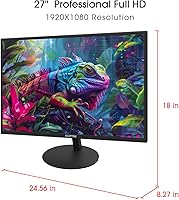
  • Screen Size: The panel measures 27 inches diagonally, offering generous screen real estate for multitasking and media consumption.
  • Resolution: Native resolution is 1920x1080 Full HD, delivering standard high-definition clarity across the full panel area.
  • Refresh Rate: The display supports a maximum refresh rate of 75Hz over HDMI and VGA connections, providing smoother motion than a standard 60Hz screen.
  • Sync Technology: Adaptive Sync is supported, reducing screen tearing and stuttering during gameplay without requiring a premium graphics card.
  • Color Gamut: The panel covers 99% of the sRGB color space, making colors appear vivid and consistent for everyday content and light creative work.
  • Panel Surface: A matte anti-glare coating reduces reflections from ambient light sources, improving comfort in well-lit environments.
  • Connectivity: The monitor includes two HDMI ports and one VGA port, supporting simultaneous connection of multiple devices such as computers and consoles.
  • Built-in Audio: Two integrated speakers provide basic audio output suitable for voice calls, video playback, and background listening.
  • Eye Care: A Blue Light Shift mode reduces high-energy blue light emission to help minimize eye fatigue during extended viewing sessions.
  • Game Modes: Dedicated FPS and RTS preset display modes adjust contrast and clarity settings to suit first-person shooter and real-time strategy gaming.
  • VESA Mount: The monitor is VESA wall-mount compatible, allowing users to remove the stand and attach a third-party arm or wall bracket.
  • Tilt Range: The stand supports a tilt range of 3 degrees forward and 13 degrees backward, allowing basic vertical angle adjustment.
  • Aspect Ratio: The display uses a standard 16:9 widescreen aspect ratio, compatible with virtually all modern video content and operating system interfaces.
  • Dimensions: The monitor measures approximately 24.56 inches wide, 18 inches tall, and 8.27 inches deep with the stand attached.
  • Weight: Total unit weight including the stand is 8.8 pounds, making it manageable for a single person to position on a desk.
  • Color Finish: The chassis is finished in metallic black, giving the monitor a clean, understated appearance that suits most desk setups.
  • Ergonomics: The stand offers tilt adjustment only; height, swivel, and pivot adjustments are not available without a third-party VESA arm.
  • Power: The monitor uses an external power adapter and does not draw power through its HDMI or VGA connections.

Related Reviews
Sceptre E225W 22-inch FHD Monitor

74%
91%
Value for Money
76%
Image Quality
88%
Refresh Rate Performance
62%
Build Quality
44%
Ergonomics & Adjustability
More
ViewSonic TD2760 27-Inch 1080p Touch Monitor
87%
91%
Touch Response
88%
Ergonomics & Comfort
84%
Display Quality
87%
Connectivity Options
90%
Build Quality & Durability
More
Sceptre E205W-16003R 20″ LED Monitor
76%
91%
Value for Money
63%
Image Clarity & Resolution
82%
Refresh Rate & Smoothness
77%
Response Time
88%
Connectivity & Port Selection
More
ASUS VZ279QG1R 27-inch 1080P Gaming Monitor
83%
88%
Gaming Performance
91%
Smooth Visuals (Motion Blur Reduction)
93%
Value for Money
80%
Build Quality
85%
Display Quality (Color Accuracy, Brightness)
More
Sceptre U275W-UPT 27″ 4K IPS Monitor
68%
91%
Image Sharpness
78%
Color Accuracy
63%
Panel Uniformity
69%
Refresh Rate & Smoothness
71%
Connectivity
More
ViewSonic VX2776-SMHD 27-inch 1080p IPS Monitor
84%
92%
Display Quality
88%
Gaming Performance
90%
Ease of Setup
91%
Design & Aesthetics
89%
Eye Comfort
More
ASUS VA27DQF 27-inch IPS Monitor
77%
83%
Image Quality
88%
Eye Comfort & Fatigue Reduction
79%
Refresh Rate & Motion Handling
51%
Ergonomics & Stand
76%
Connectivity
More
ASUS TUF Gaming VG277Q1A 27″ Gaming Monitor
78%
93%
Refresh Rate Performance
88%
Motion Clarity & Response Time
91%
Adaptive Sync & Tear-Free Gaming
74%
Out-of-Box Color Quality
82%
Shadow Boost & Dark Scene Visibility
More
ViewSonic VA2756A-MHD 27 Inch IPS 1080p Monitor
86%
92%
Display Quality
90%
Value for Money
88%
Gaming Performance
80%
Ergonomics & Comfort
83%
Build Quality
More
ViewSonic VS2747-H 27-inch IPS Monitor
75%
91%
Value for Money
86%
Image Quality
88%
Eye Comfort
79%
Refresh Rate & Smoothness
71%
Build Quality
More

FAQ

It depends on how close you sit and what you use the monitor for. At a typical desk distance of two to three feet, most people find it perfectly acceptable for browsing, streaming, and casual gaming. Where it starts to show its limits is if you work with small text all day or sit very close; in those cases you may notice the image looks slightly soft compared to a QHD panel. For the price and the intended audience, it is a reasonable trade-off, not a fatal flaw.

Yes, both the PS5 and Xbox Series X connect via HDMI and will work with this Sceptre monitor without any adapters. Keep in mind the display caps at 1080p and 75Hz, so the console will output at those limits rather than 4K or 120Hz. For most living room or bedroom console setups, that is still a solid experience.

It does, as long as your MacBook has an HDMI port or you use an HDMI-compatible adapter. Newer MacBooks with only USB-C ports will need a USB-C to HDMI cable or hub. Once connected, the monitor functions as a standard extended or mirrored display with no additional drivers required.

They are functional but nothing to get excited about. Volume is modest and the sound is thin, lacking bass depth. They are adequate for a video call or listening to a podcast in the background, but if you care about music or game audio quality, you will want to pair the monitor with external speakers or headphones.

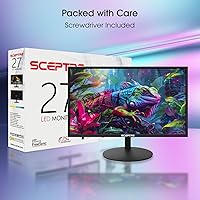
Sceptre typically includes one HDMI cable in the box along with a power adapter, though it is always worth double-checking your specific shipment. A VGA cable is generally not included, so if you plan to use that connection, have one on hand before setup.

Yes, the 27-inch Sceptre is VESA compatible, so you can remove the stand and attach it to any standard VESA-compliant wall mount or monitor arm. This is also a practical solution if you want height or swivel adjustment, since the included stand only tilts.

The stand holds up well for its price tier. Most buyers report it feels stable on a desk without noticeable wobble during normal use. It is not as rigid as a premium monitor stand, but it is solid enough that it should not be a daily annoyance.

Blue Light Shift reduces the amount of high-energy blue light the screen emits by shifting colors slightly warmer. If you spend several hours a day in front of the monitor, especially in the evening, turning it on can reduce eye strain noticeably over time. It does make the image look a bit more yellow-tinted, so some users prefer to use it only at night.

A small number of buyers have reported backlight bleed, particularly in the corners, which shows up most visibly when the screen displays a dark or black image. It does not appear to be a widespread issue, but it is something to be aware of. If you notice significant bleed after unboxing, that would be grounds for a return or exchange.

It handles both reasonably well. The large 27-inch size is genuinely useful for productivity tasks like keeping multiple windows open side by side, and the matte panel is easy on the eyes in typical home office lighting. The 75Hz refresh rate and game modes are a bonus for after-hours gaming, but they do not get in the way of everyday work use at all.

Where to Buy