Overview

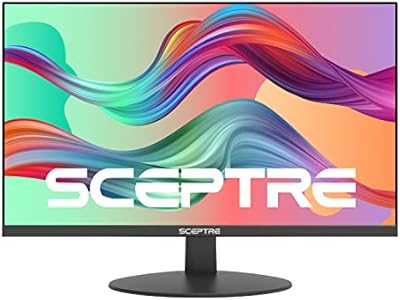
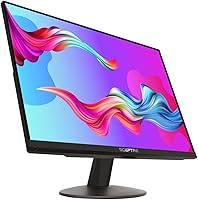
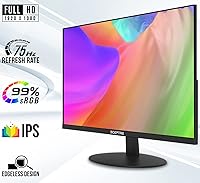
The Sceptre E248W-FPT 24-inch IPS Monitor sits squarely in the budget tier, designed for home office users and anyone who wants a capable daily display without overspending. Its edgeless bezel gives it a cleaner look than you might expect at this price, and the compact footprint works well on crowded desks. The 75Hz refresh rate is a genuine step up from the 60Hz panels that dominate this category, making everyday scrolling and video noticeably smoother. Over 4,000 buyers have rated it 4.6 stars, which is a strong signal for an entry-level screen. Just be clear going in: this is not a professional color-grading monitor or a high-refresh gaming display.

Features & Benefits

The IPS panel is where this budget IPS display earns its keep. Colors stay consistent whether you are viewing straight-on or from a sharp angle — a real advantage in shared workspaces or multi-person setups. Two HDMI ports and a legacy VGA connection mean you can keep a laptop and a desktop plugged in simultaneously, switching between them without unplugging anything. Built-in speakers handle casual audio well enough to skip a separate unit for background music or video calls. VESA mount support opens up arm and wall options, and the Blue Light Shift mode makes long work sessions noticeably less taxing on the eyes. Color coverage is solid for web browsing, document work, and streaming.

Best For

This Sceptre 24-inch monitor makes the most sense for remote workers and students who need a reliable screen without a hefty price tag. If you are building out a dual-monitor workstation on a budget, picking up a second unit is easy to justify — consistent IPS colors help them pair well visually. Casual gamers will find the 75Hz panel smoother than standard displays for everyday gaming, though anyone chasing competitive frame rates should look elsewhere. Small offices needing to outfit multiple desks with identical, low-maintenance screens will also find this a practical choice. It is not built for professional photo editing or color-sensitive creative work, but for the tasks most people actually do daily, it covers the bases well.

User Feedback

Across hundreds of reviews, the pattern is fairly consistent. Buyers are pleasantly surprised by image quality — colors come across as vivid and sharp for the category — and the plug-and-play setup gets mentioned constantly as a big convenience win. Where opinions split is on audio and ergonomics. The built-in speakers are usable but thin-sounding, and most people with any interest in audio end up routing through the headphone jack or an external unit. The stand's limited adjustability — tilt only, no height control — draws grumbles from taller users or those with specific ergonomic needs. Long-term owners, however, report the panel holding up well with no backlight bleed or color shift after extended use, which is genuinely reassuring.

Pros

  • IPS panel delivers consistent, accurate colors from wide viewing angles — a real advantage over budget TN screens.
  • The 75Hz refresh rate makes scrolling and casual gaming noticeably smoother than standard 60Hz displays.
  • Dual HDMI ports let you keep two devices connected and switch between them without touching a cable.
  • VESA mount support gives you the freedom to add a monitor arm and completely free up your desk surface.
  • Built-in speakers handle video calls and background audio without needing a separate device.
  • The edgeless bezel design looks surprisingly modern for an entry-level display.
  • Plug-and-play setup works straight out of the box — no drivers, no configuration headaches.
  • Blue Light Shift mode reduces eye strain during extended work or study sessions.
  • Long-term owners consistently report reliable performance with no significant degradation over time.
  • Lightweight and easy to reposition, which is handy in shared or flexible workspaces.

Cons

  • The stand offers tilt adjustment only — no height control, swivel, or pivot, which limits ergonomic flexibility.
  • Built-in speaker audio is thin and lacks depth, making it a poor choice for music or immersive media.
  • 75Hz is the ceiling — users cannot push higher refresh rates even with capable hardware.
  • No USB hub or USB-C port, which is increasingly standard on monitors in adjacent price brackets.
  • The VGA port, while occasionally useful, signals aging connectivity compared to newer display standards.
  • Color accuracy, though decent for everyday tasks, is not reliable enough for any serious creative work.
  • On-screen display menu controls can feel slow and unintuitive to navigate.
  • Brightness levels may feel insufficient in very bright rooms or near windows without blinds.
  • The included stand feels lightweight and less stable than what you might expect on a heavier desk setup.
  • No HDR support, so content mastered for high dynamic range will not display as intended.

Ratings

The scores below reflect an AI-driven analysis of verified global user reviews for the Sceptre E248W-FPT 24-inch IPS Monitor, with spam, bot-generated, and incentivized feedback actively filtered out to ensure reliability. Each category is scored independently based on recurring patterns across thousands of real buyer experiences, capturing both what this display genuinely does well and where it falls short. Nothing here is rounded up to make the product look better than it is — the strengths and the frustrations are given equal weight.

Image Quality
83%
For a display in this price range, the IPS panel consistently impresses buyers with its color vibrancy and sharpness during everyday tasks. Text looks crisp for long document sessions, and colors hold up well when streaming video or browsing photo-heavy sites — without the washed-out look common on cheaper TN panels.
Users doing any serious photo editing or color-critical work quickly notice the limitations in color accuracy and contrast depth. Blacks can appear slightly grey in darker scenes, and the display lacks the punch of panels with higher contrast ratios or HDR support.
Value for Money
91%
This is where the budget IPS display earns its strongest praise — buyers repeatedly express surprise at how much usable screen real estate and image quality they get without a steep financial commitment. For students and first-time monitor buyers, it hits a sweet spot that few competitors match at a comparable price.
Buyers who later upgrade to a mid-range display often look back and realize the savings came with trade-offs in stand quality, ergonomics, and panel depth that, spread over two years of daily use, add up in ways not obvious at purchase time.
Viewing Angles
79%
21%
The IPS panel technology pays off clearly here — colors and brightness stay consistent when viewed from the side, which is genuinely useful in shared workspaces or when someone else is watching your screen from across the desk. Most buyers coming from TN monitors notice the improvement immediately.
At extreme off-axis angles, some color shift and slight brightness drop are still visible, which is expected for IPS at this tier. It is not a problem for standard solo use, but users running collaborative setups with colleagues seated at wide angles may notice inconsistency.
Refresh Rate & Motion
74%
26%
The step up to 75Hz over the standard 60Hz makes a perceptible difference in day-to-day smoothness — scrolling through long documents or timelines feels more fluid, and casual gaming benefits from reduced judder during movement. For non-competitive gamers, it strikes a practical balance.
Anyone who has used a 144Hz or higher display will find 75Hz underwhelming for fast-paced action. The panel's response characteristics also mean that very fast motion in competitive titles can still produce some trailing, making it a poor choice for serious gaming.
Connectivity
88%
Having two HDMI ports is a practical win that buyers frequently call out — it means a laptop and a desktop can both stay connected simultaneously, removing the daily frustration of swapping cables. The added VGA port extends compatibility with older hardware that many office environments still rely on.
The absence of a DisplayPort or USB-C input is a real gap as more laptops move toward these standards. There is also no USB hub functionality, which feels like a missed opportunity given how many users rely on monitors as a central connectivity point on their desks.
Stand & Ergonomics
44%
56%
The stand is stable enough to keep the monitor steady on a flat surface, and the tilt adjustment, while limited, allows for some basic angle correction. For users with a fixed desk height who happen to land at the right eye level, it works without any friction.
This is the most consistent pain point across buyer feedback — no height adjustment, no swivel, and no portrait pivot make the stand feel unfinished for a monitor sold partly on professional use cases. Taller users or those with ergonomic needs almost universally end up buying a VESA arm separately, adding to the real-world cost.
Built-in Audio
51%
49%
For video calls, quick system alerts, or low-volume background audio, the built-in speakers clear the basic usability bar. They are convenient for users who genuinely only need minimal sound output and want to keep their desk free of extra peripherals.
The audio quality is thin and lacks any meaningful bass or stereo separation, which becomes obvious the moment you listen to music or watch a film with it. The vast majority of buyers who care about sound quality migrate to headphones or external speakers within the first few weeks.
Build Quality
67%
33%
The overall construction feels adequate for daily office use, and long-term owners report that the panel holds up without developing obvious defects like backlight bleed or dead pixels over one to two years. The edgeless bezel gives it a more refined appearance than its price tier might suggest.
The plastic chassis has a noticeable flex when handled, and the stand connection point feels less solid than what mid-range monitors offer. It is not fragile, but it does not inspire confidence if the monitor will be moved or adjusted frequently.
Setup & Ease of Use
93%
Plug-and-play performance is one of the E248W-FPT's clearest strengths — buyers consistently note that it worked immediately after connecting via HDMI with no driver downloads or display configuration required. Assembly of the stand takes just a few minutes with no tools needed.
The on-screen display menu, used to access settings like Blue Light Shift or input switching, is controlled by a set of small buttons on the rear edge that many users find awkward and slow to navigate. It is not a dealbreaker, but it is noticeably less refined than more expensive monitors.
Eye Comfort
76%
24%
The matte screen coating does a solid job of diffusing glare, which is particularly useful for home office setups near windows. The Blue Light Shift mode is appreciated by buyers who do evening work, with several noting a genuine reduction in the eye fatigue they previously experienced on other screens.
Flicker sensitivity varies between users, and some reviewers with known flicker sensitivity report mild discomfort during long sessions. The Blue Light mode also introduces a warm color cast that makes precise color judgment harder, so it is not ideal to keep active all day.
Color Accuracy
62%
38%
The 99% sRGB coverage means colors look punchy and well-saturated for web browsing, streaming, and casual content creation. For users whose work lives entirely within sRGB content — which covers the vast majority of everyday computer use — it is more than sufficient.
Out of the box calibration leaves room for improvement, and without hardware calibration tools, color accuracy for professional workflows is inconsistent. Users working with print production, photography, or video color grading will find the factory settings unreliable and the panel unsuitable for their needs.
VESA & Mounting Flexibility
84%
VESA compatibility is a significant plus that many buyers take advantage of, especially since the default stand is so limited in adjustability. Pairing this budget IPS display with an affordable monitor arm effectively solves most of the ergonomic shortcomings and transforms the setup flexibility entirely.
The VESA mount holes are positioned such that routing cables cleanly through an arm can be slightly fiddly depending on the arm design. It also means buyers who want full ergonomic control should factor in the additional cost of an arm from the start.
Long-term Reliability
78%
22%
The durability track record for the Sceptre 24-inch monitor is better than many budget-tier competitors. A meaningful number of owners report sustained daily use over multiple years with no panel degradation, which provides reasonable confidence for buyers treating this as a long-term purchase.
As with any budget electronics product, unit consistency is not guaranteed, and a small percentage of buyers report early defects including backlight irregularities or input detection issues. Warranty support experience is mixed, with some buyers finding the resolution process slower than they expected.

Suitable for:

The Sceptre E248W-FPT 24-inch IPS Monitor is a strong pick for anyone who needs a dependable, no-fuss display without stretching their budget. Students setting up a dorm or apartment workspace will appreciate the compact footprint and the clean edgeless look that punches above its price tier. Remote workers who spend long hours on video calls, documents, and browser tabs will find the wide-angle IPS panel and Blue Light Shift mode genuinely useful for day-to-day comfort. It also makes a practical second screen for dual-monitor setups — the consistent color across the display means two units side by side do not look dramatically mismatched. Small offices looking to outfit several desks with reliable, low-maintenance monitors can deploy these cost-effectively without worrying much about setup complexity.

Not suitable for:

Buyers with more demanding needs should think carefully before committing to the Sceptre E248W-FPT 24-inch IPS Monitor. Graphic designers, photographers, or video editors who require precise color accuracy and calibration options will quickly find its limitations — 99% sRGB is reasonable for casual use, but it is not a substitute for a proper content-creation panel. Competitive gamers chasing high refresh rates and ultra-fast response times will also be underserved; the 75Hz ceiling and IPS response characteristics are fine for casual play but fall short of what serious gaming demands. Users who need ergonomic flexibility — particularly height adjustment or portrait-mode rotation — will find the basic tilt-only stand frustrating without investing in a separate VESA arm. Anyone who relies on speakers for music or media beyond background noise should plan to add external audio, as the built-in sound is functional at best.

Specifications

  • Screen Size: The display measures 24 inches diagonally, providing a comfortable viewing area for both single and dual-monitor desk setups.
  • Panel Type: Uses an IPS (In-Plane Switching) panel, which produces consistent color and brightness across a wide range of viewing angles.
  • Resolution: Native resolution is 1920x1080 (Full HD), delivering sharp text and clear images for everyday productivity and media consumption.
  • Refresh Rate: Supports up to 75Hz, providing smoother motion than standard 60Hz panels during casual gaming and fast-scrolling content.
  • Aspect Ratio: Features a 16:9 widescreen aspect ratio, which is standard for HD video, streaming, and most modern computing tasks.
  • Screen Surface: The matte screen coating reduces glare and reflections from ambient light sources, making it easier to work near windows.
  • Color Gamut: Covers 99% of the sRGB color space, offering reasonably accurate and vivid color reproduction for web content and everyday use.
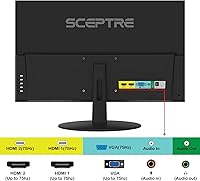
  • Connectivity: Equipped with two HDMI ports and one VGA port, allowing simultaneous connection of multiple devices without unplugging cables.
  • Audio: Includes built-in stereo speakers, a 3.5mm headphone jack, and an audio-in port for flexible sound routing options.
  • VESA Mount: Compatible with standard VESA wall mount patterns, enabling use with third-party monitor arms or wall brackets to save desk space.
  • Eye Care: Features a Blue Light Shift mode that reduces high-energy blue light emission to help minimize eye fatigue during extended screen sessions.
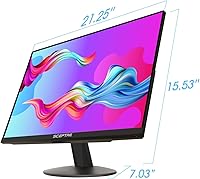
  • Dimensions: The monitor measures 21.25 x 15.53 x 7.03 inches with the stand attached, making it compact enough for most standard desks.
  • Weight: Weighs 6 pounds with the stand, keeping it light and easy to reposition or transport between workspaces.
  • Bezel Design: Features an edgeless (near-frameless) bezel design that minimizes visual interruption and looks clean in multi-monitor configurations.
  • Power Input: Operates on 120V AC power, compatible with standard North American wall outlets without an adapter.
  • Game Modes: Includes FPS and RTS preset display modes that adjust picture settings to enhance visibility in specific game genres.
  • Stand Adjustment: The included stand supports tilt adjustment only, with no built-in height, swivel, or pivot functionality.

Related Reviews
Sceptre E248W-FW100T 24-inch Gaming Monitor

76%
91%
Value for Money
74%
Image Quality
78%
Gaming Performance
82%
Refresh Rate & Sync
67%
Response Time & Motion
More
ViewSonic VG2448A 24-inch IPS Monitor

83%
93%
Ergonomic Adjustability
88%
Eye Comfort
86%
Connectivity & Port Selection
74%
Image Quality
81%
Build Quality
More
HP Series 5 524sf 24-inch Monitor
75%
78%
Display Quality
71%
Color Accuracy
67%
Brightness
86%
Eye Comfort
74%
Build Quality
More
Z-Edge U24I 24-inch IPS Monitor
85%
88%
Display Quality
92%
Value for Money
85%
Build Quality
84%
Gaming Performance
80%
Ergonomics & Design
More
ReHisk 241KV2 24-inch Gaming Monitor
73%
91%
Refresh Rate Performance
88%
Adaptive Sync
79%
Panel & Color Quality
54%
Brightness & HDR
67%
Build Quality
More
Dell E2420H 24-inch FHD IPS Monitor
88%
88%
Display Quality
90%
Color Accuracy
87%
Viewing Angles
92%
Ease of Setup
91%
Energy Efficiency
More
Dell P2419H 24-Inch IPS Monitor
84%
88%
Color Accuracy
91%
Viewing Angles
89%
Eye Comfort
93%
Stand Ergonomics
87%
Build Quality
More
KTC H24T27 24-inch QHD Gaming Monitor

68%
88%
Image Clarity
84%
Color Accuracy
74%
Gaming Performance
41%
HDR Quality
46%
Ergonomics & Adjustability
More
Sceptre E278W-FPT 27″ Gaming Monitor
71%
91%
Value for Money
78%
Image Quality
74%
Color Accuracy
62%
Gaming Performance
63%
Build Quality
More
ViewSonic VP2468a 24-Inch IPS Monitor
76%
93%
Color Accuracy
89%
Connectivity
61%
Resolution & Pixel Density
86%
Build Quality
91%
Ergonomics
More

FAQ

It works immediately on plug-and-play for the vast majority of users. Windows and macOS both detect it automatically over HDMI or VGA without any driver installation. You may want to adjust brightness or contrast in the on-screen menu once it is connected, but that is about it.

Yes, the two HDMI ports make this straightforward. You can keep both devices plugged in and toggle between inputs using the monitor's on-screen display menu. It is one of the more practical features for anyone running a mixed setup at their desk.

It depends on what kind of gaming you do. For casual titles, indie games, or slower-paced genres, it handles things well and the 75Hz refresh rate does make motion feel noticeably smoother than a 60Hz panel. If you are into competitive shooters where every millisecond of response time matters, you would be better served by a dedicated gaming monitor with a higher refresh rate and faster response spec.

They are usable but modest. For video calls, YouTube, or background music at low volume, they get the job done. Do not expect rich bass or room-filling sound — most people who care about audio quality end up plugging into the headphone jack or routing to external speakers within a few weeks.

Absolutely. It supports standard VESA mounting, so any compatible monitor arm or wall bracket will work. This is actually a popular upgrade among buyers who find the default stand too limited in adjustability — swapping to an arm immediately gives you height, tilt, and swivel control.

The stand only supports tilt, which is a real limitation if you need precise ergonomic positioning. There is no height adjustment, no swivel, and no pivot for portrait mode. If ergonomics matter to you, budget for a VESA monitor arm alongside the purchase — it makes a significant difference in comfort.

Sceptre typically includes a cable with the monitor, but it is worth checking the current listing details to confirm what is in the box at the time of your purchase. Having a spare HDMI cable on hand is always a safe bet regardless.

Generally, yes. IPS panels tend to have more uniform color output than TN alternatives, so two units of this budget IPS display placed side by side should look reasonably well-matched. Minor panel variation between manufacturing batches can occur, but most dual-setup buyers report being satisfied with the consistency.

Many users find it genuinely helpful for evening work — it shifts the color temperature warmer and reduces the harsher part of the light spectrum. The image does take on a slightly warmer, yellower tone when activated, so some people prefer to keep it off during the day and enable it only in lower-light conditions.

Feedback from longer-term owners is encouraging. Most report no backlight bleed, color shift, or pixel issues developing after one to two years of daily use. As with any budget electronics purchase, individual unit quality can vary, but the overall durability track record for this Sceptre 24-inch monitor is better than you might expect at its price point.

Where to Buy