Overview

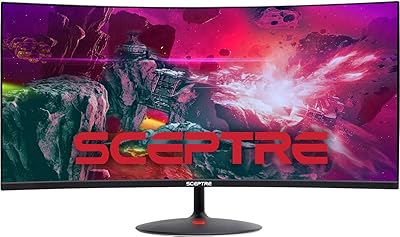
The Sceptre C305B 30-inch Curved Ultrawide Gaming Monitor is Sceptre's answer to a question a lot of budget-conscious gamers ask: can you get a genuinely immersive ultrawide experience without spending a fortune? The 21:9 aspect ratio at 2560x1080 gives you noticeably more horizontal screen real estate than a standard 16:9 display — the kind of difference you actually feel when playing or multitasking. The curved panel helps pull the edges of that wide image into your natural field of view, reducing how much your eyes strain during longer sessions. It launched back in 2019, yet this budget ultrawide display continues to hold its own in a competitive category.

Features & Benefits

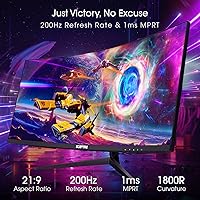
The headline spec here is the 200Hz refresh rate over DisplayPort — for fast-paced competitive games, that smoothness is genuinely noticeable compared to a typical 60Hz or even 144Hz panel. Pair that with AMD FreeSync and you get tear-free performance without paying extra for a premium sync license. The 5ms GTG response time keeps things crisp enough for most gaming genres, though dedicated esports players may notice it is not at the absolute cutting edge. A Blue Light Shift mode makes extended sessions more comfortable, and the FPS and RTS presets let you switch display modes quickly. The built-in speakers work fine as a fallback but treat them as a convenience, not a feature.

Best For

This curved ultrawide is a natural fit for anyone stepping into the 21:9 world for the first time. The extra horizontal real estate makes a genuine difference in strategy games, open-world titles, and cinematic single-player experiences — content that actually benefits from the wider canvas. Competitive shooter players also gain an edge, since that broader peripheral view can reveal flanking enemies a narrower screen simply would not show. AMD GPU owners get the most from the Sceptre 30-inch monitor thanks to FreeSync compatibility. If desk space is a concern, its compact 30-inch footprint is worth noting — it does not dominate a setup the way larger ultrawides often do.

User Feedback

Across nearly 13,000 ratings and a 4.5-star average, the Sceptre 30-inch monitor has earned a loyal following, and the praise centers mostly on the value delivered for the asking price. That said, the feedback is not entirely one-sided. Vertical sharpness is the most repeated concern: at 1080p spread across a 30-inch ultrawide, images can look softer than you might expect if you are coming from a 1440p screen. The stand is tilt-only, which frustrates users who want height or swivel adjustments. A few buyers also note that color accuracy could be stronger straight out of the box. None of these are surprising at this price tier, but they are worth knowing before committing.

Pros

  • The 200Hz refresh rate over DisplayPort delivers genuinely smooth gameplay that competitive gamers will notice immediately.
  • AMD FreeSync eliminates screen tearing without requiring any additional hardware or software configuration.
  • The 21:9 curved panel provides a wider field of view that meaningfully improves immersion in games and productivity layouts.
  • At this price, getting a 30-inch curved ultrawide with high refresh rate capability is a strong value proposition.
  • The Blue Light Shift mode makes extended late-night sessions noticeably easier on the eyes.
  • VESA compatibility gives buyers a straightforward path to better ergonomics with an aftermarket monitor arm.
  • The anti-glare coating handles moderate ambient lighting well, reducing distracting reflections during daytime use.
  • FPS and RTS display presets offer quick optimization for specific game genres without manual calibration.
  • The slim metal black design looks clean and understated — it fits most desk aesthetics without standing out awkwardly.
  • A 4.5-star average across nearly 13,000 verified buyers is a reliable signal of consistent real-world satisfaction.

Cons

  • The 1080p vertical resolution looks noticeably soft on a 30-inch panel, especially for users sitting within arm's reach.
  • HDMI users are limited to 120Hz — you only get the full 200Hz performance through DisplayPort.
  • The stand offers tilt adjustment only, with no height, swivel, or pivot options included in the box.
  • Nvidia GPU owners get no adaptive sync support, which is a real functional gap for a large portion of PC gamers.
  • Factory color calibration can be inconsistent between units, sometimes requiring manual corrections straight out of the box.
  • Built-in speakers produce thin, bass-free audio that most users will replace with external options fairly quickly.
  • Backlight bleed near panel corners is a recurring complaint, particularly noticeable in dark-room gaming environments.
  • The OSD navigation buttons are positioned awkwardly on the monitor's rear edge, making menu adjustments cumbersome.
  • Not all games support 21:9 natively, and some competitive titles actively restrict ultrawide resolutions in multiplayer modes.
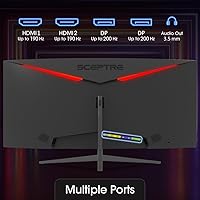
  • With only two video inputs and no USB hub, the port selection feels tight for users managing multiple devices.

Ratings

The Sceptre C305B 30-inch Curved Ultrawide Gaming Monitor has been scored by our AI system after analyzing thousands of verified global buyer reviews, with spam, bot submissions, and incentivized feedback actively filtered out. The scores below reflect real-world usage patterns — from competitive gaming sessions to everyday multitasking — and do not shy away from the trade-offs that come with this price tier. Both the genuine strengths and the recurring pain points are represented transparently.
Value for Money
93%
Few monitors at this price point offer a 30-inch ultrawide curved panel with a 200Hz refresh rate, and buyers repeatedly call that out. For gamers who cannot justify spending twice as much on a premium ultrawide, this budget ultrawide display punches well above its weight in terms of raw feature count.
The value equation only holds if you are not comparing image quality to pricier IPS ultrawides. Buyers who upgrade from a higher-end monitor often notice the color and sharpness gap more acutely than first-time ultrawide users.
Refresh Rate Performance
89%
The 200Hz ceiling via DisplayPort is a legitimate differentiator at this price, and competitive gamers in fast-paced shooters consistently report that the smoothness feels tangible compared to 144Hz panels. Paired with a capable AMD GPU, frames stay fluid even during chaotic scenes.
The 200Hz rate is only achievable over DisplayPort — HDMI users are capped at 120Hz, which catches some buyers off guard when they first set it up. That distinction matters if your PC or console setup relies primarily on HDMI.
AMD FreeSync Compatibility
88%
FreeSync works reliably here, and AMD GPU owners report a noticeably cleaner experience during fast gameplay, with tearing effectively eliminated across a wide range of frame rates. It requires no additional cost or configuration, which makes it a genuine practical win.
Nvidia GPU users get no G-Sync support, which effectively locks out a large segment of PC gamers from the adaptive sync benefits. Those running older or mid-range AMD cards may also find the effective sync range narrower than expected.
Ultrawide Field of View
91%
The 21:9 aspect ratio is the central appeal here, and buyers across genres — from open-world RPGs to real-time strategy games — consistently describe the wider canvas as immersive and hard to go back from. Multitaskers also appreciate having two virtual windows open side by side without feeling cramped.
Not all games support 21:9 natively, and a small but vocal group of reviewers reports black bars or stretched visuals in older titles. Competitive multiplayer games sometimes cap ultrawide support, which can undercut the main selling point for certain players.
Image Sharpness & Resolution
63%
37%
For casual gaming and video content at a normal viewing distance of around 3 feet, the 2560x1080 resolution looks reasonably clean and detailed. Text is readable and fast-moving game content rarely exposes the pixel density limitations during active play.
At 30 inches, spreading 1080p vertical resolution across that panel size results in a noticeably lower pixel density than comparable 1440p ultrawides, and buyers who sit close or do fine detail work like photo editing often find the softness frustrating. This is the single most common technical complaint in the reviews.
Response Time & Motion Clarity
74%
26%
The 5ms GTG response time handles most gaming scenarios well enough — casual and mid-level competitive players rarely report visible ghosting in standard game modes. For the majority of buyers, motion clarity feels adequate during normal use.
Enthusiast-level gamers coming from 1ms IPS panels will notice trailing on fast-moving objects, particularly in dark scenes. Overdrive settings help slightly, but the panel cannot fully close the gap with faster monitors in its broader competitive class.
Panel Curvature & Ergonomics
78%
22%
The curvature wraps the wide panel into a more natural arc for your eyes, and users who spend several hours at a desk report less fatigue at the edges of the screen compared to flat ultrawides. It also gives the monitor a premium visual presence on a desk that belies its price.
At only 30 inches, the curvature is subtle enough that some buyers feel it adds less practical benefit than it would on a 34-inch or wider panel. The effect is real but not dramatic, and a few reviewers wished the curve radius were tighter.
Stand & Adjustability
44%
56%
The stand holds the monitor steady without wobble during normal use, and the overall physical build feels more solid than some buyers expect at this price. Setting it up out of the box is quick and straightforward.
Tilt is the only adjustment available — no height, swivel, or pivot — and this comes up consistently in negative reviews. Taller users or those with specific ergonomic desk arrangements often end up buying a monitor arm just to get the screen into a comfortable position.
Build Quality & Design
72%
28%
The matte metal black finish looks clean and understated, avoiding the flashy gamer aesthetic that some buyers dislike. The slim profile makes it easy to fit into compact desk setups, and the overall plastic-to-metal balance feels reasonable for the category.
The bezels are thinner than older budget monitors but still noticeable, particularly on the bottom edge. A handful of reviewers report light backlight bleed near the panel corners, which shows up in dark-room gaming and dark-scene content.
Connectivity & Port Selection
71%
29%
Having both DisplayPort and HDMI 2.0 inputs covers the most common connection scenarios for PC gamers, and switching between two sources is straightforward. The inclusion of HDMI 2.0 rather than the older 1.4 standard is a practical plus.
There is no USB hub built into the monitor, and only two input ports means users with multiple devices quickly run out of options without an external switch. No USB-C or headphone passthrough is available, which feels limiting for modern desk setups.
Built-in Speakers
38%
62%
The integrated speakers remove the need for any external audio device in a minimal setup, which some users — particularly those using this monitor as a secondary display or in a spare room — genuinely appreciate for convenience.
Audio quality is thin and lacks bass, and most reviewers treat the speakers as a last resort rather than a real feature. Anyone who cares about sound during gaming or media consumption will want dedicated external speakers or headphones.
Blue Light & Eye Comfort
76%
24%
The Blue Light Shift mode makes a noticeable difference during late-night sessions, reducing the harsh cool tint that contributes to eye fatigue over time. Buyers who use this monitor for both work and gaming report it as a genuinely useful feature for extended use.
The anti-glare coating does its job in moderately lit rooms, but in bright environments with windows behind the user, reflections can still be distracting. Brightness topping out at 250 nits also means the screen can feel washed out in well-lit rooms.
Gaming Preset Modes
67%
33%
The FPS and RTS presets offer a quick way to optimize the display for specific game types without manually adjusting color temperature, contrast, and gamma from scratch. Casual gamers appreciate the simplicity of one-button mode switching.
The presets are a starting point rather than a polished solution — several reviewers note that the FPS mode pushes brightness and contrast to levels that look unnatural. Users who prefer fine-tuned picture settings tend to ignore the presets entirely after initial exploration.
VESA Mount Compatibility
83%
VESA compatibility opens the door to a much wider range of positioning options, and buyers who pair this curved ultrawide with an aftermarket arm consistently report a better overall experience once the limited stock stand is out of the picture. It is a straightforward upgrade path.
The VESA mount pattern is standard but the monitor arm is a separate purchase, which adds to the total cost. Some users also note that finding an arm rated for the monitor's weight and width at a reasonable price requires a bit of research.
Setup & Out-of-Box Experience
79%
21%
Assembly is quick and the on-screen display menu is navigable without needing to consult the manual. Most buyers report being up and running within 15 minutes, which reduces the friction for first-time ultrawide users who are not particularly tech-savvy.
Factory color calibration is inconsistent — some units arrive with noticeably warm or cool color temperatures that require manual correction. A few buyers also note that the OSD button placement on the back edge of the panel is awkward to reach without looking.

Suitable for:

The Sceptre C305B 30-inch Curved Ultrawide Gaming Monitor is an excellent fit for first-time ultrawide buyers who want the immersive 21:9 experience without committing to a premium price. Gamers who play competitive shooters or real-time strategy titles will find real value in the wider horizontal view, which genuinely expands peripheral awareness in ways a standard 16:9 monitor simply cannot match. AMD GPU owners get the most complete experience here, since FreeSync works reliably and adds meaningful smoothness during fast gameplay at no extra cost. The relatively compact 30-inch footprint also suits desk setups where space is limited — it delivers a wide screen presence without overwhelming a smaller work area. Movie watchers and fans of cinematic single-player games will appreciate that native 21:9 support means no black bars on compatible content, which makes the wider panel feel purposeful beyond just gaming.
Not suitable for:

Buyers who prioritize sharp, detailed image quality above all else should think carefully before purchasing, because the Sceptre C305B 30-inch Curved Ultrawide Gaming Monitor spreads a 1080p vertical resolution across a 30-inch panel — and that pixel density is noticeably lower than competing 1440p ultrawide monitors in a similar size class. If you sit close to your screen or do any work involving fine text, photo editing, or detailed graphic work, the softness will likely be a persistent frustration. Nvidia GPU users also miss out entirely on adaptive sync, which undermines one of the display's stronger practical features. Anyone who needs ergonomic flexibility — height adjustment, swivel, or pivot — will find the tilt-only stand limiting and may need to budget separately for a monitor arm. Finally, buyers hoping to use this curved ultrawide as a serious audio output device will be disappointed; the built-in speakers are strictly a fallback, and a dedicated audio solution is essentially required for anything beyond background noise.

Specifications

  • Screen Size: The panel measures 30 inches diagonally, offering a wide viewing area that comfortably fits most standard desks.
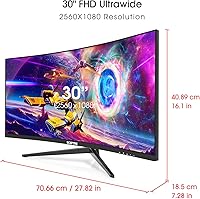
  • Resolution: Native resolution is 2560x1080 pixels, formatted as an ultrawide FHD panel with a 21:9 aspect ratio.
  • Refresh Rate: Supports up to 200Hz over DisplayPort and up to 120Hz over HDMI 2.0.
  • Response Time: Rated at 5ms GTG (gray-to-gray), which keeps motion blur manageable across most gaming genres.
  • Sync Technology: AMD FreeSync is supported, reducing screen tearing and stuttering when paired with compatible AMD graphics cards.
  • Panel Curvature: The screen features a curved panel design intended to better match the natural arc of human vision during extended use.
  • Brightness: Typical brightness is rated at 250 cd/m², which is adequate for moderately lit rooms but may struggle in very bright environments.
  • Viewing Angle: Horizontal and vertical viewing angles are both rated at 170 degrees, allowing decent off-axis visibility.
  • Connectivity: Input options include one DisplayPort and one HDMI 2.0 port; no USB hub or USB-C input is included.
  • Built-in Speakers: The monitor includes integrated speakers as a convenience feature for minimal setups, though no wattage specification is published.
  • Blue Light Mode: A dedicated Blue Light Shift mode is available via the OSD to reduce eye fatigue during long sessions.
  • Display Presets: FPS (First Person Shooter) and RTS (Real-Time Strategy) preset modes are accessible directly through the on-screen display menu.
  • Surface Coating: The panel uses an anti-glare hard coating rated at 3H, reducing reflections in ambient lighting conditions.
  • VESA Compatibility: The monitor supports VESA wall mount and monitor arm installation, though the specific VESA hole pattern should be confirmed before purchasing a mount.
  • Dimensions (no stand): Without the stand attached, the monitor measures 27.82 x 12.64 x 3.69 inches (W x H x D).
  • Dimensions (with stand): With the stand, the overall footprint measures approximately 27.82 x 16.1 x 7.28 inches.
  • Weight: The monitor weighs 12.2 pounds, which is manageable for a single person to install on a desk or mount.
  • Stand Adjustment: The included stand supports tilt adjustment only; height, swivel, and pivot adjustments are not available without a third-party arm.
  • Color & Finish: Available in a Metal Black finish with a slim profile that suits most neutral desk aesthetics.
  • Voltage: The monitor operates at 120 volts, compatible with standard North American power outlets.

Related Reviews

CRUA 30-inch Ultrawide Curved Monitor
86%
89%
Display Quality
92%
Color Accuracy
85%
Gaming Performance
88%
Ergonomics and Comfort
84%
Build Quality
More
Sceptre E305B-FU200T 30-inch Ultrawide Monitor
79%
91%
Value for Money
88%
Gaming Performance
79%
Picture Quality
93%
Ultrawide Immersion
74%
Build Quality
More
Westinghouse 34-inch Curved Ultrawide Gaming Monitor
86%
87%
Display Quality
91%
Gaming Performance
92%
Value for Money
85%
Ease of Setup
78%
Built-in Speakers
More
Raywego Q34DB45-1 34-inch Curved Gaming Monitor
72%
88%
Value for Money
84%
Gaming Performance
74%
Image Quality
51%
HDR Performance
67%
Build Quality
More
Sceptre C248W-1920RN 24-inch Curved Gaming Monitor
76%
91%
Value for Money
78%
Display Quality
83%
Curvature & Immersion
74%
Refresh Rate & Motion Clarity
67%
Build Quality & Design
More
Sceptre C275B-FWT240 27″ Curved Gaming Monitor
75%
91%
Refresh Rate Performance
88%
Value for Money
79%
Panel Contrast & Color
83%
Motion Clarity
61%
Build Quality
More
Sceptre 34-inch Curved UltraWide Monitor C345W-2560UN
82%
89%
Value for Money
84%
Gaming Performance
87%
Display Quality
80%
Ergonomics & Comfort
75%
Build Quality
More
INNOCN 45C1R 45-Inch Ultrawide Curved Gaming Monitor
85%
91%
Value for Money
94%
Display Quality
88%
Ergonomics & Adjustability
85%
Connectivity
92%
Ease of Setup
More
Sealan 34-inch Ultrawide Curved Gaming Monitor Q34P4D-1
83%
91%
Visual Quality
88%
Gaming Performance
79%
Build Quality
93%
Color Accuracy
85%
Connectivity Options
More
Sceptre C255B-FWT240 25-inch Curved Gaming Monitor
76%
93%
Motion Clarity & Refresh Performance
88%
Response Time & Ghosting Control
91%
Value for Money
86%
Adaptive Sync & Tear-Free Performance
82%
Panel Curvature & Immersion
More

FAQ

FreeSync is an AMD technology, so you get the full adaptive sync benefit only with a compatible AMD graphics card. If you have an Nvidia GPU, the monitor will still work fine at its rated refresh rates, but you will not get adaptive sync — tearing and stuttering will be managed only by in-game vsync options instead.

You can hit 200Hz, but only when connected via DisplayPort. If you are using HDMI, the maximum refresh rate is 120Hz. Make sure your PC has a DisplayPort output and you are using a cable rated for the bandwidth — a cheap or old cable can prevent you from reaching the full refresh rate.

This is the honest trade-off with this monitor. At 30 inches, 2560x1080 results in a lower pixel density than a comparable 1440p ultrawide, so images are noticeably softer if you sit close or do detail-heavy work. For gaming and video at a normal viewing distance of around 2.5 to 3 feet, most users find it acceptable, but if sharpness is a priority, a 1440p ultrawide is a better fit.

Yes, it connects via HDMI 2.0, so both consoles will work. Keep in mind that consoles output at 16:9 by default, so you may see black bars on the sides unless the game or console supports 21:9 output — most current-gen consoles do not natively. Refresh rate over HDMI is also capped at 120Hz on this monitor.

The stand only supports tilt adjustment — there is no height, swivel, or pivot. The tilt range is limited, so if you need significant screen angle adjustment or want the monitor at a specific height, a VESA-compatible monitor arm is the practical solution and a worthwhile extra investment.

Honestly, they are more of a last resort than a real feature. The audio is thin and lacks bass, so for any gaming or media where sound quality matters, external speakers or headphones are a much better option. That said, they work fine if you just need occasional background audio without setting anything else up.

The monitor does not include a dedicated headphone jack or audio output port. Sound from the built-in speakers is routed through the HDMI or DisplayPort connection from your PC, so your audio routing will depend on your computer's own output options.

Backlight bleed is a known issue on a portion of units, typically appearing in the corners of the panel. It is most noticeable during dark scenes or in a completely dark room. Not every unit exhibits the same level of bleed, but if you primarily game in a dark environment and dark-room image quality is important to you, this is worth factoring into your decision.

The monitor is VESA compatible, but Sceptre does not prominently advertise the exact hole pattern dimensions in standard marketing materials. Before buying a monitor arm, it is worth checking Sceptre's official support page or the product manual to confirm the specific VESA pattern so your arm purchase is compatible.

This budget ultrawide display does not officially list PBP (picture-by-picture) or PIP (picture-in-picture) as supported features in its specification sheet. If using two input sources simultaneously is important to your workflow, you should verify this directly with Sceptre support before purchasing, as this feature is more commonly found on higher-end ultrawide models.

Where to Buy