Overview

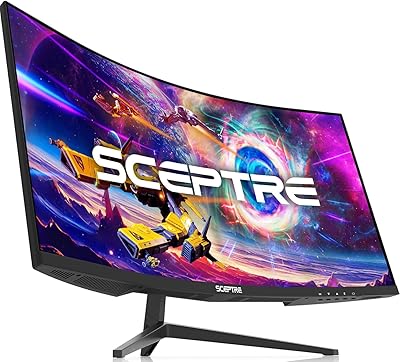
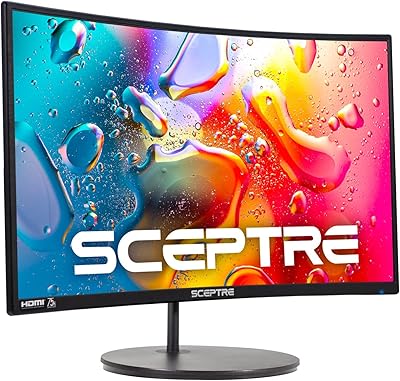
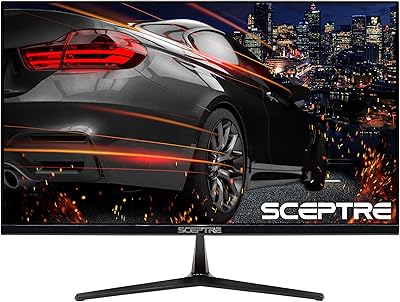
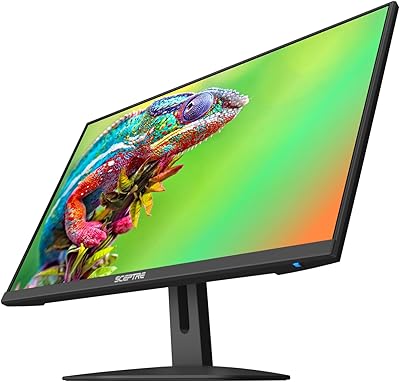
The Sceptre C255B-FWT240 25-inch Curved Gaming Monitor arrived in mid-2025 and wasted little time earning a spot among Amazon’s top-ranked computer monitors. Sceptre has always chased the value end of the market, and this curved gaming monitor is no exception — it promises high-refresh performance at a price that doesn’t require much deliberation. The 1500R panel and matte screen surface make it practical for rooms with windows or overhead lighting. If pixel-perfect sharpness for productivity work is your priority, 1080p at 25 inches may feel limiting — but for gaming, the focus on smoothness makes far more sense.
Features & Benefits

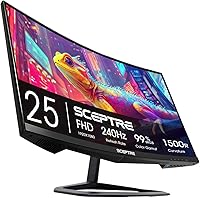
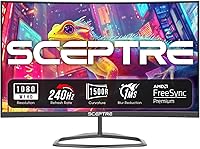
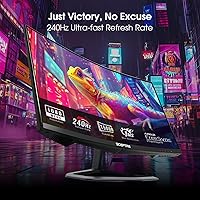
The headline spec is 240Hz at 1080p, and that’s genuinely easy for modern mid-range GPUs to sustain. Paired with a 1ms response time, fast-moving objects in shooters and racing titles stay crisp without the blur trails common on slower panels. AMD FreeSync Premium keeps frame delivery honest — its LFC floor means the Sceptre 240Hz display adapts even when frame rates dip, not just when they’re climbing. Two DisplayPort and two HDMI inputs add real flexibility for switching between a PC and a console without cable juggling. The built-in speakers are functional rather than impressive — fine for background audio while you game, but serious listeners will reach for headphones.

Best For

This curved gaming monitor hits a sweet spot for competitive PC players who care more about frame rate than pixel count. Console owners also benefit — two HDMI ports mean you can keep a PlayStation and a PC connected at once without a switch box. Students or first-time buyers stepping up from a flat 60Hz screen will notice the jump in motion clarity right away. At a typical arm’s-length desk distance, the 1500R curve adds a gentle sense of depth — noticeable without being disorienting. Anyone outfitting a spare room or building a secondary gaming rig will find this 25-inch Sceptre a smart, low-friction choice.

User Feedback

With nearly 5,000 ratings at a 4.5-star average, the Sceptre 240Hz display has clearly connected with buyers. The most consistent praise centers on how smooth gameplay feels right out of the box, especially from people upgrading from standard 60Hz screens — value for money comes up repeatedly. The complaints worth noting involve color accuracy; a portion of reviewers describe tones as slightly washed out and recommend dialing in settings before serious use. Panel uniformity is another minor flag, with a handful of buyers noting slight brightness variation near the screen edges. Stand adjustability is limited to tilt only, which some find restrictive once the monitor is in position.

Pros

  • 240Hz refresh rate delivers a genuinely smooth experience that budget monitors in this class rarely match.
  • The 1ms response time keeps fast-moving visuals crisp, with minimal ghosting during intense gameplay.
  • AMD FreeSync Premium keeps screen tearing in check even when frame rates fluctuate mid-session.
  • Two HDMI and two DisplayPort inputs offer flexible multi-device connectivity without extra hardware.
  • The matte panel coating handles glare well in rooms with overhead or natural lighting.
  • 1500R curvature wraps naturally into peripheral vision at arm’s length, reducing fatigue over long play sessions.
  • Quick, hassle-free assembly makes this 25-inch Sceptre accessible even for first-time monitor buyers.
  • Strong value-for-money ratio backed by nearly 5,000 ratings and a sustained 4.5-star average.
  • Built-in speakers eliminate the need for external audio in minimalist or space-limited desk setups.

Cons

  • Default color settings run cool and washed out; calibration is required before the image looks its best.
  • Panel brightness uniformity can be uneven near screen edges, most visible on dark or solid-color backgrounds.
  • Stand adjustment is limited to tilt only — no height, swivel, or pivot options included.
  • OSD navigation buttons are stiff and awkwardly placed, making menu adjustments genuinely fiddly.
  • No USB-C input limits compatibility with modern laptops relying on single-cable connectivity.
  • Built-in speakers distort at higher volumes and lack bass — headphones are necessary for real audio quality.
  • Nvidia GPU users may encounter inconsistent G-Sync compatibility, as official certification is absent.
  • No USB hub means additional peripherals require direct connections to the PC rather than the monitor.
  • The plastic chassis and lightweight materials feel noticeably budget-grade compared to mid-range alternatives.

Ratings

The scores below for the Sceptre C255B-FWT240 25-inch Curved Gaming Monitor were generated by our AI engine after analyzing verified global user reviews, actively filtering out incentivized, bot-generated, and duplicate submissions to surface genuine buyer sentiment. Nearly 5,000 ratings were processed, and the results reflect both the real strengths that keep buyers satisfied and the recurring friction points that honest shoppers deserve to know before purchasing.
Motion Clarity & Refresh Performance
93%
The 240Hz panel is the undisputed highlight of this curved gaming monitor, and buyers consistently report that the difference is immediately noticeable when switching from a 60Hz or 144Hz screen. In fast shooters and racing titles, movement stays sharp and fluid in ways that feel genuinely impactful during play.
To sustain 240Hz in demanding titles, your GPU needs to be reasonably powerful — budget cards will often cap out well below that ceiling, leaving the panel’s headline spec underutilized. A handful of users noted that the perceived benefit shrinks in slower-paced or single-player games.
Response Time & Ghosting Control
88%
At 1ms, trailing and ghosting are kept firmly in check during high-speed gameplay. Buyers who play competitive titles like tactical shooters report that targets remain crisp even in chaotic scenes, which is exactly what this spec promises and, according to most reviewers, delivers.
A small but consistent group of reviewers noted faint inverse ghosting artifacts in certain overdrive modes, particularly in darker scenes. It’s not a dealbreaker, but users sensitive to this may want to experiment with panel overdrive settings straight out of the box.
Value for Money
91%
This is where the Sceptre 240Hz display earns its strongest praise. Buyers repeatedly describe feeling like they got far more monitor than the price suggested, particularly those stepping up from older flat panels or basic 1080p screens. The combination of refresh rate and curvature at this price tier is genuinely hard to match.
The value equation works best if gaming performance is your main goal. Buyers who expected premium build materials, wide color gamut, or a sturdy ergonomic stand found the trade-offs more noticeable at this price, suggesting expectations need calibrating toward gaming utility rather than all-round quality.
Adaptive Sync & Tear-Free Performance
86%
AMD FreeSync Premium functions reliably on this curved gaming monitor, and buyers with AMD GPUs specifically called out how clean gameplay feels when frames fluctuate. The 120Hz LFC floor means the sync stays active even during GPU-intensive scenes, which keeps the experience consistent.
Users with Nvidia GPUs noted that G-Sync compatibility is not officially certified, and while many reported it working acceptably in practice, the experience was less polished compared to a native FreeSync setup. It’s worth factoring in if your system runs an Nvidia card.
Panel Curvature & Immersion
82%
18%
At a typical desk distance of roughly 24 to 30 inches, the 1500R curve wraps the screen edges into your peripheral vision in a way that feels natural rather than forced. Buyers regularly described longer gaming sessions feeling less fatiguing than on flat alternatives, which aligns with what this curvature radius is designed to do.
The immersive effect is most apparent in widescreen content and open-world games. For desktop productivity work, spreadsheets, or document editing, the curve can make straight horizontal lines appear subtly bowed, which some users found mildly distracting outside of gaming contexts.
Color Accuracy & Vibrancy
67%
33%
Out of the box, colors are punchy enough for casual gaming and video content. Buyers who simply plugged in and played reported satisfaction with the visual presentation for everyday use, and the matte coating keeps reflections from washing out the image in brighter rooms.
Reviewers with a more critical eye toward color consistently noted that the panel leans cooler and slightly washed out by default, particularly in mid-tones. Accurate color representation requires manual calibration, and even after adjustments, the gamut coverage falls short of what content creators or color-sensitive users would expect.
Panel Uniformity
63%
37%
For the majority of buyers, panel uniformity is acceptable during gaming where dynamic content masks minor inconsistencies. Most users watching standard content or playing brightly lit games reported no distracting variations across the screen surface.
A recurring complaint in the review pool involves subtle brightness falloff near the screen edges, most visible on solid-color backgrounds or dark loading screens. This is a known trade-off at this price tier, but buyers planning to use the monitor for photography editing or productivity on white backgrounds should factor this in.
Build Quality & Materials
71%
29%
The chassis feels solid enough for desk use and the matte black finish resists fingerprints reasonably well. Buyers generally described the physical construction as appropriately sturdy for a budget-segment monitor, with no widespread reports of creaking, flexing panels, or loose connectors.
The plastics feel lightweight and entry-level up close, and the rear panel design is fairly plain. For buyers accustomed to monitors costing twice as much, the material quality gap is noticeable, though it has no impact on actual display performance.
Stand & Ergonomics
54%
46%
The stand is stable on a flat desk surface and keeps the monitor firmly in place during use. For buyers who simply set it up and leave it, the basic tilt adjustment covers the most common ergonomic need without any fuss.
The stand supports tilt adjustment only — no height raise, swivel, or pivot. This frustrated a meaningful number of buyers, particularly taller users or those with multi-monitor setups requiring precise alignment. A VESA mount adapter is a practical workaround, but it represents an added step and cost.
Connectivity & Input Options
89%
Two DisplayPort and two HDMI inputs is a genuinely useful configuration at this price. Buyers with a PC and a console both connected reported switching between them painlessly, and the dual DisplayPort options are particularly appreciated by PC gamers pushing high refresh rates.
There is no USB hub functionality and no USB-C input, which modern buyers are increasingly expecting even on budget monitors. Cable management options on the stand are also minimal, which can make the rear of the desk look cluttered once everything is connected.
Built-in Speakers
58%
42%
The built-in speakers earn quiet appreciation from buyers in shared spaces or minimalist desk setups where adding external speakers is not practical. For background audio, system sounds, or casual video calls, they get the job done without requiring any additional hardware.
Anyone expecting meaningful audio quality will be disappointed. The speakers lack bass, sound thin at higher volumes, and clip noticeably in louder scenes. Reviewers were fairly unanimous that headphones or even inexpensive desktop speakers are a significant upgrade the moment audio quality matters.
Setup & Out-of-Box Experience
84%
Assembly is quick and uncomplicated — most buyers reported the monitor was up and running within minutes of opening the box. The included cables and clear instructions make this a strong option for first-time monitor buyers who want a low-friction setup experience.
The default display settings are not optimized for gaming out of the box, and buyers who skipped the initial calibration occasionally reported colors or sharpness feeling off. A brief settings adjustment session is recommended before forming any impressions.
Eye Care & Long Session Comfort
77%
23%
The matte panel coating significantly reduces glare compared to glossy alternatives, which buyers in naturally lit rooms found genuinely useful during long sessions. The curvature also contributes to reduced eye movement across the screen, a benefit several long-session gamers specifically called out.
Flicker and blue light filtering features exist in the OSD menu, but the implementation is basic and the controls are not intuitive to navigate. A few reviewers reported eye strain during extended sessions regardless, suggesting the eye care features are more of a checkbox than a thoroughly engineered solution.
OSD & Menu Usability
61%
39%
The on-screen menu covers all the essential adjustments — brightness, contrast, color temperature, and overdrive settings are all accessible. For buyers who set their preferences once and rarely return to the menu, the functionality is sufficient.
The physical buttons used to navigate the OSD are stiff and awkwardly positioned on the underside of the bezel, which makes adjustments fiddly in practice. Multiple reviewers described the menu navigation as unintuitive, particularly when trying to toggle between input sources quickly.

Suitable for:

The Sceptre C255B-FWT240 25-inch Curved Gaming Monitor is purpose-built for buyers who want high-refresh gaming without spending serious money, and it delivers on that promise more reliably than most options in its tier. Competitive PC gamers running fast-paced shooters or racing titles will get the most tangible benefit from the 240Hz panel, especially those whose GPU can consistently push high frame counts at 1080p. Console players also have a legitimate reason to consider this curved gaming monitor, since two HDMI ports mean a PlayStation and an Xbox — or a console and a PC — can stay connected simultaneously without a switch. Students, first-time monitor buyers, and anyone upgrading from an older 60Hz flat screen will feel the jump in smoothness immediately and find the value proposition easy to justify. The 1500R curvature at typical desk distances adds a subtle but real sense of depth that makes longer gaming sessions feel more natural, and the matte coating handles ambient light well enough to use comfortably near a window.
Not suitable for:

The Sceptre C255B-FWT240 25-inch Curved Gaming Monitor is a poor fit for anyone whose primary use case extends meaningfully beyond gaming. At 1080p on a 25-inch panel, pixel density is adequate for gaming but noticeably soft for prolonged reading, document editing, or any work where text sharpness matters — users who split time between gaming and productivity will feel the resolution ceiling fairly quickly. Photographers, video editors, or anyone working with color-sensitive content should look elsewhere entirely; the panel’s out-of-box color accuracy is inconsistent, and even after calibration it does not cover a wide enough gamut for professional color work. The stand offers tilt adjustment only, so users with specific ergonomic needs — those who require height adjustment or want to position the screen precisely in a multi-monitor array — will find the setup frustrating without a third-party VESA arm. The Sceptre 240Hz display also lacks USB-C input, which is increasingly relevant for users with modern laptops who prefer single-cable desk setups.
Specifications

  • Screen Size: The display measures 25 inches diagonally, providing a usable viewing area well-suited to single-monitor desktop gaming setups.
  • Resolution: Native resolution is 1920x1080 (Full HD 1080p), delivering standard high-definition image clarity across the 16:9 aspect ratio panel.
  • Refresh Rate: The panel supports a maximum refresh rate of 240Hz, enabling exceptionally smooth motion rendering in fast-paced games when paired with a capable GPU.
  • Response Time: Rated at 1ms response time, the panel transitions between colors rapidly to minimize motion blur and ghosting during high-speed gameplay.
  • Panel Curvature: The screen features a 1500R curvature radius, meaning the panel curves to match a circle with a 1500mm radius for a wrap-around viewing effect at typical desk distances.
  • Adaptive Sync: AMD FreeSync Premium is supported, requiring a minimum 120Hz refresh rate at 1080p with Low Framerate Compensation to prevent screen tearing and stutter.
  • Video Inputs: Connectivity includes two DisplayPort inputs and two HDMI inputs, allowing simultaneous connection of multiple PCs, consoles, or other video sources.
  • Screen Surface: The panel uses a matte anti-glare coating that diffuses ambient light and reduces reflections in brightly lit or mixed-lighting environments.
  • Built-in Audio: Two integrated speakers are included, providing basic stereo audio output suitable for casual use without requiring external speakers.
  • Aspect Ratio: The display uses a standard 16:9 widescreen aspect ratio, compatible with the vast majority of gaming, streaming, and productivity content.
  • Stand Adjustment: The included stand supports tilt adjustment only; height raise, swivel, and pivot adjustments are not available without a third-party VESA mount.
  • VESA Compatibility: The monitor supports VESA mounting, allowing users to replace the stock stand with a compatible wall mount or monitor arm for greater positioning flexibility.
  • Dimensions: With the stand attached, the monitor measures 8.5 x 21.99 x 16.3 inches (depth x width x height), making it a compact fit for most standard desks.
  • Weight: The unit weighs 12.77 pounds including the stand, which is typical for a 25-inch curved monitor and generally manageable for a solo setup.
  • Color Finish: The chassis is finished in Machine Black, a neutral matte dark tone that blends with most gaming and desktop environments without drawing visual attention.
  • Model Series: This monitor belongs to the C255B-FWT240 series manufactured by e-Sceptre, with the specific model code C255B-FWT240.A1 used for identification and support purposes.
  • Availability: The monitor was first listed for sale in June 2025 and represents Sceptre’s updated 2026 lineup of budget-tier high-refresh curved gaming displays.
  • Ratings & Rank: As of available data, the monitor holds a 4.5-star average across nearly 5,000 verified ratings and ranks within the top 15 monitors in the Computer Monitors category on Amazon.

Related Reviews

KOORUI 25-inch Curved Gaming Monitor G2511XC
85%
92%
Display Quality
89%
Gaming Performance
85%
Build Quality
83%
Ease of Setup
88%
Connectivity Options
More
Sceptre E255B 25-inch 240Hz Gaming Monitor
81%
88%
Performance
85%
Display Quality
91%
Refresh Rate/Response Time
92%
Value for Money
80%
Build Quality
More
Sceptre C305B 30-inch Curved Ultrawide Gaming Monitor
74%
93%
Value for Money
89%
Refresh Rate Performance
88%
AMD FreeSync Compatibility
91%
Ultrawide Field of View
63%
Image Sharpness & Resolution
More
Sceptre C248W-1920RN 24-inch Curved Gaming Monitor
76%
91%
Value for Money
78%
Display Quality
83%
Curvature & Immersion
74%
Refresh Rate & Motion Clarity
67%
Build Quality & Design
More
Sceptre C275B-FWT240 27″ Curved Gaming Monitor
75%
91%
Refresh Rate Performance
88%
Value for Money
79%
Panel Contrast & Color
83%
Motion Clarity
61%
Build Quality
More
Sceptre E255B-1658A 25-inch 1080p 165Hz Gaming Monitor
82%
91%
Value for Money
87%
Display Performance
89%
Refresh Rate & Response Time
82%
Build Quality
58%
Sound Quality
More
Skytech Gaming Moonshadow 27-inch Curved Gaming Monitor
83%
88%
Image Quality
91%
Refresh Rate Performance
86%
Adaptive-Sync
83%
VA Panel Contrast
84%
Stand & Ergonomics
More
Sealan 27-inch Curved Gaming Monitor
82%
85%
Display Quality
90%
Ease of Setup
91%
Value for Money
87%
Performance in Gaming
83%
Color Accuracy
More
Amzfast 49-Inch Curved Gaming Monitor
85%
93%
Display Quality
88%
Ergonomics & Adjustability
91%
Gaming Performance
89%
Color Accuracy
85%
Connectivity & Ports
More
KOORUI 32-inch Curved Gaming Monitor
84%
89%
Display Quality
92%
Gaming Performance
78%
Build Quality
85%
Color Accuracy
82%
Ergonomics & Comfort
More

FAQ

Yes, to get meaningful use out of 240Hz you need a GPU that can consistently output 240 frames per second in the games you play. In less demanding titles or older games this is very achievable with a mid-range card, but in graphically intensive modern games you may find your frame rate sitting well below 240. The monitor will still work at lower frame rates — FreeSync Premium helps smooth things out — but the full benefit requires a capable system.

The Sceptre C255B-FWT240 25-inch Curved Gaming Monitor officially supports AMD FreeSync Premium, which is designed for AMD GPUs. Many Nvidia GPUs support G-Sync Compatible mode with FreeSync monitors, and most users report it working acceptably, but it is not officially certified for G-Sync. If you have an Nvidia card, expect variable results and test it yourself — the display will still function normally, just without guaranteed adaptive sync support.
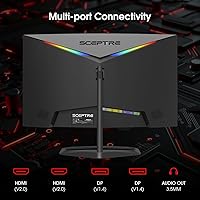
Yes, easily. The monitor has two HDMI ports and two DisplayPort inputs, so you can keep a PS5 connected via HDMI and your PC connected via DisplayPort simultaneously. Switching between them is handled through the on-screen display menu. It’s one of the more practical advantages of this curved gaming monitor for multi-device households.

At a typical desk distance of around 24 to 30 inches, the curve is clearly visible but not dramatic. It wraps the screen edges gently into your peripheral vision rather than creating an aggressive fish-eye effect. Most users describe it as feeling natural after a few minutes. For gaming and video content it adds a subtle sense of depth; for spreadsheets or document work, some users find straight horizontal lines look slightly bowed.

They are usable for low-demand scenarios — background music, system sounds, video calls, or casual YouTube watching. Do not expect any bass response or clean audio at higher volumes. Most reviewers describe them as thin and prone to distortion when pushed. If audio quality matters to you at all, a budget headset or even inexpensive desktop speakers will be a meaningful upgrade.

Almost certainly not — this is a known characteristic of this panel at default settings. The factory calibration tends to run cool and low-contrast out of the box. Spend a few minutes in the OSD menu adjusting brightness, contrast, and color temperature to your preference, and the image improves considerably. Many reviewers noted this same experience and resolved it quickly with manual adjustments.

Yes, the monitor is VESA compatible, so you can remove the stock stand and attach a third-party monitor arm or wall mount. This is actually a popular choice among buyers who want height and swivel adjustability that the included stand does not provide. Just verify the VESA hole pattern on your arm matches the monitor before purchasing.

It’s straightforward. The stand attaches to the monitor with a couple of screws, and most buyers report being fully set up within ten minutes of opening the box. The included instructions are clear enough for first-timers. Connecting the cables and adjusting the OSD settings takes slightly longer, but nothing about the process requires technical experience.

It works for general home use, but there are real trade-offs to be aware of. At 1080p on a 25-inch screen, text sharpness is adequate rather than crisp — people who spend long hours reading documents or working with fine detail may find it less comfortable than a higher-resolution panel. The curve can also make straight lines in spreadsheets appear slightly bowed. For occasional home office use alongside gaming it is fine, but if productivity is your primary need, a flat 1440p monitor would serve you better.

First, make sure FreeSync Premium is enabled in the monitor’s OSD menu and that your GPU’s adaptive sync setting is also turned on in the driver software. If you’re on Nvidia, confirm G-Sync Compatible mode is active in the Nvidia Control Panel. Flickering unrelated to sync issues can sometimes be resolved by switching the cable type — try DisplayPort if you’re currently on HDMI. If problems persist, checking the overdrive setting in the OSD is also worth a try, as aggressive overdrive modes can introduce artifacts on some panels.