Overview

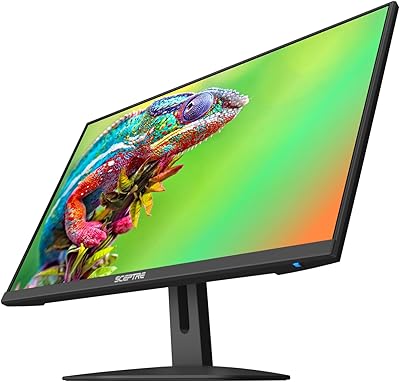
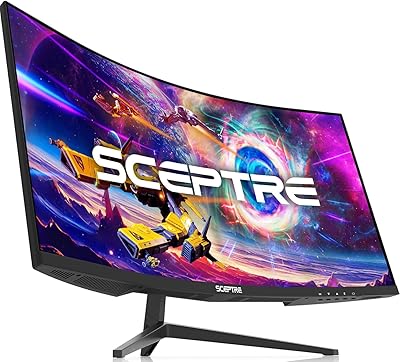
The Sceptre C248W-1920RN 24-inch Curved Gaming Monitor is a straightforward, no-frills display that punches reasonably well for its budget price point. Sceptre has built a reputation for keeping costs low without stripping out every useful feature, and this curved monitor reflects that approach. The 1800R curved panel wraps the image just enough to feel more engaging than a flat screen at a typical desk distance. At 1080p and 75Hz, the specs are honest entry-level territory — not cutting-edge, but perfectly adequate for casual gaming or everyday computing. The matte screen surface handles indoor lighting well, and built-in speakers mean you can get up and running without hunting for extra hardware.

Features & Benefits

The dual HDMI inputs are a practical highlight — you can connect a PC and a console simultaneously and switch between them without unplugging cables. The 75Hz refresh rate is a genuine step up from a standard 60Hz panel; motion in fast games looks noticeably cleaner, even if it won't satisfy competitive players chasing high frame rates. Color coverage sits at 98% sRGB, which translates to reasonably vibrant, accurate hues straight out of the box. The anti-glare matte coating is genuinely useful if your desk faces a window. VESA wall-mount support adds flexibility for anyone who finds the included stand too limiting — and frankly, its adjustment range is minimal.

Best For

This budget gaming display makes the most sense for someone stepping up from a television to a proper monitor for the first time. Console players who want a dedicated gaming screen without spending heavily will find the size and curve satisfying. Students and home-office users who split their time between spreadsheets and casual gaming also fit the profile well. If your PC or console tops out around 1080p at 60–75 frames, there is no practical reason to spend more on a higher-spec panel. It also works well as a secondary display in a multi-monitor setup where cost per screen matters more than absolute performance.

User Feedback

Close to 23,000 ratings with a 4.6 average tells its own story — buyers at this price level are largely satisfied with what they get. The most consistent praise centers on out-of-box color quality and the genuinely immersive feel of the curve for the money. That said, the stand draws repeated criticism: it offers almost no height adjustment and only modest tilt, which can be awkward for taller users or those without a wall-mount option. Built-in speakers get a polite pass — fine for a background playlist, nothing more. A small number of buyers have flagged backlight bleed along panel edges, though this appears to be a quality-control variance rather than a universal flaw.

Pros

  • The 1800R curved panel creates a noticeably more immersive viewing experience than flat monitors at the same price.
  • Dual HDMI ports let you connect a PC and a console simultaneously without swapping cables.
  • Colors look vibrant and well-balanced right out of the box with no manual calibration needed.
  • The matte anti-glare coating genuinely reduces reflections in bright home and office environments.
  • VESA wall-mount support makes it easy to pair with an aftermarket arm for a better ergonomic setup.
  • Built-in speakers remove the need for separate audio hardware during casual or light use.
  • At 1080p on a 24-inch screen, text and images appear sharp and clean for everyday tasks.
  • The Sceptre 24-inch ships with both HDMI and power cables included, so setup requires no extra purchases.
  • Nearly 23,000 verified buyers give it a 4.6-star average, indicating strong real-world satisfaction at this tier.
  • 75Hz refresh rate delivers a visible smoothness improvement over standard 60Hz panels for everyday gaming.

Cons

  • The included stand offers almost no height adjustment, making comfortable long-session posture difficult without a monitor arm.
  • No adaptive sync support means screen tearing can appear in demanding or fast-paced games.
  • Brightness tops out at 250 cd/m², which feels limiting in well-lit or sunlit rooms.
  • A portion of units arrive with noticeable backlight bleed along panel edges, suggesting inconsistent quality control.
  • Off-axis viewing causes visible color shift, which is frustrating during co-op or side-by-side viewing situations.
  • Built-in audio is thin and distorts at higher volumes, making external speakers effectively mandatory for serious listening.
  • The OSD menu for picture adjustments is unintuitive and slow to navigate compared to competing models.
  • Plastic construction feels hollow in places, which undermines confidence in long-term durability.
  • VGA takes the place of a more useful port such as DisplayPort, limiting compatibility with modern hardware.
  • VESA mounting specifications are not clearly documented, leading some buyers to order incompatible monitor arms.

Ratings

The scores below for the Sceptre C248W-1920RN 24-inch Curved Gaming Monitor were generated by our AI rating engine after analyzing thousands of verified global buyer reviews, with spam, bot activity, and incentivized submissions actively filtered out. What you see here reflects the honest consensus of real users — the things they genuinely appreciated and the friction points that came up repeatedly. Both sides of the story are represented transparently, so you can make an informed call before buying.

Value for Money
91%
This is where the Sceptre 24-inch earns its strongest marks. Buyers consistently express surprise at how much display they get for the asking price — a curved panel, dual HDMI, and a respectable color output at a cost that undercuts most branded competitors by a significant margin.
A handful of users feel the value equation only holds if the unit arrives without panel defects. Those who received screens with noticeable backlight bleed report feeling the savings evaporated quickly when dealing with returns or replacements.
Display Quality
78%
22%
Out-of-the-box color vibrancy impresses most buyers who are coming from older flat panels or budget TVs. The 98% sRGB coverage means everyday content — YouTube, casual gaming, general browsing — looks punchy and reasonably well-balanced without any manual calibration.
This is not a panel for color-critical work. Some users notice slight color shift when viewing from wider angles, and the brightness ceiling of 250 cd/m² can feel limiting in very bright rooms. It is a solid everyday display, not a professional one.
Curvature & Immersion
83%
The 1800R curve is noticeable and well-received at typical desk distances of two to three feet. Users upgrading from flat screens frequently mention that the curve draws them into gaming sessions and makes wide desktop workspaces feel more cohesive and natural.
At just 24 inches, a few buyers feel the curvature benefit is less dramatic than it would be on a 27-inch or 32-inch panel. The curve is real, but some users expected a more pronounced wraparound effect and found it subtler than marketing imagery suggested.
Refresh Rate & Motion Clarity
74%
26%
Moving from a standard 60Hz screen to 75Hz is a tangible upgrade that casual gamers notice immediately. Fast-paced games feel smoother, and general desktop scrolling has a more fluid quality that is hard to go back from once you have experienced it.
Competitive or serious PC gamers will find 75Hz limiting fairly quickly. There is no FreeSync or G-Sync support mentioned, which means screen tearing can appear in graphically demanding titles. This is an entry-level refresh rate, and buyers expecting high-performance gaming should look elsewhere.
Build Quality & Design
67%
33%
The chassis feels reasonably solid for its price tier, and the matte black finish looks clean and unobtrusive on most desks. At seven pounds it is light enough to reposition easily, and the overall construction does not feel flimsy during day-to-day use.
The plastic finish shows fingerprints and scratches more readily than premium builds. Several buyers have pointed out that the rear panel and base feel noticeably hollow when pressed, which creates a less-than-premium impression even if it does not affect actual performance.
Stand & Ergonomics
44%
56%
The stand gets the monitor off the desk and holds it stable without wobble during normal use. For buyers who plan to wall-mount via the VESA bracket immediately, the included stand is serviceable enough as a temporary solution during setup.
This is the most consistently criticized aspect across user reviews. The stand offers almost no height adjustment and only a minimal tilt range, making it genuinely uncomfortable for users who are taller or who prefer a more upright viewing angle. A monitor arm or wall mount is practically a necessity.
Connectivity & Port Selection
86%
Dual HDMI ports are a real convenience feature that buyers appreciate immediately. Switching between a PC and a gaming console without touching cables is a small but meaningful quality-of-life benefit that users mention repeatedly as a positive surprise at this price.
The inclusion of VGA feels dated and takes the place of a port that could have been more useful, such as DisplayPort. Audio passthrough is limited to a 3.5mm PC audio input, so users expecting more versatile audio routing may need an external adapter.
Built-in Speakers
52%
48%
Having any speakers built in at this price point is appreciated by users who just need background audio during casual use. For a video call, background music, or a quick YouTube session without headphones, they do the job without requiring any additional setup.
The audio quality is thin and lacks bass almost entirely. At higher volumes, distortion becomes noticeable, and stereo separation is minimal. Any buyer who cares about audio quality at all will want external speakers or headphones — these are a convenience feature, not a listening experience.
VESA Wall-Mount Compatibility
88%
VESA compatibility is a genuine strong point that partially compensates for the weak stand. Users who invest in a basic monitor arm report an immediately improved ergonomic setup, and the monitor sits securely without any wobble once properly mounted.
The VESA mount spec is not prominently documented, which caused some buyers to order incompatible arms. Sceptre could do a better job of clearly publishing the exact hole pattern dimensions to save buyers the hassle of guessing or researching before purchasing accessories.
Anti-Glare Coating
79%
21%
The matte coating performs well in typical home or office environments with overhead lighting or nearby windows. Buyers in brighter workspaces specifically call out the anti-glare surface as a reason they did not need to reposition their desk or use blinds constantly.
The coating has a slightly grainy texture that can soften fine text at close distances, which some users find mildly distracting during extended reading or document work. It is a common trade-off with matte panels, but worth knowing if sharp text clarity is a priority.
Setup & Out-of-Box Experience
82%
18%
Assembly is straightforward and takes under ten minutes for most buyers. The monitor arrives with HDMI and power cables included, so it is genuinely ready to use immediately without a separate accessory run, which buyers consistently mention as a pleasant practical touch.
The on-screen display menu for adjusting brightness and color settings is basic and not the most intuitive to navigate. A small number of buyers found the default color and brightness settings too warm or too dim and had to spend time dialing in their preferred picture mode.
1080p Resolution Sharpness
71%
29%
At 24 inches, 1080p delivers a pixel density that looks clean and sharp for everyday computing and gaming. Text is crisp enough for extended work sessions, and most users transitioning from lower-resolution displays report a clear and immediate visual improvement.
Users coming from 1440p or 4K panels will find 1080p a step back, particularly for desktop productivity tasks where screen real estate matters. At 24 inches the resolution holds up, but buyers with higher-resolution expectations should weigh this carefully before committing.
Compatibility & Plug-and-Play
87%
The monitor is broadly compatible across Windows PCs, laptops, and gaming consoles without driver installation or configuration headaches. Buyers consistently report a truly plug-and-play experience regardless of the source device, which removes a common frustration from the setup process.
A small subset of users reported intermittent signal handshake issues with certain HDMI cables or older graphics cards, requiring a cable swap or port change to resolve. These appear to be edge cases rather than a widespread issue, but worth flagging for users with older hardware.

Suitable for:

The Sceptre C248W-1920RN 24-inch Curved Gaming Monitor is a strong fit for anyone entering the PC gaming space without wanting to spend heavily upfront. Console players switching from a television to a dedicated screen will appreciate the step up in input responsiveness and the more focused viewing experience the curve provides at desk distance. Students who split their time between coursework and casual gaming get a genuinely versatile display that handles both without compromise. Home-office users on a tight budget who need a second screen for multitasking will find the size and image quality more than adequate for everyday productivity. Older hardware setups — machines that comfortably run games at 1080p and 60 to 75 frames — are well matched to what this curved monitor actually delivers, meaning buyers won't be paying for headroom their system can't use. Anyone planning to wall-mount their display immediately will also sidestep the most common complaint about the stand and end up with a clean, ergonomic setup at a price that's hard to argue with.

Not suitable for:

Serious or competitive PC gamers will likely find this budget gaming display frustrating within a few months of purchase. The 75Hz refresh rate and lack of adaptive sync support mean fast-paced titles can exhibit screen tearing, and players accustomed to 144Hz or higher will notice the difference immediately. Creative professionals who need accurate color reproduction for photo editing, video grading, or design work should look elsewhere — 98% sRGB is a reasonable baseline, but the panel's brightness ceiling and off-axis color shift make it unsuitable for color-critical tasks. Users who are particularly sensitive to ergonomics will find the stand a recurring annoyance, as it offers almost no height adjustment and only a limited tilt range; without a monitor arm in the budget, comfortable long-session posture is genuinely difficult to achieve. Anyone coming from a 1440p or 4K display will find stepping back to 1080p noticeably limiting on a 24-inch panel, particularly for reading dense text or working across multiple application windows. If long-term build durability and premium materials are important to you, the Sceptre C248W-1920RN 24-inch Curved Gaming Monitor's plastic construction and hollow-feeling chassis may undermine your confidence in the product over time.

Specifications

  • Screen Size: The panel measures 24 inches diagonally, offering a comfortable viewing area for single-monitor desk setups without dominating smaller workspaces.
  • Panel Curvature: The screen uses a 1800R curvature radius, which gently wraps the image around the viewer's field of vision at a typical desk viewing distance.
  • Resolution: Native resolution is 1920x1080 (Full HD 1080p), delivering a pixel pitch of 0.27156mm both horizontally and vertically for clean, detailed imagery at 24 inches.
  • Refresh Rate: The panel runs at a maximum refresh rate of 75Hz, providing smoother motion rendering than standard 60Hz displays during gaming and video playback.
  • Aspect Ratio: The display uses a standard 16:9 widescreen aspect ratio, compatible with virtually all modern video content, games, and operating system interfaces.
  • Color Coverage: The monitor covers 98% of the sRGB color space, providing reasonably accurate and vibrant color reproduction for everyday computing, media consumption, and casual gaming.
  • Brightness: Peak brightness is rated at 250 cd/m², which is adequate for typical indoor environments but may feel insufficient in very bright or sunlit rooms.
  • Screen Surface: The display features a matte anti-glare coating that diffuses ambient light reflections, reducing eye strain in home and office settings with overhead or nearby lighting.
  • Video Inputs: Connectivity includes two HDMI ports and one VGA port, allowing simultaneous connection of multiple source devices such as a PC and a gaming console.
  • Audio Input: A 3.5mm PC audio input is included, enabling audio passthrough from a connected computer directly to the monitor's built-in speakers.
  • Built-in Speakers: The monitor integrates two built-in speakers suitable for casual listening, background audio, and video calls without requiring a separate external audio device.
  • VESA Compatibility: The rear of the monitor is VESA wall-mount compatible, allowing users to replace the included stand with a third-party monitor arm or wall bracket.
  • Physical Dimensions: The monitor measures 21.61 inches wide, 16.04 inches tall, and 9.06 inches deep with the stand attached, fitting most standard desks comfortably.
  • Item Weight: The complete unit weighs 7 pounds, making it light enough to reposition or wall-mount without requiring additional assistance during installation.
  • Power Input: The monitor accepts a wide voltage range of 110–240V, making it compatible with standard power outlets across North America and international markets.
  • Lamp Life: The backlight is rated for 30,000 or more hours of operational life under typical usage conditions, representing several years of daily use before significant degradation.
  • Operating System: The monitor is fully plug-and-play compatible with Windows 10 and other major operating systems without requiring proprietary driver installation.
  • Color: The unit is finished in a matte metal black colorway that blends neutrally into most desk and gaming room environments.

Related Reviews

Sceptre E248W-FW100T 24-inch Gaming Monitor
76%
91%
Value for Money
74%
Image Quality
78%
Gaming Performance
82%
Refresh Rate & Sync
67%
Response Time & Motion
More
Sealan 24-Inch Curved Gaming Monitor
86%
92%
Gaming Performance
88%
Visual Quality
91%
Refresh Rate Smoothness
85%
Design & Build
87%
Eye Care Features
More
KTC 24-inch 1500R Curved Gaming Monitor
86%
94%
Gaming Performance
89%
Display Quality
92%
Value for Money
87%
Build Quality
83%
Ergonomics
More
Samsung CRG5 24-Inch Curved Gaming Monitor
78%
88%
Value for Money
83%
Image Quality
81%
Gaming Performance
86%
Curvature & Immersion
84%
FreeSync Performance
More
Z-Edge UG24 24-inch Curved Gaming Monitor
85%
88%
Gaming Performance
85%
Display Quality
81%
Build Quality
92%
Value for Money
89%
Ease of Setup
More
Sceptre C275B-FWT240 27″ Curved Gaming Monitor
75%
91%
Refresh Rate Performance
88%
Value for Money
79%
Panel Contrast & Color
83%
Motion Clarity
61%
Build Quality
More
Sceptre C305B 30-inch Curved Ultrawide Gaming Monitor
74%
93%
Value for Money
89%
Refresh Rate Performance
88%
AMD FreeSync Compatibility
91%
Ultrawide Field of View
63%
Image Sharpness & Resolution
More
ViewSonic VX2418C 24-inch 1080p Curved Gaming Monitor
84%
90%
Value for Money
91%
Gaming Performance
87%
Display Quality
85%
Ease of Setup
82%
Build Quality
More
Gawfolk 24.5-inch Gaming Curved Monitor GF245A
84%
86%
Display Quality
88%
Gaming Performance
92%
Value for Money
80%
Build Quality
90%
Ease of Setup
More
Samsung CF390 24-inch Curved Gaming Monitor
78%
88%
Value for Money
79%
Image Quality
71%
Gaming Performance
86%
Design & Aesthetics
43%
Ergonomics & Stand
More

FAQ

Yes, it connects to both PlayStation consoles via HDMI with no additional adapters needed. The dual HDMI ports are a genuine convenience here — you can leave both a console and a PC plugged in at the same time and switch inputs through the on-screen menu.

It is a subtle but real difference, especially during fast-paced gaming or quick desktop scrolling. You probably won't be blown away, but most people who switch notice that motion feels a bit more fluid and that there's less judder during camera pans in games. It's a meaningful step up for casual use.

Yes, the Sceptre C248W-1920RN 24-inch Curved Gaming Monitor is VESA wall-mount compatible. The exact hole pattern is 75x75mm, which is a standard size that fits the vast majority of monitor arms and wall brackets available online. If the stand's limited adjustment range bothers you, swapping in an arm is a straightforward fix.

It varies from unit to unit, which points to quality control inconsistency rather than a design flaw across the board. Most buyers don't experience it at a noticeable level. That said, a small percentage of users do receive panels with visible light bleed along the edges, particularly in dark scenes. If it happens, the return process through the retailer is your best route.

Yes, an HDMI cable and a power cable are both included, so you can connect and start using the monitor straight away. No need to order extras before it arrives, which is a practical touch that buyers frequently mention as a welcome inclusion.

Honestly, no — not if audio quality matters to you at all. They are fine for a quick YouTube video, a video call, or background music at low volume, but they lack bass and distort noticeably when pushed higher. Think of them as a convenience feature rather than a real audio solution.

The stand is basic. It offers a small degree of tilt adjustment but no height adjustment whatsoever. If you are taller or prefer a more upright viewing angle, this will likely be uncomfortable for extended sessions. A monitor arm is strongly recommended if ergonomics are important to you, and the VESA compatibility makes that upgrade easy.

Yes, the VGA input is included specifically for compatibility with older hardware. You can run a VGA cable directly from a legacy graphics card or laptop to the monitor without an adapter. Keep in mind that VGA is an analog signal and won't deliver the same sharpness as HDMI, but it works.

It handles office work perfectly well. The curve is subtle enough at 24 inches that it doesn't feel distracting during document editing or browsing, and the matte coating actually makes it more comfortable to use for long work sessions under typical office lighting than many glossy alternatives. It's a decent dual-purpose display.

Most buyers find the out-of-box picture quality pleasant and usable immediately without touching any settings. Colors are vibrant and contrast is decent. If you want to fine-tune brightness or color temperature, the OSD menu does the job, though it's not the most intuitive interface to navigate. For casual use, factory defaults are generally good enough.

Where to Buy