Overview

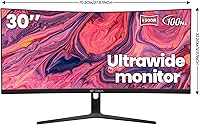
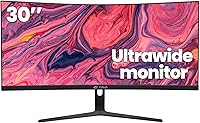
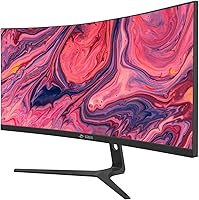
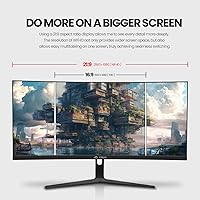
The CRUA CR300ZA 30-Inch Ultrawide Curved Monitor arrived on the market in early 2024 as a value-focused entry into the ultrawide space, and it has carved out a surprisingly solid niche in a short time. Moving from a standard 16:9 display to a 29.5-inch 21:9 panel is a genuinely noticeable shift — you gain real horizontal room for side-by-side apps, widescreen content, and coding layouts. CRUA is a newer brand, so some skepticism is fair, but over 3,500 ratings and a top-100 monitor rank suggests real buyer volume. This is a budget-tier display, and expectations should be set accordingly.
Features & Benefits

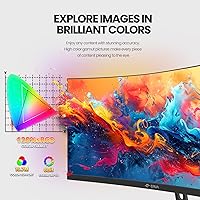
The VA panel is arguably the standout specification at this price. With a 3000:1 contrast ratio, dark scenes in games or films look noticeably deeper than on typical IPS alternatives — blacks stay black rather than washing to grey. The 100Hz refresh rate paired with AMD FreeSync delivers tangibly smoother motion than a 60Hz panel, particularly useful for mid-range GPU owners. Color coverage is rated at 120% sRGB, which produces vibrant results for media consumption, though critical editing work will outgrow it quickly. Connectivity covers HDMI 2.0 and DisplayPort 1.4, and the 1500R curvature wraps naturally at typical desk distances without feeling forced.

Best For

This ultrawide curved monitor makes the most sense for productivity-heavy workflows — think running a browser, a messaging app, and a code editor side by side without constant tab-switching. Students and developers especially benefit from that extra horizontal real estate. Casual gamers with a mid-range GPU will also find real value in the 100Hz panel without needing high-end hardware to drive it. First-time ultrawide buyers upgrading from a standard 24-inch screen will feel the difference immediately. That said, if your work involves serious color grading or retouching, this widescreen VA monitor is not the right fit — factory-calibrated panels serve that use case better.

User Feedback

With a 4.3-star average across more than 3,500 reviews, the CRUA 30-inch display earns consistent praise for its wide format and color vibrancy relative to its asking price. Buyers frequently describe the screen size as a day-to-day revelation. On the critical side, the tilt-only stand draws recurring complaints — no height or swivel adjustment frustrates users coming from more ergonomic setups. Some report minor backlight uniformity variation in the corners, though this appears inconsistent across units. Packaging and assembly are generally described as straightforward. Customer support response times earn positive mentions, which is a reassuring sign for a brand this early in its market life.

Pros

  • The 21:9 aspect ratio creates genuinely useful horizontal space for multitasking, coding, and widescreen media.
  • VA panel contrast at 3000:1 produces deep blacks that budget IPS panels simply cannot match.
  • 100Hz refresh rate paired with FreeSync delivers noticeably smoother motion for mid-range GPU users.
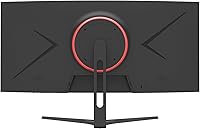
  • VESA 100x100mm wall-mount support gives buyers a clean, flexible setup option beyond the included stand.
  • Matte screen surface cuts glare effectively in typical indoor lighting conditions.
  • HDMI 2.0 and DisplayPort 1.4 ports cover virtually every modern desktop and laptop connection scenario.
  • Over 3,500 buyer ratings with a 4.3-star average signals strong real-world satisfaction at this price tier.
  • The 1500R curvature feels natural at typical desk distances and reduces edge distortion over long sessions.
  • Assembly is widely reported as quick and straightforward, with sensible packaging protecting the panel during shipping.

Cons

  • The stand offers tilt adjustment only — no height, swivel, or pivot, which limits ergonomic flexibility.
  • Color accuracy is not factory-calibrated, making it unreliable for professional creative work.
  • Some units show minor backlight uniformity variation in screen corners, which can be distracting on plain backgrounds.
  • At 2560x1080, pixel density across 29.5 inches is noticeably lower than a 1440p display of similar size.
  • CRUA is a young brand with limited long-term reliability data, which may concern buyers prioritizing longevity.
  • No built-in USB hub or KVM functionality limits desk convenience for multi-device users.
  • The 100Hz ceiling will feel modest to buyers familiar with 144Hz or faster competitive monitors.
  • Brightness tops out at 300 cd/m², which may struggle against strong ambient light or near a sunny window.

Ratings

The scores below for the CRUA CR300ZA 30-Inch Ultrawide Curved Monitor were generated by our AI system after analyzing thousands of verified global buyer reviews, with spam, bot-submitted, and incentivized feedback actively filtered out. Each category reflects the honest distribution of real user experiences — strengths and frustrations alike — weighted by review depth and recency.
Value for Money
88%
Buyers repeatedly call out the price-to-screen-size ratio as one of the best they have found in the ultrawide category. Getting a curved 21:9 VA panel with FreeSync at this price point is genuinely difficult to match, and that comes through clearly in the feedback from first-time ultrawide buyers.
A handful of users who compared it directly to established brands felt the savings came at the cost of polish in build finishing and color calibration out of the box. For buyers who equate value with long-term durability, CRUA's short track record adds some uncertainty to the equation.
Picture Quality
79%
21%
The VA panel's 3000:1 contrast ratio delivers noticeably richer dark scenes than budget IPS alternatives — users watching films or playing atmospheric games consistently praise how deep the blacks look. Color vibrancy for everyday content like streaming and web browsing is described as punchy and pleasing.
Some buyers noted that the out-of-box color calibration skews slightly warm and benefits from manual adjustment. A few users also flagged that the 120% sRGB coverage claim feels optimistic in practice, particularly when compared against panels with hardware calibration reports.
Contrast & Blacks
83%
This is one of the clearest advantages the VA panel brings over IPS options in the same price range. Users playing darker game titles like horror or sci-fi RPGs specifically mentioned that black levels made a meaningful difference in immersion compared to their previous displays.
Some reviewers reported a degree of black smearing — a known VA characteristic — during fast dark-on-dark motion sequences in games. It is not severe enough to ruin gameplay for most, but buyers used to high-end fast VA or OLED panels may find it noticeable.
Refresh Rate & Smoothness
81%
19%
Users upgrading from 60Hz monitors consistently describe the 100Hz experience as a clear, tangible improvement in day-to-day scrolling and gaming motion. Paired with FreeSync on an AMD GPU, screen tearing was effectively eliminated for the majority of reviewers running mid-range hardware.
Buyers coming from 144Hz or higher panels found 100Hz underwhelming for competitive gaming. A small number also reported that FreeSync compatibility with certain NVIDIA GPUs required manual configuration, which frustrated less technically experienced users.
Ultrawide Screen Real Estate
91%
The 21:9 format is consistently described as the most impactful aspect of daily use. Coders appreciate running a terminal, editor, and browser simultaneously without overlap; spreadsheet users love seeing more columns without scrolling; and film viewers note that widescreen content fills the panel without letterboxing.
A minority of users found that some older software and certain games do not fully support 2560x1080, defaulting to stretched 16:9 output instead. This is a 21:9 industry-wide limitation rather than a flaw specific to this display, but it is worth knowing before buying.
Ergonomics & Stand
47%
53%
The stand is stable enough that the monitor does not wobble during normal desk use, and the tilt range covers most basic seating adjustments for users who sit at a fixed chair height. VESA compatibility at least gives buyers a path to a better ergonomic setup without replacing the monitor itself.
The lack of height or swivel adjustment is the single most common complaint across all reviews. Users who came from monitors with full ergonomic stands found the fixed height frustrating, especially in shared desk environments or for anyone who alternates between sitting and standing.
Build Quality & Materials
68%
32%
The panel itself feels solid for the price, and most buyers report that the chassis shows no flex or creaking during normal adjustments. The matte plastic finish resists fingerprints reasonably well and looks clean on a desk without looking cheap.
The stand base and neck feel noticeably lightweight compared to monitors from more established brands, and a few buyers reported minor wobble when the desk vibrates from typing. It is functional, but the materials clearly reflect the budget-tier positioning.
Color Accuracy
61%
39%
For general use — web content, YouTube, casual photo browsing — most buyers found the colors pleasing and vivid enough without any calibration. The wide color gamut does make everyday visuals pop in a way that budget monitors at lower sRGB coverage do not.
Users who attempted color-critical work found notable deviation from accurate reference values without manual calibration. The panel does not ship with a calibration report, and getting it dialed in for professional photo or video work requires either third-party profiling tools or significant OSD experimentation.
Connectivity
84%
Having both HDMI 2.0 and DisplayPort 1.4 covers virtually every modern setup scenario — desktop PCs, gaming consoles, and laptops with adapters all connect without issue. The 3.5mm audio output is a quiet but genuinely useful addition for users who prefer to route headphone audio through the monitor.
There is no USB hub built in, which is a miss for users managing multiple peripherals at a single desk. Cables are not always included in the box depending on the purchase channel, which caught a small number of buyers off guard at setup time.
Glare & Matte Finish
77%
23%
The anti-glare matte coating handles typical indoor ambient lighting well, and most buyers working near windows found it far more manageable than glossy alternatives. The coating does not add visible graininess to the image at normal viewing distances.
In very bright rooms or with a window directly behind the viewer, the 300 cd/m² brightness ceiling becomes a limiting factor even with the matte coating doing its job. Users in sunlit home offices occasionally reported needing to adjust desk positioning to maintain comfortable visibility.
Setup & Assembly
86%
The assembly process earns consistent praise for being quick and intuitive — most buyers had the monitor fully set up within 15 minutes of opening the box. The packaging was described as protective and well-organized, with the panel arriving undamaged in the vast majority of cases.
A small number of buyers noted that included documentation was minimal, which caused brief confusion around OSD navigation and FreeSync activation. Cable inclusion was inconsistent across orders, which caused friction for buyers who did not already have HDMI or DisplayPort cables on hand.
Gaming Performance
74%
26%
For casual and mid-core gaming, the combination of 100Hz, FreeSync, and the immersive 1500R curve genuinely delivers a satisfying experience at this price. Racing games, open-world RPGs, and cinematic titles benefit noticeably from both the refresh rate and the wide field of view.
Competitive FPS players found the 100Hz ceiling and VA panel response time — which can exhibit slight motion blur on fast lateral movement — insufficient for serious ranked play. The monitor is a solid casual gaming display but not designed for high-frame-rate competitive scenarios.
Eye Comfort
76%
24%
The combination of the 1500R curve, matte finish, and available low blue light mode made extended work sessions comfortable for most users. Several buyers who work 8-plus hour days mentioned reduced eye strain compared to flat monitors they previously used.
A few users reported that the low blue light mode noticeably yellows the screen and felt too aggressive as a daily setting. The absence of flicker-free certification details in available documentation left some buyers uncertain about long-term comfort for sensitive eyes.
Brand Reliability & Support
63%
37%
Customer support responsiveness earns genuinely positive mentions in user feedback, with several buyers noting that CRUA responded promptly to defect claims and replacement requests. For a brand this new, that responsiveness is a meaningful data point worth noting.
CRUA only entered the market in early 2024, so there is simply no multi-year reliability track record to draw on yet. Buyers who prioritize knowing a brand will be around in three or four years to honor warranties may feel understandably cautious.

Suitable for:

The CRUA CR300ZA 30-Inch Ultrawide Curved Monitor is a strong fit for anyone who spends long hours juggling multiple applications and wants to replace a cluttered dual-monitor setup with a single, wider screen. Coders and students will immediately appreciate having a terminal, browser, and documentation open side by side without constant window-switching. Casual and mid-core gamers running a mid-range GPU will notice a genuine difference in motion smoothness compared to a standard 60Hz panel, and the 1500R curve adds natural immersion in racing or adventure titles. Home office workers on a budget who are upgrading from a 24-inch 16:9 display for the first time will find the jump to a 21:9 format surprisingly impactful for daily productivity. The accessible price point also makes it a practical choice for students furnishing a first desk setup without overspending.
Not suitable for:

Buyers with serious color work in their workflow should look elsewhere — this widescreen VA monitor does not ship factory-calibrated, and while the color coverage is respectable for casual use, professional photo editing or video grading demands more precision than this panel can reliably deliver. Users who have grown accustomed to fully adjustable monitor arms or ergonomic stands will find the tilt-only base frustrating, since there is no height or swivel adjustment built in. Those working in very bright rooms may also find the 300 cd/m² brightness ceiling limiting, particularly next to a window. Competitive esports players chasing high frame rates will find the 100Hz ceiling modest compared to the 144Hz and 165Hz panels available at similar price points. Finally, buyers expecting a polished brand experience with years of reliability data may feel uncertain about CRUA given its short track record in the market.

Specifications

  • Screen Size: The panel measures 29.5 inches diagonally, providing a noticeably wider workspace than a standard 27-inch 16:9 monitor.
  • Aspect Ratio: The 21:9 ultrawide aspect ratio offers significantly more horizontal screen space than conventional widescreen displays.
  • Resolution: Native resolution is 2560x1080 (WFHD), which delivers crisp text and detail across the wide panel at typical desk viewing distances.
  • Panel Type: Uses a VA (Vertical Alignment) panel, which provides strong contrast performance compared to IPS alternatives in the same price range.
  • Refresh Rate: The display runs at a native 100Hz, offering smoother motion handling than standard 60Hz monitors for both gaming and fast-scrolling content.
  • Contrast Ratio: A 3000:1 static contrast ratio allows the panel to render deep blacks and bright whites simultaneously, benefiting dark-scene visibility.
  • Color Gamut: Covers 120% of the sRGB color space, producing vibrant, saturated colors suited to media consumption and general productivity use.
  • Brightness: Peak brightness is rated at 300 cd/m², which is adequate for most indoor environments but may struggle against strong direct light sources.
  • Curvature: The 1500R curve radius is calibrated for single-user immersion at typical arm-length desk distances, reducing peripheral distortion.
  • Viewing Angle: Rated at 178° horizontally and vertically, the panel maintains acceptable color consistency when viewed from moderate off-axis positions.
  • Connectivity: Equipped with one HDMI 2.0 port, one DisplayPort 1.4, and a 3.5mm audio output jack for headphone or speaker connection.
  • Adaptive Sync: Supports AMD FreeSync, which dynamically matches the display refresh rate to GPU output to reduce screen tearing during gameplay.
  • VESA Mount: Compatible with standard 100x100mm VESA wall mounts, allowing the included stand to be replaced for a cleaner or more ergonomic setup.
  • Stand Adjustment: The included stand supports tilt adjustment from -5° to +15° only; height, swivel, and pivot adjustments are not available.
  • Surface Finish: The matte anti-glare coating reduces reflections from ambient lighting, making it easier to use in rooms with windows or overhead lights.
  • Dimensions: The monitor measures 27 x 3.3 x 16 inches with the stand attached, requiring a desk depth of at least 24 inches for comfortable viewing.
  • Weight: The unit weighs 11.76 pounds with the stand, which is typical for a curved ultrawide display in this size category.
  • Power Input: Operates on 12V DC input; an AC power adapter is included in the box for standard wall outlet use.
  • Low Blue Light: A built-in low blue light mode is available to reduce eye fatigue during extended viewing sessions, accessible through the OSD menu.
  • Surface Area: The screen's physical footprint spans 27 inches wide, so verify your desk width before ordering if space is limited.

Related Reviews
CRUA 24-Inch Curved Monitor
84%
88%
Display Quality
91%
Value for Money
84%
Ease of Setup
80%
Gaming Performance
79%
Build Quality
More
CRUA CR320C 32″ Curved 4K Monitor

73%
91%
Image Sharpness
78%
Color Accuracy
88%
Contrast & Black Levels
84%
Curvature & Immersion
67%
Refresh Rate & Smoothness
More
Sceptre E305B-FU200T 30-inch Ultrawide Monitor
79%
91%
Value for Money
88%
Gaming Performance
79%
Picture Quality
93%
Ultrawide Immersion
74%
Build Quality
More
CRUA CR270C 27″ Curved Gaming Monitor
71%
83%
Value for Money
78%
Image Quality
81%
Refresh Rate Performance
86%
Panel Contrast & Blacks
67%
Build Quality
More
Raywego Q34DB45-1 34-inch Curved Gaming Monitor
72%
88%
Value for Money
84%
Gaming Performance
74%
Image Quality
51%
HDR Performance
67%
Build Quality
More
Westinghouse 34-Inch Curved Ultrawide Gaming Monitor
72%
84%
Value for Money
78%
Image Quality
81%
Refresh Rate & Motion
82%
Adaptive Sync
83%
Curve & Immersion
More
INNOCN 25G2S 24.5″ Gaming Monitor
76%
91%
Image Clarity
88%
Refresh Rate Performance
86%
Color Accuracy
84%
Gaming Responsiveness
89%
Console Compatibility
More
LG 38WR85QC-W 38-inch Curved UltraWide Monitor
85%
93%
Color Accuracy
91%
Panel & Display Quality
78%
HDR Performance
89%
Refresh Rate & Gaming
84%
USB-C Connectivity
More
Sceptre C305B 30-inch Curved Ultrawide Gaming Monitor
74%
93%
Value for Money
89%
Refresh Rate Performance
88%
AMD FreeSync Compatibility
91%
Ultrawide Field of View
63%
Image Sharpness & Resolution
More
LG 34BL85C-B 34-inch UltraWide Curved Monitor
86%
92%
Display Quality
87%
Build Quality
88%
Ease of Setup
85%
Gaming Performance
90%
Multitasking Experience
More

FAQ

Yes, the HDMI 2.0 port works with most modern laptops, including MacBooks that have an HDMI output or use a USB-C to HDMI adapter. Just be aware that macOS may need a small resolution adjustment in display settings to fill the 21:9 panel correctly, since macOS does not natively support 2560x1080 in all versions without a third-party workaround.

At 29.5 inches, the pixel density lands around 93 PPI, which is noticeably lower than a 1440p display of similar width. Text is perfectly readable for everyday work, but if you sit very close or do a lot of fine typesetting, you may notice some softness compared to higher-resolution panels. For most productivity and gaming use, it is not a problem.

The included stand only tilts between -5° and +15° — there is no height, swivel, or pivot adjustment built in. If you need to raise or lower the screen, your best option is to wall-mount it using the 100x100mm VESA pattern on the back, or purchase a compatible aftermarket monitor arm.

FreeSync is natively supported on AMD GPUs. NVIDIA GPUs from the GTX 10 series onward also support FreeSync displays through NVIDIA's G-Sync Compatible certification, though performance can vary slightly by GPU model. Either way, the monitor works as a standard 100Hz display with any GPU that has HDMI or DisplayPort output.

It is actually quite well-suited for that. The 21:9 aspect ratio matches the native format of most cinematic films, which means you get a full image without the black bars you typically see on 16:9 screens. The VA panel's high contrast ratio also helps with dark scenes in a way budget IPS panels often cannot match.

Most buyers report it takes under 15 minutes to assemble. The stand attaches to the monitor base with a few screws, and the connection ports are clearly labeled on the back. Cables are not always included in the box, so check what ports your devices use and have the appropriate cables ready before setting up.

The 1500R curvature is moderate — you will definitely notice it compared to a flat monitor, but it does not feel extreme or distorting. At a normal desk distance of about 24 to 30 inches, the curve wraps comfortably into your peripheral vision. It is noticeably more immersive than a flat panel without being as aggressive as some 1000R gaming monitors.

No, the stand does not support pivot rotation, and a 29.5-inch ultrawide panel in portrait orientation would be impractically tall for most desks anyway. If portrait mode is important to you, this widescreen VA monitor is not the right choice.

The monitor does not have built-in speakers. It does include a 3.5mm audio output jack, so you can plug in headphones or external speakers directly. If you are connecting via DisplayPort or HDMI from a PC, audio can also route through the source device.

CRUA's listed warranty and support terms should be confirmed directly at point of purchase, as they can vary by retailer and region. That said, buyer feedback on CRUA's customer support is generally positive for a newer brand, with multiple reviewers noting that the company responded promptly to issues. Given that CRUA only launched this model in early 2024, long-term durability data is still limited, so keeping proof of purchase and registering the product where possible is a smart precaution.