

Overview
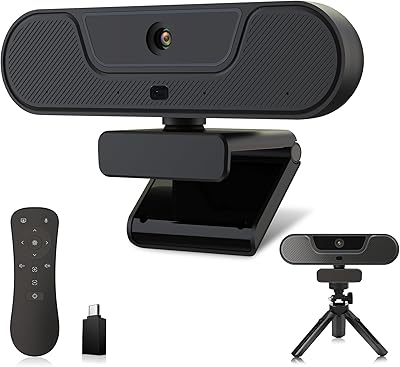
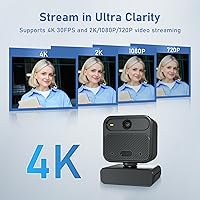
The Saylas W12S 4K Webcam arrived in April 2025 and quickly carved out a respectable position in the mid-range webcam market, reaching #77 in Amazon's webcam category within weeks of launch. Powered by a Sony 48MP CMOS sensor, it supports 4K at 30fps alongside 2K, 1080p, and 720p modes, giving users meaningful flexibility depending on their platform and bandwidth. What makes it stand out at this price tier isn't just resolution options — it's the bundled accessory set. A remote control, tripod, and privacy cover all come in the box, which is genuinely uncommon here. It targets educators, streamers, and remote workers who want more hands-on control than a basic plug-and-play camera provides.
Features & Benefits
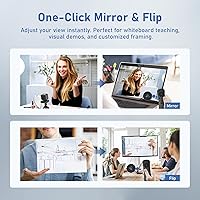
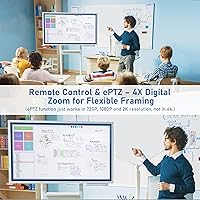
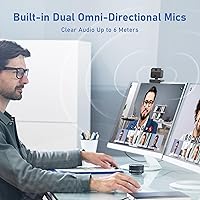
The feature most users will appreciate almost immediately is the remote control. Being able to trigger mirror and flip, freeze frame, mute the mic, and adjust focus without touching the camera or navigating software menus is a real advantage during a live class or stream. The remote-driven manual focus deserves particular attention — it locks the frame and holds it, something autofocus cameras frequently fail to do reliably under shifting conditions. The ePTZ pan and tilt with 4x digital zoom adds repositioning flexibility without physically moving anything. The 85-degree wide-angle lens provides a noticeably roomier field of view than many competitors, and the dual noise-canceling mics claim a 6-meter pickup range, which is ambitious but genuinely useful in open or shared spaces.
Best For
This remote-controlled camera is a strong pick for online teachers who regularly need to mirror text or flip their camera angle mid-lesson — tasks that normally require pausing a call to dig through software settings. Streamers running OBS who want manual focus stability without the budget for a dedicated PTZ camera will find the W12S punches above its class. It also suits home office workers dealing with inconsistent or dim lighting, since the auto light correction compensates reasonably well without extra gear. Small shared workspaces benefit from the wide-angle view and extended mic range. It is less suited to users who need plug-and-forget simplicity or who require high-frame-rate 4K output.
User Feedback
With 828 reviews and a 4.2-star average, the reception for this webcam is broadly positive — though worth contextualizing, since the product only launched in April 2025, leaving limited long-term durability data available. Buyers frequently cite remote control convenience and image clarity as highlights, with many noting the accessory bundle represents genuine value. The 4K label does attract some skepticism, with a portion of reviewers suggesting the output looks closer to upscaled 1080p in real-world use. Negative feedback tends to cluster around microphone performance in echo-prone rooms and the tripod feeling lightweight for the price. Compatibility with Zoom and Teams appears widely confirmed, while OBS users generally report clean integration with no notable driver problems.
Pros
- Remote control lets you adjust focus, mute audio, and flip the view without touching the camera or pausing your call.
- The bundled accessory set — remote, tripod, and privacy cover — adds genuine out-of-box value without extra spending.
- ePTZ pan, tilt, and 4x digital zoom offer PTZ-style flexibility at a fraction of a dedicated PTZ camera's cost.
- Auto light correction handles dim or uneven lighting well enough to reduce dependence on external lighting gear.
- The 85-degree wide-angle lens captures significantly more of the room than most webcams in this segment.
- Manual focus via remote locks the frame and holds it, avoiding the jitter that autofocus cameras produce during live streams.
- Confirmed compatibility with Zoom, Teams, OBS, and YouTube means less troubleshooting on day one.
- The one-click mirror and flip function is a practical, friction-free tool for educators showing physical documents on camera.
- A 4.2-star average across over 800 reviews in just weeks suggests buyers are broadly satisfied with what they receive.
Cons
- The 4K output appears upscaled to a noticeable portion of buyers, which may disappoint those expecting true native 4K sharpness.
- The included tripod feels lightweight and flimsy for day-to-day use, with multiple reviewers flagging durability concerns.
- Microphone performance drops noticeably in echo-prone or reverberant rooms, limiting usefulness in bare-walled spaces.
- As a brand-new April 2025 release, there is no meaningful long-term reliability data available yet to assess how it holds up.
- Manual focus, while precise, requires a deliberate button press — not ideal for scenarios where subjects move frequently.
- The USB cable length may fall short for some desk setups, potentially requiring an extension for comfortable placement.
- Digital zoom degrades image quality at higher magnification levels, as is typical of ePTZ solutions without optical zoom.
- Buyers who prefer fully automatic, hands-off camera management may find the remote-dependent workflow more friction than it is worth.
Ratings
The scores below reflect an AI-driven analysis of verified buyer reviews for the Saylas W12S 4K Webcam from across global markets, with spam, bot-generated, and incentivized feedback actively filtered out before scoring. Each category is weighted against patterns found in real ownership experiences — not manufacturer claims — so both the genuine strengths and the recurring frustrations are represented transparently. This is an honest, balanced snapshot of how the webcam actually performs in daily use.
Image Quality
Remote Control Usability
Manual Focus Performance
Microphone Quality
Low-Light Performance
ePTZ & Zoom
Wide-Angle Coverage
Software Compatibility
Build Quality
Tripod Quality
Value for Money
Setup & Ease of Use
Privacy & Security Features
Suitable for:
The Saylas W12S 4K Webcam is a genuinely strong fit for online educators and tutors who regularly need to mirror or flip their camera view mid-lesson — a task that sounds minor until you've fumbled through software menus while 30 students wait. Streamers running OBS or similar platforms will appreciate the remote-controlled manual focus, which holds a locked frame far more reliably than autofocus during live sessions where lighting or movement shifts. Home office workers dealing with dim, uneven, or changing light conditions benefit from the built-in auto light correction, which reduces the pressure to invest in a separate ring light. The 85-degree wide-angle lens and claimed 6-meter microphone range make this webcam a practical choice for small shared meeting rooms or open-plan workspaces where a narrow-field camera simply wouldn't capture enough of the scene. Anyone who wants PTZ-style camera control without the steep cost of a dedicated PTZ unit will find the ePTZ pan, tilt, and 4x zoom a compelling workaround at this price point.
Not suitable for:
The Saylas W12S 4K Webcam is not the right call for buyers who prioritize simplicity above all else — the remote control and manual focus add meaningful capability, but they also add a layer of setup and learning curve that pure plug-and-play users may find unnecessary. If you need genuine native 4K output for professional video production or high-end content creation, the 4K label here warrants healthy skepticism; a meaningful number of users report the footage looks closer to upscaled 1080p under real-world conditions. The build quality, particularly the tripod, has drawn criticism from buyers who want hardware that feels durable over years of daily use, and since the product only launched in April 2025, there is simply not enough long-term ownership data yet to assess reliability with confidence. Users in highly reverberant rooms — tiled bathrooms, bare-walled offices — may find the noise-canceling microphones struggle with echo, which no beamforming algorithm fully solves. If you already own a quality standalone microphone, the dual built-in mics become a redundant selling point that should not be driving your purchase decision.
Specifications
- Brand: The W12S is manufactured by Saylas, a consumer electronics brand offering USB webcams and accessories.
- Model Number: The official model designation for this unit is W12S.
- Sensor: This webcam uses a Sony 48MP CMOS image sensor designed to capture detailed video across multiple resolution modes.
- Max Resolution: The camera outputs video at a maximum of 4K at 30fps, with additional modes at 2K, 1080p, and 720p.
- Field of View: An 85-degree wide-angle lens provides a broader horizontal capture area than the 60–70-degree lenses common in this segment.
- Focus System: Focus is manual and remote-controlled, allowing precise frame locking without the drift associated with continuous autofocus systems.
- Digital Zoom: The ePTZ system supports up to 4x digital zoom with pan and tilt control via the included remote.
- Microphones: Two AI omnidirectional noise-canceling microphones with beamforming technology are built into the unit, with a claimed pickup range of up to 6 meters.
- Light Correction: An automatic light correction feature adjusts color temperature and brightness in real time to compensate for dim or uneven ambient lighting.
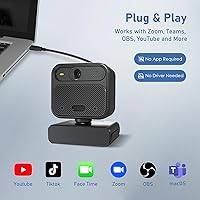
- Connectivity: The webcam connects via USB and requires no additional drivers for basic operation on compatible operating systems.
- Software Support: Confirmed compatible platforms include Zoom, Microsoft Teams, OBS Studio, and YouTube Live.
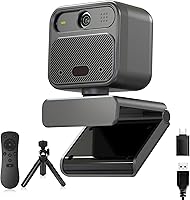
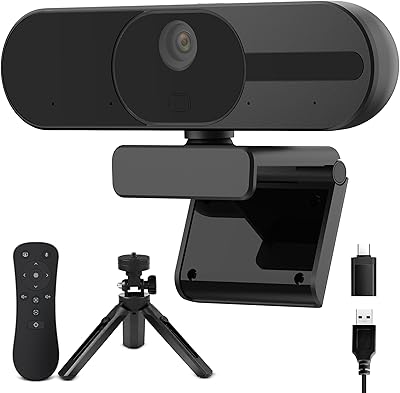
- Accessories Included: Each unit ships with a remote control, a desktop tripod, and a sliding privacy cover that physically blocks the lens when not in use.
- Item Weight: The complete package weighs 13.1 ounces, making it suitable for standard monitor-top or tripod-based placement.
- Package Dimensions: The retail packaging measures 5.98 x 4.33 x 3.11 inches, compact enough for easy storage or transport.
- Video Format: Captured video is output in MPEG and YUV formats, consistent with standard USB webcam protocols for broad software compatibility.
- Aperture: The lens has a maximum aperture of f/1.8 (expressed as 1.8mm in manufacturer specs), which supports better light intake in lower-brightness environments.
- Focal Length: The maximum focal length is listed at 6mm, which corresponds to the wide-angle optical characteristics of this camera.
- Date Available: The Saylas W12S became available for purchase in April 2025, making it a recent entry in the mid-range webcam market.
Related Reviews
Saylas V21 4K Webcam with Speaker

PixelForge 4K Webcam

PEATOP 4K-C80CCMD Webcam

Diccik 4K HD Webcam

Lumina LX011 4K Webcam

Lusinx TW 4K Webcam

Combess XIAOJINGLING 4K Webcam

MOERTEK MT 4K Webcam
NearStream V08AF 4K Webcam