Overview

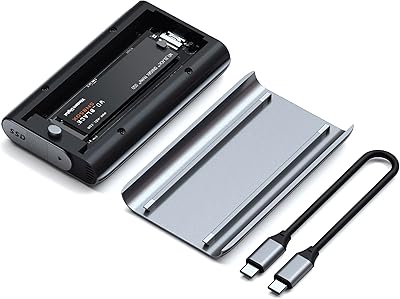
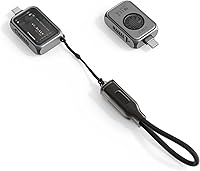
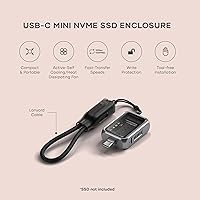
The Satechi ST-E2230M M.2 NVMe 2230 SSD Enclosure is a surprisingly capable little accessory that punches well above its size. Built around the shorter 2230 NVMe form factor, it targets mobile professionals and Apple ecosystem users who need fast, reliable portable storage without the bulk. The aluminum chassis feels genuinely solid in hand, and the magnetic tempered glass lid gives it a premium character you don't usually expect at this scale. USB-C Gen 2 connectivity means transfer speeds that comfortably outpace any SATA-based alternative, and the included braided lanyard cable and write-lock switch round out a thoughtful package. It sits toward the higher end of the pricing spectrum for 2230 enclosures, so build quality and active cooling are what Satechi is betting on here.
Features & Benefits

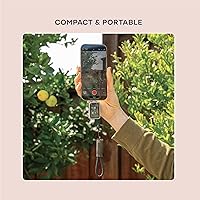
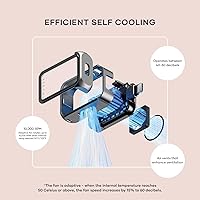
What sets this NVMe caddy apart from most passive competitors is the built-in active cooling fan. It stays quiet during light transfers, but when internal temperatures climb past 50°C, it spins up aggressively to prevent the speed drops that plague aluminum-only enclosures during sustained workloads. Real-world read performance approaches 1,200 MB/s on a capable host — fast enough to handle 4K video editing or large game file transfers without frustration. The tool-free magnetic lid makes swapping drives genuinely effortless, and the write-lock toggle is one of those small features you don't appreciate until you desperately need it. At just over an ounce, it disappears into any pocket or bag.

Best For

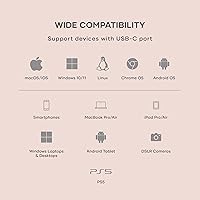
The Satechi 2230 enclosure makes the most sense for people who already have a spare 2230 NVMe drive sitting around — pulled from a Steam Deck, ROG Ally, or a recently upgraded laptop. It works with any USB-C device, not just Apple hardware, so Windows users, Chromebook owners, and Android phone users are all fair game. That said, it's particularly well-matched for Mac and iPhone 15/16 Pro users who do a lot of on-location work. Photographers who want a locked-down backup drive for field transfers and travelers trying to minimize carry weight without sacrificing speed will both find it fits naturally into their workflow.

User Feedback

With 126 ratings averaging 4.0 out of 5 stars, the mini enclosure earns mostly positive marks but isn't without its critics. Buyers frequently highlight the solid construction and appreciate that the cooling fan actually delivers — a claim you genuinely cannot make for most passive enclosures in this category. The magnetic lid gets consistent praise for its everyday convenience. On the flip side, a handful of reviewers flag that the fan is audible in very quiet environments, which could bother users in library or studio settings. A few also report inconsistent speeds on certain non-Apple USB-C hosts. For those weighing value against cheaper passive alternatives, the active cooling and premium build are the honest differentiators.

Pros

  • Active cooling prevents thermal throttling during long, sustained transfers — a real differentiator over passive alternatives.
  • The magnetic tempered glass lid enables tool-free SSD swaps in seconds, no screwdriver required.
  • Write-lock switch is a genuine safety net for photographers and archivists handling irreplaceable data.
  • Works with any USB-C device — Mac, Windows, Chromebook, Android, or iPhone — not just Apple hardware.
  • Aluminum build feels premium and durable, not hollow or flimsy like many enclosures in this size class.
  • At just over an ounce, this mini enclosure disappears into a pocket or small pouch without adding bulk.
  • Swappable drive design means you can upgrade storage capacity later without replacing the enclosure itself.
  • Braided lanyard cable is tangle-resistant and more durable than the thin flat cables bundled with budget options.
  • Two-year warranty provides meaningful coverage above the one-year standard common in this accessory category.
  • Transfer speeds are fast enough for real-world 4K video editing and large game file transfers without frustration.

Cons

  • Fan is audible at peak load — not ideal for quiet offices, studios, or shared sleeping spaces.
  • Bundled USB-C cable is too short for comfortable stationary desk use; most users need a separate longer cable.
  • Full speed potential depends entirely on the host having a proper USB 3.2 Gen 2 port, which is not universal.
  • Intermittent disconnection issues reported by some Windows users when connected through a hub rather than a direct port.
  • The write-lock toggle is small and recessed, requiring a fingernail or tool to change state reliably.
  • Strictly limited to M-key 2230 NVMe drives — no flexibility for other M.2 lengths or SATA-based M.2 drives.
  • Tempered glass lid shows fingerprints quickly, needing regular wiping to stay looking clean.
  • The price premium is hard to justify for users who only do occasional light transfers with no sustained workload.

Ratings

The Satechi ST-E2230M M.2 NVMe 2230 SSD Enclosure scores below are generated by AI after analyzing verified buyer reviews worldwide, with spam, bot-submitted, and incentivized feedback actively filtered out. Ratings reflect a balanced read of both what this mini enclosure genuinely excels at and where real users have run into frustration. Strengths and pain points are weighted equally — nothing is glossed over.
Build Quality
91%
The aluminum chassis feels noticeably more substantial than most plastic enclosures in this category. Buyers consistently describe it as pocket-safe and scratch-resistant, with the magnetic tempered glass lid adding a premium touch that holds up well after repeated daily use.
A small number of users noted the glass lid can attract fingerprints quickly, requiring frequent wiping to maintain its clean look. A few also felt the magnet strength, while adequate, could be slightly stronger to fully inspire confidence when tossing it in a bag.
Transfer Speed
88%
On capable USB-C Gen 2 hosts, real-world read performance lands impressively close to the theoretical ceiling — fast enough to handle large video file transfers or game library moves without sitting around waiting. Buyers upgrading from SATA-based enclosures notice the difference immediately.
Speeds are highly host-dependent, and several users on older USB-C ports or non-compliant hubs reported hitting a ceiling well below expectations. Getting the full performance requires a proper USB 3.2 Gen 2 port, which not every device guarantees even when labeled USB-C.
Active Cooling Effectiveness
86%
The built-in fan is the defining feature that separates this NVMe caddy from passive alternatives. During sustained transfers — think large game installs or multi-gigabyte video dumps — it measurably prevents the speed drop-off that passive aluminum enclosures regularly suffer from after a few minutes.
The fan does its job, but it is not silent. In a quiet home office or library setting, the spin-up is noticeable. Users who prioritize a completely silent workflow should factor this in; it is not disruptive in most environments, but it is present.
Fan Noise Level
67%
33%
For everyday desk use or transfers in a noisy environment like a coffee shop or an airplane, the fan noise is a complete non-issue. Most buyers doing occasional bulk transfers report barely noticing it over ambient room sound.
The noise range extends up to 60 dB at peak load, which is audible enough to annoy users in quiet settings. This is the most frequently cited complaint in critical reviews, and it is a legitimate concern for anyone doing late-night transfers in a shared space or recording environment.
Portability & Size
94%
At just over an ounce and barely longer than a large USB stick, this is one of the most genuinely pocketable high-speed enclosures available. Travelers and commuters appreciate being able to slip it into a shirt pocket alongside a phone without adding any meaningful bulk.
The compact size is almost entirely a strength, though a handful of users wish the included cable were slightly longer than its 20 cm length for more flexible desk positioning. The lanyard format is clever for travel but not ideal for stationary workstation use.
Ease of SSD Installation
89%
The magnetic lid pops off without tools, and sliding in a 2230 NVMe drive takes under a minute for anyone who has handled M.2 drives before. Users upgrading from a Steam Deck or handheld gaming device find the process intuitive and clean.
The enclosure is strictly M-key 2230 only, which is by design but catches some buyers off guard. There is no tolerance for longer 2242 or 2280 drives, and anyone expecting flexibility there will be disappointed.
Write Lock Functionality
83%
Photographers doing tethered backups and archivists managing irreplaceable data particularly value this switch. It provides genuine peace of mind against accidental overwrites or malware-triggered modifications during transfers, which is a real-world risk most people underestimate.
The switch itself is small and recessed, which means toggling it requires a fingernail or a SIM tool. Under pressure in the field, that is a minor but real inconvenience. A more tactile toggle design would improve confidence in its state without having to look closely.
Compatibility
74%
26%
It works reliably across Mac, Windows, Chromebook, and recent iPhone and iPad models with USB-C ports. Users with modern devices report plug-and-play recognition with no drivers or configuration needed, which is exactly what you want from a portable storage accessory.
Edge cases emerge with older USB-C hosts, budget Android phones, and certain docking stations that do not fully negotiate USB 3.2 Gen 2 speeds. A few Windows users also reported intermittent disconnections that were resolved by switching to a direct port rather than a hub.
Cable Quality
78%
22%
The braided USB-C to USB-C lanyard cable is a thoughtful inclusion — durable, tangle-resistant, and compact enough to store with the enclosure itself. It feels noticeably better than the thin flat cables bundled with cheaper competitors.
At roughly 20 cm, it is too short for comfortable use when a laptop is on a desk and the enclosure needs to sit to the side. Most users end up reaching for a longer personal cable, which slightly defeats the purpose of having a dedicated bundled option.
Value for Money
69%
31%
For users who need active cooling and plan to swap drives over time, the price premium over passive alternatives is defensible. The build quality, fan, write-lock, and warranty together represent a coherent package rather than a collection of afterthoughts.
Passive 2230 enclosures with similar aluminum builds exist for considerably less. Buyers who rarely do sustained transfers or work in noise-sensitive environments may find themselves paying for a cooling system they barely use. The value equation is strong only if the fan genuinely addresses a problem you have.
Thermal Management
85%
Real-world testing confirms the fan keeps drive temperatures well below the throttling threshold during extended transfers. Users moving large Steam library backups or continuous 4K footage dumps report consistent speeds from start to finish, which is not something passive enclosures can reliably claim.
The fan activation at 50°C means light, short transfers complete entirely without fan engagement — which is fine. But it also means the enclosure needs a moment to react when a sudden heavy load hits, and very briefly there can be a small dip before cooling kicks in.
Software & Driver Experience
82%
18%
There is nothing to install. The enclosure presents as a standard USB mass storage device across all tested platforms, meaning it is ready to use out of the box on any modern operating system without hunting for drivers or utilities.
The lack of any companion app means there is no way to monitor drive temperature or fan speed directly, which is a minor missed opportunity for technically curious users who would appreciate that visibility without third-party tools.
Warranty & Brand Support
79%
21%
A two-year limited warranty is above average for this accessory category, and Satechi has a reasonable reputation for honoring it. Buyers who have contacted support generally report competent, timely responses without excessive hoops to jump through.
The warranty covers defects in materials and workmanship but does not extend to SSD compatibility issues or user-induced damage — which is standard, but worth understanding before assuming broad coverage. International warranty support can also vary depending on the purchase region.

Suitable for:

The Satechi ST-E2230M M.2 NVMe 2230 SSD Enclosure is a strong fit for anyone sitting on a spare 2230 NVMe drive and needing a fast, portable way to use it — which covers a surprisingly wide range of people. Steam Deck and ROG Ally owners who have swapped their internal drives are the obvious crowd, since repurposing that pulled 2230 drive into a high-speed external saves real money. Mobile professionals and creatives who move large files regularly — photographers dumping RAW files in the field, videographers offloading footage between shoots — will genuinely appreciate both the transfer speeds and the write-lock protection. Mac users with USB-C MacBooks or recent iPhones will find it plug-and-play and fast enough to handle anything from Time Machine backups to editing proxies directly off the drive. Travelers and commuters who care about minimizing what they carry without stepping down to slower flash drives round out the ideal audience.

Not suitable for:

The Satechi ST-E2230M M.2 NVMe 2230 SSD Enclosure makes little sense if you are working in a noise-sensitive environment and need completely silent operation — the fan is functional and not loud by most standards, but it is audible, and in a quiet studio or shared bedroom at night that matters. It also should not be the first choice for anyone whose USB-C ports do not support USB 3.2 Gen 2, since the speed advantage that justifies the price premium simply will not materialize on older hardware. Budget-focused buyers who rarely do sustained large transfers should look at passive aluminum enclosures that cost considerably less — if your typical use case is occasional document backup or small file moves, active cooling is a feature you will never actually need. This NVMe caddy is also not an option if you need to house a 2242 or 2280 M.2 drive; it accepts only the shorter 2230 form factor, and there is no workaround. Finally, users who need a long desktop cable for stationary workstation use will find the included lanyard cable too short for comfortable reach.
Specifications

  • Model Number: The enclosure carries the official model designation ST-E2230M.
  • SSD Form Factor: Accepts M-key M.2 2230 NVMe drives only; no other M.2 lengths or SATA-based M.2 drives are compatible.
  • Interface: Connects via USB-C Gen 2, supporting theoretical bandwidth up to 10Gbps.
  • Max Read Speed: Peak sequential read performance reaches up to 1,250 MB/s under optimal conditions with a compatible host.
  • Max Capacity: Supports NVMe 2230 drives up to 2TB in capacity; the SSD itself is not included.
  • Active Cooling: A built-in mini fan spins up to 10,000 RPM and activates automatically when internal temperature reaches 50°C (122°F).
  • Fan Noise: Fan operating noise ranges between 40 and 60 dB depending on workload and ambient temperature conditions.
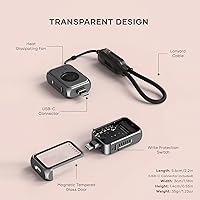
  • Dimensions: The enclosure measures 2.17 x 1.18 x 0.59 inches, making it one of the smallest active-cooled enclosures available.
  • Weight: Total weight without an installed SSD is 1.23 oz (approximately 35g).
  • Body Material: The main chassis is machined aluminum in Space Gray, with a magnetic tempered glass lid covering the drive bay.
  • Write Lock: A physical write-lock switch prevents any data modification or deletion while engaged, protecting against accidental overwrites and malware.
  • Included Cable: A 20 cm braided USB-C to USB-C lanyard-style cable is included in the box.
  • Compatibility: Works with any device featuring a USB-C port, including Mac, Windows PCs, Chromebooks, iPads, iPhones 15 Pro and later, and USB-C DSLR cameras.
  • Lid Mechanism: The tempered glass lid is secured and released using embedded magnets, requiring no tools or screws to access the drive bay.
  • Color: Available in Space Gray only.
  • Warranty: Covered by a 2-year limited warranty against defects in materials and workmanship under normal use conditions.
  • Power Source: Bus-powered via the USB-C connection; no external power adapter or separate cable is required.
  • OS Support: Compatible with macOS, Windows, ChromeOS, and iPadOS without requiring additional drivers or software installation.

Related Reviews

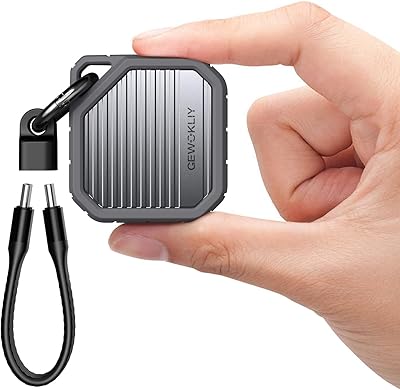
GEWOKLIY 2230 M.2 NVMe SSD Enclosure
86%
88%
Performance & Speed
90%
Build Quality & Durability
93%
Portability & Design
91%
Setup & Ease of Use
85%
Compatibility with Devices
More
Satechi M.2 Enclosure USB4 NVMe SSD Pro, 16TB
88%
94%
Performance
91%
Ease of Installation
88%
Heat Management
89%
Portability
92%
Compatibility
More
dockteck DH0002 M.2 NVMe/SATA SSD Enclosure
84%
88%
Transfer Speed (NVMe)
76%
SATA Drive Performance
83%
Build Quality
93%
Ease of Setup
79%
Thermal Management
More
ineo C2605-NVMe M.2 NVMe SSD Enclosure
85%
91%
Transfer Speed
88%
Cooling Performance
85%
Write Protection Functionality
90%
Build Quality
92%
Ease of Setup
More
WAVLINK M.2 SSD Cloner, 20Gbps NVMe Dual-Bay SSD Enclosure, 8TB
86%
88%
Performance & Cloning Speed
91%
Build Quality & Durability
85%
Ease of Use (Setup & Cloning Process)
93%
Compatibility with SSD Sizes
89%
Cooling Efficiency
More
Cable Matters 40Gbps Portable USB4 Thunderbolt 4 SSD Enclosure for M.2 NVMe SSD
85%
94%
Performance (Speed)
89%
Ease of Setup
92%
Portability & Design
75%
Cooling Efficiency
90%
Compatibility
More
Plugable M.2 NVMe SSD Enclosure
87%
94%
Ease of Setup
92%
Data Transfer Speed
88%
Build Quality
90%
Port Compatibility
87%
Cooling & Thermal Management
More
KINGDATA M.2 2230 2TB NVMe SSD
88%
91%
Performance
93%
Read Speed
89%
Write Speed
85%
Durability
88%
Temperature Management
More
ANYOYO 80Gbps M.2 NVMe SSD Enclosure
88%
89%
Transfer Speed
91%
Cooling Performance
94%
Ease of Setup
85%
Build Quality
88%
Compatibility
More
ORICO M.2 NVMe SSD Enclosure 4TB
86%
92%
Performance
94%
Ease of Setup
75%
Heat Management
88%
Build Quality
89%
Compatibility
More

FAQ

No SSD is included. The Satechi ST-E2230M M.2 NVMe 2230 SSD Enclosure is a bare enclosure only, so you will need to source a compatible M-key M.2 2230 NVMe drive separately. Common sources include spare drives pulled from a Steam Deck, ROG Ally, or a recently upgraded laptop.
It works with any device that has a USB-C port, regardless of operating system. Windows, Chromebook, and Android users are all fully supported. The marketing leans Apple-heavy, but the hardware itself has no platform restriction.

For light or short transfers, the fan may not spin up at all. During sustained heavy transfers, it becomes audible — roughly in the range of a quiet desktop computer fan. It is not disruptive in most environments, but if you are working in a very quiet room or recording audio nearby, you will hear it.

No. This mini enclosure is built specifically around the 2230 form factor and cannot physically accommodate longer drives. If you have a standard 2280 drive, you will need a different enclosure entirely.

NVMe only. SATA M.2 drives use a different protocol and will not be recognized by this enclosure even if the physical connector looks similar. Make sure your 2230 drive is specifically NVMe before purchasing.

On a host with a genuine USB 3.2 Gen 2 port and a fast NVMe 2230 drive, real-world speeds come close to the theoretical maximum — fast enough to make a clear, practical difference for large file transfers. On older or lower-spec USB-C ports, speeds will be noticeably lower, so the host device matters a lot here.

Flipping the switch into the locked position prevents any write operations to the drive while it is connected. It is useful when you are connecting to an untrusted computer, doing a read-only forensic transfer, or simply want insurance that nothing on the source machine can modify your backup files.

The magnets hold the lid firmly in place during normal handling and transport. That said, if the enclosure takes a direct hard impact, there is theoretically a chance the lid could dislodge. For peace of mind when traveling, slipping it into a small pouch is a sensible habit.

The fan is temperature-activated, not always-on. It only kicks in once the internal temperature climbs past a set threshold during heavy workloads. During idle or light use, the enclosure runs completely silently.

The two-year warranty covers the enclosure itself against manufacturing defects, not any SSD you install inside it. Drive failure would fall under the warranty of whichever brand manufactured your NVMe drive. Keep that in mind when choosing a drive to pair with this NVMe caddy.