Overview

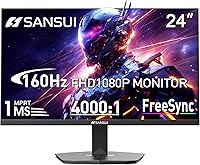
The SANSUI ES-G24F4M 24-inch Gaming Monitor is a no-frills entry-level display built for buyers who want capable gaming performance without stretching their budget. SANSUI sits in the accessible end of the monitor market, and this model is manufactured by Express Luck Industrial, a Chinese OEM that supplies panels under various brand names — a common arrangement at this price tier that shouldn't automatically raise red flags. One small but practical touch: an HDMI cable ships in the box. Worth knowing upfront, though — no built-in speakers means you'll need to plan for external audio from day one, and color accuracy isn't this display's primary selling point.

Features & Benefits

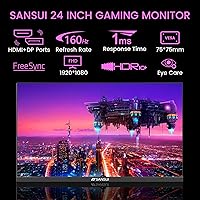
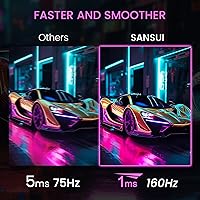
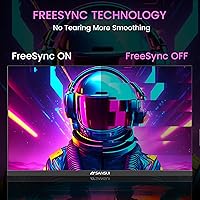
Where this 24-inch gaming display punches above its weight is motion handling. A 160Hz refresh rate paired with 1ms MPRT response time means fast-paced shooters and racing games feel noticeably snappier than what you'd get on a standard 60Hz office screen. AMD FreeSync keeps tearing in check even with mid-tier graphics cards, which is exactly the pairing most buyers at this level will be running. The 4000:1 contrast ratio is genuinely strong for the class, producing decent shadow detail. Color coverage sits at 72% sRGB — fine for gaming and casual use, but not the display for color-critical creative work. The matte coating handles overhead lighting without much glare.

Best For

This SANSUI monitor makes the most sense for someone buying their first dedicated gaming display or upgrading from an aging 60Hz screen — the jump in smoothness alone will feel significant. Students pulling double duty between coursework and gaming will appreciate the compact 24-inch footprint and the included HDMI cable that gets them connected right away. Console players who've been gaming on a TV and want a proper monitor refresh rate without spending much will also find it fits the bill. The 30-day return window and lifetime technical support add a layer of confidence that not every budget brand bothers to offer.

User Feedback

Buyers who picked up the ES-G24F4M tend to land on the same takeaway: the 160Hz experience at this price is genuinely hard to argue with for casual and competitive gamers alike. The recurring praise centers on how smooth everyday gameplay feels out of the box. Criticism, when it appears, usually points to the stand — it offers tilt but nothing more, which frustrates users who want height or pivot control. A handful of reviewers find the OSD menu clunky to navigate. Overall, those focused on pure motion performance walk away satisfied; buyers hoping for rich, accurate colors or premium build quality tend to feel the budget constraints more clearly.

Pros

  • 160Hz refresh rate delivers genuinely smooth gameplay that is hard to find at this price point.
  • AMD FreeSync keeps screen tearing under control without needing a high-end graphics card.
  • The 4000:1 contrast ratio produces deeper blacks than most competing budget panels.
  • An HDMI cable is included in the box, so you can get up and running immediately.
  • Both HDMI and DisplayPort inputs give you flexible connectivity for PC and console setups.
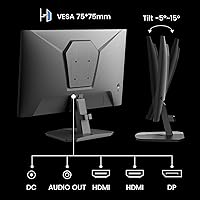
  • VESA mount compatibility means you can move to an arm if the stock stand frustrates you.
  • The matte anti-glare coating handles overhead and ambient lighting without heavy reflections.
  • Eye-care features like flicker reduction make longer work or study sessions more comfortable.
  • The 30-day money-back guarantee and lifetime technical support add real peace of mind for budget buyers.
  • At under 4 pounds, it is easy to reposition or transport without any hassle.

Cons

  • The stand only tilts — no height, swivel, or pivot adjustment makes ergonomic positioning difficult.
  • No built-in speakers means extra cost and desk clutter for buyers who need audio.
  • 72% sRGB coverage leaves colors looking flat compared to monitors with wider gamut panels.
  • The OSD menu interface is reported by users to be unintuitive and slow to navigate.
  • Basic HDR support has minimal real-world impact and should not be a purchase driver.
  • Build quality feels noticeably budget-oriented, with plastic that lacks rigidity under light pressure.
  • The ES-G24F4M is manufactured under an OEM arrangement, so long-term brand support is harder to predict.
  • 1080p resolution on a 24-inch panel may feel limiting if you later upgrade to a more powerful GPU.
  • Brightness at 300 cd/m² can struggle in very bright rooms or under direct sunlight exposure.

Ratings

The scores below reflect AI-synthesized analysis of verified global buyer reviews for the SANSUI ES-G24F4M 24-inch Gaming Monitor, with spam, bot activity, and incentivized feedback actively filtered out to ensure the results represent genuine user experiences. Both the standout strengths and the recurring frustrations are reflected honestly, so you can make a confident buying decision based on what real owners actually reported — not marketing claims.

Value for Money
88%
Buyers consistently point to this monitor as one of the better budget options at its price tier, particularly because 160Hz at this cost was previously much harder to find. The included HDMI cable and lifetime tech support add tangible value that users openly appreciate when comparing alternatives.
A small but vocal group of buyers feel the limited stand adjustability and lack of speakers chip away at the overall package, making the value proposition feel slightly compromised for those who expected a more complete out-of-box experience.
Gaming Performance
91%
The 160Hz refresh rate is the clear highlight for most gamers who picked this up, with users describing fast-paced shooters and racing games as feeling far more responsive than on their previous 60Hz or 75Hz displays. FreeSync support keeps things tear-free even with mid-range AMD GPUs, which most buyers in this category are pairing it with.
On the NVIDIA side, adaptive sync compatibility is not guaranteed, and a handful of PC gamers report that G-Sync Compatible mode did not activate reliably. High-frame-rate console gaming is also capped by the console itself, so the full 160Hz benefit is PC-exclusive in practice.
Motion Clarity
86%
The 1ms MPRT response time translates to clean, blur-reduced motion during fast gameplay, something users upgrading from slower panels notice immediately. Tracking moving targets in competitive games feels tighter, and general desktop scrolling takes on a noticeably smoother quality.
MPRT is a backlight strobing measurement rather than true pixel transition speed, which some technically informed buyers flag as slightly misleading. In very demanding fast-motion sequences a small number of users reported residual ghosting that suggested the native pixel response was not quite as instantaneous as the spec implies.
Color Accuracy
58%
42%
For casual gaming and everyday web browsing the colors look acceptable, with enough saturation to make games visually engaging. Most non-critical users — those watching YouTube, browsing, or playing action games — reported no meaningful dissatisfaction with the on-screen palette.
The 72% sRGB color gamut is a real ceiling that shows up clearly when placed next to wider-gamut panels. Content creators and anyone doing photo work found colors washed out and inaccurate, and even some casual users noticed that certain greens and reds looked less punchy than expected.
Contrast & Black Levels
79%
21%
The 4000:1 contrast ratio stands out relative to competing budget monitors, and users playing darker games or watching films in dim rooms reported noticeably richer shadow detail than they got from previous budget displays. Night scenes in games hold up well at this contrast level.
In brighter room conditions the advantage is harder to appreciate, and a few users noted that the actual perceived contrast felt somewhat lower than the rated spec suggested in typical daily lighting. The basic HDR mode adds little on top of the standard contrast performance.
Brightness
67%
33%
At 300 cd/m², the monitor performs adequately in typical indoor environments with controlled lighting, and the matte coating helps diffuse glare so the image stays readable in most home office or bedroom setups.
Users in brighter rooms or near windows consistently flagged that the display struggles to maintain visibility when sunlight enters the space. The brightness ceiling feels noticeable during the daytime, and there is no automatic brightness adjustment to compensate.
Build Quality
61%
39%
For the price, the monitor arrives solidly enough packaged and looks presentable on a desk. The overall aesthetic is clean and understated, which works well in both gaming and office environments without looking cheap at a glance.
Pick it up or apply light pressure to the bezel and the budget construction becomes apparent — the plastic housing flexes more than users expect, and several buyers described the overall feel as noticeably lightweight in a way that makes it feel fragile. Long-term durability is an open question.
Stand & Ergonomics
43%
57%
The stand does its basic job of keeping the monitor upright and stable on a flat desk surface, and the tilt function gives users a small degree of viewing angle adjustment that covers the most common seated positions.
Tilt-only adjustment is a genuine frustration for many buyers, particularly those who need to raise or lower the display to match their chair height or who share the monitor between users. No height, swivel, or pivot means anyone with specific ergonomic needs will need to immediately budget for a VESA arm.
Connectivity
82%
18%
Having both HDMI and DisplayPort inputs is a practical plus at this price, letting users run a PC through DisplayPort at full refresh rate while keeping a console or second device connected on HDMI simultaneously. The included cable means setup requires zero extra purchases for most buyers.
There is no USB hub, no headphone jack, and no additional ports beyond the two video inputs. Users who want to connect peripherals through the monitor or need audio pass-through are left without options and must rely entirely on their PC or console for those functions.
Eye Care
74%
26%
The flicker-reduction and low blue light mode are real features that long-session users — students doing evening study marathons or remote workers on extended screens — said made a noticeable difference in end-of-day eye fatigue compared to older monitors they had used.
The low blue light mode noticeably warms the color temperature, which some users found too strong a trade-off for accurate-looking visuals during gaming. There is no granular blue light intensity slider, so it is essentially an all-or-nothing adjustment.
OSD & Controls
51%
49%
The on-screen display covers all the essential adjustments — brightness, contrast, refresh rate confirmation, and the eye-care toggle — so the necessary options are present and functional once you navigate to them.
Multiple buyers singled out the OSD navigation as one of their main frustrations, describing the button layout as unintuitive and the menu response as sluggish. Finding specific settings, particularly the first time, requires patience and a willingness to cycle through several menu layers.
Setup & Out-of-Box Experience
83%
Assembly is straightforward — the stand attaches quickly without tools, and the included HDMI cable means most buyers are displaying an image within minutes of opening the box. First-time monitor buyers in particular appreciated how uncomplicated the process was.
The manual is minimal and offers limited troubleshooting guidance. A small number of users reported needing to contact support to enable 160Hz correctly through their GPU settings, which is a driver-side step that the documentation does not clearly walk through.
Noise & Thermals
88%
The monitor runs completely silently — no fan, no coil whine reported by the majority of buyers, and no noticeable heat buildup during extended gaming or work sessions. This is exactly what users expect and the ES-G24F4M delivers without issue.
A very small number of buyers reported faint electronic buzzing under certain brightness settings, though this was not a widespread complaint. It is worth noting during the first few days of use just to confirm the unit is free from coil whine before the return window closes.
Warranty & Support
76%
24%
The 30-day money-back and free replacement window, combined with lifetime technical support access, gives buyers more post-purchase protection than many competing brands in this tier offer. Several users mentioned that support responses were prompt and helpful when contacted.
Lifetime support from an OEM-manufactured brand carries inherent uncertainty — the brand infrastructure backing that promise is less established than major monitor brands. Users outside of straightforward initial-setup questions reported mixed experiences with the depth of technical assistance available.

Suitable for:

The SANSUI ES-G24F4M 24-inch Gaming Monitor is a strong fit for first-time PC gamers who are stepping up from a basic 60Hz screen and want a real performance jump without spending a lot. Students sharing a desk between lectures and late-night gaming sessions will appreciate the compact footprint and the dual-purpose usability — it handles spreadsheets and fast-paced shooters equally well at this size. Console players who have been gaming on a living room TV and want the responsiveness of a dedicated monitor will notice an immediate difference with the 160Hz refresh rate over HDMI. Remote workers who occasionally game after hours but don't want to invest in two separate displays will also find this a practical single-screen solution. The 30-day return window and lifetime technical support are genuine reassurances for buyers cautious about purchasing from a less-established brand.

Not suitable for:

The SANSUI ES-G24F4M 24-inch Gaming Monitor is not the right call for anyone who prioritizes color accuracy or visual fidelity over raw motion performance. Graphic designers, photo editors, or content creators who rely on true-to-life color reproduction will find the 72% sRGB coverage noticeably limiting — colors can appear flat or undersaturated compared to wider-gamut panels. Buyers who want a premium physical experience should also look elsewhere; the stand offers only basic tilt adjustment, with no height, swivel, or pivot options, which can be frustrating for ergonomic setups. Those who need integrated audio should factor in the cost of external speakers or a headset, since there are no built-in speakers whatsoever. Competitive players who demand G-Sync compatibility or a higher-resolution panel beyond 1080p will also want to consider stepping up to a different category of display entirely.

Specifications

  • Screen Size: The panel measures 24 inches diagonally, offering a compact footprint well suited to standard desks and dual-monitor arrangements.
  • Resolution: Native resolution is 1920x1080 pixels (Full HD), delivering sharp detail at typical desktop viewing distances for this screen size.
  • Refresh Rate: The display runs at up to 160Hz, meaning the screen updates 160 times per second for noticeably fluid motion in fast-paced games.
  • Response Time: Rated at 1ms MPRT (Moving Picture Response Time), which reduces motion blur during rapid on-screen movement.
  • Contrast Ratio: The panel offers a 4000:1 static contrast ratio, producing deeper blacks than most monitors in this price class.
  • Brightness: Peak brightness is rated at 300 cd/m², adequate for indoor use under normal or moderate ambient lighting conditions.
  • Color Gamut: Color coverage is 72% sRGB, which is standard for budget gaming panels but below what color-critical creative work demands.
  • Adaptive Sync: AMD FreeSync is supported, synchronizing the display refresh rate to the GPU output to reduce tearing and stuttering during gameplay.
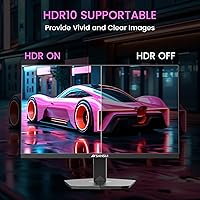
  • HDR Support: Basic HDR is supported, though the panel's contrast and brightness ceiling means the real-world HDR impact is modest.
  • Panel Surface: The screen uses a matte anti-glare coating that diffuses reflections and helps maintain image clarity under overhead lighting.
  • Ports: Connectivity includes one HDMI port and one DisplayPort input, covering the most common connections for both PC and console setups.
  • Speakers: There are no built-in speakers; users must connect external audio hardware through their PC, console, or a separate device.
  • VESA Mounting: The monitor is VESA mount compatible, allowing it to be fitted to a third-party arm or wall mount for ergonomic flexibility.
  • Stand Adjustment: The included stand supports tilt adjustment only; height, swivel, and pivot adjustments are not available without a third-party mount.
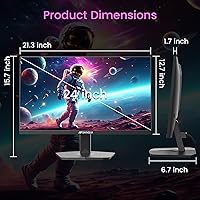
  • Dimensions: With the stand attached, the unit measures 21.2 x 7.95 x 16.28 inches (width x depth x height).
  • Weight: The monitor weighs 3.54 pounds, making it lightweight and easy to reposition or transport.
  • Aspect Ratio: The panel uses a standard 16:9 widescreen aspect ratio, compatible with virtually all modern games, video content, and applications.
  • In-Box Accessories: The package includes one HDMI cable, so users can connect a compatible device and get started without a separate cable purchase.
  • Eye-Care Features: The display includes flicker-reduction technology and a low blue light mode intended to reduce eye fatigue during extended use.
  • Warranty: SANSUI provides a 30-day money-back and free replacement guarantee from the order date, along with lifetime technical support access.

Related Reviews
SANSUI ES-G24F4L 24-inch Gaming Monitor
71%
88%
Refresh Rate Performance
91%
Value for Money
74%
Image Clarity
67%
Color Accuracy
41%
HDR Quality
More
SANSUI ES-G24C1 24-inch Curved Gaming Monitor
74%
91%
Value for Money
86%
Gaming Performance
83%
Color & Image Quality
88%
Contrast & Black Levels
47%
Stand & Ergonomics
More
SANSUI 24.5 Inch QHD Gaming Monitor 300Hz ES-G25F6Q Pro
87%
94%
Gaming Performance
91%
Color Accuracy
88%
Build Quality
89%
Ergonomics & Adjustability
95%
Refresh Rate & Response Time
More
SANSUI ES-G27C1 27″ Curved Gaming Monitor
73%
91%
Value for Money
88%
Refresh Rate Performance
84%
Color & Image Quality
72%
Motion Clarity & Response
76%
Build Quality & Aesthetics
More
SANSUI ES-G34C5 34-inch Curved Gaming Monitor
73%
91%
Value for Money
84%
Image Quality & Color Accuracy
83%
Refresh Rate & Smoothness
47%
HDR Performance
41%
Ergonomics & Stand Adjustability
More
SANSUI ES-G25X1 Pro 24.5″ 300Hz Gaming Monitor
87%
94%
Performance
89%
Display Quality
92%
Response Time
84%
Build Quality
88%
Color Accuracy
More
CUNPU 24-inch 240Hz Gaming Monitor
83%
88%
Gaming Performance
90%
Visual Quality
92%
Response Time
65%
Build Quality
89%
Color Accuracy
More
Viewedge USC2412FDA-P 24-inch FHD 144Hz Gaming Monitor
71%
83%
Value for Money
79%
Gaming Performance
76%
Image Quality
81%
Eye Comfort
63%
Build Quality
More
KOORUI 24-inch Gaming Monitor E2411K
84%
88%
Gaming Performance
90%
Display Quality (Color Accuracy)
85%
Ease of Setup
80%
Build Quality
92%
Eye-Care Features
More
KTC 24-inch 190Hz Gaming Monitor
86%
92%
Performance
89%
Display Quality
85%
Ease of Setup
91%
Gaming Experience
87%
Color Accuracy
More

FAQ

Yes, it connects to both via HDMI and the 160Hz refresh rate is supported over that connection. Keep in mind that current-generation consoles output at different frame rate caps depending on the game, so you may not always hit 160fps, but the display will handle whatever the console sends it without issue.

An HDMI cable is included in the box, which is a convenient touch at this price tier. You can plug in and get going right away without an extra purchase, at least for your first connection.

Yes, the monitor is VESA compatible, so swapping to an aftermarket arm is straightforward. Given that the included stand only tilts and offers no height or swivel adjustment, using a monitor arm is actually a popular upgrade for buyers who want better ergonomic positioning.

It works fine with NVIDIA GPUs for display output and the full 160Hz refresh rate, but FreeSync adaptive sync is officially an AMD feature. NVIDIA cards support FreeSync monitors through their G-Sync Compatible program on select displays, but compatibility is not guaranteed here, so check your specific GPU settings if that matters to you.

At 24 inches, 1080p still looks sharp and pixel density is comfortable at normal sitting distances. You would start noticing the resolution ceiling more on larger panels — at 24 inches it is a practical and well-matched combination, especially for gaming where the lower resolution also means your GPU has an easier job pushing high frame rates.

You access it through the on-screen display (OSD) menu using the buttons on the back or side of the monitor. Navigation has been described by some users as a bit clunky, so it may take a few minutes to get familiar with the menu layout, but the option is there once you locate the image or eye-care settings section.

There is no built-in audio and no headphone jack on the monitor itself, which is standard for budget displays in this class. Your audio will come from your PC, console, or a separate audio device — a headset plugged into your computer or a standalone speaker set connected to your source device are the most common solutions.

It can handle casual photo browsing and basic document work without problems, but for serious color-accurate editing it falls short. The 72% sRGB color gamut means colors may appear less saturated and accurate than on a wide-gamut panel, which matters a lot for design and photography professionals. For that kind of work, a monitor with 99-100% sRGB or wider DCI-P3 coverage would serve you much better.

The jump is very noticeable, even outside of gaming. Scrolling through web pages and moving windows around the desktop feels considerably smoother. In fast-paced games the difference is significant — motion looks cleaner, tracking moving targets feels more responsive, and the overall experience is less fatiguing over long sessions.

SANSUI offers lifetime technical support, so reaching out to their after-sales team is the right first step for any issue beyond the initial return period. Document your problem clearly with photos or video if relevant, and contact them through the channel listed on your order. While lifetime support does not guarantee free hardware replacement after 30 days, having a support line available long-term is more than many budget brands provide.