Overview

The SANSUI ES-G34C5 34-inch Curved Gaming Monitor arrives at a price point that makes serious ultrawide gaming accessible without requiring a premium budget. Built around a VA panel with 1500R curvature, it wraps your field of view in a way that flat monitors simply cannot match at this size. SANSUI has been quietly building a following on Amazon among budget-conscious buyers who want real performance without flagship pricing. That said, this is a value-tier pick — you get a lot for the money, but you should walk in with clear expectations about the stand's limited adjustability and a few other trade-offs discussed below.
Features & Benefits

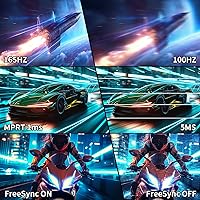
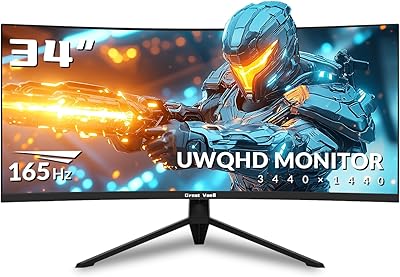
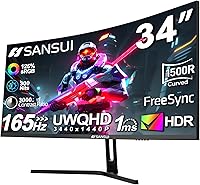
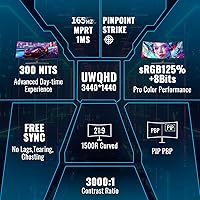
Stretching across 3440x1440 pixels at 21:9, the SANSUI 34-inch monitor gives you noticeably more horizontal workspace than a standard 27-inch panel — whether you're managing a spreadsheet across two virtual windows or immersed in an open-world game. Connect via DisplayPort 1.4 and you unlock up to 165Hz; stick with HDMI and you're capped at 100Hz, so choose your cable accordingly. The 1ms MPRT rating helps keep fast motion looking clean, though it's worth knowing this measures backlight strobing, not traditional pixel transition speed. AMD GPU owners will appreciate FreeSync support for tear-free gameplay, but NVIDIA users should verify variable refresh compatibility on their specific card before assuming full support.

Best For

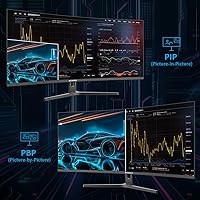
This budget ultrawide display makes the most sense for simulation and RPG gamers who thrive in expansive virtual environments — the 21:9 format wraps peripheral vision rather than just widening a flat image. It's also a practical choice for anyone stepping up from a 1080p or standard 1440p flat panel who wants a meaningful visual upgrade without overspending. Home office users can take advantage of PIP and PBP modes to run two input sources side by side. One thing worth flagging upfront: the stand only tilts. No height adjustment, no swivel. If ergonomics matter to you, factor in the cost of a VESA-compatible arm before committing.

User Feedback

Buyers consistently praise this curved ultrawide for its out-of-the-box color vibrancy and the sense of immersion the 1500R curve delivers — especially for those coming from flat displays. The included DisplayPort cable is a small but appreciated touch that reviewers frequently mention. On the downside, the lack of built-in speakers is a recurring frustration, and many note that HDR mode doesn't deliver the punch the spec sheet implies — 300 nits simply isn't enough brightness for HDR to look compelling. The tilt-only stand draws consistent criticism from users at non-standard desk heights. Positively, the 30-day return window and lifetime technical support offer meaningful peace of mind for a brand not yet widely known in Western markets.

Pros

  • Exceptional price-to-performance ratio for a 34-inch UWQHD curved panel with 165Hz capability.
  • The 1500R curve creates genuine immersion in open-world and simulation games that flat monitors cannot replicate.
  • Rich, punchy VA colors look impressive out of the box with minimal calibration needed for most users.
  • Dual DisplayPort 1.4 and dual HDMI inputs support flexible multi-device setups without a switch box.
  • PIP and PBP modes make this curved ultrawide a practical dual-input productivity monitor as well as a gaming display.
  • DisplayPort cable is included in the box, so you can run at full 165Hz immediately after setup.
  • FreeSync support delivers smooth, tear-free gameplay for AMD GPU users without extra cost or configuration.
  • VESA 75x75mm compatibility means upgrading to a monitor arm is straightforward if the stock stand falls short.
  • Assembly is quick and painless — most buyers report being fully set up in under ten minutes.
  • The 30-day return window and lifetime technical support provide meaningful reassurance for a newer brand.

Cons

  • Stand offers tilt only — no height adjustment, swivel, or pivot for users with ergonomic requirements.
  • HDR mode is largely cosmetic at 300 nits; do not buy this monitor expecting a real HDR experience.
  • HDMI connections are capped at 100Hz, which catches console and laptop users off guard after seeing the 165Hz headline spec.
  • No built-in speakers means a separate audio solution is mandatory from day one.
  • OSD navigation is button-based and unintuitive, requiring patience to configure picture or input settings in the dark.
  • VA panel gray-to-gray response times lag behind IPS alternatives, which is noticeable in competitive fast-paced gaming.
  • No USB hub or USB-C port limits cable management and peripheral connectivity on busy desks.
  • Color uniformity toward the panel edges is inconsistent across units, with some buyers reporting noticeable brightness falloff.
  • NVIDIA users must verify G-Sync Compatible support independently — FreeSync alone does not guarantee full variable refresh functionality.
  • Brand support infrastructure is still maturing in Western markets, leaving some uncertainty around long-term warranty claims.

Ratings

Our AI-generated scores for the SANSUI ES-G34C5 34-inch Curved Gaming Monitor were produced by analyzing thousands of verified buyer reviews collected globally, with spam, incentivized, and bot-flagged submissions actively filtered out before scoring. Each category reflects the real consensus of buyers across a wide range of use cases — from competitive gaming setups to dual-input home office rigs. Both the genuine strengths and the frustrating limitations are represented transparently in every score below.
Value for Money
91%
Among buyers who prioritize getting the most display per dollar, this curved ultrawide consistently over-delivers. The combination of UWQHD resolution, a 165Hz ceiling, and a 34-inch VA panel at this price tier is genuinely hard to find elsewhere, and reviewers frequently note it feels like a monitor that should cost significantly more.
A small segment of buyers feels the value calculus shifts once they factor in the cost of a third-party monitor arm to compensate for the tilt-only stand. For those users, the effective price of a fully ergonomic setup creeps closer to pricier competitors.
Image Quality & Color Accuracy
84%
Out of the box, the VA panel produces rich, punchy colors that immediately impress users coming from budget IPS or TN panels. The wide color gamut coverage makes games and movies look noticeably vivid, and buyers often mention that skin tones and landscape environments in RPGs look especially natural.
Factory calibration is inconsistent across units — some buyers report needing to reduce saturation and adjust gamma before the image looks accurate rather than oversaturated. Color uniformity toward the edges of the panel draws occasional complaints, which is fairly typical for VA at this price.
Refresh Rate & Smoothness
83%
At 165Hz over DisplayPort, gameplay in fast-paced titles feels genuinely fluid, and buyers upgrading from 60Hz or 75Hz panels describe the difference as immediately noticeable. Even at 100Hz via HDMI, everyday desktop navigation and scrolling feel significantly smoother than lower-refresh alternatives.
The 165Hz ceiling is only achievable through DisplayPort 1.4 — HDMI tops out at 100Hz, which catches some buyers off guard if they assumed both connections were equivalent. Console users connecting via HDMI are effectively limited and may feel the spec sheet overpromises on the headline refresh rate.
HDR Performance
47%
53%
HDR mode does technically activate in supported titles and content, and a small number of buyers with modest expectations report that it adds a subtle layer of depth to dark scenes. The wide color gamut helps the image hold up reasonably well even when HDR is engaged.
At 300 nits peak brightness, HDR here is more of a checkbox feature than a meaningful visual upgrade. Most buyers who tested it against OLED or premium HDR displays describe the result as underwhelming — highlights don't pop, and the lack of local dimming means black levels suffer noticeably in bright scenes.
Ergonomics & Stand Adjustability
41%
59%
The stand is stable and the monitor sits at a reasonable fixed height for users at average desk-and-chair configurations. Assembly is genuinely straightforward, and the base footprint is manageable for most desk sizes.
Tilt adjustment between -5 and 15 degrees is the only movement you get — no height, no swivel, no pivot. This is probably the most complained-about aspect across all user feedback, particularly from taller users or those with multi-monitor setups who need precise vertical alignment.
Curvature & Immersion
88%
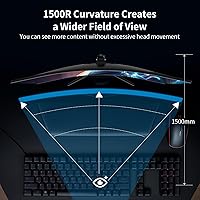
The 1500R curve is a meaningful differentiator at this price, wrapping the display around the viewer's natural field of vision in a way that flat ultrawide monitors cannot replicate. Simulation, racing, and open-world RPG players consistently describe the immersion as one of the primary reasons they chose this monitor.
Users with multiple monitors occasionally note that the 1500R curve creates slight edge distortion when mixing this display with flat panels side by side. A minority of buyers also report needing a short adjustment period before the curve stops feeling exaggerated during regular desktop use.
Response Time & Motion Clarity
72%
28%
For the majority of gaming genres — strategy, RPG, simulation, casual shooters — motion clarity is more than adequate, and buyers report minimal ghosting under typical gameplay conditions. The MPRT backlight strobing helps keep fast-moving objects looking cleaner than the raw panel spec might suggest.
The 1ms MPRT figure refers to backlight strobing, not traditional pixel transition speed, and buyers who understand this distinction note some trailing in very fast-paced competitive titles. VA panels inherently carry slower gray-to-gray transitions compared to IPS, and that limitation shows in high-speed multiplayer gaming.
Connectivity & Port Selection
78%
22%
Having two HDMI and two DisplayPort 1.4 inputs is genuinely useful for buyers juggling a gaming PC, a work laptop, or a console simultaneously. The earphone output adds flexibility for headset users, and the included DisplayPort cable means you're ready to run at full refresh rate straight out of the box.
There is no USB hub, no USB-C, and no built-in KVM switching despite the PIP/PBP functionality. For buyers hoping to reduce cable clutter on a dual-input desk setup, the absence of any USB passthrough is a recurring point of frustration in longer-term reviews.
PIP & PBP Functionality
74%
26%
The ability to display two input sources simultaneously is a genuine productivity asset, and home office users who switch between a personal gaming rig and a work laptop particularly appreciate it. The 21:9 canvas provides enough horizontal real estate to make split-screen use feel practical rather than cramped.
Menu navigation for configuring PIP and PBP modes is described by several buyers as unintuitive, requiring multiple button presses through an OSD that lacks polish. Some users also note that PIP window sizing options are limited, reducing its flexibility for certain workflow configurations.
Build Quality & Aesthetics
69%
31%
The overall build impresses for its price tier — the bezels are slim on three sides, the back panel has a clean matte finish, and the monitor doesn't feel hollow or excessively plasticky when handling it. The understated design fits most desk aesthetics without drawing attention to its budget origins.
The stand's plastic construction feels noticeably less premium than the panel itself, and a few buyers have reported slight wobble on uneven surfaces. The OSD buttons on the underside of the panel are small and require some trial-and-error to operate confidently in a dark room.
Brightness & Glare Handling
63%
37%
The matte screen surface handles ambient light reasonably well, reducing reflections in naturally lit rooms without introducing the haze that some anti-glare coatings produce. For evening or controlled-lighting gaming sessions, 300 nits provides adequate visual comfort.
In brightly lit environments or near windows, 300 nits starts to feel genuinely insufficient — colors wash out and contrast drops. Buyers who work near natural light sources during daylight hours frequently note they have to reposition or use blinds, which limits the monitor's versatility as a day-use productivity screen.
Setup & Out-of-Box Experience
86%
Assembly is consistently described as quick and pain-free, with buyers completing the full setup in under ten minutes. The packaging is adequately protective, and the inclusion of a DisplayPort cable is a small but frequently mentioned positive that reduces the usual accessory shopping that accompanies monitor purchases.
The printed quick-start guide is minimal, and some buyers note that BIOS-level display settings or Windows scaling adjustments are needed to get the best out of the UWQHD resolution — information that isn't included in the box and requires self-research for less experienced users.
Warranty & Brand Support
77%
23%
The 30-day money-back window combined with a lifetime technical support promise gives budget buyers meaningful reassurance when purchasing from a brand that lacks the long-standing reputation of LG or Samsung. Several users report positive experiences with SANSUI's customer service team resolving issues promptly.
The warranty coverage beyond the 30-day return window is not clearly defined in terms of hardware defects or panel longevity, which leaves some buyers uncertain about long-term protection. As a newer brand in Western markets, the lack of a well-documented support track record adds some residual risk for risk-averse buyers.

Suitable for:

The SANSUI ES-G34C5 34-inch Curved Gaming Monitor is built for buyers who want a genuine ultrawide experience without crossing into premium monitor pricing — and for that specific audience, it delivers well above what the price suggests. Gamers who spend most of their time in simulation titles, open-world RPGs, or real-time strategy games will get the most mileage out of the 21:9 format, where the extra horizontal canvas adds meaningful immersion rather than just extra desktop space. It's also a strong fit for users upgrading from a 1080p flat panel, since the jump to UWQHD on a curved 34-inch screen is dramatic enough to feel transformative. Home office users who regularly switch between two input sources — say, a personal PC and a work laptop — will appreciate the PIP and PBP functionality, which makes context-switching practical without a second monitor. AMD GPU owners in particular will benefit from FreeSync, making tear-free gaming accessible at a price point where adaptive sync is not always guaranteed. If your desk doesn't accommodate a monitor arm and you need a tilt-only stand to work, this curved ultrawide fits that constraint without requiring extra investment.
Not suitable for:

Buyers with serious ergonomic requirements should think carefully before committing to this budget ultrawide display, because the stand offers tilt adjustment only — no height, no swivel, no pivot — and for taller users or those with specific posture needs, that limitation becomes a daily frustration rather than a minor inconvenience. Competitive multiplayer gamers who prioritize the absolute lowest pixel response times should also look elsewhere; while the 165Hz refresh rate is respectable, the VA panel's inherent gray-to-gray transition speed lags behind IPS alternatives, and that difference is perceptible in fast-paced shooters or fighting games. Anyone hoping for a meaningful HDR experience will be disappointed: 300 nits is simply not enough brightness to make HDR content pop, and without local dimming, the feature exists more on paper than in practice. NVIDIA GPU users should verify variable refresh rate compatibility carefully before purchasing, since FreeSync support does not guarantee full G-Sync Compatible certification. Users who work in bright, naturally lit rooms or near windows may find 300 nits inadequate during daylight hours, making this a better fit for evening gaming or controlled-lighting environments. Finally, buyers who expect built-in speakers, a USB hub, or USB-C connectivity will need to look at a different category of monitor entirely — this one keeps the port selection lean.

Specifications

  • Screen Size: The display measures 34 inches diagonally, using a VA panel with a 1500R curvature radius for a wraparound viewing experience.
  • Resolution: Native resolution is 3440 x 1440 pixels (UWQHD), delivering a noticeably sharper and wider image than standard 2560 x 1440 flat panels.
  • Aspect Ratio: The panel uses a 21:9 ultrawide aspect ratio, providing significantly more horizontal screen real estate than a conventional 16:9 monitor.
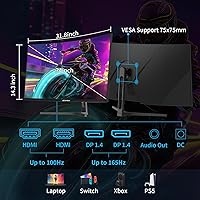
  • Refresh Rate: Maximum refresh rate is 165Hz via DisplayPort 1.4, while HDMI connections are limited to a maximum of 100Hz.
  • Response Time: Rated at 1ms MPRT (Moving Picture Response Time), which reflects backlight strobing speed rather than traditional gray-to-gray pixel transition performance.
  • Brightness: Peak brightness is rated at 300 nits, which is adequate for controlled-lighting environments but limiting in brightly lit or sunlit rooms.
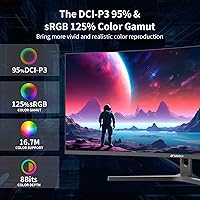
  • Color Gamut: The panel covers sRGB at 125% and DCI-P3 at 95%, offering wide color reproduction suitable for gaming and general media consumption.
  • HDR Support: HDR is supported, though the 300 nits brightness ceiling and absence of local dimming significantly limit the practical impact of HDR content.
  • Adaptive Sync: AMD FreeSync is supported for variable refresh rate gameplay; NVIDIA G-Sync Compatible certification is not officially listed for this model.
  • Connectivity: Input options include two HDMI ports, two DisplayPort 1.4 ports, and one 3.5mm earphone output jack; no USB hub or USB-C is provided.
  • Speakers: This monitor has no built-in speakers; audio output is available only through the 3.5mm earphone jack for headset or external speaker use.
  • Stand Adjustment: The included stand supports tilt adjustment between -5° and +15° (plus or minus 2°); height adjustment, swivel, and pivot are not available.
  • VESA Compatibility: The monitor is VESA mount compatible at a 75 x 75mm pattern, allowing use with most standard third-party monitor arms and wall mounts.
  • PIP & PBP: Picture-in-Picture and Picture-by-Picture modes are supported, enabling two separate input sources to be displayed on screen simultaneously.
  • Panel Type: The display uses a VA (Vertical Alignment) panel, which offers strong contrast ratios and rich colors but slower gray-to-gray transitions than IPS alternatives.
  • Viewing Angle: Rated at 178 degrees horizontally and vertically, allowing reasonably consistent image quality when viewed from off-center positions.
  • Dimensions: The monitor measures 31.8 x 17.96 x 8.6 inches with the stand attached and weighs approximately 15.72 pounds fully assembled.
  • Kensington Lock: A Kensington Lock slot is included on the unit, providing a basic physical security option for shared or semi-public workspace environments.
  • Included Accessories: The package includes a DisplayPort cable, allowing buyers to immediately run the monitor at its maximum 165Hz refresh rate without a separate purchase.
  • Warranty: SANSUI provides a 30-day money-back guarantee from the order date, along with lifetime technical support for the product.

Related Reviews

SANSUI ES-G27C1 27″ Curved Gaming Monitor
73%
91%
Value for Money
88%
Refresh Rate Performance
84%
Color & Image Quality
72%
Motion Clarity & Response
76%
Build Quality & Aesthetics
More
SANSUI ES-G24C1 24-inch Curved Gaming Monitor
74%
91%
Value for Money
86%
Gaming Performance
83%
Color & Image Quality
88%
Contrast & Black Levels
47%
Stand & Ergonomics
More
Alienware AW3425DWM 34-inch Curved Gaming Monitor
82%
91%
Image Clarity & Sharpness
89%
Refresh Rate & Motion Performance
93%
Ultrawide Immersion
84%
Color Accuracy & Vibrancy
62%
HDR Performance
More
Raywego Q34DB45-1 34-inch Curved Gaming Monitor
72%
88%
Value for Money
84%
Gaming Performance
74%
Image Quality
51%
HDR Performance
67%
Build Quality
More
SANSUI ES-G24F4L 24-inch Gaming Monitor
71%
88%
Refresh Rate Performance
91%
Value for Money
74%
Image Clarity
67%
Color Accuracy
41%
HDR Quality
More
Dell S3422DWG 34-inch Curved Gaming Monitor
83%
88%
Image Quality
84%
Refresh Rate & Smoothness
93%
Curvature & Immersion
54%
HDR Performance
91%
Build Quality & Design
More
Westinghouse 34-inch Curved Ultrawide Gaming Monitor
86%
87%
Display Quality
91%
Gaming Performance
92%
Value for Money
85%
Ease of Setup
78%
Built-in Speakers
More
Great Voell 34-Inch Curved Gaming Monitor
86%
92%
Visual Quality
89%
Gaming Performance
85%
Ergonomics & Adjustability
80%
Setup & Installation
91%
Value for Money
More
Xiaomi 34-inch Curved Gaming Monitor G34WQi
84%
94%
Display Quality
91%
Gaming Performance
88%
Color Accuracy
82%
Build Quality
89%
Value for Money
More
ASUS TUF VG34VQL1B 34-inch Curved Gaming Monitor
78%
83%
Image Quality
89%
Refresh Rate & Smoothness
78%
Response Time & Motion Clarity
81%
Adaptive Sync Performance
54%
HDR Performance
More

FAQ

No — 165Hz is only achievable through a DisplayPort 1.4 connection. HDMI on this monitor tops out at 100Hz, so if you want the full refresh rate, use the included DisplayPort cable and make sure your GPU has a DP output available.

It will work as a standard display with any NVIDIA card, but FreeSync adaptive sync is primarily designed for AMD GPUs. Some NVIDIA cards support FreeSync displays under the G-Sync Compatible program, but this monitor is not officially certified, so variable refresh rate performance may vary. Check NVIDIA's compatibility list for your specific card before assuming full adaptive sync support.

Honestly, not in any meaningful way for most people. At 300 nits peak brightness and without local dimming zones, HDR mode produces only a subtle difference compared to SDR. If you are coming from an OLED or a high-brightness HDR display, you will likely find the effect underwhelming. It is technically present, but it is not a reason to choose this monitor.

Yes, the SANSUI ES-G34C5 34-inch Curved Gaming Monitor supports VESA mounting at the standard 75 x 75mm pattern, so it is compatible with the vast majority of monitor arms and wall mounts on the market. This is actually a popular upgrade for buyers who need height or swivel adjustability that the stock tilt-only stand does not offer.
No, there are no built-in speakers. The monitor includes a 3.5mm earphone output jack, so you can connect headphones or external speakers directly, but you will need to bring your own audio solution.

Most users adjust to it quickly, usually within a day or two. At a typical viewing distance of 24 to 32 inches, the 1500R curve feels natural and immersive for both gaming and general desktop work. A small number of buyers find it slightly disorienting at first, particularly when reading straight lines of text, but it is not considered extreme among curved ultrawide panels.

Yes. The monitor supports both Picture-in-Picture (PIP) and Picture-by-Picture (PBP) modes, which let you display two input sources simultaneously. It is useful if you want to monitor a second PC or laptop alongside your main gaming rig, for example. The OSD menu to configure this is functional but not the most intuitive to navigate.

Running demanding titles at full UWQHD resolution and high frame rates requires a relatively powerful GPU — something in the range of an AMD RX 6800 XT, RX 7700 XT, NVIDIA RTX 3080, or better for modern AAA games at high settings. In less demanding or older titles, mid-range cards can handle 100Hz or above at this resolution reasonably well. If your card is more modest, consider targeting 100Hz, which is still very smooth.

It covers DCI-P3 at 95% and sRGB at 125%, which is respectable for a monitor at this price, and the colors look vivid out of the box. However, factory calibration varies between units, and without a hardware colorimeter to profile the display, it is not ideal for professional color-critical work. For casual photo editing or content creation where perfect accuracy is not essential, it performs well enough.

Very straightforward — most buyers complete the full assembly in under ten minutes. The stand attaches to the panel with a few screws, the included DisplayPort cable handles the connection, and the monitor is recognized immediately by Windows in most cases. The main setup step that trips people up is adjusting Windows display scaling for the UWQHD resolution, which may need to be set manually for the sharpest result.