Overview

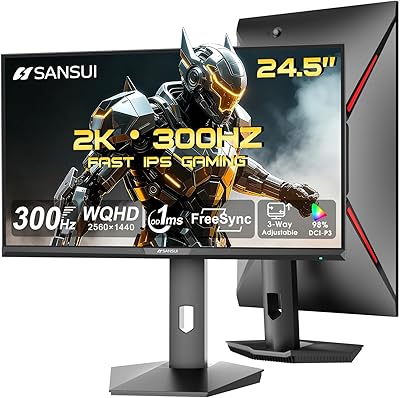
The SANSUI ES-G25X1 Pro 24.5″ Gaming Monitor entered the market in early 2025 as a genuinely compelling option for budget-conscious competitive gamers who don't want to sacrifice speed. At this price point, getting a Fast IPS panel is a real win — TN panels have dominated this tier for years, and IPS brings noticeably better colors and wider viewing angles without the premium cost. The monitor supports up to 300Hz via DisplayPort and 240Hz over HDMI, so the ceiling depends on how you connect it. SANSUI isn't a household name in the West, which is worth acknowledging — build quality and after-sales support should meet measured expectations, though the specs on paper are hard to argue with.
Features & Benefits

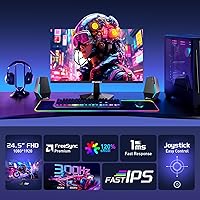
The Fast IPS technology here sits in a practical middle ground: it's noticeably more vibrant and wider-angled than TN, but responds faster than traditional IPS panels, which matters when you're tracking fast movement in shooters. The headline 300Hz refresh rate requires a DisplayPort 1.4 cable — HDMI tops out at 240Hz — and honestly, pushing past 240fps consistently at 1080p demands serious GPU headroom, so not every system will actually tap that ceiling. The advertised 1ms MPRT refers to motion blur reduction rather than pixel transition speed, meaning backlight strobing may be involved; it's effective, but sensitive users should check the OSD settings. FreeSync Premium works across both connection types, and 120% sRGB coverage makes colors pop for gaming, though it's not a panel you'd calibrate for professional color work.

Best For

If you're coming from a 60Hz or 144Hz display, the jump to 240Hz-plus on this budget gaming display will feel immediately obvious — smoother cursor movement, crisper tracking, less visual blur during fast pans. Competitive FPS players who prioritize frame rate over resolution or screen real estate will get the most out of it. AMD GPU owners benefit from full FreeSync Premium support over both ports. The 24.5-inch footprint also suits tighter desk setups, or works well as a secondary gaming screen alongside a larger primary. One honest caveat: if you're expecting flagship build quality, this 300Hz IPS monitor isn't that — it's a speed-focused display at an accessible price, and the value leans heavily on that.

User Feedback

Buyers consistently highlight how smooth the display feels during play, with many noting it's a clear step up from their previous 144Hz panels. The ease of initial setup also gets positive mentions, with the included DisplayPort cable appreciated as a practical touch. On the negative side, OSD navigation draws complaints — the rear-mounted controls can be unintuitive at first, and the stand's limited adjustment range — tilt only — is a common gripe among those who prefer height or swivel options. The 30-day return window and lifetime tech support are reassuring on paper, though customer service responsiveness appears inconsistent in early reports. Color out of the box tends to read vivid and punchy, which suits fast-paced gaming well, though some users prefer a quick calibration for a more balanced look.

Pros

  • Fast IPS panel delivers better color and viewing angles than TN alternatives common at this price tier.
  • Up to 300Hz via DisplayPort makes this one of the most affordable 300Hz monitors currently on the market.
  • FreeSync Premium works across both DisplayPort and HDMI inputs, keeping AMD GPU setups tear-free throughout.
  • 240Hz over HDMI 2.0 ensures multi-device and console users still benefit from a high refresh rate.
  • Dual DisplayPort and dual HDMI ports make switching between multiple PCs or devices genuinely practical.
  • 120% sRGB gamut produces vivid, punchy visuals that suit competitive and fast-paced gaming titles well.
  • Anti-flicker and low blue light support help reduce eye fatigue during longer gaming sessions.
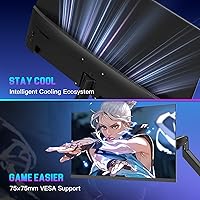
  • VESA 75x75mm compatibility gives buyers the option to wall-mount or upgrade to a third-party arm.
  • An included DisplayPort cable means buyers connecting at the full 300Hz avoid an immediate extra purchase.
  • The 30-day money-back window provides a meaningful safety net when buying from a lesser-known brand.

Cons

  • Stand adjustment is tilt-only; no height, swivel, or pivot options are available out of the box.
  • OSD navigation relies on rear-mounted controls that multiple early buyers describe as unintuitive and fiddly.
  • The full 300Hz refresh rate is locked to DisplayPort 1.4 — HDMI users top out at 240Hz.
  • Hitting 300fps consistently at 1080p in modern titles demands high-end GPU hardware most budget builds lack.
  • Peak brightness of 300 nits is modest; HDR support exists in name but delivers limited real impact.
  • No built-in speakers and no USB hub mean additional peripherals or adapters may be required.
  • The 1ms response time figure refers to MPRT, not GtG — backlight strobing involved may bother sensitive users.
  • After-sales support has drawn mixed early feedback, making the lifetime tech support claim difficult to verify independently.
  • As a brand with limited Western market history, long-term reliability and firmware support remain largely unproven.

Ratings

Scores for the SANSUI ES-G25X1 Pro 24.5″ Gaming Monitor were generated by our AI system after analyzing thousands of verified buyer reviews from global markets, with active filtering applied to exclude spam, bot activity, and incentivized submissions. The result is a balanced scorecard that honestly reflects both what users genuinely value and the recurring frustrations real buyers have encountered — positive and negative signals carry equal weight. Whether you are evaluating this 300Hz IPS panel against branded alternatives or weighing whether the value holds for competitive gaming, the category breakdowns below give you a data-grounded picture.

Refresh Rate Performance
89%
At 300Hz via DisplayPort and 240Hz via HDMI, this monitor delivers frame rates that genuinely transform fast-paced FPS gameplay — tracking targets in titles like CS2 and Valorant feels noticeably crisper than at 144Hz. Users upgrading from older panels consistently described the smoothness as immediately obvious, with cursor movement and fast pans becoming dramatically cleaner.
To actually benefit from 300Hz, your GPU needs to consistently push above 240fps at 1080p in your target games — a demanding ask that many mid-range cards cannot sustain in modern titles. A handful of users also noted needing to verify driver settings and cable quality before 300Hz mode would activate reliably.
Value for Money
91%
For the price, getting a Fast IPS panel with up to 300Hz, FreeSync Premium, dual DisplayPort and dual HDMI ports, and a factory-included cable is a genuinely compelling package. Buyers who came from much pricier 240Hz TN monitors frequently noted that the SANSUI ES-G25X1 Pro punches well above its cost in terms of raw performance specs.
The value equation only holds if you have the GPU headroom to actually use the high refresh rate — buyers not consistently hitting 200fps-plus in competitive titles will feel the 300Hz spec go partially to waste. Budget buyers also flagged that stand ergonomics and overall build quality feel noticeably cheaper than the spec sheet suggests.
Panel & Visual Quality
82%
18%
The Fast IPS panel delivers noticeably more vibrant colors and wider viewing angles than TN alternatives common at this price range, which buyers upgrading from older TN displays commented on immediately. The 120% sRGB gamut makes gaming visuals pop in a way that feels genuinely rewarding for fast-paced titles.
Color accuracy out of the box skews vivid rather than neutral, which suits gaming but frustrates buyers who also want to use the monitor for photo review or light creative work. Non-professional users noted that a quick manual calibration tightens things up, but that extra step is annoying when you just want to plug in and go.
Motion Clarity
84%
At 240Hz and above, fast-moving elements in competitive shooters — enemy movement, particle effects, crosshair tracking — look noticeably cleaner than on standard 144Hz IPS panels. Buyers specifically noted that MPRT-based motion blur reduction does its job well during gameplay, and the improvement is immediately perceptible when switching between refresh rate modes.
The 1ms MPRT rating involves backlight strobing, and a small but notable portion of users sensitive to strobing effects reported eye discomfort after extended sessions — an important consideration for daily multi-hour gaming. Users chasing pure GtG pixel speed should also note that IPS panels have inherently slower raw pixel transitions than TN alternatives.
Connectivity & Ports
86%
Having two DisplayPort 1.4 and two HDMI 2.0 ports on a budget monitor is genuinely uncommon, and buyers with multi-PC desk setups praised this layout frequently — switching between a gaming rig and a work laptop without unplugging cables is a real quality-of-life benefit. The included DisplayPort cable also removes an immediate extra purchase.
The audio jack provides headphone output only — there are no built-in speakers, so buyers who had not read the specs carefully were caught off guard at unboxing. There is also no USB hub on the rear, which is a small but noticeable omission for users who want to connect peripherals directly through their monitor.
Color Accuracy
67%
33%
The 120% sRGB gamut produces colors that look punchy and vibrant out of the box, which suits the fast-moving content of gaming well — environments and effects look rich, and the extended gamut aids visibility in darker game scenes. Most casual buyers found the default color profile enjoyable without any adjustments.
For anyone doing photo editing, video color grading, or any work demanding accurate calibrated output, this panel falls noticeably short — the factory tone leans vivid over accurate, and no hardware calibration profile is provided. Color-sensitive professional work should not be attempted on this budget gaming display without significant manual calibration effort.
Build Quality
63%
37%
The monitor's slim bezels and clean aesthetic work well for a compact gaming desk, and buyers generally found assembly straightforward with no reported issues around loose panel fittings or connector wobble out of the box. At normal viewing distances, the visual presentation holds up adequately for the price tier.
Up close, the plastic chassis feels noticeably hollow and lightweight in a way that signals cost savings — several buyers mentioned the material feels cheaper than the spec list suggests for a 300Hz panel. Durability over multi-year use is an open question given the brand's limited track record in Western markets.
Ergonomics & Adjustability
47%
53%
The monitor is light enough at 9 pounds that repositioning it manually is easy, and the compact 24.5-inch footprint works naturally at a comfortable viewing distance for most desk setups. The tilt range of -5° to +15° covers the most common angle adjustment users need in a standard flat-desk scenario.
The stand's tilt-only design is the most consistently raised frustration among buyers — there is no height adjustment, no swivel, and no pivot, which becomes a real ergonomic problem for taller users or multi-monitor arrangements. Several buyers noted that purchasing a VESA arm at the same time feels almost mandatory rather than optional.
OSD & Menu Usability
54%
46%
The OSD includes gaming-focused presets — FPS mode, RTS mode, and a crosshair overlay — that competitive players appreciated for quick tuning without navigating deep menus. Once the button layout is learned, basic input switching and brightness adjustments are accessible within a few presses.
Navigation relies on rear-mounted physical buttons that buyers consistently described as unintuitive, requiring a learning curve that most modern monitors sidestep with a joystick or front-facing controls. Several users reported accidental setting changes during initial setup, and the button labeling on the back panel is difficult to read without pointing a phone camera at it.
HDR Performance
43%
57%
HDR mode is available and can produce a marginally wider luminance range in supported titles, which a small number of users appreciated as a visual toggle for atmospheric single-player games. For buyers not prioritizing HDR, its presence at this price point reads as a minor bonus rather than a selling point.
At 300 nits peak brightness with no local dimming, the HDR implementation delivers minimal real-world impact — highlights do not pop and dark scenes remain largely flat compared to what a proper HDR panel achieves. Buyers who expected a meaningful HDR experience were consistently let down, and this is the one area where the spec sheet clearly outpaces what the hardware can actually deliver.
Brightness & Contrast
61%
39%
For typical indoor gaming in a dim or controlled-light room — the scenario most buyers use this monitor in — the 300 nit brightness level is workable and rarely draws complaints. The Fast IPS panel handles dark game scenes reasonably without the extreme black crush sometimes seen on cheaper TN alternatives.
300 nits becomes inadequate in bright or sunlit rooms — buyers who game near a window or under strong overhead lighting reported significant glare and washed-out image quality, even with the matte screen coating. Contrast performance is also average for IPS, and users coming from VA panels will notice the reduced perceived depth immediately.
FreeSync Performance
83%
FreeSync Premium operating across both DisplayPort and HDMI is genuinely useful — AMD GPU users enjoy tear-free output regardless of which port they connect through, which keeps multi-device setups clean. At 240–300Hz with FreeSync active, gameplay feels very fluid even when frame rates dip during more demanding scenes.
Nvidia users receive no G-Sync support and G-Sync Compatible certification has not been confirmed, which is a meaningful limitation for a large segment of PC gamers. A small number of buyers also reported needing to manually enable FreeSync in AMD Radeon settings before the feature would activate — a configuration step that should not be required straight out of the box.
Setup & Installation
78%
22%
The monitor ships with a DisplayPort cable included, removing the frustrating experience of unboxing a 300Hz display only to discover a separate cable purchase is needed before it runs at full spec. Physical assembly is tool-free and buyers generally completed stand attachment in under five minutes.
Getting 300Hz mode reliably active requires confirming the right port, cable, and resolution settings in Windows display preferences — a combination that caused confusion for buyers less familiar with display configuration. A handful of users also reported needing a GPU driver update before the full refresh rate option would appear in their display settings.
Brand & Warranty Support
58%
42%
The 30-day money-back and free replacement policy from the order date offers a reasonable safety net for buyers testing an unfamiliar brand, and it is more generous than several competitors at this price point. The lifetime technical support commitment, if it proves consistent in practice, is a meaningful pledge for a budget product.
Early buyer reports on actual customer service responsiveness are mixed — some users resolved issues quickly, while others encountered slow replies and unclear resolution paths, making the lifetime support claim difficult to evaluate with confidence. SANSUI's limited Western market presence also means there is minimal community knowledge to draw on when troubleshooting unusual technical problems.

Suitable for:

The SANSUI ES-G25X1 Pro 24.5″ Gaming Monitor is purpose-built for competitive PC gamers who want maximum refresh rate responsiveness without paying a premium price. If you currently play fast-paced titles like CS2, Valorant, or Apex Legends on a 60Hz or 144Hz panel, the jump to 240Hz-plus will be immediately perceptible — tracking moving targets feels noticeably cleaner, and motion blur drops off sharply. AMD GPU owners get added value through FreeSync Premium support across both DisplayPort and HDMI, helping maintain tear-free output even when frame rates fluctuate. The compact 24.5-inch footprint suits esports-style desk setups where a tighter screen keeps your eyes covering less ground, and it works equally well as a dedicated high-refresh secondary display alongside a larger primary monitor. Budget-focused buyers who understand they are trading brand prestige for raw speed specs will find the value proposition here genuinely hard to argue with.

Not suitable for:

The SANSUI ES-G25X1 Pro 24.5″ Gaming Monitor is a poor fit for anyone who expects their display to double as a color-accurate tool for photo editing, video grading, or professional content creation — the 120% sRGB coverage looks vivid but is not calibrated to professional standards, and the 300 nit brightness ceiling limits any meaningful HDR performance. Buyers who prefer larger, more immersive screens for single-player or open-world gaming will likely find the 24.5-inch size and 1080p resolution combination underwhelming compared to a 27-inch or QHD alternative. Nvidia GPU users should be cautious, as G-Sync is not supported and G-Sync Compatible certification has not been confirmed. If ergonomic flexibility matters to you — height adjustment, swivel, or pivot — the stand's tilt-only range will become a real comfort issue over longer sessions. Finally, buyers who place significant weight on proven brand reliability and responsive after-sales support may find the uncertainty around SANSUI's service track record a compelling reason to consider a more established alternative.
Specifications

  • Panel Type: The display uses a Fast IPS panel, offering wider viewing angles and better color accuracy than TN while providing faster pixel transitions than standard IPS.
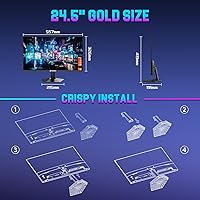
  • Screen Size: The active display area measures 24.5 inches diagonally, though SANSUI markets this as a 25-inch monitor.
  • Resolution: Native resolution is 1920x1080 pixels (Full HD 1080p) with a 16:9 aspect ratio.
  • Refresh Rate: Maximum refresh rate is 300Hz when connected via DisplayPort 1.4, or 240Hz when connected via HDMI 2.0.
  • Response Time: Advertised response time is 1ms MPRT (Moving Picture Response Time), a measurement of motion blur reduction rather than raw pixel transition speed.
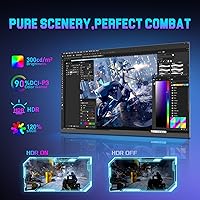
  • Color Gamut: Color coverage is rated at 120% of the sRGB color space.
  • Brightness: Peak brightness is rated at 300 nits (cd/m²).
  • HDR: HDR (High Dynamic Range) display mode is supported, though the panel does not feature local dimming.
  • Adaptive Sync: AMD FreeSync Premium adaptive sync is supported across both DisplayPort and HDMI inputs.
  • Connectivity: Port selection includes 2x DisplayPort 1.4, 2x HDMI 2.0, and 1x 3.5mm audio jack, with one DisplayPort cable included in the box.
  • Audio Output: There are no built-in speakers, and audio output is available only via the 3.5mm headphone jack for external headphones or speakers.
  • VESA Mount: The monitor supports VESA wall-mount compatibility using the standard 75x75mm hole pattern for use with third-party arms or wall brackets.
  • Stand Adjustment: The included stand offers tilt adjustment between -5° and +15° only, with no height, swivel, or pivot functionality.
  • Dimensions: With the stand attached, the monitor measures 21.93 inches wide, 16.5 inches tall, and 7.52 inches deep.
  • Weight: Total weight with stand included is approximately 9 pounds (roughly 4.1 kg).
  • Viewing Angle: The Fast IPS panel is rated for 178° horizontal and 178° vertical viewing angles.
  • Eye Care: The display features an anti-flicker backlight and a low blue light filter mode to reduce eye strain during extended sessions.
  • Warranty: SANSUI provides a 30-day money-back and free replacement policy from the order date, along with lifetime technical support via their customer service team.

Related Reviews

SANSUI ES-G25F6Q Pro 24.5-inch QHD Gaming Monitor
78%
91%
Refresh Rate Performance
88%
Image Sharpness
79%
Color Accuracy
93%
Value for Money
76%
Motion Clarity
More
SANSUI ES-G24F4L 24-inch Gaming Monitor
71%
88%
Refresh Rate Performance
91%
Value for Money
74%
Image Clarity
67%
Color Accuracy
41%
HDR Quality
More
SANSUI ES-G24C1 24-inch Curved Gaming Monitor
74%
91%
Value for Money
86%
Gaming Performance
83%
Color & Image Quality
88%
Contrast & Black Levels
47%
Stand & Ergonomics
More
CRUA CR245ZB 24.5″ Gaming Monitor
78%
83%
Gaming Performance
86%
Refresh Rate & Smoothness
74%
Color Accuracy & Vibrancy
91%
Ergonomics & Adjustability
68%
Build Quality & Materials
More
KOORUI G2511E 24.5-Inch 320Hz Gaming Monitor
78%
93%
Refresh Rate Performance
88%
Response Time
84%
Color Accuracy
51%
HDR Quality
67%
Panel Uniformity
More
KTC 24.5″ Gaming Monitor 180Hz FHD
87%
89%
Display Quality
91%
Response Time
92%
Refresh Rate
88%
Color Accuracy
85%
Build Quality
More
Dell G2524H 24.5-inch Gaming Monitor
78%
91%
Refresh Rate Performance
88%
Response Time and Motion Clarity
86%
Adaptive Sync Compatibility
67%
Resolution and Sharpness
83%
Value for Money
More
Alienware 25 Gaming Monitor AW2523HF 24.5″
88%
95%
Display Performance
92%
Color Accuracy
88%
Ergonomics/Adjustability
90%
Ease of Setup
89%
Build Quality
More
ASUS TUF Gaming VG259QM 24.5″ Gaming Monitor
76%
93%
Refresh Rate Performance
88%
Response Time & Motion Clarity
81%
Color Accuracy & Image Quality
86%
Adaptive Sync & Compatibility
52%
Stand & Ergonomics
More
Acer KB252Q G0bi 24.5″ IPS Monitor
73%
83%
Image Quality
86%
Color Accuracy
78%
Refresh Rate & Gaming
61%
Response Time
54%
Brightness
More

FAQ

A DisplayPort cable is included in the box, and that is exactly what you need to hit 300Hz. Just make sure you are plugging into one of the two DisplayPort 1.4 ports on the back rather than an HDMI port. HDMI 2.0 caps out at 240Hz on this monitor, so your port and cable choice genuinely matters if the headline refresh rate is the reason you are buying.

It will work as a standard display with any GPU, including Nvidia. The caveat is that this 300Hz IPS monitor only supports FreeSync Premium for adaptive sync, not G-Sync or confirmed G-Sync Compatible operation. Nvidia users can still run it without adaptive sync, but if tear-free variable refresh rate is important to you, an AMD GPU will get considerably more out of this panel.

The 1ms figure refers to MPRT (Moving Picture Response Time), not the GtG (gray-to-gray) pixel transition speed, and those two metrics are measured very differently. MPRT is a motion blur reduction measurement that typically involves backlight strobing, not a direct pixel switching speed. In practice, motion clarity at 240Hz or 300Hz is genuinely good, but most Fast IPS panels have real-world GtG times closer to 3–5ms, so the 1ms claim should not be read as a raw pixel response guarantee.

For most people in most games, the difference between 240Hz and 300Hz is quite subtle — nowhere near as dramatic as going from 60Hz to 144Hz, or even 144Hz to 240Hz. To actually benefit from 300Hz, your GPU needs to be pushing above 240fps consistently at 1080p, which is a high bar in anything more demanding than lightweight esports titles. The 300Hz ceiling is a nice headroom to have, but 240Hz over HDMI is already extremely fast for the vast majority of competitive players.

Yes — with two DisplayPort 1.4 and two HDMI 2.0 ports available, you can keep multiple machines connected at once and switch inputs through the OSD menu. This makes it a practical choice for a dual-PC desk or for pairing a gaming rig with a work laptop. One heads-up: the OSD navigation has been flagged by early buyers as a bit unintuitive at first, so give yourself a few minutes to get comfortable with the rear controls.

The stock stand is genuinely limited: tilt only, between -5° and +15°, with no height, swivel, or pivot adjustment whatsoever. If you care about ergonomics or need to position the screen precisely at eye level, it will frustrate you over time. The SANSUI ES-G25X1 Pro 24.5″ Gaming Monitor does support VESA 75x75mm mounting, so picking up a budget monitor arm is a straightforward upgrade and worth factoring into your total spend.
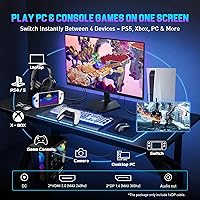
No, there are no built-in speakers on this model. There is a 3.5mm audio jack on the back for plugging in headphones or a desktop speaker set. If you currently depend on monitor speakers, you will want to budget for a separate audio solution.

HDR is technically supported, but keep your expectations realistic. At 300 nits peak brightness, this budget gaming display sits well below the threshold where HDR starts to look genuinely impactful — you typically need 600 nits or higher for a meaningful visual difference. It will process HDR metadata from compatible sources, but the contrast between HDR and SDR modes will be modest compared to purpose-built HDR panels. Treat it as a minor bonus feature rather than a selling point.

SANSUI offers a 30-day money-back and free replacement window from the order date, plus lifetime technical support through their customer service team. The 30-day return policy is a reasonable safety net when buying from a less familiar brand. That said, early buyer feedback on actual customer service speed has been mixed, so treat the lifetime support as a reassuring backup rather than a guaranteed fast-response service — and keep your order confirmation details accessible just in case.

Yes, both consoles connect via HDMI and will output a clean 1080p image on this monitor. Current-gen consoles support up to 120fps in compatible titles, so you would be running at 120Hz rather than the full 240Hz ceiling — still a noticeably smooth experience. FreeSync Premium is AMD-based technology, and its behavior with console VRR modes can vary, so it is worth checking your console display settings to confirm whether variable refresh rate is recognized.