Overview

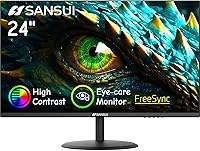
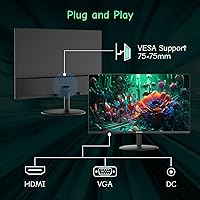
The SANSUI ES-24X5AL 24-inch Monitor enters a crowded budget space with a few features that actually make it stand out from the usual pack. It pushes up to 100Hz refresh rate — uncommon at this price tier — and wraps a 1080p matte panel in a slim, frameless chassis that looks tidier than most monitors in this range. Connectivity covers both HDMI 1.4 and VGA, which is genuinely useful if you work with older hardware. One thing to flag upfront: there are no speakers or headphone jack. If you assumed audio was included, it is not. Keep that in mind before purchasing.

Features & Benefits

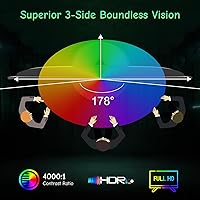
The 100Hz refresh rate combined with AMD FreeSync cuts down on screen tearing during fast-paced tasks — nothing dramatic, but noticeable if you have been staring at a 60Hz panel for years. The 178-degree viewing angle is wide enough that color and contrast hold up well even from the side, which matters when sharing your screen during calls or collaborative reviews. The tilt range (-5° to 22°) handles most ergonomic setups without requiring an arm, and the 75×75mm VESA mount means adding one is straightforward. The matte surface does a solid job diffusing light in overhead-lit offices, though 250 nits of brightness may feel a little flat near a sunny window.

Best For

This SANSUI monitor makes the most sense for home office workers and students who need a dependable display without a premium price tag. It handles the basics well — clean 1080p image, a size that fits most desks, and enough refresh rate headroom for casual gaming on the side. If your older laptop or desktop only has a VGA port, the dual-input setup is a practical advantage. Minimalist setups benefit from the slim, borderless look. Where it makes less sense is for creative professionals needing precise color reproduction, or anyone who relies on built-in audio. For everyday productivity and light use, though, it covers a lot of ground.

User Feedback

Buyers consistently point to image clarity as a strong suit — for the price, most are genuinely surprised by how sharp and even the picture looks straight out of the box. Setup is described as quick and hassle-free. On the critical side, the missing speakers catch people off guard more than anything else; knowing ahead of time prevents frustration. Stand stability gets mixed responses — adequate for a desk that does not get bumped, but some users prefer swapping to a VESA arm for better flexibility. The 30-day return policy and lifetime technical support earn genuine goodwill from first-time buyers. Color accuracy is rated as solid for everyday tasks, less so for detailed photo editing.

Pros

  • Sharp 1080p image quality that consistently impresses at this price point.
  • The 100Hz refresh rate is a meaningful upgrade over standard 60Hz budget monitors.
  • AMD FreeSync reduces screen tearing during gaming and fast video without added cost.
  • Wide 178-degree viewing angles keep colors consistent from almost any seat.
  • Dual HDMI and VGA inputs make it compatible with both modern and older devices.
  • The matte panel surface handles overhead office lighting well, reducing distracting reflections.
  • A frameless design keeps the display looking clean and minimal on any desk.
  • VESA mounting support gives users flexibility to upgrade to an arm mount easily.
  • The tilt range covers most ergonomic needs without requiring extra accessories.
  • A 30-day return window and lifetime technical support add genuine peace of mind.

Cons

  • No built-in speakers or headphone jack — external audio hardware is required.
  • At 250 nits, brightness may feel insufficient near windows or in well-lit rooms.
  • The stand offers tilt only; there is no height adjustment or pivot option.
  • Some users find the default stand less stable than expected for a busy desk environment.
  • Color accuracy is adequate for general use but not reliable enough for photo or video editing.
  • Only one HDMI port is included, limiting multi-source switching without an adapter.
  • The 100Hz advantage is limited to compatible sources and cables — not automatic with every setup.
  • No USB hub or additional port options are available on the monitor itself.

Ratings

The SANSUI ES-24X5AL 24-inch Monitor has been scored by our AI system after analyzing verified global buyer reviews, with spam, bot activity, and incentivized feedback actively filtered out. The scores below reflect an honest synthesis of real user experiences — including where this budget monitor delivers and where it genuinely falls short. Both strengths and friction points are represented transparently so you can make a confident buying decision.

Value for Money
91%
Among buyers who picked this up as a primary or secondary home office display, the general consensus is that the feature-to-price ratio is hard to beat. Getting a 100Hz refresh rate, FreeSync support, and a frameless design at this price tier consistently surprises first-time buyers in a positive way.
A small number of users feel that the missing audio output brings the overall value down, since they had to purchase external speakers separately — adding unexpected cost to an otherwise budget-friendly setup.
Image Clarity
87%
The 1080p panel draws repeated praise for looking crisp and well-balanced out of the box, particularly for spreadsheets, web browsing, and video streaming. Users in home office setups note that text rendering is sharp enough for long reading sessions without eye strain.
Those coming from higher-resolution displays occasionally find 1080p on a 24-inch screen less impressive, and a handful of users report that the factory color calibration leans slightly cool, requiring manual adjustment in the OSD menu.
Refresh Rate Performance
83%
Moving from a 60Hz monitor to this 100Hz panel is a noticeable improvement for most users, even in non-gaming tasks like scrolling through documents or watching high-frame-rate video. Casual gamers report that FreeSync meaningfully reduces the screen tearing they experienced on older displays.
Achieving 100Hz requires correct setup through display settings and a compatible HDMI source — users who skip this step often run at 60Hz without realizing it. Also, the panel's response characteristics are not tuned for competitive gaming, so fast-action titles may still show some ghosting.
Build Quality
74%
26%
The slim, frameless chassis feels reasonably sturdy for a monitor at this price point, and the plastic finish is clean enough that it does not look cheap on a tidy desk. Assembly is straightforward and most buyers complete it without tools or confusion.
The overall construction feels noticeably lighter and less premium compared to monitors even slightly higher in price. Some users detect minor flex in the back panel when adjusting the tilt, which does not affect function but reinforces the budget-tier feel.
Stand Stability
63%
37%
For static desk use where the monitor is set and rarely moved, most buyers find the included stand perfectly functional. It sits flat without wobbling under normal conditions and holds its tilt position reliably throughout a workday.
Users who type firmly or have desks in high-traffic areas report that the stand allows more vibration than expected. Several reviewers ultimately switched to a VESA monitor arm for better rigidity, which adds cost but is at least supported by the 75×75mm mounting pattern.
Matte Screen & Glare Resistance
84%
The matte coating earns consistent praise from users working under overhead fluorescent or LED lighting, where a glossy panel would cause constant distracting reflections. Office workers specifically highlight this as one of the most practical day-to-day advantages of the display.
A minority of users feel the anti-glare coating softens fine detail very slightly compared to a glossy alternative, which is a real — if minor — tradeoff. In darker rooms, some notice that the coating adds a faint texture to the image that takes some adjustment.
Brightness Adequacy
61%
39%
At 250 nits, the display is comfortable in typical indoor environments like bedrooms, home offices, and classrooms with controlled lighting. Users in these settings rarely mention brightness as an issue and find the default levels perfectly usable for all-day work.
In rooms with natural daylight or near a window, 250 nits starts to feel genuinely underpowered — colors wash out and text contrast drops. This is a recurring complaint from users who did not account for their room's ambient light level before purchasing.
Viewing Angles
82%
18%
The 178-degree viewing angles hold up well in practical use — users sharing their screen during video calls or group reviews note that color and contrast remain consistent from well off to the side. This makes the monitor more flexible in small shared spaces.
At extreme angles near the limits of the rated range, some color shift is still perceptible, which is expected on a panel in this category. Users who rely on perfectly consistent colors across a wide field — such as those doing visual presentations — may find this limiting.
Connectivity & Compatibility
79%
21%
Having both HDMI 1.4 and VGA on the same monitor is a genuine convenience for users who switch between a modern laptop and an older desktop tower. The plug-and-play setup is frequently praised — most buyers report the display was detected and working within minutes of unboxing.
Only one HDMI port is available, which limits flexibility for users who want to connect two HDMI sources and switch between them. There are also no USB ports or a hub built into the monitor, which feels like a missed opportunity at this desk-setup tier.
Ergonomics & Adjustability
58%
42%
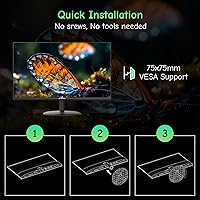
The tilt range of -5° to 22° covers the most common ergonomic positions for seated desk use, and setting it up requires no tools. For a typical workstation where the monitor does not need to move often, this is sufficient.
The absence of height adjustment is a meaningful limitation — taller users or those with standing desks often find they cannot get the display at the right eye level without stacking it on a riser. No pivot or swivel function further limits flexibility compared to even moderately priced alternatives.
Setup & Ease of Use
93%
Buyers consistently describe unboxing and setup as one of the smoothest experiences they have had with a monitor. The stand attaches without tools, the OSD controls are intuitive, and the display is typically detected automatically by Windows and macOS alike.
The OSD menu navigation using physical buttons on the back edge of the panel can feel slightly fiddly at first, and the button layout is not immediately obvious without consulting the manual. This is a minor annoyance that fades quickly with use.
Color Accuracy
67%
33%
For general productivity — documents, spreadsheets, web browsing, and casual video watching — the color output is balanced enough that most users have no complaints. The matte panel handles mixed content well, and whites appear neutral rather than overly warm or cool.
Out-of-the-box calibration is inconsistent across units, with some users reporting a noticeable cool blue tint that requires manual correction. Photo editors and designers testing this panel typically find it unreliable for color-sensitive work without external calibration hardware.
Warranty & Support
88%
The 30-day money-back window gives buyers a real safety net, and lifetime technical support is an unusually generous commitment for a budget brand. Users who have contacted SANSUI support report reasonably fast and helpful responses to troubleshooting queries.
The warranty terms are tied to the order date rather than arrival date, which can feel tight for buyers who do not unbox immediately. Some users also note that the replacement process requires back-and-forth communication rather than an instant exchange, which adds wait time.

Suitable for:

The SANSUI ES-24X5AL 24-inch Monitor is a strong fit for anyone who needs a dependable everyday display without stretching their budget. Students setting up a first workstation will find the 24-inch 1080p panel more than capable for writing, research, and video streaming. Home office workers who want a second screen to extend their workspace get solid value here, especially given the slim, frameless design that keeps a desk looking uncluttered. The inclusion of both HDMI and VGA ports is a quiet but meaningful advantage for users with older laptops or desktop towers that lack modern outputs. Casual gamers who want a noticeable step up from a standard 60Hz display will also benefit from the 100Hz refresh rate and FreeSync support, even if the panel is not built for competitive play. Anyone who plans to mount their display on an arm will appreciate the VESA compatibility, which opens up flexible positioning options without additional hassle.

Not suitable for:

The SANSUI ES-24X5AL 24-inch Monitor has real limitations that certain buyers should weigh carefully before committing. There are no built-in speakers and no headphone jack whatsoever, which means anyone expecting audio output from the monitor itself will need a separate solution — this is a hard stop for setups where external speakers are not already in place. At 250 nits of brightness, the display can feel underwhelming in rooms with strong natural light or near a window, making it a poor fit for bright open-plan offices. Color professionals, photographers, or video editors who depend on accurate, wide-gamut color reproduction will find this budget panel falls short of the precision they need. Competitive gamers chasing high frame rates for fast-paced titles should also look elsewhere, as the panel's response characteristics are suited to casual rather than performance-driven use. If height adjustment, portrait mode rotation, or a wide range of ergonomic positioning options are a priority, the basic stand will likely disappoint.

Specifications

  • Screen Size: The display measures 24 inches diagonally, offering a comfortable viewing area suitable for both productivity and casual use.
  • Resolution: Native resolution is 1920×1080 (Full HD), delivering sharp, clear images for everyday computing tasks and media consumption.
  • Refresh Rate: Supports up to 100Hz refresh rate, which reduces motion blur and provides smoother visuals compared to standard 60Hz panels.
  • Panel Surface: The matte screen coating reduces glare and reflections, making it more comfortable to use under typical indoor lighting conditions.
  • Brightness: Peak brightness is rated at 250 nits, which is adequate for most indoor environments but may appear dim in very bright rooms.
  • Viewing Angle: Offers 178-degree horizontal and vertical viewing angles, allowing consistent image quality when viewed from wide off-center positions.
  • Aspect Ratio: Standard 16:9 widescreen aspect ratio, compatible with the vast majority of modern video content and productivity applications.
  • Connectivity: Equipped with one HDMI 1.4 port and one VGA port; an HDMI cable is included in the box.
  • Audio Output: This monitor has no built-in speakers and no headphone jack; a separate external audio solution is required for sound.
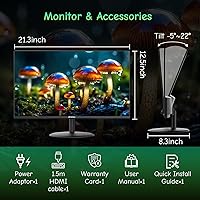
  • Tilt Adjustment: The included stand supports a tilt range of -5° to 22°, allowing basic ergonomic positioning without a third-party arm.
  • VESA Mount: Compatible with 75×75mm VESA mounting patterns, making it straightforward to attach to most standard monitor arms or wall mounts.
  • Adaptive Sync: AMD FreeSync is supported, which synchronizes the monitor's refresh rate with a compatible GPU to reduce screen tearing.
  • Dimensions: The monitor measures 21.3″ wide, 8.3″ deep, and 15.6″ tall with the stand attached.
  • Weight: Total weight with stand is 8.18 pounds, making it light enough for easy repositioning on a desk.
  • Voltage: Rated for 240 volts input, compatible with standard international power configurations when used with an appropriate adapter.
  • Warranty: SANSUI provides a 30-day money-back guarantee from the order date, free replacement coverage, and lifetime technical support.

Related Reviews
SANSUI ES-G24F4L 24-inch Gaming Monitor
71%
88%
Refresh Rate Performance
91%
Value for Money
74%
Image Clarity
67%
Color Accuracy
41%
HDR Quality
More
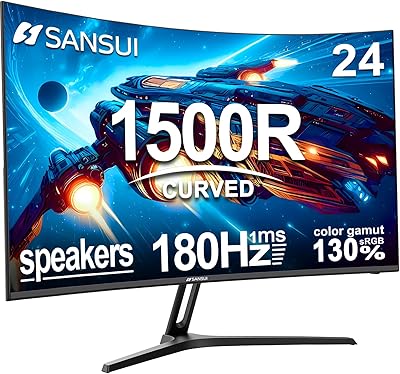
SANSUI ES-G24C1 24-inch Curved Gaming Monitor
74%
91%
Value for Money
86%
Gaming Performance
83%
Color & Image Quality
88%
Contrast & Black Levels
47%
Stand & Ergonomics
More
SANSUI 24.5 Inch QHD Gaming Monitor 300Hz ES-G25F6Q Pro
87%
94%
Gaming Performance
91%
Color Accuracy
88%
Build Quality
89%
Ergonomics & Adjustability
95%
Refresh Rate & Response Time
More
SANSUI ES-27F2 27-Inch 120Hz Monitor
71%
88%
Value for Money
79%
Image Quality
91%
Refresh Rate & Smoothness
52%
Glare & Reflections
83%
FreeSync Performance
More
SANSUI ES-22X3 22-Inch IPS FHD Monitor
83%
88%
Display Quality
91%
Value for Money
85%
Build Quality
82%
Ease of Setup
80%
Eye Care Features
More
SANSUI ES-27X3 27-inch 100Hz IPS Monitor
84%
89%
Display Quality
92%
Value for Money
85%
Ease of Setup
88%
Gaming Performance
86%
Color Accuracy
More
SANSUI ES-G27C1 27″ Curved Gaming Monitor
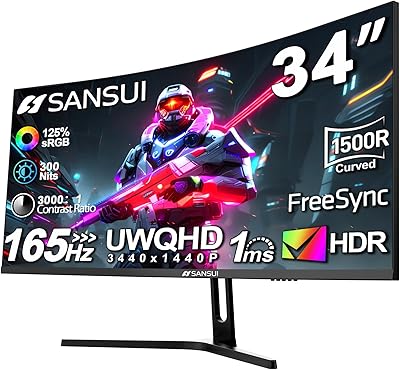
73%
91%
Value for Money
88%
Refresh Rate Performance
84%
Color & Image Quality
72%
Motion Clarity & Response
76%
Build Quality & Aesthetics
More
SANSUI ES-G34C5 34-inch Curved Gaming Monitor
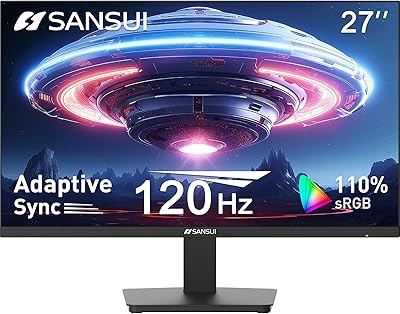
73%
91%
Value for Money
84%
Image Quality & Color Accuracy
83%
Refresh Rate & Smoothness
47%
HDR Performance
41%
Ergonomics & Stand Adjustability
More
SANSUI ES-G24F4M 24-inch Gaming Monitor
73%
88%
Value for Money
91%
Gaming Performance
86%
Motion Clarity
58%
Color Accuracy
79%
Contrast & Black Levels
More
SANSUI ES-G25X1 Pro 24.5″ 300Hz Gaming Monitor
87%
94%
Performance
89%
Display Quality
92%
Response Time
84%
Build Quality
88%
Color Accuracy
More

FAQ

No, it does not. There are no speakers and no headphone jack on this display at all. If you need audio, you will have to connect external speakers or headphones directly to your PC or use a USB audio adapter.

An HDMI cable is included in the package. If you plan to use the VGA port, you will need to supply your own VGA cable, as one is not bundled with the monitor.

Yes, the VGA port is specifically useful for older laptops and desktop towers that lack HDMI. Just make sure you have a VGA cable on hand since only the HDMI cable is included.

It is a reasonable choice for casual gaming. The 100Hz refresh rate and AMD FreeSync do reduce screen tearing noticeably compared to a 60Hz panel. That said, this is not a high-performance gaming monitor — competitive players chasing low input lag and fast response times should look at displays built specifically for that purpose.

You need to set the refresh rate manually in your operating system's display settings. On Windows, go to Display Settings, then Advanced Display Settings, and select 100Hz from the refresh rate dropdown. Also make sure you are using the HDMI port rather than VGA, as VGA typically cannot carry a 100Hz signal.

Yes, the monitor supports 75×75mm VESA mounting, which is a common standard. You can remove the stand and attach it to most monitor arms or wall mounts that list 75×75mm compatibility.

No, the stand only supports tilt adjustment, ranging from -5° to 22°. There is no height adjustment or pivot function. If you need more flexibility in positioning, pairing it with a VESA-compatible monitor arm is a practical solution.

It is adequate for general use but not ideal for precise color work. The panel offers decent color reproduction for everyday tasks, but it is not factory-calibrated for wide color gamut accuracy. Creative professionals who need reliable color representation would be better served by a display designed for that purpose.

SANSUI offers a 30-day money-back window from the order date, so if something is wrong early on you have a clear return path. Beyond that, they provide lifetime technical support, which means you can contact them with issues at any point. Most buyers report the support team is responsive to troubleshooting requests.

Matte panels do reduce peak vibrancy slightly compared to glossy screens, but the tradeoff is significantly less glare and reflection in typical room lighting. For office work, reading, and general media consumption, most users find the matte finish more comfortable over long sessions rather than distracting.