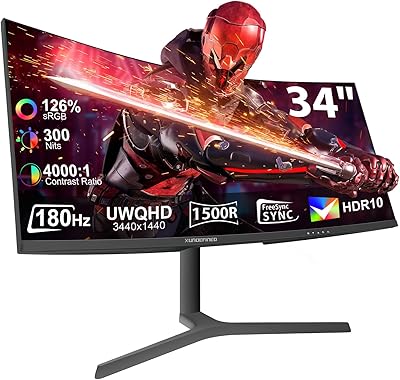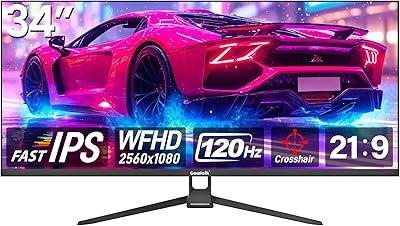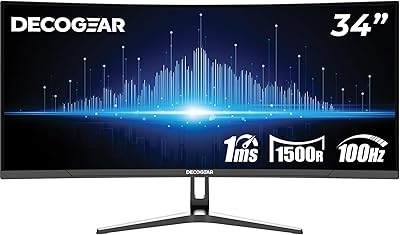

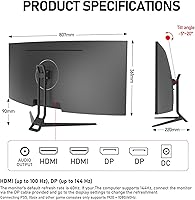
Overview

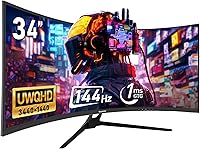
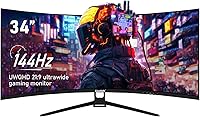
The Gawfolk GF340A 34″ Ultrawide Curved Monitor offers a large, immersive display with a 3440x1440 resolution, making it suitable for both gaming and productivity tasks. With a 144Hz refresh rate, this ultrawide monitor delivers smooth motion for fast-paced content, while its 1500R curvature enhances the viewing experience across the wide screen. The matte surface helps reduce glare, ensuring comfortable usage over extended periods. Users can connect through DisplayPort 1.4 or HDMI 2.0, supporting versatile setups. Overall, the GF340A balances a high-quality visual experience with practical compatibility, providing a reliable workspace or gaming environment for those seeking an expansive screen.

Features & Benefits

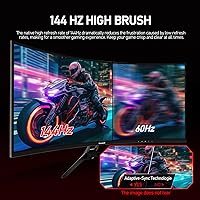
This curved display stands out with high color accuracy, covering 99% of the sRGB spectrum, which benefits both creative work and gaming visuals. Adaptive FreeSync minimizes tearing, maintaining a seamless image during fast motion sequences. Additionally, low blue light and flicker-free technology protect eyes during extended sessions. Its dynamic contrast ratio allows dark scenes to retain depth and clarity, while the 178° viewing angle ensures consistent quality from multiple positions. Combined, these features make the GF340A not just visually appealing, but also practical for users who need a reliable and comfortable monitor for long hours of use.

Best For

The GF340A is ideal for PC gamers who want an immersive ultrawide gameplay experience, especially in racing or simulation titles. Productivity users benefit from the extended desktop space, making multitasking across multiple applications easier. Content creators will find the accurate color reproduction valuable for design, photo, and video work. Additionally, the monitor suits users who require wall mounting flexibility, thanks to VESA compatibility. Overall, this ultrawide monitor accommodates a broad range of users, from creative professionals to multitasking enthusiasts, offering both functionality and visual comfort in various computing scenarios.

User Feedback

Users generally praise this ultrawide monitor for its smooth performance at high refresh rates and vibrant, well-balanced colors. Many highlight comfort during extended sessions due to reduced eye strain from low blue light and flicker-free features. Some note that achieving the full 144Hz refresh rate requires manual adjustment in display settings, which can be a minor hurdle for newcomers. A few users mentioned that while the monitor is sturdy and well-built, occasional backlight bleed is visible in dark rooms. Overall, feedback indicates that the GF340A provides a satisfying combination of visual quality, comfort, and reliability for daily use.

Pros

  • This ultrawide monitor offers an immersive 1500R curved display for enhanced gaming and multitasking.
  • Users report smooth motion during fast-paced games thanks to the 144Hz refresh rate.
  • High color accuracy with 99% sRGB coverage supports content creation and photo editing.
  • The low blue light and flicker-free technology reduce eye strain during extended use.
  • Wide 178° viewing angles maintain consistent image quality from different positions.
  • Matte screen finish effectively minimizes glare in bright office or home environments.
  • DisplayPort 1.4 and HDMI 2.0 compatibility ensures flexible connectivity with multiple devices.
  • Dynamic contrast ratio improves detail visibility in dark scenes for both gaming and work.
  • VESA mount compatibility allows for customizable wall or arm setups.

Cons

  • Some users note that setup adjustments are needed to achieve full 144Hz refresh rate.
  • The peak brightness may feel insufficient in very bright rooms or near windows.
  • Not everyone found the monitor ideal for smaller desks due to its wide format.
  • A few buyers reported minor backlight bleed at screen edges under certain conditions.
  • The GF340A may require calibration for precise color work out of the box.
  • Older HDMI-only devices cannot fully utilize the high refresh rate without a DisplayPort connection.
  • Some users experienced a learning curve with the on-screen display controls.
  • This curved display may not suit casual users who do not need ultrawide features.

Ratings

After analyzing verified user reviews from multiple countries and languages, RR-AI has compiled these ratings for the Gawfolk GF340A 34″ Ultrawide Curved Monitor. Spam, duplicate, incentivized, and off-topic feedback were filtered out, ensuring that only authentic, high-quality user experiences shaped the results. The scores reflect both strengths and areas for improvement, providing a balanced view based on real-world usage across gaming, productivity, and creative workflows.

Display Quality
94%
Many buyers mention that this curved display delivers sharp, vibrant visuals that make both gaming and productivity work more engaging. Users appreciate the wide field of view and immersive feel provided by the ultrawide format, which enhances cinematic content and multitasking. Several note that the panel maintains consistent brightness across the entire screen, even at edges.
A few users reported minor backlight uniformity issues in very dark scenes, which can be noticeable when watching movies or working with black backgrounds. Some also mentioned that glare can occur under certain lighting conditions despite the matte surface. These issues appear infrequently and usually do not affect everyday usage.
Color Accuracy
91%
This device provides strong color reproduction with 99% sRGB coverage, which users found suitable for photo and video editing. Several reviewers highlighted that colors remain consistent across the ultrawide panel, making design tasks more reliable. Many appreciated the natural tones and vivid saturation for gaming and streaming content.
Not everyone agreed on perfect color uniformity; a few users noted slight variation in shades at extreme screen corners. Some buyers found calibration needed for professional-grade color accuracy, requiring external tools for fine adjustments.
Refresh Rate Performance
92%
Gamers particularly enjoy the 144Hz refresh rate, which makes motion appear smooth and responsive during fast-paced gameplay. Many point out that adaptive sync reduces tearing and stuttering, providing a more enjoyable experience. Several users also report improved performance when switching between competitive and casual gaming.
A minority of users found that achieving the full 144Hz requires adjusting display settings or using the correct DisplayPort connection. Some noted that HDMI connections limit the refresh rate, which may confuse first-time setup.
Build Quality
89%
Most buyers praise the solid construction of this ultrawide monitor, describing it as sturdy and stable on desks. The materials feel premium for the price point, and the monitor holds well when adjusting angles or positioning. Users also appreciate that the stand supports the weight without wobbling.
A few users mentioned that the included stand has limited ergonomic adjustment, requiring a VESA mount for preferred height or tilt. Some noticed minor scratches on arrival, though this appears rare and often resolved by the seller.
Eye Comfort
88%
Many reviewers highlight that low blue light and flicker-free features reduce eye strain during long work or gaming sessions. Users found this device comfortable to use for extended periods without fatigue. Several also noted that the matte screen surface minimizes reflections and glare in well-lit rooms.
Not all users experience full relief from eye fatigue, especially those sensitive to bright environments or long sessions. Some reported that brightness adjustments are necessary to maximize comfort, which can require repeated tweaking.
Connectivity Options
85%
This curved display offers flexible connectivity with DisplayPort 1.4 and HDMI 2.0, allowing users to connect multiple devices easily. Buyers appreciate the straightforward plug-and-play setup with PCs and laptops. Some also enjoy using it with dual-system configurations thanks to the multiple ports.
A few users noted that older devices or adapters may not support full resolution or refresh rates. Some found the port placement inconvenient for certain desk setups, requiring extra cable management.
Setup & Installation
82%
18%
Many users found this ultrawide monitor easy to assemble and mount on desks or with VESA brackets. The lightweight design facilitates movement, and the manual provides clear guidance. Some appreciated that minimal tools are required for initial setup.
Several users pointed out that optimizing the full 144Hz refresh or enabling adaptive sync can be confusing for first-time users. A few also mentioned that the large size may require extra space, making initial placement tricky in compact setups.
Viewing Angles
90%
Reviewers consistently note that the 178° viewing angle provides uniform colors and brightness from multiple perspectives. This feature is helpful for shared screens in meetings or collaborative work. Many found that image quality remains consistent even at wide off-center angles.
A small number of users observed minor color shifts when viewed from extreme side angles. While rarely an issue for single-user setups, this can affect multi-viewer scenarios slightly.
Contrast & Brightness
87%
Users report that this device offers a high dynamic contrast ratio, making dark scenes more detailed and bright content vivid. Several reviewers mention that 320 nits brightness is sufficient for indoor use, even in well-lit rooms. Overall, buyers find the display visually balanced for gaming and productivity.
Some users found that peak brightness could be insufficient in direct sunlight or very bright environments. A few also noted that extreme HDR content is not fully realized, limiting cinematic effects slightly.
Multitasking Usability
86%
This ultrawide monitor is praised for facilitating multitasking with multiple windows open simultaneously. Users enjoy extended horizontal space, which improves workflow and organization. Several reviewers also note that the wide layout is ideal for side-by-side documents, spreadsheets, or creative tools.
A few users mentioned that software or OS scaling issues can occur with certain applications, making text or UI elements appear stretched. Some found adjusting multiple windows requires practice to optimize workspace layout effectively.
VESA Mount Compatibility
84%
Many buyers appreciate the ease of using standard VESA mounts with this device, allowing flexible wall or arm installation. The mounting system is stable and secure, giving confidence for customized setups. Users found it particularly useful in home offices or shared workspaces.
Some users noted that VESA screws and adapters are not included in all packages, requiring separate purchase. A few mentioned the monitor's weight necessitates a sturdy mount for safe long-term installation.
Long-Term Reliability
83%
Several reviewers report consistent performance over months of use without noticeable degradation. Components appear durable, and the display maintains color accuracy and refresh stability over time. Users appreciate the monitor's reliability for daily work or gaming routines.
A small number of buyers noted occasional firmware quirks or minor pixel anomalies that appeared after extended use. While infrequent, these issues may require troubleshooting or support intervention.
HDR Performance
76%
24%
Users found that this device enhances certain HDR content, providing improved contrast and depth in compatible games or videos. Some appreciated the extra visual punch for cinematic viewing. The HDR effect can make certain scenes appear more vivid and engaging.
Many reviewers felt that HDR is limited by the monitor's brightness and peak performance, making the effect less pronounced than premium displays. Several also noted that HDR setup can be confusing, requiring manual adjustments for optimal results.

Suitable for:

The Gawfolk GF340A 34″ Ultrawide Curved Monitor is ideal for PC gamers who want an immersive experience with smooth motion and vibrant visuals, especially in fast-paced games where the 144Hz refresh rate and adaptive FreeSync make a noticeable difference. Productivity users can benefit from the extended horizontal workspace, which supports multitasking with multiple apps or large spreadsheets. Content creators and designers will appreciate the accurate colors and wide viewing angles for photo, video, and graphic work. Additionally, anyone using a VESA-compatible mount or setting up a home office will find this monitor convenient, while its low blue light and flicker-free features make long sessions more comfortable for students, remote workers, or professionals.

Not suitable for:

The Gawfolk GF340A 34″ Ultrawide Curved Monitor may not be suitable for users who require extremely bright HDR performance or outdoor visibility, as the peak brightness is moderate and HDR effects are limited. Buyers with very limited desk space might find the wide format challenging to accommodate. Those who rely heavily on HDMI-only older devices may not achieve the full refresh rate, and casual users who do not need ultrawide multitasking or gaming features may find the setup and size excessive. Additionally, users sensitive to minor backlight variations or those expecting full factory calibration might need to make adjustments, which could be inconvenient for some.

Specifications

  • Brand: Manufactured by Gawfolk, a company specializing in computer displays.
  • Model: Identified as GF340A in the product lineup.
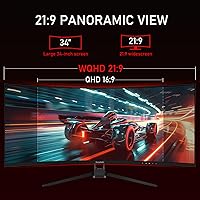
  • Screen Size: Measures 34″ diagonally with an ultrawide 21:9 aspect ratio.
  • Resolution: Delivers a 3440x1440 pixel resolution for sharp and detailed visuals.
  • Panel Type: Utilizes an IPS panel for consistent colors and wide viewing angles.
  • Refresh Rate: Supports a 144Hz refresh rate for smooth motion during fast scenes.
  • Curvature: Features a 1500R curve for an immersive and natural viewing experience.
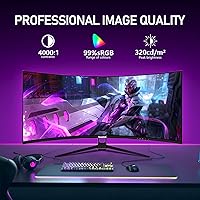
  • Color Coverage: Covers 99% of the sRGB color space for accurate color reproduction.
  • Brightness: Offers up to 320 nits of brightness under standard settings.
  • Contrast Ratio: Provides a dynamic contrast ratio of 4000:1 to enhance image depth.
  • Viewing Angle: Maintains image quality across a 178° horizontal and vertical viewing range.
  • Eye Care: Includes low blue light and flicker-free technology to reduce eye strain.
  • Connectivity: Equipped with DisplayPort 1.4 and HDMI 2.0 ports for multiple devices.
  • VESA Mount: Compatible with VESA wall mounts or monitor arms for flexible placement.
  • Weight: Weighs 9.9 pounds, suitable for desktop or wall-mounted setups.
  • Dimensions: Measures 7.48 x 31.77 x 18.43 inches, including the stand.
  • Surface Finish: Matte screen surface helps reduce glare from ambient lighting.
  • Adaptive Sync: Supports FreeSync technology to minimize screen tearing in games.
  • Multitasking: Wide display area allows multiple applications to be used simultaneously.
  • Compatibility: Works with most PCs, laptops, and gaming consoles that support high refresh rates.

FAQ

The Gawfolk GF340A 34″ Ultrawide Curved Monitor features a 3440x1440 resolution, 144Hz refresh rate, 1500R curvature for immersive viewing, matte screen to reduce glare, and compatibility with DisplayPort 1.4 and HDMI 2.0.

Place the monitor on a stable, flat surface using the included stand. Connect your PC via DisplayPort 1.4 or HDMI 2.0, then adjust the tilt and height for comfortable viewing. Ensure the power cable is securely connected and that drivers are installed for optimal performance.

Yes, this monitor supports a 144Hz refresh rate and Adaptive FreeSync, which reduces screen tearing. Many users find it ideal for fast-paced games and immersive ultrawide experiences.

Yes, the monitor is VESA-compatible, allowing you to attach it to standard wall mounts or adjustable arms for flexible positioning and desk space optimization.

The GF340A features low blue light and flicker-free technology, which most users report as effective in reducing eye fatigue during extended use. Adjusting brightness and contrast also helps improve comfort.

To reach 144Hz, connect the monitor via DisplayPort 1.4 or a compatible HDMI 2.0 port. Then, ensure your graphics card settings and operating system display settings are configured for the maximum refresh rate.

With 99% sRGB coverage, this monitor offers high color accuracy suitable for content creation, photo editing, and tasks where precise colors matter. Calibration may further optimize results for professional work.

Some users note minor backlight bleed near screen edges or the need to adjust settings to fully utilize 144Hz. A few also mentioned that the wide format may be challenging on smaller desks.

Yes, the 21:9 ultrawide aspect ratio provides extended horizontal space, making it convenient for multitasking with multiple windows, spreadsheets, or creative software simultaneously.

This curved display includes DisplayPort 1.4 and HDMI 2.0 ports, allowing easy connection to PCs, laptops, and gaming consoles with support for high refresh rates and ultrawide resolution.