Overview

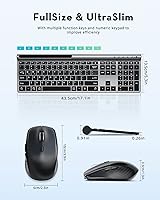
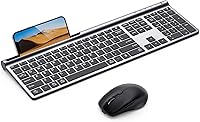
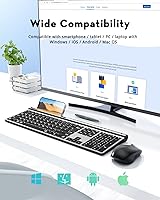
The Samsers KM08 Wireless Keyboard and Mouse Combo sits in a crowded mid-range market, but it earns attention by solving a specific problem: juggling multiple devices without a desk full of dongles. It supports three simultaneous connections — two via Bluetooth 5.0 and one through a plug-and-play 2.4G USB receiver — covering Mac, Windows, iOS, and Android. Both the keyboard and mouse charge over USB-C, which means no hunting for AA batteries. The full-size layout includes a numeric keypad, yet the footprint stays compact enough for tidy home-office setups. It is a practical, no-fuss option for anyone who needs cross-platform flexibility without paying premium prices.
Features & Benefits

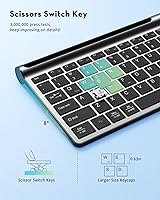
The multi-device switching is the standout here. One dedicated key cycles through paired devices — handy when you are toggling between a work laptop and a personal iPad. Battery life holds up well in practice: the keyboard runs up to 90 hours on a single charge, and the mouse about 60. An auto-sleep function kicks in during idle periods, pushing standby figures to months rather than days. The low-profile scissor-switch keys keep noise to a minimum, making this wireless combo a reasonable pick for open offices or late-night sessions. The mouse offers four DPI settings, giving you enough range to adapt to different screen sizes and working surfaces.

Best For

This multi-device peripheral duo makes the most sense for people who constantly switch contexts — think a student moving between a MacBook for assignments and an Android tablet for note-taking, or a remote worker who keeps a personal phone beside their work laptop. It is also a solid fit for Mac and iPad users who want a full-size keyboard with a number pad but no wired clutter. Anyone working in a shared space — a co-working spot, a quiet bedroom, a library — will appreciate how little noise the keys make. It is not a gaming peripheral, but for everyday productivity it covers the bases well.

User Feedback

Buyers tend to praise the quick device switching and how slim and light the Samsers keyboard-and-mouse set feels on a desk, with battery longevity earning consistent mentions as a genuine plus. That said, one frustration surfaces regularly: the keyboard and mouse do not switch devices in sync — you toggle each one separately, which breaks rhythm when moving quickly between machines. A smaller group reports Bluetooth pairing hiccups, particularly on older Windows builds, though these appear to be isolated rather than widespread. The mouse is on the compact side, suiting average hands but leaving larger-handed users wanting more. Most buyers consider the build quality fair for the price, though the plastic finish is noticeable up close.

Pros

  • Connects to three devices simultaneously — two via Bluetooth 5.0 and one via 2.4G USB receiver.
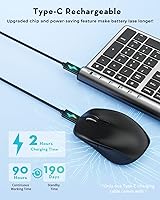
  • USB-C charging on both peripherals means no disposable batteries and no proprietary cables.
  • Keyboard battery lasts up to 90 hours per charge, reducing interruptions during busy workweeks.
  • Scissor-switch keys are genuinely quiet — comfortable to use in shared offices or late at night.
  • Full-size layout with numeric keypad fits productivity workflows without taking up excessive desk space.
  • The Samsers KM08 Wireless Keyboard and Mouse Combo works reliably across Mac, Windows, iOS, and Android.

  • Auto-sleep mode keeps standby life stretching into months, not days.
  • Four DPI settings on the mouse adapt well when moving between a laptop screen and a large external display.
  • Slim, matte profile looks clean and fits most desk aesthetics without standing out awkwardly.
  • Setup is fast — the 2.4G receiver is plug-and-play with no driver installation required.

Cons

  • Keyboard and mouse switch devices independently, disrupting flow when moving quickly between machines.
  • Mouse is too compact for extended use if you have larger hands — palm fatigue sets in over long sessions.
  • Bluetooth connectivity can be unstable on certain Windows 10 configurations, requiring reconnection workarounds.
  • No battery percentage readout — a small LED only alerts you when charge is critically low.
  • Mouse scroll wheel has been reported to loosen noticeably after several months of regular use.
  • DPI adjustment is limited to four fixed presets with no software for fine-tuning to specific needs.
  • Plastic construction feels mid-range up close, falling noticeably short of premium peripheral build standards.
  • Android compatibility is functional but inconsistent — some key mappings and shortcuts require manual workarounds.
  • No carry pouch or protective case included, despite the combo being marketed partly toward mobile, on-the-go users.

Ratings

The Samsers KM08 Wireless Keyboard and Mouse Combo has been scored by our AI system after processing verified buyer reviews from global markets, with spam, bot activity, and incentivized feedback actively filtered out. The result is an honest snapshot of where this multi-device peripheral duo genuinely delivers and where real-world use reveals its limits. Both the strengths buyers love and the frustrations they repeat are reflected in each category below.
Multi-Device Switching
83%
Users who keep a laptop, tablet, and phone on the same desk consistently call out the one-key switching as the combo's most practical feature. The 2.4G connection is especially reliable, and switching between a MacBook and an iPad mid-task takes only a second.
The keyboard and mouse must be switched independently, which breaks flow when you need to move quickly between devices. Several users describe this as a small but persistent annoyance that they did not anticipate before buying.
Battery Life
91%
The claimed 90-hour keyboard runtime holds up well in everyday use — most buyers report going weeks between charges even with full workdays. Knowing both devices charge over USB-C means one cable handles everything, which genuinely simplifies the desk setup.
The mouse battery, rated at around 60 hours, runs out noticeably faster than the keyboard, occasionally catching users off guard. A small number of buyers report the battery indicator giving little warning before the mouse dies mid-session.
Typing Feel & Key Response
78%
22%
The low-profile scissor switches feel crisp and quiet enough for open-plan offices or late-night use without disturbing others nearby. Buyers coming from membrane keyboards tend to feel an immediate improvement in feedback and accuracy.
Users upgrading from higher-end mechanical keyboards find the travel distance shallow and the tactile bump underwhelming. A few reviewers note that the keys feel slightly hollow under fast, heavy typing — fine for casual use but not satisfying for dedicated writers.
Mouse Ergonomics & Comfort
67%
33%
For average-sized hands, the mouse sits comfortably during typical office sessions, and the four DPI settings give enough range to adapt from a small laptop screen to a wide external monitor. The matte finish resists fingerprints and feels pleasant to grip.
Users with larger hands consistently flag that the mouse body is too compact for extended sessions, leading to palm fatigue after an hour or more. The compact size appears to be a deliberate design trade-off for portability, but it limits daily comfort for a meaningful portion of buyers.
Bluetooth Connectivity Stability
72%
28%
On macOS and iOS, the Bluetooth connection is generally solid and reconnects reliably after the devices wake from sleep. Most buyers report a trouble-free pairing experience out of the box, especially when using the 2.4G receiver as a fallback.
A recurring thread among Windows users involves intermittent Bluetooth dropout, particularly on Windows 10 machines with older driver stacks. These issues appear to affect a minority of buyers, but they are reported consistently enough to warrant caution if your primary device runs Windows.
Build Quality & Materials
69%
31%
The matte ABS and PC construction keeps the combo lightweight and easy to reposition, and the keyboard sits flat without flexing during normal typing. The overall aesthetic is clean and understated, fitting most desk setups without standing out awkwardly.
Up close, the plastic finish feels mid-range at best — buyers comparing it to Apple or Logitech peripherals notice the difference in material density immediately. Some users report the mouse scroll wheel developing a slightly loose feel after several months of daily use.
Value for Money
82%
18%
Considering the triple-device support and rechargeable batteries in both peripherals, most buyers feel the pricing is fair for the feature set on offer. It competes well against similarly priced combos that typically offer only single-device Bluetooth without USB-C charging.
A handful of reviewers feel the build quality slightly undercuts the price when stacked against budget competitors that feel more solid in hand. Those who primarily need single-device connectivity may find better construction at the same price point elsewhere.
Setup & Pairing Ease
88%
The 2.4G receiver is plug-and-play with zero driver installation required — most buyers have both devices working within two minutes of opening the box. Bluetooth pairing on Mac and iPad is straightforward and remembered reliably between sessions.
Pairing all three device slots simultaneously for the first time can be slightly confusing without clearer visual feedback from the indicator lights. The manual, while adequate, leaves some users guessing about the exact button-hold sequence for re-pairing.
Keyboard Layout & Key Coverage
86%
Having a full numeric keypad in a combo this slim is a genuine practical bonus for anyone who does data entry or works with spreadsheets regularly. The multimedia shortcut keys are logically placed and reduce the need to reach for a mouse during media playback.
The function row doubles as media controls, which requires an extra key press for standard F-key inputs on some applications — a known trade-off on compact full-size layouts that still catches occasional users off guard.
Noise Level
89%
The scissor-switch mechanism keeps keystroke noise well below average, making this wireless combo genuinely usable in libraries, shared bedrooms, or quiet co-working spaces. The mouse clicks are soft and unobtrusive as well, which is not always the case at this price tier.
While noticeably quieter than most budget keyboards, it is not completely silent — users in very quiet environments or on calls can still hear the keys at speed. True silent keyboards with dampening foam feel meaningfully quieter by comparison.
Cross-Platform Compatibility
84%
Coverage across macOS, Windows, iOS, and Android from one combo is broadly reliable, and most OS-specific shortcuts work correctly without remapping. iPad users in particular appreciate getting a full-size keyboard with a number pad that pairs cleanly over Bluetooth.
Android compatibility is functional but inconsistent — some keyboard shortcuts and special characters do not map correctly on certain Android builds. Users who rely heavily on Android as a primary device may need to do some manual key remapping.
Portability & Weight
81%
19%
At just under two pounds for the full combo, it is light enough to move between rooms or pack for short trips without adding noticeable bag weight. The slim keyboard profile means it slides into most laptop bags alongside the laptop itself.
The keyboard is still full-size, so it is not genuinely compact for travel — users looking for a truly portable option would need a tenkeyless or 65-percent layout instead. The lack of a carry pouch in the box is a minor but noted omission.
Charging Convenience
87%
USB-C charging on both the keyboard and mouse is a practical, forward-looking choice that most buyers appreciate immediately, especially since it shares a cable with phones and laptops. The two-hour charge time to full is fast enough that overnight charging is never strictly necessary.
There is no pass-through charging or battery percentage readout, so users have to rely on a small LED indicator that only signals low battery rather than showing remaining charge. A few buyers have also noted the charging port on the mouse feels slightly less robust than on the keyboard.
Mouse Tracking & DPI Range
74%
26%
The four DPI presets cover a practical range for everyday office work, and switching between them is quick enough for users who move between a small laptop screen and a large external display throughout the day.
The DPI ceiling is moderate, which limits usefulness for users working across high-resolution 4K monitors where higher sensitivity settings genuinely matter. There is no software for customizing DPI values beyond the four presets, which restricts fine-tuning for power users.

Suitable for:

The Samsers KM08 Wireless Keyboard and Mouse Combo is built for people who live across multiple devices and hate the clutter that comes with it. If your typical workday involves a MacBook for core tasks, an iPad for reading or sketching, and an Android phone for messaging — all on the same desk — this wireless combo handles that juggling act without extra dongles or cable swaps. Students in shared dorms or library spaces will appreciate how quietly the keys operate, and remote workers who need a tidy, minimal desk setup get a full-size layout including a numeric keypad without sacrificing much surface area. The USB-C charging on both devices is a genuine convenience bonus for anyone already running a USB-C ecosystem. It also makes sense as a first real upgrade for someone moving away from a wired keyboard-and-mouse bundle who wants rechargeable reliability without spending heavily.
Not suitable for:

The Samsers KM08 Wireless Keyboard and Mouse Combo is not the right pick for everyone, and a few specific scenarios make that clear. If you have large hands, the compact mouse will likely cause discomfort during long sessions — this is a consistent real-world complaint, not an edge case. Heavy typists who have used mid-range mechanical keyboards will find the scissor-switch travel shallow and the overall typing experience underwhelming by comparison. Anyone who needs to switch devices rapidly and in sync — say, a developer flipping between a desktop and a test machine every few minutes — will find the separate keyboard and mouse switching genuinely disruptive to their workflow. Windows users on older system builds should also be aware of occasional Bluetooth pairing instability that has been reported across multiple reviews. Finally, if you primarily work across a single device and have no need for multi-device support, this combo's main selling point is irrelevant, and better-built single-device options exist at a similar price.

Specifications

  • Connectivity: Connects via two independent Bluetooth 5.0 channels and one 2.4G USB receiver, supporting up to three paired devices simultaneously.
  • Keyboard Battery: Built-in 280mAh lithium-ion battery provides up to 90 hours of active use and up to 190 days of standby per full charge.
  • Mouse Battery: Built-in 300mAh lithium-ion battery delivers up to 60 hours of active use and up to 330 days of standby per full charge.
  • Charging Port: Both the keyboard and mouse charge via USB-C, with a full charge taking approximately 2 hours for each device.
  • Key Switch Type: Low-profile scissor-switch mechanism with short key travel, designed for quiet actuation and consistent tactile feedback.
  • Keyboard Layout: Full-size layout including a numeric keypad, function row, and multimedia shortcut keys in a compact footprint.
  • Keyboard Dimensions: The keyboard measures 17.1″ long by 5.3″ wide by 0.91″ thick.
  • Combo Weight: The full keyboard and mouse combo weighs approximately 1.83 lbs combined.
  • Mouse DPI: Mouse offers four adjustable DPI presets to accommodate different screen sizes and surface types.
  • Materials: Both devices use an ABS and PC plastic blend with a matte finish that resists fingerprints and minor surface scratches.
  • OS Compatibility: Compatible with macOS 10.12 and above, Windows 8 and Windows 10 and above, iOS, and Android 4.3 and above.
  • 2.4G Receiver: Plug-and-play USB nano receiver requires no driver installation and provides a stable, low-latency wireless connection.
  • Auto-Sleep: Both devices feature an automatic sleep function that activates after a period of inactivity to conserve battery charge.
  • Color: Available in a Silver Black colorway with a uniform matte gray tone across both keyboard and mouse bodies.
  • Device Switching: A dedicated key on the keyboard and a dedicated button on the mouse each cycle independently through the three paired device slots.
  • Power Source: Both devices are powered by their built-in rechargeable lithium-ion batteries; no disposable batteries are required.
  • Included Accessories: Package includes the wireless keyboard, wireless mouse, one 2.4G USB nano receiver, and USB-C charging cables.
  • Bluetooth Version: Uses Bluetooth 5.0 for both wireless channels, offering a more stable connection range compared to older Bluetooth 4.0 implementations.

Related Reviews

Arteck HW192 Wireless Keyboard and Mouse Combo
78%
78%
Build Quality
72%
Typing Experience
63%
Mouse Comfort & Ergonomics
81%
Battery Life
69%
Wireless Connectivity
More
SABLUTE Wireless Keyboard and Mouse Combo
84%
88%
Typing Comfort
92%
Battery Life
85%
Ergonomics
73%
Connectivity Stability
80%
Backlighting Performance
More
TopMate Wireless Keyboard and Mouse Combo
77%
91%
Value for Money
78%
Typing Experience
68%
Mouse Performance
63%
Build Quality
83%
Wireless Reliability
More
Atelus Wireless Keyboard and Mouse Combo
83%
94%
Ease of Setup
88%
Ergonomics & Comfort
90%
Design & Aesthetics
80%
Mouse Performance
86%
Keyboard Performance
More
MARVO Wireless Keyboard and Mouse Combo
76%
91%
Value for Money
88%
Wireless Connectivity
79%
Mouse Performance
63%
Keyboard Typing Feel
67%
Ergonomics & Comfort
More
RECCAZR Wireless Keyboard and Mouse Combo
86%
89%
Ergonomics & Comfort
86%
Build Quality & Durability
75%
Keyboard Responsiveness
91%
Mouse Precision & Quietness
94%
Ease of Setup
More
Links9+ Wireless Keyboard and Mouse Combo
85%
89%
Ergonomics and Comfort
92%
Wireless Performance and Connectivity
85%
Build Quality
94%
Ease of Use and Setup
80%
Battery Life
More
HP 18H24AA Wireless Keyboard and Mouse Combo
79%
91%
Value for Money
93%
Ease of Setup
74%
Keyboard Typing Experience
63%
Mouse Comfort & Ergonomics
86%
Wireless Reliability
More
QUASIO Wireless Keyboard and Mouse Combo
77%
88%
Value for Money
93%
Setup & Ease of Use
79%
Typing Comfort
84%
Wireless Connectivity & Range
72%
Mouse Performance
More
Hayyiesh KG659-01 Wireless Keyboard and Mouse Combo
75%
88%
Value for Money
79%
Keyboard Comfort & Ergonomics
74%
Key Feel & Typing Experience
58%
Mouse Build Quality
86%
Noise Level
More

FAQ

Unfortunately, no. The keyboard and mouse each have their own independent switching button, so you need to press both separately when moving to a new device. It only takes a couple of seconds, but if you switch devices constantly throughout the day, that extra step can get mildly repetitive.

It works reliably with iPads running iOS 10.12 or above. Pairing over Bluetooth is straightforward, and most standard keyboard shortcuts translate correctly. It is actually one of the more popular use cases for the Samsers KM08 Wireless Keyboard and Mouse Combo — iPad users who want a full-size keyboard with a number pad without adding a USB hub to their setup.
About two hours each from a fully drained state, which is fairly quick. In practice, most users just plug both in overnight once every few weeks and never think about it again. The keyboard in particular goes a long time between charges under normal daily use.

Honestly, this is one of the more consistent criticisms from buyers. The mouse is on the smaller side by design, which works well for average or smaller hands but tends to cause palm fatigue for people with larger hands during longer sessions. If your hands are on the bigger side, it is worth considering before committing to a purchase.

Most users on Windows 11 report a stable experience, but a subset of Windows 10 users — particularly on machines with older Bluetooth drivers — have noted occasional dropout issues. Keeping your Bluetooth drivers updated helps considerably. The 2.4G USB receiver is also a solid fallback if Bluetooth proves inconsistent on your specific machine.

No software or driver installation is needed. The 2.4G USB receiver is fully plug-and-play — just insert it and both devices connect automatically. Bluetooth pairing follows standard OS pairing steps, which most people complete in under a minute.

Yes, that is exactly the kind of split setup this combo supports. Since the keyboard and mouse pair independently to each device slot, you can have them pointing at completely different devices simultaneously. It is a genuinely flexible arrangement for mixed-device desks.

Yes, for most shared environments they are quiet enough. The scissor-switch mechanism produces a soft, muffled click rather than the sharp clack of a mechanical keyboard. Occasional fast typing is audible up close, but it is unlikely to disturb someone sitting nearby in a library or sleeping in the same room.

There is a small LED indicator on the mouse that lights up to signal low battery, but there is no percentage readout or detailed status display. It gives you a warning, but not much advance notice — a few users have been caught off guard. Getting into the habit of charging both devices on a set schedule is the easiest workaround.

The 2.4G connection is stable up to around 10 meters in open space, which covers most living room or home office distances without issue. Bluetooth range is comparable. Walls and interference from other wireless devices can reduce effective range, but for typical indoor desk use it performs reliably.