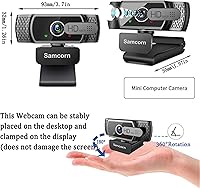
Overview

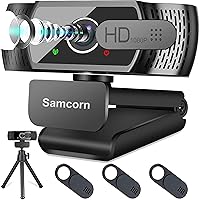
The Samcorn A36 1080p Webcam is a compact, no-fuss entry-level camera that has quietly built a solid reputation among remote workers, students, and casual streamers since its 2020 launch. With over 5,600 ratings and a 4.4-star average, it sits comfortably among the better-regarded options in the budget HD webcam space. Plug it into any USB port and it works — no driver downloads, no software headaches. The foldable design and 1.5-meter USB cable make repositioning between a desktop monitor and a laptop genuinely painless. For those who want a reliable step up from a built-in laptop camera without spending much, this webcam makes a credible case for itself.

Features & Benefits

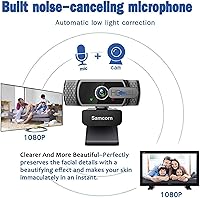
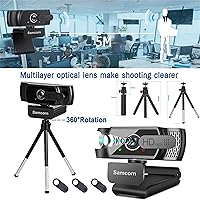
The core appeal of this webcam is practical: 1080p at 30fps with H.264 compression keeps video smooth and legible for everyday calls and recordings without demanding much from your machine. The autofocus handles minor movement well, tracking without obvious lag in normal lighting conditions. Low-light performance is one of the more pleasant surprises here — the HDR brightness adjustment does a reasonable job lifting dim rooms without washing everything out. The built-in dual stereo microphone covers a wide pickup range, and the noise cancellation meaningfully reduces background hum during calls. A 360-degree rotating base and foldable clip round out a setup that adapts to monitors, laptops, and tripods without tools.

Best For

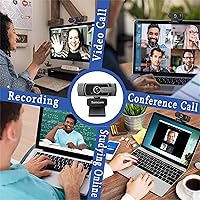
This desktop camera hits a sweet spot for people who need reliable video calls daily without investing in a prosumer rig. Students on tight budgets will appreciate the honest 1080p output for online classes, while remote professionals juggling back-to-back meetings will find the plug-and-play setup a genuine time-saver. It suits casual streamers looking to upgrade from a built-in laptop camera without spending significantly more. If your home office has variable lighting, the auto-brightness correction provides a real practical benefit. Keep expectations calibrated, though — the Samcorn A36 is a budget-tier tool that performs well within its class, not a broadcast-quality camera chasing perfection.

User Feedback

Across thousands of reviews, a few clear patterns emerge. Buyers consistently praise how easy setup is — plug in, and it works — and many report that the video clarity feels notably better than expected at this price point. The rotating clip mount draws frequent compliments for feeling more solid than flimsy alternatives. Opinions split more on the microphone: adequate for casual calls, but not something anyone with a critical ear will love. The autofocus also divides users — reliable in good light, but prone to hunting momentarily in very dim conditions. A smaller portion of reviewers note that color accuracy can shift depending on ambient lighting, which is worth knowing upfront.

Pros

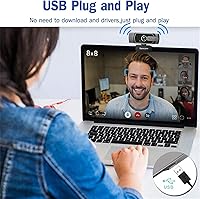
  • Plug-and-play setup works instantly across Windows, Mac, and most major platforms with zero driver installation.
  • 1080p video quality consistently impresses buyers given the budget-friendly price tier.
  • The rotating clip mount holds firmly on a wide range of monitor sizes without scratching screens.
  • Built-in noise cancellation handles steady background hum like fans and HVAC effectively during calls.
  • Wide 90-degree field of view keeps you well-framed without sitting awkwardly close to the screen.
  • HDR auto-brightness provides a real improvement for home office users with dim or inconsistent lighting.
  • Compatible with every major conferencing app including Zoom, Skype, Teams, and Google Meet out of the box.
  • At under five ounces with a foldable design, this webcam travels easily between home, office, and anywhere else.
  • A two-year replacement warranty and 60-day money-back window offer reassuring protection for a budget purchase.
  • The 1.5-meter USB cable is long enough for most standard desktop and laptop setups without needing an extension.

Cons

  • Autofocus hunts and briefly loses focus in low-light conditions, which disrupts evening video calls noticeably.
  • The built-in microphone captures voice adequately but lacks depth — serious streamers will need a dedicated mic.
  • Color accuracy shifts under warm or mixed lighting, sometimes making skin tones look unnatural mid-call.
  • No companion software means zero manual control over exposure, white balance, or frame rate settings.
  • The fixed, non-detachable cable makes packing the camera messier than it needs to be for frequent travelers.
  • USB-A only — users with modern laptops that lack standard ports will need an adapter for basic functionality.
  • The plastic hinge on the foldable clip shows signs of loosening after months of repeated adjustments.
  • Frame rate is capped at 30fps, which produces minor choppiness during fast-moving content or active hand gestures.
  • Customer support quality appears inconsistent, with some buyers reporting delays or unclear responses on warranty claims.
  • Wide-angle lens introduces mild barrel distortion at frame edges, subtly stretching faces and objects near the corners.

Ratings

The Samcorn A36 1080p Webcam has accumulated thousands of verified purchases worldwide, and the scores below reflect what real buyers actually experienced — not marketing claims. Our AI rating system processed global user reviews, actively filtering out incentivized, duplicate, and bot-generated feedback to surface genuine sentiment. The result is a transparent scorecard that captures both where this webcam genuinely delivers and where it falls short.

Video Clarity
83%
For a budget-tier camera, the 1080p output holds up well in well-lit environments. Users on daily Zoom and Teams calls consistently noted that colleagues could see them clearly without any pixelation or blurring during normal conversation movement.
At 30fps, fast motion can occasionally appear slightly choppy — not a dealbreaker for calls, but noticeable to anyone trying light gaming or fast-paced streaming. It is not a camera that competes with mid-range options when resolution demands go up.
Autofocus Performance
71%
29%
In decent lighting, the autofocus tracks subject movement without requiring any manual adjustment, which most users found genuinely useful during longer calls where they shift position frequently. The response time is fast enough that it rarely causes distraction mid-conversation.
In low-light conditions, the autofocus tends to hunt — cycling in and out of focus briefly before locking on. Several reviewers mentioned this specifically as a frustration during evening video calls with only desk lamp lighting available.
Low-Light Handling
68%
32%
The HDR auto-adjustment does lift dim rooms to a usable level, which surprised a fair number of buyers who expected the worst from a budget camera. Home office users with limited natural light reported that the image stayed recognizable and reasonably clear.
The low-light correction brightens the image but at the cost of some color fidelity and added digital noise. It handles mild dimness acceptably, but in genuinely dark rooms the footage looks washed out and grainy rather than naturally brightened.
Microphone Quality
62%
38%
The built-in dual stereo microphone picks up voice clearly enough for everyday video calls, and the noise cancellation does a reasonable job reducing constant background hum like HVAC systems or fan noise. For standard Zoom or Teams calls, it is functional.
Anyone expecting near-broadcast audio quality will be disappointed — the microphone captures voice adequately but lacks warmth and depth, and intermittent sharper background sounds still bleed through. Podcasters or streamers who care about audio will want a dedicated external mic.
Ease of Setup
94%
Plug-and-play is the single most praised aspect across buyer reviews. Users reported being fully operational within seconds of plugging in — no driver downloads, no software conflicts, no configuration screens to navigate. It works across Windows, Mac, and even Android Smart TVs without issue.
The simplicity of setup leaves no room for manual configuration — users who want to tweak exposure, white balance, or frame rate will find no companion software or settings panel available out of the box. What you get is what you get.
Build Quality
74%
26%
The rotating clip mount surprised buyers who expected a flimsy plastic bracket — it holds its position well on monitor edges ranging from thin laptop lids to thicker desktop displays. The overall feel is more solid than some competitors at a similar price.
The body itself is lightweight plastic that does not inspire premium confidence when handled. The hinge mechanism on the foldable clip works well initially, but a handful of longer-term owners noted it loosening with repeated adjustments over several months.
Mounting Versatility
81%
19%
The combination of a 360-degree rotating base and a 180-degree foldable clip gives this webcam more placement flexibility than most budget alternatives. It sits stably on a desk surface, clips to monitors without scratching screens, and threads onto a standard tripod mount.
The clip width range works well for most standard monitors but can feel slightly strained on thicker-framed all-in-one displays. A small number of users noted the tripod thread feels slightly loose, requiring occasional repositioning mid-call.
Field of View
78%
22%
The 90-degree wide-angle lens captures enough of the room to keep users well-framed without needing to sit uncomfortably close to the camera. For users who present with a whiteboard or share a desk setup with a partner, the wider capture area is a practical advantage.
Wide-angle lenses at this price range can introduce mild barrel distortion at the edges of the frame, making objects and faces near the corners appear slightly stretched. It is subtle, but visible if you look for it in recorded footage.
Cable & Connectivity
86%
The 1.5-meter USB cable is long enough to reach comfortably from a tower desktop on the floor to a monitor at desk height, and the USB 2.0 connection is universally compatible. Users appreciated not having to awkwardly stretch or use an extension cable for most standard desk setups.
USB 2.0 is functional but dated — there is no USB-C option for users with modern thin laptops that have dropped standard USB-A ports. Those users will need an adapter, which adds minor inconvenience and a potential point of signal instability.
Software Compatibility
91%
Recognized instantly by Zoom, Skype, Microsoft Teams, Google Meet, OBS, and YouTube Live with zero configuration. Users who regularly switch between conferencing platforms noted that the camera never required re-selection between sessions, which made the day-to-day experience genuinely frictionless.
There is no dedicated software of any kind, so advanced users cannot adjust color temperature, exposure lock, or aspect ratio. If you need fine-grained control over how the image is processed before it reaches your call, you will need to rely on third-party apps.
Color Accuracy
63%
37%
Under consistent, neutral lighting — such as a daylight-balanced LED desk lamp — the color reproduction is pleasant and skin tones look fairly natural. Buyers who set up a fixed, well-lit workspace generally had few complaints about how they appeared on camera.
Color accuracy wobbles noticeably when ambient lighting changes throughout the day. Warm incandescent bulbs tend to push the image orange, and the auto white balance sometimes overcorrects in mixed lighting, leaving faces looking slightly unnatural on the other end of a call.
Portability
88%
At under five ounces and with a foldable design, this webcam fits easily into a laptop bag or backpack side pocket. Users who work from multiple locations — office, home, coffee shop — consistently praised how little space it occupies when packed away.
The USB-A cable is fixed and non-detachable, which means packing it always involves dealing with the full cord length. A detachable cable design would have made it notably more convenient to transport without the cable tangling around the body.
Value for Money
89%
Measured purely against what buyers paid and what they received, this webcam consistently registers as a strong value. The feature set — autofocus, noise-canceling mic, wide-angle lens, HDR — would have commanded a significantly higher price just a few years ago at this quality level.
The value equation holds only if expectations are matched to the price tier. Buyers who compare it to mid-range or prosumer webcams will find it lacking in several areas; it earns its reputation within the budget segment, not above it.
Warranty & Support
77%
23%
A two-year replacement warranty and a 60-day money-back window are notably generous for a budget-category product. Several users who reported defective units mentioned receiving replacements without significant friction, which builds confidence in the purchase.
Customer service response speed and quality appears inconsistent based on buyer reports — some users resolved issues quickly, while others described delays or unclear communication. The warranty terms are solid on paper but execution reportedly varies.

Suitable for:

The Samcorn A36 1080p Webcam is a strong fit for anyone who needs a reliable, no-fuss camera upgrade without spending significantly. Remote workers who spend their days on back-to-back Zoom or Teams calls will appreciate that setup takes seconds — plug it in and it works, every time, on every major platform. Students attending online classes benefit from the clear 1080p output and the built-in noise-canceling microphone, which handles typical home background noise well enough for lectures and group discussions. If your home office or bedroom setup has inconsistent natural lighting, the HDR auto-brightness adjustment provides a genuine, practical improvement over most built-in laptop cameras. Casual streamers or YouTubers just starting out and not yet ready to invest in a dedicated camera rig will find this desktop camera more than capable for their early content. Anyone who works across multiple locations will also value how compact and portable the Samcorn A36 is — it slips into a bag without a second thought.

Not suitable for:

The Samcorn A36 1080p Webcam is not the right tool for buyers with professional-grade expectations or specialized technical needs. Content creators who care deeply about audio will find the built-in microphone underwhelming — it handles casual calls, but it is not a substitute for even an entry-level USB condenser microphone if audio quality matters to your audience. Streamers or video producers who need 60fps output, 4K resolution, or manual control over exposure and white balance will hit hard limits quickly, since there is no companion software and no advanced settings panel of any kind. Users who primarily work in very dim environments should also temper expectations — the autofocus struggles in genuinely low light, and the HDR correction can introduce digital noise rather than clean brightness. Anyone with a modern thin laptop that has dropped USB-A ports will need an adapter, which adds friction to what should be a simple setup. If you need broadcast-quality output or a camera that can grow with increasingly demanding production needs, this webcam will feel limiting sooner rather than later.

Specifications

  • Resolution: Captures video at Full HD 1080p, delivering clear, detailed image quality suitable for video calls, streaming, and recording.
  • Frame Rate: Records and streams at 30 frames per second, which is standard for this category and produces smooth video under normal conditions.
  • Sensor Type: Uses a CMOS image sensor, the industry-standard choice for webcams at this price tier.
  • Compression: Employs H.264 video compression to reduce bandwidth and processing load while maintaining acceptable image fidelity.
  • Field of View: Features a 90-degree wide-angle lens that captures a broad frame, keeping users well-centered without sitting extremely close to the camera.
  • Autofocus: Equipped with automatic autofocus that continuously adjusts to subject movement, though performance can degrade in very low-light conditions.
  • Low-Light Mode: Uses HDR auto-adjustment technology to automatically correct brightness and color balance in dim environments.
  • Microphone: Integrates a dual stereo microphone with 3D automatic noise cancellation, rated for voice pickup at distances up to 17 feet.
  • Connectivity: Connects via USB 2.0 using a standard plug-and-play UVC protocol, requiring no driver installation on supported operating systems.
  • Cable Length: Includes a fixed, non-detachable USB cable measuring approximately 1.5 meters (around 6.5 feet) in length.
  • Mounting: Features a 360-degree rotating base combined with a 180-degree foldable clip for attachment to monitors, laptop lids, or standard tripods.
  • Tripod Support: Compatible with standard tripod mounts, giving users an additional stable placement option beyond clipping to a screen.
  • Dimensions: Measures 1.97 x 3.7 x 1.26 inches, making it compact enough to pack into a laptop bag side pocket without difficulty.
  • Weight: Weighs 4.8 ounces, light enough to clip onto a laptop lid without placing meaningful strain on the display hinge.
  • OS Compatibility: Officially supports Windows XP, 2000, 7, 8, and 10, Mac OS, and Android Smart TV platforms without requiring additional drivers.
  • App Compatibility: Works out of the box with major conferencing and streaming platforms including Zoom, Skype, Microsoft Teams, Facetime, YouTube, and OBS.
  • Warranty: Backed by a 2-year free replacement warranty and a 60-day money-back guarantee, which are notably generous terms for this price category.
  • Model Number: Sold under the model designation A36 by manufacturer Samcorn, first made available in August 2020.

Related Reviews

HuddleCamHD HC-WEBCAM-94

77%
83%
Video Quality (Daylight)
51%
Low-Light Performance
91%
Field of View
94%
Ease of Setup
57%
Audio Quality
More
Akyta 1080P Webcam
Akyta 1080P Webcam
82%
88%
Video Quality
85%
Audio Quality
94%
Ease of Setup
82%
Field of View
80%
Noise Reduction
More
ZIQIAN 1080P Webcam
ZIQIAN 1080P Webcam
83%
88%
Video Quality
76%
Audio Performance
91%
Ease of Setup
85%
Wide-Angle Lens
78%
Microphone Quality
More
NexiGo N980P
NexiGo N980P
78%
83%
Video Clarity
88%
Frame Rate Smoothness
71%
Low-Light Performance
79%
Wide-Angle Lens
62%
Built-in Microphone
More
MTORED 1080p USB Webcam
84%
89%
Video Quality
94%
Ease of Setup
78%
Microphone Quality
85%
Wide-Angle Lens
82%
Build Quality
More
Svcouok pT011 1080p Webcam
75%
74%
Image Clarity
63%
Low-Light Performance
58%
Microphone Quality
93%
Ease of Setup
77%
Wide-Angle Coverage
More
NexiGo N60 1080P Webcam
74%
78%
Image Quality
93%
Setup & Ease of Use
67%
Microphone Performance
91%
Value for Money
88%
Privacy Cover
More
Angetube PC 1080P Webcam
85%
88%
Video Quality
90%
Audio Quality
95%
Ease of Setup
84%
Low Light Performance
87%
Wide-Angle Lens
More
JETAKu XZC-920phro Webcam 1080P 60FPS
71%
83%
Video Smoothness at 60fps
71%
Image Clarity & Resolution
54%
Low-Light Performance
58%
Autofocus Reliability
66%
Microphone Quality
More
TOUCAN 1080P Webcam with Microphone
88%
89%
Video Quality
91%
Microphone Performance
95%
Ease of Use
88%
Field of View
93%
Privacy Protection
More

FAQ

No, none at all. The camera uses a standard plug-and-play protocol, so your operating system recognizes it automatically the moment you plug it in. Windows, Mac, and Android Smart TV all work without downloading anything extra.

Yes, it works with all of them without any setup. It also plays nicely with Skype, Facetime, OBS, YouTube Live, and most other major conferencing or streaming platforms. Your software will detect it as a standard camera input the first time you open it.

It is honest to say the microphone is functional rather than impressive. It picks up your voice clearly enough for everyday video calls and handles steady background noise — like a fan or air conditioning — reasonably well. That said, if you care about richer, more natural-sounding audio for streaming or recording, a dedicated external USB microphone will make a noticeable difference.

It manages mild dimness better than you might expect at this price — the HDR auto-adjustment lifts the image brightness and helps with color balance automatically. The limitation is that the autofocus can struggle in genuinely dark rooms, occasionally hunting in and out before locking on. Adding even a basic desk lamp pointed toward your face makes a meaningful difference.

Yes. The rotating base allows the camera to sit flat on a desk surface and stay stable, and the mount is compatible with standard tripod threads if you want more height or positioning control. The clip is useful but not your only option.

Generally yes — the clip is padded and designed not to scratch or dent screens. Multiple users with standard laptops have reported no damage after extended use. That said, if your laptop lid is particularly thin or flexible, it is worth checking that the clip does not flex the display when clamped.

There is no dedicated software or settings panel for this webcam, so manual adjustments are not available through the camera itself. If you need that level of control, you can use third-party tools like OBS or the camera settings within Zoom or Teams, which offer some basic exposure and brightness sliders.

It works on Mac without any issues — no drivers needed there either. Just plug it in and macOS picks it up immediately. It has been tested with both older and more recent macOS versions without reported compatibility problems.

The cable is approximately 1.5 meters long, which covers most standard desk setups comfortably. Unfortunately, it is fixed and non-detachable, so you cannot swap it for a longer cable or fold it away neatly for travel. For most users the length is fine, but it is worth noting if you have an unusual desktop layout.

Samcorn covers this camera with a 2-year replacement warranty and a 60-day money-back window, which is a reassuring safety net for a budget product. Most buyers who reported defective units said replacements were arranged without too much friction, though a minority noted that response times from customer support can vary.