Overview

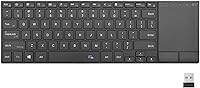
The Rii K22S Wireless Bluetooth Touchpad Keyboard is a slim, aluminum-alloy input device that tries to cover all your wireless bases without asking much from your wallet. Launched in late 2023, it combines Bluetooth 5.1 and 2.4G RF in one compact body — meaning you are not stuck choosing one connectivity method over the other. The built-in touchpad is arguably its biggest selling point, letting you skip a separate mouse entirely. It charges over Type-C, which keeps things tidy and modern. For home theater setups or casual multi-device households, this wireless touchpad keyboard positions itself as a practical, no-fuss option rather than a performance powerhouse.
Features & Benefits

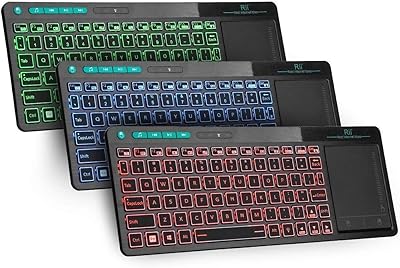
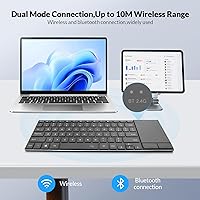
The dual wireless setup here is genuinely useful. Bluetooth 5.1 handles most modern devices, but the included USB RF dongle means you can still connect to older TVs or PCs that lack Bluetooth entirely — just plug it in and it works. You can pair with up to two devices and flip between them using dedicated switch keys. The backlit keys run in a single color, nothing fancy, but functional in a dark living room. Build quality, considering the price tier, leans more solid than expected — the aluminum top plate adds real rigidity. Compatible with Windows, Linux, iOS, and Android, it covers most everyday use cases without requiring any driver installation.

Best For

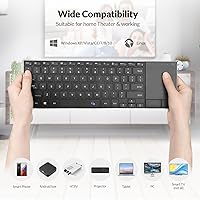
This compact Bluetooth keyboard is a natural fit for anyone who controls their TV or media box from the couch. Smart TV users, Android TV Box owners, and home theater PC enthusiasts will find the touchpad-plus-keyboard combo genuinely handy — no reaching for a separate remote or mouse. Students who need a lightweight secondary input device will appreciate how easy it is to carry between rooms. The plug-and-play dongle is a real bonus for older devices without Bluetooth built in. If you regularly juggle two connected devices and want a quick way to switch between them, this wireless touchpad keyboard checks that box without overcomplicating things.

User Feedback

With over 1,200 ratings and a 3.8 out of 5 average, the Rii K22S sits in mixed-but-decent territory. Buyers consistently praise the build quality and the convenience of having a touchpad baked right in, especially at this price point. Where things get messier: touchpad sensitivity is a real complaint that shows up often, with some users finding it inconsistent or sluggish. Key travel is shallow for a touch typist. Bluetooth pairing with certain smart TVs can also take a few tries. A handful of lower-star reviews raise questions about long-term durability. Not a flawless buy, but for casual, light-use scenarios, most buyers seem to find it worth the trade-offs.

Pros

  • Dual Bluetooth 5.1 and 2.4G RF connectivity covers both modern and older devices in one unit.
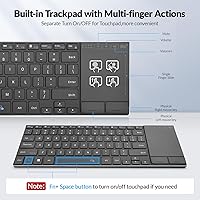
  • The built-in touchpad removes the need for a separate mouse, keeping your setup clean and simple.
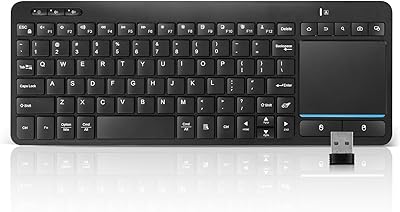
  • Plug-and-play USB dongle requires no drivers — just insert and start typing.
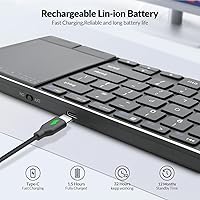
  • Type-C charging is a practical, modern touch that eliminates disposable battery costs.
  • Pairs with up to two devices and switches between them using dedicated keys.
  • Aluminum alloy top plate gives it a sturdier feel than most keyboards at this price point.
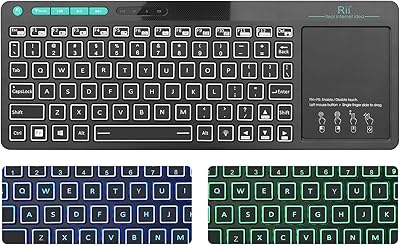
  • Backlit keys make it usable in dim living rooms or dark home theater setups.
  • Broad OS support covers Windows, Linux, iOS, and Android without compatibility headaches.
  • At under 1.2 pounds, this wireless touchpad keyboard is easy to carry between rooms or pack in a bag.
  • A 12-month warranty provides basic peace of mind for a budget-tier purchase.

Cons

  • Touchpad sensitivity is inconsistent and frequently cited as a frustration by real buyers.
  • Key travel is shallow, making extended typing sessions uncomfortable for fast or heavy typists.
  • Bluetooth pairing can be unreliable with certain smart TV models, requiring repeated attempts.
  • Single-color backlight offers no customization — fine for basic use but nothing more.
  • Long-term durability is a question mark, with some lower-star reviews flagging build issues over time.
  • Only supports two paired devices, which limits flexibility for users with larger multi-device setups.
  • The touchpad size is small relative to the keyboard body, restricting cursor movement range.
  • No dedicated media control or function shortcut layout tailored to home theater use.
  • Battery life feedback from users is mixed, with some reporting faster-than-expected drain.
  • Customer support experience is inconsistent based on reported buyer interactions.

Ratings

The scores below reflect our AI-driven analysis of verified global buyer reviews for the Rii K22S Wireless Bluetooth Touchpad Keyboard, with spam, bot-generated, and incentivized feedback actively filtered out before scoring. Each category captures what real users consistently praised or complained about across thousands of interactions — nothing is glossed over. Both the strengths that keep buyers satisfied and the friction points that push others toward returns are represented transparently here.

Value for Money
78%
22%
For a budget-tier keyboard that bundles dual wireless modes, a touchpad, backlit keys, and a rechargeable battery into one unit, most buyers feel they are getting a fair deal. Home theater users in particular tend to feel the price-to-function ratio works in their favor when compared to buying a keyboard and mouse separately.
A portion of buyers who expected longer-lasting build quality or more responsive input feel the price is appropriate only for very casual use. Those who push it harder than couch-based media control often feel the trade-offs become more apparent over time.
Connectivity Reliability
71%
29%
The 2.4G RF dongle is consistently praised for its plug-and-play reliability — users report it connects instantly with no pairing ritual and stays stable during use. For devices without Bluetooth, this is a genuine saving grace that keeps the keyboard broadly useful.
Bluetooth 5.1 performance is more hit-or-miss, particularly with certain smart TV brands where initial pairing requires multiple attempts or occasional re-pairing after power cycles. A measurable share of users flagged this as a recurring inconvenience rather than a one-time setup issue.
Touchpad Performance
53%
47%
The touchpad does its job well enough for slow, deliberate navigation — scrolling through streaming menus, clicking app icons on a TV interface, or moving a cursor across a tablet screen in relaxed sessions. Having it built in at all is genuinely appreciated by users who want to avoid a second device on the couch.
Sensitivity calibration is the most common complaint across low-star reviews, with users describing the cursor as jittery, sluggish, or inconsistent depending on surface contact and speed. For anyone used to a laptop trackpad or a decent standalone mouse, the experience here will feel noticeably inferior.
Typing Experience
62%
38%
For short bursts of typing — entering passwords, searching for content on a streaming platform, or sending a quick message — the keyboard layout is comfortable and the key spacing is reasonable for its compact size. Most casual users report no meaningful frustration for these light-duty tasks.
Key travel is shallow, which becomes tiring quickly for anyone typing more than a sentence or two. Touch typists and people who prefer tactile feedback report that extended typing feels flat and fatiguing, making this a poor choice as a primary writing or productivity keyboard.
Build Quality
74%
26%
The aluminum alloy top plate is the most consistently praised physical feature — it gives the keyboard a rigidity and finish that exceeds what buyers typically expect at this price tier. Holding it feels more composed than the flimsy plastic keyboards it competes with on the market.
The ABS plastic underside and key caps show wear faster than the top plate suggests, and a subset of long-term users report key feel degrading over months of regular use. The overall construction holds up fine for occasional home use but has not impressed users who carry it daily.
Setup & Ease of Use
83%
The RF dongle truly is plug-and-play — no software, no configuration, no hunting through system menus. First-time users consistently report being up and running within seconds, which removes a common barrier for less tech-savvy buyers like elderly users or kids setting it up on a TV.
Bluetooth setup is straightforward on phones and tablets but occasionally requires navigating deeper settings menus on smart TVs, and some users find the pairing instructions in the manual vague. The process is not difficult, but it is not as frictionless as the RF dongle experience.
Multi-Device Switching
69%
31%
Being able to pair two devices simultaneously and switch between them with a dedicated key is a meaningful convenience for users who split time between, say, a laptop and an Android TV box. The switch happens within a few seconds, which is fast enough for most use cases.
Two paired devices is the hard ceiling, which limits flexibility for users with three or more devices in rotation. Reconnection speed after switching can also lag occasionally, leaving a brief dead window before the second device registers input.
Backlight Quality
58%
42%
The single-color backlight is functional and appreciated by users who rely on the keyboard in dim home theater rooms or darkened bedrooms. It illuminates the keys adequately for casual nighttime use without being distractingly bright on nearby screens.
There is no brightness adjustment and no color customization, which puts it well behind even modestly priced competitors that offer multi-level or RGB backlighting. Users expecting anything beyond basic key visibility illumination will be underwhelmed.
Battery Life
61%
39%
With light use and the backlight disabled, a portion of users report the keyboard lasting several weeks between charges, which is a reasonable interval for a couch-side device that is not in constant use. Type-C charging means top-ups are quick and cables are always close at hand.
Heavy users and those who keep the backlight on report battery draining much faster than expected, with some needing to charge every few days. Rii does not publish a specific battery life rating, which makes it difficult to set accurate expectations before purchase.
Portability
81%
19%
At just over a pound and roughly the footprint of a tablet, this compact Bluetooth keyboard slides easily into a bag, moves between rooms without thought, and works well as a travel companion for light computing needs. The slim profile means it does not take up awkward space.
The included USB dongle is small enough to lose easily if not stored carefully, and there is no dedicated storage slot for it on the keyboard body. Losing it means contacting Rii support for a replacement rather than using an off-the-shelf universal receiver.
OS Compatibility
76%
24%
Coverage across Windows, Linux, iOS, and Android is broad enough to serve most buyers without compatibility anxiety. iPad users on iPadOS 13 and later get cursor support through the touchpad, which works better than many budget keyboards in the same space.
Compatibility claims are occasionally overstated in marketing — some niche smart TV platforms and older Linux distributions require manual configuration or simply do not recognize the touchpad as an input device. Buyers with less mainstream setups should verify before committing.
Durability
57%
43%
For users who keep it as a secondary, light-duty input device in a fixed home setting, the Rii K22S holds up adequately across the first year of ownership. The aluminum plate resists cosmetic wear better than full-plastic alternatives in the same category.
Lower-star reviews that arrive after six months or more of use describe key response deteriorating and the touchpad becoming less reliable over time. For a daily-use keyboard, the long-term reliability track record based on buyer feedback is not confidence-inspiring.
Customer Support
59%
41%
Rii includes a 12-month warranty and provides a support contact point, which offers baseline reassurance for budget buyers. Some users report quick, helpful responses when reaching out with setup questions or early defect issues.
Experiences with support are inconsistent — a notable segment of buyers describe slow response times or difficulty getting warranty claims processed efficiently. For a budget product, the support quality should be a stronger safety net than it currently appears to be.

Suitable for:

The Rii K22S Wireless Bluetooth Touchpad Keyboard was clearly designed with couch-based computing in mind, and it delivers best in exactly that context. Smart TV owners, Android TV Box users, and home theater PC enthusiasts will find the built-in touchpad genuinely practical — it removes the need to keep a separate mouse on the coffee table. The dual wireless modes make it unusually flexible: Bluetooth 5.1 for modern devices and the plug-and-play USB dongle for older hardware that skips Bluetooth entirely. Students who want a lightweight secondary keyboard to move between a tablet and a laptop will also get solid mileage here. Anyone managing two paired devices and wanting a quick hardware switch without re-pairing will appreciate how the Rii K22S handles that without drama.
Not suitable for:

The Rii K22S Wireless Bluetooth Touchpad Keyboard is not the right tool for anyone who types heavily or demands precision input. Writers, coders, or data-entry users who spend long hours at a keyboard will likely find the shallow key travel fatiguing and unsatisfying. The touchpad, while convenient, is not a substitute for a quality standalone mouse — users who rely on precision cursor control for photo editing, design work, or detailed navigation will run into frustration quickly. Those with finicky smart TVs may also hit Bluetooth pairing issues that require patience to resolve. If you are looking for a primary workstation keyboard that will hold up daily over years of use, this compact Bluetooth keyboard sits in a value tier that does not promise that kind of long-term durability.
Specifications

  • Brand: Manufactured and sold by Rii, a brand known for compact input devices targeting home theater and casual computing users.
  • Model: The model identifier is K22S-Black, part of Rii's K22S product line released in late 2023.
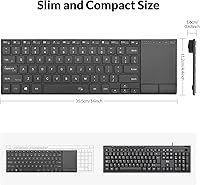
  • Dimensions: The keyboard measures 14.41 x 4.84 x 1.14 inches, keeping it slim enough to rest comfortably on a lap or armrest.
  • Weight: At 1.16 pounds, this wireless touchpad keyboard is light enough to carry between rooms without any real effort.
  • Material: The top plate uses aluminum alloy for rigidity, while the base and key structure are made from ABS plastic.
  • Connectivity: Supports both Bluetooth 5.1 and 2.4G RF wireless simultaneously, giving users two independent connection methods in one device.
  • USB Dongle: A plug-and-play USB RF dongle is included in the box and requires no driver installation on the host device.
  • Multi-Device: The keyboard can be paired with up to two devices and includes dedicated hardware keys for switching between them.
  • Battery: Powered by one built-in rechargeable lithium-ion battery, which is included and pre-installed at the time of purchase.
  • Charging Port: Charges via a Type-C port, allowing use of modern, widely available cables rather than proprietary or legacy connectors.
  • Backlight: Keys are backlit in a single fixed color, providing basic visibility in low-light environments such as darkened living rooms.
  • OS Compatibility: Compatible with Windows, Linux, iOS, and Android operating systems, covering most mainstream computing and mobile platforms.
  • Device Compatibility: Designed to work with laptops, desktop PCs, smart TVs, Android TV boxes, tablets, and iPads.
  • Color: Available in black with a dark aluminum finish that resists visible smudging under typical room lighting conditions.
  • Warranty: Rii provides a 12-month warranty along with direct customer support access for troubleshooting or replacement requests.
  • BSR Ranking: Holds a Best Sellers Rank of #270 in the Computer Keyboards category on Amazon as of its listed data.
  • Input Method: Combines a full QWERTY keyboard layout with an integrated touchpad, removing the need for a separate pointing device.
  • Package Contents: The retail package includes the keyboard unit, the USB RF dongle, a Type-C charging cable, and a user manual.

Related Reviews

Rii RT518S Wireless Keyboard
75%
78%
Trackpad Responsiveness
83%
Dual-Mode Connectivity
61%
Build Quality
67%
Backlight Quality
81%
Battery Life
More
Bnnwa Multi-Device Wireless Bluetooth Keyboard with Touchpad
83%
91%
Value for Money
88%
Ease of Use
72%
Touchpad Responsiveness
94%
Device Switching
85%
Portability
More
Links9+ Wireless Bluetooth Keyboard
86%
89%
Typing Comfort
85%
Build Quality
78%
Connectivity Stability
90%
Battery Life
91%
Design & Aesthetics
More
JPHTEK Foldable Bluetooth Keyboard with Touchpad
87%
92%
Portability & Design
87%
Typing Experience
90%
Battery Life
85%
Compatibility with Devices
88%
Ease of Setup
More
Logitech K480 Wireless Bluetooth Keyboard
86%
88%
Ease of Device Switching
81%
Bluetooth Connectivity
85%
Build Quality
72%
Ergonomics and Comfort
92%
Battery Life
More
Kidopire Foldable Bluetooth Keyboard with Touchpad
86%
94%
Portability
89%
Multi-device Connectivity
90%
Battery Life
87%
Touchpad Performance
92%
Ease of Use
More
Keychron B1 Pro Wireless Bluetooth Keyboard
86%
88%
Overall Performance
91%
Typing Experience
93%
Battery Life
89%
Portability & Size
84%
Build Quality
More
TECKNET TK-KB041 Wireless Keyboard
80%
91%
Value for Money
78%
Typing Feel & Key Response
93%
Noise Level
82%
Multi-Device Switching
63%
Build Quality & Materials
More
Rii K18 Plus Wireless Keyboard with Trackpad
83%
88%
Battery Life
85%
Trackpad Performance
91%
Portability
80%
Build Quality
79%
Compatibility
More
UBOTIE Portable Bluetooth Wireless Mini Keyboard
87%
91%
Bluetooth Connectivity
87%
Typing Comfort
94%
Portability
80%
Battery Life
88%
Multi-Device Support
More

FAQ

It depends on the specific model. Fire TV Stick supports Bluetooth, so the Rii K22S Wireless Bluetooth Touchpad Keyboard should pair via BT 5.1 without issue in most cases. Roku devices generally have more limited Bluetooth input support, so using the USB RF dongle is a better option there — though your Roku will need an available USB port. Always check your device specs before buying.
The keyboard has dedicated quick-switch keys that let you hop between your two paired connections without going into any settings menus. You just press the relevant key and the keyboard re-connects to the other device in a few seconds. It is straightforward once you have both devices paired and ready.

Honestly, it is adequate for casual use like navigating menus, scrolling through streaming apps, or light web browsing. However, it is not a precision tool — if you are used to a quality standalone mouse or a laptop trackpad from a major brand, this compact Bluetooth keyboard's touchpad will feel less refined. Multiple users have flagged sensitivity inconsistencies, so go in with realistic expectations.

Yes, that is actually one of the more useful aspects of this keyboard. You can have one device connected via Bluetooth 5.1 and a second connected through the USB RF dongle simultaneously, then switch between them using the hardware keys. It is a practical setup for anyone who uses, say, a laptop and a TV box side by side.

Rii does not publish a specific battery life figure for this model, which is a bit frustrating. User reports vary quite a bit — some find it lasts weeks with light use, others report faster drain, particularly with backlighting on. Turning off the backlight when it is not needed will likely extend usage time noticeably.

Yes, iOS is listed as a compatible platform, so it should pair with an iPad or iPhone via Bluetooth without needing any additional apps or adapters. Keep in mind that touchpad support on iOS works best on iPadOS 13 and later, which introduced proper cursor and trackpad functionality. On older iOS versions, you may only get keyboard input.

For most users doing casual typing, the wireless response feels fine and lag is not a major complaint. The touchpad, however, can feel sluggish to some users — less because of transmission lag and more because of sensitivity calibration. If you are doing anything time-sensitive, like gaming, this wireless touchpad keyboard is not designed for that kind of use.

That is exactly where the included USB RF dongle comes in. Plug the dongle into any free USB port on your TV, and the keyboard connects automatically — no pairing process, no settings to configure. It is genuinely plug-and-play, which makes setup on older or non-Bluetooth TVs very straightforward.

You can toggle the backlight on or off using a dedicated key. Keeping it off when you do not need it is a smart way to extend how long you go between charges, especially if you are using the keyboard in a well-lit room where the backlight adds no real benefit.

If you lose the dongle, you can still use the keyboard via Bluetooth 5.1 with any compatible device. However, the RF dongle is not a standard universal receiver — it is paired to this specific unit — so replacing it means contacting Rii support directly. It is worth keeping the dongle in a safe spot if you rely on it regularly.

Where to Buy