Overview

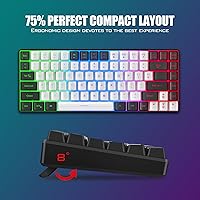
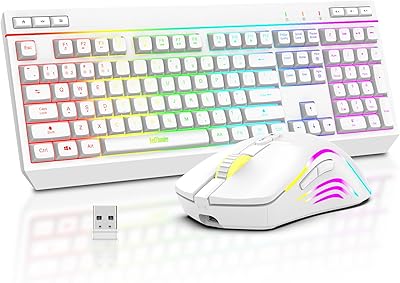
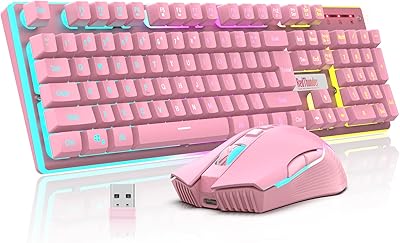
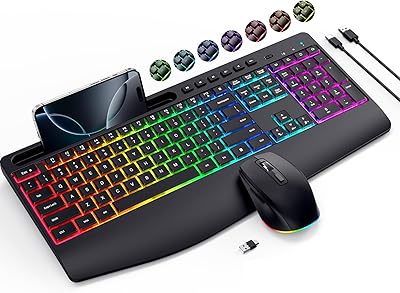
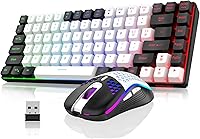
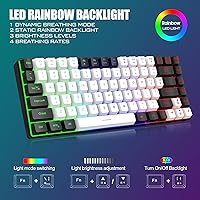
The RedThunder K84 Wireless Keyboard and Mouse Combo launched in mid-2024 and has already climbed to a top-100 bestseller ranking in its category — which tells you something about how well it fills a specific gap. It targets people who want a compact wireless setup without sacrificing everyday practicality. The 75% layout is the real draw here: smaller than a full-size board but smarter than a 60% because you still get dedicated arrow keys and media controls. One USB nano-receiver handles both devices, which keeps the desk tidy. Just know upfront that the backlight is a fixed rainbow pattern — there is no per-key RGB customization here.
Features & Benefits

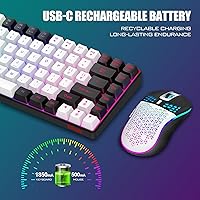
The 2.4G wireless connection holds up well for everyday typing and casual gaming — don't expect esports-level response times, but for the intended use case it's reliably snappy. Both devices are rechargeable: the keyboard carries a 1850 mAh battery while the mouse runs on 500 mAh, giving you roughly eight hours of backlit use before needing a top-up. The auto-sleep kicks in after two minutes idle, which helps stretch that runtime, though there's a brief lag when waking things back up. The mouse weighs around 65 grams thanks to its honeycomb shell design, making it noticeably light in hand. The keycaps use a two-color injection molding process, so the legends won't wear off quickly.

Best For

This wireless combo is a natural fit for students and remote workers who need a smaller desk footprint but still want to game after hours without swapping gear. If you're making your first jump from wired to wireless, the single-receiver plug-and-play experience makes onboarding about as low-friction as it gets. It also travels well — the compact form factor slips easily into a bag without the bulk of a full-size board. Anyone who has wrestled with a 60% keyboard missing arrow keys will appreciate the K84 set's smarter layout compromise. What it won't suit is anyone needing macro keys, software-driven RGB profiles, or an adjustable-weight mouse.

User Feedback

Sitting at 3.8 stars across 82 ratings, this compact keyboard-and-mouse bundle earns its score fairly. At this price tier, 3.8 isn't a warning sign — it reflects honest trade-offs rather than a flawed product. Buyers consistently praise the easy out-of-the-box setup and the keyboard's visual appeal for the money. Complaints tend to cluster around two things: occasional wireless dropouts after weeks of use, and the discovery that the mouse's scroll wheel light only glows while charging — it stays dark the rest of the time. A few buyers were also caught off guard by the required 8-hour initial charge before first use. The mouse battery also drains noticeably faster than the keyboard's in extended sessions.

Pros

  • The 75% layout keeps your desk uncluttered while retaining the arrow and media keys most users actually need.
  • Single shared USB nano-receiver means one port used, zero cable mess, and instant plug-and-play setup.
  • Both devices are rechargeable via USB-C, so you're never hunting for replacement batteries.
  • At roughly 65 grams, the honeycomb mouse is noticeably lighter than most mice in this price range.
  • Two-color injection-molded keycaps hold up well over time — the legends won't fade with daily use.
  • Rainbow backlight offers multiple brightness levels and breathing modes, giving the setup a polished look for the price.
  • Auto-sleep function helps preserve battery life during breaks without any manual intervention.
  • Compact package dimensions make this wireless combo easy to pack and carry between locations.
  • Straightforward out-of-the-box experience — no drivers, no app, no pairing sequence to figure out.

Cons

  • Wireless connection drops have been reported by multiple buyers after several weeks of regular use.
  • The mouse battery drains significantly faster than the keyboard's, creating mismatched charging schedules.
  • Auto-sleep kicks in after just two minutes of inactivity, and the wake-up delay can interrupt your flow.
  • The scroll wheel light is only active while charging — it stays off during normal use, which surprises many buyers.
  • Both devices must be fully charged for eight hours before first use, which is an inconvenient out-of-the-box hurdle.
  • The backlight cannot be customized per-key — there is no RGB software, no color mapping, and no macro support.
  • Mouse DPI tops out at 3200, which is functional but limiting for users who work across high-resolution multi-monitor setups.
  • With only 82 ratings, long-term durability data is still limited, making it harder to assess build quality over years of use.

Ratings

The scores below were generated by our AI after analyzing verified buyer reviews for the RedThunder K84 Wireless Keyboard and Mouse Combo from across global marketplaces, with spam, bot-submitted, and incentivized feedback actively filtered out. Each category reflects the honest distribution of real user experiences — the wins and the frustrations alike — weighted by how frequently a theme appeared and how strongly buyers felt about it. Nothing has been smoothed over to make the product look better than it is.

Value for Money
84%
Most buyers come away feeling they got more than they paid for — particularly when comparing the wireless convenience and rechargeable batteries to wired combos at the same price point. The lightweight mouse and backlit keyboard together feel like a step up from basic office bundles.
A handful of users who experienced connection drops or early pairing issues revised their value assessment sharply downward, feeling the reliability didn't justify even the modest investment. When something goes wrong at this price tier, there's less goodwill buffer to absorb the frustration.
Wireless Reliability
67%
33%
For the first few weeks of daily use, the 2.4G connection performs solidly — typing feels responsive and casual gaming sessions rarely show any lag under normal desktop distances. Most users working within a few feet of their receiver report a stable, interference-free experience.
A recurring complaint across reviews involves connection drops and re-pairing issues that surface after extended ownership, sometimes weeks in. A subset of users found the receiver and devices needed manual resets more often than expected, which erodes confidence in long daily-use sessions.
Keyboard Layout & Usability
88%
The 75% layout hits a genuinely useful middle ground — buyers who switched from full-size boards love the reclaimed desk space, while those coming from 60% layouts appreciate getting their arrow keys and media shortcuts back. It adapts well across work typing and gaming without feeling like a compromise either way.
Users with large hands or those accustomed to wider key spacing occasionally note the tighter layout takes an adjustment period. A few touch-typists flagged that the compressed row spacing initially affected their accuracy during the first week of use.
Mouse Comfort & Weight
82%
18%
At roughly 65 grams, this is one of the lightest mice you'll find in this price bracket, and buyers who do long work sessions or play casual games for hours genuinely notice the reduced wrist strain. The honeycomb shell also provides natural grip without becoming slippery during extended use.
The lightweight construction comes with a slightly hollow, plasticky feel that reminds some users of its budget origins. Those with larger hands also noted the mouse runs a bit small, which reduces comfort during extended precision work like photo editing or detailed spreadsheet navigation.
Battery Life
71%
29%
The keyboard's 1850 mAh battery holds up well across a standard workday with backlighting enabled, and the auto-sleep feature genuinely extends runtime for people who step away from their desk frequently. For light-to-moderate daily use, most buyers charge the keyboard every couple of days.
The mouse's 500 mAh battery is the weak link — it needs charging noticeably more often than the keyboard, and the two devices falling out of sync on charge cycles is a consistent minor irritation. Several buyers mentioned the mouse dying mid-session while the keyboard still had plenty of charge remaining.
Setup & Ease of Use
91%
Plug-and-play works exactly as advertised for the vast majority of users — insert the receiver, flip the power switches, and both devices are live within seconds. There is no software to hunt down, no firmware to update, and no pairing button sequence to memorize on first use.
The mandatory 8-hour initial charge requirement before first use trips up buyers who expected to use the combo straight out of the box. It's a legitimate safety precaution, but it's buried in the documentation and catches enough people off guard to generate repeated complaints.
Backlighting
73%
27%
For buyers who just want their setup to look good on a budget, the rainbow backlight delivers a visually appealing glow that punches above its price tier in low-light environments. The multiple brightness levels and breathing rate options add enough variety to keep it from feeling static.
Anyone expecting RGB customization will be let down — the backlight is a fixed rainbow pattern with zero per-key control and no companion software. The mouse's scroll wheel lighting staying off during normal use is also a specific disappointment that appears repeatedly in reviews from buyers who noticed it post-purchase.
Build Quality
69%
31%
The two-color injection-molded keycaps are a genuine bright spot — the legends feel durable and show no signs of fading even after months of daily typing, which is better than many combos at this tier. The overall assembly is acceptably solid for a budget peripheral with no alarming flex in the keyboard chassis.
The mouse shell and keyboard body both carry a lightweight plastic feel that signals budget construction to anyone handling them. A small number of users reported minor build inconsistencies like slightly wobbly keys or a scroll wheel that felt imprecise out of the box.
Keycap Quality
79%
21%
The two-color injection process is a meaningful upgrade over pad-printed keycaps at this price point — the characters are part of the cap structure, not sitting on the surface waiting to wear off. Buyers who have owned budget keyboards before specifically called this out as better than expected.
The ABS plastic still develops shine over high-use keys like W, A, S, D and the spacebar after a few months of intense use, which is a universal ABS limitation rather than a manufacturing defect. Buyers wanting PBT keycaps for a more premium texture will need to look at higher-priced options.
Mouse Sensor Performance
74%
26%
The 3200 DPI optical sensor tracks accurately on standard desk surfaces and handles everything from spreadsheet navigation to casual gaming without skipping or stalling. For productivity users and light gamers, it covers the full range of what they actually need day-to-day.
Serious gamers or users working on high-resolution multi-monitor setups may find 3200 DPI limiting when they need faster cursor travel across large screen real estate. The sensor also lacks adjustable DPI step settings, so you're locked into fixed preset levels rather than fine-tuning.
Portability
86%
The compact dimensions and combined weight under 1.5 pounds make this one of the more travel-friendly wireless combos available at this price. Users who shuttle between a home desk and an office, or who work from cafes and co-working spaces, specifically highlighted how easily it fits into a standard laptop bag.
The nano-receiver is small enough to lose easily in transit, and there's no dedicated storage pouch or case included in the package. A few traveling buyers mentioned the receiver cap covering its storage slot came loose in a bag, increasing the risk of losing it.
Auto-Sleep Function
62%
38%
The 2-minute auto-sleep is effective at conserving battery during breaks, and most users appreciate that they don't have to manually power off the devices between tasks. It makes the rechargeable battery story more credible for all-day use scenarios.
The 2-minute threshold is too aggressive for many users — pausing to think, read, or take a short call means coming back to a sleeping keyboard and mouse that need a moment to wake up. Several buyers flagged that this interruption breaks their workflow more than the battery savings justify.
Charging Experience
58%
42%
USB-C charging on both devices is a sensible modern choice that means most users already have compatible cables on hand. Charging while continuing to use the keyboard is possible since it functions during the charge cycle.
The lack of fast charging means topping up a fully depleted keyboard takes several hours, and the required 8-hour first charge is a notable friction point. The mouse cannot be used wirelessly while charging, which creates a window of forced wired use that some buyers didn't anticipate.

Suitable for:

The RedThunder K84 Wireless Keyboard and Mouse Combo is a strong pick for students and remote workers who spend most of their day at a desk but don't have room to spare — the 75% layout reclaims meaningful space without the frustrating trade-off of losing arrow or media keys. It works equally well as a daytime productivity tool and a casual evening gaming setup, so you're not maintaining two separate peripherals. First-time wireless buyers will appreciate how frictionless the setup is: one receiver, two devices, no software to install. The lightweight honeycomb mouse is genuinely comfortable for extended use, and the rechargeable batteries mean no drawer full of AAs. If you move your workspace regularly — between a home office and a living room setup, or in and out of a bag — the compact form factor and tangle-free wireless make this combo a practical travel companion.
Not suitable for:

Competitive or serious gamers should look elsewhere — the K84 set is not built for the split-second precision that demanding titles require, and the 2.4G connection, while adequate for casual play, has shown occasional reliability issues in longer sessions according to real buyer feedback. Anyone who wants full RGB lighting with per-key color customization will be disappointed; the backlight is a fixed rainbow pattern with no software control whatsoever. Power users who rely on macro keys, advanced mouse weight tuning, or multi-device Bluetooth switching will find the feature set too limited. The mouse battery is noticeably smaller than the keyboard's, which means the two devices will not stay in sync on charge cycles — the mouse will need topping up more often. If you're outfitting a professional workstation where long-term reliability and support are priorities, this compact keyboard-and-mouse bundle sits below the threshold you'd want.

Specifications

  • Layout: The keyboard uses a 75% tenkeyless layout with 84 keys, retaining dedicated arrow keys and media controls absent from 60% boards.
  • Connectivity: Both the keyboard and mouse connect via a single shared 2.4G USB nano-receiver stored in the keyboard or mouse when not in use.
  • Keyboard Battery: The keyboard houses a built-in 1850 mAh lithium-ion rechargeable battery that supports up to 8 hours of continuous backlit use.
  • Mouse Battery: The mouse runs on a 500 mAh lithium-ion rechargeable battery, which drains faster than the keyboard and will need more frequent charging in regular use.
  • Charging: Both devices charge via Type-A to Type-C cable at a maximum of DC 5V with no fast-charging support.
  • Auto-Sleep: The keyboard and mouse automatically enter sleep mode after 2 minutes of inactivity; pressing any key or moving the mouse wakes them.
  • Mouse Weight: The mouse weighs approximately 65 grams (plus or minus 5 grams) thanks to its perforated honeycomb ABS shell construction.
  • Mouse Sensor: The mouse uses an optical sensor with a maximum resolution of 3200 DPI, suitable for standard desktop and casual gaming use.
  • Keycaps: Keycaps are ABS plastic made using a two-color injection molding process, rated for up to 10 million keystrokes with legends that resist fading.
  • Backlight: The keyboard offers a fixed rainbow backlight pattern with 3 static modes, 1 breathing mode, 3 brightness levels, and 4 breathing rate options — per-key RGB is not supported.
  • Mouse Lighting: The mouse features a built-in 7-color cyclic gradient lighting effect on the body; the scroll wheel light is active only during charging.
  • Key Rollover: The keyboard is designed for standard mixed typing and casual gaming use; it does not advertise full N-key rollover.
  • Dimensions: The packaged combo measures 15.55 x 7.72 x 1.73 inches, making it compact enough to slip into a backpack or laptop bag.
  • Total Weight: The full combo weighs 1.43 pounds, keeping the overall setup lightweight for a keyboard-and-mouse bundle.
  • Compatibility: The combo is compatible with desktop PCs and personal computers; it uses a standard USB receiver and requires no additional drivers.
  • Keycap Material: All keycaps are made from ABS plastic with a two-color injection process that bonds the legends directly into the cap rather than printing them on the surface.
  • Mouse Shell: The mouse body uses a perforated honeycomb ABS design intended to reduce weight and improve grip comfort during extended sessions.
  • First-Use Charge: The manufacturer requires an initial charge of approximately 8 hours via a computer USB port before first use, as devices are shipped partially charged for safe transport.

Related Reviews

RedThunder K20 Wireless Keyboard and Mouse Combo
75%
83%
Value for Money
74%
Wireless Connectivity
51%
Mouse Battery Life
79%
Keyboard Battery Life
86%
RGB Lighting Quality
More
RedThunder K10 Wireless Keyboard and Mouse Combo
77%
84%
Value for Money
63%
Typing Feel
74%
Build Quality
71%
Wireless Performance
88%
RGB Lighting
More
Arteck HW192 Wireless Keyboard and Mouse Combo
78%
78%
Build Quality
72%
Typing Experience
63%
Mouse Comfort & Ergonomics
81%
Battery Life
69%
Wireless Connectivity
More
KNOWSQT Wireless Keyboard and Mouse Combo
87%
89%
Wireless Performance
83%
Build Quality
86%
Ergonomics & Comfort
91%
Design & Aesthetics
76%
Battery Life
More
JOYACCESS Wireless Keyboard and Mouse Combo
82%
88%
Value for Money
83%
Typing Experience
74%
Mouse Performance
86%
Backlight Quality
81%
Battery Life
More
GEEZER Wireless Keyboard and Mouse Combo
72%
83%
Value for Money
91%
Aesthetic Design
94%
Ease of Setup
67%
Typing Feel
62%
Mouse Quality
More
Cimetech Wireless Keyboard and Mouse Combo
88%
91%
Value for Money
88%
Ease of Use
83%
Connectivity
94%
Portability
85%
Ergonomics
More
FOPETT Wireless Keyboard and Mouse Combo
85%
91%
Typing Experience
87%
Battery Life
94%
Design & Aesthetics
88%
Ergonomics
85%
Build Quality
More
CHESONA Multi-Device Wireless Keyboard and Mouse Combo
79%
88%
Multi-Device Switching
81%
Keyboard Typing Feel
61%
Mouse Quality
84%
Battery Life
74%
Wireless Connectivity Stability
More
Letton Wireless Keyboard and Mouse Combo
83%
89%
Design & Aesthetics
81%
Ergonomics & Comfort
75%
Wireless Connectivity
90%
Battery Life
92%
Value for Money
More

FAQ

No, the RedThunder K84 Wireless Keyboard and Mouse Combo is fully plug-and-play. Just insert the USB nano-receiver, switch both devices on, and they should connect automatically — no driver downloads or app installs required.
They share a single nano-receiver, which is actually convenient since it only occupies one USB port. The downside is that if you lose that receiver, both devices stop working, so keep track of it.

The devices ship partially charged for safety reasons, and the manufacturer recommends an initial 8-hour charge before first use. If you plug in and nothing happens, charge both the keyboard and mouse fully first — this resolves most out-of-the-box issues.

Not really. The backlight is a fixed rainbow pattern, and while you can cycle through a few static modes, a breathing mode, and adjust brightness levels, there is no software to customize individual key colors. If per-key RGB matters to you, this setup won't deliver that.

That's actually by design. The scroll wheel light on the mouse only illuminates while the device is charging — it turns off during normal use. It catches a lot of buyers off guard, but it's not a defect.

With backlighting on, expect around 8 hours from the keyboard and somewhat less from the mouse since it has a smaller 500 mAh battery. If you turn the backlight off or lower the brightness, you can stretch runtime considerably. The auto-sleep feature also helps when you step away from your desk.

The combo is primarily designed for PC use and the key labeling reflects a Windows layout. It may function on a Mac via the USB receiver, but certain special keys and shortcuts may not map correctly without remapping software. It's not officially supported for macOS.

Start by making sure both devices are powered on and the receiver is fully inserted. If they still won't pair, there's a reset or re-pairing procedure that involves holding specific key combinations — check the included manual for the exact steps. RedThunder's support team is also responsive if you get stuck.

It holds up fine for casual gaming — the 3200 DPI sensor and lightweight honeycomb shell make it feel responsive for everyday titles. That said, it's not built for competitive play where ultra-low latency and precise sensor tracking are critical. Think of it as a capable all-rounder, not a dedicated gaming mouse.

The keycaps use a two-color injection molding process, meaning the legends are part of the keycap structure rather than printed on top. That makes them significantly more resistant to fading compared to cheaper pad-printed alternatives. For a budget keyboard, the longevity of the lettering is one of its stronger qualities.

Where to Buy