RedThunder K20 Wireless Keyboard and Mouse Combo



Overview
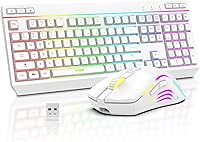
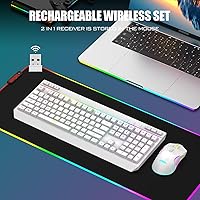
The RedThunder K20 Wireless Keyboard and Mouse Combo sits squarely in the budget wireless space, offering a cord-free desk setup with enough features to appeal to both home office workers and casual gamers. It runs on a 2.4GHz nano-receiver shared between both devices, so setup takes about ten seconds flat. The rechargeable batteries mean no scrambling for AAs mid-workday, which alone justifies the switch from a disposable-battery combo. RGB lighting at this price tier is a genuine surprise — it looks better than expected. Mac users should know upfront that compatibility is limited; this wireless combo is built around Windows and works best there.
Features & Benefits
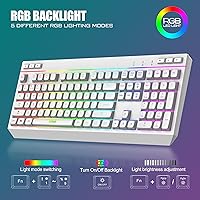
The keyboard packs 104 standard keys plus 10 dedicated multimedia keys, so volume control, playback, and common shortcuts sit right at your fingertips rather than buried in function-key gymnastics. The mouse covers five DPI levels up to 4800, which handles careful document work and relaxed gaming equally well. RGB options go deeper than the price suggests — four dynamic modes and seven monochrome colors on the keyboard, eleven modes on the mouse. The smart sleep feature kicks in after a couple of minutes of inactivity, stretching overall battery life. One quirk worth flagging early: the mouse charges in wired mode only, so wireless freedom pauses temporarily during top-ups.
Best For
This keyboard-and-mouse bundle makes the most sense for home office users who want a cleaner desk without committing serious money to peripherals. Students setting up a dorm workspace will appreciate how frictionless it is — plug in the receiver, flip both power switches, and it just works. Entry-level gamers who play casual titles will find the mouse responsive enough for relaxed sessions, though competitive or high-refresh-rate play is not where this set belongs. Windows users get the full experience; Mac users can make it function, but multimedia keys won't fully cooperate with macOS. Anyone ditching an old wired combo and wanting RGB personality on a tight budget should feel right at home.
User Feedback
Sitting at 3.8 out of 5 stars across roughly 180 reviews, the K20 set lands in genuinely mixed territory — not a runaway success, but not a frustrating purchase either. Buyers consistently highlight the lighting quality for the price, and the driver-free plug-and-play setup earns repeated praise. On the flip side, the mouse battery is on the small side and needs more frequent charging than the keyboard. Some reviewers mention occasional input lag at longer distances from the receiver, which is worth keeping in mind for larger desks. Build quality divides opinion most sharply — the combo feels functional rather than premium, which is fair for the tier but not a surprise to set aside.
Pros
- Single USB nano-receiver handles both keyboard and mouse, keeping port usage minimal and setup instant.
- No drivers or software required — it works the moment you plug it in.
- Rechargeable batteries on both devices eliminate the cost and hassle of disposable AAs.
- RGB lighting quality genuinely punches above its price tier on both devices.
- Ten dedicated multimedia keys make volume, playback, and shortcuts a one-press affair during the workday.
- The keyboard battery lasts several days of regular use, especially with lighting dimmed or off.
- Keycap legends stay legible in daylight with backlighting fully off, a detail many budget boards get wrong.
- Auto-sleep mode on both devices helps conserve charge during natural breaks without any manual intervention.
- The nano-receiver stores inside the mouse body during travel, so it is unlikely to get lost.
- Full-size layout with standard key spacing means no relearning curve when switching from any standard keyboard.
Cons
- The mouse battery is small and needs charging every one to two days under moderate use.
- While charging, the mouse operates in wired mode only, temporarily cancelling the wireless setup.
- Wireless signal can degrade noticeably at longer desk distances or after extended use sessions.
- Plastic construction on both devices feels lightweight in a way that raises questions about multi-year durability.
- ABS keycaps will develop shine and a slicker feel on heavily used keys within several months.
- RGB customization is limited to cycling through fixed presets — no software, no per-key control.
- The aggressive auto-sleep timeout can feel disruptive when pausing to read or think rather than type.
- Membrane key feel is soft and lacks tactile definition, which will disappoint faster or more demanding typists.
- Mac compatibility is too limited for anyone relying on this combo as their primary macOS input device.
- At 3.8 out of 5 stars from real buyers, satisfaction is moderate rather than strong — temper expectations accordingly.
Ratings
The RedThunder K20 Wireless Keyboard and Mouse Combo has been evaluated by our AI rating engine after parsing verified buyer reviews from global markets, with spam, incentivized, and bot-flagged submissions actively filtered out before scoring. The scores below reflect where this wireless combo genuinely delivers and where real users have run into friction — no category has been softened or inflated. Both the standout strengths and the recurring pain points are represented transparently so you can make a fully informed decision.
Value for Money
Wireless Connectivity
Mouse Battery Life
Keyboard Battery Life
RGB Lighting Quality
Build Quality
Typing Experience
Mouse Ergonomics
Mouse Tracking & DPI Performance
Setup & Ease of Use
Multimedia Key Functionality
Compatibility
Portability & Form Factor
Keycap Legibility
Suitable for:
The RedThunder K20 Wireless Keyboard and Mouse Combo is a practical fit for Windows-based home office workers who want a cleaner desk without spending serious money on peripherals. If you are tired of cable clutter but cannot justify a premium wireless setup, this keyboard-and-mouse bundle hits a sweet spot where functionality and price align reasonably well. Students setting up a dorm workstation will appreciate how little friction is involved — there is nothing to install, configure, or pair beyond plugging in a single receiver. Casual gamers who play relaxed titles in the evenings and work from the same machine during the day will find the DPI range and multimedia key layout genuinely useful across both contexts. The rechargeable design also makes this a smart pick for anyone burned by disposable-battery combos dying mid-session, as long as they accept that the mouse needs charging more frequently than the keyboard.
Not suitable for:
This wireless combo is not the right call for Mac-primary users — the compatibility issues go beyond minor quirks, with multimedia keys largely non-functional under macOS and occasional wake-from-sleep inconsistencies that can disrupt a workflow. Competitive or serious gamers should also look elsewhere; the wireless latency and optical sensor are tuned for casual use, not the kind of precision and responsiveness that fast-paced or ranked gameplay demands. If you are a heavy typist who spends hours writing every day, the soft membrane feel will likely frustrate you compared to even an entry-level mechanical keyboard. Users with large desks or setups where the receiver sits more than a meter away may run into signal reliability issues that become genuinely annoying over time. Finally, buyers expecting premium build quality — solid plastics, tight tolerances, a weighty mouse — will find the K20 set falls short of that standard, and should budget up accordingly.
Specifications
- Wireless Technology: Both the keyboard and mouse connect via a shared 2.4GHz USB nano-receiver, requiring only one port on the host device.
- Keyboard Layout: Full-size QWERTY layout with 104 standard keys plus 10 dedicated multimedia keys for a total of 114 keys.
- Anti-Ghosting: The keyboard supports 26-key rollover, allowing up to 26 simultaneous key inputs to be registered accurately.
- Keyboard Battery: The keyboard is powered by a built-in 2000mAh rechargeable lithium-ion battery charged via USB cable.
- Mouse Battery: The mouse uses a built-in 600mAh rechargeable lithium-ion battery and operates in wired mode only during charging.
- Mouse DPI Range: The optical mouse offers five adjustable DPI levels with a maximum sensitivity of 4800 DPI.
- Mouse Buttons: The mouse features seven programmable buttons including two side buttons for navigation shortcuts.
- Keyboard RGB Modes: The keyboard includes four dynamic backlight effects, four breathing speed levels, seven monochrome color options, and one RGB rainbow mode.
- Mouse RGB Modes: The mouse supports eleven distinct backlight modes adjustable directly via a dedicated button on the device.
- Key Lifespan: Keyboard keys are rated for up to 10 million keystrokes, offering a projected lifespan of approximately a decade under regular use.
- Keycap Material: Keys use ABS plastic with transparent character printing that remains legible whether the backlight is on or off.
- Sleep Mode: Both devices enter automatic low-power sleep mode after one to three minutes of inactivity and wake instantly on any input.
- Dimensions: The combined package measures 17.32 x 9.45 x 1.57 inches, with the keyboard accounting for the majority of the footprint.
- Weight: The full combo weighs 1.98 pounds, making it manageable for desk relocation or occasional transport between workspaces.
- Compatibility: Fully supported on Windows 2000, XP, Vista, 7, 8, 10, and 11, as well as Raspberry Pi 3 and 4; macOS support is limited and multimedia keys may not function correctly.
- Driver Requirement: No drivers or third-party software are required; the combo operates as a plug-and-play device on all supported operating systems.
- Receiver Storage: The nano-receiver stores in a dedicated compartment on the underside of the mouse to prevent loss during transport.
- Charging Method: Both devices charge via USB cable; the keyboard charges wirelessly while the mouse must be connected via cable and used in wired mode during charging.
- Power Source: Both devices are powered by included built-in lithium-ion batteries; no disposable batteries are required at any point.
- Battery Runtime: With RGB lighting active, the combo supports approximately eight hours of continuous use on a full charge under typical conditions.
Related Reviews
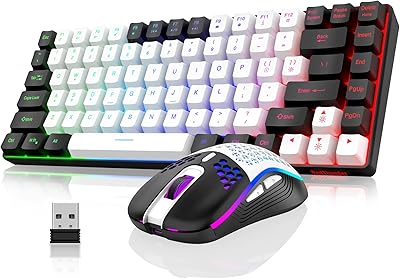
RedThunder K84 Wireless Keyboard and Mouse Combo
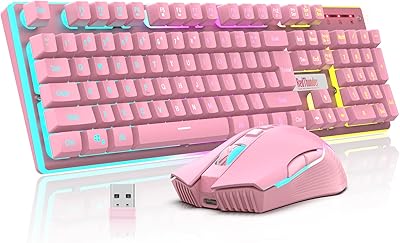
RedThunder K10 Wireless Keyboard and Mouse Combo

Arteck HW192 Wireless Keyboard and Mouse Combo

QUASIO Wireless Keyboard and Mouse Combo

UBOTIE Wireless Keyboard and Mouse Combo

TKVPJYYI Wireless Retro Typewriter Keyboard and Mouse Combo

Vssoplor Wireless Keyboard and Mouse Combo

HP 18H24AA Wireless Keyboard and Mouse Combo

SABLUTE Wireless Backlit Keyboard and Mouse Combo