Overview

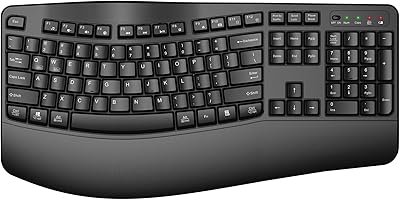
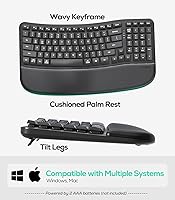
The Nulea RT08 Wave Keys Ergonomic Keyboard sits in an interesting spot — it's neither a basic flat keyboard nor a complex split design that takes weeks to adjust to. Think of it as a gentle on-ramp into ergonomic typing, suited for anyone who spends long hours at a desk and is starting to feel the effects. The wave-shaped key layout follows the natural arc of your fingers without forcing you to relearn where anything is. Add in a cushioned palm rest, 2.4GHz wireless connectivity, and broad Mac and Windows support, and you have a practical, budget-friendly option. Just know going in: it uses membrane switches, not mechanical ones.

Features & Benefits

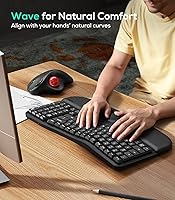
The wave-row key design is where this ergonomic board earns its keep. Each row is gently curved to match how your fingers naturally splay outward, which can meaningfully reduce lateral stretching during marathon typing sessions. The integrated silicone rubber palm rest has a firm but cushioned feel — it keeps your wrists at a neutral angle rather than letting them droop onto a hard desk surface. Two rear footrest positions let you dial in a tilt that works with your chair height. Wireless setup is genuinely painless: plug in the USB dongle and it connects instantly on both Mac and Windows. The full key layout, including a complete function row, means no compromises for everyday office work.

Best For

This wave keyboard makes the most sense for office workers who clock serious hours at a keyboard and want wrist relief without committing to the learning curve of a split or columnar layout. It's also a solid pick for home office setups where a clean, cable-free desk matters — the wireless design keeps things tidy. Cross-platform users will appreciate that it works out of the box on both Mac and Windows with no driver installations needed. And if you've been eyeing ergonomic boards but balked at the price tags on premium models, the Nulea RT08 lands at a budget-friendly price point that makes it genuinely low-risk to try.

User Feedback

Sitting at a 4.6-star rating across roughly 200 reviews, the Nulea RT08 has built an early reputation that skews positive — though the product is new enough that long-term durability remains an open question. Most buyers highlight reduced wrist fatigue after switching from flat keyboards, and the palm rest gets consistent praise for feeling more substantial than the flimsy pads found on cheaper boards. On the critical side, anyone coming from a mechanical keyboard will notice the softer, mushier feel of the membrane switches — that's not a flaw exactly, but it's worth knowing before you buy. A handful of users also mention they'd appreciate longer battery life between changes.

Pros

  • Wave-shaped key rows reduce lateral finger stretch noticeably during long typing sessions.
  • The integrated palm rest is firmer and more supportive than typical aftermarket foam pads.
  • Plug-and-play wireless setup works on Mac and Windows with no software installation required.
  • Adjustable rear footrests let you fine-tune the tilt to match your desk height and sitting posture.
  • Full-size layout with a complete function row covers all everyday office and shortcut needs.
  • No split-keyboard learning curve — this ergonomic board feels immediately familiar from the first keystroke.
  • Consistent key actuation keeps typing rhythm steady without noticeable wobble or keys sticking.
  • Cable-free wireless design helps keep the desk clean and uncluttered.
  • Broad cross-platform compatibility means fewer headaches when switching between operating systems.
  • At its price tier, the combination of wrist rest, wireless, and ergonomic shaping offers solid overall value.

Cons

  • Membrane switches feel soft and imprecise — a real step down for anyone coming from a mechanical board.
  • Long-term durability is still unproven given the late 2024 launch date and limited ownership history.
  • Roughly 200 reviews is an encouraging start, but too small a sample to draw firm reliability conclusions.
  • No Bluetooth support means the USB dongle occupies a port permanently, which matters on slim laptops.
  • Battery life has drawn mixed impressions from some users, with a few finding it shorter than expected.
  • The wave curve offers a gentler ergonomic benefit than a true split keyboard — not a like-for-like substitute.
  • No macro keys, programmable layers, or backlighting for users who want a more customizable experience.
  • The silicone palm rest surface can feel slightly warm or tacky during long sessions in warmer environments.

Ratings

The Nulea RT08 Wave Keys Ergonomic Keyboard has been scored across 14 categories by our AI rating engine, which analyzed verified global purchase reviews while actively filtering out incentivized, duplicate, and bot-generated feedback. The scores below reflect both what genuinely impresses daily users and the real-world friction points that hold the board back from a higher overall standing. Nothing has been softened.

Ergonomic Comfort
84%
The wave-shaped key rows make a tangible difference for users who type four or more hours daily. Fingers don't have to stretch as far sideways, and the gradual arc of each row keeps the hands in a more relaxed position throughout the workday. Most reviewers noticed reduced tension within the first few days of switching.
The ergonomic benefit is real but more subtle than what a full split keyboard delivers. Users dealing with significant wrist issues or repetitive strain injuries often find that the wave design alone isn't enough correction, with a few reporting their discomfort plateauing rather than continuing to improve over time.
Typing Feel
67%
33%
For quiet office environments or shared workspaces, the membrane switches are genuinely pleasant — soft landings, no clatter, and a surprisingly uniform keypress across the board. Users transitioning from cheap rubber dome keyboards often describe the consistency here as a step up, even if the overall feel doesn't match mechanical boards.
Mechanical keyboard veterans consistently flag typing feel as the biggest letdown. The membrane actuation lacks the tactile definition many typists rely on for accuracy and rhythm, and the softer keypress can feel imprecise during fast typing bursts — the most frequently cited reason for returns among dissatisfied buyers.
Palm Rest Quality
88%
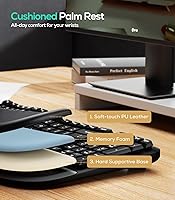
The built-in silicone cushion earns high marks from daily users who previously relied on separate foam pads. It sits at just the right height to keep wrists elevated slightly off the desk during typing, and the surface is firm enough to provide real support without feeling like resting on bare plastic.
In warmer months or heated office environments, the silicone surface can start to feel slightly tacky against bare skin after an hour or two of continuous contact. A small number of users also wish the cushion were wider to accommodate larger hand sizes more comfortably across extended sessions.
Wireless Performance
86%
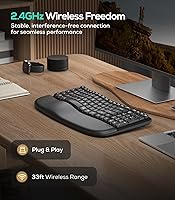
The 2.4GHz dongle connection is one of this wave keyboard's stronger suits. Out of the box, it pairs in seconds and maintains a stable, responsive link at normal desk distances. For document editing, spreadsheets, and email, the connection feels completely transparent and causes no noticeable disruption to workflow.
A handful of users in environments with significant wireless interference — dense Wi-Fi networks or proximity to other 2.4GHz devices — report occasional brief dropouts. There is also no Bluetooth option, so the dongle must remain plugged in at all times, consuming a USB port that some compact laptops simply cannot spare.
Value for Money
91%
At its price tier, this wave keyboard bundles wireless connectivity, an ergonomic key layout, and an integrated wrist rest into a package that would cost noticeably more if those features were sourced separately. Buyers hesitant to spend heavily on a first ergonomic board repeatedly cite value as the deciding factor in their purchase.
The value proposition holds only as long as durability proves out — and that remains an open question for a product launched in late 2024. If the keyboard requires early replacement due to build issues, the effective per-year cost rises considerably, which is worth factoring into any budget-focused purchasing decision.
Build Quality
73%
27%
For its price range, the overall construction feels solid enough for daily desk use. The plastic housing doesn't flex noticeably under normal typing pressure, and keycaps sit evenly with no obvious alignment issues out of the box. First impressions from the majority of buyers are genuinely positive on this front.
Because the product has been on the market only since late 2024, there is little data on how it holds up after 12 to 18 months of heavy use. A few early adopters have noted that the silicone palm rest shows minor surface wear sooner than expected, raising questions about long-term material resilience.
Key Stability
79%
21%
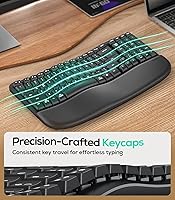
The crater-style keycap design does a solid job of keeping individual keys from wobbling during normal typing. Reviewers moving from cheaper membrane boards note the travel feels more consistent here, with less lateral play when striking keys off-center — a small but perceptible improvement in day-to-day typing rhythm.
While better than budget-tier alternatives, key stability still falls short of what a mid-range mechanical or premium membrane board provides. Users who type with significant force or employ aggressive key-rolling techniques occasionally describe a slightly spongy rebound that can interrupt fast, confident typing flow during demanding sessions.
Tilt & Adjustability
72%
28%
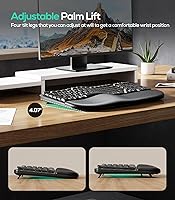
The dual-position rear footrests give users a meaningful choice between a flatter typing surface and a moderately raised incline. For most standard desk heights, one of the two positions lands in a comfortable range, and making the switch takes only seconds. Users with height-adjustable desks particularly appreciate the quick flexibility.
Two tilt positions is a limited range compared to keyboards that offer stepless adjustment or three or more footrest increments. Taller users or those with very specific posture requirements may find that neither preset angle fully satisfies their needs, forcing a compromise rather than a precise ergonomic dial-in.
Setup & Compatibility
93%
Plug-and-play setup is an area where this ergonomic board genuinely excels. The USB dongle connects in under a minute on both Mac and Windows with no configuration needed — a strong plus for users who dislike software installations or Bluetooth pairing sequences. Switching between compatible machines is refreshingly painless.
The absence of Bluetooth locks users to a single connected device at a time, which can frustrate those who switch between a desktop and a laptop throughout the day. Official compatibility covers only Windows and Mac, leaving Chromebook and Linux users to troubleshoot any edge-case key mapping issues independently.
Noise Level
87%
The membrane switches make this one of the quieter keyboards at its tier. Open-plan office workers and frequent video call participants consistently highlight how unobtrusive the keypress sound is — there's none of the clack that mechanical boards generate, and the cushioned palm rest further dampens vibration transmitted to the desk surface.
While quiet by keyboard standards, the membrane keypress is not completely silent. A faint thud remains audible with each keystroke, particularly if you type with any force behind your fingers. In a very still room or during a podcast recording session, that residual sound can still be picked up by sensitive microphones.
Battery Life
63%
37%
For light to moderate daily use — a few hours of typing spread across a standard workday — the battery holds up well enough that most users don't need to think about it week to week. An auto-sleep function when idle also helps extend intervals between replacements for part-time desk workers.
Battery life is one of the more polarizing aspects of the Nulea RT08 experience. Heavy daily typists report needing replacements more frequently than expected, and the lack of a built-in rechargeable cell means always keeping alkaline batteries on hand rather than simply plugging in a charging cable at the end of the day.
Key Layout
82%
18%
The full-size layout with a complete function row makes this a practical daily driver for office applications. Shortcut-heavy workflows in spreadsheet software and productivity suites are well-served without remapping or adapting to a compressed board. Mac users also benefit from standard function key support that works without configuration.
The keyboard offers no dedicated media playback keys and no programmable layers or macro support. Users accustomed to software-customizable boards will find no way to reassign keys or create personalized shortcuts, meaning the layout is entirely fixed and may not align with every individual workflow or application preference.
Portability & Weight
76%
24%
At 2.14 pounds, this wave keyboard is light enough to move between rooms or carry in a laptop bag without much hassle. For users who hot-desk across different workspaces or occasionally travel with their keyboard, the wireless operation and relatively modest weight make it a reasonably practical option on the move.
The full-size footprint and non-removable palm rest add more bulk than smaller or tenkeyless ergonomic alternatives carry. At over 17 inches in length, it can feel oversized when packed for travel and won't fit comfortably in most standard laptop sleeves without a dedicated carrying case or keyboard pouch.
Desk Footprint
69%
31%
The wireless setup removes cable clutter entirely, which does a lot to keep the desk feeling clean even with a large keyboard on it. Users who moved from bulky wired ergonomic boards consistently note that eliminating the cable alone makes their workstation feel noticeably more organized and easier to maintain.
The physical size of this ergonomic board is substantial — at over 17 inches wide, it dominates the desk space in front of a monitor more than a compact or tenkeyless alternative would. For users with small desks or tight multi-monitor arrangements, the footprint is a genuine and ongoing practical constraint.

Suitable for:

The Nulea RT08 Wave Keys Ergonomic Keyboard is a strong fit for desk workers who spend the bulk of their day in documents, spreadsheets, or email and are beginning to notice tension building in their wrists or fingers. You don't need a diagnosed condition to benefit — anyone typing for three or more hours daily will likely appreciate the wave layout's more natural finger positioning compared to a flat board. Ergonomic beginners will find it especially approachable since there is no real adjustment period the way there is with split or ortholinear designs; you plug in the USB dongle and type as you normally would. It also suits home office setups well, where keeping the desk tidy matters and a wireless keyboard removes one more cable from the equation. Mac and Windows users alike can get going without installing any drivers, making it a practical option for anyone who regularly switches between machines.

Not suitable for:

Mechanical keyboard enthusiasts who depend on tactile feedback or audible click will almost certainly find the Nulea RT08 Wave Keys Ergonomic Keyboard underwhelming — the membrane switches are quiet and soft by design, and that softer keypress is a deliberate trade-off rather than a premium typing experience. Competitive gamers or power users who need dedicated macro keys, RGB lighting, or deep software customization will quickly hit the ceiling of what this board can offer. Anyone dealing with significant, medically diagnosed wrist issues should also temper expectations; while the wave layout may help with day-to-day comfort, it is not a therapeutic device and cannot replicate the relief that a full split or tented keyboard provides. Finally, buyers who prioritize proven long-term reliability should note that this keyboard only launched in late 2024, meaning there simply is not enough real-world data yet to vouch for how it holds up over years of daily use.

Specifications

  • Connectivity: The keyboard connects via a 2.4GHz wireless USB dongle that requires no software pairing and works immediately on both Mac and Windows.
  • Switch Type: Keys use membrane switches, delivering a quiet and soft actuation feel that differs noticeably from the tactile response of mechanical switches.
  • Key Layout: Full-size layout includes a complete function row, number row, and all standard modifier and navigation keys for comprehensive office and productivity use.
  • Key Design: Crater-style keycaps are arranged in a wave-row arc pattern where each row follows a gentle curve intended to reduce lateral finger extension during typing.
  • Palm Rest: An integrated silicone rubber cushion is built directly into the keyboard base, providing a firm padded surface for wrist support throughout typing sessions.
  • Tilt Adjustment: Dual-position rear footrests allow the keyboard angle to be set at one of two incline levels to suit different desk heights and sitting postures.
  • Compatibility: Officially compatible with Windows and Mac operating systems out of the box via the included USB dongle, with no driver installation required.
  • Power Source: The keyboard is powered by replaceable batteries; there is no built-in rechargeable cell, so spare batteries should be kept on hand for uninterrupted use.
  • Dimensions: The unit measures 17.17 x 10.12 x 1.77 inches, reflecting the full-size footprint that includes the integrated palm rest along the front edge.
  • Weight: The keyboard weighs 2.14 pounds, consistent with a full-size wireless board that includes an attached palm rest in its construction.
  • Material: The palm rest cushion and portions of the key housing are constructed from silicone rubber, contributing to both the cushioned contact surface and overall build.
  • Color: Available exclusively in Black, with a uniform matte finish applied across the key body, frame, and palm rest surface.
  • Brand: Manufactured and sold by Nulea, a brand focused on ergonomic office peripherals including keyboards, mice, and wrist support accessories.
  • User Rating: The keyboard holds a 4.6 out of 5 star average on Amazon, based on verified purchase ratings collected since its launch in late 2024.
  • Review Count: Approximately 199 ratings have been submitted as of early 2025, representing a modest but growing base for a product that is still relatively new to market.

Related Reviews
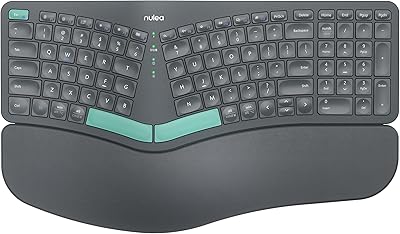
Nulea HD315 Wireless Ergonomic Split Keyboard
75%
83%
Ergonomic Design
81%
Wrist Rest Comfort
76%
Wireless Reliability
88%
Value for Money
58%
Typing Feel
More
Nulea KM75
Nulea KM75
76%
83%
Ergonomic Comfort
79%
Memory Foam Palm Rest
76%
Keyboard Typing Feel
72%
Mouse Ergonomics
74%
Multi-Device Switching
More
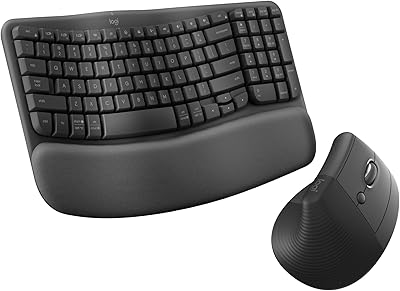
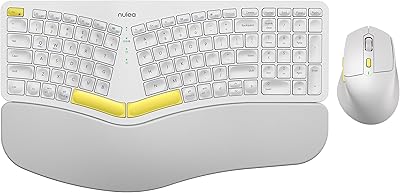
Logitech Wave Keys & Lift Vertical Mouse Bundle
81%
91%
Ergonomic Comfort
84%
Keyboard Typing Feel
83%
Mouse Ergonomics
78%
Build Quality
71%
Palm Rest Quality
More
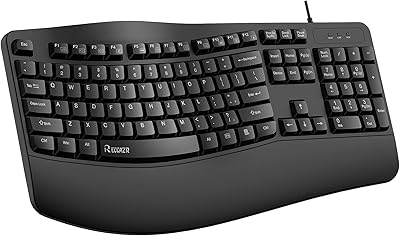
RECCAZR Ergonomic Wired Keyboard
74%
78%
Ergonomic Comfort
74%
Wrist Rest Quality
66%
Typing Feel
61%
Build Quality
81%
Spill Resistance
More
Logitech Wave Keys for Mac Ergonomic Keyboard
79%
88%
Ergonomic Comfort
71%
Palm Rest Quality
74%
Key Feel & Typing Experience
86%
Multi-Device Switching
91%
Noise Level
More
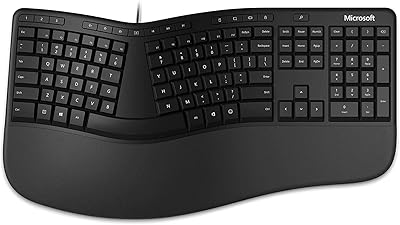
Microsoft Ergonomic Keyboard for Business Wired
77%
88%
Ergonomic Comfort
83%
Build Quality
79%
Typing Feel
86%
Wrist & Posture Support
67%
Shortcut Keys
More
TECKNET TK-EKB01040BS01 Wireless Keyboard
76%
83%
Ergonomic Comfort
86%
Typing Noise Level
79%
Wireless Reliability
62%
Build Quality
88%
Value for Money
More
X9 Performance Wireless Ergonomic Split Keyboard
76%
83%
Ergonomic Comfort
58%
Key Feel & Typing Experience
86%
Wireless Performance
88%
Battery Life
62%
Build Quality
More
QUASIO Wave Keys Ergonomic Wireless Keyboard with Wrist Rest
75%
83%
Ergonomic Comfort
71%
Wrist Rest Quality
67%
Typing Feel & Key Travel
86%
Wireless Reliability
81%
Mac & Windows Compatibility
More
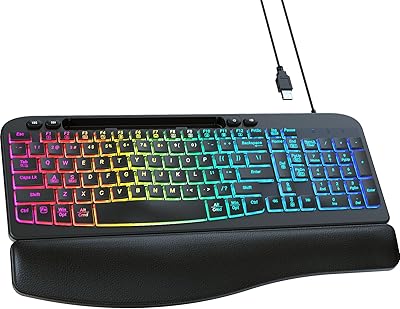
SABLUTE KG812B Ergonomic Wired Keyboard
78%
83%
Ergonomic Comfort
78%
Wrist Rest Quality
81%
Key Feel & Actuation
74%
Backlight Quality
67%
Build Quality
More

FAQ

Yes, it is plug-and-play on macOS. Insert the USB dongle into an available port and the wave keyboard is recognized immediately — no driver downloads or configuration software needed.

The included dongle uses a standard USB-A connector, so you will need a USB-A to USB-C adapter if your laptop lacks a full-size USB port. The adapter is not included in the box, but any generic one should work without issue.

Nulea does not publish a specific battery life figure for this model, and user feedback on this point varies. Some reviewers report several weeks of comfortable daily use, while others find they go through batteries faster than expected. Keeping a spare set on hand is a sensible precaution.

The Nulea RT08 Wave Keys Ergonomic Keyboard may help reduce day-to-day wrist and finger fatigue for many users, but it is not a medical device and individual results will vary. The wave-shaped key arc and built-in palm rest encourage a more neutral hand position, which tends to ease strain during long sessions. If your wrist issues are more serious, it is worth consulting a healthcare professional and potentially looking at a full split keyboard for more pronounced ergonomic correction.

No — the palm rest on this ergonomic board is permanently integrated into the keyboard base and cannot be removed or swapped out. If you already have a dedicated wrist rest setup you like, that is worth factoring in before purchasing.

For everyday office typing, the 2.4GHz wireless connection feels effectively instant, and most users report no perceptible delay. This board is designed for productivity use rather than competitive gaming, so if ultra-low latency is a hard requirement, a wired keyboard would be the more reliable choice.

Quite different, honestly. This ergonomic board uses membrane switches, which produce a softer, less defined keypress with no tactile bump and no audible click. For users accustomed to Cherry MX or similar mechanical switches, the adjustment can feel like typing through a cushion. Whether that trade-off is acceptable really comes down to how much you prioritize key feel versus comfort and quiet operation.

In most cases, yes — ChromeOS tends to recognize plug-and-play USB HID devices without issue. However, Nulea only officially lists Windows and Mac compatibility, so some function key behaviors may not map perfectly, and there is no guarantee of full support for all key combinations on ChromeOS.

A lightly dampened microfiber cloth works well for wiping down the silicone surface. Avoid alcohol-based or abrasive cleaners, as these can gradually degrade the silicone texture over time. For dust and debris between the keys, a can of compressed air handles the job without any disassembly.

It generally works fine through a powered USB hub. Unpowered hubs can occasionally cause dropouts or connection inconsistencies with 2.4GHz wireless dongles, so if you experience any instability, try plugging the dongle directly into your computer first to rule that out before troubleshooting further.