Overview

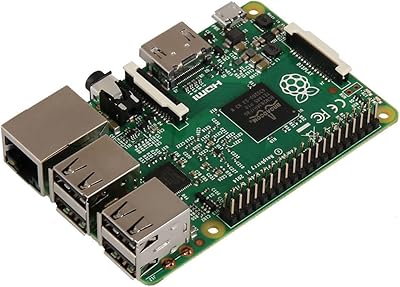
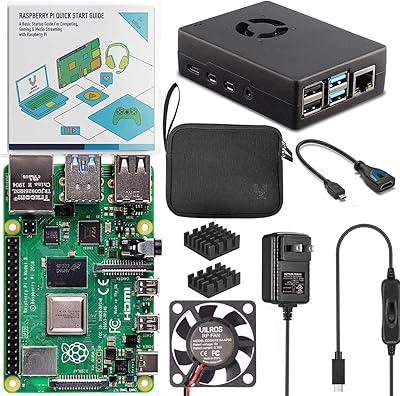
The Raspberry Pi 4 Model B 1GB Computer lands on your desk ready to go, which is honestly rare for a board like this. Inside the box you get a 32GB Samsung SD card already loaded with Raspbian Buster, so there's no fumbling with imaging software before your first boot. Power it up and you're greeted by a full desktop almost immediately, no setup wizards or driver hunts required. Under the hood sits a quad-core 64-bit chip clocked at 1.5GHz, enough muscle for browsing, writing scripts, or running small utilities without constant lag. For anyone who has dealt with finicky single-board setups before, this kind of out-of-box simplicity stands out.
Features & Benefits

Built-in WiFi and Bluetooth mean you skip the usual dongle shuffle that older boards demanded, which makes this mini computer feel more like a finished product than a kit. The 1GB of RAM is the entry-level tier, and it shows once you start juggling several browser tabs or running heavier applications, but for single-purpose tasks it holds up fine. That pre-flashed SD card genuinely saves time, since you're not stuck downloading an OS image and burning it yourself. Its small footprint slips easily into enclosures, cases, or tight DIY builds. There's also an optional IoT registration feature tied to a remote monitoring platform, useful if you're into that kind of project, skippable if you're not.

Best For

This Pi board fits naturally into a beginner's toolkit, whether someone is just starting to learn Linux commands, picking up Python, or experimenting with basic electronics wiring. It's also a solid pick for home automation tinkering, since lightweight scripts and sensor projects don't demand much horsepower. Retro gaming fans on a budget can get a kick out of emulating older consoles, though don't expect anything beyond classic-era titles given the RAM ceiling. Teachers running coding clubs or after-school programs will appreciate how quickly it gets students from unboxing to typing actual code. It also works well as a low-key media center or a dedicated network utility box, handling one job reliably rather than trying to do everything at once.

User Feedback

Most buyers seem genuinely pleased with how little setup this single-board computer demands, crediting the preloaded SD card for getting them running within minutes. The recurring complaint, unsurprisingly, centers on the 1GB RAM ceiling; a few owners mention it struggles once they try heavier multitasking or anything resembling a modern desktop workload. On the reliability front, feedback skews positive, especially for people using it as a dedicated, single-purpose device rather than a daily driver. A handful of reviewers found the optional IoT registration step unnecessary for their casual use case, though it's easy enough to ignore. Taken together, the consensus paints this as solid entry-level value, with realistic expectations about its limits.

Pros

  • Boots straight into a working desktop with zero manual setup
  • Bundled 32GB SD card comes preloaded with Raspbian Buster already installed
  • Built-in WiFi and Bluetooth eliminate the need for extra dongles
  • Quad-core 64-bit chip handles browsing and light coding tasks smoothly
  • Small footprint fits easily into custom cases or tight DIY builds
  • Great entry point for students learning Python or basic Linux
  • Reliable performer when dedicated to a single, focused task
  • Optional IoT monitoring registration is available but never required

Cons

  • 1GB of RAM becomes a real bottleneck during heavier multitasking
  • Not suited for daily-driver desktop use or demanding workloads
  • Limited memory may shorten the board's usefulness for future projects
  • Retro gaming emulation tops out with older, less demanding titles
  • IoT registration step feels unnecessary for casual, non-IoT buyers
  • Storage capacity caps out at the bundled 32GB card
  • Lacks headroom compared to higher-RAM variants in the same lineup

Ratings

Our scores for the Raspberry Pi 4 Model B 1GB Computer are generated by AI after analyzing verified buyer reviews from around the world, with spam, bots, and incentivized feedback filtered out before anything gets calculated. Every category below reflects what real owners actually experienced once this board left the box. We've kept both the strong points and the genuine frustrations visible, so you get an honest picture rather than a polished sales pitch.
Setup Simplicity
91%
Owners consistently mention how quickly they were up and running, thanks to the preloaded SD card skipping the usual OS-flashing step. For beginners especially, going from unboxing to a working desktop in minutes feels like a genuine relief compared to other boards.
A small number of users felt the optional IoT registration step added unnecessary friction to an otherwise smooth process. It's not required, but its presence in the instructions confuses a few first-timers.
Performance for Light Tasks
78%
22%
For browsing, scripting, and basic coding practice, the quad-core chip keeps things moving without noticeable lag. Students working through Python tutorials or simple electronics projects report a smooth, responsive experience day to day.
Push it toward anything resembling real multitasking and the limits show up fast. Several reviewers noted slowdowns when running multiple applications or browser tabs simultaneously.
RAM Capacity
52%
48%
For single-purpose, dedicated projects like a sensor hub or simple media player, 1GB is genuinely sufficient and keeps the board affordable for entry-level buyers. It does exactly what it needs to for narrowly scoped tasks.
This is the most frequently criticized spec among owners. Anyone hoping to use it as a general desktop replacement or run several programs at once finds the memory ceiling restrictive almost immediately.
Connectivity (WiFi/Bluetooth)
89%
Built-in WiFi and Bluetooth save buyers from hunting down extra adapters, a common annoyance with older board generations. Pairing peripherals or connecting to home networks works smoothly right out of the box.
A handful of users in homes with weaker WiFi signals reported occasional drops, though this seems more tied to router placement than the board itself.
Build Size & Portability
88%
The compact footprint makes it a favorite for custom enclosures and tight DIY builds, fitting neatly into 3D-printed cases or small project boxes. Tinkerers building portable rigs especially appreciate the small profile.
Its tiny size means ports and headers are closely packed, which a few reviewers found slightly fiddly when connecting multiple cables at once.
Pre-Loaded Software Experience
86%
The Raspbian Buster setup on the included SD card boots cleanly into a full desktop without configuration headaches. Buyers repeatedly praise not having to troubleshoot driver or OS issues before starting their actual project.
Some more experienced users would have preferred a blank card to install their own preferred OS distribution from scratch, seeing the pre-load as a minor inconvenience rather than a benefit.
Beginner Friendliness
90%
First-time tinkerers consistently describe this as an approachable entry point into Linux and basic electronics, with the ready-to-boot setup removing the most intimidating early hurdle. Classroom and after-school program use cases reinforce this strength.
A few newer users mentioned wishing for clearer in-box documentation on next steps after the initial boot, since guidance beyond setup is fairly minimal.
IoT and Home Automation Use
71%
29%
Hobbyists building sensor networks or smart home experiments appreciate the optional monitoring platform integration, which adds a layer of remote oversight without much extra setup. Combined with built-in wireless, it suits small automation projects well.
Several casual buyers felt the IoT registration feature was irrelevant to their needs and described it as an unnecessary extra step bundled into an otherwise simple device.
Retro Gaming Capability
64%
36%
Budget-conscious retro gaming fans report decent results emulating older, less demanding consoles, making this a low-cost way to revisit classic titles. The quad-core processor handles lighter emulation workloads adequately.
Anything beyond early-generation consoles tends to stutter or underperform, with reviewers noting the RAM and processing ceiling become apparent quickly during more demanding emulation.
Educational Value
87%
Teachers and parents running coding programs highlight how quickly groups of students can get hands-on, thanks to the plug-and-play setup. It lowers the barrier for classroom-scale deployment of multiple boards.
A few educators noted that the limited RAM means certain more advanced classroom software or simulations run sluggishly, requiring lesson plans to stay within lighter technical scope.
Reliability for Dedicated Projects
84%
When assigned a single, focused job like a network utility or simple media center, owners describe this board as dependable over extended use. It tends to run steadily without unexpected crashes in these narrower roles.
Reliability feedback dips somewhat for users who tried stretching it into broader, multi-tasking roles it wasn't really designed for, leading to occasional freezing under heavier loads.
Overall Value for Entry-Level Buyers
82%
18%
Considering the bundled SD card, wireless connectivity, and beginner-friendly setup all included together, many reviewers see this as solid value for anyone starting out. It removes several common extra purchases typically needed with bare boards.
Buyers planning more ambitious or performance-heavy projects sometimes felt they'd have been better served paying more upfront for a higher-RAM variant rather than upgrading later.

Suitable for:

The Raspberry Pi 4 Model B 1GB Computer makes the most sense for people who want to learn rather than buy a finished machine. Students picking up Python or basic Linux commands will find the preloaded SD card removes a frustrating first hurdle, letting them start typing code within minutes of unboxing. Hobbyists building home automation setups or small IoT sensors get a board with enough WiFi and Bluetooth connectivity to skip extra adapters entirely. It also suits teachers running coding clubs, where a room full of identical, ready-to-boot boards saves real classroom time. Retro gaming tinkerers working with older console emulators will appreciate the quad-core chip's ability to handle that workload without complaint. Even as a lightweight network utility box or simple media center, it quietly does one job well.
Not suitable for:

Anyone expecting desktop-replacement performance should look elsewhere, since the Raspberry Pi 4 Model B 1GB Computer ships with the entry-level RAM tier and feels it under any real multitasking load. Video editors, software developers running multiple containers, or anyone planning to use it as a daily-driver workstation will hit a wall fast. People who specifically want a board with more memory headroom for future projects may end up wishing they'd paid more upfront for a higher-RAM variant. Buyers uninterested in the optional IoT registration system might find it an unnecessary extra step, even though it's skippable. Those who already own a similar board may not see enough new functionality here to justify a second purchase. It's also not the right pick for anyone hoping for a polished, plug-and-play consumer gadget rather than a DIY-friendly board.
Specifications

  • Brand: The board is manufactured by Raspberry Pi.
  • Model: This unit is the Raspberry Pi 4 Model B.
  • RAM: The board includes 1GB of onboard memory.
  • CPU Type: It runs on a quad-core 64-bit processor.
  • CPU Speed: The processor is clocked at 1.5GHz.
  • Included Storage: A 32GB Samsung SD card is included in the box.
  • Pre-installed OS: The bundled SD card comes preloaded with Raspbian Buster.
  • Connectivity: The board supports both WiFi and Bluetooth out of the box.
  • Dimensions: The board measures 3.74 x 2.76 x 1.18 inches.
  • Weight: The unit weighs 1.76 ounces.
  • Setup Required: The included SD card lets the board boot directly into a desktop without manual OS installation.
  • IoT Monitoring: An optional registration process connects the board to a remote IoT monitoring platform.
  • Manufacturer: The product is manufactured by Raspberry Pi.
  • Release Date: The board first became available on June 28, 2019.

Related Reviews
Raspberry Pi 4 Model B 8GB
80%
88%
Processing Performance
91%
RAM & Multitasking
58%
Thermal Management
87%
Video Output & Display
92%
Connectivity & Networking
More
Raspberry Pi 2 Model B Single-Board Computer
80%
91%
Value for Money
78%
Performance
88%
Build Quality
96%
Community & Support
63%
Ease of Setup
More
Raspberry Pi 3 Model B+
79%
74%
Processing Performance
61%
RAM & Multitasking
88%
Wireless Connectivity
57%
Ethernet Performance
91%
GPIO & Hardware Expandability
More
CanaKit Raspberry Pi 4 4GB Basic Kit
82%
83%
Value for Money
92%
Power Supply Quality
91%
PiSwitch Convenience
74%
Thermal Management
79%
Board Performance
More
Vilros Raspberry Pi 4 4GB Starter Kit
81%
91%
Build Quality
88%
Thermal Management
84%
Ease of Setup
86%
Performance
89%
Power Supply Quality
More
Vilros Raspberry Pi 4 Starter Kit 8GB
82%
93%
Out-of-Box Readiness
88%
Value for Money
84%
Thermal Management
86%
Accessory Completeness
89%
Power Supply Quality
More
CanaKit Raspberry Pi 4 8GB Extreme Kit 128GB
84%
94%
Kit Completeness
91%
Thermal Management
93%
RAM & Multitasking Performance
71%
Storage — microSD Speed & Reliability
89%
Power Supply Quality
More
CanaKit Raspberry Pi 3 B+ Starter Kit
83%
92%
Out-of-Box Experience
88%
Bundle Value
91%
Power Supply Quality
74%
Performance for Intended Use
86%
Storage & SD Card
More
TJCXELE USB 3.0 Switch Selector 4-Port for 4 Computers
88%
94%
Ease of Use
89%
Performance
91%
Remote Control Feature
76%
Power Supply and Stability
98%
Setup and Installation
More
Raspberry Pi 400 All-in-One Keyboard Computer
77%
88%
Value for Money
76%
Performance
83%
Build Quality
86%
Ease of Setup
74%
Software & OS
More

FAQ

No, you're covered there. It comes with a 32GB Samsung SD card already loaded with Raspbian Buster, so you can boot straight into a desktop without flashing anything yourself.

It depends on what you're doing. For light tasks like coding practice, basic browsing, or running a single dedicated project, it holds up fine. If you're hoping to multitask heavily or run several applications at once, you'll likely feel the limit.

Nope, WiFi and Bluetooth are both built in, so you can connect to your network or pair devices right out of the box without buying extra hardware.

Yes, that's really where this Pi board shines. The preloaded SD card removes the trickiest setup step, letting beginners start learning Python or basic Linux commands almost immediately.

You can, within reason. The quad-core chip handles older, less demanding console emulators reasonably well, though don't expect smooth performance from anything graphically intensive.

It's an optional add-on that connects the board to a remote monitoring platform, mainly useful if you're building an IoT project. If that's not your use case, you can simply ignore it.

It can handle lightweight media center duties or network utility tasks reasonably well, though it's better suited to simple, dedicated jobs than anything resource-heavy.

The Raspberry Pi 4 Model B 1GB Computer comes bundled with a preloaded SD card, so you skip the OS download and flashing process that bare boards typically require.

Not at all, it's actually a benefit. The compact footprint makes it easy to tuck into enclosures, custom cases, or tight DIY builds without much fuss.

Feedback tends to be positive for simple, dedicated-purpose projects, with people appreciating the plug-and-play setup. The main recurring criticism is that the 1GB RAM ceiling shows up once you push it toward heavier, modern desktop-style use.