Overview

The CanaKit Raspberry Pi 4 8GB Extreme Kit 128GB is one of the most complete Pi bundles available — everything you need to get running arrives in a single box, which matters more than it sounds when you consider how many separate purchases a typical Pi build requires. CanaKit has been supplying the Pi community long enough to know what actually ends up in a shopping cart, and this kit reflects that experience. The 8GB RAM configuration is the ceiling for Pi 4, making it genuinely useful for running a full Linux desktop or juggling multiple services simultaneously. That said, be clear-eyed: this is still a single-board computer, and some tinkering is part of the deal.
Features & Benefits

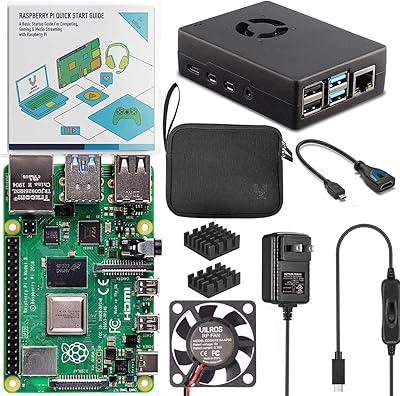
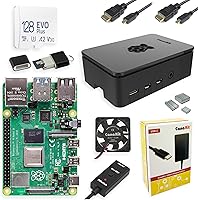
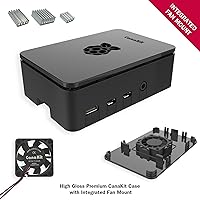
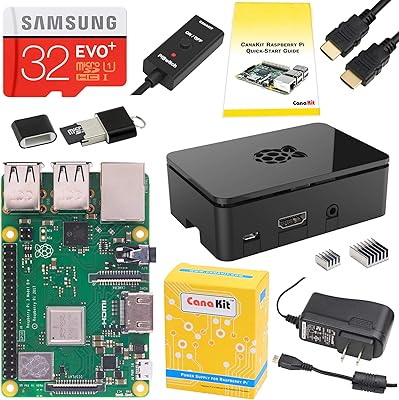
The 128GB Samsung EVO+ card comes pre-loaded with NOOBS, so first boot is a matter of minutes rather than a research project. Storage-wise it is reliable and roomy for most projects, though if you are planning intensive database or I/O workloads, you will want to factor in its Class 10 limits. Thermal management is where this Pi 4 kit genuinely earns its place — the fan-mount case with a low-noise bearing fan keeps the board running cool during sustained loads, which bare-board or passive-only setups simply cannot match. The 3.5A USB-C power supply handles the Pi 4 appetite under full load, and the bundled six-foot dual Micro HDMI cables mean a dual-monitor setup is ready without extra shopping.

Best For

This Raspberry Pi starter kit is a strong match for developers and students who want a capable Linux environment without spending an afternoon sourcing a compatible power supply, case, and cables separately. It also suits makers building media centers or home servers, where reliable cooling matters over months of continuous operation. Educators running classroom computing labs will appreciate the curated nature of the bundle — fewer compatibility questions, more time actually teaching. If you already own a Pi 4 with lower RAM and want the full accessory ecosystem alongside the 8GB upgrade, this kit packages everything neatly. Buyers who prefer knowing every component is tested together will find real value in that consistency.

User Feedback

Across a large pool of verified buyers, the CanaKit bundle earns high marks overall, and the consistent theme is that kit completeness removes the guesswork that frustrates first-time Pi builders. The fan draws particular praise — users report it runs noticeably quieter than many third-party cooling options while still doing its job during long sessions. On the critical side, a handful of reviewers flag that routing the fan cable inside the case requires patience and can feel fiddly on a first build. The microSD card performs reliably day-to-day, but experienced users who need high-speed storage for demanding workloads note it is not the fastest option available. For most use cases, the balance of quality and convenience holds up well.

Pros

  • All essential accessories arrive in one box, eliminating the compatibility guesswork of a DIY parts build.
  • The 8GB RAM configuration handles full Linux desktop use, Docker containers, and light virtualization comfortably.
  • Pre-loaded NOOBS on the 128GB card means first boot is guided and genuinely fast.
  • The fan-mount case solves the Pi 4 thermal throttling problem that passive or bare-board setups cannot.
  • Both Micro HDMI cables are included, so dual-monitor setups are ready without an extra purchase.
  • The 3.5A power supply with noise filter delivers stable current even with multiple USB peripherals attached.
  • The PiSwitch adds a physical power toggle that the Pi 4 board conspicuously lacks by default.
  • CanaKit's component selection reflects years of community feedback — nothing in the box feels like a filler item.
  • The Samsung EVO+ card is a reliable long-term performer for typical project and OS workloads.

Cons

  • A monitor, keyboard, and mouse are still required separately, which can surprise first-time buyers.
  • The microSD card is not suitable as the primary drive for I/O-heavy or write-intensive applications.
  • Fan cable routing inside the case is fiddly and may require two attempts for a clean first assembly.
  • No Ethernet cable is included, making initial headless Wi-Fi configuration an extra hurdle.
  • The glossy case finish scratches and collects fingerprints more readily than matte alternatives.
  • Documentation covers initial setup only — software issues and project questions require community research.
  • The power supply has a fixed non-detachable cable, which is inconvenient for users who move the unit frequently.
  • Buyers with existing compatible accessories will find some components in the bundle redundant and unavoidable.

Ratings

The CanaKit Raspberry Pi 4 8GB Extreme Kit 128GB has been evaluated by our AI system after parsing thousands of verified global buyer reviews, with spam, bot-generated feedback, and incentivized posts actively filtered out before scoring. The ratings below reflect the honest consensus of real users — hobbyists, developers, educators, and makers — who put this kit to work in actual projects. Both the standout strengths and the friction points that come up repeatedly in the community are transparently represented here.
Kit Completeness
94%
Users consistently highlight that unboxing this Pi 4 kit means having everything needed to reach a working system in a single purchase — power supply, storage, cables, cooling, and a case all arrive together. For buyers who have previously assembled a Pi build by sourcing parts individually, this is a genuinely meaningful convenience that saves both time and compatibility headaches.
A small number of experienced users note that a keyboard, mouse, and monitor are still required separately, which can catch absolute beginners off guard. The bundle also does not include an Ethernet cable, which matters for headless setups where Wi-Fi configuration requires extra steps.
Thermal Management
91%
The Pi 4 has a well-documented tendency to throttle under sustained load when run passively or in a poorly ventilated enclosure, and the CanaKit fan-mount case directly addresses this. Users running media servers, compilation jobs, or continuous background services report stable performance without the thermal warnings that plague cheaper enclosure choices.
The fan cable routing inside the case is fiddly enough that a handful of reviewers mention needing a second attempt to seat it cleanly without pinching wires. The fan does produce a faint hum that is noticeable in a very quiet room, though most users consider it a fair tradeoff for reliable cooling.
RAM & Multitasking Performance
93%
Running the 8GB configuration opens up workloads that lower-RAM Pi 4 variants genuinely struggle with — full desktop Raspberry Pi OS with several browser tabs, a code editor, and background services running simultaneously feels fluid rather than sluggish. Developers using it as a lightweight Linux workstation or for Docker containers find the headroom makes a practical difference day to day.
It is still a 1.5GHz ARM processor, so users expecting desktop-class speed for compiling large codebases or running complex emulators will hit CPU limits well before RAM becomes the bottleneck. The 8GB advantage is real but only relevant if the software stack actually demands it.
Storage — microSD Speed & Reliability
71%
29%
The 128GB Samsung EVO+ card is a reliable, well-regarded option for general Pi use, and arriving pre-loaded with NOOBS means a first-time user can be selecting an OS within minutes of opening the box. For typical project storage — system files, a media library, light databases — it performs without issues over extended periods.
Users with I/O-intensive workloads such as high-frequency database writes, network-attached storage builds, or frequent large file transfers will find the Class 10 rating a real ceiling. Several technically informed reviewers recommend pairing the kit with a USB 3.0 SSD for those use cases, treating the included card as a boot drive only.
Power Supply Quality
89%
The 3.5A USB-C supply with noise filter is one of the more underappreciated components in this bundle — underpowering a Pi 4 causes subtle instability issues that are notoriously hard to diagnose, and CanaKit's supply delivers clean, adequate current even when USB peripherals are drawing from the board simultaneously. Users running the Pi as a always-on server appreciate this stability over months of uptime.
The power supply uses a fixed, non-detachable cable, which is fine for permanent installs but slightly awkward for users who swap the Pi between locations. International buyers should also verify the plug type for their region before purchasing.
Case Build Quality
84%
The high-gloss finish looks noticeably more polished than the utilitarian snap-together cases commonly bundled with cheaper kits, and the integrated fan mount is a thoughtful design choice that keeps the cooling solution clean rather than taped on. Users who display their Pi setups on a desk rather than hiding them in a cabinet appreciate the premium aesthetic.
The glossy surface attracts fingerprints readily and shows scratches over time if the unit is handled frequently or transported. A few users also note the case fit is snug enough that removing the board for hardware modifications requires more force than expected.
Cable Inclusions
86%
Bundling two six-foot Micro HDMI to standard HDMI cables is a smart call — the Pi 4 supports dual displays natively, and having both cables in the box means users can set up a dual-monitor coding or media environment without an extra purchase. The six-foot length is practical for most desk setups where the Pi sits behind or below monitors.
Micro HDMI connectors are inherently less robust than full-size HDMI, and a handful of users report that the connectors feel slightly loose in the Pi's ports over time with repeated plugging. Users who need longer cable runs for living-room media center setups may still need to source longer options separately.
PiSwitch Utility
82%
18%
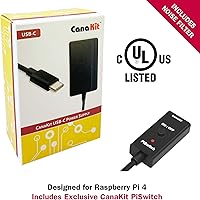
The USB-C PiSwitch is a small addition that solves a genuinely annoying problem — the Pi 4 has no hardware power button, meaning users must either unplug the unit or use software commands to power down safely. Having a physical switch makes the experience feel more like a real computer and less like a development board.
The switch is an external dongle that sits in the power cable line, which looks a little inelegant in a tidy setup. Users who run the Pi headlessly and manage it entirely via SSH rarely use the switch and may consider it redundant for their workflow.
First-Boot Experience
88%
NOOBS pre-loaded on the microSD means the initial setup process is guided and forgiving — users can choose from several OS options including Raspberry Pi OS, and the installer handles partitioning automatically. For educators or anyone setting up a Pi for a less technical user, this lowers the barrier considerably compared to manually flashing an image.
NOOBS does add a layer of abstraction that experienced users often bypass by flashing a specific OS image directly anyway. The guided installer also requires an internet connection to download the full OS, which is not always practical in a classroom or remote environment.
Value for Money
79%
21%
Pricing this kit against the sum of its individually purchased parts — Pi 4 board, Samsung card, quality power supply, case with fan, two Micro HDMI cables, and PiSwitch — typically shows the bundle is competitive or modestly cheaper, with the added benefit of known compatibility between components. For buyers who value time as a cost, the convenience premium is easy to justify.
Budget-conscious buyers who already own a compatible power supply or case may find themselves paying for redundancy. The premium configuration also places this kit at a price point where entry-level alternatives with less RAM or storage may better fit lighter project requirements.
Cooling Noise Level
77%
23%
Relative to the broader market of Pi cooling fans, the low-noise bearing system fan included here performs well — users switching from noisier third-party fans consistently mention the improvement, and in normal ambient conditions the fan blends into background noise without drawing attention.
It is still an active cooling fan, and in a very quiet workspace like a late-night home office or a library setup, the steady hum is perceptible. Users who require near-silent operation should look into passive heatsink-only configurations, accepting some throttling risk under heavy load.
Documentation & Setup Guidance
73%
27%
CanaKit includes a quick-start guide that covers the physical assembly and initial boot process clearly enough for most users to proceed without external research. The NOOBS pre-load also provides contextual hints during OS selection, which helps newcomers understand their options.
The included documentation does not go far beyond the initial setup, so users who hit software configuration issues, Wi-Fi troubleshooting, or GPIO project questions are quickly directed to community forums and external documentation. This is an inherent Pi ecosystem reality rather than a CanaKit-specific failure, but it does affect the out-of-box experience for true beginners.
Wireless Connectivity
81%
19%
The Pi 4 board's integrated Bluetooth and dual-band Wi-Fi perform reliably for typical use cases — wireless keyboard and mouse pairing works without fuss, and the 5GHz Wi-Fi band delivers adequate throughput for video streaming or software downloads in a home network environment.
Users building high-throughput network applications or running the Pi as a network storage device find the integrated wireless insufficient and rely on the Gigabit Ethernet port instead. Bluetooth range is adequate for peripherals on the same desk but is not suited for room-scale applications.
Long-Term Reliability
83%
Users who have run this Pi 4 kit as an always-on home server or media center for twelve months or more report stable operation with no component failures, which speaks well of CanaKit's component selection — particularly the power supply and cooling solution, which are the two most common failure points in budget builds.
Long-term reliability of the microSD card remains a known weak point for any Pi build running a write-heavy workload, as SD cards have finite write cycles. This is a platform-level concern rather than a CanaKit-specific one, but it is relevant for users planning mission-critical or data-intensive deployments.

Suitable for:

The CanaKit Raspberry Pi 4 8GB Extreme Kit 128GB is the right choice for developers, students, and technically curious buyers who want to start a Pi project without spending hours tracking down compatible accessories. If your goal is a capable Linux desktop for coding, scripting, or learning, the 8GB RAM configuration gives you real headroom — enough to run a desktop environment with a browser, terminal, and editor open simultaneously without constantly hitting memory limits. Makers building always-on home servers, lightweight media centers, or retro gaming systems will particularly appreciate that the included fan-mount case keeps the board cool during sustained workloads, which is a real operational concern rather than a theoretical one. Educators setting up a small classroom lab will find the pre-loaded NOOBS card and curated component selection reduces per-unit setup time meaningfully. Anyone who has previously assembled a Pi build from scratch and remembers the frustration of sourcing a reliable power supply and the right cables will immediately understand what this Pi 4 kit gets right.
Not suitable for:

The CanaKit Raspberry Pi 4 8GB Extreme Kit 128GB is not the right purchase for buyers expecting a consumer-grade plug-and-play computing experience — this is a single-board computer platform, and some comfort with Linux, command-line basics, and community troubleshooting is genuinely required to get full value from it. If you need a desktop replacement for everyday productivity, video calls, and office software, a used laptop or mini-PC will serve you better at a comparable price point. Users planning I/O-intensive projects such as high-frequency database writes, network-attached storage, or large media transcoding should know upfront that the included microSD card will become a bottleneck, and a USB 3.0 SSD is almost certainly in your future. Buyers who already own a quality Pi 4 case, power supply, and cables from a previous build may find themselves paying for redundancy rather than meaningful upgrades. Finally, anyone who needs near-silent operation — in a home recording environment or a quiet office — should be aware that active fan cooling, while effective, does produce an audible hum.

Specifications

  • CPU: The board uses a Broadcom BCM2711 1.5GHz 64-bit quad-core ARM Cortex-A72 processor.
  • RAM: 8GB LPDDR4 SDRAM is soldered directly to the Raspberry Pi 4 Model B board.
  • Storage: A 128GB Samsung EVO+ microSD card (Class 10) is included and pre-loaded with the NOOBS installer.
  • Power Supply: A CanaKit 3.5A USB-C power supply with integrated noise filter provides stable, regulated power for the Pi 4 under full load.
  • Display Output: Two Micro HDMI to HDMI cables (6 ft each) support dual-display output at resolutions up to 4K at 60p.
  • Cooling: A low-noise bearing system fan mounts directly into the CanaKit case lid to provide active cooling over the processor and RAM.
  • Enclosure: The high-gloss CanaKit case features an integrated fan mount and is designed specifically for the Raspberry Pi 4 Model B form factor.
  • Power Switch: A USB-C PiSwitch inline power toggle allows hardware-level on/off control without unplugging the power supply.
  • Wireless: The Raspberry Pi 4 board includes integrated dual-band 802.11ac Wi-Fi and Bluetooth 5.0.
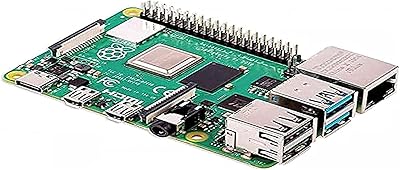
  • Connectivity: The Pi 4 board provides two USB 3.0 ports, two USB 2.0 ports, a Gigabit Ethernet port, and a 40-pin GPIO header.
  • Card Reader: A USB microSD card reader is included to allow flashing or re-imaging the microSD card from another computer.
  • OS Installer: NOOBS (New Out Of Box Software) comes pre-loaded on the microSD card and guides users through OS selection on first boot.
  • Package Size: The retail package measures 9.65 x 9.45 x 2.24 inches, housing all bundled components in a single box.
  • Heat Sinks: A set of adhesive heat sinks is included for application to the processor, RAM, and USB controller chips on the board.
  • Brand: All accessories in the kit are manufactured and quality-tested by CanaKit, a dedicated Raspberry Pi accessory brand.
  • Availability: This kit configuration has been available since June 2020, with the 8GB RAM variant representing the top memory tier of the Pi 4 lineup.

Related Reviews
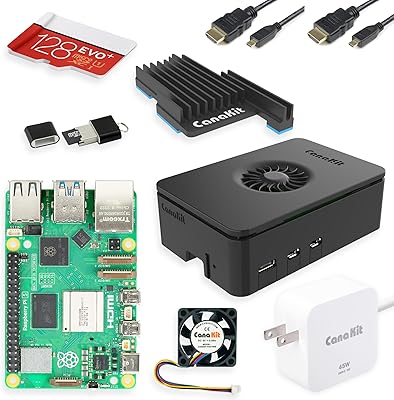
CanaKit Raspberry Pi 5 Starter Kit PRO (8GB RAM, 128GB)
87%
94%
Ease of Assembly
91%
Cooling Performance
93%
Processing Power & Speed
78%
Value for Money
96%
Multitasking Capability
More
Vilros Raspberry Pi 4 Starter Kit 8GB
82%
93%
Out-of-Box Readiness
88%
Value for Money
84%
Thermal Management
86%
Accessory Completeness
89%
Power Supply Quality
More
iRasptek Raspberry Pi 5 Starter Kit 8GB RAM 128GB SSD Edition
85%
91%
Performance
88%
Build Quality & Durability
86%
Cooling & Thermal Management
94%
Ease of Setup
90%
Storage Speed & Reliability
More
Raspberry Pi 4 Model B 8GB
80%
88%
Processing Performance
91%
RAM & Multitasking
58%
Thermal Management
87%
Video Output & Display
92%
Connectivity & Networking
More
CanaKit Raspberry Pi 4 4GB Basic Kit
82%
83%
Value for Money
92%
Power Supply Quality
91%
PiSwitch Convenience
74%
Thermal Management
79%
Board Performance
More
Vilros Raspberry Pi 4 4GB Starter Kit
81%
91%
Build Quality
88%
Thermal Management
84%
Ease of Setup
86%
Performance
89%
Power Supply Quality
More
Vilros Raspberry Pi 5 8GB Starter Kit
80%
93%
Ease of Setup
89%
Thermal Performance
91%
Build Quality
67%
Value for Money
88%
Cooling System Design
More
Raspberry Pi 5 8GB Starter Kit 64GB Edition
87%
88%
Performance
91%
Setup and Installation
83%
Cooling Efficiency
87%
Build Quality
92%
Value for Money
More
ELECROW CrowPi 1 Raspberry Pi 5 8GB Kit
84%
88%
Ease of Use for Beginners
91%
Educational Value
84%
Build Quality and Durability
87%
Step-by-Step Programming Lessons
70%
Setup and Installation
More
CanaKit Raspberry Pi 3 B+ Starter Kit 32GB EVO+ Edition
85%
92%
Value for Money
91%
Ease of Setup
72%
Wi-Fi Connectivity
85%
Build Quality
86%
Performance
More

FAQ

It covers the core hardware — board, storage, power, cooling, case, and display cables — but you will still need a monitor, USB keyboard, and mouse to complete a desktop setup. If you plan to manage the Pi headlessly over SSH from another computer, you can get started without a display at all.

It lowers the barrier considerably compared to assembling a Pi from individual parts, but it does not eliminate the learning curve entirely. The NOOBS pre-load makes the first boot guided and approachable, but some comfort with Linux basics will be necessary once you move past initial setup. The Raspberry Pi community has excellent documentation and active forums that most beginners rely on heavily in the first few weeks.

It makes a genuine, measurable difference. The Pi 4 is known to throttle its clock speed under sustained CPU load when passively cooled or left in an open-air configuration, and the active fan in this case keeps the chip running at full speed during extended tasks like compilation jobs or continuous media serving. Users who have compared the same workloads with and without the fan report significantly lower steady-state temperatures.

Yes to both. You can swap in any compatible microSD card and re-flash it using the included USB card reader and the Raspberry Pi Imager tool. For better sustained performance on write-heavy workloads, attaching a USB 3.0 SSD to one of the Pi 4 board's USB 3.0 ports and booting from it is a well-documented and widely used upgrade in the Pi community.

NOOBS gives you several options at first boot, including Raspberry Pi OS (the official Debian-based system), LibreELEC for media center use, and others. Beyond what NOOBS offers, the Pi 4 supports a wide range of Linux distributions including Ubuntu, Manjaro, and Kali, as well as specialized images for retro gaming, home automation, and network tools. Windows 11 on ARM can also run experimentally, though performance is limited.

In a normal home or office environment with typical ambient noise, most users do not find it intrusive — it produces a low, steady hum rather than a high-pitched whine. In a very quiet room late at night, it is perceptible. If near-silence is critical for your setup, a passive heatsink-only configuration is the alternative, though that does come with throttling risk under heavy load.

For typical hobbyist projects — running a home server, retro gaming, basic desktop use, or simple automation tasks — the 4GB version handles the workload comfortably. The 8GB configuration earns its place for users running a full desktop OS alongside Docker containers, multiple services, or memory-intensive development environments. If you are unsure what you will build, the 4GB variant is more than adequate for most people.

Yes, and it performs well in that role. The 8GB RAM means Plex Media Server can transcode streams without the memory pressure that affects lower-RAM boards, and the active cooling keeps the processor running at full speed during sustained transcoding sessions. Connecting a USB 3.0 external drive for media storage is the standard approach, since the microSD card alone is not well-suited as a high-volume media library.

The PiSwitch is an inline USB-C dongle that adds a physical on/off switch to the power cable, giving you hardware-level control without unplugging the supply. The Pi 4 board has no built-in power button, so without this you either pull the cable or issue a software shutdown command. It is a small convenience, but once you have used a proper power switch on a Pi you tend not to want to go without one.

CanaKit products are generally covered by a manufacturer warranty, and the company has a reputation within the Pi community for responsive customer support on defective or missing components. For specific warranty terms and return procedures, it is worth checking CanaKit's official support page directly, as terms can vary by region and retailer. Most buyers report that issues are resolved without significant friction.