Overview

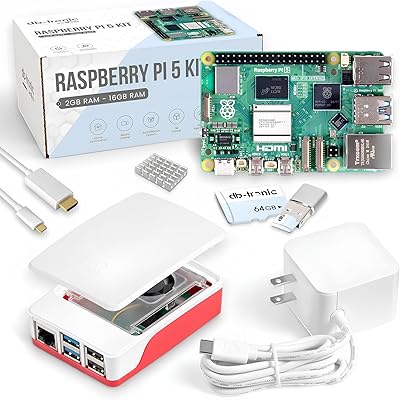
The Raspberry Pi 4 Model B 8GB represents the most capable version of a board that has quietly grown from a classroom curiosity into a legitimate mini-computer for real-world tasks. The 8GB RAM tier sits at the top of the lineup, giving it enough headroom to handle browser-heavy sessions, background services, and light development work without constantly hitting memory limits. It fits in the palm of your hand, yet runs a full Linux desktop. That said, if you've never touched a single-board computer before, expect a learning curve — there's no pre-installed OS, no case, and some assembly required. The ecosystem is mature, though, with years of community guides, forum threads, and OS options that make the research side far less daunting than it used to be.
Features & Benefits

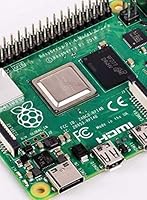
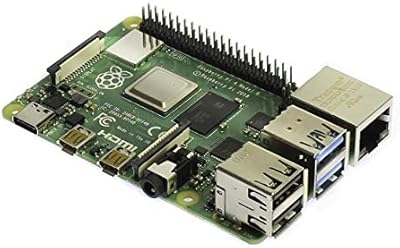
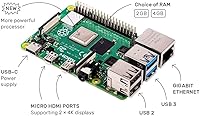
The jump from the Pi 3 to the Pi 4 8GB is hard to overstate once you actually use it. The quad-core Cortex-A72 running at 1.5GHz handles multitasking in a way the older board never could — opening several browser tabs alongside a terminal session no longer grinds things to a halt. The dual micro-HDMI outputs are a genuine highlight: you can run two monitors at up to 4K resolution, which is genuinely useful for a compact workstation setup. USB 3.0 makes external SSD boot speeds practical rather than theoretical. Gigabit Ethernet finally delivers full-speed wired throughput, and the switch to USB-C power means fewer frustrating cable compatibility headaches.

Best For

The Pi 4 8GB hits a sweet spot for anyone who already knows their way around Linux or is genuinely motivated to learn. Home lab builders running Pi-hole, Home Assistant, or a personal media server will appreciate the extra RAM buffer — those services stack up quickly. Students and developers working through programming projects or compiling small codebases will find the 8GB variant significantly less frustrating than lower-memory options. It also works well for retro emulation setups, where demanding cores benefit from the additional memory. As a thin-client or basic productivity machine for light browsing and document editing, it holds its own — just don't expect it to replace a proper desktop for anything intensive.

User Feedback

Owners of this single-board computer are largely positive, with most praising the jump in day-to-day responsiveness compared to older Pi models. The dual 4K display support gets called out repeatedly as a feature people didn't expect to actually use — but ended up relying on. On the downside, heat is a consistent concern. Under sustained workloads, the board throttles without active cooling, and several buyers wish that had been communicated more clearly upfront. The other recurring note is that this little powerhouse ships as a bare board — no case, no power supply, no storage. Factor in those accessories before comparing prices. A few early buyers also ran into USB-C charger compatibility quirks, though most report these issues resolve with a quality cable.

Pros

  • Massive performance step up from the Pi 3 — the difference is immediately noticeable in everyday use.
  • 8GB RAM handles multiple simultaneous services without breaking a sweat.
  • Dual 4K display output from a board this size is a genuinely impressive and practical feature.
  • True gigabit Ethernet finally makes the Pi 4 8GB a credible wired home server platform.
  • USB 3.0 support makes booting from an external SSD fast and reliable.
  • USB-C power input is more stable and far less fiddly than the old micro-USB connector.
  • Idle power consumption is remarkably low — running 24/7 barely registers on an electricity bill.
  • One of the most documented pieces of hardware ever made — nearly every problem has a solved tutorial.
  • Wi-Fi 5 and Bluetooth 5.0 cover modern wireless needs without requiring any dongles.
  • Credit-card size opens up build possibilities that no conventional computer can match.

Cons

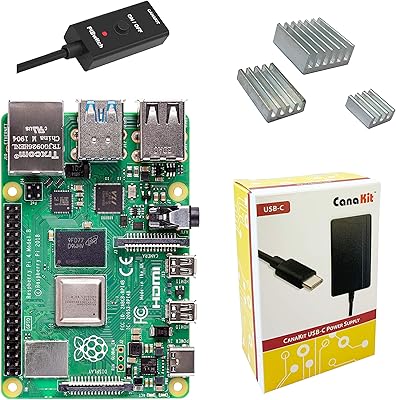
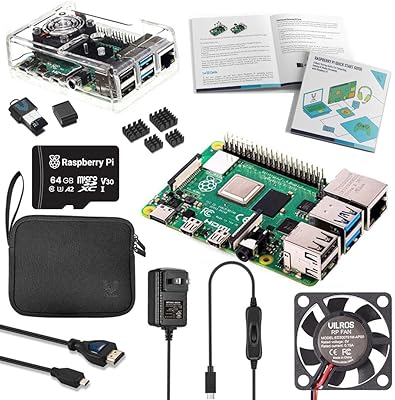
  • Ships as a bare board — budget for a case, power supply, microSD card, and cables on top.
  • Runs hot under sustained load; a heatsink or active cooling is essentially mandatory, not optional.
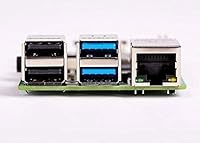
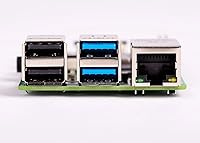
  • Only two of the four USB ports are USB 3.0 — a powered hub is often needed for complex setups.
  • Micro-HDMI connectors require specific cables or adapters most people do not already own.
  • Some USB-C chargers trigger compliance errors; a dedicated 5V/3A adapter may be required.
  • ARM architecture means certain commercial software and x86-only tools simply will not run.
  • No onboard storage whatsoever — performance depends heavily on the quality of the microSD or USB drive used.
  • Steep learning curve for anyone unfamiliar with Linux or command-line environments.
  • No upgrade path for RAM or CPU — when you outgrow it, you replace the whole board.
  • The 8GB RAM advantage is partially wasted on simpler single-purpose setups that would run fine on a cheaper tier.

Ratings

The scores below were generated by AI after analyzing thousands of verified global user reviews for the Raspberry Pi 4 Model B 8GB, with spam, bot submissions, and incentivized feedback actively filtered out. Ratings reflect the full spectrum of real buyer experiences — from home lab enthusiasts and students to developers running production-grade services on a shoestring budget. Both the standout strengths and the recurring frustrations are transparently represented so you can make a genuinely informed decision.

Processing Performance
88%
Users coming from the Pi 3 consistently describe the performance jump as dramatic rather than incremental. Running a lightweight desktop with a terminal, a browser, and a background service simultaneously no longer causes the sluggishness that made previous boards feel like a compromise.
Under sustained CPU-heavy workloads — think prolonged compilation or streaming transcoding — the board throttles noticeably without active cooling. Users who push it hard report performance dipping closer to what a mid-range Pi 3 could achieve once thermal limits kick in.
RAM & Multitasking
91%
The 8GB LPDDR4 configuration is the single biggest reason buyers choose this tier over the 4GB variant. Running Pi-hole alongside Home Assistant and a media server simultaneously stays comfortable, and light software compilation rarely triggers swap usage — a real-world difference that matters daily.
A handful of users point out that the operating system and software ecosystem are not always optimized to take full advantage of 8GB, meaning some workflows see diminishing returns over the 4GB model. The premium paid for the extra RAM is not always justified for simpler single-purpose setups.
Thermal Management
58%
42%
For light to moderate tasks — web browsing, running a single background service, or casual desktop use — the board stays at an acceptable temperature without any additional hardware. Passive cooling in a well-ventilated case is sufficient for many everyday use cases.
This is one of the most-cited pain points across reviews. Without a heatsink or active fan, sustained workloads cause the SoC to throttle aggressively, visibly impacting performance. Many users feel a basic thermal solution should be included given how common heavier use cases are.
Video Output & Display
87%
Dual micro-HDMI outputs capable of running two 4K displays simultaneously is a feature buyers frequently describe as unexpectedly impressive. Setting up a dual-monitor productivity station from a board this size genuinely surprises people who assumed it was a marketing footnote.
The switch to micro-HDMI connectors — rather than standard HDMI — means most users need to buy adapters or dedicated cables, adding cost and a potential point of failure. A few reviewers also note that 4K@60fps performance can stutter depending on GPU load and the application being used.
Connectivity & Networking
92%
Full gigabit Ethernet finally operating at true wire speeds is a major upgrade for anyone using the board as a home server or NAS companion. Combined with Wi-Fi 5 and Bluetooth 5.0, the networking stack feels genuinely modern and handles simultaneous wired and wireless activity without issues.
Wi-Fi antenna placement inside an enclosure can affect signal strength, and some users report inconsistent speeds in crowded wireless environments. The onboard antenna is adequate but not exceptional — users with demanding wireless throughput needs may want a wired connection for reliability.
USB Performance
83%
The addition of two USB 3.0 ports makes booting from an external SSD a genuinely practical option rather than a workaround. File transfer speeds to and from USB 3.0 storage are dramatically improved over the previous generation, which matters for anyone using the board as a media server or backup device.
Only two of the four USB ports are USB 3.0; the remaining two are USB 2.0, which can be a bottleneck if you need multiple high-speed peripherals connected at once. Users building out more complex peripheral setups often end up needing a powered USB hub.
Power Input & Stability
74%
26%
The move to USB-C is a genuine quality-of-life improvement over the old micro-USB connector. The 5V/3A requirement is met reliably by any compliant USB-C charger, and users report fewer random reboots compared to the power instability that plagued earlier models under load.
USB-C compliance issues created real headaches for early adopters, particularly with chargers that use USB Power Delivery negotiation. Some users found their perfectly good USB-C chargers were flagged as non-compliant by the board, requiring a specific dumb 5V/3A adapter to work correctly.
Out-of-Box Readiness
43%
57%
For experienced users, the bare-board format is exactly what they want — no bundled accessories they will immediately discard, and full control over every component choice. The hardware itself arrives well-protected and in perfect condition in the vast majority of orders.
First-time buyers are regularly caught off guard by how much is not included. No case, no power supply, no microSD card, and no HDMI cable means the actual cost to get running is meaningfully higher than the board price alone. This is the most common source of one-star reviews from newcomers.
Software Ecosystem
89%
The Raspberry Pi OS has matured into a polished, capable Linux distribution that handles initial setup without requiring terminal expertise. The sheer volume of community tutorials, official documentation, and pre-configured software images means almost any project has a proven starting point.
Outside of Raspberry Pi OS, some third-party software support still lags behind x86 Linux. Certain commercial applications, proprietary tools, or ARM-incompatible packages simply do not run, which can frustrate users coming from a traditional PC development environment.
Build Quality & Hardware Reliability
86%
The board itself is solidly built and consistent across units. Long-term reliability reports are strong — users running boards as always-on home servers or automation hubs over multiple years report very few hardware failures unrelated to power issues or physical damage.
Exposed components without a case are vulnerable to static discharge and accidental shorts, which has caused failures for users who handle the board carelessly. The board also shows no meaningful changes in physical layout from the Pi 3, which means some older cases require adapters for the new connector positions.
Value for Money
78%
22%
For the target audience — developers, home lab builders, and educators — the Pi 4 8GB delivers a capable platform at a price point that no comparable x86 system can match for size and power draw. The total cost of ownership for a well-configured setup is still relatively modest.
When you add up the case, power supply, heatsink, microSD card, and cables, the real entry cost climbs considerably from the board price. Buyers comparing the headline price to a budget mini-PC sometimes find the total accessory spend tips the value equation closer than expected.
Beginner Accessibility
63%
37%
The Raspberry Pi Foundation has invested heavily in beginner-friendly documentation, and communities like the official forums and dedicated subreddits are genuinely helpful for newcomers. Guided OS installation tools like Raspberry Pi Imager have reduced the technical barrier substantially.
Compared to a plug-and-play mini-PC or even a Chromebook, the setup process still requires research, patience, and comfort with troubleshooting. Users who expected a simple unboxing experience are frequently frustrated, and the lack of any included quick-start hardware compounds this.
Size & Portability
94%
At under two ounces and roughly credit-card sized, this little powerhouse fits into spaces and projects that no conventional computer could. Users building portable retro consoles, in-car computers, or wall-mounted kiosk displays specifically cite the compact form factor as irreplaceable for their use case.
The small footprint comes with trade-offs around expandability — there are no PCIe slots, no room for additional RAM modules, and limited space for internal storage expansion. Users who eventually need more headroom have no upgrade path within the same board.
Power Efficiency
88%
Running a full Linux server stack on 5W to 8W of idle power consumption is a genuine advantage for always-on use cases. Users running home automation hubs or lightweight servers report near-invisible electricity costs over months of continuous operation.
Under full load, power consumption rises more sharply than many users anticipate, and the 5V/3A requirement means a substandard power supply will cause instability. The thermal output under load also means the board is not quite as energy-neutral as its idle figures suggest.

Suitable for:

The Raspberry Pi 4 Model B 8GB is purpose-built for people who know what they want to do with it and are ready to roll up their sleeves a little. Home lab enthusiasts will get the most out of it — running Pi-hole, Home Assistant, or a personal media server is exactly the kind of always-on, low-power workload where this board excels. Students and developers working through Linux projects, learning shell scripting, or compiling small codebases will find the 8GB RAM tier gives them genuine breathing room that the lower-memory variants simply cannot match. Makers and educators who want a full desktop OS on a tight budget and in a tiny footprint will also be well served, especially given the depth of community documentation available for nearly every project imaginable. Retro gaming and emulation enthusiasts building a compact console will appreciate both the extra memory headroom and the dual-display output, which opens up some genuinely creative build options.
Not suitable for:

If you are expecting a plug-and-play experience, the Raspberry Pi 4 Model B 8GB will likely disappoint you — it ships as a bare board with no case, no power supply, no storage, and no cables included, meaning the real cost to get a working system is considerably higher than the board price alone. Complete beginners with no Linux experience and no appetite for troubleshooting should seriously consider whether a Chromebook, a budget mini-PC, or even a lower-end laptop might better serve their needs without the setup friction. Anyone hoping to use this little powerhouse as a full desktop replacement for demanding tasks — video editing, running resource-heavy software, or managing large databases — will hit its ceiling quickly and come away frustrated. Users who need guaranteed software compatibility with commercial or proprietary Windows and x86 applications will find the ARM architecture a hard blocker. And if sustained heavy workloads are part of your plan, the thermal management situation demands attention from day one — without proper cooling, performance degrades in ways that are genuinely annoying in practice.
Specifications

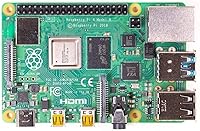
  • CPU: Broadcom BCM2711 quad-core ARM Cortex-A72 processor running at 1.5GHz delivers substantially faster computation than the previous Pi 3 generation.
  • RAM: 8GB LPDDR4 SDRAM is the highest memory configuration available for this board, suitable for multitasking and memory-intensive applications.
  • GPU: VideoCore VI GPU supports OpenGL ES 3.0 and hardware-accelerated H.265 decoding, enabling smooth 4K video playback.
  • Video Output: Two micro-HDMI ports support simultaneous dual-display output at resolutions up to 4K@60fps.
  • USB Ports: Four USB ports are provided: two USB 3.0 for high-speed peripherals and storage, and two USB 2.0 for standard devices.
  • Networking: Onboard Gigabit Ethernet delivers true 1000Mbps wired throughput, alongside dual-band Wi-Fi 5 (802.11ac) for wireless connectivity.
  • Bluetooth: Bluetooth 5.0 is integrated onboard, offering double the transfer speed and four times the range of the Bluetooth 4.2 found in the Pi 3B+.
  • Power Input: Power is supplied via a USB-C connector requiring a stable 5V/3A (15W) source; non-compliant USB-C cables or chargers may cause boot or stability issues.
  • Storage: A microSD card slot handles the operating system and primary storage; there is no onboard flash memory included with the board.
  • Operating System: Officially supported by Raspberry Pi OS (Debian-based Linux), with community support for Ubuntu, Manjaro, and other ARM-compatible distributions.
  • Dimensions: The board measures 3.74 x 2.76 x 1.1 inches, maintaining the same compact credit-card footprint established by earlier Pi generations.
  • Weight: The bare board weighs 1.76 ounces, making it suitable for portable, embedded, or space-constrained project builds.
  • GPIO Header: A 40-pin GPIO header is included for connecting sensors, displays, HATs, and other hardware peripherals directly to the board.
  • Camera & Display: Dedicated CSI camera and DSI display connectors are present for attaching compatible Raspberry Pi camera modules and official touchscreen displays.
  • Audio Output: A 3.5mm stereo audio and composite video jack is included for direct analog audio output without requiring an external DAC.
  • Voltage: The board operates at 5 volts DC; voltage spikes or an underpowered supply are a leading cause of SD card corruption and system instability.
  • Enclosure: No case or enclosure is included in the box; the board ships bare and requires a separately purchased case for physical protection.
  • Manufacturer: Designed and manufactured by the Raspberry Pi Foundation, a UK-based nonprofit organization focused on accessible computing education.

Related Reviews

Raspberry Pi 4 Model B 1GB
87%
92%
Value for Money
85%
Performance
89%
Build Quality
88%
Ease of Use
90%
Connectivity
More
CanaKit Raspberry Pi 4 4GB Basic Kit
82%
83%
Value for Money
92%
Power Supply Quality
91%
PiSwitch Convenience
74%
Thermal Management
79%
Board Performance
More
Raspberry Pi 2 Model B 1GB
86%
92%
Value for Money
88%
Performance for Basic Tasks
85%
Connectivity Options
87%
Ease of Setup
91%
Compatibility with DIY Projects
More
Raspberry Pi 3 Model B+
79%
74%
Processing Performance
61%
RAM & Multitasking
88%
Wireless Connectivity
57%
Ethernet Performance
91%
GPIO & Hardware Expandability
More
Vilros Raspberry Pi 4 Starter Kit 8GB
82%
93%
Out-of-Box Readiness
88%
Value for Money
84%
Thermal Management
86%
Accessory Completeness
89%
Power Supply Quality
More
CanaKit Raspberry Pi 4 8GB Extreme Kit 128GB
84%
94%
Kit Completeness
91%
Thermal Management
93%
RAM & Multitasking Performance
71%
Storage — microSD Speed & Reliability
89%
Power Supply Quality
More
RasTech Raspberry Pi 5 8GB Kit
84%
93%
CPU Performance
91%
Power Supply Compatibility
72%
Thermal Management
84%
Value for Money
88%
PCIe Expandability
More
Vilros Raspberry Pi 4 4GB Starter Kit
81%
91%
Build Quality
88%
Thermal Management
84%
Ease of Setup
86%
Performance
89%
Power Supply Quality
More
Vilros Raspberry Pi 5 8GB Starter Kit
80%
93%
Ease of Setup
89%
Thermal Performance
91%
Build Quality
67%
Value for Money
88%
Cooling System Design
More
ELECROW CrowPi 1 Raspberry Pi 5 8GB Kit
84%
88%
Ease of Use for Beginners
91%
Educational Value
84%
Build Quality and Durability
87%
Step-by-Step Programming Lessons
70%
Setup and Installation
More

FAQ

No — the Raspberry Pi 4 Model B 8GB ships as a bare board only. You will need to purchase a USB-C power supply (5V/3A), a microSD card (at least 16GB recommended), a case, and micro-HDMI cables separately. Budget for these accessories before comparing prices with ready-to-run alternatives.
Not quite. The board requires a clean, stable 5V/3A output, and some USB-C chargers that support Power Delivery negotiation can trigger a low-voltage warning or cause instability. The official Raspberry Pi USB-C power supply is the safest choice. Many quality third-party 5V/3A adapters also work fine, but avoid cheap or multi-port chargers that may not deliver consistent current.

It can be, but set your expectations accordingly. The setup process involves flashing an OS image, configuring settings, and likely spending time in a terminal. The official documentation and community forums are genuinely excellent, but if you want something that just works out of the box, a Chromebook or budget laptop will be less frustrating. If you are motivated to learn, the Pi ecosystem is one of the best-documented platforms available.

Under light use you may be fine, but under sustained load — compiling code, running a media server, or anything CPU-intensive — the board will throttle its clock speed to protect itself from overheating. This means real, measurable performance drops. A basic heatsink costs very little and is strongly recommended. An active fan is worth considering if you plan to push it hard.

For light tasks — web browsing, writing documents, watching videos, and running a few background services — it handles itself reasonably well. For anything heavier, like video editing, running virtual machines, or using demanding desktop applications, it will struggle. Think of it as a capable lightweight workstation, not a full PC replacement.

Yes, and it is a popular upgrade. USB 3.0 boot from an external SSD is significantly faster and more reliable than a microSD card for intensive workloads. You can set this up through the Raspberry Pi Imager and bootloader configuration. Most users who run the Pi 4 8GB as an always-on server make this switch early on.

For desktop productivity use with two monitors, yes — it works well. For 4K video playback on a single screen, hardware-accelerated H.265 content plays smoothly. Running two 4K displays simultaneously while doing heavy GPU work is more taxing, and some users report occasional stuttering depending on the content. For most practical purposes, though, dual-display output is a genuinely useful feature.

It depends entirely on what you are running. For a single-purpose project — Pi-hole, a basic web server, or a retro gaming console — the 4GB model handles it without breaking a sweat and costs less. Where the 8GB earns its price is when you are stacking multiple services simultaneously, doing light development work, or using it as a daily desktop. If you are unsure, think about your use case honestly before paying the premium.

Quite a few. Ubuntu Desktop and Server have official ARM builds that run well on the Pi 4. Manjaro ARM, DietPi, and LibreELEC for media center use are popular community options. Some users also run lightweight versions of Android, though support varies. Raspberry Pi OS remains the best-supported and most reliable option for most use cases, especially for newcomers.

Without active cooling the board is completely silent, since there is no fan by default. If you add an active cooling fan, noise depends on the specific product — many quality cases with fans are near-silent at low RPM. Power draw at idle is typically around 3 to 5 watts, rising to 7 to 10 watts under heavier load. For an always-on device, the electricity cost over a year is genuinely minimal.