Overview

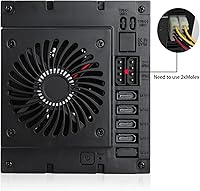
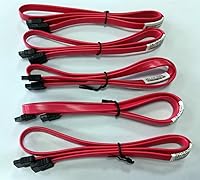
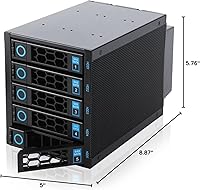
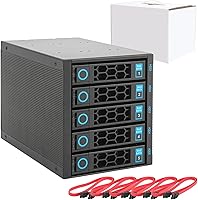
The RackChoice R35-6GB 5-Bay Hard Drive Backplane Enclosure is a practical solution for anyone sitting on a tower or rack chassis with unused 5.25″ bays and a growing need for organized, accessible storage. Rather than replacing an entire case, this backplane enclosure drops into three standard 5.25″ slots and gives you five hot-swappable drive bays that accept both 2.5″ and 3.5″ SATA or SAS drives. RackChoice has been building server-focused accessories since 2022, and this unit sits in a mid-range price tier competing directly with ICY DOCK and Silverstone alternatives. Five SATA cables are included, though you will need two MOLEX connectors from your existing power supply — there is no PSU in the box.
Features & Benefits

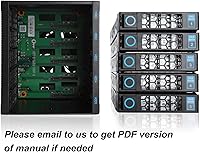
What makes this hot-swap bay adapter stand out in day-to-day use is its mix of practical flexibility and solid thermal management. All five bays support both 2.5″ SSDs and full-size 3.5″ HDDs, so you are not locked into a single drive format. The backplane runs at SATA 3.0 speeds — up to 6 Gbps per bay — which covers the practical ceiling of most spinning drives and plenty of SATA SSDs. An 80mm fan keeps airflow moving across the drive stack, and the all-metal body helps dissipate heat rather than trap it. Per-bay LED indicators let you quickly spot activity or a failing drive without pulling things apart. RAID configurations up to RAID 10 are supported, but you need to supply your own RAID card.

Best For

This backplane enclosure is built for a specific type of builder, and it is worth being upfront about that. If you already have a tower or rack case with three spare 5.25″ bays and a RAID card on hand, this unit slots right into an existing setup without much friction. Home lab enthusiasts consolidating a pile of loose drives will appreciate the clean, single-unit approach. Small offices needing affordable hot-swap expansion — without committing to full enterprise hardware — will also find it a reasonable fit. What it is not is a plug-and-play box. You need to supply MOLEX power from your PSU and a compatible RAID card separately, so complete beginners may find the setup more involved than expected.

User Feedback

Across roughly 100 reviews, the RackChoice 5-bay unit lands at about 3.9 out of 5 stars — a score that reflects something genuinely useful rather than something polished to perfection. The solid metal construction and tidy cable management earn consistent praise, and most buyers who understood the power requirements going in report a straightforward installation. On the other side, the fan is audible — not loud, but not silent either — which matters if this unit lives in a quiet home office. The tray replacement process is also a real friction point: if you need spare caddies, you have to email RackChoice directly rather than order through a standard storefront. Go in prepared and it delivers; expect a complete kit and it can disappoint.

Pros

  • Converts three unused 5.25″ bays into five accessible, hot-swappable drive slots — a genuinely efficient use of dead chassis space.
  • Accepts both 2.5″ SSDs and full-size 3.5″ HDDs in the same unit, making mixed storage builds straightforward.
  • All-metal construction feels noticeably more durable than plastic alternatives at this price tier.
  • Per-bay LED activity indicators let you visually confirm drive status without opening a dashboard or management tool.
  • Five SATA cables are included out of the box, covering all bays from day one.
  • Hot-swap works reliably with SATA drives, allowing drive replacement without powering down an active system.
  • Compatible with RAID 0, 1, 5, 6, and 10 configurations when paired with a suitable RAID card.
  • The built-in 80mm fan keeps drive temperatures manageable even when all five bays are occupied and active.
  • At its price point, this backplane enclosure is meaningfully cheaper than comparable ICY DOCK or Silverstone alternatives.

Cons

  • MOLEX power connectors are required but not included — many buyers only discover this after the unit arrives.
  • Replacement drive trays cannot be ordered online; you must email RackChoice directly, which slows down repairs.
  • The 80mm fan produces an audible constant hum that is noticeable in quiet home environments.
  • No fan speed control or silent mode is available, limiting options for noise-sensitive installations.
  • SAS hot-swap behavior is inconsistent across configurations and may require manual drive rescans after a swap.
  • A separate RAID card is mandatory for any redundancy setup — that additional cost is easy to overlook initially.
  • Tray compatibility with third-party caddies is unreliable, effectively locking you into the RackChoice ecosystem for spares.
  • Documentation is minimal, and new builders may struggle to find setup guidance beyond the basic product listing.
  • Five bays is the hard ceiling — there is no modular expansion path if your storage needs grow beyond that.
  • In deep or compact cases, rear cable connections can be difficult to secure cleanly due to the unit's length.

Ratings

The RackChoice R35-6GB 5-Bay Hard Drive Backplane Enclosure was evaluated by our AI rating system after analyzing verified buyer reviews from global markets, with spam, bot-generated, and incentivized feedback actively filtered out. Scores reflect the honest consensus of real builders — home lab tinkerers, small business server admins, and NAS enthusiasts — who put this hot-swap bay adapter through its paces in live environments. Both the genuine strengths and the friction points that repeatedly surfaced in user accounts are transparently captured below.
Build Quality
83%
The all-metal body is consistently one of the first things buyers mention positively. In rack and tower environments where units get handled regularly during drive swaps, the chassis holds up without flex or rattling. Users coming from cheaper plastic alternatives noted the difference immediately.
A few buyers reported minor finishing inconsistencies on the bay rails, which caused slight resistance when inserting trays. Nothing structural, but in a precision-focused server context it stands out more than it would in a casual desktop setup.
Hot-Swap Reliability
78%
22%
For always-on NAS and server builds, the ability to yank and replace a drive without a shutdown is genuinely useful, and most users confirm it works as advertised across SATA drives. Home lab users running Unraid or TrueNAS reported clean drive detection after swaps.
A smaller group of users experienced inconsistent detection when hot-swapping SAS drives specifically, with some needing a rescan or reboot to register the new drive. This is not universal, but it is worth testing before relying on it in a production environment.
Compatibility
74%
26%
Supporting both 2.5″ SSDs and full 3.5″ HDDs in the same unit is genuinely flexible for mixed storage builds. Buyers appreciated being able to slot a fast SSD alongside spinning drives without needing separate mounting hardware or a second enclosure.
Tray compatibility is the weakest link here — replacement or third-party trays do not always fit cleanly, and the email-only process for getting OEM spares from RackChoice adds friction. Users who needed extra caddies quickly found this process frustrating and slow.
Thermal Management
76%
24%
The built-in 80mm fan keeps temperatures reasonable across all five bays during sustained workloads. Users running five drives simultaneously in warm rack environments reported no unexpected thermal shutdowns or drive temperature warnings in their monitoring software.
The fan is audible. Not disruptively loud, but in a home office or living room server setup it adds a consistent background hum. Users hoping for near-silent operation will be disappointed, as there is no fan speed control or low-noise mode available.
Noise Level
61%
39%
For rack rooms or dedicated server closets where ambient noise is already a non-issue, the fan volume is perfectly acceptable and most users in those settings did not flag it as a concern at all.
In quieter home environments the 80mm fan becomes a genuine annoyance, particularly at night. Several reviewers specifically called out noise as something they wished they had researched more carefully before buying, especially for always-on home NAS builds.
Ease of Installation
67%
33%
Buyers who came in prepared — with a RAID card already installed and MOLEX connectors ready — generally found the physical installation straightforward. The five included SATA cables cover all bays, and the unit slides into standard 5.25″ bays without modification.
A recurring complaint is that the MOLEX power requirement is not prominently communicated, catching first-time buyers off guard after the unit arrives. Several reviewers had to delay setup while sourcing adapters or a compatible PSU, which created a frustrating first experience.
RAID Support
72%
28%
The backplane plays nicely with standard RAID cards and supports a broad range of configurations from RAID 0 striping through RAID 10 mirroring and parity-based RAID 5 and 6. Home lab users running hardware RAID controllers confirmed clean initialization across multiple card brands.
RAID functionality requires an entirely separate RAID card — nothing is included, and software RAID behavior varies by OS and controller. Buyers who did not realize this ended up with a backplane they could not fully use out of the box.
Cable Management
81%
19%
Five SATA cables in the box is a practical inclusion that reduces the immediate need for a separate cable order. Builders noted that routing cables from the backplane to a controller card stayed tidy, which matters in dense rack or mid-tower builds with limited airflow clearance.
The MOLEX power cables are not included, and depending on where the PSU sits in the chassis, routing two MOLEX lines to the unit can get awkward. In tighter cases, users had to use extension cables or repositioned PSU cables to reach cleanly.
Drive Bay Capacity
88%
Converting three 5.25″ slots into five usable drive bays is an efficient use of space, and for builders who have a chassis full of unused optical bay real estate, it feels like a smart trade. The density is genuinely competitive with alternatives in this category.
Five bays is the ceiling with this unit. Users who eventually needed six or more drives had to add a second enclosure, which raised cabling and bay count complexity. There is no expandable or modular option within this product line.
LED Activity Indicators
84%
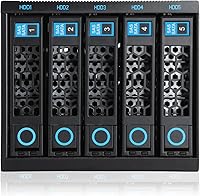
Per-bay LED indicators proved genuinely useful to users managing multiple drives, particularly when troubleshooting a sluggish or unresponsive drive. Being able to visually confirm which bay is active — or dead — without opening software is a small but practical quality-of-life feature.
A few users mentioned the LEDs were difficult to read at an angle in bright ambient lighting, and the indicators do not differentiate between read and write activity — just presence and general activity — which limits their diagnostic usefulness.
Value for Money
69%
31%
For the price point, this hot-swap bay adapter offers a reasonable set of features — full metal construction, hot-swap support, RAID compatibility, and included SATA cables — that would cost significantly more in a branded enterprise equivalent from ICY DOCK or Silverstone.
The total cost of ownership is higher than the sticker price once you factor in a RAID card, MOLEX adapters, and potentially replacement trays. Buyers who account for those extras sometimes feel the overall package is less competitive than it initially appeared.
Brand Support & Documentation
53%
47%
RackChoice does respond to email inquiries for tray replacements and setup questions, and a handful of users reported getting useful responses within a reasonable timeframe. For a smaller brand in this niche, that direct line of contact is at least present.
Documentation is thin, and there is no online store for spare trays or accessories — everything goes through email. For buyers used to ordering parts through standard retail channels, this feels like a significant gap, especially when a tray is damaged and needs fast replacement.
SAS Drive Compatibility
63%
37%
Supporting SAS I and II alongside SATA gives this backplane enclosure a broader range of usable hardware, which appeals to users repurposing older enterprise drives pulled from decommissioned servers — a common scenario in home lab and budget NAS builds.
SAS support is more temperamental than SATA in practice. Users with SAS drives reported needing to verify controller compatibility carefully before trusting the setup, and hot-swap behavior with SAS was less consistent than with pure SATA configurations.
Form Factor Fit
79%
21%
At 225.3mm in length, the unit fits comfortably in most standard mid-tower and full-tower cases, as well as rackmount chassis with 5.25″ external bays. Builders confirmed fit in a range of popular Fractal, Phanteks, and generic rackmount cases without modification.
Unusually deep or shallow 5.25″ bay areas in some compact cases can create clearance issues at the rear of the unit. A small number of users found the depth pushed against internal components or made rear cable connections difficult to secure properly.

Suitable for:

The RackChoice R35-6GB 5-Bay Hard Drive Backplane Enclosure is a strong fit for technically confident builders who want to put unused 5.25″ drive bays to work without replacing their entire chassis. DIY NAS enthusiasts running platforms like Unraid or TrueNAS will find the hot-swap functionality genuinely useful for routine drive maintenance and capacity expansion without downtime. Home lab operators who already own a RAID card and are comfortable routing MOLEX power from an existing PSU will get the most out of this backplane enclosure with minimal friction. Small business owners building a budget-conscious internal server — who need structured, accessible storage but cannot justify enterprise-grade pricing — will also find it a reasonable investment. It is equally well-suited for builders consolidating a scattered collection of 2.5″ SSDs and 3.5″ HDDs into a single, organized bay system within a rack or tower that still has available optical bay slots.
Not suitable for:

Buyers expecting a complete, ready-to-run storage solution should look elsewhere before committing to the RackChoice R35-6GB 5-Bay Hard Drive Backplane Enclosure. This hot-swap bay adapter ships without a power supply adapter, and the two MOLEX connectors it requires must come from your existing PSU — a detail that catches a surprising number of buyers off guard. Anyone without a compatible RAID card already installed will also need to budget separately for one before unlocking the unit's full redundancy features. Users who need quiet operation — think a home office shared with family, or a bedroom server — may find the built-in 80mm fan disruptive enough to be a dealbreaker. If you anticipate needing replacement drive trays quickly, the email-only process for sourcing OEM caddies from RackChoice adds unnecessary friction compared to competitors who stock accessories through standard retail channels. Finally, users planning to rely heavily on SAS drives should verify controller compatibility carefully, as hot-swap behavior with SAS has proven less consistent than with pure SATA setups in real-world use.

Specifications

  • Model Number: This unit is identified by the model number R35-6GB, manufactured by RackChoice.
  • Drive Bays: The enclosure provides five total hot-swappable bays, each accepting either 2.5″ or 3.5″ drives interchangeably.
  • Drive Interface: Compatible with SATA I, II, and III as well as SAS I and II drive interfaces.
  • Backplane Speed: The backplane operates at up to 6 Gbps, in line with the SATA 3.0 specification.
  • Bay Requirement: Installation requires three available external 5.25″ drive bays in the host chassis.
  • Power Input: Power is supplied via two standard MOLEX connectors drawn from the host system's power supply unit, which is not included.
  • Included Cables: Five SATA data cables are included in the package, one for each drive bay.
  • Cooling: An 80mm fan is built into the enclosure to maintain airflow across all active drive bays.
  • Body Material: The enclosure shell and bay structure are constructed entirely from metal for rigidity and heat dissipation.
  • LED Indicators: Each of the five bays has an individual LED activity indicator to show drive presence and read/write status.
  • RAID Support: The backplane supports RAID modes 0, 1, 5, 6, and 10 when used in conjunction with a compatible external RAID controller card, which is sold separately.
  • Full Length: The unit measures 225.3mm in total length, which determines rear clearance requirements inside the host chassis.
  • Dimensions: Overall dimensions are 8.87″ deep by 5.76″ tall by 5″ wide.
  • Weight: The assembled unit weighs 4.27 pounds, reflecting its all-metal construction.
  • Tray Availability: Replacement drive trays are not stocked through standard retail channels and must be requested directly from RackChoice via email.
  • Brand: Manufactured and sold by RackChoice, a brand specializing in rackmount and server storage accessories since 2022.

Related Reviews

Yottamaster PS500C3 5-Bay Hard Drive Enclosure 90TB
82%
85%
Build Quality
91%
Ease of Installation
78%
Cooling Performance
82%
Data Transfer Speed
96%
Storage Capacity
More
Yottamaster PS500U3 5-Bay External HDD Enclosure
74%
84%
Build Quality
79%
Cooling Performance
61%
Transfer Speed
88%
Drive Compatibility
91%
Ease of Installation
More
Yottamaster DF5RU3 5-Bay RAID Hard Drive Enclosure, 90TB Capacity
85%
94%
Storage Capacity
90%
RAID Flexibility
85%
Cooling Efficiency
88%
Build Quality
91%
Ease of Setup
More
ikuai 3.5″ USB 3.0 Hard Drive Enclosure
80%
93%
Ease of Setup
71%
Build Quality
62%
Cable Quality & Reliability
88%
Drive Compatibility
74%
Data Transfer Speed
More
Cenmate 10 Bay Hard Drive Enclosure with Cooling Fan
82%
89%
Performance
94%
Ease of Installation
78%
Cooling Efficiency
85%
Data Transfer Speed
83%
Build Quality
More
Yottamaster 4 Bay External Hard Drive Enclosure 64TB
82%
94%
Storage Capacity
88%
Ease of Setup
85%
Cooling Performance
90%
Build Quality
91%
Data Transfer Speed
More
Cenmate Dual Bay Hard Drive Enclosure
78%
83%
Build Quality
78%
Cooling Performance
76%
Transfer Speed
86%
Hot-Swap Functionality
91%
Ease of Installation
More
Cenmate 3 Bay Hard Drive Enclosure 60TB with Cooling Fan
83%
89%
Setup and Installation
82%
Cooling Efficiency
90%
Build Quality
85%
Data Transfer Speed
62%
Noise Level
More
RSHTECH RSH-339 3.5-inch Hard Drive Enclosure
85%
91%
Value for Money
88%
Build Quality
93%
Data Transfer Speed
85%
Setup/Installation
87%
Power Consumption & Energy Efficiency
More
ORICO 9948C3 4-Bay 3.5-inch HDD Enclosure
76%
88%
Build Quality
84%
Transfer Speed
79%
Daisy-Chain Functionality
73%
Cooling & Thermal Management
86%
Hot-Swap Usability
More

FAQ

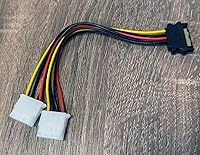
You will need to power this hot-swap bay adapter using two MOLEX connectors from your existing system PSU — nothing is included for power. This is one of the most commonly missed details before purchase, so make sure your power supply has available MOLEX connectors, or pick up an adapter cable if needed.

The backplane will function as a standard JBOD setup without a RAID card — your drives will simply appear as individual volumes to your operating system. However, if you want any RAID redundancy (mirroring, striping with parity, etc.), you will need to add a compatible hardware RAID card separately. Software RAID through your OS is also an option depending on your platform.

Yes, that is one of the more practical aspects of this backplane enclosure. Each bay independently accepts either drive format, so you can slot a couple of SSDs alongside spinning drives without any adapters or special mounting hardware.

It fits in most mid-towers and full towers that still have three consecutive external 5.25″ bays, which are increasingly rare in modern cases. Check your case specifications carefully — you need three open, stacked 5.25″ external bays, not internal ones. The unit is 225.3mm long, so also verify rear clearance in your chassis before ordering.

The 80mm fan is audible — not aggressively loud, but noticeable in a quiet room. If this unit is going into a dedicated server closet or rack room, the noise level is a non-issue. For a shared home office or bedroom setup, it may become an annoyance over time, especially since there is no fan speed control or silent mode available.

Unfortunately, no. Replacement trays for the RackChoice R35-6GB 5-Bay Hard Drive Backplane Enclosure are not available through standard online retail channels. You need to contact RackChoice directly by email to request them. If you anticipate needing spares, it is worth emailing them at the time of purchase to get a few on hand, rather than scrambling when one breaks.
For SATA drives, hot-swap works reliably in practice for most users — your OS or NAS platform should detect the new drive without a reboot. SAS drive behavior is less consistent and may require a manual rescan depending on your controller. If hot-swap reliability is critical to your workflow, test it thoroughly with your specific setup before depending on it in a production environment.

It connects to your system via standard SATA data cables, so it will work with any motherboard or controller that has available SATA ports. For RAID functionality you need a dedicated RAID card, but for basic drive access through a motherboard's onboard SATA controller, no additional hardware is required beyond those MOLEX power connections.

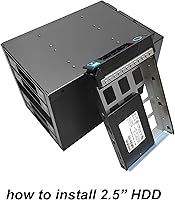
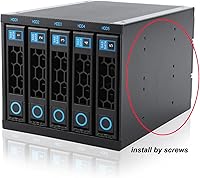
Drives are installed into individual metal trays which then slide into the enclosure bays. The trays that come with the unit accommodate both 2.5″ and 3.5″ drives, and once a drive is mounted in its tray, insertion and removal from the enclosure is tool-free and fairly smooth. Keep in mind that spare or replacement trays are only available through RackChoice directly, not through third-party retail.

The RackChoice 5-bay unit is generally priced competitively against ICY DOCK and Silverstone options. Where it gives up ground is brand familiarity, retail accessory availability, and post-sale support infrastructure — both competitors have wider retail distribution for spare parts and more established reputations. Where it holds its own is build quality for the price and the flexibility of accepting both 2.5″ and 3.5″ drives across all five bays, which not all competitors offer at this tier.

Where to Buy