Overview

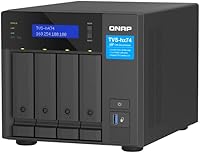
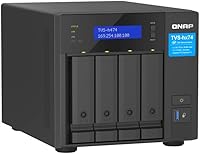
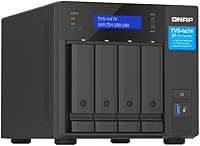
The QNAP TVS-h474 4-Bay Desktop NAS sits firmly in prosumer and small-business territory — this isn't a simple plug-and-play media box you set up on a Sunday afternoon and forget about. What separates it from cheaper 4-bay alternatives is its operating system: QuTS hero runs on ZFS, a file system built for data integrity and snapshot reliability, which matters when you're protecting critical business files. Worth noting upfront: this unit ships diskless, so drives aren't included and must be budgeted separately. At its price point, it competes at the upper tier of the desktop NAS market, and QNAP's reputation among technically minded users is strong, though it demands more from its owner than Synology typically does.
Features & Benefits

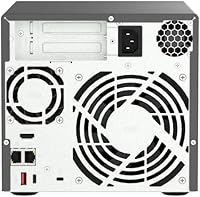
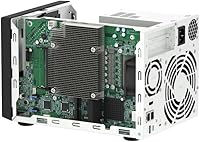
The TVS-h474 packs a capable Intel Pentium Gold G7400 processor — don't let the modest chip name fool you. At 3.7 GHz with four threads, it handles 4K transcoding and light VM workloads without issue. The dual 2.5GbE ports are a real standout at this form factor; link them together and you get multi-user throughput that a single gigabit connection simply can't match. Two M.2 NVMe slots enable SSD caching, which meaningfully speeds up access to frequently used data sitting on mechanical drives. A PCIe Gen 4 slot means dropping in a 10GbE or 25GbE card is straightforward when your network demands grow, and USB 3.2 Gen 2 ports round out connectivity for external drive workflows.

Best For

This desktop NAS is built for people who know what they want and aren't intimidated by configuration. Small creative teams — photographers, video editors, or anyone moving large media files daily — will find the storage capacity and 4K playback capabilities well matched to their workflow. Home lab enthusiasts wanting to run Docker containers, lightweight virtual machines, or IP camera feeds will appreciate the headroom that expandable RAM and a solid ZFS foundation provide. If you're already planning a 10GbE network upgrade, the PCIe slot makes this QNAP 4-bay unit a forward-looking purchase rather than one you'll outgrow quickly. Less technical buyers, however, may find better footing with a more approachable platform.

User Feedback

With a 4.6-star average across 88 ratings, this QNAP 4-bay unit has earned solid standing, though the sample size is modest enough to read with some caution. Buyers consistently praise the build quality — the metal chassis feels substantial — and QuTS hero's stability once properly configured. Networking flexibility also draws frequent compliments, especially from users who utilized the dual-port setup. On the other side, the learning curve is a genuine and recurring concern: several reviewers migrating from Synology found the interface less intuitive and initial setup more demanding than expected. A handful flagged fan noise during heavy sustained workloads. Technically confident buyers seem to find the trade-offs worthwhile; for newcomers, real patience is required.

Pros

  • ZFS-based QuTS hero OS provides strong data integrity and reliable snapshot protection for critical files.
  • Dual 2.5GbE ports enable link aggregation, delivering noticeably faster throughput for multi-user environments.
  • PCIe Gen 4 slot makes upgrading to 10GbE or 25GbE networking straightforward as demands grow.
  • Two M.2 NVMe slots allow SSD caching that brings a real speed boost to mechanical drive arrays.
  • RAM is expandable up to 64GB, giving this QNAP 4-bay unit genuine headroom for containers and VMs.
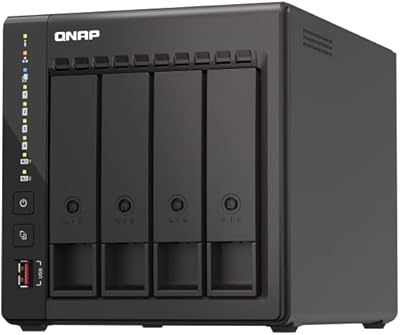
  • Solid metal chassis feels durable and well-constructed for long-term, always-on deployment.
  • USB 3.2 Gen 2 ports handle direct-attach external drives and expansion enclosures without bottlenecking.
  • HDMI output supports 4K playback at 30Hz directly from the unit, removing the need for a separate media player.
  • Ranked among the top NAS devices on Amazon with a strong buyer rating across a respectable number of reviews.

Cons

  • Ships diskless — drives must be purchased separately, adding significantly to the real total cost.
  • QuTS hero has a steep learning curve that regularly catches buyers migrating from simpler NAS platforms.
  • Fan noise under sustained heavy workloads has been flagged by multiple buyers as noticeable in quiet environments.
  • The base 8GB RAM feels limiting given the hardware's VM and container capabilities; upgrading is an added expense.
  • QNAP's software update history has occasionally introduced instability, which requires staying on top of firmware management.
  • The interface is not intuitive for first-time NAS users and can feel overwhelming without prior experience.
  • At this price tier, buyers are also paying for features they may never use if their needs are more straightforward.
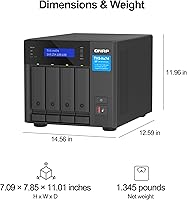
  • Physical footprint is substantial at 17 x 12 x 16 inches — desk space and ventilation clearance need real consideration.

Ratings

The scores below were generated by our AI after analyzing verified buyer reviews for the QNAP TVS-h474 4-Bay Desktop NAS from multiple global sources, with spam, incentivized, and bot-flagged submissions actively filtered out before scoring. Each category reflects real patterns from owners across different use cases — home labs, small business deployments, and creative studios — so both the strengths and the friction points are represented honestly. Nothing here is padded to flatter the product or the brand.
Build Quality
91%
The metal chassis consistently earns praise from buyers who have owned cheaper plastic NAS enclosures before. It feels substantial on the desk, and the drive bay construction inspires confidence for long-term, always-on use in an office or server closet.
A handful of buyers noted that the drive trays themselves feel slightly less premium than the outer shell, and the overall footprint at 14 pounds is bulky enough that desk placement requires real planning.
Networking Performance
88%
Dual 2.5GbE ports with link aggregation support deliver noticeably faster real-world throughput compared to the standard gigabit connections found on most competing 4-bay units. Small teams sharing large video or design files across the local network report a meaningful difference in day-to-day transfer speeds.
Out of the box, 2.5GbE requires compatible switches and client network cards, which not every buyer already has. Those without a 2.5GbE-capable network infrastructure will need additional hardware investment to see the full benefit.
Software & OS Experience
67%
33%
QuTS hero's ZFS foundation genuinely impresses technically experienced users — snapshot management, data integrity verification, and storage pool flexibility are best-in-class for a desktop NAS at this price tier. Power users running containers or self-hosted services find the app ecosystem broad and capable.
The interface is dense and not well-suited to buyers without prior NAS experience. Users migrating from Synology's DSM frequently describe QuTS hero as unintuitive, and the initial configuration process has a steep enough learning curve to generate real frustration in the first week of ownership.
Setup & Initial Configuration
58%
42%
Buyers with networking or IT backgrounds generally report a smooth setup process once they understand QNAP's ecosystem. The hardware side — slotting in drives and powering up — is straightforward and well-documented in the physical quick-start guide.
For less technical buyers, the configuration experience is a recurring pain point. Multiple reviewers spent hours troubleshooting QuTS hero settings that would have been one-click operations on a competing platform. First-time NAS owners should budget time, not just money, for this unit.
Processing Power
82%
18%
The Intel Pentium Gold G7400 handles 4K transcoding, Docker containers, and simultaneous file serving without obvious strain under typical prosumer workloads. Buyers running Plex, surveillance apps, and file sharing concurrently report the CPU holds up well in daily use.
Under heavy sustained loads — multiple simultaneous VM instances alongside active transcoding jobs — the dual-core architecture shows its ceiling. Users with more demanding virtualization needs will hit a processing wall before they hit a storage one.
Storage Expandability
93%
The combination of four SATA bays, two M.2 NVMe slots, and a PCIe Gen 4 expansion slot makes this one of the most upgrade-friendly 4-bay desktop units available. Buyers who installed a 10GbE card via the PCIe slot describe it as a straightforward process that meaningfully extends the unit's lifespan.
The M.2 slots run at PCIe Gen3x2 rather than full Gen4 speeds, which is a minor bottleneck for buyers expecting maximum NVMe performance. It is not a dealbreaker, but it is worth noting for those choosing drives based on peak rated speeds.
Value for Money
71%
29%
For technically experienced buyers who will actually use the ZFS features, PCIe expandability, and dual 2.5GbE networking, the TVS-h474 delivers a strong capability-per-dollar ratio compared to similarly priced alternatives. The upgrade headroom alone justifies the investment for long-term deployments.
The diskless configuration means the real cost of ownership is significantly higher than the device price suggests. Buyers who do not need ZFS or advanced networking may find they are paying a premium for features they will never touch, making cheaper alternatives a smarter choice for simpler use cases.
Fan Noise & Acoustics
61%
39%
During light workloads — basic file serving, occasional backups, or idle periods — the unit operates at an acceptable noise level that most buyers in a home office environment describe as tolerable rather than intrusive.
Under sustained heavy workloads like long backup jobs or continuous transcoding, fan noise ramps up noticeably. Several buyers explicitly mentioned this as a concern for quiet room placements, and it is a real consideration if the unit will live on a desk rather than in a dedicated equipment cabinet.
4K Media Playback
76%
24%
The built-in HDMI 1.4b output and the G7400's hardware decoding capability make direct 4K playback from the NAS a practical feature for buyers who want to connect it to a living room display without a separate media player. It handles common 4K formats without significant dropped frames.
The 30Hz refresh rate ceiling on the HDMI output is limiting for anything beyond standard video content. High-frame-rate or HDR workflows are not well-served here, and buyers with high-end display setups will likely prefer a dedicated media device over relying on the NAS directly.
RAM & VM Capability
79%
21%
The ability to expand RAM up to 64GB gives this desktop NAS genuine credibility as a lightweight virtualization host. Home lab users running two or three lightweight VMs alongside container workloads report stable performance when the RAM is upgraded beyond the base 8GB configuration.
The stock 8GB is undersized for buyers who want to run multiple VMs or memory-hungry containers simultaneously without upgrading. That upgrade is an added expense that many buyers did not fully account for at purchase, and it surfaces frequently as a post-purchase frustration in reviews.
Data Protection & Reliability
89%
ZFS-native snapshot support and inline data integrity checking give technically aware buyers real confidence in long-term data protection. Users who have experienced silent data corruption on older NAS units specifically called out ZFS as a reason they chose this platform over alternatives.
Realizing the full benefit of ZFS-level data protection requires correct RAID and snapshot configuration upfront, which is not trivial. Buyers who skip the setup documentation risk running the hardware without the protections that justify its premium positioning.
USB Connectivity
83%
The USB 3.2 Gen 2 ports — both Type-A and Type-C — handle direct-attach external drives and expansion enclosures at speeds that do not bottleneck modern SSDs. Buyers who regularly transfer large media files from external drives to the NAS find this a genuinely useful day-to-day feature.
The number and physical placement of USB ports on the unit has drawn minor criticism from buyers who wanted more front-facing ports for frequent connections. It is a convenience complaint rather than a technical shortcoming, but worth noting for high-frequency external drive users.
Long-Term Upgrade Path
87%
The PCIe Gen 4 slot and 64GB RAM ceiling make this one of the more future-proof 4-bay desktop options in its class. Buyers who think two or three years ahead about network speed upgrades or expanded virtualization needs will find the hardware does not become the limiting factor quickly.
QNAP's firmware update cadence has historically introduced occasional instability, which means buyers need to stay engaged with update management rather than setting it and forgetting it. That is an ongoing time commitment that some buyers did not anticipate.
Documentation & Support
62%
38%
QNAP maintains an extensive online knowledge base, community forum, and YouTube tutorial library that technically motivated buyers find genuinely useful. The hardware documentation included in the box is clear and well-organized for the physical installation steps.
Official customer support response times and the quality of direct assistance have drawn criticism from buyers who hit complex software issues. The community forum is often more practically helpful than official support channels, which is a gap buyers should be aware of before committing to the platform.

Suitable for:

The QNAP TVS-h474 4-Bay Desktop NAS is purpose-built for technically confident users who need more than basic file storage. Small business owners and IT professionals managing shared storage for a team will find the dual 2.5GbE networking and ZFS-backed data integrity genuinely useful in day-to-day operations. Creative professionals — video editors, photographers, and motion designers — who regularly move large files and want local 4K playback without relying on cloud services will get real mileage here. Home lab enthusiasts who want to run Docker containers, lightweight virtual machines, or a self-hosted surveillance setup on a single piece of hardware will appreciate the RAM expandability and PCIe upgrade path. If you are already planning a 10GbE network or expect your storage needs to grow significantly within a few years, this desktop NAS is a genuinely forward-looking investment rather than one you'll quickly outgrow.
Not suitable for:

The QNAP TVS-h474 4-Bay Desktop NAS is a poor fit for buyers who simply want a plug-and-play device to back up family photos or stream movies to a TV with minimal configuration. QuTS hero, while powerful, is a feature-dense operating system that demands a real learning investment — users coming from Synology's DSM often describe the transition as jarring. It is also worth being clear-eyed about total cost: the unit ships without drives, so the full investment is meaningfully higher than the device price alone once you account for compatible hard drives or SSDs. Buyers on a tight budget looking for a capable but simpler 4-bay NAS will find more accessible options on the market. Anyone who needs immediate, hands-off setup or lacks the patience to troubleshoot configuration issues should look elsewhere.
Specifications

  • Processor: Intel Pentium Gold G7400 dual-core, 4-thread CPU running at 3.7 GHz handles transcoding and light virtualization without significant bottlenecking.
  • RAM: Ships with 8GB DDR4 memory installed, with support for expansion up to 64GB for more demanding container and VM workloads.
  • Drive Bays: Four SATA bays accept both 3.5-inch and 2.5-inch hard drives or SSDs, providing flexible storage configuration options.
  • M.2 Slots: Two M.2 PCIe Gen3x2 NVMe slots are available for SSD caching or dedicated SSD storage pools separate from the main drive bays.
  • Networking: Dual 2.5GbE RJ45 ports support speeds of 2.5G, 1G, and 100M and can be configured for link aggregation to increase throughput.
  • PCIe Expansion: A single PCIe Gen 4 slot allows installation of a 10GbE or 25GbE network expansion card for high-speed network upgrades.
  • USB Ports: Multiple USB 3.2 Gen 2 ports in both Type-A and Type-C configurations offer transfer speeds up to 10Gb/s for external drives and enclosures.
  • Display Output: One HDMI 1.4b port supports 4K video output at 30Hz for direct multimedia playback from the NAS to a connected display.
  • Operating System: Runs QuTS hero, QNAP's ZFS-based NAS operating system, which provides inline data deduplication, snapshot protection, and advanced RAID management.
  • Dimensions: The unit measures 17 x 12 x 16 inches and weighs 14 pounds, requiring dedicated desk or shelf space with adequate ventilation clearance.
  • Drive Interface: All four main bays use Serial ATA (SATA) connectivity, compatible with standard NAS-rated mechanical hard drives and 2.5-inch SSDs.
  • Configuration: Ships diskless — no hard drives or SSDs are included, and drives must be purchased and installed separately before the unit can store data.
  • Chassis Material: The enclosure is constructed from metal, contributing to the unit's 14-pound weight and its durability for always-on, long-term deployment.
  • Hard Drive Speed: The product listing references 7200 RPM mechanical hard disk compatibility, typical for NAS-rated drives optimized for sustained read and write workloads.
  • Availability: First listed on Amazon in September 2022 and currently ranked in the top 20 of the NAS Devices category with a 4.6-star average rating.

Related Reviews

QNAP TS-453E 4-Bay NAS
79%
91%
Network Performance
87%
Processor Performance
68%
Software & OS (QTS)
89%
Build Quality
73%
Value for Money
More
QNAP TS-433-4G 4-Bay NAS
73%
89%
Network Speed
91%
Storage Capacity
77%
Value for Money
62%
Processor Capability
68%
QTS Software
More
QNAP TVS-h674T i5 6-Bay Desktop NAS
76%
91%
Thunderbolt 4 Performance
88%
Build Quality
86%
Storage Flexibility
67%
Software & OS (QuTS hero)
84%
Real-Time Transcoding
More
QNAP TS-435XeU-4G 4-Bay Rackmount NAS
74%
88%
Network Performance
91%
Build Quality & Physical Design
72%
Software & OS Flexibility
61%
Setup & Initial Configuration
67%
M.2 NVMe Cache Performance
More
QNAP TR-004U 4-Bay Rackmount NAS Expansion
78%
88%
Build Quality
91%
RAID Configuration
86%
Ecosystem Integration
67%
DAS Mode Usability
83%
Drive Tray Security
More
QNAP TVS-h874T-i9-64G 8-Bay NAS
83%
92%
Performance
68%
Setup/Installation
89%
Build Quality
85%
Software/Firmware Experience
80%
Usability/Ease of Use
More
QNAP TVS-h874 i7-32G 8-Bay NAS
80%
93%
Processing Performance
91%
Storage Flexibility
89%
ZFS & OS Reliability
84%
Networking Capability
88%
RAM & Virtualization Headroom
More
Asustor Lockerstor 4 Gen3 AS6804T NAS
78%
93%
Raw Performance
91%
Network Throughput
89%
Memory & Data Integrity
87%
NVMe Cache Flexibility
88%
Build Quality
More
Asustor Drivestor 4 Pro AS3304T 4-Bay NAS
78%
88%
Network Performance
83%
Software & ADM Interface
74%
Media Playback & Transcoding
76%
App Ecosystem
57%
RAM & Multitasking
More
KCMconmey NAS-411 4+1 Bay DIY NAS Case
84%
85%
Ease of Setup
80%
Build Quality
70%
Cooling Performance
90%
Customization Options
88%
Drive Compatibility
More
Asustor AS5404T 4-Bay NAS Enclosure
80%
88%
Build Quality
82%
Processing Performance
93%
NVMe Storage Flexibility
87%
Network Throughput
76%
Software Ecosystem (ADM OS)
More

FAQ

No, the QNAP TVS-h474 4-Bay Desktop NAS ships completely diskless. You will need to purchase compatible hard drives or SSDs separately and install them yourself before the unit can store any data. Factor that cost into your total budget from the start.
Honestly, it depends on your patience and willingness to learn. The TVS-h474 runs QuTS hero, which is a powerful but complex operating system. If you are comfortable reading documentation and troubleshooting configuration issues, you can absolutely get it running. If you want something more approachable out of the box, a Synology unit with DSM might be a gentler starting point.

ZFS is a file system designed to protect your data from silent corruption — the kind that can happen gradually without you noticing. It constantly verifies data integrity and supports reliable snapshots, meaning you can roll back files to a previous state if something goes wrong. For anyone storing important business files or irreplaceable media, that level of protection is worth having.

Both options are supported. You can configure the M.2 NVMe drives as an SSD cache to accelerate your main mechanical drive pool, or you can set them up as a fully independent SSD storage pool. It gives you flexibility depending on whether you prioritize speed for frequently accessed files or need a separate fast-access storage tier entirely.

With both 2.5GbE ports active and link aggregation configured, you can push combined throughput well beyond a standard gigabit connection, which makes a real difference when multiple users are accessing files simultaneously. If you eventually need even faster speeds, the PCIe Gen 4 slot lets you drop in a 10GbE or 25GbE card without replacing the whole unit.

Under light to moderate workloads, most users find the fan noise manageable. However, several buyers have noted that the unit gets noticeably louder under sustained heavy workloads — think long backup jobs or continuous transcoding. If it will sit in a quiet home office or bedroom, that is worth considering before you buy.

Yes, and it handles both reasonably well for a desktop NAS at this level. The Pentium Gold G7400 has enough headroom for lightweight containers and VMs, and with the RAM expandable up to 64GB, you can allocate meaningful resources to those workloads. Just keep in mind that simultaneously running containers, VMs, and serving files to multiple users will push the CPU harder.

It depends entirely on what you value. QNAP generally offers more raw hardware flexibility and a wider range of advanced features, which is why it appeals to technically experienced users and home lab enthusiasts. Synology tends to offer a cleaner, more intuitive interface that is easier to manage day-to-day. If you want power and are comfortable digging into configuration, this QNAP 4-bay unit holds its own. If you want simplicity, Synology may suit you better.

NAS-rated drives designed for 24/7 operation are the right choice here — options from Western Digital Red Pro, Seagate IronWolf Pro, or Toshiba N300 are all commonly used in units like this. Consumer desktop drives are not optimized for always-on workloads and can fail earlier in a NAS environment. Check QNAP's official hardware compatibility list for confirmed supported models before purchasing.

Yes, the unit includes an HDMI 1.4b port that supports 4K output at 30Hz, so you can connect it directly to a compatible display and use QNAP's built-in media apps for playback. It is a useful feature for a home media setup, though the 30Hz refresh rate means it is better suited for video content than for anything requiring smooth motion like gaming.

Where to Buy

NAS Headquarters
In stock $2,525.00