Overview

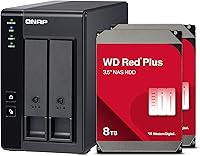
The QNAP TR-002 8TB 2-Bay Direct-Attached Storage arrives ready to work — RAID 1 pre-configured, drives already installed, nothing to figure out before you start copying files. That matters more than it sounds. Most external RAID enclosures ship empty, leaving you to source drives, slot them in, and navigate setup menus. This two-bay DAS skips all of that. It connects directly to your computer over USB-C and shows up as a standard external drive. Worth being clear about: this is not a NAS. There is no network port, no app ecosystem, no remote access. What you get is redundant local storage that runs off a single cable.
Features & Benefits

The hardware RAID controller is the standout technical detail here. Unlike software RAID, it handles drive management independently — no CPU overhead, no OS dependency. You can switch between RAID 0, RAID 1, JBOD, or individual disk modes directly on the unit without touching a computer. The bundled WD Red Plus drives are a legitimate upgrade over generic HDDs; they're rated for continuous operation and built to handle the vibration that comes with running two spinning disks side by side. USB 3.2 Gen 2 theoretically reaches 10 Gbps, though with spinning drives you'll realistically see speeds more in line with HDD limits. The lockable drive bays and broad OS support round out a thoughtfully specified package.

Best For

This RAID enclosure is a natural fit for video editors and photographers who keep large active project files on a local drive and need automatic data redundancy built in. RAID 1 means both drives hold identical data — if one fails, nothing is lost. Small business users who want straightforward backup without administering a server will appreciate how little this demands of them. It also works as a NAS expansion unit for anyone already running a QNAP NAS, meaningfully extending its usefulness. Cross-platform users get native support across Windows, macOS, and Linux out of the box, no extra drivers needed.

User Feedback

With a 4.3-star average across more than 600 ratings, the QNAP TR-002 bundle earns its reputation as a reliable, no-fuss storage solution. Buyers consistently praise the build quality and how quickly it's recognized after plugging in. The pre-configured RAID 1 gets particular appreciation from users who aren't comfortable digging into storage settings. On the critical side, some owners report noticeable fan noise under sustained load and mild vibration from the HDDs at certain spin speeds — worth knowing if you work in a quiet environment. A recurring question in reviews is value: a handful of buyers feel the bundled drives push the price higher than buying the enclosure separately, though most concede the convenience factor is real.

Pros

  • Arrives pre-configured with RAID 1 — no setup required before your first use.
  • WD Red Plus drives are a genuine NAS-grade choice, not cheap filler HDDs.
  • Hardware RAID controller works independently of your OS, adding real reliability.
  • Recognized instantly on Windows, macOS, and Linux without installing any drivers.
  • Lockable drive bays offer useful physical security in shared office environments.
  • QNAP NAS owners can repurpose this two-bay DAS as direct capacity expansion.
  • USB 3.2 Gen 2 delivers strong sequential throughput for large media file transfers.
  • RAID mode can be changed on the unit itself without connecting to a computer.
  • The included USB-C cable is rated for the full Gen 2 spec — not an afterthought.
  • A 4.3-star average across hundreds of verified reviews reflects consistent real-world satisfaction.

Cons

  • Fan noise under sustained load is a frequently reported annoyance, especially in quiet workspaces.
  • Real-world transfer speeds are capped by the mechanical HDDs, not the USB interface.
  • Switching RAID modes requires a full data wipe — a detail that catches some buyers off guard.
  • No network port means you cannot share this storage across multiple machines simultaneously.
  • HDD vibration at certain spin speeds adds a low-frequency hum some users find distracting.
  • Thin included documentation makes RAID mode-switching less straightforward than it should be.
  • Bundle pricing can be undercut by buyers willing to source drives and configure RAID separately.
  • Only one USB-C cable included — limiting for users with more complex desk setups.
  • NAS expansion mode is only useful within the QNAP ecosystem, adding no value to everyone else.
  • Changing from RAID 1 to any other mode permanently erases all existing drive data.

Ratings

The QNAP TR-002 8TB 2-Bay Direct-Attached Storage has been scored across 12 categories by our AI rating system, which analyzed hundreds of verified global buyer reviews while actively filtering out incentivized, bot-generated, and low-signal feedback. The scores below reflect the full picture — what this two-bay DAS genuinely does well and where real users have run into friction.
Ease of Setup
91%
Coming pre-configured with RAID 1 and drives already installed means most buyers are up and running within minutes of unboxing. Users repeatedly highlight that plugging it into a Mac or Windows machine just works — no drivers, no configuration screens, no head-scratching.
A subset of buyers who wanted to switch from RAID 1 to a different RAID mode found the hardware RAID button interface less intuitive than expected. The documentation for mode-switching is thin, and a few users had to consult online forums before feeling confident making changes.
Build Quality
86%
The enclosure feels solid and purposefully constructed — not the plasticky shell you sometimes get with budget external storage. Lockable drive bays in particular get called out by studio and office users as a detail that signals genuine commercial-grade intent.
Some buyers note that the chassis picks up fingerprints easily and that the drive bay locks, while a nice touch, feel slightly loose over repeated use. At its price point, a few users expected a more premium finish on the exterior panels.
Transfer Speed
69%
31%
The USB 3.2 Gen 2 interface is genuinely fast enough for large sequential reads and writes — video editors moving multi-gigabyte project files report comfortable, consistent throughput that keeps up with their workflows without long waits.
Real-world speeds are constrained by the mechanical HDDs, not the interface. Buyers expecting performance close to the 10 Gbps theoretical ceiling are routinely disappointed. Spinning drives cap practical transfer rates well below what the USB spec suggests, and this gap catches some purchasers off guard.
RAID Reliability
88%
The hardware RAID controller earns consistent trust from long-term users. Several reviewers specifically mention drive recovery events where RAID 1 mirroring saved their data after a single disk failure — exactly the scenario this product is built for.
A small number of users report that after a power interruption, the enclosure occasionally needs a manual reset to re-establish RAID status. It is not a common complaint, but it is specific enough to be worth noting for users in regions with unstable power.
Drive Quality (WD Red Plus)
84%
Bundling NAS-grade WD Red Plus drives rather than desktop-class HDDs is a meaningful decision. These drives are rated for continuous 24/7 operation and handle the vibration of running two disks in close proximity better than consumer drives typically do.
Some buyers feel the bundled drives push the total price higher than assembling the enclosure and drives separately, particularly when drives go on sale. The value equation depends heavily on how much you weight the convenience of a pre-tested, pre-configured bundle.
Noise Level
61%
39%
Under light loads or idle conditions, the enclosure is reasonably quiet and sits unobtrusively on a desk. Users doing occasional backups rather than sustained transfers rarely find noise to be a meaningful issue in practice.
Under sustained read/write activity the fan spins up noticeably, and HDD vibration at certain RPM ranges adds a low-frequency hum that some users in quiet home offices find distracting. This is one of the more consistently mentioned criticisms across reviews.
OS Compatibility
89%
Recognition across Windows, macOS, and Linux without any driver installation is a genuine strength. Cross-platform creative teams and freelancers who move between operating systems find this two-bay DAS works reliably regardless of which machine they connect it to.
A handful of Linux users on less common distributions report needing minor manual configuration. Mac users on Apple Silicon machines have occasionally flagged compatibility quirks after major macOS updates, though these are typically resolved quickly.
NAS Expansion Compatibility
82%
18%
For existing QNAP NAS owners, the ability to slot this enclosure in as direct expansion storage rather than buying a new unit is a practical and cost-effective upgrade path. Users with QNAP systems consistently report the integration works as advertised.
This feature is irrelevant to non-QNAP users, and some buyers feel it is over-emphasized in marketing relative to its niche applicability. Those coming from other NAS ecosystems get no comparable benefit from the expansion mode.
Value for Money
67%
33%
Buyers who factor in the cost of the drives, the hardware RAID controller, and the setup convenience generally conclude the bundle pricing is defensible. For users who want a ready-to-go, tested configuration without sourcing components separately, the premium has a clear rationale.
Savvy buyers who are comfortable sourcing WD Red Plus drives independently and configuring RAID themselves can undercut this package noticeably. At its price tier, the enclosure alone competes with feature-richer alternatives, which makes the value case harder for technically confident buyers.
Thermal Management
73%
27%
Drive temperatures under typical workloads stay within safe operating ranges, and the active cooling fan does its job well enough that heat-related drive errors are rarely mentioned in user feedback. Long-term reliability appears solid based on multi-month owner reports.
The fan noise trade-off for that thermal performance is the persistent complaint. There is no passive cooling option, and users who prioritize silence have no configuration path to reduce fan activity without risking higher drive temperatures.
Cable & Accessory Inclusion
78%
22%
Including a USB Type-C to USB 3.2 Gen 2 cable in the box is a practical touch that many competing enclosures skip. Buyers appreciate not needing an immediate accessory purchase to get started, particularly given the performance-sensitive nature of the cable spec.
Only one cable is included, which limits flexibility for users who want to daisy-chain connections or keep a spare. A few buyers also note the included cable length is shorter than ideal for certain desk setups where the enclosure sits at a distance from the host machine.
RAID Mode Flexibility
81%
19%
Supporting RAID 0, RAID 1, JBOD, and individual disk modes without requiring software gives technically minded users real flexibility. Switching modes on the hardware itself — rather than through a management interface — is appreciated by users who prefer keeping storage management simple.
Changing RAID modes requires a full data wipe, which is expected but not prominently communicated at point of purchase. New users who set up in RAID 0 and later want RAID 1 protection have been caught off guard by this requirement in reviews.

Suitable for:

The QNAP TR-002 8TB 2-Bay Direct-Attached Storage is built for people who need dependable, redundant local storage without the overhead of managing a full network-attached server. Video editors and photographers working with large raw files will appreciate plugging directly into their workstation over USB-C and getting consistent throughput for active project work. Small business owners or solo operators who want a fire-and-forget backup device — one that protects their data automatically through RAID 1 mirroring without requiring any ongoing configuration — will find this two-bay DAS fits that brief well. It also makes strong practical sense for anyone already running a QNAP NAS who has outgrown their current capacity, since the enclosure slots directly into that ecosystem as an expansion unit. Cross-platform teams sharing a single drive between Mac and Windows machines will encounter no compatibility friction, which removes a common headache from multi-OS workflows.

Not suitable for:

The QNAP TR-002 8TB 2-Bay Direct-Attached Storage is a poor fit for anyone expecting network accessibility, remote file access, or the kind of app-driven features that come with a true NAS. If your goal is to stream media to multiple devices around your home, share files across a local network, or access your storage remotely while traveling, this enclosure simply cannot do those things — it connects to one computer at a time over USB-C, full stop. Budget-conscious buyers who are comfortable sourcing drives independently and configuring RAID themselves may find they can assemble a comparable setup for meaningfully less by purchasing the enclosure and WD Red Plus drives separately when drives are on promotion. Users who work in very quiet environments — a home studio, a library office — should factor in the fan noise under load before committing, as it is a recurring complaint that does not have a workaround. Anyone expecting SSD-level transfer speeds should also recalibrate: the USB 3.2 Gen 2 interface is fast, but the mechanical drives inside create a ceiling that the spec sheet alone does not make obvious.

Specifications

  • Drive Bays: The enclosure houses 2 internal 3.5-inch drive bays, both lockable for physical security.
  • Total Capacity: Usable raw storage totals 8TB across two pre-installed 4TB WD Red Plus HDDs.
  • Included Drives: Two Western Digital Red Plus 4TB 3.5-inch HDDs come pre-installed and pre-configured at the factory.
  • RAID Modes: The hardware RAID controller supports RAID 0, RAID 1, JBOD, and Individual disk modes, switchable directly on the unit.
  • Default RAID: The unit ships pre-configured in RAID 1 mirroring mode, providing immediate data redundancy out of the box.
  • Interface: Connectivity is provided via USB 3.2 Gen 2 Type-C, with a theoretical maximum throughput of 10 Gbps.
  • Included Cable: A USB Type-C to USB 3.2 Gen 2 cable is included in the box for immediate use.
  • OS Compatibility: The enclosure is natively compatible with Windows, macOS, and Linux without requiring additional drivers.
  • NAS Expansion: The unit can function as an expansion storage device when connected to compatible QNAP NAS systems.
  • Drive Form Factor: Both installed drives use the standard 3.5-inch form factor, common to desktop and NAS-grade HDDs.
  • Unit Weight: The fully loaded enclosure weighs 7.94 pounds, reflecting the solid build and inclusion of two HDDs.
  • Package Dimensions: The retail package measures 10.79 x 9.41 x 7.99 inches, including all accessories and cables.
  • Cooling: An internal active cooling fan manages thermal output, running at variable speeds based on drive load.
  • Drive Bay Lock: Each drive bay features a physical lock mechanism to prevent unauthorized drive removal in shared environments.
  • Status Indicators: LED indicator lights are present on the unit to signal drive activity, RAID status, and power state.
  • Model Number: The official model identifier is TR-002, manufactured and sold by QNAP under the TR series lineup.
  • Buyer Rating: The unit holds an average rating of 4.3 out of 5 stars based on 635 verified ratings on Amazon.
  • Market Rank: This enclosure ranks at number 50 in the Network Attached Storage Devices category on Amazon.

Related Reviews
QNAP TR-004-44WD-US 4 Bay DAS with 12TB Storage
85%
87%
Performance
92%
Ease of Setup
84%
Build Quality
65%
Noise Level
90%
Data Redundancy (RAID 5)
More
QNAP TS-233 2-Bay NAS Drive
77%
83%
Ease of Setup
78%
Software & App Ecosystem
76%
Performance for File Sharing
87%
Backup Reliability
58%
Media Streaming
More
QNAP TR-004U 4 Bay Rackmount NAS Expansion
82%
88%
Performance & Reliability
91%
Ease of Setup
85%
Value for Money
87%
Build Quality
80%
RAID Configuration & Flexibility
More
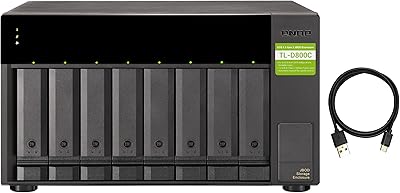
QNAP TL-D800C 8-Bay JBOD Storage Enclosure
71%
83%
Build Quality
78%
Drive Compatibility
74%
USB 3.2 Gen 2 Throughput
51%
JBOD Architecture Clarity
57%
NAS Integration
More
QNAP TS-264-8G-US 2-Bay NAS
87%
89%
Performance
92%
Setup/Installation
86%
Build Quality/Durability
90%
File Transfer Speed
85%
Software/Firmware/App Experience
More
QNAP TL-R1200C-RP 12-Bay Rackmount JBOD Storage Enclosure
84%
88%
Performance and Speed
91%
Reliability & Power Redundancy
85%
Storage Capacity
84%
Compatibility with QNAP NAS
82%
Ease of Setup
More
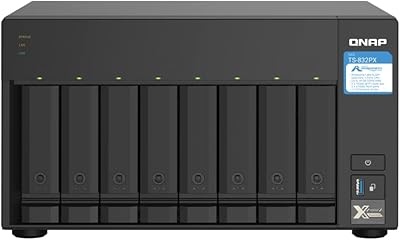
QNAP TS-832PX-4G 8-Bay NAS with 10GbE SFP+ and 2.5GbE
85%
91%
Performance
94%
Network Connectivity
89%
Ease of Setup
85%
Expandability (RAM)
88%
Data Security (Encryption)
More
WAVLINK Dual-Bay NVMe M.2 SSD Cloner
75%
83%
Offline Cloning Reliability
78%
Transfer Speed
71%
Compatibility Range
76%
Build Quality
86%
Ease of Setup
More
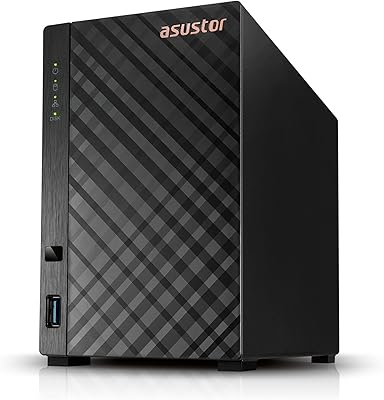
Asustor Drivestor 2 Lite AS1102TL NAS
76%
88%
Ease of Setup
83%
Build Quality
74%
Performance for Everyday Use
71%
Software (ADM OS) Usability
69%
4K Media Streaming
More
Asustor Drivestor 2 Pro Gen2 2-Bay NAS
76%
83%
Setup & Initial Configuration
89%
Network Performance (2.5GbE)
71%
4K Transcoding Performance
67%
Software & ADM Ecosystem
86%
Build Quality & Physical Design
More

FAQ

The drives come pre-installed. The QNAP TR-002 8TB 2-Bay Direct-Attached Storage includes two 4TB WD Red Plus HDDs already seated in the bays and pre-configured in RAID 1 mode, so you can plug it in and start using it right away without purchasing anything extra.

RAID 1 means both drives inside the enclosure hold an exact, continuous copy of your data at all times. If one drive fails, the other still has everything intact and you lose nothing. It does not double your usable storage — with 8TB raw, you get 4TB of usable space — but the trade-off is genuine protection against a single-drive failure.

No — this is a direct-attached storage device, which means it connects to one computer at a time over a single USB-C cable. It has no network port and no file-sharing capabilities. If you need storage accessible to multiple machines simultaneously over a network, you would need a NAS instead.

Yes, you can switch between RAID 0, RAID 1, JBOD, and individual disk modes using the physical RAID button on the enclosure itself. However, changing the RAID mode requires a full format of the drives, meaning all existing data will be erased. Make sure you have a complete backup before making any RAID mode change.

The USB 3.2 Gen 2 interface supports up to 10 Gbps in theory, but the actual bottleneck is the mechanical hard drives, not the connection. Spinning HDDs typically deliver sequential read and write speeds in the range of 150 to 200 MB/s under ideal conditions. That is perfectly capable for large video file transfers, but nowhere near what you would see from an SSD-based setup.

It works with macOS out of the box — no drivers or software required. Plug the USB-C cable into your Mac and the enclosure mounts as a standard external drive. The same applies to Windows and Linux systems, making this two-bay DAS a solid option for anyone working across different operating systems.

Under light loads or when the drives are idle, the fan is relatively unobtrusive. During sustained transfers — like backing up a large project folder — the fan spins up and becomes noticeable, and the HDDs themselves can add a low hum from vibration at certain speeds. If you work in a very quiet environment and noise sensitivity is a real concern for you, this is worth factoring into your decision.

Yes, this is one of the key use cases the TR-002 was designed for. When connected to a compatible QNAP NAS, the enclosure can operate as a direct expansion storage unit rather than a standalone DAS. This lets you add capacity to your existing NAS setup without replacing the NAS itself. Check QNAP's compatibility list to confirm your specific NAS model supports TR-002 expansion.

Yes, the drive bays accept standard 3.5-inch SATA HDDs, so you can swap in larger drives when you need more capacity. You would need to rebuild the RAID array after swapping drives, which means backing up your data first. QNAP recommends using NAS-rated drives for best reliability, so sticking with WD Red Plus or equivalent is a sensible choice.

It depends on your situation. Technically savvy buyers who track drive sales and are comfortable configuring RAID themselves can sometimes assemble a comparable setup at a lower cost by purchasing components separately. What the bundle offers is convenience — factory-tested, pre-configured RAID 1 with matched NAS-grade drives, ready to go the moment it arrives. For users who value their time or prefer not to manage the sourcing and setup process, that convenience has genuine worth.

Where to Buy