Overview

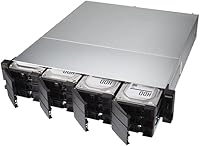
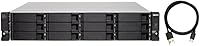
The QNAP TL-R1200C-RP 12-Bay Rackmount JBOD Enclosure is a purpose-built storage expansion unit aimed squarely at small businesses and power users who already have QNAP NAS hardware or rackmount server infrastructure in place. JBOD — Just a Bunch of Disks — means the enclosure presents drives individually to the host rather than managing them as a unified array; there's no onboard intelligence, no RAID, just raw capacity handed off to whatever system it's connected to. Released in April 2020, it still holds up reasonably well in a market where direct-attached expansion options remain limited at this scale. One thing to be clear about upfront: this is not a standalone device. Without a host system driving it, it does nothing. The prosumer price point reflects that — this is infrastructure hardware, not a consumer gadget.
Features & Benefits

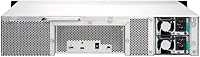
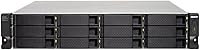
Twelve 3.5-inch SATA bays is the headline spec, and at current HDD densities — think 16TB or 20TB drives — the raw capacity ceiling is substantial for archival or backup-heavy workflows. Connectivity runs through a single USB 3.2 Gen 2 Type-C port at 10Gbps, which sounds fast but becomes a bottleneck under heavy simultaneous load across all bays; it excels at sequential workloads, less so for mixed random I/O. The redundant 250W PSU is the feature that justifies much of the cost for always-on deployments — one power failure won't kill the array. QNAP NAS users face a critical constraint though: this enclosure must exist as its own separate storage pool and cannot be folded into an existing one. A USB Type-C to Type-A cable is included, which is a small but appreciated convenience at setup.

Best For

This rackmount JBOD enclosure is a natural fit for QNAP NAS owners who have exhausted their internal drive bays and want to stay within the QNAP ecosystem rather than replatform entirely. It is equally well-suited to small IT teams running rack infrastructure that prioritize uptime — the redundant power supply makes it a reasonable choice for environments where downtime has real costs. Video editors and archivists working with large sequential file sets will find the USB connection adequate, provided the host machine is powerful and well-configured. What it is not for: anyone expecting network-attached access, RAID management, or tight integration with an existing NAS pool. This is a direct-attached expansion shelf, plain and simple, and it does that job capably when matched to the right workload.

User Feedback

Across roughly 85 ratings, the QNAP 12-bay expansion unit sits at 3.8 out of 5 — a score that tells a nuanced story. Buyers who came in with the right expectations tend to praise the solid metal construction, the reliability of the redundant PSU over extended use, and the sheer capacity it unlocks. Where frustration concentrates is around the storage pool isolation constraint: QNAP NAS users who expected this to blend naturally into their existing setup were caught off guard by the requirement to run it as a completely separate volume. A handful of reviews also mention USB stability concerns with non-QNAP hosts. Honestly, the mixed rating feels less like a product failure and more like a documentation failure — buyers who understood exactly what they were getting tend to walk away satisfied.

Pros

  • Twelve drive bays offer serious raw capacity potential when populated with high-density HDDs.
  • Redundant power supply provides meaningful uptime protection for always-on business environments.
  • Metal chassis feels appropriately solid and durable for a rack-deployed unit.
  • USB 3.2 Gen 2 delivers reliable throughput for large sequential workloads like video archives.
  • Works across Windows, macOS, and QNAP NAS hosts without requiring proprietary drivers.
  • Includes a USB Type-C to Type-A cable in the box, so initial setup does not require a separate purchase.
  • Rackmount form factor integrates cleanly into existing 2U rack infrastructure.
  • The QNAP 12-bay expansion unit fills a real gap for users who have exhausted internal NAS bays.
  • Redundant PSU design reduces the risk of total data loss from a single power component failure.

Cons

  • Cannot merge with an existing QNAP NAS storage pool — a hard limitation that surprises many buyers after purchase.
  • A single USB connection becomes a throughput bottleneck when multiple drives are accessed simultaneously.
  • Real-world USB 3.2 Gen 2 speeds vary significantly depending on host system quality and drive configuration.
  • At over 31 pounds, physical installation requires two people and proper rack planning.
  • Non-QNAP hosts have reported occasional USB connectivity instability under sustained workloads.
  • JBOD architecture means all RAID, volume management, and redundancy logic falls entirely on the host — no onboard protection.
  • No network connectivity — this is strictly a direct-attached device, which rules out shared or remote access scenarios.
  • The 3.8-star average rating reflects a pattern of buyer frustration that the product documentation does not adequately address upfront.
  • At this price tier, the absence of any onboard management interface or health monitoring is a notable omission.

Ratings

Our AI scoring model analyzed verified global buyer reviews for the QNAP TL-R1200C-RP 12-Bay Rackmount JBOD Enclosure, actively filtering out incentivized, duplicate, and bot-generated feedback to reflect genuine ownership experiences. The scores below capture both what this unit genuinely excels at and where real buyers have run into frustration — nothing has been softened or omitted. Whether you are considering it as a storage expansion solution or trying to avoid a costly mismatch, these ratings give you an honest picture.

Build Quality
88%
The all-metal chassis consistently earns praise from users who have deployed this unit in active rack environments. Buyers report that drive trays feel solid, the overall frame shows no flex under load, and the unit looks and feels appropriately industrial for its intended setting.
A small number of users noted that tray locking mechanisms felt slightly inconsistent across units, and at over 31 pounds empty, handling during installation can be awkward without a second person or proper rack-mount rails prepared in advance.
Redundant PSU Reliability
91%
The dual redundant power supply is the feature buyers in always-on environments mention most positively. Several reviewers specifically described deploying this in small business settings where a single PSU failure would have caused downtime, and the redundant design handled the failover without any disruption to connected drives.
There are no widespread complaints about the PSU hardware itself, but some users pointed out that replacing a failed power module requires sourcing QNAP-specific parts, which can introduce delays if a spare is not kept on hand.
Storage Capacity Potential
86%
Twelve 3.5-inch SATA bays give this enclosure an impressive raw capacity ceiling when paired with current high-density drives. Archivists and video teams especially appreciate being able to house a substantial portion of their working and cold storage in a single rackmount unit.
The capacity ceiling is entirely dependent on what drives you populate it with — the enclosure ships empty. Buyers on tighter budgets who cannot immediately fill all twelve bays may find the value proposition weaker until the unit is substantially loaded.
NAS Integration
43%
57%
For QNAP NAS owners who need additional storage and are comfortable managing a second, completely independent storage pool, the connection process is straightforward and the enclosure is recognized reliably by QTS firmware without driver headaches.
This is where the most buyer frustration lives. The enclosure cannot be merged into an existing QNAP NAS storage pool or volume — it must operate as a fully isolated pool, which fundamentally disrupts storage planning for users who expected a transparent expansion. Many lower-star reviews trace directly back to this single architectural constraint.
USB Connectivity Stability
61%
39%
When connected to a compatible QNAP NAS host, the USB 3.2 Gen 2 link is generally stable for long sequential transfer sessions. Users running archival or backup workflows on QNAP hardware report consistent operation once the unit is properly set up.
Stability complaints surface more frequently when the enclosure is used with non-QNAP Windows or macOS hosts, particularly under sustained multi-drive workloads. Several users reported intermittent disconnections or reduced throughput that required host-side driver updates or USB controller changes to resolve.
Throughput Performance
67%
33%
For large sequential file operations — bulk video ingest, full-volume backups, long archive transfers — the USB 3.2 Gen 2 connection delivers adequate real-world throughput that satisfies most archival and media storage use cases without creating a painful bottleneck.
The single USB connection becomes a genuine constraint when multiple drives are being accessed concurrently or during mixed random I/O workloads. The 10Gbps theoretical maximum is rarely approached in practice, and throughput is heavily influenced by the quality of the host system's USB controller.
Ease of Setup
72%
28%
Drive installation is tool-free in most configurations, the included USB Type-C to Type-A cable covers the most common connection scenario immediately out of the box, and users with prior NAS or server experience report getting the unit operational without consulting documentation.
Buyers unfamiliar with JBOD architecture or QNAP storage pool management will encounter a steeper learning curve than expected, particularly around understanding why the enclosure cannot integrate with existing volumes. The product documentation does not adequately prepare buyers for this constraint.
Cross-Platform Compatibility
69%
31%
The enclosure functions as a standard USB mass storage device on both Windows and macOS, allowing IT admins to use it with servers running either OS without proprietary software or drivers. This flexibility is useful in mixed-OS environments.
Compatibility is more reliable on QNAP NAS than on third-party hosts, and some buyers managing Windows Server environments have reported needing to troubleshoot USB controller compatibility before achieving stable operation. macOS support works but lacks any dedicated management tooling.
Value for Money
58%
42%
Buyers who specifically needed a rackmount JBOD with redundant power at this bay count acknowledge that equivalent alternatives are hard to find at a similar or lower price point, making the value case reasonable when the feature set genuinely matches the workload.
At its price tier, the absence of onboard RAID, any management interface, or network connectivity leaves buyers paying a premium largely for bay count and the redundant PSU alone. Users who discover the storage pool isolation limitation after purchase feel the value proposition collapses significantly.
Noise Level
63%
37%
In a dedicated server room or a rack enclosure with existing fan noise, this unit does not stand out as unusually loud. Buyers deploying it in proper rack environments treat the noise as a non-issue consistent with standard infrastructure hardware.
This is not a quiet device by any measure, and several buyers who attempted to place it in office-adjacent or home lab settings found the fan noise intrusive. It is genuinely rack-room hardware and should not be evaluated against desktop or tower storage standards.
Drive Compatibility
83%
The bays accept a wide range of 3.5-inch SATA HDDs including high-capacity models from major manufacturers, and users report no significant compatibility issues when using drives from WD, Seagate, and Toshiba across varying capacities.
The enclosure does not natively support 2.5-inch SSDs without adapter trays, which limits flexibility for buyers who want to mix SSD and HDD bays. There is also no SAS drive support, which some enterprise-adjacent buyers considered a gap at this price level.
Physical Installation
71%
29%
The rackmount form factor is standard 19-inch compatible and designed for 2U installation, which integrates cleanly into most existing rack deployments without modification. Buyers with established rack infrastructure report the physical fit as expected and trouble-free.
At 31.5 pounds empty and considerably heavier when fully loaded, safe installation genuinely requires two people or proper rail hardware. A few buyers were surprised by the absence of rack ears or rails in the box, which need to be sourced separately for proper installation.
Documentation & Support
52%
48%
QNAP's online knowledge base covers the TL-R1200C-RP in reasonable depth for technically confident users, and community forum threads exist that address many of the common setup scenarios across different host configurations.
The included documentation does not clearly communicate the storage pool isolation restriction upfront, which is the root cause of a significant portion of negative reviews. Buyers feel the product is marketed in a way that implies tighter NAS integration than the hardware actually supports, and support responses on this issue have been inconsistent.

Suitable for:

The QNAP TL-R1200C-RP 12-Bay Rackmount JBOD Enclosure is built for a specific kind of buyer: someone already running rack-based infrastructure who needs to push their storage capacity significantly higher without rebuilding their setup from scratch. QNAP NAS owners who have filled every internal bay will find this a natural extension of their existing environment, even with the separate pool requirement factored in. Small businesses and home lab operators with always-on workloads will particularly appreciate the redundant power supply, which removes a common single point of failure in direct-attached storage setups. IT administrators managing Windows or macOS servers who need a high-bay-count external JBOD at a manageable cost will also find it fits a real gap in the market. Video production teams and archivists dealing with large, sequential file volumes — raw footage libraries, cold backups, long-term archives — are well-matched to the USB 3.2 Gen 2 throughput this unit delivers.
Not suitable for:

The QNAP TL-R1200C-RP 12-Bay Rackmount JBOD Enclosure is a poor fit for anyone expecting plug-and-play storage that works independently or integrates cleanly into an existing QNAP storage pool. Buyers hoping to extend a current NAS volume will hit an immediate wall: QNAP's firmware requires this enclosure to operate as a fully isolated pool, not a continuation of existing storage — and that distinction matters enormously for how you plan and use the space. Home users with a single desktop or a basic NAS setup will find the rackmount form factor impractical, the weight and dimensions demanding, and the overall package overkill for their needs. Anyone prioritizing network-attached access, built-in RAID management, or remote storage availability should look at a proper NAS expansion unit rather than a JBOD enclosure. Buyers who need all twelve bays to appear as a single unified volume under one file system will also run into limitations, since JBOD architecture leaves that responsibility entirely to the host operating system or volume manager.
Specifications

  • Brand: Manufactured by QNAP, a Taiwanese company specializing in network-attached storage and storage expansion hardware.
  • Model Number: The exact model designation is TL-R1200C-RP, where RP denotes the redundant power supply configuration.
  • Drive Bays: Accommodates 12 x 3.5-inch SATA 6Gb/s hard drives, with no support for 2.5-inch SSDs without third-party trays.
  • Storage Architecture: Operates exclusively as a JBOD (Just a Bunch of Disks) enclosure, presenting individual drives to the host without onboard RAID or volume management.
  • Connectivity: Connects to a host system via a single USB 3.2 Gen 2 Type-C port rated at 10Gbps theoretical maximum bandwidth.
  • Power Supply: Includes a 250W redundant PSU, allowing one power module to fail without interrupting operation.
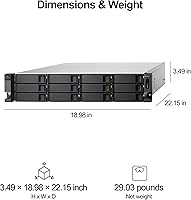
  • Form Factor: Rackmount design fits a standard 19-inch server rack and occupies 2U of vertical rack space.
  • Dimensions: The unit measures 28.31 x 21.73 x 9.96 inches (length x width x height) and is intended for rack installation, not desktop use.
  • Weight: Ships at approximately 31.5 pounds unloaded; actual installed weight will increase substantially with 12 drives populated.
  • Material: The chassis is constructed from metal, providing structural rigidity appropriate for rackmount deployment environments.
  • Compatible OS: Officially supported on Windows and macOS operating systems, as well as QNAP NAS firmware environments.
  • Compatible Devices: Designed for use with QNAP NAS units, Windows and macOS servers, and general-purpose computers with a USB 3.2 Gen 2 port.
  • Included Cable: Ships with one USB Type-C to Type-A cable for immediate connection to hosts lacking a native Type-C port.
  • NAS Pool Limit: When connected to a QNAP NAS, this enclosure must be configured as a completely separate storage pool and cannot be merged with any existing NAS volume.
  • Release Date: The TL-R1200C-RP was first made available in April 2020 and remains in active production as of this writing.
  • ASIN: The Amazon product identifier for this unit is B086WCRH3C.
  • User Rating: Holds an average rating of 3.8 out of 5 stars based on approximately 85 customer reviews on Amazon.
  • BSR Rank: Ranked number 476 in the Enclosures category on Amazon at the time of this review.

Related Reviews

QNAP TL-D800C 8-Bay JBOD Storage Enclosure
71%
83%
Build Quality
78%
Drive Compatibility
74%
USB 3.2 Gen 2 Throughput
51%
JBOD Architecture Clarity
57%
NAS Integration
More
QNAP TR-004U 4-Bay Rackmount NAS Expansion
78%
88%
Build Quality
91%
RAID Configuration
86%
Ecosystem Integration
67%
DAS Mode Usability
83%
Drive Tray Security
More
QNAP TS-435XeU-4G 4-Bay Rackmount NAS
74%
88%
Network Performance
91%
Build Quality & Physical Design
72%
Software & OS Flexibility
61%
Setup & Initial Configuration
67%
M.2 NVMe Cache Performance
More
Asustor Flashstor 12 Pro Gen2 NAS
76%
93%
Read/Write Performance
61%
SSD Compatibility
89%
Noise & Thermal Management
47%
USB4 / Thunderbolt Connectivity
84%
Build Quality & Design
More
ICY DOCK ToughArmor MB998SP-B 8-Bay 2.5” SATA/SAS HDD/SSD Mobile Rack Enclosure for 5.25″ Bay
87%
91%
Performance
88%
Cooling Efficiency
89%
Build Quality
93%
Ease of Installation
72%
Noise Level
More
Cenmate 4-Bay RAID Enclosure 80TB
73%
83%
Build Quality
78%
RAID Functionality
71%
Cooling & Thermal Management
47%
Mac Compatibility
89%
Windows Compatibility
More
Kicker CompC 12-inch Enclosed Subwoofer
77%
88%
Bass Output
91%
Installation Ease
86%
Build Quality
83%
Value for Money
79%
Amplifier Compatibility
More
QNAP TS-233 2-Bay NAS Drive
77%
83%
Ease of Setup
78%
Software & App Ecosystem
76%
Performance for File Sharing
87%
Backup Reliability
58%
Media Streaming
More
MTX TNE212D Dual 12″ Subwoofer Enclosure
79%
83%
Bass Output & Impact
88%
Build Quality
79%
Carpet Finish & Aesthetics
91%
Value for Money
84%
Installation Ease
More
Klipsch RP-1200SW 12″ Subwoofer
79%
91%
Bass Accuracy & Control
88%
Output & Dynamic Range
93%
Build Quality
87%
Amplifier Performance
61%
Ease of Calibration
More

FAQ

Yes, the QNAP TL-R1200C-RP 12-Bay Rackmount JBOD Enclosure works as a direct-attached storage device on Windows and macOS systems, not just QNAP NAS hardware. You plug it in via USB, and the drives appear to the host OS, which then handles all volume and file system management. Just be aware there is no onboard RAID — your OS or a software volume manager is responsible for any data protection you want to layer on top.

It has to be completely separate. QNAP's firmware does not allow this enclosure to be added to or merged with an existing storage pool or volume on your NAS. It will show up as its own independent pool, which means your storage architecture needs to account for that boundary. This catches a lot of buyers off guard, so plan accordingly before purchasing.

The theoretical ceiling is 10Gbps, but real-world throughput varies considerably depending on your host system, drive speeds, and the workload pattern. For large sequential reads and writes — think bulk video transfers or archive backups — you can see respectable speeds. Where it struggles is under heavy simultaneous access across many bays, since everything is funneled through a single USB connection. It is not the right tool for random I/O intensive workloads.

Redundant PSUs exist so that if one power module fails, the other picks up the load without any interruption to the drives or the host connection. For a home user running occasional backups, it is probably overkill. For a small business or anyone running this unit 24/7 with data that cannot afford downtime, it is a genuinely important feature that reduces a common hardware failure vector.

The bays accept 3.5-inch SATA hard drives running at up to 6Gb/s. There is no officially stated per-drive capacity ceiling, and in practice it works with current high-density drives including 16TB and 20TB models. The total raw capacity potential across all twelve bays is substantial — though your host system and file system choice will determine what you can actually address and use.

If you have experience with NAS or server hardware, setup is straightforward — physically install drives, connect the USB cable, and configure volumes on the host. A USB Type-C to Type-A cable is included, so you do not need additional accessories for basic connection. That said, anyone unfamiliar with JBOD concepts or volume management will face a learning curve, particularly on QNAP NAS where the separate pool requirement needs deliberate planning.

This is a 2U rackmount device, so it occupies two rack units in a standard 19-inch server rack. Fully loaded with twelve drives, it is going to be quite heavy, so proper rail hardware and ideally a second person for physical installation are recommended. The unit itself weighs 31.5 pounds empty, and HDDs will add meaningful weight on top of that.

Since this is a JBOD enclosure with no onboard intelligence, the drives are managed entirely by the host system. That means mixing drive sizes or brands is physically possible, but how they behave depends on your operating system or NAS firmware. On a QNAP NAS for example, you could create separate volumes per drive or combine them using the NAS volume management tools — the enclosure itself does not care about drive uniformity.

Some users have reported occasional USB connectivity instability when using this unit with non-QNAP host systems, particularly under sustained workloads. It is not universal, but it has appeared in enough reviews to be worth noting. If you are connecting to a Windows or Mac server, make sure your USB controller and drivers are current, and test stability before committing this enclosure to a production workflow.

It is worth understanding what is driving it rather than treating it as a simple quality signal. A recurring theme in lower-rated reviews is the storage pool isolation constraint — buyers who expected seamless QNAP NAS integration were caught off guard by a fundamental architectural limitation. Users who went in with accurate expectations tend to rate it much more favorably. That said, there are genuine complaints about USB stability worth factoring in. If your use case matches what this enclosure is actually designed to do, the rating is less alarming than it first appears.

Where to Buy