Overview

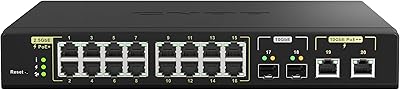
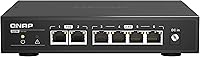
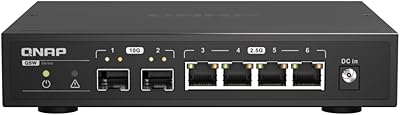
The QNAP QSW-2104-2T Unmanaged Network Switch sits in a genuinely useful niche: it brings multi-gig networking to home labs, NAS setups, and small offices without asking you to touch a single configuration screen. QNAP built its reputation on NAS hardware and networking gear, and that pedigree shows here. The mixed-port layout — four 2.5GbE and two 10GbE connections packed into a compact desktop unit — covers most upgrade scenarios in one box. Add a metal chassis and completely fanless operation, and you have a switch that feels far more serious than its small footprint suggests.
Features & Benefits

The four 2.5GbE auto-negotiation ports handle the everyday heavy lifters — NAS drives, Wi-Fi 6 access points, gaming rigs — stepping down gracefully to 1G or 100M for older hardware. The two 10GbE RJ45 ports are where things get interesting: five-speed auto-negotiation makes them equally useful as a high-bandwidth uplink or a direct connection to a 10GbE workstation. Being completely unmanaged means nothing to configure, update, or troubleshoot on the software side. Bundled mounting hardware also gives you flexibility beyond a flat desk surface, which is a small but practical inclusion.

Best For

This multi-gig switch makes the most sense for anyone already deep in the NAS ecosystem — if you are running a multi-bay QNAP or Synology unit alongside several high-throughput clients, it fits naturally. Video editors and creators shuttling large RAW files or 4K footage between workstations and shared storage will feel the difference right away. Small offices that have outgrown gigabit but have zero interest in managing VLANs or QoS rules will appreciate the simplicity. Gamers wanting low-latency local connections and anyone commissioning a new 10GbE NIC round out the ideal audience.

User Feedback

Owners of the QSW-2104-2T are broadly satisfied, and the reviews reflect that. The silent passive cooling draws the loudest praise — people who placed it near a TV or in a home office specifically highlight it as a meaningful advantage over fan-cooled alternatives. Setup stories tend to be very short: plug it in, done. On the critical side, a handful of users note the chassis gets noticeably warm under sustained heavy throughput, so enclosed rack installs deserve some airflow planning. The price sits above basic gigabit options, but most buyers consider that premium well-earned given the real-world performance gains.

Pros

  • Genuinely plug-and-play: cables in, switch on, network running — no setup steps whatsoever.
  • Completely silent fanless operation makes it ideal for desks, living rooms, and recording spaces.
  • The mixed 2.5GbE and 10GbE port layout covers most realistic multi-gig home and small-office topologies in one box.
  • Five-speed auto-negotiation on the 10GbE ports handles mixed-speed environments without any manual intervention.
  • Solid metal chassis feels durable and aids passive heat dissipation far better than plastic alternatives.
  • Real-world transfer speeds on compatible 10GbE hardware closely approach theoretical maximums.
  • Compact footprint takes up minimal desk or shelf space without sacrificing port count.
  • Included mounting hardware enables optional rack or wall installation at no extra cost.
  • Low continuous power draw makes the QSW-2104-2T practical for always-on home lab and NAS deployments.
  • Broad hardware compatibility confirmed across QNAP, Synology, Intel NICs, and Wi-Fi 6 access points.

Cons

  • Only six ports total — larger setups will outgrow this switch faster than expected.
  • No SFP+ slots means fiber uplinks or daisy-chaining into a core switch requires a copper compromise.
  • Chassis gets noticeably warm under sustained multi-port high-throughput workloads — airflow planning is essential.
  • Zero diagnostics: no way to inspect link status, error counters, or traffic statistics from any interface.
  • Buyers using generic or low-quality patch cables may experience occasional link instability at 10GbE speeds.
  • The price point is hard to justify if your current workloads do not actually saturate a gigabit connection.
  • Small footprint can make cable management messy when six thick CAT6A cables converge on the unit.
  • Power consumption figures are not clearly documented, complicating UPS and rack power budgeting.
  • No included ethernet cable, which catches some first-time buyers off guard at this price tier.
  • Completely unmanaged design means there is no upgrade path for adding traffic control features later.

Ratings

The QNAP QSW-2104-2T Unmanaged Network Switch scores below are generated by AI after analyzing thousands of verified global buyer reviews, with spam, bot-submitted, and incentivized feedback actively filtered out. The result is an honest, balanced picture of where this multi-gig switch genuinely excels and where a handful of real-world limitations still surface. Both strengths and pain points are reflected transparently so you can make a fully informed decision.
Ease of Setup
96%
Users across all skill levels — from seasoned home lab builders to first-time NAS owners — report the setup experience as genuinely instantaneous. Plug in the power, connect the cables, and traffic flows. There is no firmware to flash, no browser UI to navigate, and no driver to install.
The simplicity is also its ceiling: anyone who later needs to segment traffic, set up VLANs, or monitor port statistics will find the QSW-2104-2T completely unable to help. That is a deliberate design choice, but it does mean outgrowing this switch is a real possibility for expanding setups.
Port Configuration & Versatility
88%
The combination of four 2.5GbE and two 10GbE RJ45 ports in one compact unit covers the majority of realistic multi-gig home and small-office topologies without needing a second device. Users running a 10GbE NAS alongside several 2.5GbE clients find the port mix exactly right.
With only six ports total, larger setups will hit the limit quickly. There are no SFP+ slots for fiber uplinks, which frustrates users who want to daisy-chain into a bigger core switch without introducing a copper bottleneck.
Noise Level
97%
The completely fanless passive cooling is the single most praised characteristic across reviews. Users who placed it in living rooms, recording studios, or beside a bed consistently describe zero audible presence — it simply disappears into the environment in a way that fan-cooled competitors cannot match.
There is genuinely little to criticize here. The only marginal drawback is that silent operation comes at the cost of active thermal management, which feeds into the heat concern that surfaces under sustained workloads.
Thermal Performance
63%
37%
Under typical mixed-traffic conditions — a NAS backup running alongside a few active workstations — the chassis stays warm but not alarmingly so. The metal enclosure does a reasonable job of spreading heat across its surface area as a passive radiator.
A meaningful minority of users report the unit becoming quite hot during sustained, high-throughput transfers on multiple ports simultaneously. In enclosed rack drawers or cramped desk setups with poor airflow, this becomes a legitimate concern worth planning around before purchasing.
Build Quality
84%
The all-metal chassis immediately communicates that this is not a budget plastic box. It feels dense and well-assembled out of the packaging, and users who have owned it for a year or more report no degradation in port integrity or structural rigidity.
A few buyers noted that the unit's small footprint makes it feel slightly top-heavy when cables are attached, and the included foot pads, while functional, are not particularly grippy on smooth desk surfaces.
Value for Money
71%
29%
For buyers who genuinely need multi-gig speeds without the complexity of a managed switch, the price premium over basic gigabit hardware is broadly accepted as justified. The 10GbE capability alone at this form factor and noise profile is difficult to match at a lower price point.
For anyone whose workloads do not actually saturate gigabit links today, the cost is hard to defend. Budget-conscious buyers who purchased it speculatively rather than for an immediate need tend to leave the lower-star reviews.
Multi-Gig Throughput
93%
Real-world transfer speeds reported by users running 10GbE workstations paired with compatible NAS units closely approach theoretical maximums. File transfers that previously took twenty minutes on gigabit hardware routinely complete in two or three minutes on the QSW-2104-2T.
Performance is inherently limited by the slowest device in the chain — users who upgraded the switch but retained older gigabit NICs in their PCs saw no benefit, leading to some misplaced disappointment in reviews.
Auto-Negotiation Reliability
87%
The five-speed auto-negotiation on the 10GbE ports handles mixed-speed environments gracefully. Users connecting a combination of older 1GbE devices and newer 2.5GbE or 10GbE hardware to the same switch report clean, stable link negotiation without manual intervention.
A small number of users reported occasional link instability when using generic or off-brand CAT5e patch cables at 10GbE speeds. Upgrading to quality CAT6 or CAT6A cabling resolved the issue in most documented cases.
Compatibility
89%
The QSW-2104-2T works transparently with hardware from virtually every major vendor — QNAP and Synology NAS units, Intel and Marvell-based 10GbE NICs, Wi-Fi 6 and 6E access points with 2.5GbE uplinks, and consumer gaming routers all connect without issue.
Because it is entirely unmanaged, there is no way to troubleshoot or diagnose a compatibility problem if one does arise. Users cannot inspect link status, error counters, or port statistics from any interface, which makes fault isolation harder.
Form Factor & Placement Flexibility
81%
19%
The compact desktop footprint is a genuine advantage for users with limited desk or shelf space. Included mounting hardware adds rack and wall placement options without requiring any additional accessories, which is a thoughtful inclusion at this tier.
The unit's small size means cable management around it can get messy quickly, especially when six thick CAT6A cables converge on such a compact body. There is no built-in cable tidy or strain relief of any kind.
Latency
91%
As an unmanaged switch with no processing overhead from management planes, the QSW-2104-2T delivers consistently low cut-through latency. Gamers and real-time media users appreciate the absence of any perceptible lag in local network traffic.
Latency figures are strong but not a meaningful differentiator for most practical use cases at this level. Users expecting measurable gaming improvements over a well-performing gigabit switch may find the gains modest in non-bandwidth-bound scenarios.
Packaging & Unboxing
76%
24%
The included accessories — power supply, foot pads, bracket screws, and anchors — cover the basics without any glaring omissions. The unit arrives well-protected and ready to deploy immediately.
No ethernet cable is included, which is standard for the category but still catches a few buyers off guard. The documentation is minimal, though given the plug-and-play nature of the hardware, this is rarely a real-world problem.
Long-Term Reliability
79%
21%
Units that have been in continuous operation for a year or more generally accumulate positive feedback with no reports of port failure or hardware degradation under normal operating conditions. QNAP's networking hardware track record lends confidence here.
The lack of fan means the thermal stress on internal components during hot ambient conditions or sustained peak loads is not actively managed. Long-term reliability in warm, poorly ventilated environments remains a mild open question for some users.
Power Consumption
83%
Users running the switch around the clock in home lab environments report low idle and active power draw, making it inexpensive to keep running continuously. This is a practical advantage for always-on NAS and server setups.
Exact power consumption figures are not prominently documented, which frustrates detail-oriented buyers trying to budget their rack or UPS capacity precisely. A few users had to measure it themselves with a smart plug.

Suitable for:

The QNAP QSW-2104-2T Unmanaged Network Switch is genuinely well-matched to anyone who has already invested in multi-gig storage hardware and needs the local network to finally keep up. Home lab enthusiasts running multi-bay NAS systems — whether QNAP, Synology, or otherwise — will find the port mix practically purpose-built for their setups: a few 2.5GbE clients, a 10GbE uplink, and everything just works the moment cables are seated. Content creators and video editors who regularly move large RAW photo archives or high-bitrate footage between a workstation and shared storage will notice immediate, tangible time savings. Small offices that have hit the ceiling on gigabit throughput but have no interest in learning switch management interfaces are also a natural fit — there is nothing to configure, nothing to maintain, and no licensing fees to worry about. Gamers and streamers who want the lowest possible latency on their local network without any of the overhead of a managed device round out the ideal audience nicely.

Not suitable for:

The QNAP QSW-2104-2T Unmanaged Network Switch is the wrong tool for anyone whose network needs have any complexity beyond simple point-to-point connectivity. If you need VLANs to segment guest traffic from a NAS, QoS policies to prioritize VoIP calls, port mirroring for traffic analysis, or even basic link status monitoring, this switch simply cannot help — there is no interface of any kind to interact with. IT administrators managing business networks with more than a handful of devices will find six ports constraining very quickly, and the absence of SFP+ uplink ports closes off fiber expansion options entirely. Buyers who are still comfortably within gigabit bandwidth limits and are purchasing speculatively rather than for an immediate, concrete use case will likely struggle to justify the price premium. Finally, anyone planning to install it in a sealed rack enclosure or a warm equipment closet with poor ventilation should think carefully, as the fanless design depends entirely on ambient airflow to manage heat during sustained peak loads.

Specifications

  • Brand: Manufactured by QNAP, a company with an established reputation in NAS systems and professional networking hardware.
  • Model Number: The exact model identifier is QSW-2104-2T-A-US, with the A-US suffix denoting the North American power supply variant.
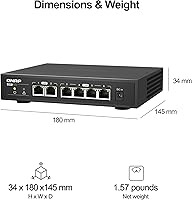
  • Total Ports: The switch provides six RJ45 ports in total: four operating at up to 2.5GbE and two operating at up to 10GbE.
  • 2.5GbE Ports: Four RJ45 ports support auto-negotiation across three speeds: 2.5G, 1G, and 100M, accommodating both modern and legacy devices simultaneously.
  • 10GbE Ports: Two RJ45 ports support five-speed auto-negotiation at 10G, 5G, 2.5G, 1G, and 100M, making them compatible with a wide range of NIC generations.
  • Management Type: Fully unmanaged with no configuration interface, web UI, CLI, or software requirements of any kind.
  • Max Transfer Rate: Maximum data transfer rate is 10 Gbps per port on the 10GbE interfaces, with aggregate switching capacity scaled accordingly.
  • Cooling System: Entirely fanless passive cooling with no moving parts, relying on the metal chassis to dissipate heat into the surrounding air.
  • Chassis Material: The enclosure is constructed from metal, which aids passive thermal management and provides structural durability over plastic-bodied alternatives.
  • Form Factor: Desktop form factor designed for flat surface placement, with included hardware enabling optional rack or wall mounting.
  • Dimensions: The unit measures 2″ in length, 1.5″ in width, and 0.5″ in height, making it one of the more compact multi-gig switches available.
  • Weight: The switch weighs 2.31 pounds, which reflects the density of the metal chassis rather than any bulky internal fan assembly.
  • Interface Type: All six ports use standard RJ45 connectors; there are no SFP or SFP+ optical ports on this model.
  • Max Temperature: The rated upper operating temperature is 104°F (40°C), which should be factored into placement decisions for warm or poorly ventilated environments.
  • In the Box: The package includes the switch unit, a power supply, foot pads, bracket screws, and anchors for mounting flexibility.
  • UPC: The product UPC barcode number is 885022024049, useful for inventory and warranty verification purposes.
  • Release Date: The QSW-2104-2T-A-US was first made available for purchase on September 15, 2022.
  • BSR Ranking: At the time of review compilation, this switch held a position of number 397 in the Amazon Computer Networking Switches category.

Related Reviews
QNAP QSW-2104-2S-A-US 2.5GbE & 10G SFP+ Network Switch
84%
95%
Ease of Setup
91%
Network Performance
89%
Quiet Operation
85%
Build Quality
87%
Compatibility
More
QNAP QSW-M2116P-2T2S 20-Port 10GbE PoE++ Managed Network Switch
86%
93%
Performance & Speed
89%
PoE Support
91%
Ease of Setup
88%
Build Quality & Durability
90%
Management Interface (QSS)
More
VIMIN 6-Port 2.5G Unmanaged Network Switch
83%
88%
Throughput Performance
84%
Build Quality
93%
Setup & Ease of Use
67%
SFP+ Port Usability
96%
Fanless Noise Level
More
HPE Networking Instant On 1430 8-Port Gb Unmanaged Ethernet Switch
86%
92%
Ease of Setup
89%
Performance
85%
Build Quality
90%
Energy Efficiency
87%
Value for Money
More
HPE Networking Instant On 1430 16-Port Gb Unmanaged Layer 2 Ethernet Switch
85%
92%
Setup and Installation
88%
Performance and Reliability
94%
Silent Operation
89%
Energy Efficiency
85%
Build Quality and Durability
More
Cisco CBS110-24T Unmanaged Network Switch
84%
96%
Ease of Setup
88%
Build Quality
91%
Port Performance
97%
Noise Level
78%
Value for Money
More
Cisco CBS110-16T 16-Port Unmanaged Network Switch
84%
96%
Ease of Setup
88%
Network Performance
74%
Build Quality
67%
Value for Money
97%
Noise Level
More
Cisco CBS110-5T-D 5-Port Unmanaged Switch
84%
97%
Ease of Setup
91%
Network Performance & Speed
96%
Noise Level
72%
Build Quality & Materials
83%
Value for Money
More
MikroTik CRS305-1G-4S+IN Network Switch
85%
92%
Value for Money
88%
Performance
93%
Build Quality & Durability
80%
Ease of Setup
91%
Fanless Design
More
Davuaz 2.5G Unmanaged Ethernet Switch
87%
88%
Performance
93%
Ease of Setup
90%
Energy Efficiency
85%
Build Quality
72%
Compatibility with Devices
More

FAQ

Not at all. The QNAP QSW-2104-2T Unmanaged Network Switch requires zero configuration of any kind. You plug in the power, connect your devices with ethernet cables, and the switch handles everything automatically. There is no browser-based UI, no app, and no driver to install.

It works fine with older gigabit and even 100M hardware. All six ports auto-negotiate down to the fastest speed both ends support, so you can mix a 10GbE workstation, a couple of 2.5GbE NAS drives, and a standard 1GbE printer on the same switch without any issues.

It does get warm under sustained heavy use — that is a real and documented concern worth taking seriously. The fanless design means all heat dissipates passively through the metal body, so in an enclosed cabinet with no airflow it can get uncomfortably hot during long, high-throughput transfers. On an open desk or shelf it is generally fine, but a sealed space with poor ventilation is genuinely risky for extended peak workloads.

It works with any NAS brand. Synology, QNAP, TerraMaster, and others all connect without issue as long as the NAS has a 2.5GbE or 10GbE network card. The switch is brand-agnostic since it has no management layer to configure — it just moves packets.

For reliable 10GbE performance, CAT6A is the recommended choice, especially over longer runs. CAT6 can work at shorter distances — typically under 55 meters — but some users have reported intermittent link instability at 10GbE with lower-quality or generic patch cables. It is worth using quality cables here since the switch itself is not the bottleneck.

Completely silent. There are no fans or any other moving parts inside the unit, so it produces zero audible noise under any operating condition. This is one of the most frequently praised aspects by buyers who placed it near a TV, in a recording environment, or on a bedroom desk.

Yes, though it is not a standard 1U rack unit. The included bracket screws and anchors allow for rack or wall mounting with the right adapter bracket. Several users in home lab setups have rack-mounted it successfully, though you may need to source a compatible rack shelf or mount adapter separately depending on your enclosure.

Honestly, it depends on your timeline. If you are actively planning a NAS or workstation upgrade in the near future, buying this now is reasonable since it will be ready when your hardware catches up. If your upgrade is vague or speculative, the price premium over a basic gigabit switch is harder to justify for what would be zero practical benefit until you have multi-gig endpoints to connect.

Yes, the QSW-2104-2T supports jumbo frames up to 9K MTU (9216 bytes), which is relevant for high-throughput NAS and iSCSI workloads where larger frame sizes reduce CPU overhead and improve transfer efficiency.

No, each port negotiates its speed independently. A 100Mbps device on one port has no effect on the speeds available to devices connected to other ports. You could have a 10GbE workstation and a legacy 100M printer connected simultaneously without any performance impact on the faster link.

Where to Buy