
Overview

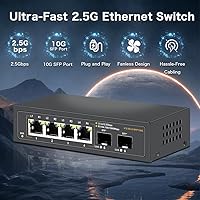
The Davuaz Da-K6402W 2.5G Ethernet Switch is a surprisingly capable unmanaged switch that punches well above its weight in the budget multi-gig networking space. Davuaz isn't a household name like TP-Link or Zyxel, but that shouldn't automatically disqualify it — the specs here are genuinely competitive for a prosumer or home lab build. What stands out most is the pairing of four 2.5G copper ports with two 10G SFP uplinks at a price point where most rivals offer far less. Add in a fully fanless, all-metal body and plug-and-play operation, and this 2.5G switch makes a strong case for anyone who wants multi-gig performance without a complicated setup.

Features & Benefits

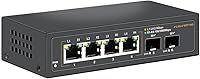
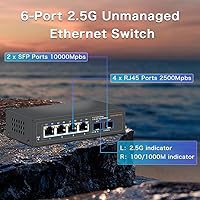
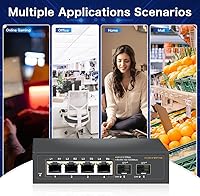
The four RJ45 ports handle speeds from 100Mbps all the way up to 2.5Gbps, which means older devices on your network don't get left behind. The 10G SFP slots are where things get interesting — plug in a compatible DAC cable or fiber module and you have a high-bandwidth pipe straight to your router or core switch. The 25Gbps switching fabric is fully non-blocking, so there's no hidden congestion even when every port is busy. The chassis stays completely silent thanks to passive metal cooling, and each port has a small LED that tells you instantly whether it's running at 2.5G or a slower rate. At just over 5 inches long, it disappears on a desk or shelf without fuss.

Best For

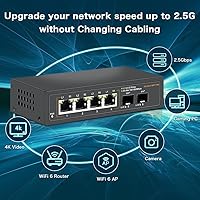
This unmanaged multi-gig switch is a natural fit for a few specific types of buyers. If you've got a Wi-Fi 6 access point with a 2.5G uplink port sitting bottlenecked behind a 1G switch, the Davuaz switch solves that immediately. NAS users see some of the most tangible gains — copying large files between a 2.5G-capable NAS and a workstation is noticeably faster than what a standard gigabit setup allows. Small production offices and video editors shuffling hefty files between machines will appreciate the extra headroom, too. That said, this is strictly an unmanaged switch — there's no VLAN support, no QoS, no web interface. If you need any of those features, look elsewhere.

User Feedback

With a 4.6-star average across nearly 360 ratings, buyer sentiment leans clearly positive. Most praise centers on the real-world speed improvement over older 1G switches and the fact that the unit runs completely quietly — both things that matter a lot to the home lab crowd. A handful of reviewers note that SFP module compatibility isn't universal; some third-party modules don't link up reliably, so sticking with well-known brands for those slots is worth the extra care. There are occasional mentions of unit-to-unit consistency, with a small number of buyers reporting a dead port out of the box. Customer support responsiveness gets mixed marks, though the warranty policy seems straightforward enough.

Pros

  • Four 2.5G copper ports and two 10G SFP uplinks in one compact unit is a genuinely rare combination at this price.
  • Completely silent operation thanks to the fanless metal chassis — no hum, no drone, ever.
  • Backward compatible with 100Mbps and 1Gbps devices, so older hardware on your network still works fine.
  • Plug-and-play setup means no software, no login, no configuration headaches whatsoever.
  • The all-metal body feels solid and dissipates heat passively without any moving parts to fail over time.
  • Per-port LED indicators make it easy to confirm at a glance whether a device has actually linked at 2.5G.
  • Small enough to tuck almost anywhere — on a shelf, zip-tied to a rack, or sitting behind a monitor.
  • Users consistently report real-world throughput gains over their previous gigabit switches, not just spec-sheet improvements.
  • The 25Gbps non-blocking switching fabric means no port gets starved even when everything is active simultaneously.
  • Strong buyer satisfaction rating across a meaningful number of reviews suggests consistent performance for most use cases.

Cons

  • No managed features at all — VLANs, QoS, port mirroring, and SNMP are completely off the table.
  • SFP module compatibility is not universal; some third-party transceivers and DAC cables have reported link failures.
  • Davuaz is a lesser-known brand with limited public track record for long-term durability or warranty follow-through.
  • Only four 2.5G copper ports — if you need five or more devices running at multi-gig speeds, this falls short immediately.
  • Customer support responsiveness has received mixed feedback, with some buyers reporting slow or inconsistent replies.
  • A small number of users have received units with a dead or unreliable port straight out of the box.
  • No rack-mount hardware or wall-mount brackets included, which adds friction for cleaner physical deployments.
  • No official compatibility list for SFP modules is published, leaving buyers to rely on community trial-and-error.

Ratings

The scores below reflect an AI-driven analysis of verified global buyer reviews for the Davuaz Da-K6402W 2.5G Ethernet Switch, with spam, incentivized, and bot-generated feedback actively filtered out to preserve accuracy. Ratings are assigned across categories most relevant to real networking use cases — from raw throughput performance to long-term reliability — and both standout strengths and genuine frustrations are represented without softening either side.

Value for Money
93%
Most buyers describe this as the clearest win: getting four 2.5G copper ports plus two 10G SFP uplinks at a price where most competitors offer only 2.5G copper. For home lab builders and NAS users upgrading from gigabit, the cost-to-capability ratio lands well above expectations for an entry-level multi-gig switch.
A small number of buyers who received a defective unit feel the value proposition collapses entirely if the switch fails early and support follow-through is slow. For that subset, the low price doesn't compensate for the time lost troubleshooting a faulty port out of the box.
Throughput Performance
88%
Users who connect 2.5G-capable NAS devices or workstations consistently report real-world transfer speeds that clearly outpace their old gigabit switches — not just marginal gains. File copies that previously topped out near 110 MB/s routinely climb higher, which is exactly what NAS enthusiasts and content creators were hoping for.
Performance is only as good as the weakest link in the chain. A handful of reviewers noted that mismatched SFP modules or cables caused the uplink port to fall back to a slower speed, which defeated the purpose of the 10G slots and took time to diagnose.
Noise Level
96%
Zero fan noise is the single most consistently praised aspect across buyer feedback. Users who placed the Davuaz switch in a bedroom, media room, or open-plan office report hearing absolutely nothing from it — a meaningful practical advantage over any switch with even a low-speed cooling fan.
The silence comes at the cost of active heat management — the chassis gets noticeably warm after hours of sustained use. In a poorly ventilated enclosure or stacked with other gear, some users noticed the case running hotter than they were comfortable with.
Build Quality
74%
26%
The all-metal chassis feels meaningfully more solid than plastic alternatives at this price point, and most buyers are satisfied with the physical construction. The compact form factor holds its shape well, and the port sockets seat cables firmly without wobble.
Consistency is the real concern — a notable minority of reviews mention arriving units with at least one non-functional or unreliable port. For a budget brand, this unit-to-unit variance is the biggest quality control issue buyers should be prepared for before purchasing.
SFP Compatibility
61%
39%
When the right modules are used — particularly transceivers from established vendors like FS.com or 10Gtek — buyers report clean 10G links that stay stable under sustained load. DAC cables from reputable brands also tend to work reliably for short-distance uplinks.
Davuaz provides no official compatibility list, which pushes buyers into community trial-and-error. Off-brand or lesser-known SFP modules have a noticeably higher failure rate with this switch, and diagnosing a bad link versus an incompatible module is not straightforward for less experienced users.
Setup & Ease of Use
91%
Plug-and-play operation is exactly as advertised — connect power, plug in cables, done. Home users with no networking background consistently report having the switch fully operational in under two minutes, with no drivers, apps, or browser interfaces involved.
The simplicity that makes setup effortless also means there is nothing to adjust if something goes wrong. Buyers who encountered a slow link or an unexpected fallback speed had no interface or logging tool to help them pinpoint the problem.
Port Count & Layout
69%
31%
Six ports in total — four 2.5G copper and two 10G SFP — covers most small home lab or prosumer setups cleanly. The physical spacing between ports is practical, and right-angle or standard RJ45 plugs seat without crowding neighboring slots.
Four copper ports fills up quickly. Users adding a NAS, a Wi-Fi 6 AP, a gaming PC, and a workstation are already at capacity with no room to grow. Anyone who underestimates their device count at purchase time is left looking for a second switch sooner than expected.
Heat Management
72%
28%
Passive cooling through the metal body works well under typical home or small office loads. In a ventilated spot on a desk or open shelf, the chassis stays warm rather than hot, and most buyers report stable operation across long periods of continuous use.
Running the switch in a closed cabinet or tight rack shelf without airflow leads to noticeably higher surface temperatures. A few long-term users have speculated that sustained high heat could be a contributing factor in early port degradation, though no firm data supports this yet.
LED Indicators
78%
22%
The per-port LEDs clearly distinguish between 2.5G and slower link speeds, which is genuinely useful when verifying that a new device has actually negotiated at 2.5G rather than falling back to gigabit. Most buyers found the indicator logic intuitive after a quick glance at the documentation.
The labeling system — using the letters L and R to indicate speed tiers — is not immediately intuitive without reading the manual first. A few buyers initially misread the indicators and assumed a port was faulty when it had simply auto-negotiated to a lower speed.
Long-Term Reliability
67%
33%
The majority of buyers who have owned this switch for six months or more report stable, uninterrupted operation with no degradation in speed or connectivity. For a budget device in a low-stress home lab environment, the durability track record is reasonably encouraging.
The sample of long-term reviews is still relatively limited given the product's age. A pattern of early port failures in a small but visible subset of units introduces uncertainty — buyers cannot easily predict whether their unit will fall into the reliable majority or the problematic minority.
Customer Support
58%
42%
Davuaz officially promises a resolution — refund or replacement — within 24 hours through Amazon, and some buyers confirm this timeline was honored when they reached out. The Amazon fulfillment channel at least provides a structured dispute resolution path if the brand itself is unresponsive.
Real-world support experiences vary too much to be reassuring. A meaningful share of buyers describe slow or generic initial responses, and escalating beyond a first reply can be frustrating. For a lesser-known brand without an established support infrastructure, this inconsistency is a real risk.
Size & Portability
89%
At just over 5 inches long and weighing under half a kilogram, the Davuaz switch is genuinely easy to tuck into tight spaces. Users in apartment setups or small offices appreciate being able to hide it behind a monitor, on a shelf edge, or inside a small networking cabinet without any strain.
The compact size means there is no included mounting solution for users who want a cleaner rack or wall installation. Sourcing a compatible bracket or tray adds a small extra cost and effort that some buyers did not anticipate.
Backward Compatibility
86%
Auto-negotiation across 100Mbps, 1Gbps, and 2.5Gbps works reliably in practice. Buyers running mixed environments — older smart home devices alongside newer 2.5G workstations — report that everything connects without any manual intervention or link failures.
There is no per-port speed locking, so users cannot force a port to stay at a specific speed tier if auto-negotiation behaves unexpectedly with a particular legacy device. This is a minor limitation that only surfaces in edge cases, but it is worth knowing.

Suitable for:

The Davuaz Da-K6402W 2.5G Ethernet Switch is a strong pick for home lab enthusiasts and prosumer users who are ready to move beyond the gigabit ceiling without spending heavily on enterprise gear. If you have a Wi-Fi 6 access point with a 2.5G uplink port, this switch lets you actually use that extra bandwidth instead of choking it at the wall. NAS users transferring large media libraries or backups between a 2.5G-capable storage device and a workstation will notice real, tangible speed differences in day-to-day use. Content creators and small teams shuffling big video or photo files across a few machines also fit squarely in the target audience. The 10G SFP uplink slots make it especially practical for anyone who already has a 10G-capable router or core switch and just needs affordable 2.5G access at the edge. And because it runs completely silent, it is equally at home in a bedroom lab, a living room AV closet, or any workspace where fan noise is genuinely disruptive.

Not suitable for:

Anyone who needs network segmentation, traffic prioritization, or remote management should look past this switch entirely — the Davuaz Da-K6402W 2.5G Ethernet Switch is strictly unmanaged, meaning there is no web interface, no VLAN support, and no QoS configuration available whatsoever. Small businesses running VoIP systems, separating guest Wi-Fi traffic, or managing security cameras on isolated VLANs will find it simply cannot do the job. IT administrators who need SNMP monitoring or any form of network visibility are also out of luck. Buyers who plan to use third-party or off-brand SFP modules should be cautious, as compatibility with the SFP uplink ports is not guaranteed across all module brands. If you need more than four 2.5G copper ports, this switch will also fall short — there is no expanding its capacity. Finally, buyers who place heavy weight on brand reputation and established after-sales support infrastructure may feel more comfortable spending a bit more for a known name like TP-Link or Netgear.

Specifications

  • Brand: Manufactured by Davuaz, a smaller networking-focused label positioned in the budget-to-prosumer segment.
  • Model Number: The unit carries the official model designation Da-K6402W.
  • Copper Ports: Equipped with 4 x 2.5G Base-T RJ45 ports, each backward compatible with 100Mbps and 1000Mbps devices.
  • SFP Uplinks: Includes 2 x 10G SFP slots for fiber transceivers or DAC cables connecting to a higher-speed router or core switch.
  • Switching Capacity: Total non-blocking switching fabric runs at 25Gbps, meaning no single port gets starved when all six are active simultaneously.
  • Speed Support: Each RJ45 port auto-negotiates across 100Mbps, 1000Mbps, and 2500Mbps to accommodate mixed-generation devices on the same network.
  • Management: Fully unmanaged with no web interface, CLI, VLAN support, or QoS configuration — the switch operates automatically with zero setup.
  • Cooling Design: Uses entirely passive, fanless cooling via the metal chassis, producing zero audible noise during normal operation.
  • Chassis Material: The outer shell is constructed from metal, which aids heat dissipation and provides more physical durability than a plastic enclosure.
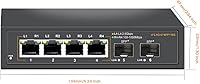
  • Dimensions: The unit measures 5.24″ long by 2.64″ wide by 1.3″ tall, making it compact enough for a shelf, desktop, or small rack.
  • Weight: Weighs approximately 0.43 kg (15.1 oz), light enough to mount or reposition without additional support hardware.
  • Port Indicators: Each port has an LED with two states: the L indicator signals a 2.5G link, while the R indicator signals a 100Mbps or 1000Mbps connection.
  • Setup: Plug-and-play operation requires only a power connection and ethernet cables — no drivers, software, or configuration steps are involved.
  • Color: Ships in a matte black finish that blends into most home lab or office environments without drawing attention.
  • Total Port Count: Offers six ports in total: four 2.5G copper RJ45 ports and two 10G SFP uplink slots.

Related Reviews
BrosTrend 8-Port 2.5G Unmanaged Switch
83%
93%
Port Speed Consistency
96%
Ease of Setup
61%
Build Quality
74%
Thermal Performance
91%
Value for Money
More
VIMIN 10-Port 2.5G Unmanaged Switch
79%
96%
Ease of Setup
89%
Port Performance
84%
Build Quality
67%
Thermal Management
71%
SFP Uplink Usability
More
Goalake 8-Port 2.5G Ethernet Switch
80%
91%
Port Count & Configuration
88%
Throughput & Switching Performance
93%
Ease of Setup
79%
Build Quality & Materials
96%
Fanless & Noise Level
More
YuanLey YS25-1600 16-Port 2.5G Ethernet Switch
81%
91%
Network Performance
93%
Plug-and-Play Setup
86%
Build Quality
97%
Noise Level
83%
Value for Money
More
Tenda TEM2010F 8-Port 2.5G Ethernet Switch
77%
96%
Ease of Setup
91%
Network Performance
94%
Noise Level
82%
Build Quality
67%
Thermal Management
More
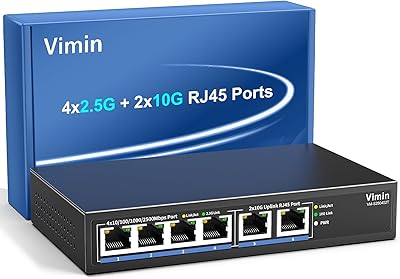
Vimin 6-Port 2.5G/10G Unmanaged Network Switch
79%
94%
Ease of Setup
86%
Network Performance
83%
Value for Money
88%
Port Configuration
67%
Thermal Management
More
Tenda SE105 5-Port 2.5G Unmanaged Switch
83%
97%
Ease of Setup
91%
Port Speed Performance
93%
Value for Money
67%
Build Quality
78%
Thermal Management
More
XikeStor SKS8300 16-Port 2.5G L3 Managed Switch
73%
88%
Value for Money
91%
Port Configuration
83%
Layer 3 Routing Capability
89%
Switching Performance
62%
Web Interface Usability
More
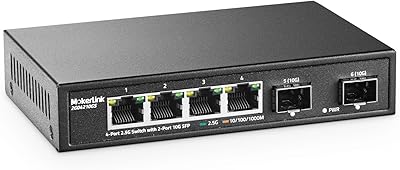
MokerLink 4-Port 2.5G 10G SFP Network Switch
82%
91%
Value for Money
86%
Build Quality
93%
Ease of Setup
97%
Noise Level
67%
Thermal Performance
More
ienRon 9-Port 2.5G 10G SFP Ethernet Switch
82%
88%
Throughput Performance
93%
Ease of Setup
82%
Build Quality
96%
Fanless Noise Level
77%
10G SFP+ Uplink Flexibility
More

FAQ

No setup is required at all. You plug in the power adapter, connect your ethernet cables, and the switch starts working immediately. There is no web interface, no app, and no configuration page — it handles everything automatically.

Yes, without any issue. Each copper port auto-negotiates down to 1000Mbps or even 100Mbps, so older devices connect and work normally alongside any 2.5G-capable hardware you have plugged in at the same time.

Davuaz does not publish an official compatibility list, which is a genuine drawback worth knowing upfront. Most users have reported success with well-known brands like FS.com or 10Gtek transceivers. If you plan to use DAC cables or fiber modules, it is worth checking community forums for confirmed working combinations before buying anything exotic.

It does get warm to the touch after extended use, which is normal for a fanless metal switch — the chassis itself acts as a heat sink. Most users report the temperature stays well within acceptable limits in a ventilated spot. Avoid enclosing it in a sealed cabinet without airflow.

Unfortunately, no. This is a fully unmanaged switch, which means VLAN configuration is not possible. If network segmentation is important to your setup, you will need to look at a managed switch instead.

The SFP ports are designed as uplinks to connect this switch to a higher-speed device on your existing network — they are not intended as a direct ISP handoff point. Whether a specific SFP module works with your ISP fiber service depends heavily on the ISP equipment, so that scenario requires careful research specific to your provider.

There is no fan at all — the Davuaz switch uses completely passive cooling. It runs in total silence, which makes it a practical choice for a bedroom, media room, or any space where networking equipment noise would be noticeable.

Yes, provided your NAS and the computer or workstation connecting to it both support 2.5G networking. In that scenario, users consistently report real throughput gains — large file transfers that previously maxed out around 110 MB/s over gigabit can climb considerably higher with 2.5G on both ends.

Davuaz offers a warranty through Amazon with a stated commitment to resolve issues within 24 hours via a refund or replacement. Feedback on how smoothly that process works in practice is mixed, so keeping your order confirmation accessible is a good idea if you ever need to follow up.

The unit is compact enough to fit in a rack space, but no rack-mount ears or brackets are included in the box. Some users attach it using a shelf tray or hook-and-loop tape. For a permanent rack installation, you would need to source a compatible mounting solution separately.