Overview

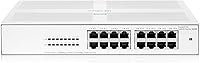
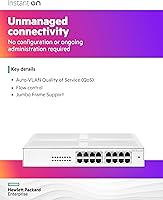
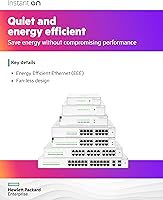
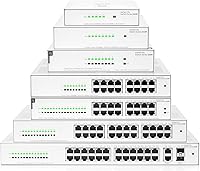
The HPE Instant On 1430 16G Unmanaged Switch is what you get when a company with serious enterprise networking credentials decides to build something genuinely simple. Aruba, HPE's networking division, has decades of experience in data centers and campus infrastructure — and that background shows in the build quality and component selection. This is a plug-and-play Layer 2 switch, meaning there is no login page, no management interface, and no ongoing administration required. It sits within a broader 1430 family spanning 8 to 26 ports, but the 16-port version hits a practical sweet spot for most small offices. Just be clear going in: if you need VLANs or traffic prioritization, you will want to look elsewhere.

Features & Benefits

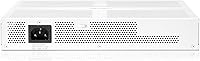
All 16 ports on this HPE unmanaged switch run at full gigabit speeds — there is no half-speed port hiding at the back. Every port auto-negotiates between 10, 100, and 1000 Mbps, so older and newer devices coexist without any fuss. The fan-less passive cooling is a genuine standout; the unit runs completely silently, which matters more than people expect once they have lived next to a noisy switch for a year. Mounting options are thoughtfully designed — wall, tabletop, or under-desk, with brackets included for all three. One honest caveat: the external power adapter adds a cable to manage and can be mildly awkward in tight spaces, though it does help keep the chassis slim and cool.

Best For

The Instant On 1430 16-port is built for people who want wired connectivity to simply work. It is a natural fit for small business owners expanding a wired network — think desktop PCs, a NAS drive, VoIP phones, and a smart TV all running without needing to call IT. Home office users benefit equally: silent operation means you can tuck this under a desk or mount it on a wall without it becoming a distraction. Its Class B certification confirms it meets residential electromagnetic standards, not just commercial ones. If you would normally spend less on a generic no-name switch but want something that will outlast it significantly, the lifetime warranty alone makes this a smarter long-term call.

User Feedback

Buyers rate this fanless gigabit switch well overall, and consistent praise centers on two things: rock-solid reliability and how effortlessly it sets up — plug it in, and it works within seconds. Many users specifically mention the silence as a welcome contrast to fan-cooled budget alternatives. That said, there are recurring gripes worth knowing. The external power brick draws complaints, particularly from users with limited space behind desks or in tight wiring closets. A handful of buyers also wished for basic VLAN support, which this switch simply does not offer — a real limitation if your network has grown more complex. On warranty, reviewers who have contacted HPE support tend to report positive experiences, adding genuine confidence to that lifetime coverage promise.

Pros

  • All 16 ports deliver full gigabit speeds with no compromised or half-speed ports in the lineup.
  • Completely silent operation thanks to fan-less passive cooling — a real advantage in shared workspaces.
  • Setup takes under a minute: plug in power, connect devices, and the network is live immediately.
  • Flexible mounting options — tabletop, wall, or under-desk — with all brackets included in the box.
  • Energy-efficient Ethernet reduces idle power draw automatically, with no settings to configure.
  • Limited lifetime warranty with HPE support access is unusually strong coverage at this price point.
  • Built by Aruba, an HPE company with a proven track record in enterprise-grade networking hardware.
  • Class B certification means it is cleared for residential use, not just commercial environments.
  • Reported MTBF of over 400 years signals exceptionally high component reliability expectations.
  • The fanless gigabit switch runs cool enough that placement near other sensitive equipment is not a concern.

Cons

  • Zero management features — no VLANs, no QoS, no traffic monitoring of any kind.
  • The external power adapter is a separate brick, which adds cable clutter in tight spaces.
  • No PoE support on this model, so IP cameras or wireless access points will need their own power source.
  • Not rack-mountable out of the box, which limits clean integration into structured wiring setups.
  • Buyers needing more than 16 ports must step up to a separate model in the family rather than expanding this one.
  • No link aggregation or redundancy features, making it unsuitable for uptime-critical network paths.
  • The white finish may show dust or marks more visibly than darker alternatives in high-traffic areas.
  • No built-in surge protection; pairing with a quality UPS or surge suppressor is strongly advisable.

Ratings

Our editorial team analyzed verified global buyer reviews for the HPE Instant On 1430 16G Unmanaged Switch using an AI-assisted scoring model that actively filters out incentivized, bot-generated, and low-quality feedback to surface genuine user sentiment. Scores reflect both the consistent strengths that make this switch a standout in its category and the real frustrations that some buyers have encountered in day-to-day use. The result is a transparent, balanced picture designed to help you make a confident purchase decision.

Setup Experience
97%
Buyers across all experience levels — from IT professionals to complete beginners — consistently describe setup as effortless. You plug in power, connect devices, and the switch is live within seconds. There is nothing to configure, no firmware to update on first boot, and no account registration required.
A small number of users noted that the complete absence of any indicator lights beyond basic link and activity LEDs means there is no visual feedback if something is misconfigured upstream in the network, which can make basic troubleshooting slightly less intuitive for inexperienced users.
Silent Operation
94%
The fan-less passive cooling design earns consistent praise from home office users and small business owners who place the switch in shared workspaces. Reviewers frequently contrast it favorably against previous fan-cooled switches they replaced, noting that the complete absence of noise is noticeable and genuinely appreciated during long work sessions.
A handful of buyers in very warm climates or poorly ventilated server closets reported the chassis running noticeably warm to the touch under sustained heavy load, even though no thermal failures were documented. Placement in well-ventilated spaces remains advisable for optimal long-term passive cooling.
Build Quality
88%
The chassis feels solid and well-constructed compared to similarly priced switches from lesser-known brands, with ports that accept cable connectors firmly without wobble. Reviewers who have handled generic budget alternatives frequently comment that this feels like a noticeably more serious piece of hardware, consistent with HPE's broader manufacturing standards.
The white plastic finish, while clean-looking, shows scuff marks and dust accumulation more readily than darker alternatives. A small number of reviewers also noted that the chassis flexes slightly under firm pressure, though no structural failures were reported and this appears to be a cosmetic rather than functional concern.
Port Performance
91%
All 16 ports operate at full gigabit speeds with reliable auto-negotiation, and reviewers who run bandwidth-heavy workflows — including NAS backups, 4K media streaming, and multi-desktop workstations — report consistently clean throughput with no dropped connections or unexpected slowdowns during normal operation.
Since this is an unmanaged switch, there is no way to monitor individual port utilization, check error rates, or prioritize traffic between ports. Users transferring large files while simultaneously running VoIP calls on the same switch have occasionally noticed quality issues that a managed switch with QoS could have prevented.
Warranty & Support
93%
A limited lifetime warranty backed by HPE is a genuine differentiator at this price tier. Buyers who have contacted HPE support report professional, knowledgeable responses, and the brand's long-standing enterprise reputation adds confidence that this warranty is unlikely to disappear if a claim is needed years from now.
A few reviewers noted that navigating HPE's support portal to register a consumer-grade switch can feel overly complex compared to the simplicity of the product itself. The warranty also does not cover the external power adapter under the same terms as the main unit, which is worth noting if the adapter develops a fault.
Value for Money
77%
23%
For buyers who factor in the lifetime warranty, Aruba-grade component reliability, and HPE support access, the price premium over generic 16-port switches represents a sensible long-term investment. Many reviewers explicitly mention that they spent less on cheaper alternatives before and ended up replacing them within a few years.
Buyers comparing on port count and gigabit speed alone will find cheaper alternatives from Netgear, TP-Link, and similar brands. If long-term warranty value and brand reliability are not priorities for your specific use case, the price gap can be harder to justify purely on headline specifications.
Mounting Versatility
83%
The inclusion of wall-mount brackets supporting ports-up and ports-down orientations, combined with under-desk mounting holes, gives buyers genuine installation flexibility without needing to source additional hardware. Reviewers who mounted the switch on a wall or under a standing desk noted it stays very tidy and out of sight.
The switch is not rack-mountable out of the box, which limits integration into structured wiring closets or patch panels without third-party adapters. Buyers expecting to slot this into a standard 19-inch rack as a desktop unit will need to find a compatible shelf or third-party rack tray separately.
Energy Efficiency
82%
18%
Energy-efficient Ethernet automatically scales power consumption down on ports that are idle or connected to devices in standby, which adds up meaningfully when a switch runs continuously around the clock. Reviewers in always-on home server setups specifically mention this as a welcome feature that requires no configuration.
The external power adapter, while keeping the chassis compact, introduces a small baseline power draw separate from the switch itself that slightly offsets the energy savings on idle ports. Buyers with very strict energy monitoring setups may find the total system draw slightly higher than the switch spec sheet alone suggests.
Thermal Management
88%
Under typical office or home network loads, the fanless gigabit switch maintains a comfortable operating temperature without requiring any airflow clearance. Most reviewers who have run the unit continuously for months report that it stays cool or only faintly warm, which is reassuring for installations in enclosed furniture or tight cabinetry.
Heavy sustained workloads — such as continuous multi-gigabit transfers across most ports simultaneously — can raise the chassis temperature more noticeably. In poorly ventilated spaces or unusually warm environments, leaving adequate clearance around the unit is advisable rather than treating its passive cooling as unconditional.
Cable Management
59%
41%
With 16 ports neatly arranged on a single face and a compact chassis footprint, plugging in and routing cables to the switch itself is straightforward. Under-desk and wall-mount options help keep the overall wiring tidy once cables are dressed and secured.
The external power adapter is the most consistently cited frustration in user reviews. It adds a separate brick and cable run to manage, which becomes a genuine annoyance in tight spaces, crowded under-desk setups, or cable-managed server closets where a built-in power supply would be far more convenient.
Brand Credibility
92%
HPE and its Aruba networking division carry significant brand trust in professional IT circles, and this reputation translates into genuine buyer confidence even for a simple consumer-facing product. Reviewers frequently cite the HPE name as the primary reason they chose this switch over similarly priced alternatives from less established manufacturers.
A small number of buyers noted minor frustration that the product is branded and marketed under the Aruba consumer umbrella rather than directly as an HPE enterprise product, which created brief confusion about which support pathway to use and where to register the warranty.
Management Features
27%
73%
For buyers who genuinely want zero management overhead — no configuration, no maintenance, no software — the complete absence of management features is exactly what they signed up for. This switch is designed to be invisible in the network, and for simple connectivity use cases, that is a real strength.
The total lack of management capabilities is a hard limitation for anyone whose network has grown beyond basic connectivity. No VLANs, no QoS, no port mirroring, no traffic monitoring, and no web interface means buyers with even modest network complexity needs will quickly find this switch insufficient for their requirements.
Port Count vs Price
84%
Sixteen active gigabit ports at this price point represents a practical density for most small offices and home networks, with no compromised half-speed ports or restricted uplink-only configurations. Buyers expanding from 8-port switches consistently note that 16 ports covers their current needs with enough headroom for future device additions.
The Instant On 1430 family does not allow daisy-chaining or stacking, so if 16 ports are not enough, a separate additional switch must be purchased. There is also no dedicated uplink port, so connecting this switch to a router or another switch consumes one of the 16 available data ports.

Suitable for:

The HPE Instant On 1430 16G Unmanaged Switch was designed for people who need reliable wired connectivity without any of the complexity that usually comes with enterprise networking gear. Small business owners who want to connect a mix of desktop workstations, a NAS device, VoIP handsets, and a printer — all on a single switch — will find this does exactly that without requiring a single configuration step. Home office workers benefit particularly from the completely silent, fan-less design, since the switch can sit on a desk, mount on a wall, or tuck underneath a surface without generating noise or noticeable heat. Buyers who prioritize long-term value over the lowest upfront cost will also appreciate that the lifetime warranty and HPE support access are genuinely rare at this price tier — most competing switches from lesser-known brands offer little more than a one-year guarantee. If your network needs are straightforward and you simply want something that works reliably from day one without ongoing maintenance, this switch is a genuinely strong fit.

Not suitable for:

Anyone who needs network segmentation, traffic prioritization, or remote management should look past the HPE Instant On 1430 16G Unmanaged Switch before they get too attached to the brand name. This is a Layer 2 unmanaged switch in the truest sense — there is no web interface, no CLI, no VLAN support, and no Quality of Service controls whatsoever. IT administrators managing multi-tenant offices, VoIP-heavy environments requiring traffic shaping, or networks that handle sensitive data requiring logical separation between departments will find this unit simply cannot meet those requirements. Growing businesses that expect to outgrow basic connectivity within a year or two might be better served investing in a managed or smart switch from the outset, even if it costs more upfront. Users with very tight desk or rack space should also be aware that the external power adapter adds a secondary cable run, which can become a genuine nuisance in cramped or cable-sensitive installations.

Specifications

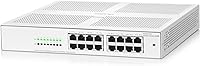
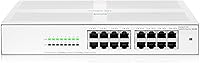
  • Port Count: The switch provides 16 active RJ45 copper ports, each capable of 10/100/1000 Mbps with automatic speed negotiation.
  • Switch Type: This is a Layer 2 unmanaged switch with no configuration interface, software, or management features of any kind.
  • Switching Capacity: Total non-blocking switching capacity is 16 Gbps, supporting full wire-speed throughput across all ports simultaneously.
  • Throughput: Maximum forwarding throughput is rated at 11.90 Mpps (million packets per second) under full load.
  • Cooling System: Passive fan-less cooling eliminates all moving parts, resulting in completely silent operation with no active airflow required.
  • Power Supply: The unit is powered by an external power adapter with a US cord included; no internal power supply is built into the chassis.
  • Mounting Options: Supports tabletop placement, wall mounting with ports facing up or down, and under-desk surface mounting, with all necessary brackets included.
  • Energy Efficiency: Energy-efficient Ethernet (IEEE 802.3az) support automatically reduces power consumption on idle or low-activity ports without any manual configuration.
  • Certification: Holds Class B certification, confirming it meets electromagnetic compatibility standards for both residential and commercial network environments.
  • Warranty: Backed by a limited lifetime warranty with access to HPE technical support for the life of the product.
  • Reliability (MTBF): Mean time between failures is rated at 416.2 years, reflecting the high-grade components used in the design.
  • Manufacturer: Designed and supported by Aruba, a Hewlett Packard Enterprise company, with a long track record in enterprise networking hardware.
  • Model Number: The official HPE model number is R8R47A, part of the broader Instant On 1430 switch family.
  • Color & Finish: The chassis is finished in white, making it visually unobtrusive in home office and small business environments.
  • Availability Date: This model became commercially available in August 2022.

Related Reviews
HPE Instant On 1430 8G Unmanaged Switch
83%
96%
Ease of Setup
93%
Reliability & Uptime
97%
Noise & Acoustic Performance
88%
Port Performance & Speed
84%
Value for Money
More
HPE Networking Instant On 1430 26-Port Switch
84%
94%
Ease of Setup
91%
Energy Efficiency
88%
Performance & Reliability
85%
Mounting Flexibility
83%
Build Quality
More
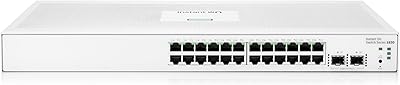
HPE Instant On 1830 48G 4SFP Switch
77%
88%
Ease of Setup
84%
Build Quality
91%
Fanless Performance
76%
Management Software
87%
Port Density & Layout
More
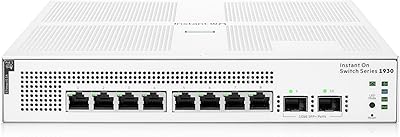
HPE Networking Instant On 1830 24-Port Switch
87%
91%
Ease of Setup
93%
Quiet Operation
89%
Reliability
85%
Build Quality
90%
Port Availability
More
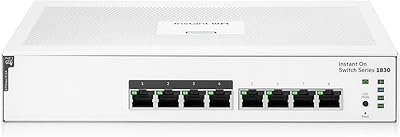
HPE Instant On 1930 8-Port PoE Switch
83%
91%
Ease of Setup
83%
Management App Quality
74%
PoE Performance
88%
Build Quality
72%
Value for Money
More
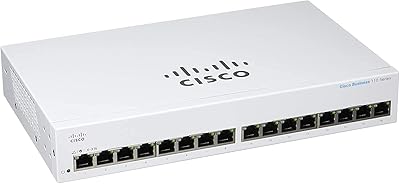
HPE Instant On 1830 8-Port PoE Switch
82%
91%
Ease of Setup
74%
PoE Performance
88%
Build Quality
77%
Management Software
83%
Value for Money
More
Cisco CBS110-24T Unmanaged Network Switch
84%
96%
Ease of Setup
88%
Build Quality
91%
Port Performance
97%
Noise Level
78%
Value for Money
More
Cisco CBS110-16T 16-Port Unmanaged Network Switch
84%
96%
Ease of Setup
88%
Network Performance
74%
Build Quality
67%
Value for Money
97%
Noise Level
More
Davuaz Da-K6402W 2.5G Ethernet Switch
79%
93%
Value for Money
88%
Throughput Performance
96%
Noise Level
74%
Build Quality
61%
SFP Compatibility
More
HPE Instant On AP22 Wi-Fi 6 AP
80%
88%
Wireless Performance
91%
Setup & Installation
79%
App & Management Experience
86%
Build Quality & Design
74%
Value for Money
More

FAQ

No setup software or web interface is required at all. The HPE Instant On 1430 16G Unmanaged Switch is a true plug-and-play device — connect power, plug in your devices, and it starts working immediately. There is nothing to configure and no ongoing administration needed.

Unfortunately, no. This is a Layer 2 unmanaged switch, which means it has no VLAN support, no traffic prioritization, and no Quality of Service controls. If network segmentation is something you need, you would want to look at a managed or smart-managed switch instead.

It is genuinely silent. The fan-less passive cooling design means there are no moving parts inside the chassis, so you will hear absolutely nothing from it during normal operation. This makes it a practical choice for desk-side use, living rooms, or any space where noise is a concern.

No, this model does not support Power over Ethernet (PoE). Devices that need to draw power through the network cable, such as IP cameras, VoIP handsets, or wireless access points, will need a separate power source. If PoE is a requirement, HPE does offer PoE variants within the same 1430 family.

The box includes brackets for wall mounting with ports facing either up or down, as well as mounting holes for under-desk surface installation. Tabletop use requires no accessories at all. Everything needed for all three mounting styles is included out of the box.

For most users it is a minor inconvenience rather than a dealbreaker, but it is worth knowing upfront. The external adapter adds a second cable to manage, which can get untidy in confined spaces or crowded desk areas. On the positive side, it keeps the switch body compact and cool by moving the power conversion outside the chassis.

The limited lifetime warranty covers the switch for as long as you own it, which is genuinely uncommon at this price tier. HPE support is accessible through their standard business support channels. Buyers who have had to use the warranty generally report positive experiences, though it is always worth registering the product with HPE after purchase to make the process smoother.

It is certified for home use. The Class B electromagnetic compatibility certification specifically covers residential environments, so you can use the Instant On 1430 16-port in a home office or living space without any concerns about interference with other household electronics.

No issues at all. Every port auto-negotiates its connection speed between 10, 100, and 1000 Mbps, so older devices connect at whatever speed they support without slowing down the rest of the network. You can mix old and new hardware freely across the 16 ports.

The core difference comes down to build quality, brand accountability, and long-term support. Budget unmanaged switches from unknown brands often use lower-grade components and typically offer only a one-year warranty with minimal support. This switch carries an MTBF rating of over 400 years and a lifetime warranty backed by a company with decades of networking expertise, which makes the price difference easier to justify if you are planning to rely on it daily.