Overview

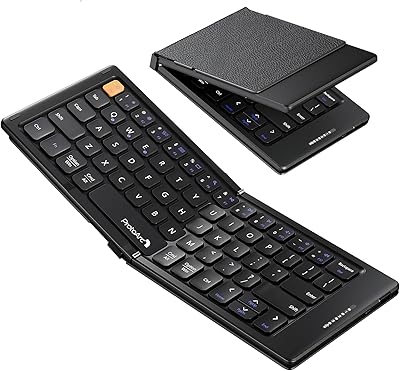
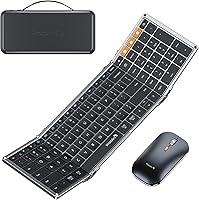
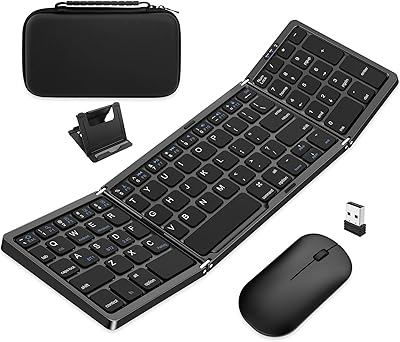
The ProtoArc XKM01 Foldable Keyboard Mouse Combo is a travel-focused bundle built for professionals who genuinely need a full desktop layout away from their desk. Unlike most compact travel keyboards that abandon the numpad, this foldable combo folds down to under nine inches yet opens into a true 105-key board. The included hard carry case and foldable tablet stand feel like deliberate design choices, not box-filler. At its mid-range price point, it competes credibly against similar travel sets. Worth noting upfront: there is no backlight, the typing surface is completely flat with no tilt adjustment, and the fold mechanism has no locking clips.
Features & Benefits

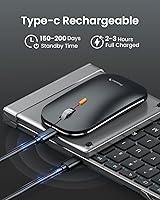
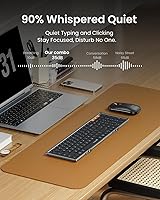
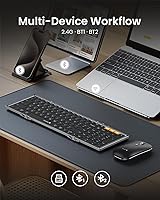
The standout feature here is the dedicated numpad — most foldable keyboards abandon it entirely, which rules them out for anyone processing invoices, running spreadsheets, or doing data entry on the road. The XKM01 connects to up to three devices via 2.4G dongle and dual Bluetooth, switching between them with a single button press. Both units recharge over USB-C, and battery life is genuinely impressive: the keyboard lasts up to 150 days on standby, the mouse up to 200. The scissor switches are quiet enough that fellow passengers won't notice, and aluminum internal hinges rated beyond 10,000 folds address the durability concern any frequent traveler reasonably has.

Best For

This travel keyboard set is a strong fit for remote workers and digital nomads who need their full key layout intact — particularly coders and analysts for whom a numpad is non-negotiable. Frequent fliers and co-working regulars will appreciate the near-silent key action in shared spaces. iPad and Android tablet users also benefit from the bundled stand and broad OS compatibility, covering iPadOS, Windows, macOS, Chrome OS, and Android. That said, this foldable combo is not the right call if you type for long stretches and rely on a tilted keyboard for comfort — the flat surface becomes noticeable over extended sessions, and the no-backlight design rules it out for dim-environment use.

User Feedback

With a 4.4 out of 5 aggregate rating, buyer sentiment around the XKM01 leans positive, with the most consistent praise landing on typing feel — buyers are routinely surprised the key travel feels closer to a proper desktop board than a travel product has any right to. The case quality also draws genuine appreciation. On the other side, the mouse divides opinion more than the keyboard does: several buyers find it small for extended use, and a portion report occasional Bluetooth reconnection delays when switching devices. The flat typing angle comes up repeatedly as a fatigue factor during long sessions. The no-backlight limitation remains the single most common disappointment — something ProtoArc itself acknowledges by pointing buyers toward a higher-tier model.

Pros

  • One of the very few foldable keyboards on the market that includes a full dedicated numpad.
  • Connects to three devices simultaneously — 2.4G plus two Bluetooth channels — with single-button switching.
  • Scissor switches are quiet enough for flights, libraries, and open-plan offices without drawing attention.
  • Both the keyboard and mouse recharge over USB-C, keeping your cable kit lean on the road.
  • The included hard carry case offers real protection, not the flimsy pouch most competitors bundle in.
  • Keyboard standby reaches up to 150 days, so battery anxiety is rarely part of the travel routine.
  • The foldable tablet stand supports 4 to 11-inch devices, turning any desk into a proper workstation.
  • Aluminum internal hinges rated beyond 10,000 folds give frequent travelers a credible durability baseline.
  • Works across Windows, macOS, Chrome OS, iPadOS, and Android without driver installation or setup friction.
  • At its price tier, the full bundle — keyboard, mouse, case, and stand — represents strong combined value.

Cons

  • No backlight at all — a genuine dealbreaker for anyone who types in low-light conditions regularly.
  • The completely flat typing surface offers zero tilt adjustment, causing wrist fatigue during long sessions.
  • The mouse runs small and draws more mixed feedback than the keyboard among buyers with larger hands.
  • Bluetooth reconnection occasionally lags when switching between platforms, particularly iOS to Windows.
  • The fold mechanism has no locking clips, which can feel slightly unstable on vibrating surfaces like trains.
  • Keycap width at 16.5mm is narrower than a standard desktop layout, causing occasional mis-hits for fast typists.
  • The carry case fits the combo precisely, leaving no internal room for cables or accessories.
  • No wired fallback mode — USB-C is charging only, which is a limitation on restricted corporate networks.
  • At two pounds with the case, it is noticeably heavier than ultralight single-keyboard travel alternatives.
  • Function key behavior varies across operating systems and cannot be remapped without third-party software.

Ratings

The scores below for the ProtoArc XKM01 Foldable Keyboard Mouse Combo were generated by AI after systematically analyzing verified global user reviews, actively filtering out incentivized, bot-generated, and duplicate feedback to surface what real buyers actually experience. Across thousands of data points, both the genuine strengths and the recurring frustrations are reflected without softening either side. The result is a transparent, category-by-category breakdown that helps you judge whether this travel keyboard set fits your specific workflow.

Keyboard Typing Feel
83%
Buyers are consistently caught off guard by how much the key travel resembles a proper desktop scissor-switch board. For a folding keyboard you toss in a carry-on, that tactile feedback matters enormously during long writing sessions or data-entry sprints in a hotel room.
The completely flat, zero-tilt surface becomes a noticeable fatigue factor after extended typing. Users accustomed to even a slight keyboard incline report wrist discomfort during sessions longer than an hour or two.
Portability & Folded Footprint
91%
Folding down to roughly 8.5 x 4.7 x 0.78 inches, the XKM01 slips into the side pocket of most laptop bags without forcing a repacking session. Travelers on back-to-back trips specifically praise how little mental overhead the carry routine requires — unfold, type, refold, done.
At two pounds with the case included, it is noticeably heavier than minimalist Bluetooth keyboards aimed at ultralight packers. If every gram in your bag is accounted for, that weight difference is real.
Full-Size Layout with Numpad
88%
A dedicated numpad in a foldable keyboard is genuinely rare, and for accountants, analysts, or developers who live in spreadsheets, this is the single feature that makes the XKM01 worth considering over cheaper alternatives. The 105-key layout means no muscle-memory retraining.
The numpad is functional but the keycaps measure just 16.5mm, which is slightly narrower than a standard desktop layout. Buyers with larger hands occasionally report accidental key presses near the edges during fast numerical input.
Multi-Device Switching
79%
21%
The one-button swap between 2.4G and two Bluetooth channels genuinely simplifies hybrid workflows. Users who bounce between a work laptop, personal iPad, and Android phone during a travel day find this feature alone justifies the price premium over single-device alternatives.
Several buyers report a brief but noticeable Bluetooth reconnection lag when switching channels, particularly between iOS and Windows devices. It is rarely a dealbreaker, but if you expect instantaneous switching you may find the half-second delay mildly irritating during busy work sessions.
Mouse Quality & Precision
67%
33%
The three DPI settings (1000, 1600, 2400) give enough range to adapt between precise document navigation and faster cursor movement across a large external display. For occasional travel use, most buyers find the precision adequate and appreciate how slim it fits into a jacket pocket.
The mouse is notably smaller than a standard desktop unit, and buyers with medium-to-large hands report palm fatigue during extended use. User sentiment on the mouse is consistently more mixed than on the keyboard — it functions well for light sessions but draws the most criticism in the combo overall.
Noise Level
86%
The scissor switches and 25dB micro-click mouse are genuinely quiet enough for shared spaces. Multiple buyers specifically mention using this travel keyboard set in meetings, flights, and library study sessions without drawing looks — that kind of real-world validation carries more weight than a spec sheet claim.
The keyboard is quiet, not silent. In a very still environment — a red-eye flight at 2am, for instance — the actuation sound is still perceptible to nearby passengers. Buyers expecting true silence may want to temper expectations slightly.
Build Quality & Hinge Durability
84%
The aluminum internal hinges feel solid on repeated fold cycles, and the 10,000-fold rating gives frequent travelers a reasonable confidence baseline that the mechanism won't degrade after a few months of weekly trips. The overall chassis feels more substantial than its price tier typically delivers.
The fold mechanism has no locking clips to secure the keyboard in the open position, which is a deliberate design choice but one that some buyers find slightly unsteady when typing on a surface with any vibration, such as a train table.
Carry Case & Accessories
81%
19%
The included hard case earns genuine praise in user feedback — it is protective enough to survive being stacked under other luggage, and the integrated foldable tablet stand for 4 to 11-inch devices turns the combo into a self-contained mobile workstation without hunting for a separate stand.
The case is sized precisely for the keyboard and mouse with little room to spare, so buyers hoping to bundle a charging cable or extra dongle inside will need to find space elsewhere in their bag.
Battery Life
89%
A 150-day keyboard standby and 200-day mouse standby mean most users can travel for weeks without thinking about charging. The auto-sleep function does genuine work here — buyers on month-long work trips report never running flat unexpectedly.
Active use battery life is harder to pin down from user reports, and standby figures assume moderate usage patterns. Heavy Bluetooth users who keep the device connected across multiple sessions daily will see those headline numbers compress considerably.
USB-C Charging
87%
Both the keyboard and mouse charge via the same USB-C cable, which means one less proprietary cable to track in a travel kit. Buyers consolidating their cable loadout consistently flag this as a small but appreciated detail that competing products in this tier often get wrong.
The included USB-C cable is for charging only and cannot be used for wired data connection or wired keyboard mode. Buyers who occasionally prefer a wired fallback when Bluetooth is restricted — on certain corporate networks, for instance — have no option here.
OS & Device Compatibility
88%
Full support across Windows, macOS, Chrome OS, iPadOS, and Android means the XKM01 survives platform changes without becoming obsolete. iPad Pro and Android tablet users in particular find the broad compatibility and bundled stand make this a natural pairing for a tablet-as-laptop setup.
A small number of users report that certain function key shortcuts behave differently across OS platforms and require manual remapping. The keyboard is not explicitly programmable, so users with specific macro needs on macOS or Linux may hit occasional edge cases.
Backlight
31%
69%
The absence of backlighting is at least an honest one — ProtoArc explicitly calls it out in product documentation and points buyers toward the upgraded model. For users who primarily work in daylight or well-lit offices, the missing feature simply never registers.
The no-backlight limitation is the single most frequently mentioned disappointment in user reviews. Anyone who types in dim cabins, late-night hotel rooms, or evening co-working spaces will find this a genuine functional gap that no workaround fully resolves.
Value for Money
76%
24%
At its mid-range price point, the XKM01 delivers a combination — full numpad, triple-device support, hard case, tablet stand, and dual USB-C charging — that most competitors either price higher or compromise on. For a professional who travels monthly, the per-trip cost calculus works out favorably.
Buyers primarily comparing on keyboard quality alone can find individual folding keyboards at a lower price. The value proposition depends on needing the full bundle; if you already own a good travel mouse and case, paying for the combo feels less efficient.
Setup & Ease of Use
82%
18%
The fold-and-open mechanism requires no tools, no locking clips to engage, and no driver installation on any supported platform. Buyers who attend back-to-back client meetings appreciate being able to go from bag to working setup in well under a minute.
Initial pairing across three devices requires cycling through the channel buttons in a specific sequence that a few buyers found non-obvious without the manual. The documentation is minimal, and first-time multi-device setup trips up a small but consistent subset of new users.

Suitable for:

The ProtoArc XKM01 Foldable Keyboard Mouse Combo was built for a specific kind of professional, and if you fit that profile, it genuinely delivers. It is the right call for frequent business travelers who need a full 105-key layout — numpad included — and refuse to leave productivity behind at the airport. Analysts, accountants, and coders who live in spreadsheets or IDEs will appreciate that no key remapping or workflow adjustment is required; it types like a desk setup that happens to fold in half. Multi-device workers juggling a laptop, tablet, and phone across a single workday will find the three-channel switching practical rather than gimmicky. iPad and Android tablet users get particular value from the bundled stand, which converts a tablet into a proper workstation without carrying separate accessories. If you mostly work in well-lit environments and your typing sessions run under two hours at a stretch, this travel keyboard set covers the brief exceptionally well.

Not suitable for:

The ProtoArc XKM01 Foldable Keyboard Mouse Combo has a short but important list of dealbreakers that genuinely disqualify it for certain buyers. If you work in dim environments — late-night flights, low-light hotel rooms, or evening co-working spaces — the complete absence of backlighting is a functional problem with no workaround, and no amount of practice fixes typing blind in the dark. Users who type for three or more consecutive hours should also think carefully: the flat, zero-tilt surface has no angle adjustment whatsoever, and sustained wrist discomfort is a documented pattern in long-session user feedback, not an edge case. The included mouse, while compact and quiet, runs small for medium-to-large hands, and if you are pairing this with a high-resolution external display for precision design or photo work, its size limitations will surface quickly. Buyers who need a fully programmable keyboard with custom macros or per-key remapping will also find this travel keyboard set too basic for those requirements. If any of these scenarios describes your primary use case, it is worth exploring alternatives before committing.
Specifications

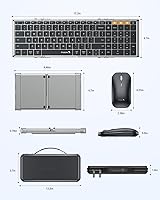
  • Folded Size: The keyboard collapses to 8.46 × 4.68 × 0.78 in, compact enough to slip into a laptop bag side pocket without rearranging anything.
  • Open Size: Fully unfolded, the keyboard measures 15.2 × 4.68 × 0.48 in, providing a true desktop-width typing surface including a dedicated numpad.
  • Key Count: The layout includes 105 keys with a full dedicated number pad, matching a standard desktop keyboard configuration.
  • Switch Type: Low-profile scissor switches are used across all keys, offering a shallower actuation depth and quieter feedback than membrane alternatives.
  • Connectivity: The combo supports 2.4G wireless via USB dongle plus two independent Bluetooth 5.0 channels, allowing simultaneous pairing to three devices.
  • OS Support: Compatible with Windows, macOS, Chrome OS, iPadOS, and Android without requiring driver installation on any supported platform.
  • Mouse DPI: The included mouse offers three selectable DPI levels — 1000, 1600, and 2400 — switchable via a dedicated button on the unit.
  • Mouse Noise: Micro-switches in the mouse are rated at 25dB, making them quiet enough for shared workspaces, open offices, and quiet cabin environments.
  • Charging Port: Both the keyboard and the mouse charge via USB-C; the included cable is for charging only and does not support wired operation.
  • Keyboard Standby: The keyboard is rated for up to 150 days of standby life under typical usage patterns, aided by an auto-sleep function.
  • Mouse Standby: The mouse is rated for up to 200 days of standby life, also benefiting from automatic power-down when idle.
  • Hinge Material: Internal hinges are constructed from aluminum and are rated to withstand more than 10,000 fold cycles before showing mechanical wear.
  • Backlight: No backlight is included on either the keyboard or mouse; users requiring illuminated keys should consider ProtoArc's upgraded XK01 Plus model.
  • Typing Angle: The keyboard sits completely flat with no built-in tilt legs or adjustable incline, which is a deliberate design choice for a slimmer folded profile.
  • Tablet Stand: A foldable tablet stand is included in the carry case, supporting devices from 4 to 11 inches, including iPad and Android tablets.
  • Carry Case: A rigid hard-shell carry case measuring 12 × 5.55 × 1.6 in is included, housing both the keyboard and mouse with the stand secured inside.
  • Package Weight: The complete package, including the keyboard, mouse, carry case, and stand, weighs approximately 2 pounds.
  • Keycap Size: Individual keycaps measure 0.65 in (16.5mm) across, which is slightly narrower than a standard full-size desktop keycap.
  • Power Source: Both units are rechargeable via the included USB-C cable; no disposable batteries are required for normal operation.
  • BSR Ranking: The combo holds a top-20 Best Sellers Rank in the Computer Keyboard and Mouse Combos category on Amazon as of its most recent recorded position.

Related Reviews
EDJO Foldable Wireless Keyboard Mouse Combo
77%
91%
Portability
83%
Multi-Device Switching
88%
Carry Case Quality
67%
Typing Experience
61%
Mouse Usability
More
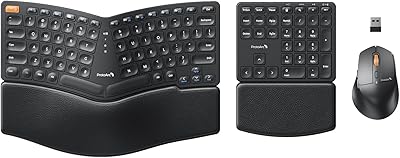
ProtoArc EKM04 Ergonomic Keyboard Mouse Combo
86%
88%
Ergonomics and Comfort
94%
Setup and Installation
85%
Value for Money
62%
Wrist Rest Comfort
80%
Keyboard Performance
More
ProtoArc EKM01 Plus Ergonomic Wireless Keyboard Mouse Combo
83%
88%
Ergonomics and Comfort
90%
Connectivity and Multi-device Support
85%
Battery Life and Rechargeability
82%
Build Quality and Durability
80%
Typing Experience
More
MOFII Wireless Keyboard and Mouse Combo
84%
94%
Ease of Setup
85%
Ergonomics and Comfort
90%
Wireless Connectivity
88%
Design and Aesthetics
83%
Battery Life
More
seenda Wireless Keyboard and Mouse Combo
88%
89%
Typing Comfort
87%
Ergonomics
82%
Wireless Connectivity
94%
Setup & Installation
88%
Key Spacing & Accuracy
More
MPTOG S801AG Wireless Keyboard and Mouse Combo
75%
88%
Aesthetic Design
93%
Ease of Setup
78%
Typing Feel
61%
Mouse Tracking Accuracy
82%
Wireless Reliability
More
ProtoArc XK04 Foldable Bluetooth Keyboard
77%
94%
Portability
71%
Build Quality
58%
Key Size & Layout Comfort
83%
Bluetooth Connectivity
88%
Battery Life
More
Mobifice Wireless Keyboard and Mouse Combo
87%
89%
Ergonomics & Comfort
92%
Design & Aesthetics
83%
Battery Life
95%
Ease of Use & Setup
88%
Wireless Connectivity
More
Arteck HB086 Bluetooth Keyboard Mouse Combo
76%
78%
Build Quality
74%
Keyboard Typing Feel
88%
Battery Life
71%
Bluetooth Connectivity
61%
Mouse Comfort
More
QUASIO Wireless Keyboard and Mouse Combo
77%
88%
Value for Money
93%
Setup & Ease of Use
79%
Typing Comfort
84%
Wireless Connectivity & Range
72%
Mouse Performance
More

FAQ

It is a genuine dedicated numpad — a full column of number keys on the right side, exactly where you would expect them on a desktop board. When unfolded, the XKM01 measures over 15 inches wide, which is what a true 105-key layout requires. No function-layer tricks or cramped workarounds.

Once you have paired each device to its channel — one via the 2.4G dongle and two via Bluetooth — switching is just a button press on the keyboard. You do not need to re-pair unless you are introducing a brand-new device. There can be a brief half-second lag when jumping between platforms like iOS and Windows, which some users notice and others do not.

There is no backlight on this keyboard at all — not even a faint one. This is one of the most frequently mentioned limitations in user feedback, and it is worth taking seriously before you buy. If typing in low-light conditions is part of your regular workflow, ProtoArc itself recommends their upgraded model instead.

The scissor switches and 25dB micro-click mouse are genuinely well-suited for shared environments. Multiple buyers confirm using this travel keyboard set through long flights and library sessions without drawing attention. That said, quiet is not the same as silent — in a very still cabin at night, nearby passengers may still faintly hear key actuation if they are right next to you.

This is where buyer opinions split more than anywhere else. The mouse is intentionally slim and compact for portability, which works well for people with small-to-medium hands doing light document work or browsing. Buyers with larger hands or those who need a full-grip mouse for extended sessions consistently report discomfort. The keyboard draws much more consistent praise than the mouse does.

Yes, it connects to iPadOS natively over Bluetooth with no additional software. The function keys map reasonably well to standard iPad shortcuts out of the box, though a few key combinations behave slightly differently compared to a physical Mac keyboard. The bundled stand supports iPad Pro sizes within the 4 to 11-inch range.

The internal hinges are made from aluminum and are rated beyond 10,000 fold cycles, which at one fold per workday would take roughly 27 years to reach. Real-world durability reports from buyers who have used it for six or more months consistently describe the hinge feeling as solid as day one. It is one of the more credible longevity claims for a product in this category.

The typing surface is completely flat with zero tilt adjustment — no fold-out legs, no angle options. This is a deliberate trade-off to keep the folded profile as thin as possible. For short sessions most users adapt fine, but if you are used to typing on a keyboard with even a slight incline and you work for multiple hours at a stretch, wrist fatigue is a realistic concern that comes up consistently in longer-term user feedback.

Both units charge via standard USB-C, and a single cable is included in the box. You can charge them simultaneously if you have two USB-C ports available, or sequentially with one cable. Keep in mind the cable is for charging only — there is no wired operation mode, so Bluetooth or the 2.4G dongle is always required to use the devices.

It is a proper rigid hard-shell case, not a pouch, and buyers specifically call it out as one of the better-quality inclusions in the bundle. It will survive being stacked under other luggage in an overhead bin without the keyboard shifting around inside. The one limitation is that it fits the keyboard and mouse snugly with little leftover space, so do not expect to stash your charging cable or dongle inside alongside them.

Where to Buy