
Overview

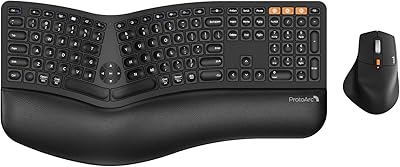
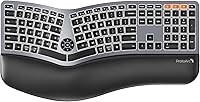
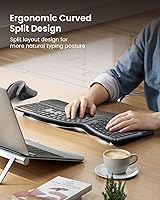
The ProtoArc EK01 Plus is a mid-range ergonomic keyboard built for people who spend serious hours at a desk and want something gentler on their wrists than a standard flat board. Its defining characteristic is the curved split-keyframe layout — not a fully separated design, but a moderate inward angle that nudges your hands into a more natural resting position. It's wireless-only, runs on a rechargeable battery, and comes in a grey-black finish constructed from plastic and silicone. Manage expectations upfront: this isn't a mechanical keyboard, and it won't replace a clinical ergonomic setup. It's a practical, approachable step toward daily comfort.

Features & Benefits

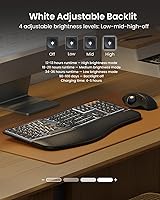
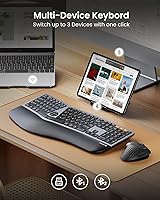
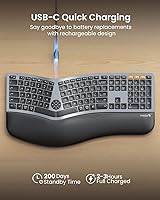
The scooped keycap profile is one of the first things you notice — each key is slightly concave, which keeps fingertips centered during longer typing sessions. The backlight is white-only with three brightness settings, useful for dim environments without being distracting. One thing worth knowing: the light switches off after just one minute of inactivity, and enters a deeper sleep after an hour — press a key to wake it, then manually toggle the light back on. Connectivity covers two Bluetooth channels plus a 2.4G USB receiver, letting you hop between three devices with a single keypress. The 2000mAh battery lasts considerably longer with the backlight off, and USB-C charging keeps things convenient.

Best For

This wireless split keyboard makes the most sense for long-hours office typists who want meaningful wrist relief without committing to the steep learning curve of a fully split or ortholinear board. It's especially well-suited to multi-device setups — if you routinely switch between a laptop, tablet, and desktop within the same workspace, the three-channel switching is genuinely useful. Cross-platform support for Windows, macOS, and Android works out of the box, which matters for mixed-OS households. Low-light workers will appreciate the clean white backlight without RGB distraction. It's less ideal for gamers, programmers needing macro keys, or anyone who wants a wired fallback option.

User Feedback

Among buyers, the wrist rest comfort and easy multi-device switching draw consistent praise — most people find the palm support noticeably reduces fatigue across full workdays, and the pairing process is reported as straightforward. On the flip side, some users feel the plastic construction is a touch lightweight relative to the price, and the key travel is on the shallow end, which takes adjustment coming from a mechanical board. The one-minute backlight timeout catches people off guard — it's not a defect, but manually re-enabling the light after a deep sleep cycle is an extra step many wish were automatic. Bluetooth stability is generally reliable, though occasional dropout on one channel has been noted.

Pros

  • The curved split layout reduces wrist and forearm strain noticeably during full-day typing sessions.
  • Switching between three devices with a single keypress is fast, reliable, and genuinely useful in multi-device setups.
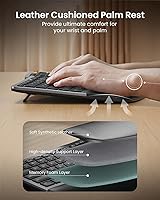
  • The integrated wrist rest provides real palm support without requiring a separate accessory purchase.
  • White-only backlight with three brightness levels is clean and practical for low-light office environments.
  • USB-C charging and a healthy battery capacity mean weeks of use before needing to plug in, especially with the backlight off.
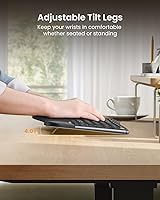
  • Four tilt feet with three angle positions give meaningful flexibility for standing desk users.
  • Cross-platform compatibility with Windows, macOS, and Android works out of the box with no driver installation.
  • Setup and pairing across all three channels is straightforward enough that most users are up and running within minutes.
  • The full-size layout with a numeric keypad makes it a comfortable daily driver for data entry and spreadsheet work.

Cons

  • Key travel is shallow and mushy — a real disappointment for anyone coming from a mechanical keyboard.
  • The one-minute backlight timeout is aggressive and requires a manual re-enable after the keyboard wakes from deep sleep.
  • Plastic construction feels lightweight relative to the price, lacking the solidity some buyers expect at this tier.
  • No wired mode means zero fallback if Bluetooth connectivity drops or is restricted by your environment.
  • Keys are non-programmable, ruling out any workflow customization or macro shortcuts.
  • Battery level is not indicated anywhere on the keyboard, so dead-keyboard surprises are a real possibility.
  • The wrist rest padding can compress and soften over months of daily use, reducing its long-term effectiveness.
  • Occasional Bluetooth dropout on one channel has been reported, particularly with Android devices.
  • At over 20 inches wide and nearly 4 pounds, it is impractical to transport and is strictly a stay-at-desk keyboard.

Ratings

The scores you see below for the ProtoArc EK01 Plus were generated by our AI engine after systematically analyzing verified buyer reviews from across multiple global markets, with spam, incentivized, and bot-flagged submissions actively filtered out before any scoring took place. The result is an honest, balanced snapshot of where this wireless split keyboard genuinely earns its praise — and where real users have run into frustration. Nothing has been softened or inflated.

Ergonomic Comfort
83%
The curved split layout consistently draws praise from users who previously dealt with wrist tension during long office shifts. The gentle inward angle feels natural within a day or two, and most buyers report noticeably less forearm strain after a week of regular use.
It is not a dramatic ergonomic intervention — users with existing RSI or carpal tunnel conditions often find the curve insufficient for serious relief. Transitioning from a flat board takes adjustment, and some typists find their accuracy dips during the first few days.
Wrist Rest Quality
78%
22%
The integrated cushioned wrist rest is one of the most consistently praised elements across buyer reviews. It cradles the palms at a natural angle and makes extended typing sessions considerably more comfortable than keyboards with no wrist support at all.
A few users noted that the wrist rest padding compresses over time, losing some of its initial firmness. It is fixed to the keyboard body, so those who prefer adjustable or detachable rests may find this limiting.
Multi-Device Switching
86%
Switching between a laptop, tablet, and desktop with a single keypress is one of the standout workflow features that buyers highlight repeatedly. Users running mixed Mac and Windows setups report the transition is fast and the keyboard re-pairs reliably without fuss.
Occasional dropout on one of the Bluetooth channels has been reported by a minority of users, particularly on Android devices. It is not a widespread issue, but it is worth noting for anyone who depends on rock-solid wireless stability.
Backlight Usability
71%
29%
The three-level white backlight is clean and easy on the eyes for evening or low-light typing. Users who find RGB lighting distracting specifically appreciate the no-frills single-color approach, and the brightness range covers both dim rooms and modestly lit offices.
The one-minute auto-sleep timeout for the backlight catches many users off guard — it is aggressive enough to feel like a malfunction. After a deep-sleep cycle, re-enabling the light requires a manual keypress beyond the wake action, which some users find tedious mid-workflow.
Battery Life
79%
21%
With the backlight off, real-world battery performance earns genuine approval — most users report going weeks between charges under normal office workloads. The 2000mAh capacity is competitive for this category, and USB-C charging is a welcome modern touch.
With the backlight kept at mid or high brightness, battery drain accelerates noticeably, and some users expected longer runtimes given the capacity figures. The lack of a battery level indicator means users occasionally get caught off guard by a dead keyboard.
Key Feel & Typing Experience
66%
34%
The scooped keycap profile helps with finger placement accuracy, particularly for touch typists making the move from a flat board. Key actuation is smooth enough for general office use and daily correspondence.
Key travel is shallow, and users coming from mechanical keyboards often describe the feel as mushy or unsatisfying. The tactile feedback is not strong, which can cause fatigue during fast typing bursts and is a real sticking point for power users.
Build Quality
62%
38%
The keyboard feels solid enough on a desk and does not flex noticeably during normal use. The grey-black colorway looks professional and fits most office environments without standing out awkwardly.
The plastic and silicone construction does feel lightweight for the price point, and several buyers noted that the chassis lacks the premium rigidity they expected. It does not feel cheap, but it does not feel substantial either — a common critique from users who have handled higher-end boards.
Connectivity Setup
84%
First-time pairing across all three channels is reported as quick and intuitive by the vast majority of buyers. The inclusion of both Bluetooth and a 2.4G USB receiver gives users real flexibility depending on their device limitations.
A small number of users reported that one Bluetooth channel required re-pairing after a firmware or OS update. There is no wired fallback mode, so if wireless connectivity fails entirely, there is no backup option available.
Tilt & Angle Adjustability
73%
27%
Four tilt feet offering three distinct angles is genuinely useful for standing desk users who shift between sitting and standing positions throughout the day. The range covers enough variance that most users can find a comfortable neutral wrist angle.
The tilt feet feel slightly flimsy compared to the rest of the keyboard, and a couple of buyers mentioned legs that became difficult to click into position after extended use. For users who rarely adjust their desk height, the feature adds little daily value.
Cross-Platform Compatibility
81%
19%
Out-of-the-box support for Windows, macOS, and Android without any driver installation is a genuine convenience that multi-platform users appreciate. Mac-specific function keys are accessible, which removes a common friction point for Apple users.
Some Mac users noted that a handful of shortcut key labels do not match macOS conventions, requiring a brief period of remapping habits mentally. There is no Linux support listed, which excludes a niche but vocal segment of potential buyers.
Portability
58%
42%
The wireless design and USB-C charging eliminate cable clutter, which helps when moving the keyboard between a home office and a main workstation within the same building.
At 3.83 pounds and over 20 inches wide, this is not a keyboard you realistically carry in a bag. There is no travel case included, and the size and weight make it firmly a stay-at-desk board despite the wireless functionality.
Value for Money
69%
31%
For users primarily motivated by wrist comfort and multi-device flexibility, the feature set relative to the asking price is reasonable. The wrist rest, backlight, and triple-device connectivity together justify the mid-range positioning for the right buyer.
Users who prioritize build quality or key feel may feel the price outpaces the physical execution. There are competing ergonomic keyboards at similar or slightly higher prices that offer better key mechanisms or sturdier chassis materials.
Included Accessories
74%
26%
The box includes the USB receiver, a USB-C charging cable, and a clear user manual — everything needed to get started immediately across all connectivity modes. Nothing feels missing for day-one setup.
There is no carrying pouch, keyboard cover, or additional keycap tools included. Buyers who want any degree of customization or protection for storage will need to source accessories separately.

Suitable for:

The ProtoArc EK01 Plus is a strong match for office workers and remote employees who spend most of their day at a keyboard and are starting to feel the cumulative toll of wrist and forearm tension. If you are not ready to commit to a fully split or ortholinear design but want something meaningfully more comfortable than a standard flat keyboard, the gentle curved layout here hits a practical middle ground. Multi-device users will find real daily value in the three-channel switching — particularly those who juggle a personal laptop, a work computer, and a tablet within the same desk setup. The integrated wrist rest and adjustable tilt feet make it well-suited for standing desk environments where typing angle shifts throughout the day. It also works cleanly across Windows, macOS, and Android without any driver headaches, which makes it a reliable pick for mixed-platform households or anyone who recently switched operating systems.

Not suitable for:

The ProtoArc EK01 Plus is not the right fit for anyone who needs a genuinely therapeutic ergonomic solution — users with diagnosed RSI, carpal tunnel syndrome, or chronic wrist conditions will likely find the curve too subtle to make a meaningful clinical difference. Mechanical keyboard enthusiasts should look elsewhere entirely; the key travel is shallow and the tactile feedback is soft, which tends to frustrate anyone accustomed to a crisper, more deliberate actuation. Gamers and programmers who rely on macro keys or custom key remapping will hit a hard wall here, as the keys are non-programmable. There is no wired mode at all, so anyone who works in a secure IT environment that restricts Bluetooth, or who simply wants a reliable wired fallback, needs to factor that in. Finally, if portability is a priority — traveling between offices or packing a bag for a co-working space — the keyboard's size and weight make it a desk-bound solution rather than a go-anywhere one.

Specifications

  • Dimensions: The keyboard measures 20.63 x 11.02 x 1.5 inches, making it a full-size desk-bound board with a substantial footprint.
  • Weight: The packaged unit weighs 3.83 pounds, reflecting its full-size frame and integrated wrist rest construction.
  • Materials: The keyboard body is constructed from plastic and silicone, offering a lightweight but functional build suited to daily office use.
  • Layout: Full-size layout includes a numeric keypad, function row, and a curved split-keyframe design with scooped keycaps across all key positions.
  • Connectivity: Supports two Bluetooth channels and one 2.4G USB receiver connection, allowing simultaneous pairing with up to three devices and one-key switching between them.
  • Compatibility: Works with Windows 8 and above, macOS 10.12 and above, and Android 4.3 and above; no wired connection mode is available.
  • Battery: Equipped with a built-in 2000mAh rechargeable lithium battery charged via USB-C; runtime is significantly extended when the backlight is disabled.
  • Charging Port: USB-C charging port is used exclusively for power input; the keyboard cannot transmit data or function as a wired input device through this port.
  • Backlight: Single-color white LED backlight with three adjustable brightness levels; automatically dims after 1 minute of inactivity and enters deep sleep after 60 minutes.
  • Tilt Adjustment: Four adjustable tilt feet provide three distinct typing angles, allowing users to customize wrist and forearm positioning for sitting or standing desk setups.
  • Wrist Rest: A cushioned wrist rest is integrated directly into the keyboard chassis, providing continuous palm support across the full width of the board.
  • Key Type: Membrane-style keys with a scooped keycap profile; keys are non-programmable and do not support custom remapping or macro assignment.
  • Backlight Color: White only; no RGB or multi-color backlight modes are available on this keyboard.
  • In the Box: Package includes the keyboard, one 2.4G USB receiver, one USB-C charging cable, and a printed user manual.
  • Charger Spec: Requires a standard DC 5V 1A power source for charging; high-power or fast-charge adapters are not recommended and may affect performance.
  • Sleep Behavior: Backlight turns off after 1 minute of inactivity; after 60 minutes, the keyboard enters deep sleep and requires a keypress wake followed by manual backlight re-activation.
  • Keycap Profile: Scooped concave keycap design is intended to guide fingertip placement and reduce lateral slipping during extended typing sessions.

Related Reviews
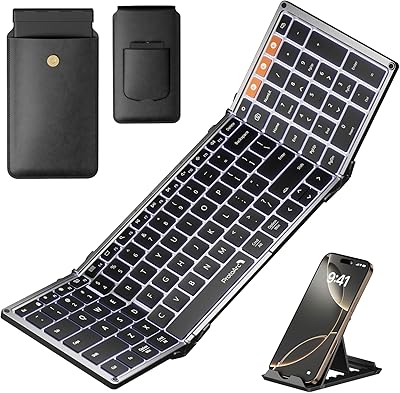
ProtoArc XK01 Plus Backlit Foldable Bluetooth Keyboard
84%
93%
Portability
88%
Backlighting Functionality
85%
Ease of Use
90%
Battery Life
80%
Typing Comfort
More
ProtoArc EKM01 Plus Ergonomic Wireless Keyboard Mouse Combo
83%
88%
Ergonomics and Comfort
90%
Connectivity and Multi-device Support
85%
Battery Life and Rechargeability
82%
Build Quality and Durability
80%
Typing Experience
More
TourBox Elite Plus
TourBox Elite Plus
87%
94%
Ergonomics & Comfort
91%
Workflow Efficiency
88%
Software Integration
90%
Programmability & Customization
85%
Build Quality
More
BuddyPhones Explore Plus
90%
94%
Comfort & Fit
91%
Build Quality
88%
Sound Clarity
97%
Volume Limiting Safety
90%
Portability
More
Meta Portal Plus 14″
85%
89%
Video Call Quality
93%
Display Quality
85%
Sound Quality
91%
Ease of Setup
88%
Privacy Features
More
Soundcore Boom 2 Plus
87%
95%
Sound Quality
93%
Bass Performance
91%
Volume Output
88%
Build Quality
90%
Water Resistance
More
Yaber L2 Plus Projector
84%
89%
Display Quality
91%
Ease of Setup
85%
Streaming Performance
80%
Sound Quality
93%
Portability
More
Quican IDW208 Plus Smartwatch
84%
88%
Battery Life
91%
Waterproofing
84%
Fitness Tracking Accuracy
92%
Ease of Setup
80%
Display Quality
More
Logitech StreamCam Plus Webcam
87%
92%
Video Quality
95%
Ease of Setup
87%
Microphone Performance
90%
Auto-Focus Accuracy
91%
Portability
More
ProtoArc K90-A Bluetooth Keyboard
85%
88%
Typing Experience
91%
Multi-device Connectivity
94%
Portability & Size
87%
Battery Life & Efficiency
85%
Backlighting Functionality
More

FAQ

No — this is a wireless-only keyboard and cannot be used as a wired device. The USB-C port is for charging only, so if the battery runs out mid-session, you will need to charge it before continuing. It is worth keeping an eye on your usage habits to avoid getting caught off guard.

Each connectivity channel has a dedicated key on the keyboard. You just tap the corresponding channel key — Bluetooth 1, Bluetooth 2, or the 2.4G USB channel — and the keyboard switches over within a second or two. Most users find it quick and reliable once the initial pairing is set up.

Nothing is wrong — this is intentional behavior designed to conserve battery life. The backlight cuts out after one minute of inactivity and the keyboard enters a deeper sleep mode after 60 minutes. Press any key to wake it, then manually toggle the backlight back on using the dedicated backlight key. It catches a lot of users off guard initially, but it is by design.

The keyboard is officially listed as compatible with Windows, macOS, and Android. While many Bluetooth keyboards do work with iPadOS and iOS in practice, Apple compatibility is not officially confirmed by the manufacturer for this model. If you primarily use an iPad, it may be worth confirming with the seller before purchasing.

The wrist rest is integrated into the keyboard body and is not detachable. If you prefer to use your own wrist rest or dislike fixed palm rests, that is worth factoring into your decision, since you cannot remove it or swap it out.

Real-world battery life varies quite a bit depending on backlight use. With the backlight off, most users report several weeks of daily office use on a single charge. With the backlight running at mid or high brightness, that runtime shortens considerably — some users see it drop to a week or less under heavy backlit use.

Unfortunately, no. The keys on this keyboard are non-programmable, and there is no companion software for remapping or macro creation. If custom key assignments are part of your workflow, you will need to look at a different keyboard.

Linux compatibility is not officially listed or supported by the manufacturer. Some users have reported basic functionality over Bluetooth on certain Linux distributions, but since it is not guaranteed or tested, you should approach that use case with caution.

The keyboard requires a standard 5V 1A power source — a basic USB wall adapter or a computer USB port both work well. Avoid fast chargers or high-wattage adapters, as the manufacturer specifically warns these can affect keyboard performance. Most standard phone chargers that are not quick-charge enabled will be fine.

For most people, the adjustment period is pretty short — a few days to a week of regular typing before the curved layout starts to feel natural. The split angle here is moderate rather than extreme, so it is not as disorienting as a fully separated ergonomic design. Typing speed and accuracy may dip slightly at first, but the majority of users settle in quickly.