POTTMACEE S8 14.2″ Laptop Screen Extender
POTTMACEE S8 14.2″ Laptop Screen Extender — image 1
POTTMACEE S8 14.2″ Laptop Screen Extender — image 2
POTTMACEE S8 14.2″ Laptop Screen Extender — image 3
POTTMACEE S8 14.2″ Laptop Screen Extender — image 4
POTTMACEE S8 14.2″ Laptop Screen Extender — image 5
POTTMACEE S8 14.2″ Laptop Screen Extender — image 6
POTTMACEE S8 14.2″ Laptop Screen Extender — image 7
POTTMACEE S8 14.2″ Laptop Screen Extender — image 8
78%
22%

Overview

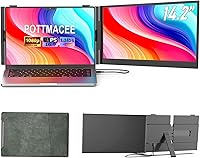
The POTTMACEE S8 14.2″ Laptop Screen Extender arrives at a moment when working from a single laptop screen increasingly feels like a real limitation. This screen extender sits in the mid-range: not a budget throwaway, but not a professional-grade display either. What makes it stand out is its plug-and-play setup and genuinely broad compatibility — Windows, Mac, ChromeOS, and more — which removes most of the friction that makes cheaper portable monitors frustrating. The aircraft-grade aluminum build gives it a solidity you wouldn't expect at this tier. Just set expectations accordingly: this is a productivity tool, not a workstation display for color-sensitive creative work.

Features & Benefits

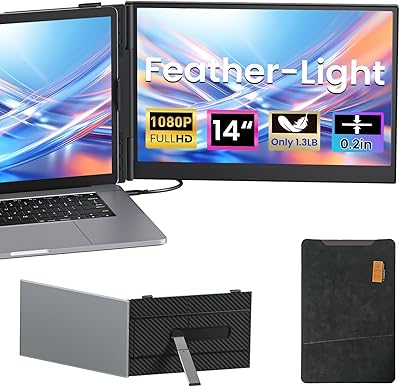
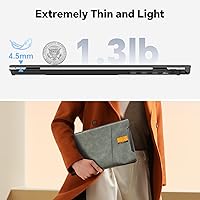
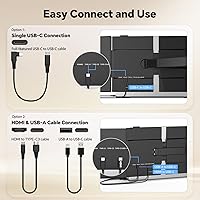
At just 0.17 inches thick and 1.3 pounds, the S8 portable monitor genuinely slides into a laptop bag without adding noticeable bulk — a meaningful difference from standalone portable displays that demand their own case. The 14.2-inch IPS panel holds up well in a café or hotel lobby, though direct sunlight will challenge it. Worth being upfront: the color gamut sits around 72% NTSC, which is perfectly fine for docs, spreadsheets, and video calls, but falls short for anyone editing photos or doing precise design work. Single USB-C cable connection works with most modern laptops, while USB-A and HDMI cover older hardware. The included stand and travel pouch are practical, not just box-filler.

Best For

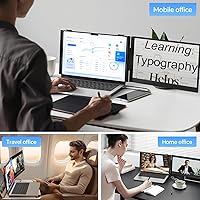
This laptop display add-on earns its keep with anyone who works seriously on the road but needs to travel light. Remote workers toggling between a browser, a messaging app, and a spreadsheet will immediately appreciate having a second screen to spread out on. Students who cross-reference sources while writing, or coders keeping a terminal and documentation side by side, are natural candidates. Business travelers presenting decks or joining video calls in hotel rooms will find setup takes under a minute. Casual users — streaming content on the secondary display while keeping work visible — also get solid mileage. Where it underperforms: anyone needing color-accurate output for creative work or a permanent desk monitor should look elsewhere.

User Feedback

Since this is a relatively new product, review volume is still building — but early buyer patterns point to a few consistent themes. Setup speed and portability tend to get the most praise: people are glad it just works without driver installs or software fiddling. Compatibility across Windows and macOS appears solid in practice. Where feedback gets mixed is stand stability — on a flat desk it holds fine, but tray tables and soft surfaces introduce wobble that depends heavily on how balanced your laptop is. A handful of buyers flag brightness as adequate for indoor use but not ideal for brighter outdoor settings. Customer support turnaround and the 12-month warranty get positive mentions, which matters for a brand still establishing itself.

Pros

  • Genuinely slim and light enough to forget it’s in your bag until you need it.
  • Single-cable USB-C connection works immediately on most modern MacBooks and Windows laptops.
  • The IPS panel delivers comfortable viewing angles, so positioning is flexible without color washout.
  • Comes with all necessary cables in the box — no separate accessory purchases required on day one.
  • The included travel pouch adds real protection without requiring a separate case.
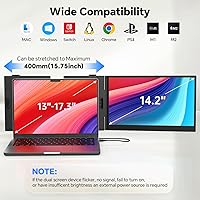
  • Compatible with a wide range of operating systems, including Windows, macOS, ChromeOS, Linux, and Android.
  • Aluminum construction feels more durable than the plastic-shell alternatives at similar price points.
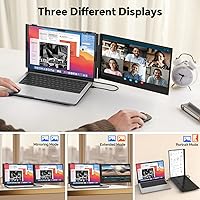
  • Extended, mirror, and presentation modes cover the vast majority of real-world use cases without extra software.
  • Fits laptops from 13-inch up to 17.3-inch, making it practical across a broad range of hardware.
  • Twelve-month warranty and responsive customer support reduce the risk of buying from a newer brand.

Cons

  • Stand stability is surface-dependent — wobbles noticeably on airplane tray tables or soft, uneven desks.
  • Color gamut is not wide enough for professional photo editing, color grading, or precise design work.
  • Brightness may struggle in direct sunlight or unusually bright indoor environments.
  • The glossy screen surface picks up reflections in well-lit rooms, which can be distracting.
  • Older laptops without full-function USB-C require an HDMI plus USB-A combo, adding cable clutter.
  • As a newer product, the volume of long-term user reviews is still limited, making durability harder to assess.
  • The screen extender clamps onto the laptop lid, so heavy or bulky laptop builds may affect balance.
  • 72% NTSC color coverage means colors can appear slightly washed out compared to higher-gamut displays.

Ratings

The POTTMACEE S8 14.2″ Laptop Screen Extender scores below are generated by AI after analyzing verified global buyer reviews, with spam, incentivized, and bot-generated feedback actively filtered out. The ratings reflect a balanced synthesis of real-world praise and genuine frustrations — nothing is glossed over. Whether this screen extender earns a place in your bag or falls short of your needs, the scorecard below lays it out transparently.

Portability
93%
This is where the S8 portable monitor genuinely outperforms most of its competition. At under 1.4 pounds and barely thicker than a few stacked credit cards, buyers consistently report slipping it into a laptop sleeve without a second thought. Frequent flyers and café workers especially note it adds no meaningful bulk to their daily carry.
A small number of users with ultralight travel setups — those carrying 11-inch or 12-inch ultrabooks — feel that even this slim profile tips the balance of their bag. The included stand, while useful, adds a few extra grams that minimalists will notice.
Display Quality
76%
24%
For productivity work — spreadsheets, code editors, browser tabs, and video calls — the IPS panel delivers clean, readable output with good off-angle visibility. Users working in dimly lit hotel rooms or co-working spaces find colors look consistent and text stays sharp without eye strain over longer sessions.
The 72% NTSC color gamut is a recurring point of criticism from buyers who expected more vivid output. Colors appear slightly muted compared to most modern laptop displays, and anyone doing design or photo review work quickly notices the gap. It is a noticeable step down from wide-gamut panels in the same price range.
Ease of Setup
91%
The plug-and-play experience is one of the most praised aspects across buyer feedback. On both Windows and macOS, the display was recognized and configured within seconds of connecting — no software downloads, no settings menus to dig through. Business travelers especially appreciate being able to set up in a meeting room without fuss.
A subset of buyers with older laptops lacking USB-C ports found the dual-cable setup (HDMI plus USB-A) slightly more cumbersome than expected. A few users also noted that on certain Linux distributions, display mode switching required manual configuration rather than working automatically out of the box.
Build Quality
84%
The aluminum alloy chassis earns consistent praise for feeling substantively more solid than plastic-bodied alternatives in the same tier. Buyers who have owned budget screen extenders before frequently comment on the quality jump, and the reinforced hinge mechanism shows no signs of loosening after months of daily use for most owners.
Some buyers noted that while the frame feels sturdy, the adjustable stand arm showed minor flex under heavier laptops — particularly 15-inch and 17-inch models. A handful of users also mentioned that the screen bezel, while thin, had slight variance in finish quality between units.
Stand Stability
67%
33%
On a flat desk or solid table, the adjustable stand holds the configuration reliably and allows comfortable angle adjustments without needing to re-balance. Office workers and students using it at fixed desks report no stability issues through full workdays.
On uneven or compliant surfaces — airplane tray tables, laps, or soft cafe counters — the stand introduces noticeable wobble, which becomes worse with heavier laptops. This is the single most common complaint across buyer feedback, and it is a real limitation for the travelers who are arguably the core audience for this type of display.
Brightness
71%
29%
In the typical indoor environments where this display add-on is most commonly used — offices, hotel rooms, libraries, and coffee shops — brightness is adequate and does not cause visible discomfort or washout. Most buyers working under standard artificial lighting report no issues with legibility across long sessions.
Near windows in daylight or in any environment with strong ambient light, brightness becomes a real constraint. The glossy panel surface compounds this by adding reflections on top of an already limited brightness ceiling, and several users who travel internationally report struggling in airport lounges with large skylights.
Compatibility
88%
Cross-platform compatibility is a genuine strength. Buyers using Windows laptops, MacBooks, Chromebooks, and even Android phones with DeX mode all report successful connections without needing manufacturer-specific software. The breadth of supported operating systems makes this one of the more versatile options available at this price point.
A small but consistent group of buyers with laptops featuring USB-C ports that do not support DisplayPort Alternate Mode were caught off guard when single-cable setup did not work as expected. The product listing could be clearer about this limitation, as it requires a workaround that some users found unintuitive.
Value for Money
78%
22%
For remote workers and students who need a reliable second screen without spending on a standalone monitor, the S8 delivers a reasonable return on investment. The inclusion of all necessary cables and a travel pouch adds tangible value without inflating the asking price, and buyers consistently mention feeling like they got what they paid for.
Buyers who purchased primarily for creative or design use feel the value proposition weakens once the color limitations become apparent in real use. A few reviewers also compared it unfavorably to competing models at similar prices that offer slightly higher brightness or wider color coverage, making the decision less clear-cut than it initially appears.
Color Accuracy
58%
42%
For users whose work lives in documents, terminals, spreadsheets, and video calls, color accuracy is largely a non-issue. The display renders UI elements, web pages, and video content with enough fidelity that day-to-day work is unaffected, and casual media consumption looks pleasant enough in dim environments.
At 72% NTSC coverage, this is simply not a color-accurate panel, and buyers with any creative workflow quickly discover that. Skin tones in photos look slightly off, gradient rendering in design tools shows banding, and colors diverge noticeably from what is visible on a well-calibrated laptop screen sitting right next to it.
Connectivity Options
83%
The dual-connection approach — USB-C for modern laptops and HDMI-plus-USB-A as a fallback — means this display works with a wide range of hardware without requiring the user to source additional adapters. Including all necessary cables in the box is a practical decision that buyers frequently call out as a detail that matters.
The HDMI-plus-USB-A configuration, while functional, requires managing two cables simultaneously, which undermines the tidiness that makes a travel display appealing. Users with laptops that have limited port availability also note that the two-cable setup can monopolize available ports depending on what else they have connected.
Screen Glare
62%
38%
In controlled lighting environments, the glossy finish produces vivid-looking colors and reasonably deep blacks that give the display a polished appearance. Users working in dim hotel rooms or shaded café spots report that the glare issue rarely interrupts their workflow.
The glossy surface is a persistent frustration for buyers in brightly lit settings. Overhead lighting, windows, and even desk lamps create reflections that distract during longer sessions, and several users expressed a clear preference for a matte option. This is a design trade-off, but it is one that affects a notable portion of the target audience.
Display Modes
86%
Extended, mirror, and presentation modes cover virtually every real-world use case that productivity users encounter. Switching between them through standard OS display settings takes only a few seconds, and buyers report that the transition is smooth and consistent across multiple connection and reconnection cycles.
There is no dedicated hardware button for switching display modes, which means users who frequently toggle between extended and mirror modes must navigate OS menus each time. On ChromeOS in particular, a small number of users found the mode-switching workflow slightly less intuitive than on Windows or macOS.
Travel Accessories
82%
18%
The included travel pouch is well-made by the standard of bundled accessories and provides genuine scratch and bump protection during transit. Buyers who have owned other portable displays without protective pouches specifically call this out as a quality-of-life improvement that justified the purchase for travel use.
The pouch, while functional, is not a hard case, so users checking luggage or travelling in crowded bags with heavier gear have expressed some concern about impact resistance. A rigid case option would be a meaningful upgrade for more demanding travel scenarios.
After-Sales Support
79%
21%
For a brand without the established reputation of major display manufacturers, buyer feedback on support responsiveness is more positive than expected. The 12-month warranty gives cautious buyers a reasonable safety net, and several users who reached out with compatibility questions reported receiving helpful and timely replies.
As a relatively new brand, POTTMACEE lacks the deep review history and community forums that help buyers troubleshoot issues independently. A few users noted that warranty processes required more back-and-forth communication than they would have preferred, which is a common pattern with emerging hardware brands.

Suitable for:

The POTTMACEE S8 14.2″ Laptop Screen Extender is a strong match for anyone whose work follows them out of the office. Remote workers and digital nomads who live out of a single bag will appreciate that it adds a real second screen without meaningfully changing how much they carry. Students who need to keep source material open while writing, or coders who want a terminal and documentation visible at the same time, get immediate, practical value from the extra screen real estate. Business travelers who frequently present slides or join video calls from hotel rooms will find the near-instant setup a genuine time saver. It also covers casual use cases well — anyone who wants to watch something on a secondary display while keeping work up on their main screen will find this more than capable for that job.

Not suitable for:

The POTTMACEE S8 14.2″ Laptop Screen Extender is not the right tool for anyone who needs color accuracy in their work. Graphic designers, photographers, and video editors who rely on precise color reproduction will find the panel’s color coverage limiting — it covers enough of the spectrum for general viewing, but not enough for professional creative output. People looking for a permanent desk monitor replacement should also look elsewhere; the stand performs well on solid, flat surfaces but introduces wobble on uneven ones, making it less dependable as a fixed workstation display. Users with older laptops that lack USB-C should factor in the added cable complexity, which somewhat undermines the simplicity that makes this display appealing. Finally, anyone working primarily in very bright outdoor conditions may find the brightness ceiling underwhelming.

Specifications

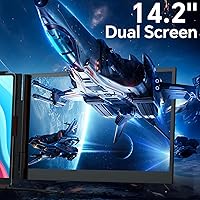
  • Screen Size: The display measures 14.2 inches diagonally, sized to sit flush alongside most laptop screens without overhanging the edges.
  • Resolution: Native resolution is 1920x1080 pixels (Full HD), delivering sharp text and clear detail for documents, code, and video calls.
  • Panel Type: Uses an IPS (In-Plane Switching) panel, which maintains consistent color and contrast when viewed from wide angles.
  • Brightness: Rated at 300 nits, which is adequate for most indoor environments but may appear dim under direct sunlight or in very bright rooms.
  • Contrast Ratio: A 1000:1 contrast ratio provides a reasonable distinction between dark and light areas for general productivity and media use.
  • Color Gamut: Covers 72% of the NTSC color space, suitable for everyday work but not recommended for color-critical tasks like photo editing or print design.
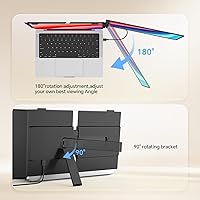
  • Viewing Angle: Supports up to 180-degree horizontal and vertical viewing angles, reducing color shift when the screen is not viewed head-on.
  • Aspect Ratio: Standard 16:9 widescreen aspect ratio, consistent with most modern laptop displays for a uniform dual-screen layout.
  • Thickness: At just 0.17 inches thin, the panel adds virtually no noticeable bulk when placed inside a laptop sleeve or backpack.
  • Weight: Weighs 1.3 pounds, light enough that most users report not noticing it in a bag alongside a laptop and charger.
  • Dimensions: Overall unit measures approximately 14 x 8.1 x 0.5 inches, fitting comfortably against laptops ranging from 13-inch to 17.3-inch screen sizes.
  • Build Material: Housing is constructed from aircraft-grade aluminum alloy, giving it a more rigid and durable feel compared to plastic-bodied alternatives.
  • Connectivity: Connects via USB-C (single-cable for supported laptops), or via a combination of USB-A and HDMI for laptops without full-function USB-C ports.
  • USB Ports: Includes 2 USB ports on the unit, allowing connection without consuming all available ports on the host laptop.
  • OS Compatibility: Works with Windows, macOS, ChromeOS, Linux, Android, and Samsung DeX, requiring no proprietary drivers for basic functionality.
  • Display Modes: Supports extended, mirror, and presentation display modes, configurable through the host operating system’s standard display settings.
  • In the Box: Package includes the monitor, a travel pouch, and all necessary cables so the unit is ready to use without additional purchases.
  • Warranty: Backed by a 12-month manufacturer warranty with 24-hour customer support response, covering defects under normal use conditions.
  • Model Number: Official model designation is S8, as listed by the manufacturer POTTMACEE.

Related Reviews
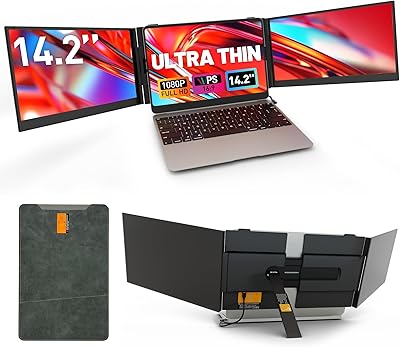
Sitrunda S8Ultra 14.2″ Triple Laptop Screen Extender
74%
82%
Single-Cable Convenience
54%
Setup & Installation
84%
Multi-Tasking Performance
73%
Display Quality
77%
Portability
More
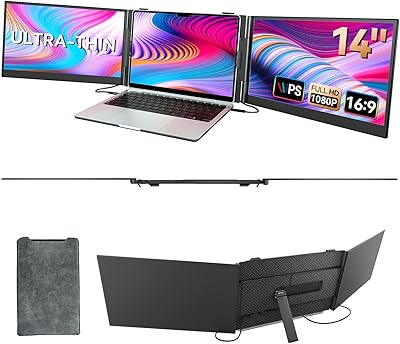
BOSII S8 Pro 14-inch Portable Triple Monitor
76%
92%
Ease of Setup
89%
Portability & Weight
81%
Screen Clarity
67%
Build Quality
61%
Brightness & Visibility
More
Vixtan 14″ Laptop Screen Extender
84%
94%
Portability & Weight
90%
Ease of Setup
87%
Display Quality
89%
Compatibility with Laptops (13″-17″)
83%
Build Quality
More
CIDETTY S2 14-Inch Portable Laptop Monitor
76%
83%
Display Quality
91%
Portability & Form Factor
88%
Ease of Setup
71%
Compatibility Range
76%
Build Quality
More
ZUMWALT S3 14″ Triple Portable Monitor
70%
88%
Ease of Setup
74%
Display Quality
71%
Build Quality & Durability
66%
Portability & Weight
82%
Screen Flexibility & Ergonomics
More
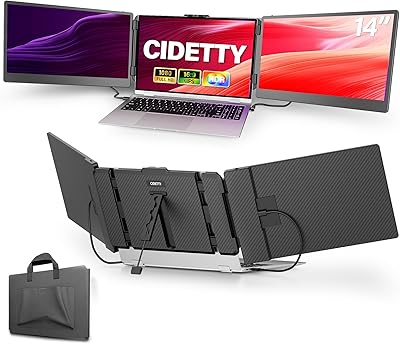
BreezyLife 14″ Triple Portable Monitor Extender
74%
91%
Ease of Setup
74%
Display Quality
62%
Portability
71%
Build Quality
67%
Compatibility Range
More
FOPO S680 14″ Quad Monitor Extender
71%
84%
Setup & Ease of Use
76%
Display Quality
61%
Portability
68%
Mac Compatibility
73%
Build Quality
More
MarsMyth S1 14-inch Portable Laptop Monitor
73%
78%
Display Quality
91%
Ease of Setup
71%
Portability & Weight
74%
Build Quality
86%
Connectivity Options
More
Alecewey F2 14-inch Laptop Screen Extender
85%
85%
Portability
90%
Display Quality
88%
Ease of Use
92%
Setup Time
63%
Weight
More
Xebec Tri-Screen 2 10.1″ Portable Laptop Monitor
62%
83%
Ease of Setup
46%
Screen Brightness
54%
Build Quality
78%
Portability
68%
Display Quality
More

FAQ

No, the S8 portable monitor is designed as a true plug-and-play device. On Windows and macOS, your operating system should detect and configure the second display automatically within a few seconds of connecting the cable. ChromeOS and Linux users have also reported it working without any manual driver installation.

If your laptop’s USB-C port supports full-function mode (also called Thunderbolt or DisplayPort Alternate Mode), a single USB-C to USB-C cable handles both video and power simultaneously. If you’re unsure whether your port supports this, check your laptop’s spec sheet. Laptops that don’t support it will need the USB-A plus HDMI cable combination instead.

Yes, most MacBook Pro models with Thunderbolt or USB-C ports work with this screen extender using a single cable. MacBooks with only USB-A ports (older models) would need an adapter, which is not included. It’s worth confirming your specific MacBook’s port capabilities before assuming single-cable setup will work.

The stand is adjustable and reinforced, and it performs well on flat, solid surfaces like desks and tables. On less stable surfaces like airplane tray tables, wobble can be an issue depending on how well-balanced your laptop is and how much the tray itself flexes. It’s not unsafe, but don’t expect rock-solid stability on a bumpy flight.

Technically yes, but it’s not the ideal tool for that job. The display covers around 72% of the NTSC color space, which means colors won’t be as accurate or saturated as what you’d see on a wide-gamut professional monitor. For casual reference or organizing your editing workspace it’s fine, but don’t rely on it for color-critical decisions like grading or retouching.

In most cases, yes. Both the Dell XPS and HP Spectre lines typically include full-function USB-C or Thunderbolt ports, making them ideal candidates for single-cable setup. The display is designed to fit laptops from 13-inch to 17.3-inch, so physical compatibility should not be a concern for either of those models.

This laptop display add-on supports extended mode (separate workspace on each screen), mirror mode (same image on both), and presentation mode (useful when presenting to others). Switching between them is done through your operating system’s display settings — no custom software needed. On Windows, right-click the desktop and open Display Settings; on macOS, go to System Settings and then Displays.

The aluminum build and included travel pouch together make it more travel-resistant than most screen extenders at this price point. The pouch protects the screen surface from scratches and light impact, and the slim profile means it sits flat against your laptop without putting pressure on adjacent items. That said, like any display, a hard drop could cause damage, so treat it with reasonable care.

Near a window with indirect natural light, it holds up reasonably well. In direct sunlight or in front of a very bright window, you may find yourself squinting or adjusting the angle to reduce glare, particularly because the panel has a glossy surface that can pick up reflections. For most indoor office or café environments, brightness is not a problem.

The manufacturer offers a 12-month warranty and claims 24-hour response times for customer support inquiries. Early buyers have generally reported positive experiences with support responsiveness, which is a good sign for a newer brand. If something goes wrong, contact them through the channel listed on your purchase confirmation — direct communication tends to be faster than going through a marketplace dispute process.