Xebec Tri-Screen 2 10.1″ Portable Laptop Monitor


Overview
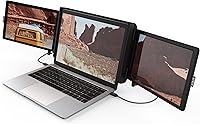
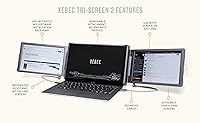
The Xebec Tri-Screen 2 10.1″ Portable Laptop Monitor takes a genuinely clever approach to the problem of working productively on the road — instead of carrying a separate external monitor, you clip two screens directly onto your laptop lid and instantly have a triple-monitor setup. It targets remote workers, frequent flyers, and anyone who finds a single laptop screen genuinely limiting when away from their desk. At its premium price tier, buyers rightfully expect a polished, near-flawless experience. The plug-and-play promise distinguishes it from conventional portable monitors that sit on a desk separately. That said, a 3.3-star average across real buyers is a signal worth taking seriously before purchasing.
Features & Benefits
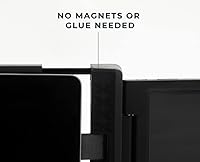
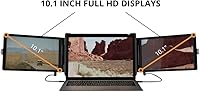
Each of the two side panels measures 10.1″ and outputs at 1920×1200 — that 16:10 aspect ratio gives you a touch more vertical space than standard widescreen, which makes a real difference when reading long documents or keeping a reference window visible. The universal clamp mechanism grips the laptop lid without any adhesives, and attaching the whole rig genuinely does take about 15 seconds once you have done it once. Everything runs off USB power — no wall adapter needed in most cases — and you get both USB-A and USB-C ports. A rear kickstand compensates for lids that flex under the added weight, and the unit works across Mac, Windows, ChromeOS, and Linux with minimal fuss.
Best For
This portable tri-screen setup makes the most sense for people whose work genuinely does not stop when they leave the office. Think consultants presenting in client boardrooms, developers who need a terminal window and a browser open simultaneously without alt-tabbing, or analysts who live in spreadsheets. If you already run dual monitors at home and hate losing that setup the moment you travel, this dual-panel extender addresses that frustration directly. One honest caveat: it works best with laptops that have a rigid lid. Thinner ultrabooks with flexible displays may shift under the load, making the kickstand less of a bonus and more of a necessity.
User Feedback
Buyers who love the Xebec Tri-Screen 2 tend to describe it as transformative for travel-heavy work — setup speed is the most consistent compliment, with many saying they had it running in under a minute the first time. But the criticisms are pointed enough to matter. Screen brightness is the most cited problem; the panels struggle in brightly lit environments and become nearly unusable outdoors. MacBook users sometimes run into adapter compatibility issues that are not clearly communicated upfront. Several reviewers also question the build quality at this price, noting that the hinge and clamp feel lightweight in hand. Glossy panels make reflections a real concern in well-lit rooms.
Pros
- Attaches to your laptop lid in about 15 seconds with no tools, adhesives, or magnets required.
- Runs entirely off USB power, so there is no wall adapter to pack or forget.
- The 16:10 aspect ratio gives each panel slightly more vertical space, which helps with documents and code.
- Works across Mac, Windows, ChromeOS, and Linux with minimal driver setup.
- Folds flat for travel and fits into most laptop bags without a dedicated case.
- Two full HD panels at 1920×1200 each deliver sharp, readable text for productivity work.
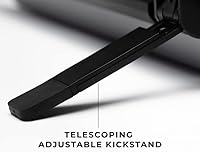
- The extendable kickstand adds meaningful stability on laptops that need rear support.
- For heavy travelers who already run dual monitors at home, this portable tri-screen setup closes a real gap.
Cons
- Panel brightness is noticeably low, making the screens hard to use in well-lit rooms or near windows.
- Glossy screen surfaces pick up reflections easily, which compounds the brightness problem indoors.
- The hinge and clamp mechanism feels lightweight relative to what buyers expect at this price tier.
- MacBook compatibility can require a separate adapter that is not always included or clearly flagged at purchase.
- Flexible or thin laptop lids may flex under the load of both panels, reducing stability.
- Build quality concerns from real buyers suggest durability over time is not guaranteed.
- The premium price is difficult to justify for anyone who travels only occasionally or sporadically.
- Outdoor or high-ambient-light use is effectively not viable due to screen brightness limitations.
Ratings
The scores below reflect an AI-driven analysis of verified global buyer reviews for the Xebec Tri-Screen 2 10.1″ Portable Laptop Monitor, with spam, bot activity, and incentivized feedback actively filtered out to ensure accuracy. Both the genuine strengths that keep loyal buyers recommending this dual-panel extender and the recurring frustrations that drag its average rating down are transparently represented. No category has been inflated to flatter the product — what you see is what real users consistently report.
Ease of Setup
Screen Brightness
Build Quality
Portability
Display Quality
Compatibility
Stability on Laptop
Value for Money
Glare & Reflection Control
USB Power Reliability
Hinge & Angle Adjustment
OS Driver Experience
Packaging & Included Accessories
Suitable for:
The Xebec Tri-Screen 2 10.1″ Portable Laptop Monitor was built for people whose productivity genuinely depends on having multiple windows visible at once — and who refuse to sacrifice that setup the moment they leave their desk. Consultants, analysts, and developers who travel regularly will find the most value here, particularly those already accustomed to dual-monitor workflows at home or in the office. It shines in controlled indoor environments: hotel rooms, coworking spaces, airport lounges, and client sites where you need to work at full capacity from a single bag. If you frequently find yourself toggling between a coding environment, documentation, and a communication tool all at once, having two extra panels attached to your laptop changes that dynamic meaningfully. Workers on firm-lidded laptops — think business-class ThinkPads or MacBook Pros with rigid displays — will get the most stable, frustration-free experience from this dual-panel extender.
Not suitable for:
The Xebec Tri-Screen 2 10.1″ Portable Laptop Monitor is a harder sell for casual or occasional travelers who only occasionally wish they had more screen space. If you work frequently outdoors or in bright, sunny environments, the glossy panels and limited brightness will fight you constantly — this is genuinely an indoor-only tool. Owners of thin, flexible ultrabooks should proceed with caution: the added weight of two side screens puts real stress on a lightweight lid, and the kickstand only partially compensates. MacBook users in particular should verify adapter compatibility before purchasing, since the out-of-box experience is not always straightforward and the extra cost of an adapter adds to an already premium price. Anyone expecting display quality comparable to a standalone portable monitor at this price point may also come away disappointed — the panels are functional, but they are not the star of the show.
Specifications
- Brand: Manufactured by Xebec, Inc., the company that originated the laptop-attachable tri-screen category.
- Model Number: The unit carries the model designation XTS2, part of the Tri-Screen 2 product series.
- Screen Size: Each of the two side panels measures 10.1″ diagonally, providing meaningful additional workspace on either side of the laptop display.
- Resolution: Both panels output at 1920×1200 Full HD, which is slightly above standard 1080p due to the taller 16:10 aspect ratio.
- Aspect Ratio: The 16:10 ratio gives each screen a touch more vertical height than a typical widescreen panel, which benefits document reading and coding.
- Screen Surface: Both displays use a glossy panel finish, which enhances color vibrancy but can produce noticeable reflections in bright environments.
- Dimensions: When folded for travel, the entire unit measures approximately 1 × 32.5 × 7.5 inches, allowing it to slip alongside a laptop in most bags.
- Weight: The full dual-panel assembly weighs approximately 2 pounds, adding moderate but noticeable load to the back of a laptop lid.
- Connectivity: The unit includes four USB 2.0 ports and two USB 3.0 ports, covering both data transfer and display signal delivery.
- Power Input: Powered entirely via USB at 5V, eliminating the need for a separate wall adapter in most standard laptop configurations.
- OS Compatibility: Compatible with macOS, Windows, ChromeOS, and Linux, with plug-and-play functionality requiring minimal or no driver installation on most systems.
- Attachment Method: A patented universal clamp grips the laptop lid mechanically, requiring no adhesives, magnets, or permanent modifications to the laptop.
- Setup Time: Xebec states the unit can be attached and operational in under 15 seconds once the user is familiar with the clamp mechanism.
- Kickstand: An extendable rear kickstand is built in to provide additional support for laptops whose lids flex under the weight of the attached screens.
- Date Available: The Xebec Tri-Screen 2 was first made available for purchase in January 2022.
Related Reviews

HP OmniBook X Flip 14″ 2K Touch-Screen 2-in-1 Laptop, AMD Ryzen AI 7 3500U, 24GB RAM, 1.5TB Storage
NAMON 2-in-1 Portable Laptop Floor & Desk Stand
VGKE B12 12.3″ 2-in-1 Touchscreen Laptop
Magedok T101F 10.1-inch Portable Touchscreen Monitor
ROADOM 10.1-inch Raspberry Pi Touchscreen Monitor
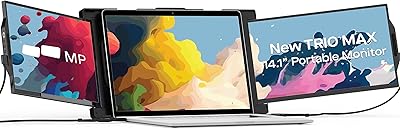
Mobile Pixels Trio Max 14.1″ Portable Monitor
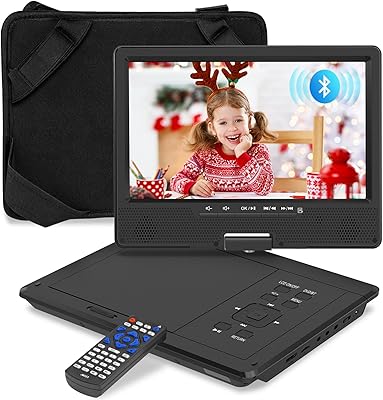
HotHat 10.1″ Portable Car DVD Player
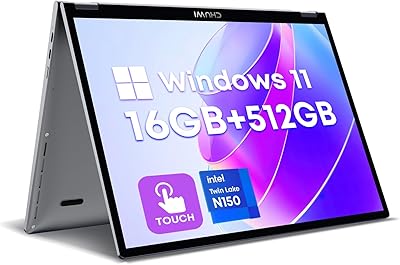
CHUWI MiniBook X N150 16GB/512GB

RCA Cambio 10.1″ Windows 2-in-1 Tablet