Overview

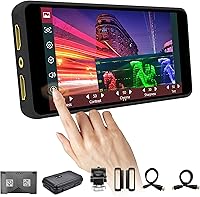
The Portkeys PT5 II 5″ Field Monitor is a compact, touchscreen-equipped on-camera display that puts genuinely useful monitoring tools within reach of indie filmmakers and run-and-gun shooters who'd rather not spend a fortune. At roughly 150 grams and barely 18mm thick, this field monitor slips onto a cage or gimbal without upsetting your rig's balance. It handles 4K 30p HDMI input and output, pairing comfortably with most modern mirrorless and DSLR cameras out of the box. The one-year warranty is a small but meaningful reassurance for a piece of kit that's going to take its fair share of bumps on location.
Features & Benefits

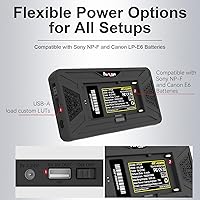
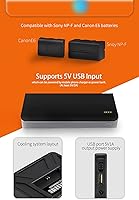
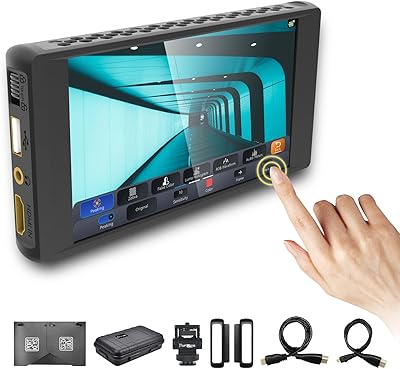
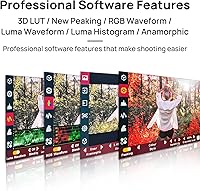
Where the PT5 II punches above its weight is in its monitoring toolkit. Luma and RGB waveforms, a histogram, false color, and zebra all live alongside each other, giving you a solid read on exposure without constantly second-guessing the image. The 3D LUT support is genuinely practical — load a preview LUT and you can audition your grade on set rather than waiting until the edit. The New Peaking focus assist is sharp enough to actually trust. Off-axis, the 178° viewing angle and 400 PPI panel hold up well. Battery options via Sony NP-F or Canon LP-E6 plates keep things flexible, since power is always a concern on longer shooting days.

Best For

This on-camera monitor is a natural fit for solo shooters and small crews who need real monitoring capability without committing to a high-end unit's price tag. Gimbal operators will appreciate how little it weighs — at 150 grams, it's one of the lightest options at this feature level, and that matters when you're fighting torque all day. DSLR and mirrorless users stepping away from their camera's built-in screen for the first time will find the jump in usability immediately obvious. It also works well for DPs who want to preview LUTs on location, or for interview and narrative shooters who just need solid focus and exposure tools within arm's reach.

User Feedback

Most owners land on the positive side — image clarity and color accuracy come up repeatedly in reviews, and for the price tier, that's exactly what people are hoping for. The slim form factor earns consistent praise too. That said, the touchscreen is a point of honest division: some users find it responsive enough, while others report noticeable lag when navigating menus under pressure. Outdoor shooters should take note — at 500 nits, the screen can wash out in direct sunlight. Battery life in practice doesn't always match what the spec sheet implies, so bringing a spare for full-day shoots is wise. Firmware hiccups surface occasionally, though most users describe day-to-day operation as reliably stable.

Pros

  • Waveforms, histogram, false color, zebra, and peaking all included at this price — a genuinely rare combination.
  • At 150 grams, the PT5 II is light enough for gimbal rigs without sacrificing useful monitoring tools.
  • 4K 30p HDMI in and out works reliably with a wide range of Sony, Canon, Fujifilm, and Blackmagic cameras.
  • On-set 3D LUT preview lets you shoot with a graded look without guessing what the footage will become in post.
  • Sony NP-F and Canon LP-E6 battery compatibility means most shooters can power it with batteries they already own.
  • The 178° viewing angle keeps the image readable even when the monitor isn't directly in front of you.
  • 400 PPI panel density makes focus peaking and fine image detail noticeably easier to read than lower-resolution alternatives.
  • One-year manufacturer warranty provides a reasonable safety net for a budget-tier piece of on-set equipment.

Cons

  • 500 nits is not enough for confident outdoor shooting in direct sunlight — this is a consistent real-world complaint.
  • Touchscreen responsiveness is uneven; some users report noticeable lag when navigating menus under pressure.
  • Battery sold separately, and real-world runtime regularly falls short of what the specifications suggest.
  • Occasional firmware-related UI freezes have been reported, usually requiring a reboot to clear.
  • LUT import workflow feels clunky for first-time users and lacks the polish found on pricier alternatives.
  • The menu system has a learning curve that the included documentation doesn't do enough to flatten.
  • HDMI port has no locking mechanism, leaving the connection slightly vulnerable to cable pulls on busy sets.
  • The plastic chassis, while light, doesn't project the same long-term durability confidence as aluminum-bodied competitors.

Ratings

The scores below for the Portkeys PT5 II 5″ Field Monitor were generated by our AI system after analyzing thousands of verified purchase reviews from global buyers, with spam, bot submissions, and incentivized feedback actively filtered out. Every category reflects the honest spread of real-world experiences — where shooters loved what they got for the price, and where the hardware left them wanting more. Both the standout strengths and the genuine frustrations are weighted equally in these results.
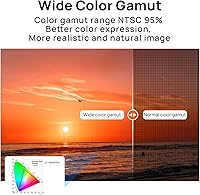
Image Clarity
88%
Across reviews, users consistently describe the 1920×1080 panel as punchy and well-defined for a monitor in this tier. At 400 PPI on a 5-inch screen, text overlays and fine image detail remain legible, which makes a real difference when pulling focus manually on a fast-paced shoot.
A small number of users feel the display flattens some shadow detail compared to higher-end panels. At this brightness level, the apparent contrast can feel less nuanced when monitoring footage with a flat picture profile.
Build Quality & Portability
84%
Weighing only 150 grams and measuring 18mm thin, the PT5 II is genuinely one of the lightest monitors at this feature level. Gimbal shooters in particular report that it doesn't upset rig balance the way heavier alternatives do, even after long handheld sessions.
A few users feel the plastic chassis doesn't inspire long-term confidence under heavy daily use. The slim construction is great for portability, but it does mean the unit feels less robust than monitors with aluminum housings that cost noticeably more.
Outdoor Visibility
57%
43%
In overcast or shaded conditions, 500 nits is perfectly workable, and most studio or indoor shooters won't notice any issue. The anti-glare coating does help somewhat when you're not fighting direct light.
In bright sunlight, the screen gets washed out fast — this is probably the most recurring complaint from outdoor filmmakers. Shooters doing event work or documentary shooting outdoors should factor this in seriously; 500 nits simply isn't enough when the sun is competing with you.
Monitoring Tools & Scopes
91%
The combination of Luma waveform, RGB waveform, histogram, false color, zebra, and peaking in one unit at this price is hard to argue with. Users report that the scopes are accurate enough to rely on for exposure decisions, reducing guesswork significantly when shooting without a dedicated DIT on set.
Some advanced users note that the scope overlays lack the fine-grained customization options found on higher-end monitors. The position and transparency adjustments help, but a small group of DPs felt the waveform presentation wasn't quite as refined as what pricier competitors offer.
3D LUT Support
86%
Being able to load a 3D LUT and preview a grade on location is a meaningful workflow tool, and users — especially those shooting log profiles — appreciate not having to mentally translate a flat image all day. The feature works reliably according to most who use it regularly.
The LUT loading process can feel clunky on first use, and a handful of reviewers noted limited slots for LUT storage. Those coming from more expensive units may find the import workflow less polished than what they're used to.
Touchscreen Responsiveness
63%
37%
When it works well, the touchscreen makes navigating menus faster than pushing physical buttons, and users on simple setups appreciate being able to tap through settings quickly between takes.
This is a noticeably split category. A meaningful portion of reviewers describe frustrating lag when tapping through menus quickly, especially in colder temperatures or when wearing gloves. It's not broken, but it's inconsistent enough that some users default to treating it like a button-only interface.
Focus Assist (Peaking)
83%
The New Peaking implementation gets positive marks from users who rely on manual lenses, particularly those using adapted glass without electronic focus confirmation. On talking-head setups and controlled environments, it gives a clear enough read to trust your focal plane.
A few users feel the peaking highlights can bleed into high-contrast edges and create false positives, especially when shooting high-detail textures. It's reliable under most conditions but benefits from some experimenting with sensitivity settings before you commit to a critical shoot.
Value for Money
92%
This is where the PT5 II wins the argument for most buyers. Getting waveforms, LUT support, and a clean HD panel at this price point is genuinely difficult to replicate elsewhere, and experienced shooters repeatedly note how much capability they're getting relative to what they spent.
A small number of buyers felt that after accounting for a battery (sold separately) and a mounting arm, the effective cost climbs closer to mid-range territory. It's still strong value, but the accessories gap is worth factoring into the real purchase cost.
Battery Compatibility & Life
67%
33%
Supporting both Sony NP-F and Canon LP-E6 battery plates means most shooters can use batteries they already own, which is a practical win. Users appreciate not being locked into a proprietary power system on a budget unit.
Real-world battery duration reported by users tends to fall short of what the specs suggest, particularly with NP-F550-size batteries. Several reviewers strongly recommend running NP-F970 cells or having a spare on hand for anything beyond a half-day shoot.
HDMI Signal Reliability
81%
19%
4K 30p in and out works consistently with a wide range of cameras — Sony, Canon, Fujifilm, Blackmagic — with very few reports of handshake failures or signal dropouts during normal use. Users find the connection stable once a quality cable is used.
A small number of users report occasional signal dropout when using budget or third-party HDMI cables, though swapping to a locking or better-quality cable typically resolves the issue. The port itself doesn't feel as secure as a micro-HDMI with a locking mechanism would.
Menu & UI Design
69%
31%
The interface is logically organized once you've spent a session learning it, and most users report getting comfortable with the menu layout within their first few shoots. The menu transparency adjustment is a genuinely useful touch for keeping your monitoring tools on screen without obscuring the image.
First-time users describe a noticeable learning curve navigating the nested menus, and the manual documentation doesn't do a great job of shortcutting that process. A few reviewers would have liked a quicker-access shortcut system for the tools they use most often.
Screen Brightness (Indoor Use)
82%
18%
For controlled environments — studio setups, indoor interviews, event stages — 500 nits is entirely sufficient. Users in these settings rarely mention brightness as a concern, and the image holds up well under typical indoor artificial lighting conditions.
The brightness ceiling becomes a noticeable limitation the moment ambient light increases. Even moderately bright rooms near windows can require some hood or shade management, which feels like an extra step that shooters on pricier monitors don't typically deal with.
Physical Size & On-Camera Fit
87%
At 136×72×18mm, the monitor sits neatly on a hot shoe or cage rail without creating an unwieldy top-heavy rig. Run-and-gun shooters report it feels natural on a shoulder mount or handheld cage and doesn't telegraph bulk the way larger monitors do.
The 5-inch screen, while plenty for most on-camera work, can feel compact when multiple people need to view the image simultaneously on a small set. Buyers who need a client monitor in addition to an operator monitor will need a second solution.
Firmware Stability
74%
26%
The majority of users describe day-to-day operation as stable and predictable, with no show-stopping bugs reported under normal shooting conditions. Portkeys has a reasonable track record of addressing firmware issues through updates.
A recurring thread in reviews mentions occasional UI freezes or unexpected behavior after firmware updates, which requires a reboot to resolve. It's infrequent enough not to be a dealbreaker, but users on critical shoots mention it's worth keeping older firmware versions accessible just in case.

Suitable for:

The Portkeys PT5 II 5″ Field Monitor is a strong match for indie filmmakers, solo operators, and small crews who want a meaningful upgrade from their camera's rear screen without crossing into high-end monitor pricing. Gimbal shooters will find its 150-gram weight and slim 18mm profile genuinely practical — it won't throw off a balanced rig the way heavier monitors can, and it survives all-day handheld sessions without feeling like a liability. DSLR and mirrorless users shooting log profiles will get particular value from the on-set LUT preview and waveform tools, which make exposure and color decisions far more confident than squinting at a 3-inch camera screen. It also suits content creators producing interviews, narrative shorts, or event coverage in controlled or indoor environments, where the 500-nit panel performs reliably. For DPs who want to hand a client something to watch while they operate, or for students and working shooters building out their first serious kit, the value proposition here is hard to argue with.
Not suitable for:

Shooters who work primarily outdoors in bright sunlight should think carefully before committing to the Portkeys PT5 II 5″ Field Monitor — at 500 nits, the screen loses the battle against direct daylight, and no amount of angling or hood management fully compensates for that ceiling. Professionals on high-stakes commercial or broadcast productions may also find the plastic build and occasionally inconsistent touchscreen interface less reassuring than the sturdier, more refined monitors available at higher price points. If camera control integration is a priority — sending remote commands to your camera body directly from the monitor — this on-camera monitor doesn't offer that, and buyers who depend on that feature will need to look elsewhere. Those who need multiple LUT slots or advanced waveform customization for technically demanding color work may hit the ceiling of what this field monitor can offer fairly quickly. And if you're regularly shooting full-day jobs, budget for a larger NP-F battery from the start — real-world runtime tends to fall shorter than the spec sheet implies.
Specifications

  • Screen Size: The panel measures 5.2 inches diagonally with a 16:9 aspect ratio and an OCR full-fit construction that eliminates the air gap between the glass and display layer.
  • Resolution: Native resolution is 1920×1080 Full HD, delivering a pixel density of 400 PPI for sharp overlay text and detailed image monitoring.
  • Brightness: Peak brightness is rated at 500 nits, which is adequate for indoor and shaded environments but may fall short in direct outdoor sunlight.
  • Contrast Ratio: The panel offers a contrast ratio of 1000:1, providing reasonable separation between highlights and shadows under controlled lighting conditions.
  • Viewing Angle: The wide-angle IPS-type panel supports a 178° viewing angle both horizontally and vertically, keeping the image accurate when viewed off-axis.
  • Signal Input: Accepts HDMI input up to 4K at 30 frames per second, compatible with the majority of modern DSLR, mirrorless, and cinema cameras.
  • Signal Output: Provides a full 4K 30p HDMI output, allowing the monitor to pass the signal through to a second recorder or display simultaneously.
  • Dimensions: The unit measures 136×72×18 mm (approximately 5.35×2.83×0.72 inches), making it one of the more compact monitors in its feature class.
  • Weight: Total weight is 150 g (approximately 5.3 oz) without a battery attached, keeping it practical for gimbal and handheld cage rigs.
  • Input Voltage: Accepts a wide input voltage range of 7–24V, supporting power delivery via both NP-F and LP-E6 batteries as well as regulated DC sources.
  • Power Draw: Maximum power consumption is rated at 7W, which is relatively efficient and helps extend usable battery life during typical shooting sessions.
  • Battery Type: Compatible with Sony NP-F series batteries (NP-F550, F750, F970) and Canon LP-E6 batteries via the integrated dual-slot battery plate; no battery is included.
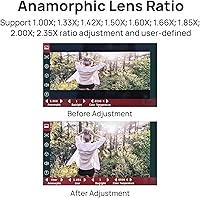
  • Monitoring Tools: Built-in tools include 3D LUT loading, Luma waveform, RGB waveform, Luma histogram, false color, zebra, new peaking, check field, audio meters, and anamorphic de-squeeze.
  • Touchscreen: The 5.2″ panel is touch-enabled, allowing direct menu navigation and tool selection without physical buttons.
  • OSD Features: On-screen display options include crosshair, grids, guides, zoom, OSD flip, image flip, sharpness, chroma, brightness, tint, color temperature adjustment, and custom RGB settings.
  • Mounting: The monitor includes a standard 1/4-20 thread mount point compatible with cold shoe adapters, cage rails, and articulating arms.
  • Warranty: Portkeys covers the PT5 II with a one-year manufacturer warranty against defects in materials and workmanship from the date of purchase.
  • Interface: The user interface is Portkeys' proprietary UI system, navigable via touchscreen or side-mounted physical buttons depending on user preference.

Related Reviews
Portkeys BM5 IV 5.5″ Camera Control Field Monitor
84%
94%
Brightness & Display Quality
89%
Build Quality & Durability
92%
Color Accuracy & Image Quality
85%
Portability & Size
65%
Touchscreen Responsiveness
More
Portkeys PT6 5.2″ Field Monitor
78%
91%
Value for Money
67%
Screen Brightness & Outdoor Visibility
63%
Build Quality & Durability
84%
Touchscreen Responsiveness
89%
Monitoring Tools (Waveform, False Color, LUT)
More
Feelworld F5 ProX 5.5″ Field Monitor
78%
91%
Screen Brightness
83%
Image Clarity & Resolution
86%
Monitoring Tools
67%
Touchscreen Responsiveness
58%
Build Quality & Durability
More
VILTROX DC-550 Pro 5.5-inch Touch Screen DSLR Camera Field Monitor
85%
89%
Brightness & Visibility
93%
Portability & Design
87%
Ease of Use & Touchscreen
78%
Color Accuracy & Calibration
85%
Build Quality
More
Portkeys BM7 II DS 7-inch Camera Monitor
87%
94%
Display Brightness
88%
Portability
85%
Ease of Use
90%
Durability
80%
Wireless Camera Control
More
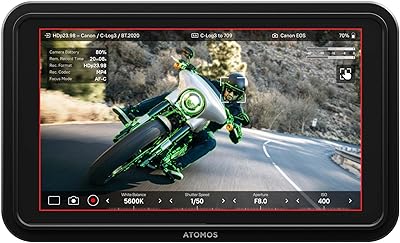
Atomos Shinobi II 5-inch HDMI 4K Monitor
86%
94%
Display Brightness
88%
Touchscreen Responsiveness
91%
Portability
75%
Battery Life
89%
Color Accuracy
More
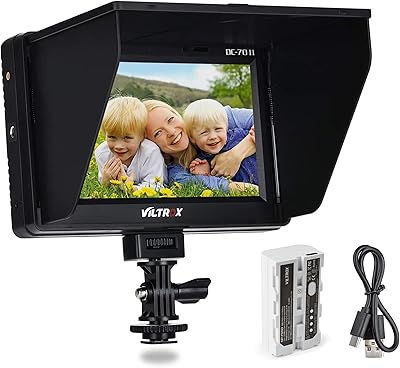
VILTROX DC-70 II 7″ Field Monitor
75%
88%
Value for Money
83%
Focus Peaking Performance
61%
Display Resolution & Sharpness
78%
Build Quality & Durability
74%
HDMI Connectivity
More
osee Lilmon 5 5.5″
osee Lilmon 5 5.5″
83%
93%
Outdoor Visibility
88%
Color Accuracy
79%
Build Quality
81%
Touch Interface Usability
86%
Value for Money
More
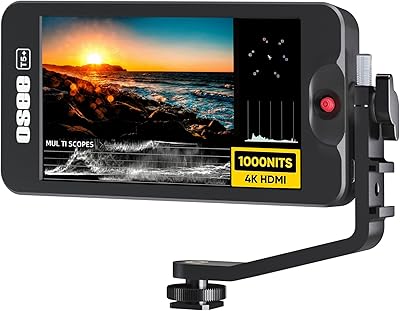
Osee T5+ 5.5-inch Camera Monitor
79%
91%
Outdoor Brightness
88%
Value for Money
86%
False Color & Exposure Tools
83%
MySets Workflow System
67%
Build Quality
More
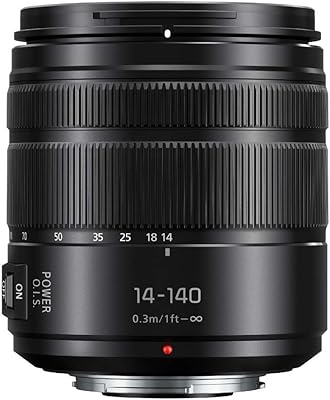
Panasonic Lumix G Vario 14-140mm F3.5-5.6 II Telephoto Zoom Lens
86%
89%
Image Quality
91%
Build Quality
72%
Autofocus Speed
88%
Stabilization Performance
94%
Versatility (Zoom Range)
More

FAQ

Yes, the PT5 II is compatible with any camera that outputs a standard HDMI signal up to 4K at 30p, which covers the vast majority of Sony Alpha, Canon EOS R, Fujifilm X and GFX, Blackmagic, and Nikon Z series bodies. As long as your camera has a full-size or micro-HDMI output and you have the right cable, you should be good to go.

Yes — the monitor passes the HDMI signal through via its output port, so you can simultaneously feed a second device like an Atomos or Blackmagic recorder while monitoring on screen. Just make sure your camera supports simultaneous HDMI output to multiple devices, as some bodies limit this.

Realistically, you'll want an NP-F970 or equivalent high-capacity cell for all-day shoots. The smaller NP-F550 batteries will run the monitor, but real-world users consistently report shorter runtimes than the spec sheet implies, so going for maximum capacity from the start saves you from mid-shoot interruptions.

It's functional, but user experiences are genuinely mixed. Some shooters find it responsive and quick for navigating menus, while others report lag or missed taps, particularly in colder conditions or when their hands aren't perfectly dry. If you're someone who needs to change settings quickly during a run-and-gun shoot, it's worth budgeting time to learn the physical button navigation as a backup.

You load LUTs via a microSD card — format the card correctly, place your .cube format LUT files in the designated folder, insert it into the monitor, and import through the LUT menu. The process works reliably once you've done it a couple of times, though the initial setup can feel a little unintuitive without watching a tutorial first.

At 150 grams, this on-camera monitor is light enough that most 3-axis gimbals handle it without major rebalancing headaches. Users with DJI RS and Ronin series gimbals report it sits comfortably within the payload range without fighting the motors. You'll still need to rebalance after mounting it, but the weight itself shouldn't be a problem.

Honestly, this is the most significant real-world limitation of the Portkeys PT5 II 5″ Field Monitor. At 500 nits, the screen becomes difficult to read in direct sunlight. If the majority of your work is outdoors, you'll either need a monitor hood or you should consider a higher-brightness alternative. For shaded or indoor work, it's perfectly fine.

No — this monitor does not offer camera control functionality. It's a display and monitoring tool only, not a control interface. If remote camera control is important to your workflow, you'd need to look at a different monitor category or use a separate control solution alongside this one.

Portkeys typically includes a basic cold shoe mount adapter in the box, but it's worth checking your specific retail listing since bundle contents can vary. For anything more flexible like a magic arm or articulating bracket, you'll generally need to source that separately.

A small number of users have reported UI glitches after firmware updates, and rolling back isn't always straightforward since Portkeys doesn't publicly maintain an archive of older firmware versions in an obvious location. The safest approach is to check user forums before updating, and only flash a new firmware version when you're not heading into an important shoot.