Overview

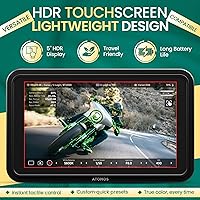
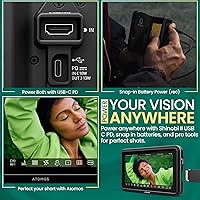
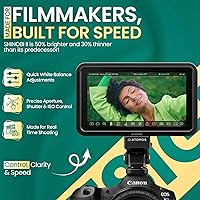
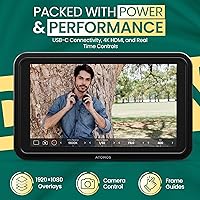
The Atomos Shinobi II 5-inch Camera Monitor is Atomos's second take on the on-camera monitor market, and it shows real refinement over its predecessor. Where the original felt like a capable but basic display option, this field monitor adds direct camera control via USB-C, making it far more practical for solo operators who hate juggling menus mid-shot. The 5-inch touchscreen hits a useful sweet spot — large enough to judge focus and exposure confidently, compact enough to mount without tipping a lightweight rig. Battery life is marketed as all-day capable, a bold claim that real-world users have tested with mixed but generally favorable results.

Features & Benefits

At 1500 nits, the Shinobi II holds up well in direct sunlight where most budget alternatives simply wash out. The panel is FHD 1080p — worth being upfront about, even though it accepts a 4K HDMI input; the incoming feed gets downscaled for display, which is standard practice at this tier. What genuinely sets this on-camera monitor apart are the built-in exposure tools: EL Zone and ARRI False Color work straight out of the box, no external app needed. Touchscreen sliders for ISO, white balance, and shutter angle keep adjustments fast. Anamorphic desqueeze and RED/ARRI format support round out a feature set aimed squarely at working professionals.

Best For

The Shinobi II makes the most sense for shooters who work alone or in small crews where every piece of gear must justify its weight. Solo documentary filmmakers get solid exposure feedback without hauling extra equipment. Those shooting with anamorphic glass will appreciate the in-field desqueeze preview, which removes guesswork from composition. Mirrorless users who want direct camera control from the monitor — adjusting ISO or white balance without touching the camera body — will find this field monitor genuinely useful on busy sets. It is less compelling for photographers who shoot video only occasionally and have no need for professional-grade monitoring tools.

User Feedback

Across 150 reviews averaging 4.1 out of 5, the Shinobi II earns its broadly positive reception without winning everyone over. Outdoor visibility and color accuracy come up repeatedly as standout strengths, with several owners noting it outperforms similarly priced rivals in direct sunlight. The most consistent criticisms center on mount compatibility and occasional friction with USB-C camera control — some camera bodies pair smoothly, others less so, and firmware updates have helped but not fully resolved every combination. Battery life draws a split response: many confirm all-day performance under moderate conditions, though intensive shooting can shorten that estimate noticeably.

Pros

  • At 1500 nits, the display remains clearly readable in harsh outdoor sunlight where budget monitors struggle badly.
  • Built-in EL Zone and ARRI False Color work right out of the box with no additional software or subscription needed.
  • Direct camera control via USB-C lets solo operators adjust ISO, white balance, and shutter angle without touching the camera body.
  • Anamorphic desqueeze support is a genuine time-saver for cinematographers composing shots on set.
  • The 5-inch touchscreen size hits a practical balance between portability and screen real estate for critical focus checks.
  • RED and ARRI format support makes this field monitor a credible choice for hybrid productions mixing cinema and mirrorless gear.
  • Most owners confirm the all-day battery claim holds up under normal to moderate shooting conditions.
  • Touch-to-focus adds a layer of responsiveness that speeds up single-operator workflows considerably.
  • At 7.4 ounces, the Shinobi II is light enough to run on a small mirrorless rig without balance problems.
  • 4K HDMI input means the monitor will stay compatible as camera bodies continue to push higher resolutions.

Cons

  • USB-C camera control compatibility is inconsistent across brands, and not every camera body pairs without friction.
  • The panel resolution is FHD 1080p, so pixel-level critical focus checks are less precise than on higher-resolution competing monitors.
  • Mount and cage compatibility has drawn complaints from some users, requiring third-party adapters to secure it reliably.
  • Battery life shortens noticeably during intensive, continuous recording sessions despite the all-day marketing claim.
  • With only a single USB port, connectivity options for accessories are limited on a busy rig.
  • The premium price puts it in direct competition with monitors that offer higher-resolution panels at a similar cost.
  • Some users report firmware updates are needed to resolve camera-specific control issues, which can disrupt production readiness.
  • Build quality concerns have surfaced in a portion of reviews, with a few owners noting the housing feels less robust than the price suggests.

Ratings

The Atomos Shinobi II 5-inch Camera Monitor has been scored by our AI rating system after analyzing verified buyer reviews from multiple global sources, with spam, bot-generated, and incentivized feedback actively filtered out before any scores were calculated. The results reflect a candid picture of where this field monitor genuinely delivers for working professionals and where real-world frustrations have surfaced across different shooting scenarios. Both the standout strengths and the recurring pain points are weighted transparently in every category below.

Display Brightness
93%
Owners consistently single out the 1500-nit panel as the monitor's most immediate practical advantage. Shooters working outdoor documentary runs or event coverage in midday sun report being able to judge exposure and composition with confidence — something cheaper monitors in the same rig class simply cannot offer.
A small number of users note that maximum brightness draws more power, which can shorten battery runtime during intensive outdoor sessions. There is also occasional mention of reflective glare at steep angles, which no amount of brightness fully eliminates on a glossy panel.
Exposure Tools
91%
The built-in EL Zone and ARRI False Color modes are praised by solo operators and DITs alike for being immediately accessible without any external app or paid add-on. On fast-paced documentary shoots where stopping to open menus is not an option, having these tools a single tap away genuinely changes the working rhythm.
A few reviewers with backgrounds in broadcast note that the waveform and vectorscope displays, while functional, lack some of the fine-tuning options found on dedicated monitoring units from SmallHD. For most hybrid shooters this is not a dealbreaker, but specialists may notice the ceiling.
Camera Control
78%
22%
The ability to adjust ISO, white balance, and shutter angle directly from the touchscreen via USB-C is consistently described as one of the strongest workflow improvements over the original model. Solo filmmakers mounting the monitor on a small mirrorless rig find it cuts the need to reach back to the camera body mid-shot noticeably.
USB-C camera control compatibility is uneven across brands and bodies, and this is the single most cited frustration across negative reviews. Some users report needing multiple firmware updates before a specific camera paired reliably, and a handful of less common bodies remain unsupported despite Atomos updating the compatibility list periodically.
Value for Money
71%
29%
Buyers who use the full feature set — false color, camera control, anamorphic desqueeze, and HDR monitoring — generally feel the pricing is justified relative to SmallHD alternatives with comparable capabilities. For professionals who need all of those tools daily, the cost amortizes reasonably across a working production schedule.
Casual shooters and hybrid photographers who only reach for video occasionally find it difficult to justify the outlay, especially given that the panel is FHD rather than a higher-resolution screen. At this price point, the single USB port and occasional build quality concerns make a few buyers feel the hardware does not fully match the asking price.
Build Quality
66%
34%
The overall construction is functional and the unit handles the demands of regular on-set use without obvious failures for most owners. The weight at 7.4 ounces feels intentional rather than cheap, and the form factor holds up reasonably well when mounted in a cage or on an articulating arm.
A recurring thread in lower-scored reviews specifically flags that the housing material and finish feel less premium than the price implies, particularly when compared directly to SmallHD units at similar tiers. A handful of users report concerns about long-term durability after drops or sustained field abuse.
Touchscreen Responsiveness
82%
18%
The touchscreen interface draws positive mentions for speed and accuracy when navigating sliders for ISO and white balance during live shooting. Most users describe the response as snappy enough to keep up with fast-paced adjustments without introducing lag-driven errors.
Some reviewers note that in cold outdoor temperatures the touchscreen becomes less responsive, which is a common issue across capacitive screens but worth knowing for winter location shoots. A small number of users also report occasional input drift on the sliders after extended use.
Anamorphic Support
88%
Cinematographers shooting with anamorphic glass consistently praise the in-field desqueeze preview as accurate and easy to configure. Being able to confirm composition and horizon in real time without a separate monitoring solution is described as a meaningful time-saver during narrative and commercial productions.
Desqueeze ratio options cover the most common anamorphic formats but a few users with less standard glass report that their specific squeeze factor is not among the presets, requiring workarounds. It is a niche limitation but relevant for shooters using boutique or vintage anamorphic optics.
Battery Life
74%
26%
Under typical event or documentary conditions — a mixed shooting day with moderate brightness settings — the majority of owners confirm the all-day battery claim holds up with an adequately sized external battery pack. This is genuinely useful for location shoots where access to mains power is inconsistent.
Intensive recording sessions at high brightness push battery consumption significantly higher than the marketing suggests, and several reviewers recommend always carrying a spare. The reliance on an external 12V battery also means additional cost and rig weight for shooters who do not already own a compatible power solution.
Portability
86%
At 7.4 ounces the Shinobi II sits comfortably on compact mirrorless rigs without tipping the balance or requiring a counterweight. Run-and-gun shooters who need to move quickly between setups appreciate that it does not add the kind of heft that forces a full cage rebuild.
The physical dimensions — 5.12 x 7.87 x 3.15 inches — make it slightly bulky for shooters trying to maintain a truly minimal travel kit. Those packing into airline carry-on bags with full production gear report it occupies meaningful space relative to even smaller 5-inch competitors.
Setup & Onboarding
79%
21%
Most users describe the initial setup as reasonably intuitive, with the touchscreen menu layout feeling logical enough for experienced video professionals to navigate without consulting the manual. Pairing with well-supported camera bodies via USB-C is described as straightforward when firmware is current on both devices.
Users pairing with less common or older camera bodies frequently report a steeper setup curve, involving firmware downloads and compatibility troubleshooting before the camera control features function correctly. First-time field monitor buyers with limited technical background also note the onboarding documentation could be clearer.
HDR Monitoring
84%
Support for HDR, HLG, and PQ formats covers the practical needs of most broadcast and streaming productions, and reviewers working in hybrid HDR workflows note the monitor switches between modes cleanly without visible calibration drift. The 1000:1 contrast ratio holds up well enough for on-set HDR judgments.
The FHD panel resolution does limit the precision of highlight and shadow detail checks compared to higher-resolution HDR monitors used in post-production environments. This is not a dealbreaker for on-set monitoring, but colorists using it as a grading reference will want to keep expectations calibrated accordingly.
Mount Compatibility
62%
38%
The standard cold shoe and thread mounting points cover the most common rig configurations, and many owners report attaching the monitor to popular cage systems without any issues. For shooters already invested in widely used rig ecosystems the out-of-box mounting experience is generally fine.
A notable portion of reviewers flag that specific third-party cages and articulating arm clamps require adapters for a secure, wobble-free fit — a frustration that comes up often enough to be treated as a real purchasing consideration. A few users report the monitor shifting position during handheld movement even when technically secured.
Software & Firmware
73%
27%
Atomos has pushed multiple firmware updates since launch that have resolved several of the early camera compatibility and UI responsiveness issues, and long-term owners generally appreciate that the product has improved meaningfully post-purchase. The commitment to ongoing updates adds some longevity to the investment.
The update process itself draws complaints for being less streamlined than it should be at this price tier, requiring manual downloads and SD card transfers rather than an automated over-the-air system. Some buyers also note that update release notes are sparse, making it hard to know whether a specific pairing issue has been addressed.

Suitable for:

The Atomos Shinobi II 5-inch Camera Monitor is built for working video professionals who need reliable, information-rich monitoring without a bulky setup. Solo documentary shooters and run-and-gun filmmakers benefit most, since the combination of direct USB-C camera control and touchscreen sliders means fewer hands pulling focus and adjusting exposure separately. Cinematographers using anamorphic lenses get real value from the in-field desqueeze preview, which makes composing shots far less of a guessing game. On-set DITs and focus pullers who depend on EL Zone or ARRI False Color throughout a long shoot day will find both tools immediately accessible and genuinely well-implemented. Content creators stepping up from entry-level field monitors who want professional scopes, HDR support, and 1500 nits of brightness for outdoor work will notice a meaningful difference in daily usability.

Not suitable for:

The Atomos Shinobi II 5-inch Camera Monitor is harder to recommend if your shooting is mostly casual or occasional, since the feature depth and price tier are genuinely aimed at professionals who will use those tools regularly. Buyers expecting a 4K panel should know the display itself is FHD 1080p; it accepts a 4K HDMI signal but downscales it, which is common at this level but worth understanding before purchase. If your camera body sits outside the well-supported mirrorless and DSLR ecosystem, USB-C camera control compatibility is not guaranteed, and some pairings require firmware workarounds that can be frustrating in production. Photographers who only shoot video occasionally and have no need for false color, waveforms, or anamorphic tools would likely find the investment difficult to justify compared to simpler, less expensive alternatives.

Specifications

  • Screen Size: The display measures 5 inches diagonally, offering enough screen real estate for confident exposure and focus checks without adding excessive bulk to a rig.
  • Resolution: The panel renders at 1920 x 1080 (FHD), which is the native display resolution regardless of the incoming signal resolution.
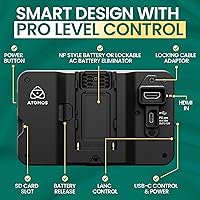
  • HDMI Input: A single HDMI port accepts signals up to 4K, meaning the monitor is compatible with high-resolution camera outputs even though the panel itself displays at FHD.
  • Brightness: Peak brightness reaches 1500 nits, making the screen usable in direct sunlight conditions where most entry-level field monitors become unreadable.
  • HDR Support: The monitor supports HDR, HLG, and PQ formats, covering the most common HDR standards used across broadcast, streaming, and cinema production.
  • Touchscreen: The full-face touchscreen supports direct interaction including on-screen sliders for ISO, white balance, aperture, and shutter angle adjustment.
  • Camera Control: Direct camera control is available via USB-C, allowing compatible mirrorless and DSLR bodies to be adjusted from the monitor without touching the camera.
  • Touch to Focus: Touch-to-focus functionality is supported on compatible camera bodies connected via USB-C, enabling fast and precise focus point selection from the monitor screen.
  • False Color: Both EL Zone and ARRI False Color modes are built in, providing professional-grade exposure monitoring tools without requiring any external software or subscription.
  • Anamorphic Support: The monitor includes anamorphic desqueeze functionality to display a corrected image preview when shooting with anamorphic lenses in the field.
  • Contrast Ratio: The display delivers a contrast ratio of 1000:1, which supports clean differentiation between shadows and highlights in HDR monitoring scenarios.
  • Aspect Ratio: The screen operates at a 16:9 aspect ratio, matching the standard widescreen format used by the majority of modern video productions.
  • Weight: The unit weighs 7.4 ounces, keeping it light enough to mount on mirrorless and compact DSLR rigs without significantly affecting balance.
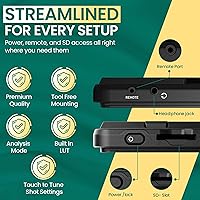
  • Dimensions: Physical dimensions are 5.12 x 7.87 x 3.15 inches, making it a compact but substantial monitor suited for on-camera or articulating arm mounting.
  • USB Ports: One USB-C port is included, serving dual duty for both camera control and power or data connectivity depending on the connected device.
  • Battery: The monitor is powered by an external 12V battery, which Atomos markets as sufficient for all-day shooting under typical production conditions.
  • Format Support: RED and ARRI camera formats are supported, extending the monitor's usefulness beyond consumer mirrorless systems into cinema-tier production environments.
  • Voltage: The monitor operates at 120V and is designed for compatibility with standard power distribution used in professional video production setups.

Related Reviews
Portkeys PT5 II 5″ Field Monitor
79%
88%
Image Clarity
84%
Build Quality & Portability
57%
Outdoor Visibility
91%
Monitoring Tools & Scopes
86%
3D LUT Support
More
osee Lilmon 5 5.5″
osee Lilmon 5 5.5″
83%
93%
Outdoor Visibility
88%
Color Accuracy
79%
Build Quality
81%
Touch Interface Usability
86%
Value for Money
More
Osee T5+ 5.5-inch Camera Monitor
79%
91%
Outdoor Brightness
88%
Value for Money
86%
False Color & Exposure Tools
83%
MySets Workflow System
67%
Build Quality
More
VILTROX DC-550 Pro 5.5-inch Touch Screen DSLR Camera Field Monitor
85%
89%
Brightness & Visibility
93%
Portability & Design
87%
Ease of Use & Touchscreen
78%
Color Accuracy & Calibration
85%
Build Quality
More
AISHICHEN Backup Camera with 5-Inch Monitor
85%
93%
Image Quality
89%
Night Vision Performance
88%
Ease of Installation
85%
Build Quality
91%
Waterproof Durability
More
Portkeys BM7 II DS 7″ Camera Monitor
77%
91%
Outdoor Brightness & Visibility
88%
Camera Control Integration
72%
Wireless Control Reliability
84%
Color Accuracy & LUT Support
63%
Software & Menu Usability (CINENORM OS)
More
FEELWORLD F570 5.7-Inch Full HD DSLR On-Camera Monitor
87%
88%
Display Quality
94%
Portability & Size
90%
Build Quality
85%
Brightness & Outdoor Use
91%
Ease of Use
More
Portkeys BM5 IV 5.5″ Camera Control Field Monitor
84%
94%
Brightness & Display Quality
89%
Build Quality & Durability
92%
Color Accuracy & Image Quality
85%
Portability & Size
65%
Touchscreen Responsiveness
More
Feelworld F5 ProX 5.5″ Field Monitor
78%
91%
Screen Brightness
83%
Image Clarity & Resolution
86%
Monitoring Tools
67%
Touchscreen Responsiveness
58%
Build Quality & Durability
More
ZEROXCLUB B3C 3-Camera Wireless Backup Camera System
76%
84%
Video Signal Reliability
83%
Image Quality
76%
Night Vision Performance
71%
Installation Experience
88%
Weather & Build Durability
More

FAQ

The HDMI port accepts a 4K signal from your camera, but the panel itself renders at 1920 x 1080 FHD. That is completely standard at this monitor tier — the display downscales the incoming feed. For judging exposure, false color, and composition on set, FHD is more than adequate.

Compatibility covers a broad range of modern mirrorless and DSLR bodies, but it is not universal. Sony, Canon, and Nikon mirrorless systems tend to pair well, though some models need a firmware update on either the camera or the monitor to function correctly. Always check Atomos's current compatibility list before assuming your specific body is fully supported.

The monitor runs off an external 12V battery source. Most shooters use NP-F style battery plates or V-mount adapters depending on their existing power setup. It does not have an internal battery, so you will need to factor a battery solution into your rig.

Under moderate conditions — a typical documentary or event shoot with normal usage — most owners confirm the monitor can run through a full day on a single adequately sized battery. That said, intensive continuous recording sessions or use of high-brightness settings will shorten runtime noticeably, so carrying a spare battery is always smart.

Yes, anamorphic desqueeze is built in. You can select the correct desqueeze ratio to see a properly proportioned preview while shooting with anamorphic lenses, which removes the guesswork from framing and composition in the field.

The second generation adds direct camera control via USB-C, touch-to-focus, and improved software tools including updated false color options — features the original lacked entirely. The form factor and brightness are broadly similar, but the Shinobi II is a meaningfully more capable tool for solo operators.

The touchscreen is reasonably responsive and the 1500-nit brightness makes the image visible in direct sunlight, which is the main reason many shooters choose this over cheaper alternatives. A few users note that glare at extreme angles can still be an issue, as with most glossy panels, but overall outdoor usability is a genuine strength here.

Absolutely. Even if you are not shooting with an ARRI or RED camera, false color is one of the fastest ways to nail consistent exposure across multiple shots without guessing from a waveform. EL Zone in particular is straightforward to learn and genuinely useful for solo run-and-gun work.

It is reasonably well constructed for its class, though a handful of user reviews flag that the housing does not feel as premium as the price might suggest. It is not a ruggedized monitor, so treating it carefully on busy sets — using a protective cage or bag when not in use — is sensible.

The unit uses a standard cold shoe and mounting thread setup, but some users have reported that certain third-party cages and arms require adapters for a secure fit. It is worth checking your specific rig before shooting to avoid any wobble or positioning issues on set.

Where to Buy